Yes/No field

Yes/No field

Greetings, form architects!


What would you do when you need a simple yes/no answer on your form?

Normally, you add a Radio field.
Type Yes. Type No.

Until now.


The new Yes/No field is purpose-built for binary decisions. It is preconfigured, visually consistent, and designed to get you a clear answer, fast.

Three visual languages, one purpose

What makes this field genuinely innovative is not that it offers yes/no options. 

Not all yes/no questions are the same.

We have recognized binary decisions exist in different emotional and contextual registers and the UI should reflect that.

Some yes/no questions are formal and serious. Others are quick, instinctive, even emotional. So, instead of building one generic yes/no solution, we built three visual styles for meaningful flexibility within purposeful constraints.
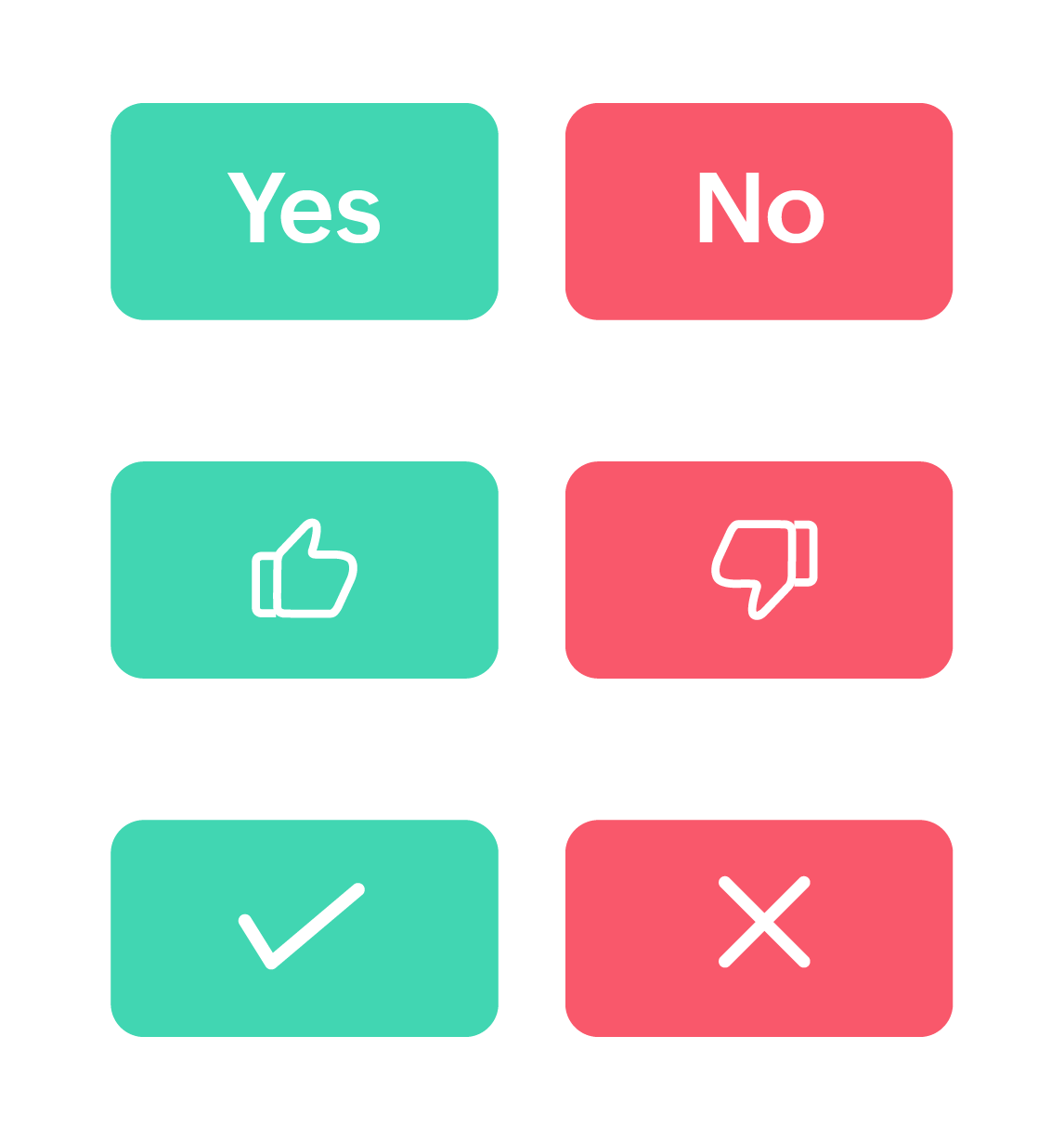

Classic toggle

Text-based, unambiguous, universally understood. When you need respondents to carefully read and consciously commit to a decision, this style delivers.
It's perfect for terms of service agreements or formal approvals.

Like/Dislike icons

Here's where we leaned into something pretty much every social platform has already proven. People respond to visual feedback. The thumbs-up/thumbs-down iconography transcends language barriers and taps into emotional response patterns. When you ask "Was this article helpful?" and show someone a thumbs-up or thumbs-down, you are inviting a feeling-based response, not a manufactured one. It works because it mirrors human gesture.

For forms where you are measuring gut reactions rather than deliberated choices, this visual language outperforms text every time.

Check mark/Cross icons

Check marks and crosses carry decades of conditioning. From grade school papers to quality control checklists, they communicate approval/rejection with zero ambiguity.

These symbols trigger decision-making mode rather than reflection mode. They are action-oriented, which is why they excel in operational and process-driven contexts.

No matter the style you choose, you can rename the labels to anything you want; the meaning remains unchanged. For example, change "Yes/No" to "Approve/Reject," and that meaning carries through whether you are showing text toggles or check mark icons.

Want minimalist, icon-only buttons? You can turn text labels on or off independently.

Beyond surface-level styling

Let's talk about the theme customization capabilities; this is where a field truly shows its sophistication.

You will find granular control over:

  • Separate background colors for labels
  • Independent text/icon colors for each option
  • Border color across all styles

Why does this matter? Because color carries meaning.
For example, the question "How are you feeling today?" can have:

  • Soft green for positive responses (calming, associated with growth)
  • Muted orange for negative responses (attention-drawing without being alarming)

Pro tip: Maintain WCAG-compliant color contrast ratios (at least 4.5:1 for normal text) to ensure accessibility; beautiful and accessible are not mutually exclusive.

Why obsess over something this small?

Let’s zoom out for a moment and talk about why a "simple" yes/no field deserves this much attention.

In product development, there is a constant tension between building flashy new features and perfecting foundational ones.

Here's what we have learned after years of building form tools.

Great experiences are built from tiny, excellent interactions stacked together.

Nobody fills out a form thinking, "Wow, I love how well-designed this binary question is." But they do notice when forms feel unnecessarily complicated.

The Yes/No field is our attempt to handle one small interaction, binary choice, with the care and thoughtfulness it deserves.

Now we want to hear from you.
What additional features would make this field indispensable for your workflows?
Drop your thoughts, use cases, and creative implementations in the comments. The best ideas often come from the community pushing features in directions we never imagined.


Cheers,
Samhita


    • Sticky Posts

    • Introducing the Yes/No field: Binary decisions made beautiful

      Greetings, form architects! What would you do when you need a simple yes/no answer on your form? Normally, you add a Radio field. Type Yes. Type No. Until now. The new Yes/No field is purpose-built for binary decisions. It is preconfigured, visually consistent,
    • DKIM Now Mandatory - Changes to Zoho Forms Email Policies

      Hello Zoho Forms Users, This post is to inform you about an important update regarding the authentication of all email domains in your Zoho Forms account. This year, we are doubling down on our commitment to deliver a secure, seamless, and empowering
    • Cloudflare Turnstile is now available in Zoho Forms!

      Hello form builders! We have added a new layer of protection to help you keep your forms free from bots. Instead of forcing users to prove they are human, Cloudflare Turnstile quietly checks browser signals in the background. Your real users glide through,
    • This festive season, offer discounts with coupon code support in Stripe Checkout

      Hello form builders! It’s the festive season, the perfect time to spread joy and great deals! Now, with Zoho Forms’ latest enhancement for Stripe Checkout, you can do exactly that with coupon codes! Your payment forms integrated with Stripe Checkout can
    • New in Zoho Forms: Google reCAPTCHA v3 for smarter spam protection

      Hello form builders, Spam submissions are one of the biggest challenges when you share your forms online. They not only clutter your data but can also waste valuable time. To help you combat this without making life harder for genuine respondents, we’re
    • Recent Topics

    • Zoho Writer for Proposals

      Hi, one of the things we've struggled with since moving to Zoho ecosystem is our proposal software Qwilr does not integrate well. It surprises me Zoho doesn't have proposal software but given all the capabilities of Zoho Writer, I'm wonder if anyone is
    • How Do Mutliple Sales People Prospect in the "LEADS" module without calling the same leads?

      We have 4 sales reps and the Leads module does not have real time intuitive knowlodge to make the sales rteps dont call the same people at the same time. How can we crate a fluent prospecting sytem where the salres reps can go out bound without calling
    • How to Create a Fixed Sliding Time Window (D-45 to D-15) in Zoho Analytics ?

      Hello, I would like to create a report in Zoho Analytics based on a sliding time window between D-45 and D-15, with a fixed snapshot of that specific period. The data displayed should strictly reflect activity recorded between D-45 and D-15 only, without
    • Wie veröffentliche ich ein PDF Datei?

      Hallo! Wie veröffentliche ich PDF Datein ich habe ein PDF Datei und den sieht ihr im Upload ich möchte ihn veröffentlichen wie? Mit Freundlichen Grüßen, Herr Bahaa Addin Chkirid
    • 🚀 WorkDrive 6.0 (Phase 1): Empowering Teams with Content Intelligence, Automation, Accessibility, and Control

      Hello, everyone! WorkDrive continues to evolve from a robust file management solution into an intelligent, secure, and connected content collaboration platform for modern businesses. Our goal remains unchanged: to simplify teamwork, strengthen data security,
    • Zoho Campaigns: An Outstanding Email Marketing Tool

      Introducing Zoho Campaigns! A product designed by Zoho, the Zoho Campaigns is made to create, deliver, and manage integrated email campaigns that can help in boosting the sales of a company and its customer base. Zoho Campaigns is actually an email marketing
    • Zoho Creator Developer Console | Improved Distribution and Lifecycle Management for apps

      Hello everyone, We're excited to introduce new enhancements now in the Zoho Creator Developer Console. These updates strengthen private app distribution through licensing controls and extend environment support across all installed apps, helping teams
    • Anchor Links in Dashboards

      Hello,  Our dashboards frequently have multiple sections that would be more easily skipped between using anchor links. Please consider adding an anchor link feature to the text widget? This could be done by adding an anchor link option to the text widget next to the "remove" option (see screenshot). The option would assign an ID to the <div> containing the text widget in the live dashboard. Then, the chosen ID could be linked using a traditional <a href="#link_id"> in the html section of the text
    • Sync images with Shopify/Cart

      Hello, sync images with shopify or other cart, it cuts out the double work of having to upload to shopify/cart and zoho. Thanks
    • Is it Possible to Modify Standard Report Urls

      Is there a way to permanently modify standard report Urls? Use case: Suppose I have a Products report. Showing list as timeline, calendar, or kanban doesn't make sense. Want to hide that from users by adding #Report:Products?zc_ShowAs=false&zc_Print=false
    • Assessment Answered - Automation (Related List)

      Hello everyone, We have linked a candidate assessment to our job posting. When someone applies, they are required to answer all the assessment questions. However, some candidates submit their applications without completing the questions. In such cases,
    • Updation of Old Browsers Versions for Zoho CRM

      We have upgraded the default browser version for CRM to facilitate features like widgets and scripts that are often implemented aside from advanced functionalities for various business requirements. The latest version is aimed to provide better performance
    • External User onboarding for zoho connect is not really intuitive.

      So the external user is sent an invite, which has a button that directs them to login to zoho to view the invite, but if they don't have a zoho account, they cannot access that invite, which seems kinda silly, as there is not real way on for them to create
    • Having trouble fetching contents of Zoho Connect Feeds using the API, requesting alternative API documentation.

      I'm trying to retrieve feed/post data from Zoho Connect using the API but facing challenges with the current documentation. What I've tried: OAuth authentication is working correctly (getting 200 OK responses) Tested multiple endpoints: /pulse/nativeapi/v2/feeds,
    • How to upload file to Connect using API?

      Hi there. I looked at the API documentation and nowhere did it mention how to use the API method to upload a file even though it is mentioned that it is possible to be done so. Please help.
    • Select the task view on the board in the Zoho Connect iPhone app

      Hello. How do I select the task view on the board in the Zoho Connect iPhone app? The Android app has this functionality.
    • Auto tagging

      Some of the articles I enter into Notebook get there when I enter them in Raindrop.io and IFTTT copies the articles in Notebook. When this happens the notes are tagged but instead of useful one word tags with topic the tag pertains to the specific article
    • Zoho Sheet for Desktop

      Does Zoho plans to develop a Desktop version of Sheet that installs on the computer like was done with Writer?
    • WebDAV support

      I need WebDAV support so that I can upload/download (and modify) documents from my local file system. Is anything planned in his direction?
    • Constant refresh required in lots of Zoho tabs

      "Hey Zoho, if you can sync my notification bell across 15 tabs using a BroadcastChannel, why can't you send a 'Data Refresh' signal the same way? We don't need a browser reload—we just need the data to sync without us clicking F5 like it's 1999." "PS:
    • What's New in Zoho Billing | January 2026

      Excited about the latest enhancements in Zoho Billing? Our January updates bring an intelligent AI assistant, smarter subscription management, and improved tax compliance, saving you time and reducing manual work. Dive into the details below to see how
    • Cliq iOS can't see shared screen

      Hello, I had this morning a video call with a colleague. She is using Cliq Desktop MacOS and wanted to share her screen with me. I'm on iPad. I noticed, while she shared her screen, I could only see her video, but not the shared screen... Does Cliq iOS is able to display shared screen, or is it somewhere else to be found ? Regards
    • Inserting images into Articles or Knowledgebase

      Hi, Are there any plans in improving the Knowledgebase text editor so it would allow inserting images through Windows clipboard via copy-paste? Say for example I took a screenshot using the snipping tool in Windows and I'd like to insert that image to
    • Links not functioning in Zoho mail

      Links that are included in emails I receive are not activating. Nothing at all happens when I click on them. I have researched FAQs and this forum to no avail. Any suggestions?
    • Zoho Mail iOS app update: Manage folders and tags

      Hello everyone! In the most recent version of the Zoho Mail iOS app, we have brought in support to manage(create, edit and delete) the folders and tags. Create folders Create Tags Edit/ Delete folder In addition to this, we have also brought in support
    • Zoho Social API for generating draft posts from a third-party app ?

      Hello everyone, I hope you are all well. I have a question regarding Zoho Social. I am developing an application that generates social media posts, and I would like to be able to incorporate a feature that allows saving these posts as drafts in Zoho Social.
    • [Important announcement] Zoho Writer will mandate DKIM configuration for automation users

      Hi all, Effective Dec. 31, 2024, configuring DKIM for From addresses will be mandatory to send emails via Zoho Writer. DKIM configuration allows recipient email servers to identify your emails as valid and not spam. Emails sent from domains without DKIM
    • Create an Eye-Catching Announcement Widget for Your Help Center

      Hello Everyone! In this week’s edition, let’s explore how to keep your customers updated with exciting news in the Help Center. See how ZylkerMobile wowed their customers by bringing updates right to their portal. ZylkerMobile, the renowned brand for
    • UI issue with Organize Tabs

      When looking at the organize Tabs window (bellow) you can see that some tabs are grayed out. there is also a "Add Module/Web Tab" button. When looking at this screen it's clear that the grayed out tabs can not be removed from the portal user's screen
    • Zoho CRM Feature Requests - SMS and Emails to Custom Modules & Time Zone Form Field

      TLDR: Add Date/Time/Timezone form field, and be able to turn off auto timezone feature. Allow for Zoho Voices CRM SMS Extension to be able to be added to custom modules, and cases. Create a feature that tracks emails by tracking the email chain, rather
    • Our Review Of Zoho CRM after 60 Days

      The purpose of this is to just share with Zoho why I love their product, but ultimately why I could not choose Zoho CRM for our next CRM. About two months ago we begun a CRM exploration process for our financial planning firm, based in Texas. We already
    • Link Purchase Order to Deal

      Zoho Books directly syncs with contacts, vendors and products in Zoho CRM including field mapping. Is there any way to associate vendor purchase orders with deals, so that we can calculate our profit margin for each deal with connected sales invoices
    • Extend the Image Choice Field

      Hi, The New Yes/No field is great for what it does, and the Image Choice Field is good but could be better with some functions from the Yes/No field. Take an example, rather than just Yes/No you want Yes/No/Maybe (Or more than 3 choices), but unlike the
    • CRM x WorkDrive: File storage for new CRM signups is now powered by WorkDrive

      Availability Editions: All DCs: All Release plan: Released for new signups in all DCs. It will be enabled for existing users in a phased manner in the upcoming months. Help documentation: Documents in Zoho CRM Manage folders in Documents tab Manage files
    • New 2026 Application Themes

      Love the new themes - shame you can't get a little more granular with the colours, ie 3 different colours so one for the dropdown menu background. Also, I did have our logo above the application name but it appears you can't change logo placement position
    • Zoho Desk: Macro to assign Ticket to self

      Hello, We are using macros in Zoho Desk to set some fields and send a response. I would also like to assign the ticket to myself (or whoever applies the macro). I can only set a fixed agent in the macro, so I would have to create one for every agent.
    • Turn off Knowlege Base Follow options and Follower lists

      Is there a way to hide or turn off the option in the Knowledge Base for users to follow specific departments/categories/sections/articles? If not, is there a way to turn off the public list of followers for each of those things? Otherwise, customer names
    • Enterprise Data management solutions

      I'm on the hunt for the perfect Data management solution for my organization. I've been doing a ton of research across different websites, but honestly, it's just left me more confused! A friend suggested I check here, so I'm hoping someone can point
    • New Feature: Audit Log in Zoho Bookings

      Greetings from the Zoho Bookings team! We’re excited to introduce Audit Log, a new feature designed to help you track all key actions related to your appointments. With Audit Log, you can maintain transparency, strengthen security, and ensure accountability.
    • Automated Task reminder

      First question: If a task does not have a reminder set, will it still send an email notification that the task is due today? If not, how can I set up an automated reminder to send the task owner an email that it is due on a certain date?
    • Next Page