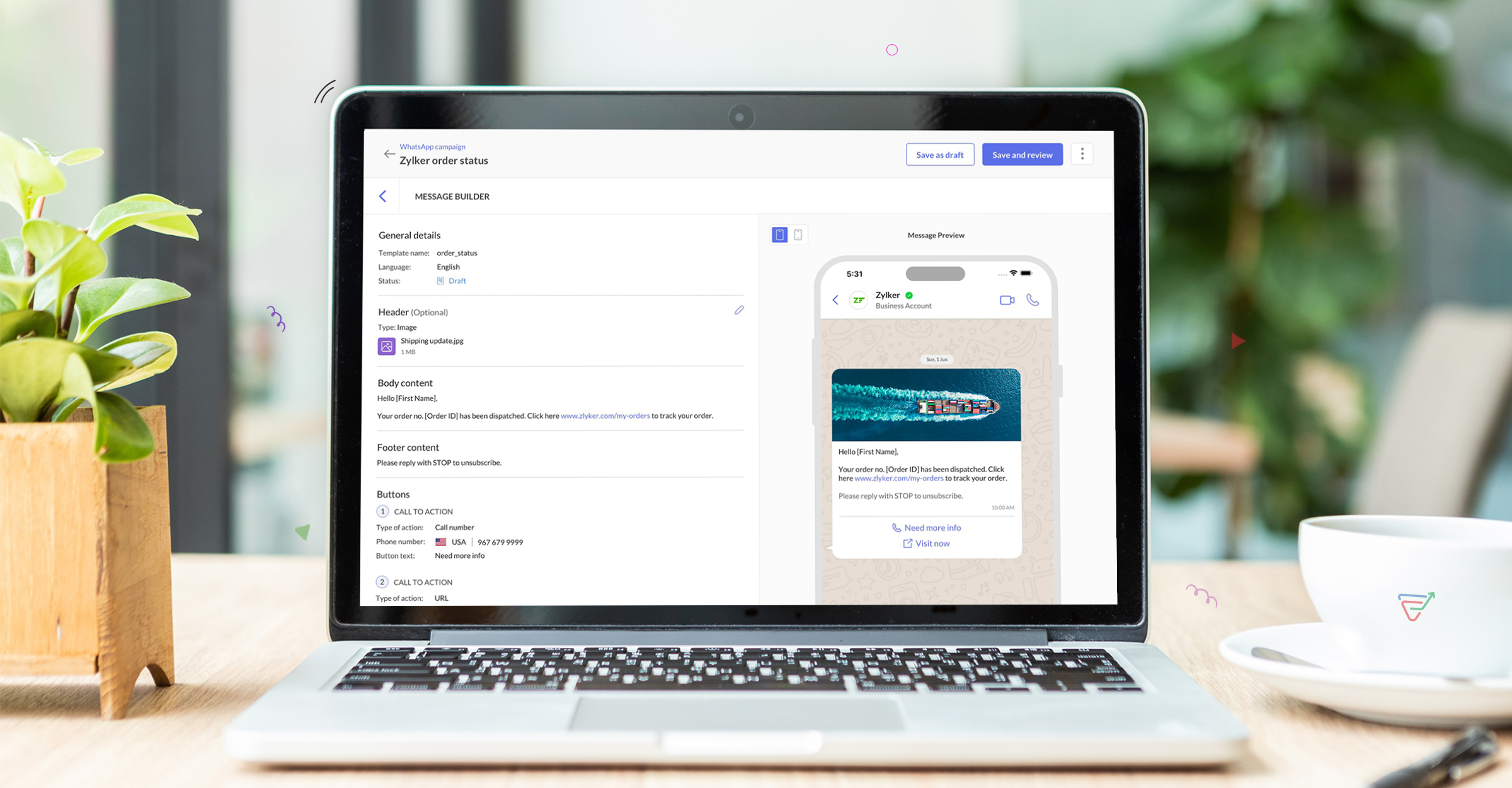
Introducing WhatsApp Marketing with Zoho Marketing Automation
Dear Marketers,
In the world of marketing, personalizing engagements with customers is often exhaustive but—thanks to WhatsApp—not exactly mysterious. WhatsApp has evolved from a simple messaging platform to a sophisticated tool for sending out marketing campaigns. Why not use it to reach your audience? To do so, it also helps to have a comprehensive marketing tool.
On that note, we're delighted to announce that Zoho Marketing Automation now integrates with WhatsApp and offers dedicated features. The all-new WhatsApp Integration will be available instantly for Zoho Marketing Automation 2.0 users.
Equipped with the vision of simplifying marketing, Zoho Marketing Automation provides the tools marketers need to optimize their marketing strategies.
What can marketers expect from Zoho Marketing Automation's WhatsApp integration?
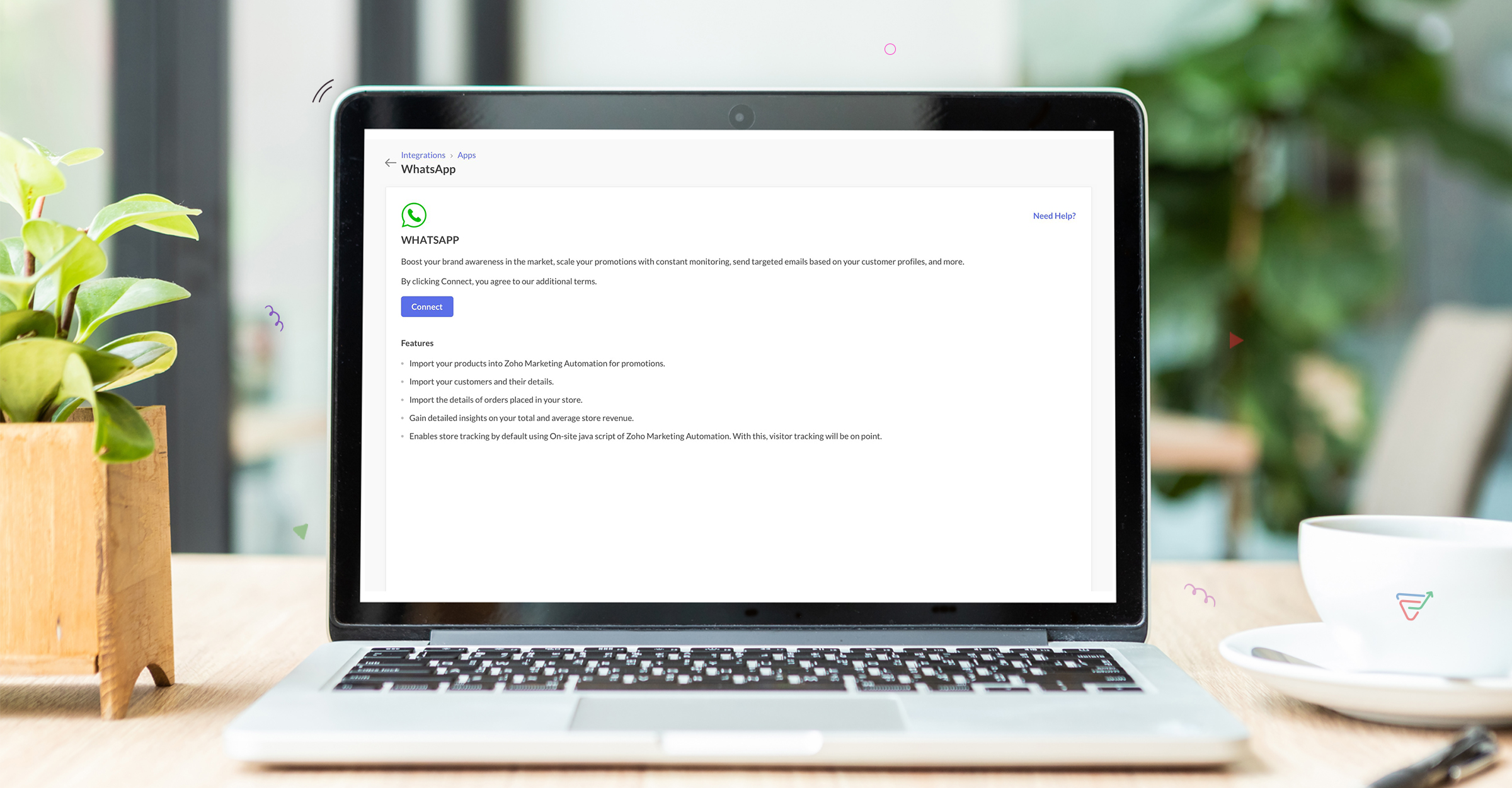
Seamlessly connect WhatsApp Business accounts to Zoho Marketing Automation
Our platform ensures a hassle-free transition by enabling you to integrate your WhatsApp Business account effortlessly and run endless WhatsApp promotional campaigns.
Choose from a library of templates
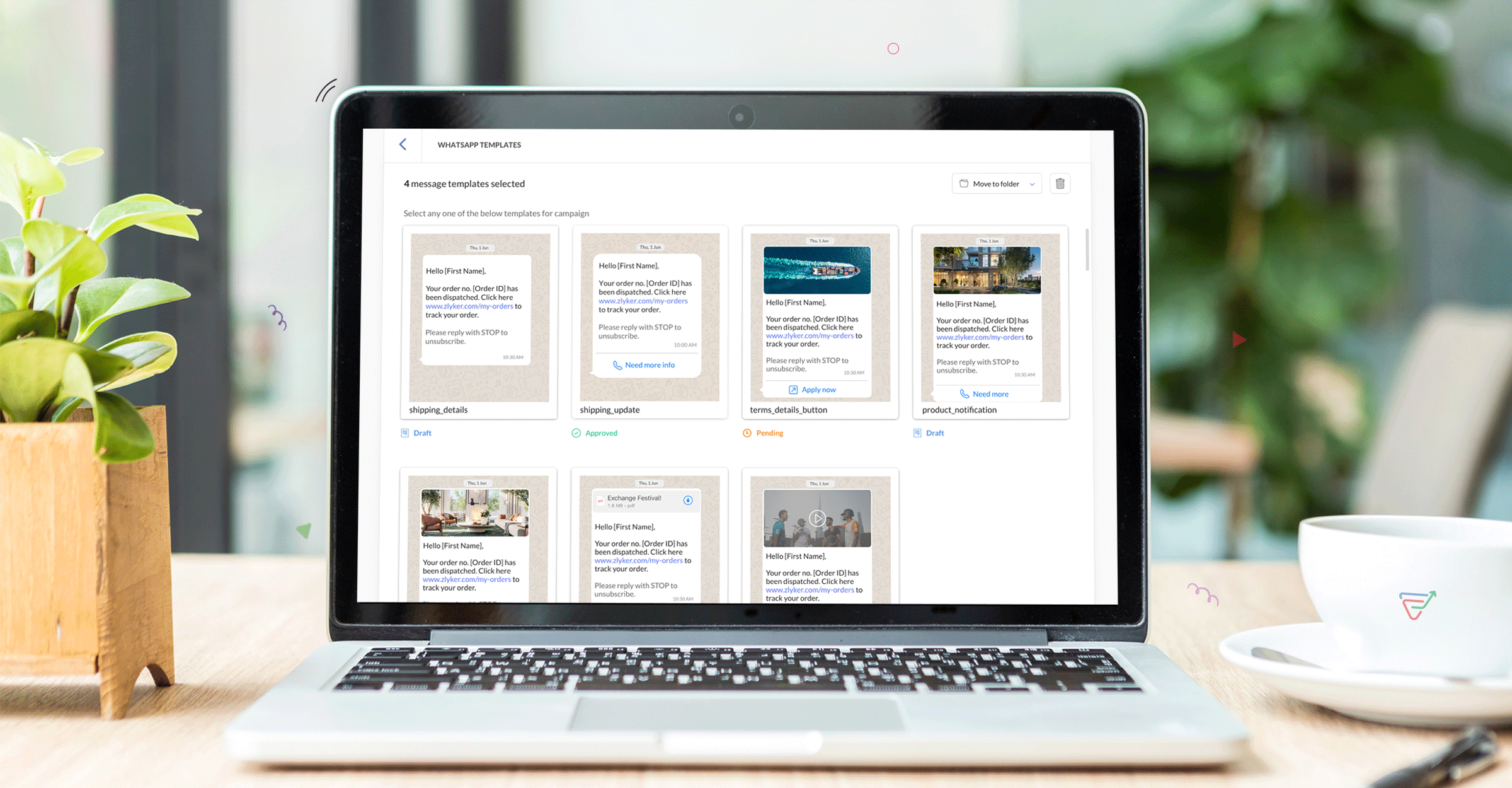
Craft messages on your own or choose from a dedicated library of messaging templates. You can easily design and send templates for quick review. Users can personalize their messaging with emojis, images, videos, CTAs, and documents to make it interactive. And just like any other campaign, you can schedule it for optimal open rates.
Intuitive WhatsApp Campaign Builder
Empower your outreach endeavors with intuitive WhatsApp campaign builder. Our user-friendly interface simplifies the campaign creation process, enabling you to design impactful messages without effort.
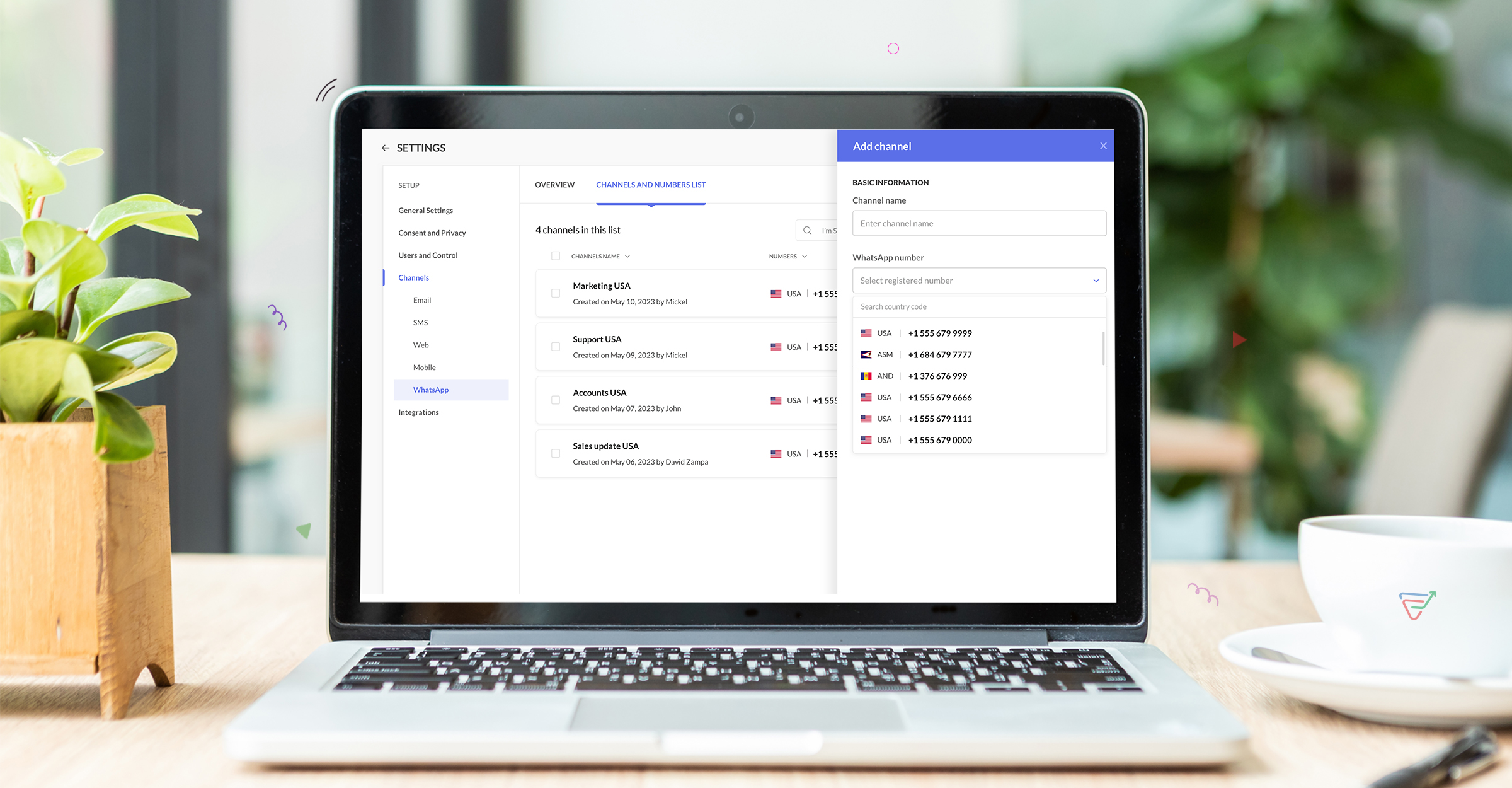
Flexibility to choose from multiple registered phone numbers
Brands can seamlessly broadcast messages and choose between multiple WhatsApp numbers based on their campaign performance. This way you can deliver your messages to multiple lists with multiple phone numbers.
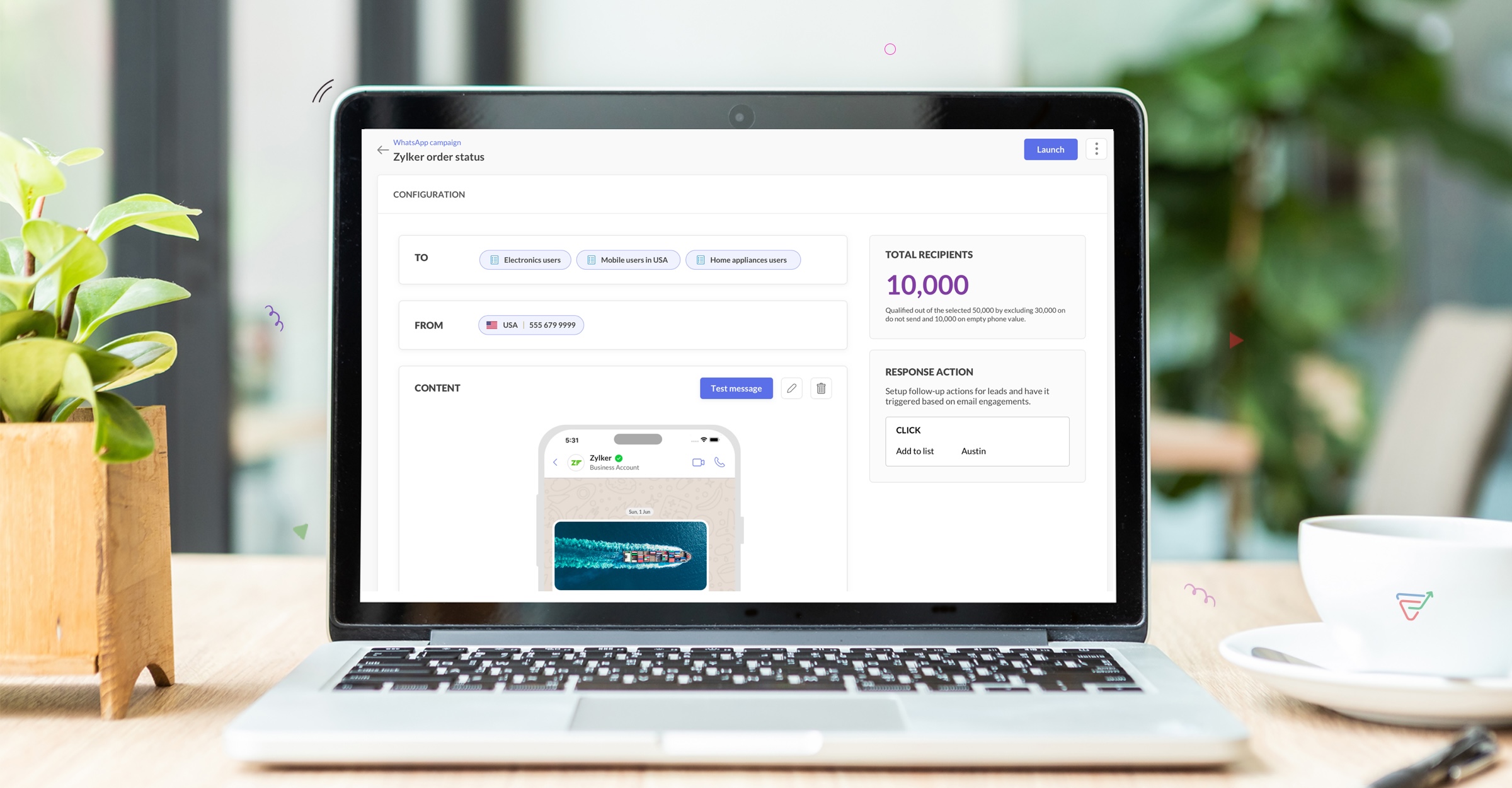
Target your audience with segments and smart filters.
You can also segment your audience based on their behavior across WhatsApp campaigns, or implement smart filters to target specific demographics. You can run campaigns to carefully curated lists, segments, tags and even custom groups.
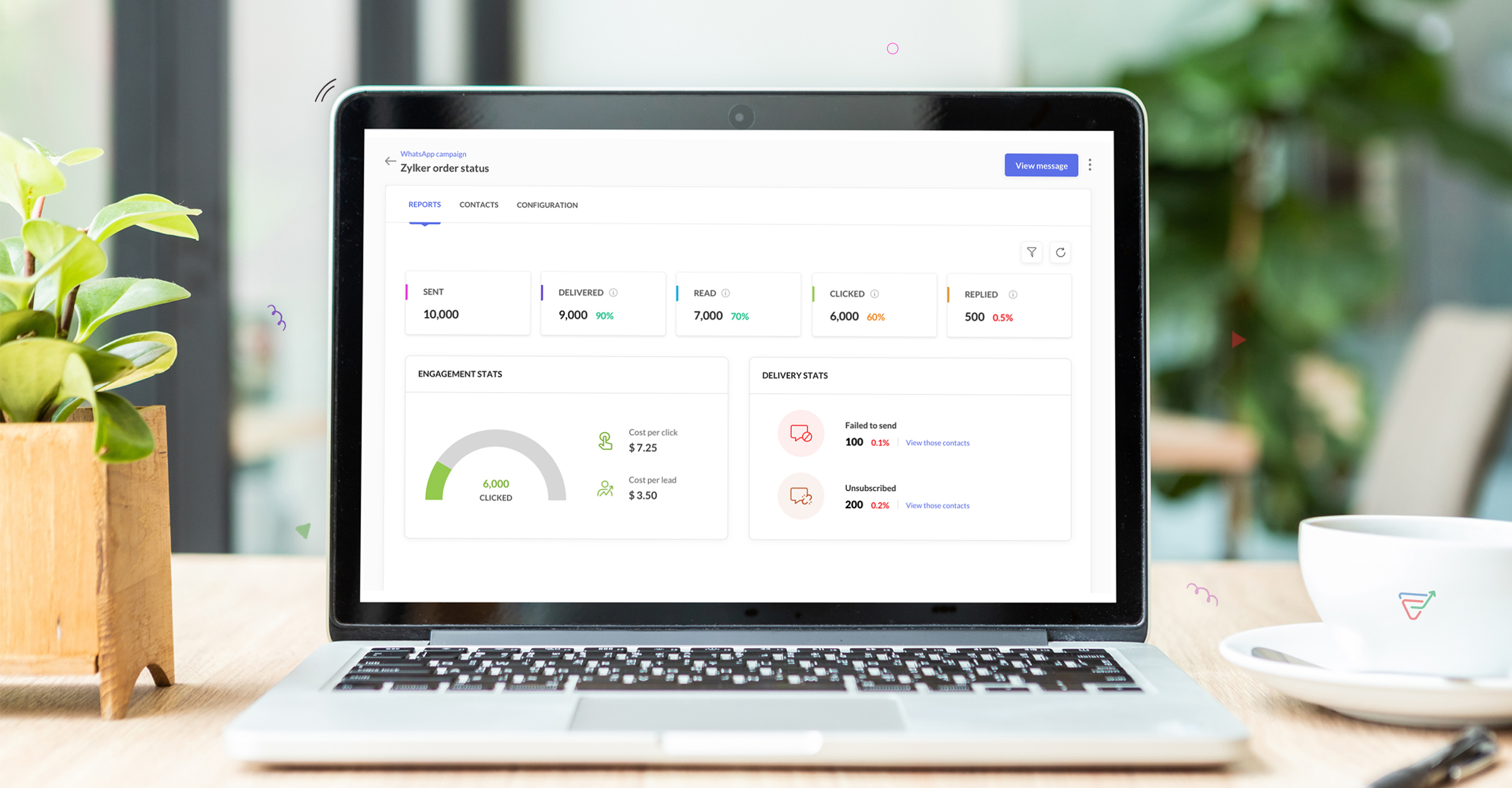
Get detailed campaign analytics
With our in-depth analytics, you'll gain a holistic view of your WhatsApp campaign performance, including engagement metrics, conversion rates, and audience behavior patterns. With access to this data, you can refine your strategies, optimize targeting, and achieve greater campaign effectiveness.
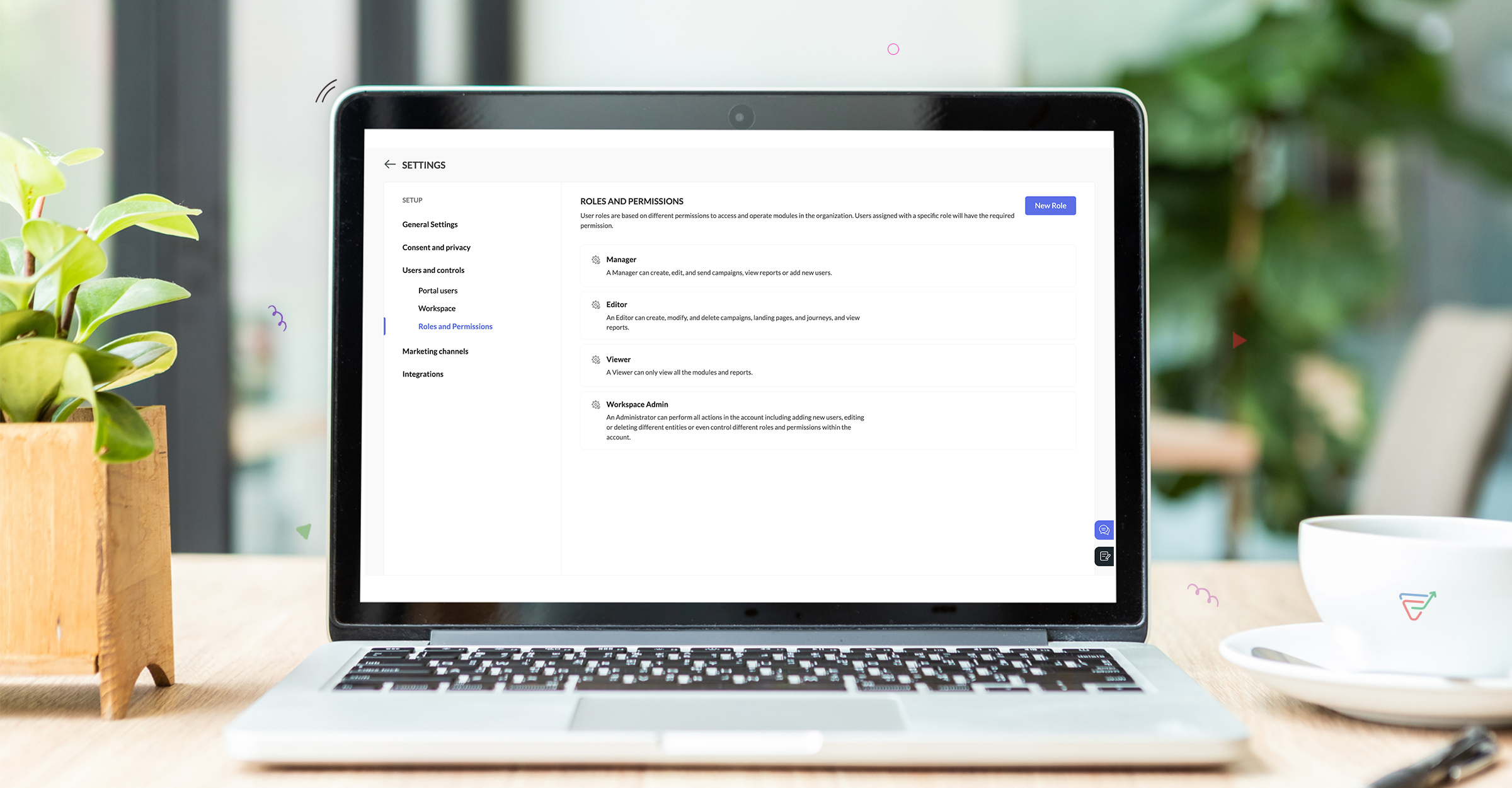
Use role-based permissions for enhanced security
Streamline access controls and bolster security with role-based permissions tailored to your team's needs. Customize permissions based on roles to ensure that each user has the right level of access they need to carry out their responsibilities. With fine control over data and functionality, you can maintain data integrity and protect sensitive information effectively.
Pricing Model
WhatsApp pricing will be an add-on pricing model similar to SMS pricing and will be available by default on all our pricing plans. We'll follow a pay-as-you-go model for WhatsApp marketing and users can send campaigns whenever they need without any expiry. With WhatsApp chat rates based on conversations initiated through business and users have to pay for what they use. Fees per conversation vary by country, offering an adaptable pricing solution.
Note: WhatsApp charges for conversations and not individual messages. Conversations are 24-hour message threads between you and your customers. Conversations are opened and charged when messages you send to your users are delivered.
How we add value in WhatsApp Marketing?
Native integration with WhatsApp -As Zoho is a WhatsApp Business Solution Provider(BSP), businesses can connect their WhatsApp Business account and drive marketing effortlessly. It's important to note that you cannot execute WhatsApp campaigns from your personal WhatsApp account or your WhatsApp Business app from your personal mobile. Brands need an officially verified WhatsApp Business Account which is integrated to a WhatsApp Business Solution Provider such as Zoho. With Zoho as a BSP, businesses can get the verified account green tick, communicate with customers proactively, and send transactional/promotional WhatsApp messages.
No additional charges - Zoho Marketing Automation does not add any margins to the pricing Meta offers for WhatsApp and charge the same price as exactly as Meta. Businesses need to pay only for the conversations based on their interactions.
Multi-language support - We support over 71 languages for WhatsApp messaging and has default Right-to-left editors for languages like Hebrew, Arabic etc. Brands can localize their messaging based on the country they are targeting and personalize content with emojis, images, videos, documents or CTAs.
Hello marketers! Welcome back to another post in Marketer’s Space. In our previous post, we explored how CRM actions in Journeys help marketing and sales teams work together by nurturing CRM leads and pushing only engaged prospects back to sales. If you
We’re excited to announce the addition of two new features to our WhatsApp integration: Automation and Utility conversations. These enhancements will allow you to streamline your marketing efforts and engage with your customers more effectively by automating
What's the last page that your lead visited before signing up for your brand? What was the page that first convinced your lead to explore more about you? Where are your leads coming in from? Well, these are some perennial questions today's marketers live upon. And, knowing the answers to these questions is crucial, considering the vitality of leads in every business. In the journey of finding lead opportunities, it's important to understand that every detail about a lead is useful. While the channels
At Zoho Marketing Automation, our highest priority is making it easier for you to use our product to accomplish your business goals. With that in mind, we are updating three of our pivotal features: Topic, Contacts, and List Management. These existing
Hello Everyone, We hope you all are doing well. We'd like to notify you that we have rebranded Zoho MarketingHub to Zoho Marketing Automation. We'll discontinue using the term "MarketingHub" from May 26, 2021. However, there will be no changes in the
1/ There is a CRM file upload field with WorkDrive file set as the source: 2/ Then the file is renamed in WorkDrive (outside CRM): 3/ The File in CRM is not synced after the change in WorkDrive; the file name (reference) in CRM record is not updated (here
I Need help. ZOHO sheets stuck on the loading screen. I've already deleted the system cache and cookies of my browser (google chrome) but it's still not opening.
hi there is few logics in manner "it this than that" logics work well when i edit entry openning it one by one (via workflow "on add/edit - on success" , for custom field "on update/on user input") but when i try bulk edit records - logic does not work. how can i turn on logic to work as programmed - for mass editing records via bulk edit?
Hi There, I am looking for a solution, script, workflow or anything to solve an issue we have - in our customers section we have a rule that doesn't allow duplicates, however Zoho will allow customers with xxxxx and xxxxx PLC or LTD so effectivley we
Hello Team, Currently, the Invoice Ref. field is set to a Number type with a maximum limit of 9 digits. However, we often receive customer invoices that contain up to 12 digits. In some cases, the invoice reference includes not only numbers but also letters
I believe the Zoho for Desktop app is built using a proprietary protocol. For the growing number of people using services such as odrive to sync multiple accounts from various providers (Google, Dropbox, Box, OneDrive, etc.) it would be really helpful
I have set up my email to work from within Bigin using IMAP. I am using IMAP so I can sync my email across multiple devices - phone / laptop / desktop / iPad / etc. I want all my emails to populate my email client (outlook & iphone email) whether or
We have many use cases where multiple signers need sign the same document. We'd love to be able to use sign forms, where the a signer who uses the Sign Form link can specify the name and email address for the next person in the sequence.
Currently I can't paste data copied from inside any of my Zoho Sheet files to any other app. Copy-paste works inside the sheet It does NOT work between two different sheets These sheets are built from automation templates Everything works fine if I create
Hello Everyone! Here’s what came through in the first half of November: new updates and a few helpful community discussions with real, notable solutions. Product Updates: Android App Update: Inctroducing Swipe Actions You can now swipe left or right on
Hi, in all known online meeting tools, I can set up a background image reflecting our corporate design. This doesn't work in Cliq. Additionally, Cliq detects our cameras as 4:3, showing black bars on the right and left sides during the meeting. Where
We’re nearing the end of the year, and the holiday season is officially kicking in! It’s that time when sales peak and your social media game needs to be stronger than ever. We’re back with exciting new updates across AI, analytics, and the mobile app
Hello everyone, As you know, notes are essential for recording information and ensuring smooth communication across your records. With our latest update, you can now use Rich Text formatting to organize and structure your notes more efficiently. By using
Hi. Is it possible to hide/exclude specific picklist options from this filter? I don't want them to be shown when someone tries to filter in the leads module
When using a pipeline that is importing Zoho Analytics data into Zoho DataPrep, the month and day of date fields are switched for some columns. For example, a Zoho Analytics record of "Nov. 8, 2025" will appear in Zoho DataPrep as "2025/08/11" in "yyyy/MM/dd"
Subforms transform your job sheets from simple checklists to powerful, data-rich forms. In field service work — whether maintenance, inspection, installation, or repair — a single job can involve multiple repeatable entries: readings, parts used, activities
I want to make a Flow that uses information returned in the GET call for Composite Items, and it's not currently available in Zoho Flow. Please consider adding this functionality.
I am trying to print individual labels to my Dymo LabelWriter - has anyone done this? Latest Update (December 2025): The Canvas Print View is now available! We encourage you all to try it out and share your feedback with us. Learn more here: Zoho CRM
Greetings, I am starting to work on Zoho Creator specifically for the agricultural field, any recommendations, tips or ideas that might be helpful ? Also, if you are interested by any means in working on such project, kindly contact me. The project is
I would like to create a custom print layout of a Lead or Contact. Is there a way to do that? What I mean is that if I'm viewing a specific lead or contact I'd like to be able to print or export that lead/contact and only print and/or export certain information.
With the holiday season right around the corner, this is the perfect time to get ready to unplug, relax, and enjoy a well-deserved break. In addition to preparing yourself, you can also make sure your organization members are set for their time away from
Hi , I would like to ask the reason why every time I added plus credit but few days later I will return back to default? (as below I add credit to 3000 but today It change back to 1000) Most important is, when the credit fully used, not any reminder to
Firstly this is for a system on the AU servers if that makes a difference. Issues are as follows (For Kiosk): 1. Re-ordering fields in the screen builder is broken. The fields seem to be re-ordering themselves, unless you order everything by moving the
Hi everyone, We migrated to Zoho Books in July 2025 and everything worked fine until 11 Nov 2025. Since then, Zoho Books system emails are landing in customers’ Spam (first Gmail, and now we’re seeing Outlook/Office 365 also starting to spam them). Impacted
Pour accompagner sa croissance, une entreprise a besoin d’une infrastructure téléphonique flexible et évolutive. Les solutions de téléphonie s’adaptent aux exigences du centre de contact, tout en intégrant aisément les opérateurs locaux de votre choix.
I can make an edit, click save, and see the blue bar annimation at the top, but the edits don't actually save. Important, because my email templates are now broken and clients are receiving bad emails. Tried on Chrome, Firefox and IE.
Hi I've trying to work out why I've getting duplicated customers being created in my desk. I have an external booking system that generates an email when I get a customer booking a job. A booking email gets sent to Desk where I manage the booking and
We have some users focusing on new business and others focusing on existing business, and they follow different sales processes/cycles, so we would like them to see different pick list values for Stage (eventually leading up to Closed Won/Lost in both cases). And just to keep it interesting - some of these users will of course do a combination, so would need to see one pick list for their New business potentials and a different pick list for their Existing business ones. Salesforce does this
Hi there, I have been using Later for a while now but keen to come back to Zoho Social as Later doesn't offer tagging of pages on Facebook but they offer something Zoho doesn't. You can add a link to your bio which opens up your profile feed where images
First off, the fact that you have to wait about 12-24 hours for every response is terrible. How are we supposed to conduct business? Second, we have been trying for several days to get the Tracking Code Snippet in marketing automation to work, to no avail.
Symptom: an email that is sent by a mail group moderator in the name of a moderated mail group is held back for approval. Reproduction: Create a moderated mail group with members and moderators. Allow that mails can be sent in the name of the group (extended
Every day I receive an email alert with an Excel file that I want to process through a Dataprep pipeline. To do this, I need to: -Save the file to disk -Open the pipeline -Run the pipeline -Update the source -Several clicks to select and open the saved
Hi all, Could anyone who has paid support package advise if it provides value for money with regards to support response times? Exploring the idea as unfortunately when we have faced issues with Recruit it has been a 7+ day timescale from reporting to
Our customer service team utilizes shared email boxes to allow multiple people to view and handle incoming customer requests. For example, the customer sends an email to info@xxxx.com and multiple people can view it and handle the request. How can I configure