Introducing Zia AI in Zoho Show

Introducing Zia AI in Zoho Show


AI is no longer a distant concept. It’s one of our everyday tools, from answering casual questions to generating critical business documents. And presentations are one area where AI can be especially helpful.

At Zoho Show, we’ve been deliberate in how we integrate AI. Our goal wasn’t to replace your creativity, but to enhance it. We wanted to build an assistant who collaborates with you, not one who takes over.

Today, we’re excited to introduce you to Zia, your smart presentation assistant in Zoho Show. In this post, we’ll walk you through everything it can do for you.

Get a head start by generating presentations 

You no longer have to begin your presentations from scratch. Zia can instantly generate presentations based on your visual style and content tone. It will also give you a solid framework that you can build on later.


Add more slides to existing presentation

Once you’ve created a few slides, you can generate additional ones that align with your existing content and add them right away.
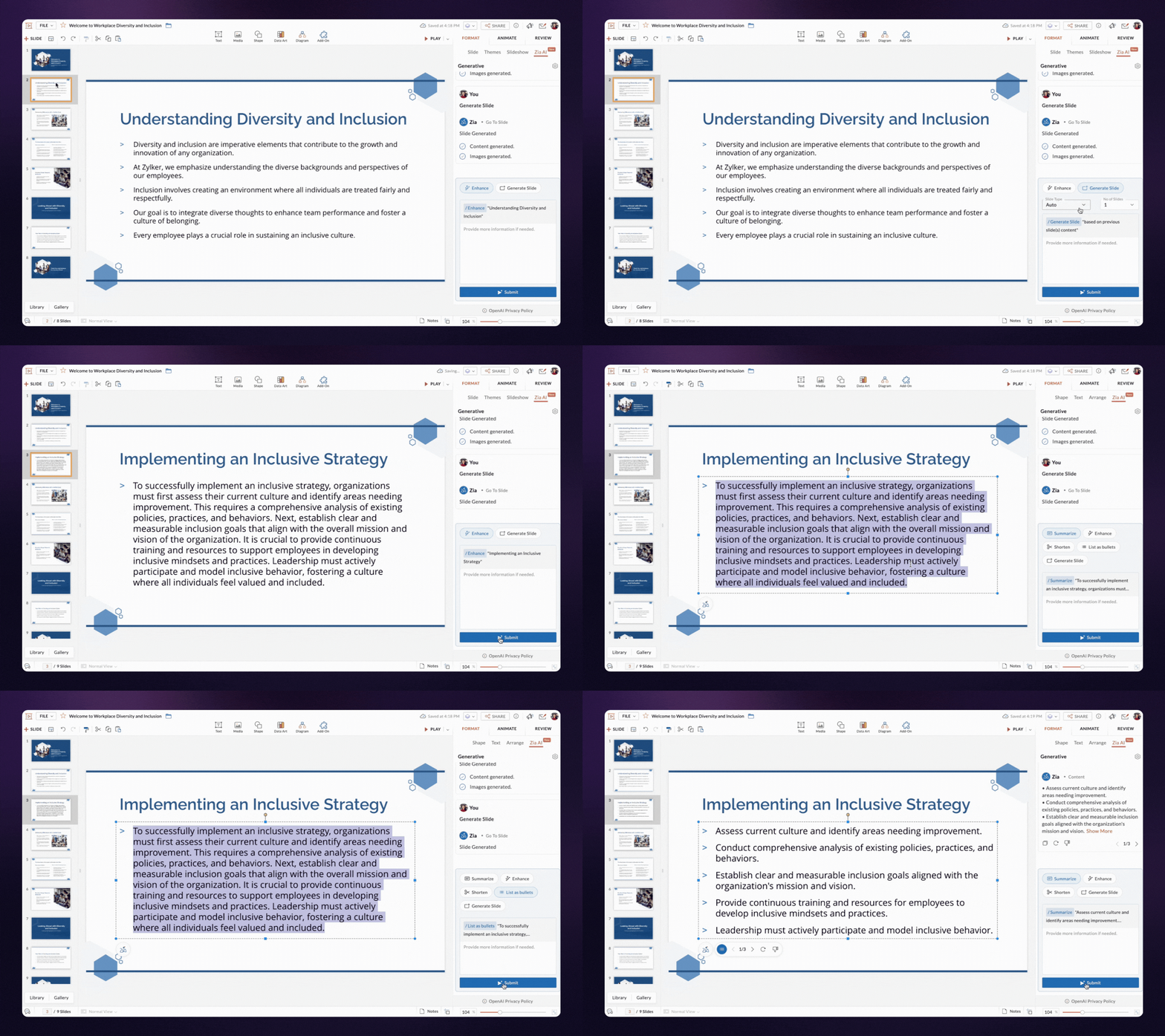


Bring life to images and content

With Zia, you can generate both content and visuals for a slide based on its title. The text and images are designed to align well with your layout, reducing the need for manual adjustments.


Enhance slide content

If your content feels unclear or incomplete, Zia can help refine and enhance it, while keeping your original message intact.

Shorten and summarize your content

You can shorten content to maintain balance in your design. If you want to make your content crisp, try the summarizing option—Zia will read the content, analyze it, and give you the key points.

Turn huge paragraphs into lists

Bulleted lists are easier to read than long paragraphs. Zia can quickly break down your content and convert it into easy-to-digest bullet points.

That's not the end! We’re continuously enhancing and extending these capabilities to assist you through out your presentation journey.
If you use the Zoho Show mobile app, we’ve got good news! Zia AI features are in development for both Android and iOS and will be available to you soon.

We can't wait for you to try out AI in Zoho Show. Let us know your experience in the comments below.

If you have any suggestions or queries, feel free to reach out to us at support@zohoshow.com.

    • Sticky Posts

    • Introducing Zoho Show extension in Your Chrome Browser

      Hi everyone, Over the years, Chrome's feature-rich support extensions have grown to offer additional ways to easily access your favorite tools from anywhere. Today, Zoho Show is excited to announce our integration with Google Chrome as an extension app to help build and access presentations directly from your browser.   Zoho Show for Google Chrome is a free extension that allows you to dive straight into drafting your presentation material. Simply install the Show extension from the Chrome Web Store
    • Take your presentations anywhere with the Zoho Show app for iOS

      We're excited to announce the launch of the Show app for iOS. Our new presentation app gives you the power to view and present slideshows on your iPhone and iPad devices wherever and whenever you want.   The Show iOS app has a host of features that will make your presentations engaging and dynamic: Access all your presentations with a single tap Sign in to your Zoho Show account to view your slides and deliver presentations on-the-go. The app stores all the presentations you've created in the My
    • Introducing All New Zoho Show - Create and Design Stunning Presentations.

      Hello,   Whether you're a first-time presenter or an expert looking to make a lasting impression, Zoho Show is the tool for you. Whatever your expertise, the All New Zoho Show's contextual user interface lets you create all kinds of slides, from plain text on a simple background to complex presentations with animations, tweets, charts, media files, and lots more.   The UI doesn't leave you to figure everything out yourself, but presents something you can easily use. It's clear, obvious, and intuitive.
    • Three smart ways to share your presentation with Zoho Show.

      "What is the best way to share a presentation?", a lingering question that is asked after every live session or a meeting. Sharing presentations can be time consuming. It can be done, either by attaching the file to an email or by saving it in a pen drive. But what happens when your file size is large or your team is spread across the globe? Zoho Show lets you share your presentations both internally and externally without worrying about the file size. You can share your slides as a link and decide
    • Convey Your Ideas and Convince Your Audience with Zoho Show

      Visual presentations are highly impactful and it is a no-brainer that your audience gets attracted to them. The use of images and videos help you reach your objectives by emphasizing your ideas more effectively.  According to the psychologist Jerome Bruner of New York University, "people only remember 10% of what they hear and 20% of what they read, but about 80% of what they see and do." For example, if the above data on its own, was presented visually, there is an 80% chance that the information
    • Recent Topics

    • How to assign one Manual to multiple Spaces?

      Hello, I have two spaces, one called tech knowledge and the other one called HR knowledge. I have a manual that is called HR tech. I want to assign this manual to HR knowledge and tech knowledge. How should I do that?
    • How can I assign courses to Spaces?

      How can I make courses show up here in this space?:
    • When will Zoho Learn be able to support SCORM files on the mobile app?

      When I click the SCORM content, I just get a message saying it's not possible yet. Yet implies that it will be coming soon. All I'm asking for is a realistic timeline so I know whether or not to invest my time in using it. If it will be soon, then I will
    • Announcing new features in Trident for Windows (v.1.35.6.0)

      Hello Community! Trident for Windows just got better with an update that makes working with your emails even more efficient. Let’s dive into what’s new! Work with PST files more efficiently. You can now do more than just view mounted PST files. You can
    • AI feature in Zoho Desk suggesting answers based on past ticket threads

      Hi I would like to suggest something that would be very useful : instead of suggesting answers based on the Knowledge Base, I think it would be great if Zia could analyze the history of all customer and agents threads, to suggest answers in new tickets.
    • Work Order Assignment for Engineers Handling Their Own Requests

      I’m setting up FSM for a business where there are multiple engineers, but each engineer handles their own process end-to-end receiving the service request, creating the work order, and completing the field service job. I noticed that I must create an
    • Marketing Tip #9: Track your traffic sources

      Not all marketing channels work equally well. Knowing whether your visitors come from Google, Instagram, or email helps you focus on what actually drives sales. Try this today: Check your Zoho Commerce reports or connect Zoho PageSense to see your top
    • Google Analytics import data inaccurate (as of October 11, 2025)

      We have Zoho Analytics connected to GA4 to import daily event data. This has been running without issue for a couple of years. However, a month ago we started noticing discrepancies. All data until October 10 lines up perfectly - October 11 onward is
    • Can't make a document editable to anyone

      Hey everyone, I am using Zoho Workdrive and trying to share a document so that it is editable by anyone with the link. I am trying to convince people to shift from Google to Zoho, but they don't have accounts yet. When I try to change the share settings
    • Converted Leads Not Showing in Lead Reports

      Converted leads are not showing in the Lead reports. How can I make converted leads visible in the report,
    • E-Invoicing in Belgium with Zoho Billing

      Starting January 1, 2026, Belgium is introducing mandatory electronic invoices (e-invoicing) for all B2B transactions between VAT-registered businesses. Invoices and credits notes must be exchanged in a prescribed digital format. How E-Invoicing works
    • Zoho Voice lance BYOC (Bring Your Own Carrier) : intégrez votre opérateur

      Pour accompagner sa croissance, une entreprise a besoin d’une infrastructure téléphonique flexible et évolutive. Les solutions de téléphonie s’adaptent aux exigences du centre de contact, tout en intégrant aisément les opérateurs locaux de votre choix.
    • Synchronise item image between Zoho Commerce and Zoho Books/Inventory/CRM

      Here is a blindingly simple idea to tie several Zoho products together. Zoho - please include a method to synchronise the item image (or images) from one Zoho application to another. For example, if you upload an item image in Zoho Inventory, a user should
    • Zoho Recruit Slow and Freezing on all screens

      We have had an issue with Zoho Recruit for weeks being extremely slow and at times freezing.  We have 100 mega internet, and I went into each computer and updated the virtual memory so there is more available.  Also restarted all computers daily.  Still having the issues.  Almost unable to work.
    • Prevent accidental duplicate entry of Customer Ordersome

      Zoho Support has confirmed that Zoho currently does not have any method (using Deluge, flow or any other method) to alert a user when a sales order has been entered twice using the same customer reference number (i.e. a duplicate). Most ERP platforms
    • Zoho Books | Product updates | November 2025

      Hello users, We’ve rolled out new features and enhancements in Zoho Books. From translating email notification templates to the new transaction locking restrictions, explore the updates designed to enhance your bookkeeping experience. Making Tax Digital
    • Insert Image into Notebook page

      Prior to today, I could add images to my notebook pages. Today when I tried to do this I got an error message that said something like, "There's been a problem on our end. Try again later." So, I've tried all the ways I know how, but I can't insert an
    • 【開催報告】名古屋 ユーザー交流会 Vol.2 2025/11/21 Zoho Analytics / Inventory で実現する在庫の"未来予測"

      ユーザーの皆さま、こんにちは。コミュニティチームの中野です。 11/21(金)に名古屋 ユーザー交流会 を開催しました。 本投稿では、当日実施したセッションの様子及び投影資料をお届けします。 会場にて参加できなかった皆さまも、ぜひご参照ください。 (Zoho 社員セッションの登壇資料については、11/28(金)開催の東京回の開催報告で共有いたします) 今年2回目の開催となる名古屋 ユーザー交流会では、株式会社エンツナクリエイト 野末さんによる Zoho Analytics / Inventory
    • Is there a way to automatically add Secondary Contacts (CCs) when creating a new ticket for specific customers?

      Some of our customers want multiple contacts to receive all notifications from our support team. Is there a way to automatically add secondary contacts to a ticket when our support team opens a new ticket and associates it with an account? This would
    • Improved RingCentral Integration

      We’d like to request an enhancement to the current RingCentral integration with Zoho. RingCentral now automatically generates call transcripts and AI-based call summaries (AI Notes) for each call, which are extremely helpful for support and sales teams.
    • Edit Pinned Comments in Zoho Desk

      It's great that private comments can now be pinned to the top of the ticket but what would be extremely helpful would be to allow for the pinned comment to be edited vs. having to find the comment in the ticket to edit it.
    • Updating Secondary Contact (CCs)

      We use Zoho Forms to capture the user request and integrated with Zoho Desk to raise tickets. Active Microsoft login is captured in our Zoho forms and registered as Primary contact in Zoho desk ticket. We also an have an option to raise ticket on behalf
    • Show Custom Button in Portal Listview Canvas

      I have created a custom button that shows in a list view of deals (internally I can see it). I have permissions to allow this button on the portal. But it is not displaying in the canvas list? Before I do too much leg work, is this function allowed?
    • Email Opt Out Question

      Has the problem where if a customer is emailed opt out prevents you sending standard emails? For me this feature is simply to stop any email marketing and should not block people from receiving emails via Zoho mobile, which makes no sense.
    • blank page after login

      blank page after logging into my email account Thanks you
    • WriterTh

      After every space Writer goes to capital letters mode in my Android tablet. The cap mode stays till the second letter is typed in the word then it comes to normal mode.
    • Does Thrive work with Zoho Billing (Subscriptions)?

      I would like to use Thrive with Zoho Billing Subscriptions but don't see a way to do so. Can someone point me in the right direction? Thank you
    • Zoho writer unable to merge documents to PDF with basic fonts in Hebrew or fonts from my computer

      I created several forms that will be merged into PDF files through Zoho Writer and I am unable to receive the PDF in the basic fonts of the Hebrew language or in the fonts I have on my computer. The writer exports to PDF an exchange font that looks very
    • I have already created some Bots, Commands, and Widgets in Cliq, but I am still not seeing the “Create Extension” option in my account. Could you please help me enable or access this option?

    • RTL Support for Webforms in Zoho CRM

      Dear Zoho CRM Support Team, We are writing to request an enhancement to the webform builder functionality within Zoho CRM. Currently, to create a webform in a right-to-left (RTL) language, the entire CRM instance must be set to RTL, which can be inconvenient
    • Unveiling Zoho Sites 2.0 - A new dimension in website building

      Dear Zoho Sites Users, We are thrilled to announce the launch of Zoho Sites 2.0 today! This refresh represents a significant step forward in the capabilities of Zoho Sites and is crucial for creating a lasting and positive impact on our customers' businesses.
    • Add Custom Reports To Dashboard or Home Tab

      Hi there, I think it would be great to be able to add our custom reports to the Home Tab or Dashboards. Thanks! Chad
    • Cliq iOS can't see shared screen

      Hello, I had this morning a video call with a colleague. She is using Cliq Desktop MacOS and wanted to share her screen with me. I'm on iPad. I noticed, while she shared her screen, I could only see her video, but not the shared screen... Does Cliq iOS is able to display shared screen, or is it somewhere else to be found ? Regards
    • Support www.camcard.com

      Hi, Is it possible CRM Zoho have integrations with https://camcard.com/? Thanks Br, Andy
    • Subform edits don't appear in parent record timeline?

      Is it possible to have subform edits (like add row/delete row) appear in the Timeline for parent records? A user can edit a record, only edit the subform, and it doesn't appear in the timeline. Is there a workaround or way that we can show when a user
    • CRM x WorkDrive: File storage for new CRM signups is now powered by WorkDrive

      Availability Editions: All DCs: All Release plan: Released for new signups in all DCs. It will be enabled for existing users in a phased manner in the upcoming months. Help documentation: Documents in Zoho CRM Manage folders in Documents tab Manage files
    • How we cut CRM updates from ~20 minutes down to 2, our real workflow

      Updating the Zoho CRM after every call used to be one of the biggest time sucks for our team. By the time you write your notes, clean them up, fill in the fields, and log everything properly… you’ve easily lost 15–20 minutes per call. We started experimenting
    • Arattai App Features Update

      1. Offline Messaging & Sync Enable users to compose messages without internet and deliver them automatically via peer-to-peer methods (Bluetooth/WiFi Direct) when nearby users are available. This would be a game-changer for rural India with unreliable
    • Zoho Books Sandbox environment

      Hello. Is there a free sandbox environment for the developers using Zoho Books API? I am working on the Zoho Books add-on and currently not ready to buy a premium service - maybe later when my add-on will start to bring money. Right now I just need a
    • How to add Product Add-Ons, Mandatory Forms, and Auto-Save Address in Zoho Commerce

      Hi all, I need help setting up several behaviors in Zoho Commerce. I can’t find the correct configuration options, so I want to confirm whether these are supported or if there is a workaround. 1. Product-Specific Add-Ons (Example: GWB Subscription) When
    • Next Page