Introducing Zoho POS for Restaurants
Hello Community,
We’re thrilled to announce the launch of Zoho POS for Restaurants, unveiled at the 30th milestone edition of Zoholics India 2026.
Running a restaurant involves multiple teams and workflows. A single table journey, from seating a guest to closing the bill, involves the host, server, kitchen staff, and cashier. When these hand offs are disconnected, they can lead to delays, errors, and a poor customer experience.
Zoho POS for Restaurants is built around these workflows. It connects your front-of-house and back-of-house operations in a single system. Orders entered by servers at the table can be sent directly to the kitchen, eliminating the need for paper tickets or verbal communication. Kitchen staff can also update order statuses, allowing floor staff to stay informed about the progress of each order without having to leave the dining area.
Menu management
A well-structured menu is an essential part of running a restaurant. Before creating a menu, you can add the food items and ingredients required for your business operations.
Food items can be managed in different ways depending on how your restaurant operates. For example, if you directly sell a packaged or ready-to-sell food product, you can add it as an item and include it in your menu. You can then track its stock based on its availability.
If your business involves preparing food, you can add the ingredients used in the preparation process, such as oil, vegetables, and other raw materials. These ingredients don't need to be displayed on the menu. Instead, you can associate them with a composite item, which represents the final food product that is added to your menu. The stock of the composite item is determined based on the availability of its associated ingredients.
You can also create modifiers to provide customers with additional options when ordering food. For example, you can create modifiers for pizza toppings, beverages, seasonings, and more. Modifiers can have their own prices, associated items, and stock levels, and can be added to your menu as required.
Once you've created your food items and modifiers, you can create a customized menu for your restaurant. Menus can be assigned based on locations, sales channels, and specific dates or times.
You can organize food items into groups and subgroups based on your business requirements. You can also configure different prices for the same menu, which can be useful when you want to maintain separate pricing for offline and online sales.
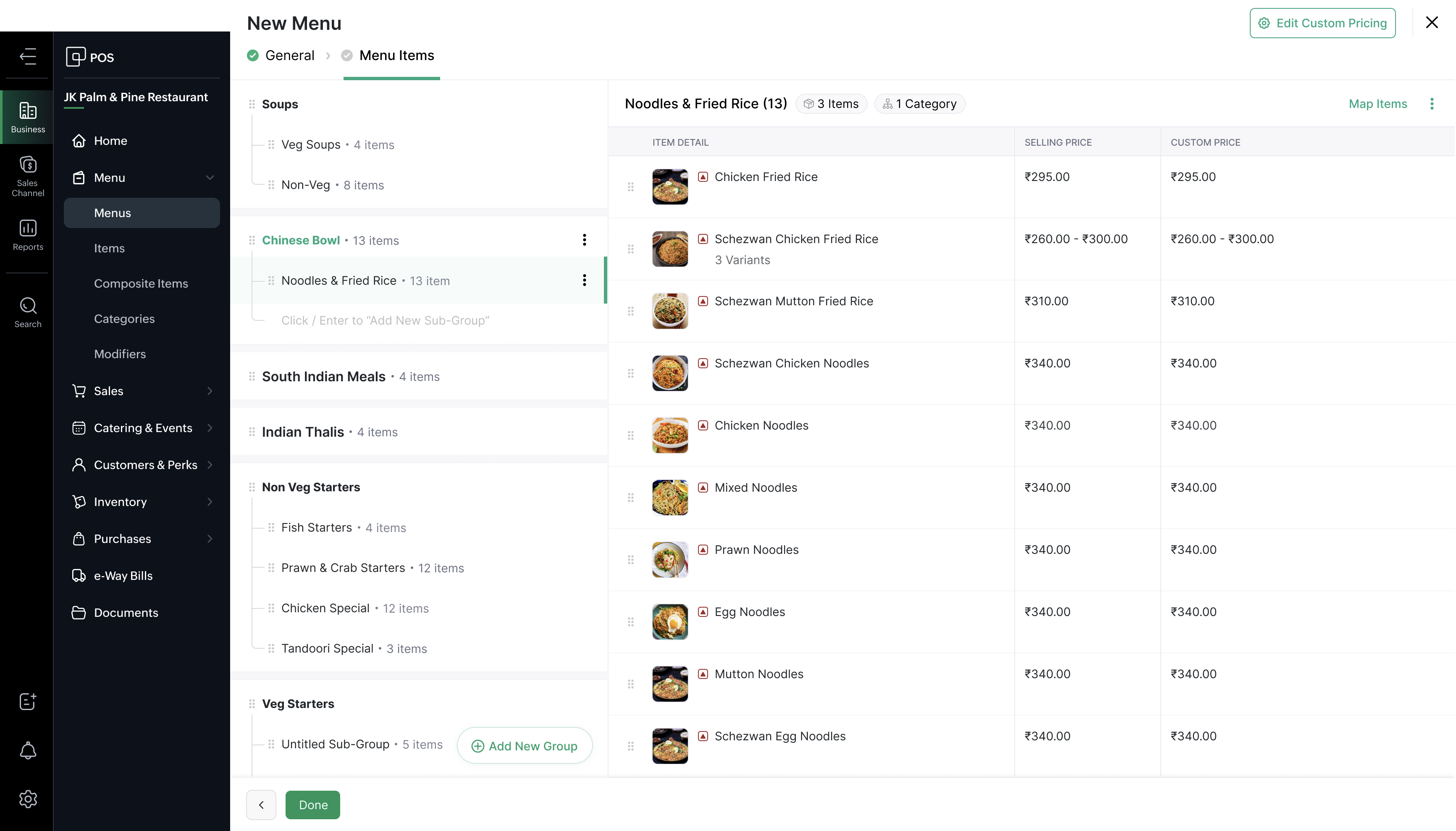
You can even host your menu online and share it with customers using a QR menu, making it easy for them to browse your offerings from their own devices.
Order and billing management
Your order and billing workflow can vary depending on your restaurant's business model. Zoho POS provides dedicated sales channel devices—including the POS Register, Waiter App, and Self-Ordering Kiosk to support different ordering and billing scenarios.
You can configure these sales channels based on your restaurant's requirements and use them individually or together.
POS Register
The POS Register is suitable for a wide range of restaurant business models and supports both ordering and billing workflows.
For example, if you operate a QSR without dining facilities, you can use the POS Register to add items and bill customers. Once the order is placed, the Kitchen Order Ticket (KOT) can be sent directly to the kitchen for preparation.

If your restaurant offers dine-in service, you can create dining areas and tables, along with their seating capacities. When taking an order, you can select the relevant table, specify the number of guests, and add the customer's order. KOTs can then be sent to the kitchen for preparation.

Waiter App
The Waiter App is designed specifically for waiters to take orders directly from tables.
You can create waiter profiles and assign devices to them. You can also restrict waiters to specific tables based on your restaurant's requirements.
Waiters can select a table, enter the number of guests, add items to the order, and send KOTs directly to the kitchen. Multiple KOTs can be sent for the same table as customers place additional orders.
Once the customers finish dining, the sale can be completed and sent for billing through the appropriate billing workflow.

Kiosk
The Self-Ordering Kiosk is designed primarily for self-service restaurant models, where customers can place their own orders, make payments, and collect their food.
If you operate with limited staff or want to manage customer queues more efficiently, you can install self-ordering kiosks and allow customers to complete the ordering process themselves.
The workflow is simple: Customers browse the menu, add items to their cart, complete the payment, and place the order. The KOT is then sent to the kitchen, where the order is prepared. Once the food is ready, the customer can collect it.
All these sales channels can work together in the same restaurant, supporting both online and offline operations. You can create registers based on your business requirements and assign unique billing sequences to help identify transactions.
You can also control access to each sales channel using user roles and permissions. Session management helps you track users' activities across these sales channels on a daily basis.

Food aggregator
If you want to take your restaurant online and reach customers beyond your physical location, you can integrate Zoho POS with hyper local food aggregators such as Swiggy and Zomato.
If you're already using these platforms, you can connect them to Zoho POS using your dedicated aggregator ID and partner portal URL. If you're new to these platforms, you can complete their onboarding process first and integrate them with Zoho POS afterward.
During the integration process, you can configure the store location, menu, order-receiving device, and deposit account. Once the integration is complete, orders from the food aggregator can be received and managed directly from your configured order-receiving device.
You can also configure preferences such as preparation time, order actions, and automatic order acceptance.
If a particular food item is temporarily unavailable, you can disable it from the POS Register. You can also configure a time after which the item is automatically made available again.

Payments
Billing in a restaurant context is rarely straightforward. Zoho POS for Restaurants handles scenarios that come up every service: splitting a bill between guests, merging two tables that have been seated together, applying item-level or order-level discounts, and processing payments across multiple methods in a single transaction. A table of four can settle their bill with two cards, one cash payment, and a gift voucher applied to the remainder, and the system will record each payment method against the same order.
Zoho POS Indian edition supports multiple payment providers, including Paytm, PhonePe, Pine Labs, Razorpay, and more. Depending on the payment provider, you can accept different payment methods such as cash, cards, wallets, UPI, and more.

Catering & events management
If your restaurant handles large food orders for events or catering, you can manage these orders using the Catering & Events module.
You can manage bulk orders through Sales Orders. If an order requires shipping, you can use the Packaging and Shipment sub-modules to manage the fulfillment process.
You can also manage returns through the Returns module.

Multi-outlet management
If you operate more than one restaurant location, Zoho POS for Restaurants lets you manage all of them from a central configuration. Menus, pricing, staff roles, and permissions can be set at the organization level and applied to individual outlets, or each outlet can be configured independently depending on how your business is structured.

Users, roles, and permissions
Zoho POS for Restaurants lets you define what each staff role can see and do within the system. A billing staff member may have access to the payment screen but not to the configuration settings. A supervisor may be able to apply discounts above a set threshold that a server cannot. A store manager may be able to view reports that are not visible to front-of-house staff. These permissions can be configured per role and applied consistently across your team, reducing the risk of unauthorized changes and keeping each person focused on their part of the workflow.

Dashboard and reports
Zoho POS stores the information generated through your day-to-day operations, including users, items, transactions, payments, inventory, and more.
You can use the Reports module to analyze this data and gain insights into your business performance. The reporting tools in Zoho POS for Restaurants give you a view of your operation beyond the current service.
Some of the key reports include:
- Sales by Customer
- Sales by Item
- Profit by Item
- Inventory Valuation Summary
- FIFO Summary
- Table Performance Summary
- Inventory Aging Summary
- Stock Summary
- Payments Summary
- Activity Logs
- Audit Trail

You can also get a quick overview of your business through Dashboards. Dashboards are displayed when you log in to Zoho POS, giving you access to important business insights at the start of your day.

Key dashboard insights include sales summaries, sales by sales channel, inventory aging, item trends, and other statistics that can help you monitor your daily operations and make informed decisions.
Availability and Specifications
Zoho POS for Restaurants is available in four plans: Free, Essential, Signature, and Premium, each offering a different set of features and capabilities.
To support budding restaurateurs in India, the Free plan supports invoices of up to ₹12 lakhs in annual value.
Zoho POS for Restaurants supports both online and offline operations. Zoho POS Web is the cloud-based administrative application that requires an internet connection and is used as the back-of-house system.
The following sales channel front-of-house applications support both online and offline operations:
Sales Channel | Platform |
POS Register | |
Waiter App |
From managing menus and table orders to streamlining kitchen operations, payments, online orders, and business insights, Zoho POS for Restaurants brings your restaurant's essential operations together in one place.
Whether you're running a café, QSR, bakery, dine-in restaurant, or catering business, you can configure Zoho POS to suit your business model and scale as your business grows.
Ready to simplify your restaurant operations? Explore Zoho POS for Restaurants and discover how it can help you serve your customers better and run your business more efficiently.
Topic Participants
Raghav Krishna E
harsh yadav
Kiran Kumar B
Sticky Posts
Introducing Zoho POS for Restaurants
Hello Community, We’re thrilled to announce the launch of Zoho POS for Restaurants, unveiled at the 30th milestone edition of Zoholics India 2026. Running a restaurant involves multiple teams and workflows. A single table journey, from seating a guest
Recent Topics
Times prepopulating in Date/Time field on deal records
Support tells me that there is no workaround to having the time auto-fill on a date/time field in our deal records -- that is HUGELY inconvenient and creates massive opportunity for error. Our deals involve several parts over various days/times, noneMulti-Day Installations
We schedule technicians on multi-day installations. A single appointment from Monday 8 AM through Friday 5 PM counts as 105 working hours, causing false overbooking. We need one appointment spanning five days but only 40 hours counted toward technicianMaking shared forms available offline
Hi, We used to be able to have our forms available offline even if it was a shared form. now we can't. Is this a new bug?Zoho Forms API
Is there any way to get all form entry list using API? Looking forward to hear from youDocuments greater than 40MB Preview
hello, Documents bigger than 40 MB cannot be previewed in WorkDrive Web App or Mobile App. would it be resolved in future?Calendar Booking - Related Deal
Is it possible to automatically associate a Calendar Booking with an existing Deal in Zoho CRM? We're trying to use the native Calendar Booking feature. Our goal is to send a booking link to a customer from an existing Deal record, so that when the customerApproval Process configuration is now more flexible and fully customizable
Hello everyone! Approval Process is back with a better user experience that makes it easier to add rules to your processes. This enhancement includes some UI updates that help you create highly structured approval stages—and more. Let's look at the enhancementsKaizen #268: Using Zoho MCP to Build and Configure Zoho CRM Cadences
Hi everyone! Welcome back to the Kaizen series! In the previous Kaizen posts, Kaizen #265 and Kaizen #266, we explored how Zoho MCP can be used to work with Zoho CRM records, retrieve metadata, customize CRM, configure automation, and even coordinateDeliverability Update: Impact of the Ongoing Microsoft 365 Service Disruption on Email Delivery
Zoho Campaigns is operating normally. Microsoft is still recovering from a global incident that affects multiple Microsoft 365 services, including Exchange Online and Outlook. If your mailing lists include Microsoft-hosted addresses (@outlook.com, @hotmail.com,Duplicate Record Creation
Hello Team, I would like to check whether there are any options available in Zoho FSM to prevent duplicate record creation in the following modules: Assets Companies Contacts Ideally, we would like the system to check for existing records before allowingTrigger a Workflow Function if an Attachment (Related List) has been added
Hello, I have a Case Module with a related list which is Attachment. I want to trigger a workflow if I added an attachment. I've seen some topics about this in zoho community that was posted few months ago and based on the answers, there is no triggerZoho Inventory - Imporoved Order Fulfillment Reporting
Hi Inventory Team, i've tried to contact you through support@eu.zohoinventory.com but haven't received a response. I am contacting you on behalf of a client. Our client is a car parts wholesale business and we set them up on Zoho Inventory earlier thisSay Hello to Telephony in Zoho FSM
Zoho FSM now brings complete telephony support so your team can manage inbound and outbound calls without switching tabs. Faster responses, smarter routing, and total call visibility—all in one place. Choose the telephony setup that works for you Zoho’sIncreasing API Credits
Hello everyone! Organizations consume Zoho CRM APIs for various business needs, and it's a show-stopper when you exhaust your API credits before the 24-hour rolling window replenishes your credits. To meet your growing needs and help you keep your business[Online Training] Zoho RPA masterclass: Fundamentals, SAP® automation, & AI workflows
Hello everyone! Greetings from the Zoho RPA Training Team! We're excited to announce our upcoming Online Training on Zoho RPA. Manual, repetitive tasks like entering data, updating spreadsheets, managing files, and extracting information from documentsZoho Inventory | Can't uncheck/turn off Advance Tracking
Hi, I wanted to know if there's a way to turn off Advanced Tracking (such as Serial Number or Batch Tracking) for an item in Zoho Inventory. I’ve read that you might need to delete associated transactions and clear the opening stock to disable these features.CNIL - Suivi de Pixel
Bonjour à tous, À la suite de la nouvelle recommandation de la CNIL sur les pixels de suivi dans les e-mails, savez-vous si Zoho Campaigns permet : de conditionner le suivi des ouvertures au consentement de chaque contact ; de proposer un lien permettantJoin Zoho Meeting only via Web browser and not with Zoho Meeting App
Dear Zoho team, according to the documentation [1], Zoho Meeting only offers web view for Chrome and Firefox on a desktop. For other browsers and devices, participants can only join a Zoho Meaning with the Zoho Meeting App installed. This is a big hurdleGetting an error when trying to use the Zoho Desk Resources with our Zobot chat
Hello, When I try to set our Zobot AI Card Training to Zoho Desk resources I get an error when testing it and it bypasses the bot completely. When I try to switch it to the Zoho SalesIQ resources option in there it will list some articles but not giveKB Articles from Zoho Learn - Import as .md
I love the concept of being able to use articles from Zoho Learn as knowledge base articles for Zia Agents. This will absolutely help with proper documentation and organization of company processes and SOPs. This was a great concept. However, even whenRequest for Zoho Desk Version and Module Details
Kindly help us confirm the version of Zoho Desk currently being used in our portal, along with the module/edition name. We require this information urgently for our internal documentation.Cannot reorder fields in Page Layout in Expenses and Purchase Requests
It is very inconvenient that the custom fields in Page Layout cannot be re-ordered. The only way is to remove the fields and re-create them; however, it is impractical. This would affect the reports and dashboards we are having. Not able to re-order thePurchase Requisition in Zoho Books
I want to understand if Zoho Books is having the following workflow: PR ( Purchase Requisition ) >> PO ( Purchase order) >> GRN/SRN ( Goods/Services receipt note) >> BillTips & Tricks #8 | Zoho Mail: Seguridad, privacidad y control para tu empresa
El correo electrónico sigue siendo una herramienta fundamental para cualquier organización. Por él circulan comunicaciones internas, información de clientes, documentos confidenciales y datos esenciales para el negocio. Por eso, elegir un proveedor dePersonalize Email Campaigns using CRM Data
Recently, few of our CRM users wanted to send an email campaign with personalized sender details and signature so that recipients can instantly recognize the sender. We are happy to announce the new enhancement in campaign creation through which you can personalize your email campaign using CRM Contact/Lead Owner's data. Let’s see how we can use those data to send emails. Personalize sender details Using Zoho Campaigns, you can send an email campaign with a personalized sender name and email address集めて終わりにしない。― Zoho FormsからCRMへデータをつなぐ
ユーザーの皆さま、こんにちは。ゾーホージャパンの友田です。 Zoho Formsで問い合わせや資料請求を受け付けた後、その情報をどうしていますか? 例えば、 フォームから届いた氏名や会社名、メールアドレスを確認して、Zoho CRMにも同じ情報を入力している。 そんな作業が発生している場合、FormsとCRMをつなぐことで、その手間を減らせるかもしれません。 Formsに入力された情報をCRMへ Zoho Formsは、Zoho CRMと連携できます。 例えば、Webサイトから資料請求を受け付ける場合、Sheet co-edit: no live presence — also on Collaborate demo?
Two Sheet co-edit sessions open OK (same document_id, document.edit: true), but there’s no real-time collaboration: no cell highlights, Group Chat → Users stays empty. Writer co-edit works on the same Office Integrator setup. We see the same on the officialShort product videos on Zoho Commerce product pages: what works?
Short product videos are becoming a normal part of online store pages, and I have been thinking about how to use them well on a Zoho Commerce store. A few points that seem to matter: Keep them short. 6 to 15 seconds showing the product from a few anglesHow to embed Google Analytics GA4 tracking on a standalone Public Page (outside Customer Portal)?
Hi, Is there an official or recommended way to embed Google Analytics (GA4) tracking directly onto a standalone public Zoho Creator Page (outside of a Customer Portal)? I’m considering using an invisible Custom JS Widget as a workaround, but I’d loveUnable to integrate Whatsapp Messaging into Zoho CRM - Business Messaging
Hello, I want to set up Business Messaging in our Zoho CRM and am struggling to set it up. I have logged into the account and our facebook business page, our business shows in the dropdown for WhatsApp Business Account but does not for WhatsApp BusinessZoho CRM calendar merge with outlook
Hi Zoho team! I did the steps for syncing the zoho CRM calendar with outlook. Everything works well as long as the user creates meetings inside the newly created Zoho CRM calendar in outlook, but I need a way to also display the meetings which are receivedThunderbird cannot authenticate Zoho on android
I keep getting a message from Thunderbird on Android that it could not authenticate for my account, dadashton@zoho.com., and to update my server settings. Now the settings are exactly the same for my other devices (1 Windows, 1 Mac and 2 Linux) Can anybodyBills import rejects the Account column (The account does not exist), although the accounts exist in the Chart of Accounts
Hello Zoho Books Team, I am unable to import bills into my Zoho Books. The import keeps rejecting the Account column, even though the accounts exist and work when I create a bill manually. What I am doing Bills > Import Bills, CSV/XLSX file, 145 rows,How do I reorder the item table columns in my invoice template?
There must be a way I just cannot find it. Anyone?Zoho Desk API returning 403 SCOPE_MISMATCH for Ticket Search API
Hello Zoho Support Team, We are experiencing an authorization issue with the Zoho Desk Ticket Search API. Our integration was working correctly yesterday, but we are now receiving the following error when calling the Search Tickets endpoint: API: GETFree webinar: Zoho Sign in Q3 2026
Hi there! From smarter signing on your Apple devices to new ways to verify and personalize your documents, Zoho Sign had a busy Q3—and we're bringing it all together in one session. Join us for a complete walkthrough of everything new this quarter, plusZoho Desk - Delete an email conversation
When using Zoho support desk I see an option to delete and edit conversations that are comments, BUT if the conversation was automatically added as a conversation from an email, then the option to delete it seems not to be available. Is there a way toMessages do not open and I cannot reply to messages in Zohodesk
Hi, this is an unusual behaviour. I cannot reply to messages: Accessing a draft message - runs endlessly. Sending Emails fail:Link item in purchase order to Customer
Is it possible to link each item in purchase order to a customer which would create an associated list, so I can easily find where, when and what my customer have order from us. Thanks!Passing the CRM
Hi, I am hoping someone can help. I have a zoho form that has a CRM lookup field. I was hoping to send this to my publicly to clients via a text message and the form then attaches the signed form back to the custom module. This work absolutely fine whenNext Page