Kaizen #105 - Functions, Integration Tasks, and API Credits - Part 1

Kaizen #105 - Functions, Integration Tasks, and API Credits - Part 1

Hello everyone!
Welcome back to another week of Kaizen!
In today's post, we will discuss functions, integration tasks, how they consume API and function credits.
In the next post, we will discuss connections, the difference between integration tasks and invoke URL in functions, how authentication happens for invoke URLs, and their credit consumption pattern.

What are functions in CRM?

A business involves multiple processes that cater to specific needs, like managing the sales pipeline, automating the flow of data between modules or different third-party systems, etc.
Zoho CRM gives you a wide range of options to achieve your business goals in the form of pre-defined functions under Setup > Developer Space > Functions. You can tweak these functions and associate them to workflows, blueprints, approval processes, circuits amongst many others, at just the click of a button.

While it is understandable that every business' needs are different, and the pre-defined functions, albeit very generic and most-commonly used, may not suit every business, Zoho CRM allows you to write your own functions specific to your needs.
More details on functions, here.
You can use Zoho's Deluge scripting language to write your own functions in a simple drag-and-drop function editor under Setup > Developer Space > Functions.

Integration tasks

We talked about how functions solve your business cases. How exactly do they do it?

Let's say you want to create a record in Zoho CRM using Functions. Instead of having to add values to every field the traditional way in web UI, functions have integration tasks that make working with records a lot easier as they act as API wrappers. These integration tasks help you make direct API calls without having to write code manually to handle API endpoints, HTTP methods, request parameters, or authentication mechanisms. What's more? They accept the input as function arguments in key-value pairs, much like JSON.

How are integration tasks beneficial to you?

When you use multiple Zoho products, data flow between them becomes much simpler and easier through integration tasks.
Your code becomes concise and easy to interpret.
As the integration tasks are essentially API wrappers, you do not have to worry about authorization as these integration tasks are considered as API calls triggered by the org's admin.

For today's post, let us discuss the function Converting a Sales Order to a Purchase Order, that uses integration tasks.
A gist of the code:
  1. Use the getRecordById integration tasks to get the ID of the Sales Order you want to convert to a Purchase Order
  2. Get the details of the product line items in the sales order, iterate through each of them, and add them to a map.
  3. Put these in another map to be used in the Purchase Order.
  4. Use the createRecord integration task and pass the new map to create a purchase order with the details from the sales order.

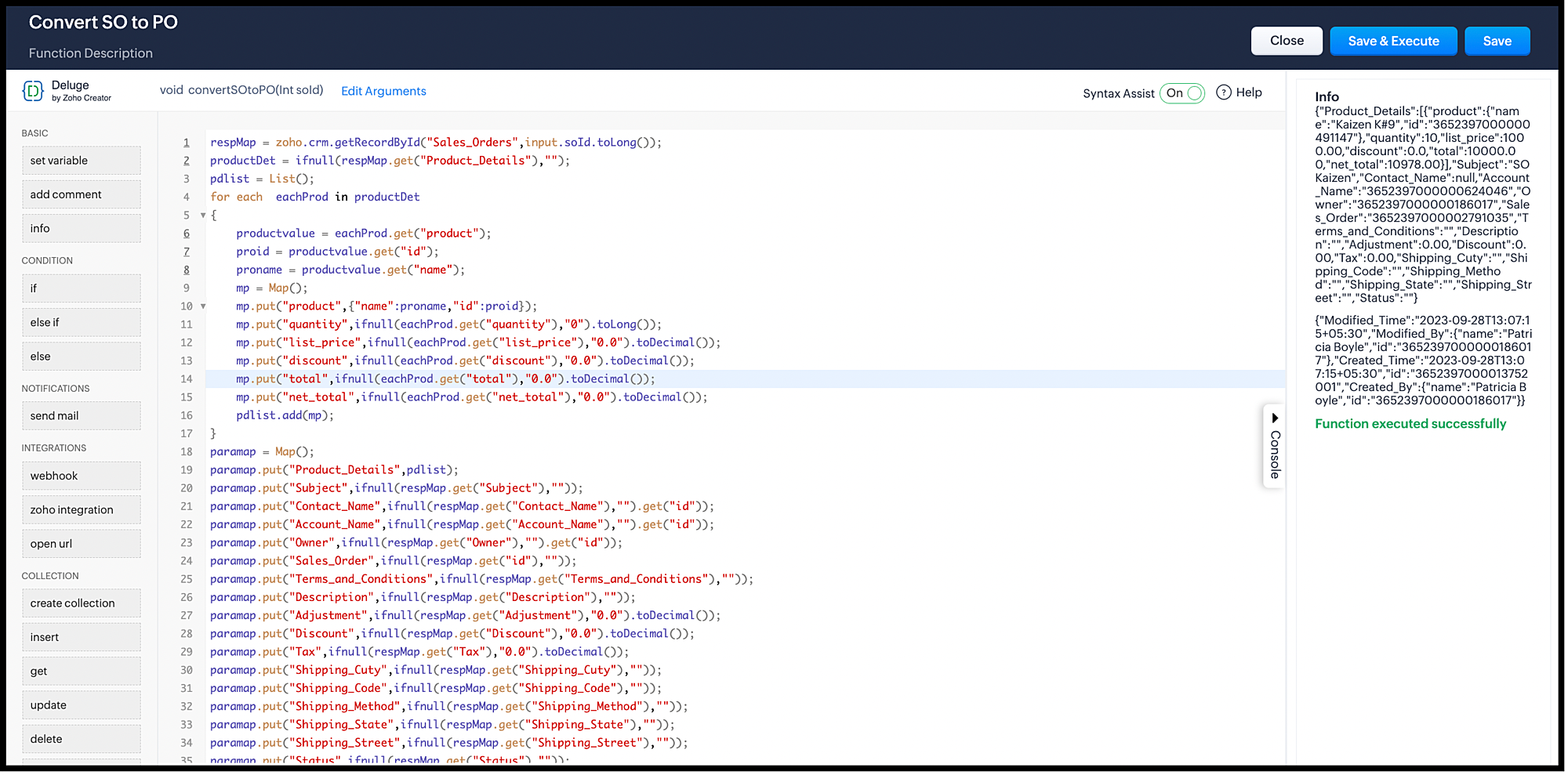
Here is the code:
Note that this function takes the soID(sales order ID) as the argument.

respMap = zoho.crm.getRecordById("Sales_Orders",input.soId.toLong());
productDet = ifnull(respMap.get("Product_Details"),"");
pdlist = List();
for each eachProd in productDet
{
productvalue = eachProd.get("product");
proid = productvalue.get("id");
proname = productvalue.get("name");
mp = Map();
mp.put("product",{"name":proname,"id":proid});
mp.put("quantity",ifnull(eachProd.get("quantity"),"0").toLong());
mp.put("list_price",ifnull(eachProd.get("list_price"),"0.0").toDecimal());
mp.put("discount",ifnull(eachProd.get("discount"),"0.0").toDecimal());
mp.put("total",ifnull(eachProd.get("total"),"0.0").toDecimal());
mp.put("net_total",ifnull(eachProd.get("net_total"),"0.0").toDecimal());
pdlist.add(mp);
}
paramap = Map();
paramap.put("Product_Details",pdlist);
paramap.put("Subject",ifnull(respMap.get("Subject"),""));
paramap.put("Contact_Name",ifnull(respMap.get("Contact_Name"),"").get("id"));
paramap.put("Account_Name",ifnull(respMap.get("Account_Name"),"").get("id"));
paramap.put("Owner",ifnull(respMap.get("Owner"),"").get("id"));
paramap.put("Sales_Order",ifnull(respMap.get("id"),""));
paramap.put("Terms_and_Conditions",ifnull(respMap.get("Terms_and_Conditions"),""));
paramap.put("Description",ifnull(respMap.get("Description"),""));
paramap.put("Adjustment",ifnull(respMap.get("Adjustment"),"0.0").toDecimal());
paramap.put("Discount",ifnull(respMap.get("Discount"),"0.0").toDecimal());
paramap.put("Tax",ifnull(respMap.get("Tax"),"0.0").toDecimal());
paramap.put("Shipping_Cuty",ifnull(respMap.get("Shipping_Cuty"),""));
paramap.put("Shipping_Code",ifnull(respMap.get("Shipping_Code"),""));
paramap.put("Shipping_Method",ifnull(respMap.get("Shipping_Method"),""));
paramap.put("Shipping_State",ifnull(respMap.get("Shipping_State"),""));
paramap.put("Shipping_Street",ifnull(respMap.get("Shipping_Street"),""));
paramap.put("Status",ifnull(respMap.get("Status"),""));
createResp = zoho.crm.createRecord("Purchase_Orders",paramap);
info paramap;
info createResp;


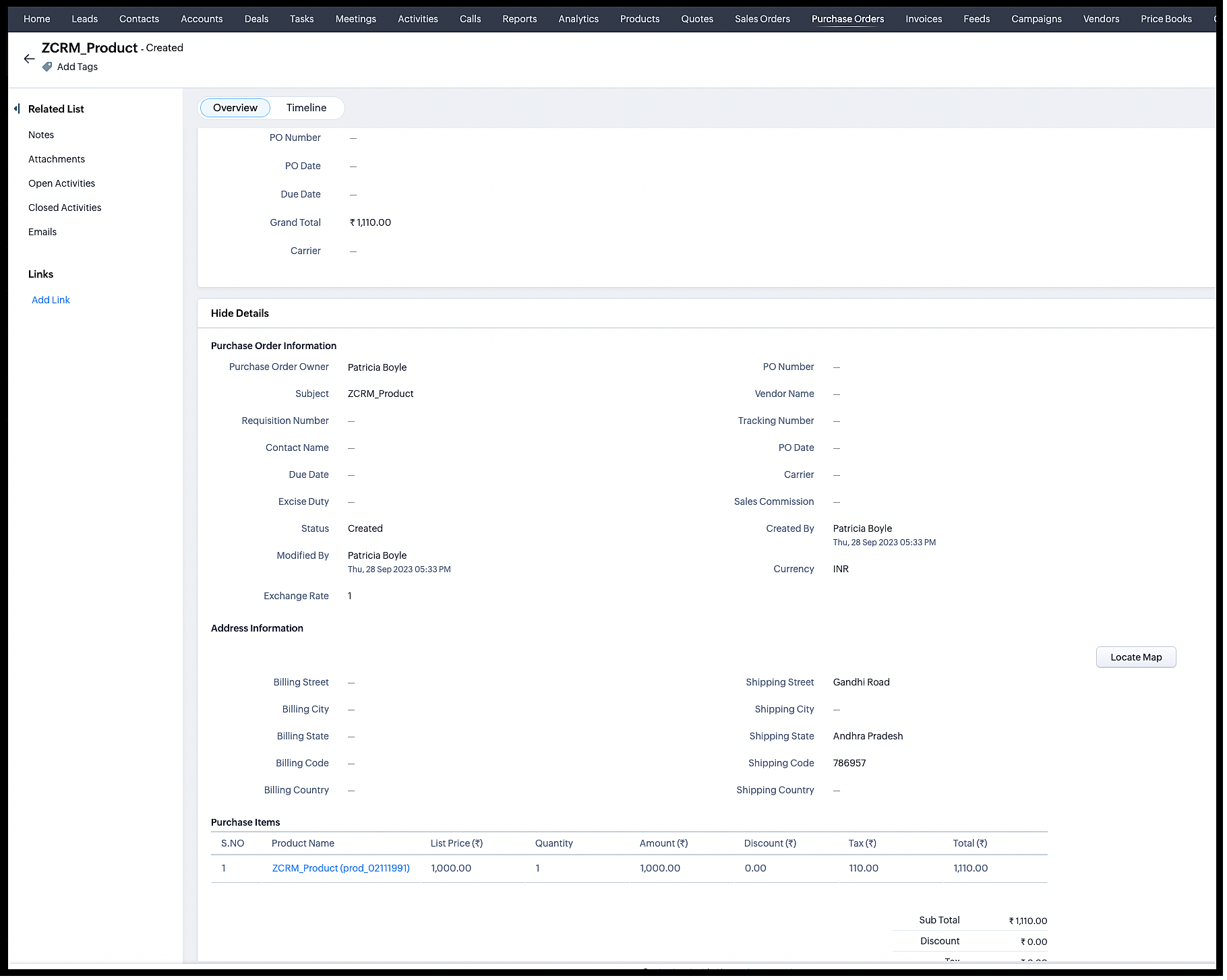
Here is the response:


This is the Purchase order created from the sales order.


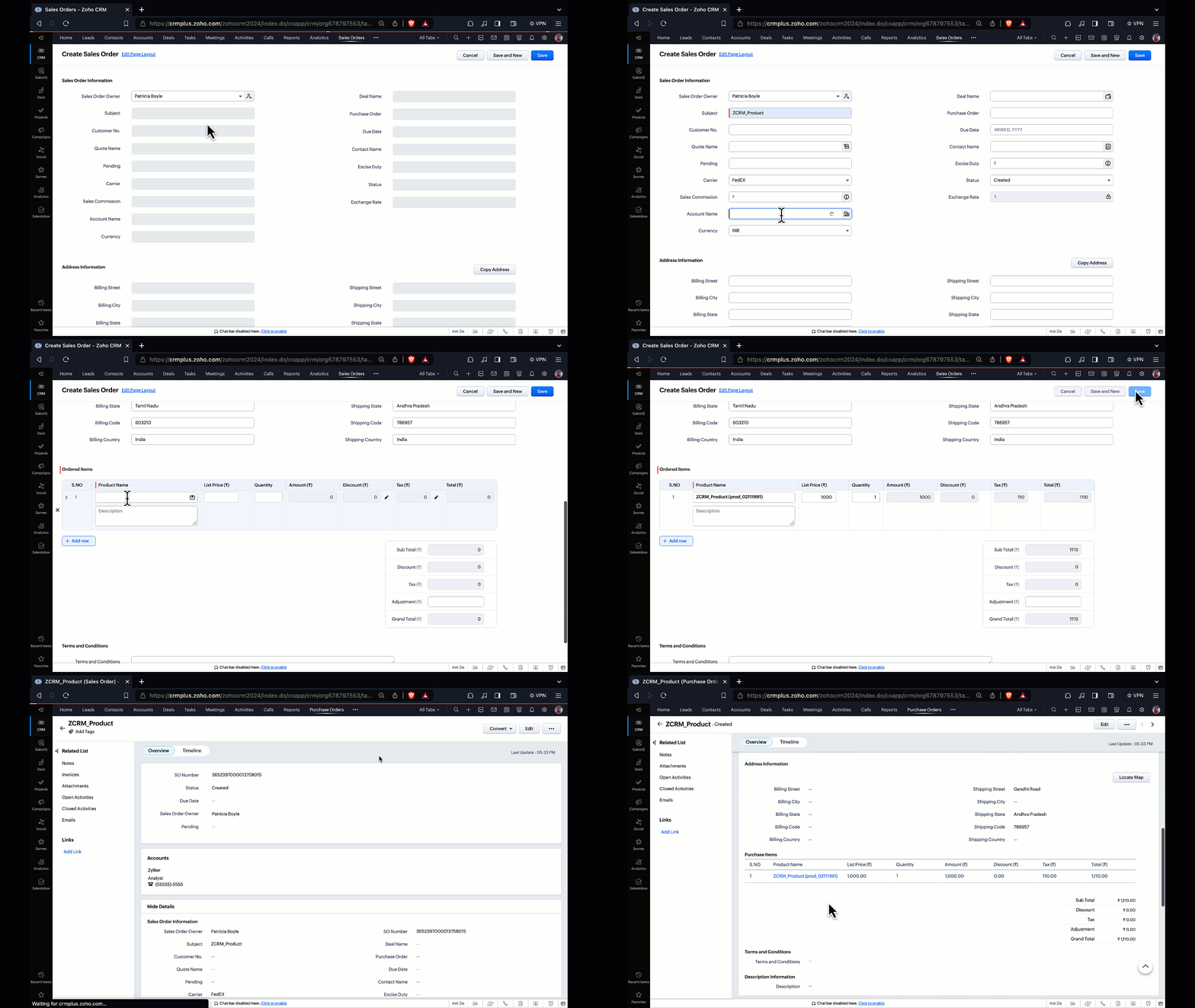
I have associated this function to a workflow that converts a sales order to a purchase order, every time a sales order is created or updated.

How is authentication handled for integration tasks?

Functions with integration tasks are triggered by actions like workflows, blueprints etc. These triggers are org-wide and not restricted to specific sets of users. So, the integration tasks are executed as if the actions are done by the org’s admin.

API and Function Credits

Just like how APIs consume credits, integration tasks consume API credits, too.
The number of credits depends on the integration task you have used. For example, if you use the createRecord integration task, it consumes the same credits as the create records API. Similarly, the getRecordById integration task consumes the same credits as the Get Records API.
This is in addition to the function credits.
So, for the above function, the following are the various limits applied:
  • API credits - 2 - one each for getRecordById and createRecords integration tasks.
  • Function credits - 1

Where can you find the usage stats?


API Dashboard

Apart from API credit consumption, the API dashboard also gives you the details of the credits consumed by integration tasks.
The "Credits Usage" section shows you the credits specific to integration tasks. As you can see, out of the total available 56000 credits, 36 credits are consumed. Out of these 36 credits, 32 are from integration tasks.


The "Credits by Applications/Functions" pie chart gives you the credit consumption by each function or app.
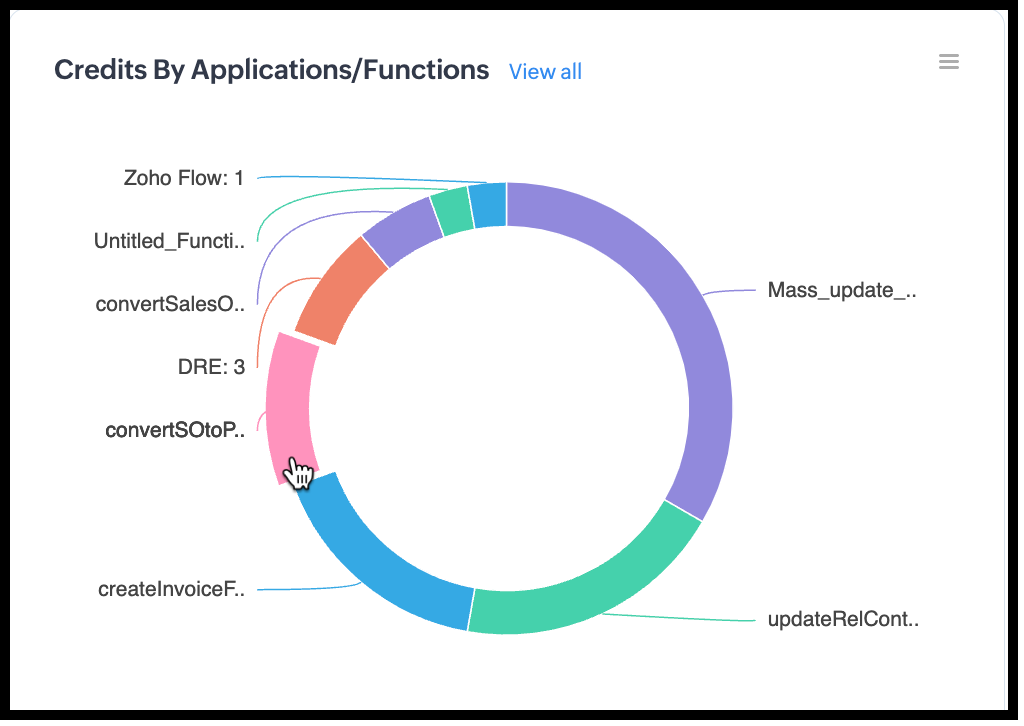

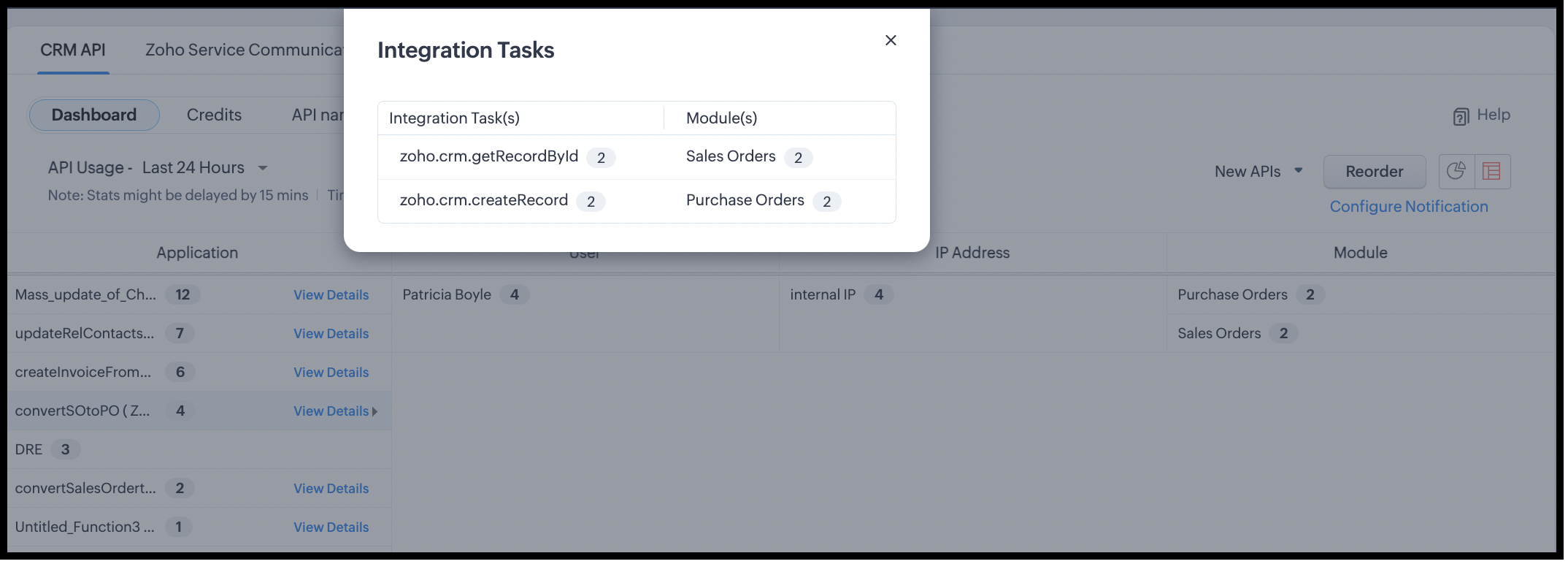
When you click on one of them, you will see the details.

Functions Dashboard

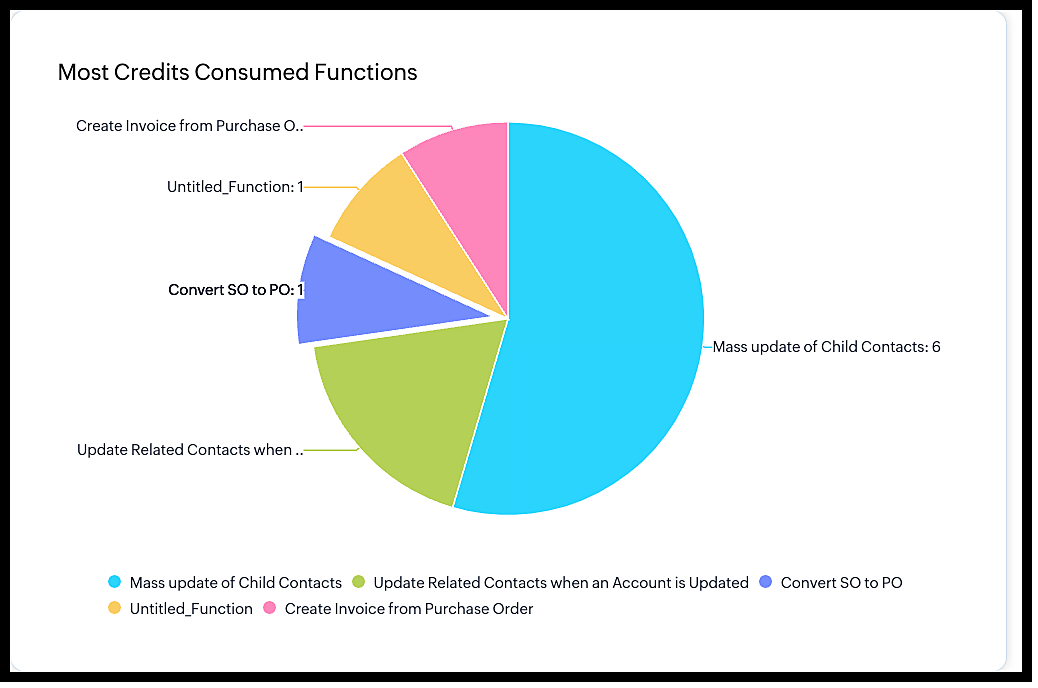
The "Most Credits Consumed Functions" chart gives you the details of the functions that have consumed credits higher than most.

We hope you found this post useful. Next week, we will discuss Connections, invoke URLs and more.
Let us know what you think in the comments, or drop us an email at support@zohocrm.com.
Cheers!

    • Sticky Posts

    • Kaizen #198: Using Client Script for Custom Validation in Blueprint

      Nearing 200th Kaizen Post – 1 More to the Big Two-Oh-Oh! Do you have any questions, suggestions, or topics you would like us to cover in future posts? Your insights and suggestions help us shape future content and make this series better for everyone.
    • Kaizen #226: Using ZRC in Client Script

      Hello everyone! Welcome to another week of Kaizen. In today's post, lets see what is ZRC (Zoho Request Client) and how we can use ZRC methods in Client Script to get inputs from a Salesperson and update the Lead status with a single button click. In this
    • Kaizen #222 - Client Script Support for Notes Related List

      Hello everyone! Welcome to another week of Kaizen. The final Kaizen post of the year 2025 is here! With the new Client Script support for the Notes Related List, you can validate, enrich, and manage notes across modules. In this post, we’ll explore how
    • Kaizen #217 - Actions APIs : Tasks

      Welcome to another week of Kaizen! In last week's post we discussed Email Notifications APIs which act as the link between your Workflow automations and you. We have discussed how Zylker Cloud Services uses Email Notifications API in their custom dashboard.
    • Kaizen #216 - Actions APIs : Email Notifications

      Welcome to another week of Kaizen! For the last three weeks, we have been discussing Zylker's workflows. We successfully updated a dormant workflow, built a new one from the ground up and more. But our work is not finished—these automated processes are
    • Recent Topics

    • Set expiration date on document and send reminder

      We have many company documents( for example business registration), work VISA documents. It will be nice if we can set a expiry date and set reminders ( for example 90 days, 60 days, 30 days etc.,) Does Zoho workdrive provide that option?
    • Analytics : How to share to an external client ?

      We have a use case where a client wants a portal so that several of his users can view dashboards that we have created for them in Zoho Analytics. They are not part of our company or Zoho One account. The clients want the ability to have user specific,
    • Automatically Update Form Attachment Service with Newly added Fields

      Hi, When I have a Form Setup and connected to a 3rd Party Service such as OneDrive for Form Attachments, when I later add a new Upload Field I have to remove and redo the entire 3rd Party Setup from scratch. This needs to be improved, such as when new
    • Facing Issues with Sites Mobile font sizes

      my page renediaz.com is facing issues mobile view, when i try to lower font sizes in home page, instead of changing the size, it changes the line space
    • Payroll and BAS ( Australian tax report format )

      Hello , I am evaluating Zoho Books and I find the interface very intuitive and straight forward. My company is currently using Quickbooks Premier the Australian version. Before we can consider moving the service we would need to have the following addressed : 1.Payroll 2.BAS ( business activity statement ) for tax purposes 3.Some form of local backup and possible export of data to a widely accepted format. Regards Codrin Mitin
    • Zoho Desk API - Send Reply to CUSTOMERPORTAL

      Hello! I'll try to send a reply to Customer Portal, But the response is 500 (INTERNAL_SERVER_ERROR in service response). {"Error":"{\"errorCode\":\"INTERNAL_SERVER_ERROR\",\"message\":\"An internal server error occurred while performing this operation.\"}"}
    • Python - code studio

      Hi, I see the code studio is "coming soon". We have some files that will require some more complex transformation, is this feature far off? It appears to have been released in Zoho Analytics already
    • Dheeraj Sudan and Meenu Hinduja-How do I customize Zoho apps to suit my needs?

      Hi Everyone, I'm Meenu Hinduja and my husband Dheeraj Sudan, run a business. I’m looking to tweak a few things to fit my needs, and I’d love to hear what customizations others have done. Any tips or examples would be super helpful! Regards Dheeraj Sudan
    • From Zoho CRM to Paper : Design & Print Data Directly using Canvas Print View

      Hello Everyone, We are excited to announce a new addition to your Canvas in Zoho CRM - Print View. Canvas print view helps you transform your custom CRM layouts into print-ready documents, so you can bring your digital data to the physical world with
    • Zoho Books Payroll

      How am I supposed to do payroll and pay my employees with Zoho Books? I think it's pretty strange that an accounting software doesn't have the ability to perform one of the most common functions in business; paying your employees. Am I missing something,
    • Layout Rules Don't Apply To Blueprints

      Hi Zoho the conditional layout rules for fields and making fields required don't work well with with Blueprints if those same fields are called DURING a Blueprint. Example. I have field A that is used in layout rule. If value of field A is "1" it is supposed to show and make required field B. If the value to field A is "2" it is supposed to show and make required field C. Now I have a Blueprint that says when last stage moves to "Closed," during the transition, the agent must fill out field A. Now
    • validation rules doesn't work in Blueprint when it is validated using function?

      I have tried to create a validation rule in the deal module. it works if I try to create a deal manually or if I try to update the empty field inside a deal. but when I try to update the field via the blueprint mandatory field, it seems the validation
    • Sort Legend & stacked bar chart by value

      I'd love to see an option added to sort the legend of graphs by the value that is being represented. This way the items with the largest value in the graph are displayed top down in the legend. For example, let's say I have a large sales team and I create
    • Is It Possible to Convert a Custom Module to a Quote?

      I recently created a custom module in our CRM environment for RFQs so that our sales team can submit quote requests directly in Zoho rather than by email/phone. This allows for a cleaner overall process, minimizing potential errors and potentially encouraging
    • All new Address Field in Zoho CRM: maintain structured and accurate address inputs

      The address field will be available exclusively for IN DC users. We'll keep you updated on the DC-specific rollout soon. It's currently available for all new sign-ups and for existing Zoho CRM orgs which are in the Professional edition. Latest update
    • How can Data Enrichment be automatically triggered when a new Lead is created in Zoho CRM?

      Hi, I have a pipeline where a Lead is created automatically through the Zoho API and I've been trying to look for a way to automatically apply Data Enrichment on this created lead. 1) I did not find any way to do this through the Zoho API; it seems like
    • Client Side Scripts for Meetings Module

      Will zoho please add client side scripting support to the meetings module? Our workflow requires most meeting details have a specific format to work with other software we have. So we rely on a custom function to auto fill certain things. We currently
    • Proposal: Actionable API Error Messages to Reduce Support Ticket Volume

      I've encountered a long-standing frustration with how Zoho Creator's API communicates errors to developers, and I'm hoping the Zoho team can address this in a future update. This issue has persisted for over 9 years based on community discussions, and
    • Zoho CRM - Option to create Follow-Up Task

      When completing a Zoho CRM Task, it would be very helpful if there was an option to "Complete and Create Follow-Up Task" in the pop-up which appears. It could clone the task you are closing and then show it on the screen in edit mode, all the user would
    • Dynamic Field Folders in OneDrive

      Hi, With the 2 options today we have either a Dynamic Parent Folder and lots of attachments all in that one folder with only the ability to set the file name (Which is also not incremented so if I upload 5 photos to one field they are all named the same
    • Drag 'n' Drop Fields to a Sub-Form and "Move Field To" Option

      Hi, I would like to be able to move fields from the Main Page to a Sub-Form or from a Sub-Form to either the Main Page or another Sub-Form. Today if you change the design you have to delete and recreate every field, not just move them. Would be nice to
    • File Conversion from PDF to JPG/PNG

      Hi, I have a question did  anyone every tried using custom function to convert a PDF file to JPG/PNG format? Any possibility by using the custom function to achieve this within zoho apps.  I do know there are many third parties API provide this with
    • Allocating inventory to specific SO's

      Is there a way that allocate inventory to a specific sales order? For example, let's say we have 90 items in stock. Customer 1 orders 100 items. This allocates all 90 items to their order, and they have a back order for the remaining 10 items which could
    • Cliq iOS can't see shared screen

      Hello, I had this morning a video call with a colleague. She is using Cliq Desktop MacOS and wanted to share her screen with me. I'm on iPad. I noticed, while she shared her screen, I could only see her video, but not the shared screen... Does Cliq iOS is able to display shared screen, or is it somewhere else to be found ? Regards
    • Pull cells from one sheet onto another

      Hello all! I have created an ingredients database where i have pricing and information and i want to pull from that database into a recipe calculator. I want it to pull based on what ingredient I choose. The ingredients database has an idea and i want
    • Closing the Loop: Why Lookup Asymmetry is Harming Data Integrity in Creator

      TL;DR: Lookup fields allow users to add new related records inline via the "+" icon, but there's no equivalent ability to edit an existing related record without navigating away and losing form context. Adding a native "Edit" icon—with automatic User
    • Add the ability to Hide Pages in Page Rules

      Hi, We have Field Rules to show and hide fields and we have page Rules, but we can't hide a page in Page Rules so it isn't completed before the previous page (And then have the Deny Rules to prevent submitting without both pages completed), we can only
    • Enable Free External Collaboration on Notecards in Zoho Notebook

      Hi Zoho Notebook Team, I would like to suggest a feature enhancement regarding external collaboration in Zoho Notebook. Currently, we can share notes with external users, and they are able to view the content without any issue. However, when these external
    • using the Client script on the load of the form if service no is empty means then i want to make issue relate to is Service

      using the Client script on the load of the form if service no is empty means then i want to make issue relate to field is Service if Purchae no is empty means then i want to make issue relate to is Purchase
    • Changes to the send mail Deluge task in Zoho CRM

      Hello everyone, At Zoho, we continuously enhance our security measures to ensure a safer experience for all users. As part of our ongoing security enhancements, we're making an important update on using the send mail Deluge task in Zoho CRM. What's changing?
    • Work Order wont mark as Completed

      I have a couple of work orders that won't mark as completed even when I've marked the Service Appointments as completed fully.
    • Item name special charaters <>

      Im trying to input speical characters such as < and > into item name and item description but comes up with following error: Invalid value passed for Item Name and Invalid value passed for Item Description How do i allow speical characters?
    • Zoho Analytics Dashboard - How to hide the user filter

      I am using the same dashboard template across different external clients and applying a user filter to the data by site URL. How can I hide the user filter in View Mode so the external client won't see the list of other clients in the drop-down menu?
    • Customer Parent Account or Sub-Customer Account

      Some of clients as they have 50 to 300 branches, they required separate account statement with outlet name and number; which means we have to open new account for each branch individually. However, the main issue is that, when they make a payment, they
    • Cannot get code to work with v2.mergeAndStore!

      Please can someone help me pass subform items into a repeating mail merge table row using v2.mergeAndStore? I have a mail merge template created in Writer and stored in Workdrive. This template is referenced by a custom CRM function which merges all of
    • Kaizen #229: Email-Deal Associations in Zoho CRM

      Hi All, Welcome back to another week of Kaizen! Emails are a core channel for customer communication in any CRM system. In Zoho CRM, emails can be associated with records across multiple modules. In this post, we will focus on email associations with
    • Deprecation of the Zoho OAuth connector

      Hello everyone, At Zoho, we continuously evaluate our integrations to ensure they meet the highest standards of security, reliability, and compliance. As part of these ongoing efforts, we've made the decision to deprecate the Zoho OAuth default connector
    • Action Required: Update Microsoft SQL Server Security Settings Before February 2026

      Dear Users, We recently deployed security updates in Zoho Analytics that inadvertently caused connection failures for a few customers using Microsoft (MS) SQL Server hosted on older Windows versions (Windows Server 2012, 2012 R2, and 2014). To restore
    • Contacts limit in basic vs standard - what counts? Are customers contacts?

      I’ve been using books for a number years for my small business. I only ever work with 20 clients at any given time. I do purchase services from a number of vendors to run my business, so there are some comtacts there too. I used to use the basic package,
    • Saving issue

      First problem I opened a MS word file in writer. after the work is done, it does not save instantly, I waited for like 10min and it still did not save. second problem When I save a file, then file gets saved as another copy. I just did save, not save
    • Next Page