Kaizen #130 - Zoho CRM Scala SDK (V6) - Configuration and Initialization
Hello and welcome to another Kaizen week!
In this week's post, we'll show you how to get started with Zoho CRM's Scala SDK, and walk you through the configuration and initialization process. Specifically, we will discuss how to use the Scala SDK to make API calls authenticated via self-client. Please note that this article holds true for Scala SDK supporting version 6 of Zoho CRM APIs.
Software Development Kits (SDKs) are sets of tools and libraries designed to simplify the development process, and the integration between applications and specific platforms or services. They provide pre-built functionalities and abstract complex tasks, facilitating easier and faster development process. Zoho CRM's Scala SDKs act as a wrapper for the REST APIs, thus making it easier to use the services of Zoho CRM.
Simplified Authentication using Scala SDK
Authentication with Zoho CRM APIs is facilitated by the OAuth 2.0 protocol, ensuring secure access to its resources. The process begins with the generation of a grant token for your organization in the Zoho Developer Console, where you specify the required scopes. Subsequently, using this grant token, you can generate both the access token, used for API call authentication, and the refresh token, employed for refreshing the access tokens after their one-hour expiry period. You must persist these tokens, along with their expiry times, in your server's data store for seamless API access.
However, with the Scala SDK, this authentication process is significantly simplified. After generating the grant token and initialization, the SDK takes care of the rest. The SDK handles token generation, persistence, and refreshing the access token automatically, ensuring access to the resources without manual intervention.
Using the Zoho CRM Scala SDK
Before diving into the usage of Scala SDKs, ensure that the following prerequisites are met:
- Ensure that the client app has Java version 11 or above.
- Ensure that the client app has Scala version 2.13.5 or above.
- Have an IDE such as IntelliJ installed.
- An active Zoho CRM account.
1. Register your application with Zoho CRM
When you register a client with Zoho CRM, you establish a connection between your application and Zoho CRM, enabling your application to securely access and interact with Zoho CRM APIs and resources after authentication. The registration process involves providing essential details such as the client type, homepage URL, and authorized redirect URIs, depending on the type of client you choose.
To register your client:
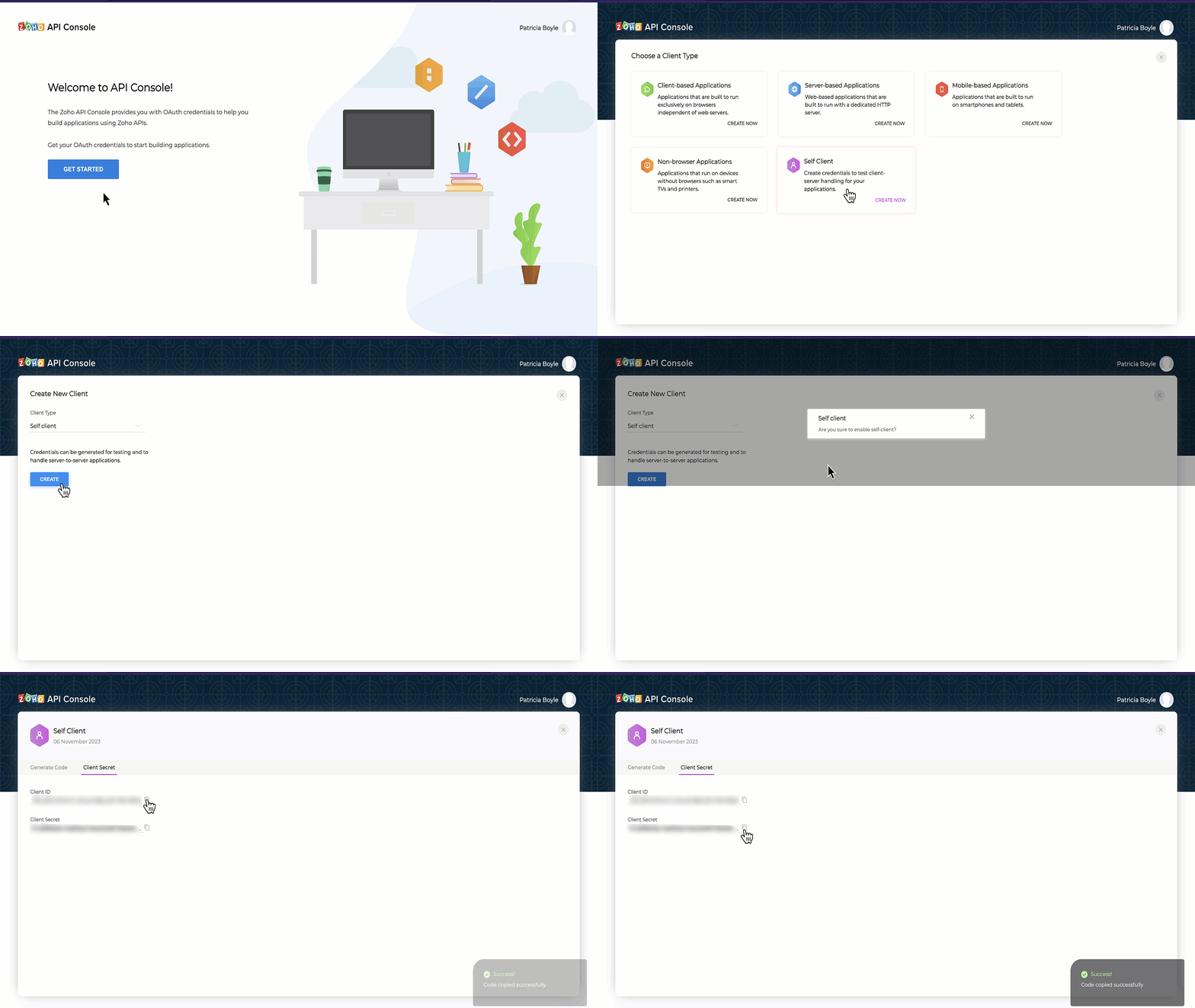
- Go to the Zoho Developer Console
- Click on Get Started or +ADD CLIENT
- Choose the Client Type as Self-Client or Server based Applications depending on your application. Read our Kaizen post on the different client types to understand better. For this article, we will proceed with Self-client as we aim to develop a Scala application for our own use.
- Fill in the necessary details and click CREATE to register your client successfully. This will provide you with a Client ID and Client Secret.
2. Create a Scala project in your preferred IDE
If you already have your project set up, you may skip this step. However, if you are starting out, the next crucial step is to create a Scala Project in your preferred IDE. For the purpose of this guide, we will be using IntelliJ IDEA as the IDE of choice.
3. Include the Zoho CRM Scala SDK in your project
To include the Zoho CRM Scala SDK in your project, you can follow different methods as outlined here. However, for the purpose of this guide, we will demonstrate how to include the SDK using the build.sbt file.
Follow these steps to include the Zoho CRM Scala SDK in your project using the build.sbt file:
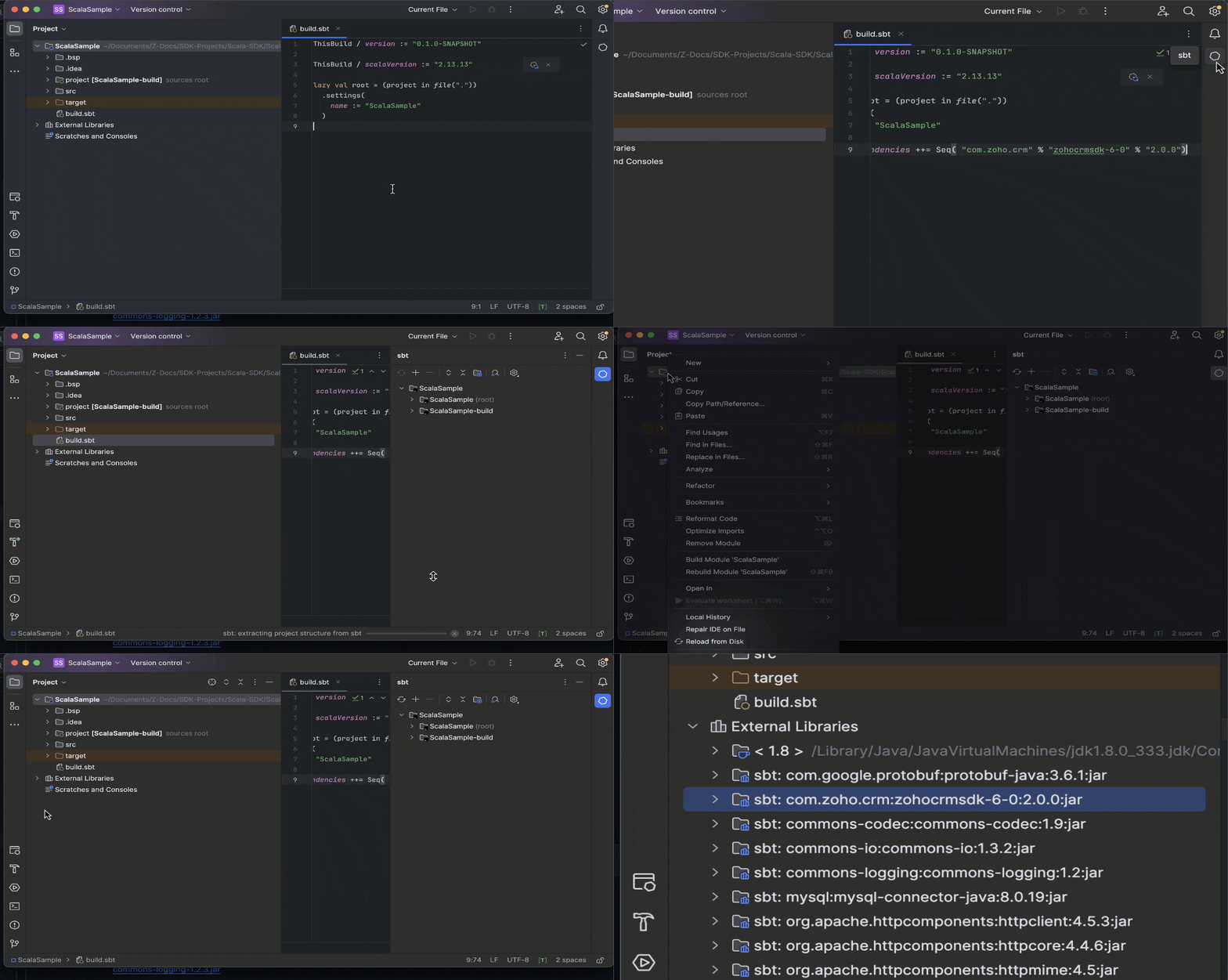
- Open your project in IntelliJ IDEA or your preferred IDE.
- Locate the build.sbt file in your project directory.
- Add the Zoho CRM Scala SDK dependency to your build.sbt file. To add the latest version (supporting version 6 of Zoho CRM APIs), include this line in the file and Save: libraryDependencies ++= Seq( "com.zoho.crm" % "zohocrmsdk-6-0" % "2.0.0")
- Sync the changes and reload the files to ensure that the SDK has been added to the project.
Please note that when you install the Zoho CRM SDK, there are many dependencies which will also be installed. These dependencies are necessary for the proper functioning of the SDK and will be automatically managed by your build tool (such as sbt) during the installation process.
4. Obtain the grant token to authenticate your client
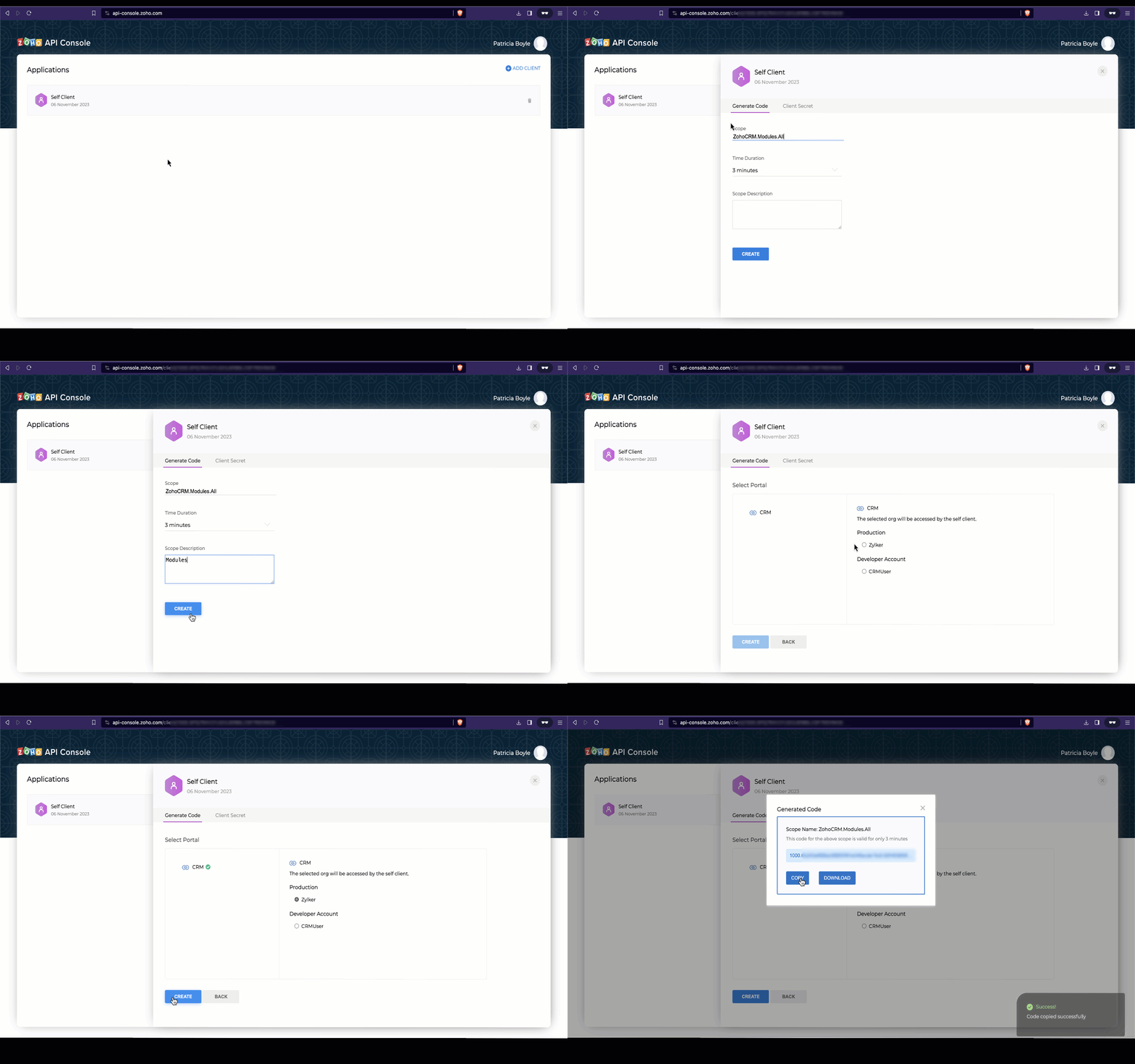
To make API calls, you need to authenticate your client by generating a grant token with the required scopes. For this guide, we will be using the self-client created in the first step.
Log in to the Zoho Developer Console, and generate the grant token with the required scopes. Please note that this grant token has a short life span, and that it is used to generate the access and refresh tokens. Refer to our Kaizen on OAuth2.0 for more details.
5. Configuration and Initialization of the SDK
The configuration step in initializing the SDK involves setting up various objects to define how the SDK operates. This includes specifying the domain for API calls, token persistence, error logging, resource information storage, and more.
Before going into the specifics of various configurations, let us first discuss Token Persistence. Token Persistence refers to the mechanism through which access tokens and refresh tokens obtained during authentication are stored and managed by the SDK. By storing tokens securely, the SDK can automatically manage token expiration and renewal, eliminating the need for manual token handling by the developer.For details on the different persistence methods supported by our SDKs, please refer to the last section of this post. In this guide, we will be using File Persistence as the method for Token Persistence. However, please note that users must choose the method that best suits their requirements and preferences.
Here is a sample code to initialize the SDK. Make sure to replace the client ID, client secret, grantToken, file paths, and other configurations with your specific values.
- import com.zoho.api.authenticator.OAuthToken
- import com.zoho.crm.api.dc.USDataCenter
- import com.zoho.crm.api.exception.SDKException
- import com.zoho.crm.api.{HeaderMap, Initializer, SDKConfig}
- import com.zoho.api.logger.Logger
- import com.zoho.api.authenticator.store.FileStore
- object BulkWrite {
- @throws[SDKException]
- def main(args: Array[String]): Unit = {
- val environment = USDataCenter.PRODUCTION
- val token = new OAuthToken.Builder().clientID("1000.xxx").clientSecret("xxx").grantToken( "1000.xxx").findUser(false).build()
- //Object containing the absolute file path to store tokens
- var tokenstore = new FileStore("/Documents/SDK-Projects/Scala-SDK/ScalaSample/sdk_tokens_new.txt")
- var logger = new Logger.Builder()
- .level(Logger.Levels.ALL)
- .filePath("/Documents/SDK-Projects/Scala-SDK/ScalaSample/scala_sdk_log.log")
- .build
- var sdkConfig = new SDKConfig.Builder().pickListValidation(false).autoRefreshFields(false).connectionTimeout(1000).requestTimeout(1000).socketTimeout(1000).build
- new Initializer.Builder().environment(environment).token(token).store(tokenstore).logger(logger).SDKConfig(sdkConfig).initialize()
- }
- }
- class BulkWrite {}
During the initialization step, the following configuration details have to be defined to configure the behavior and functionality of the SDK. While two of them are mandatory, the others are optional.
- environment (mandatory): It determines the API environment, which dictates the domain and URL for making API calls. The format follows the Domain.Environment pattern.
eg : val env = USDataCenter.PRODUCTION - token (mandatory) : Contains the user token details. Create an instance of OAuthToken with the details that you get after registering your Zoho client. Depending on the available tokens, you can select one of the following flows:
- Grant Token Flow: Involves storing and persisting the grant token. This flow is used when you have a grant token available. The SDK will generate and persist the access and refresh tokens, and also refresh the access token upon expiry.
- Refresh Token Flow: Involves storing and persisting the refresh token. This flow is used when you have a refresh token available. The SDK will generate and persist the access and refresh tokens, and also refresh the access token upon expiry.
- Access Token Flow: In this flow, the access token is directly utilized for API calls without token persistence. The SDK will persist the access token, but upon expiry it won't be refreshed, and an INVALID_TOKEN error will be thrown once the access token has expired.
- Id FLow : You can use the id from the persisted token file/DB to make API calls. The id is a unique system generated value for each token details entry in the file/DB. Please note that you can use this method only after the SDK has already been initialized.
- logger (optional) : You can customize the logging behavior by setting the desired log level, which can be one of the following: FATAL, ERROR, WARNING, INFO, DEBUG, TRACE, ALL, or OFF. Additionally, you can configure the file path and file name for the log file.
- store (optional) : Allows you to configure token persistence for your application. If this is skipped, the SDK will create the "sdk_tokens.txt" file in the current working directory by default to persist the tokens.Database PersistenceFile PersistenceCustom Persistencevar tokenstore = new DBStore.Builder().host("hostName").databaseName("databaseName").tableName("tableName").userName("userName").password("password").portNumber("portNumber").buildvar tokenstore = new FileStore("/Users/user_name/Documents/scala_sdk_token.txt")var tokenStore = new CustomStore()
- SDKConfig (optional) : This method takes care of additional SDK configurations.Configuration KeyDescriptionautoRefreshFieldsDefault Value : FalseA boolean configuration field to enable or disable automatic refreshing of module fields in the background. If set to true, fields are refreshed every hour, and if set to false, fields must be manually refreshed or deleted.pickListValidationDefault Value : TrueThis field enables or disables pick list validation. If enabled, user input for pick list fields is validated, and if the value does not exist in the pick list, the SDK throws an error. If disabled, the input is not validated and the API call is made.enableSSLVerificationDefault Value : TrueA boolean field to enable or disable curl certificate verification. If set to true, the SDK verifies the authenticity of certificate. If set to false, the SDK skips the verification.connectionTimeoutDefault Value : 0The maximum time (in seconds) to wait while trying to connect. Use 0 to wait indefinitely.timeoutDefault Value : 0The maximum time (in seconds) to allow cURL functions to execute. Use 0 to wait indefinitely.
- requestProxy (optional) : Configure this only if you're using a proxy server to make the API calls. To configure, create an instance of RequestProxy containing the proxy properties of the user.var requestProxy = new RequestProxy.Builder().host("proxyHost").port(80).user("proxyUser").password("password").userDomain("userDomain").build()
- resourcePath (optional) : To configure the absolute directory path to store user-specific files containing module fields information. If this object is skipped, the files will be stored in the project directory itself.
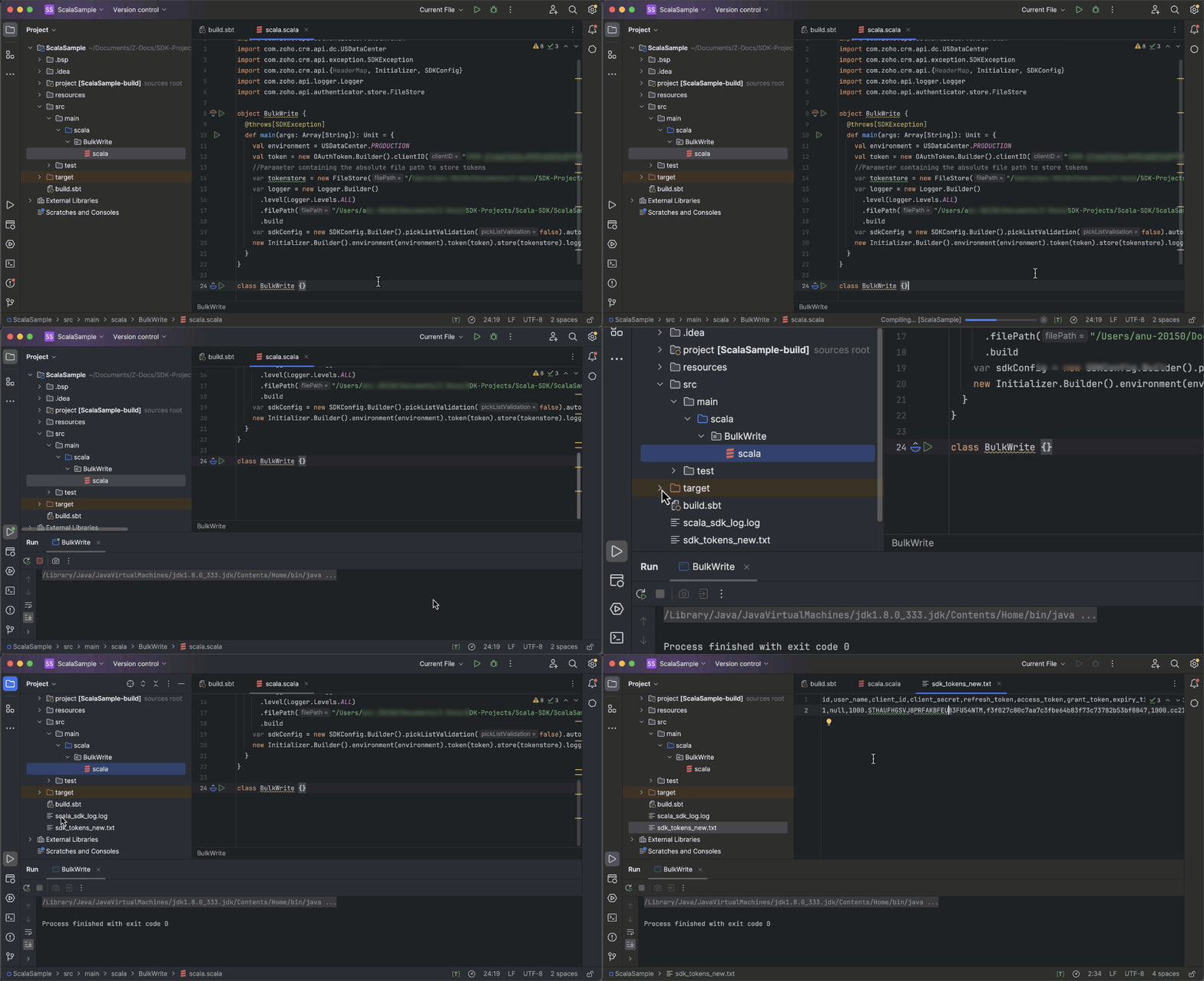
Once the initialization is successful, you can verify that the access and refresh tokens are generated and persisted. You can do this by checking the tokens file or the database, depending on the token persistence method you configured during initialization.
Token Persistence
There are three token persistence methods supported by our SDKs.
- Token Persistence using a Database : In Database persistence, tokens are stored and retrieved from a database (e.g., MySQL). In this case, you should create a table in your database with the required columns. The custom database name and table name can be set in DBStore instance, when you initialise the SDK.For instance, to persist your tokens in a table named token in database named zoho in your mySQL DB, use this:CREATE DATABASE zoho; // use this to create database named zoho// use this to create a table named token, with the following necessary columnsCREATE TABLE token (id varchar(10) NOT NULL,user_name varchar(255) NOT NULL,client_id varchar(255),client_secret varchar(255),refresh_token varchar(255),access_token varchar(255),grant_token varchar(255),expiry_time varchar(20),redirect_url varchar(255),
api_domain varchar(255),primary key (id)); - File Persistence : This method allows storing and retrieving the authentication tokens from the file in the file path that you configure. The file will contain the id, user_name, client_id, client_secret, refresh_token, access_token, grant_token, expiry_time, redirect_url, and api_domain.
- Custom Persistence : This is a method where users can create their own method of storing and retrieving authentication tokens. To use this method, users need to implement the TokenStore interface and override its methods according to their own logic. For more details, please refer here.
We hope that you found this useful. In next week's Kaizen post, we will discuss about Bulk Write operations using the Scala SDK for Zoho CRM, and on how to import both parent and child records in a single operation.
If you have any queries, let us know the comments below, or send an email to support@zohocrm.com. We would love to hear from you.
Cheers!
Anu Abraham
Anu Abraham

Recommended Reads:
- Check out our Kaizen Collection here
- Zoho CRM SDKs
- Scala SDK - Github
- Client Types in Zoho API Console
- Previous Kaizen : Client Script Support for Blueprints
Topic Participants
Anu Abraham
Sticky Posts
Kaizen #226: Using ZRC in Client Script
Hello everyone! Welcome to another week of Kaizen. In today's post, lets see what is ZRC (Zoho Request Client) and how we can use ZRC methods in Client Script to get inputs from a Salesperson and update the Lead status with a single button click. In thisKaizen #222 - Client Script Support for Notes Related List
Hello everyone! Welcome to another week of Kaizen. The final Kaizen post of the year 2025 is here! With the new Client Script support for the Notes Related List, you can validate, enrich, and manage notes across modules. In this post, we’ll explore howKaizen #217 - Actions APIs : Tasks
Welcome to another week of Kaizen! In last week's post we discussed Email Notifications APIs which act as the link between your Workflow automations and you. We have discussed how Zylker Cloud Services uses Email Notifications API in their custom dashboard.Kaizen #216 - Actions APIs : Email Notifications
Welcome to another week of Kaizen! For the last three weeks, we have been discussing Zylker's workflows. We successfully updated a dormant workflow, built a new one from the ground up and more. But our work is not finished—these automated processes areKaizen #152 - Client Script Support for the new Canvas Record Forms
Hello everyone! Have you ever wanted to trigger actions on click of a canvas button, icon, or text mandatory forms in Create/Edit and Clone Pages? Have you ever wanted to control how elements behave on the new Canvas Record Forms? This can be achieved
Recent Topics
Timeline Tracking Support for records updates via module import and bulk write api
Note: This update is currently available in Early Access and will soon be rolled out across all data centers (DCs) and for all editions of Zoho CRM. The update will be available to all users within your organization, regardless of their profiles or roles.Shifts in Zoho People vs Zoho Shifts?
Hello Zoho People Team, We hope you are doing well. We are evaluating the Shifts functionality within Zoho People and comparing it to the standalone Zoho Shifts product. We’ve encountered comments and discussions suggesting that the Shifts feature insideDisable fields in During action in Blueprint?
Hi there. I've tried field disable (setReadOnly(true)) using client script and the event is onMandatoryFormLoad on detail page, assuming it'll work on blueprint fields, but it bears no result. Is this the expected behaviour? That we can't do this yet?Develop and publish a Zoho Recruit extension on the marketplace
Hi, I'd like to develop a new extension for Zoho Recruit. I've started to use Zoho Developers creating a Zoho CRM extension. But when I try to create a new extension here https://sigma.zoho.com/workspace/testtesttestest/apps/new I d'ont see the option of Zoho Recruit (only CRM, Desk, Projects...). I do see extensions for Zoho Recruit in the marketplace. How would I go about to create one if the option is not available in sigma ? Cheers, Rémi.Best Email Backup Wizard in 2026
While searching for an email backup solution, my main hesitation was reliability. As a user, I had already seen many tools that looked promising but failed when handling large mailboxes, skipped folders, or caused authentication issues during the backupSubforms and automation
If a user updates a field how do we create an automation etc. We have a field for returned parts and i want to get an email when that field is ticked. How please as Zoho tells me no automation on subforms. The Reason- Why having waited for ever for FSMAllow Managers to Create Shifts for Their Departments in Zoho People
Hello Zoho People Product Team, Greetings and hope you are doing well. This feature request is related to Zoho People - please don't move it to zoho one! We would like to submit a feature request regarding shift management permissions in Zoho People.Zoho Learn and Zoho CRM integration
I would like to see an integration between Zoho Learn and Zoho CRM. 1. To be able to add articles in a related list in all modules 2. Zia to suggest related articles in a Deal or Case or Lead 3. Ability to read / search articles during a call / followMaintain steady traffic to your domain: How Domain Aliasing helps
Consider this scenario: An organization has its primary domain as administrator.com. Now it wants to shorten its domain to admin.com because it's simpler and easier to remember. However, changing the domain completely can cause the following problems:Why Sharing Rules do Not support relative date comparison???
I am creating a Sharing Rule and simply want to share where "Last Day of Coverage" (Date field) is Greater than TODAY (Starting Tomorrow). However, sharing rules don't have the option to compare a date field to a relative date (like today), only to StaticHow do I migrate OLM file to Gmail?
Migrating emails from Outlook for Mac to Gmail can be challenging because Gmail does not support OLM files directly. This limitation often causes confusion and delays, especially when users need quick access to important emails and mailbox data on a web-basedCRM x WorkDrive: File storage for new CRM signups is now powered by WorkDrive
Availability Editions: All DCs: All Release plan: Released for new signups in all DCs. It will be enabled for existing users in a phased manner in the upcoming months. Help documentation: Documents in Zoho CRM Manage folders in Documents tab Manage filesWorkflow rule only allows 10 workflow per module
Apparently a Zoho professional edition only allows 10 workflow rules per module. This makes workflow allocation literally impossible while allocating potential to different members of the team. I have 15 licenses. Is there a way in which related alerts can be varied? In other words, is it possible to have different related alerts be triggered with different rule criteria. so if I say, if potential is 'x' then trigger related alert 'x' and if potential is 'y' then trigger related alert 'y' Thanks,IF Statement in Zoho CRM Formula Field
Hi, I am attempting to write a formula field that will give me one result if one statement AND another statement are true, then a different value if the first statement AND a different statement are true, else 0. Stated differently: if account = destinationCRM Percent custom fields: When will it show the % symbol and behave like %?
1. Actually Percent custom fields fail to show the % symbol. 2. When in formulas Percent fields work like number: 100 x 5% = 5 ideal world 100 x 5% = 500 what happens actually 3. When importing Percent fields the % symbol has to be removed and the dataFree Webinar: Zoho Sign for Zoho Projects: Automate tasks and approvals with e-signatures
Hi there! Handling multiple projects at once? Zoho Projects is your solution for automated and streamlined project management, and with the Zoho Sign extension, you can sign, send, and manage digital paperwork directly from your project workspace. JoinAutomatically CC an address using Zoho CRM Email Templates
Hi all - have searched but can't see a definitive answer. We have built multiple email templates in CRM. Every time we send this we want it to CC a particular address (the same address for every email sent) so that it populates the reply back into ourEditing the Ticket Properties column
This is going to sound like a dumb question, but I cannot figure out how to configure/edit the sections (and their fields) in this column: For example, we have a custom "Resolution" field, which parked itself in the "Ticket Information" section of this"Total Hours" on Employee Attendance Report
I'm learning that in Zoho jargon, "total hours" does not include paid breaks. Or at least not the way that my setup is working. That seems a little weird to me, since most jurisdictions in the US don't differentiate between time spent on paid break andFixed assets in Zoho One?
Hi, We use Zoho Books and have the fixed asset option in it. I started a trial for Zoho One and I do not see that as an option. Is the books that is part of zoho one equivalent to Zoho Books Elite subscription or is it a lesser version? Thanks, MattIntegration with...
Dear Zoho Commerce team, Please could you consider the integration within Zoho Commerce / Inventory and Qapla'? (https://www.qapla.it/en/) This app is better than Aftership in many ways: - Aftership integration require PRO plan and price start from moreRepeat Column merge in ZOHO writer columns doesn't allow to set max columns per row
I'm using ZOHO writer to merge data from a ZOHO CRM subform and I want it to make a table. We're using Insert Table for Column Repeat, because this is what we need. (Name of column (Teamname) and underneath that a list of names of teammembers). It worksGenerate leads from instagram
hello i have question. If connect instagram using zoho social, it is possible to get lead from instagram? example if someone send me direct message or comment on my post and then they generate to leadAdding Markdown text using Zoho Desk API into the Knowledge Base
Hi Zoho Community members, We currently maintain the documentation of out company in its website. This documentation is written in markdown text format and we would like to add it in Zoho Knowledge Base. Do you know if there is REST API functionalityCreate case via email
Good Afternoon, I have just registered and am taking a look around the system. Is it possible to create a case via email. I.e. an employee/client/supplier emails a certain address and that auto generates the case which then prompts a member of staffNeed a Universal Search Option in Zohobooks
Hello Zoho, Need a Universal Search Option in Zohobooks to search across all transactions in our books of accounts. Please do the needful ThanksLocked Notebook
Hi, I hadn't used my Notebook in some time and was refamiliarizing myself with it. I clicked a lock icon and now I can't unlock. When I hit the information or unlock icons I'm taken to a page with the notebook icon and a keyboard. When I type, nothingUnable to produce monthly P&L reports for previous years
My company just migrated to Books this year. We have 5+ years financial data and need to generate a monthly P&L for 2019 and a monthly P&L YTD for 2020. The latter is easy, but I'm VERY surprised to learn that default reports in Zoho Books cannot createHide fields only for creation
Hello, I'd like to hide some fields only during the creation of a contact in Zoho CRM. In fact I have some fields that are automatically calculated thanks to an automation, so when my users create a contact I don't want them to fill those fields. I knowIssues with Zoho Sheet in Mac
I have downloaded the Zoho App from App Store but It is failing to Save As, Open & Download Operations. App StoreWeekly Sales Summary
Is it possible to generate a weekly report in Zoho Books to show -$$ amount of estimates generated -# of estimates generated by Salesperson -$$ amount of Sales Orders created -$$ amount of Invoices generatedSubject character limit increase
We have an occasional user case where subject lines exceed 500 characters which is the ZeptoMail imposed limit. While I understand long subject lines are not "best practice", these are particular notification emails with specific information for clientCan I write a check in Zoho Books with no associated bill?
This currently does not seem possible, and I have a client that desperately needs this function if I am able to convert them with Quickbooks. Thank you in advance for your reply.OpenAPI Specs are just plain wrong
The provided yml files for generating the OpenAPI specs are absolutely riddled with errors and inconsistencies. From missing fields on the objects, to just incorrectly named resource objects. I'm having to go through and manually changing the spec toAbout Meetings (Events module)
I was working on an automation to cancel appointments in zoho flow , and in our case, we're using the Meetings module (which is called Events in API terms). But while working with it, I'm wondering what information I can display in the image where theCustom Footer – Zoho Writer Document
Hello everyone, I’m having an issue adding a custom footer in a Zoho Writer document. I would like to insert my company information (including a logo + address) in the footer. The problem is that when I add these elements, the main content of my pagesReport grouping
I have added a grouping in a report but it is not working how i had expected. I wanted to group a summary on a field named Size but when i add the grouping the report is still showing me each record and making a summary at the bottom of the report. WhatSocial Media Simplified with Zoho Social: Preview your Instagram grid before posting
For a platform like Instagram that relies on visual appeal, it's important that you plan your image and video content in a way that holds your audience's attention. Planning your grid ahead of time gives you the benefit of understanding how your postsSpreadsheet View click & focus issue in Arabic (RTL) localization
Hello Zoho Support Team, I am facing an issue in Zoho Creator Spreadsheet View when using Arabic localization (RTL). Scenario: My app supports English (LTR) and Arabic (RTL). I created a Spreadsheet View for a form. In English, everything works correctly.VAT rates - exempt and out of scope
Good Evening, UK based company here. I am a bit confused in respect of setting up VAT rates for exempt goods and services; at present I am simply leaving the VAT rate blank in the transactions in order to prevent any VAT appearing in the VAT return. WhenNext Page