Kaizen #206 - Answering your Questions | Displaying Related Purchase Orders from Zoho Books in CRM Deals using Queries

Kaizen #206 - Answering your Questions | Displaying Related Purchase Orders from Zoho Books in CRM Deals using Queries


Hello everyone!
We're back with another post in the Kaizen series.
We're grateful for the feedback we received from all of you!

One of the questions we received was "I would like to see the list of Purchase Orders in Zoho Books for a Deal in CRM."

We will discuss how to achieve this using the Queries feature in Zoho CRM.

Scenario

In many organizations, a single Deal in Zoho CRM may correspond to one or more Purchase Orders(POs) in Zoho Books. To get a real-time view of all POs associated with a Deal in CRM, we can leverage the Queries feature under Setup > Developer Hub > Queries, and custom related lists.

1. CRM and Zoho Books Integration

Zoho CRM and Books integration allows you to
  • View POs, invoices, and payments for deals directly in CRM
  • Synchronize financial data between CRM deals and Books POs
  • Automate the mapping of deals to POs via custom fields
To create this connection,
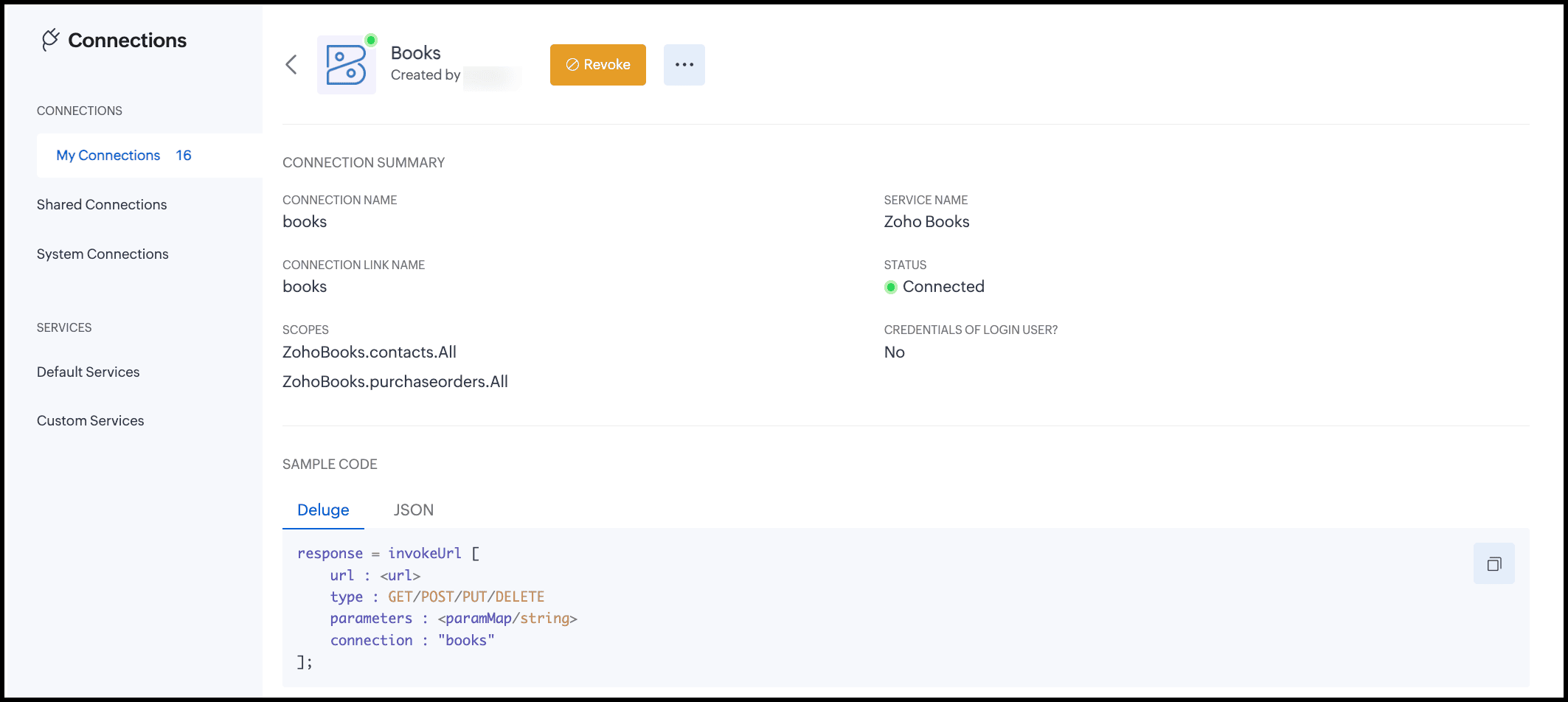
  1. Go to Setup > Developer Hub > Connections
  2. Create a connection to Books(OAuth) with the scopes ZohoBooks.contacts.All and ZohoBooks.purchaseorders.All.
2. Prerequisites

Before creating the query and automation, you must have the following ready:
  1. Zoho Books organization ID – needed for REST API calls.
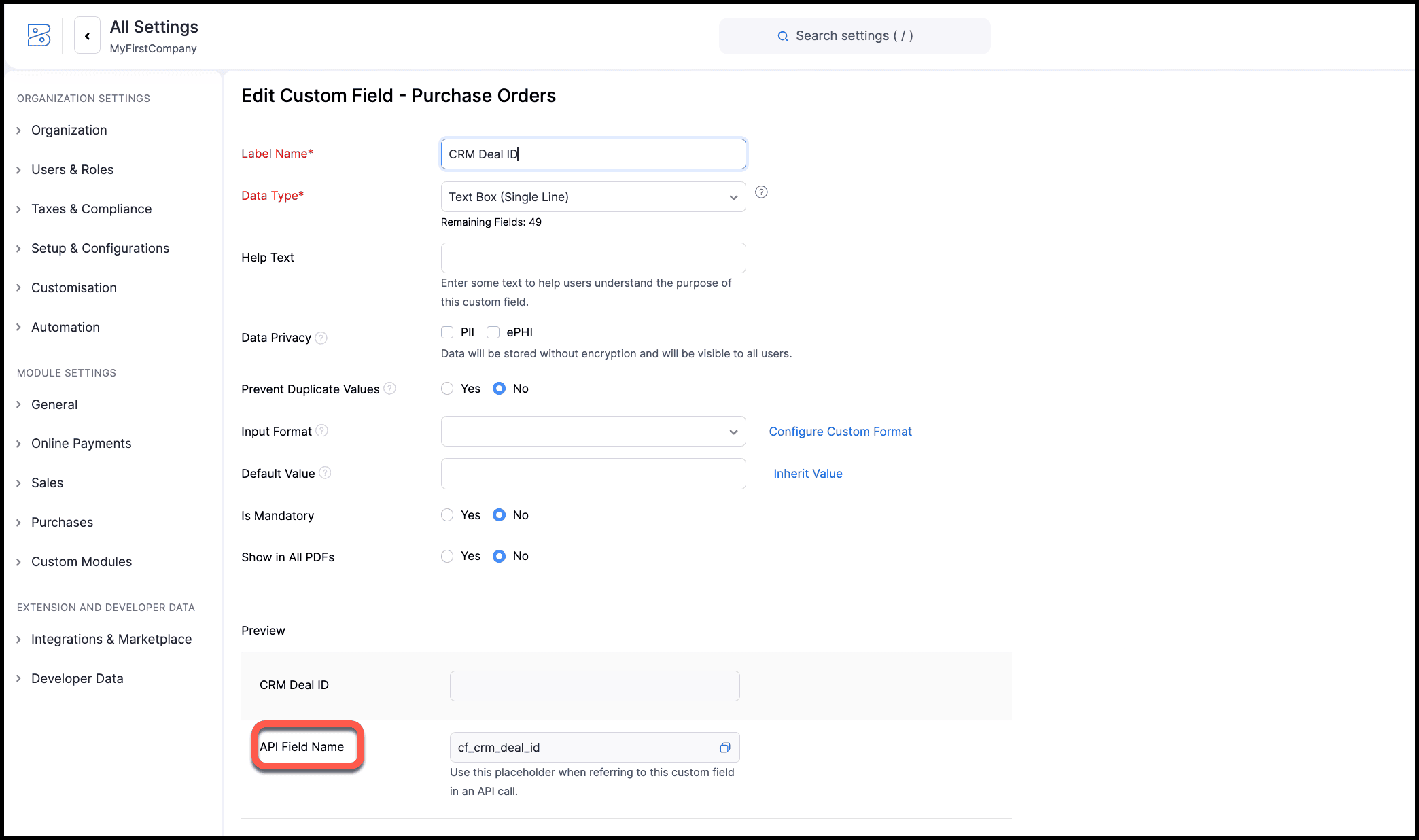
  2. Custom field in Books PO module:
    Field Name: CRM Deal ID
    Type: Single-line
    Purpose: Store the CRM deal ID that each PO relates to.
    Why do we need this custom field?
    By default, Books POs are not directly linked to CRM Deals. To bridge this gap, we create a custom single-line field(CRM Deal ID) in Books POs to store the CRM Deal’s record ID. This makes it possible to filter POs in queries(cf_crm_deal_id == {{deal_ID}}) and reliably display only the related POs in CRM.
    You can store the record ID of the deal in CRM in this field either manually or via a custom function. When you use a custom function, use the Update a Purchase Order API to update the CRM Deal ID field in Books with the record ID of the deal in CRM. You can then associate this function to a button or automation to constantly update the PO in Books every time a deal in CRM is created or updated in CRM. You can also use Zoho Flow to achieve this instead of a function.
  3. Trusted domain and source:
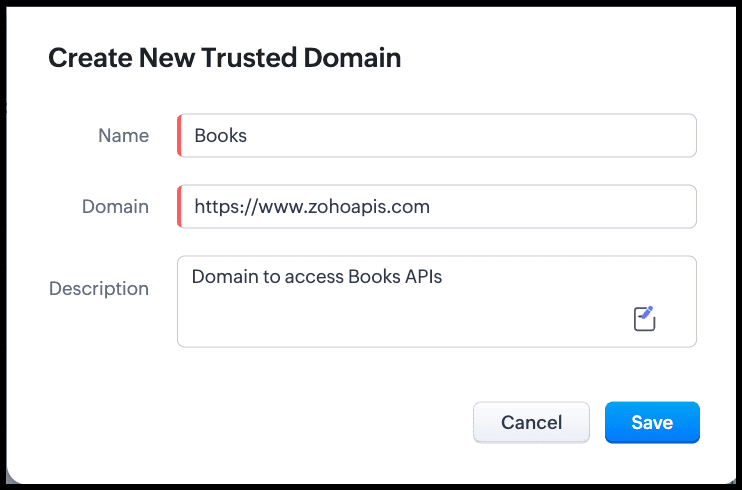
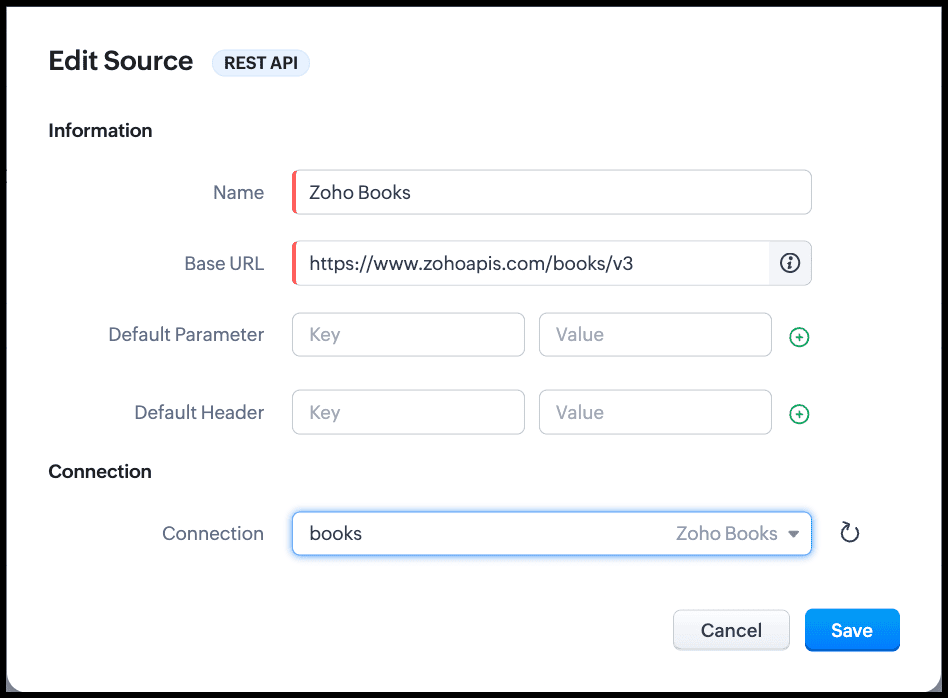
    1. Ensure you have added Books API domain to trusted domain for API calls.
    2. Add Zoho Books as the source of the query to get the PO details from Books. You can add the Books' organization ID as a parameter either here or while creating the query.
3. Single Deal, Multiple POs

Scenario

  • A CRM deal requires multiple POs from different vendors.
  • Each PO in Books stores the same Deal ID in the CRM Deal ID field.
  • This allows a related list in CRM to show all POs associated with the deal.

Why a Single-line Field Works?

  • Each PO references one deal.
  • Queries in CRM can filter using cf_crm_deal_id == {{deal_ID}}. cf_crm_deal_id is the API name of the custom field in PO of Books. You can find it under Setup > Purchases > Purchase Orders > {the custom field} > Edit.
  • Works reliably for related list display.

4. Creating a REST API Query in CRM

Since we will use Books API to get the list of POs, we will create a REST API type query.

  1. Go to Setup > Developer Hub > Queries > Create Query.
  2. Enter the details as shown in the following image:
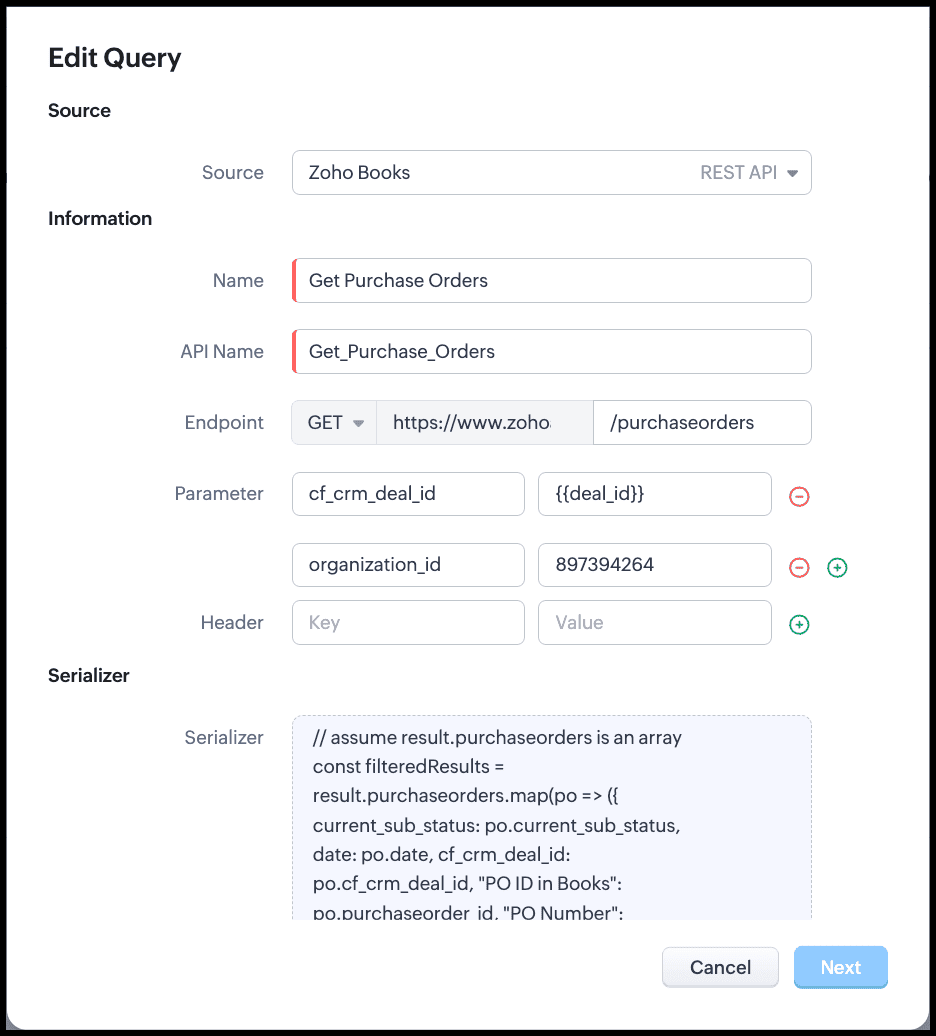
  3. Choose the Books source that you added recently.
  4. Give a name for the query.
  5. The API name will be auto-populated, and the URL will be populated from the source.
  6. Enter the endpoint to access the resource from Books. In our case, purchaseorders.
  7. To filter based on the value in the CRM Deal ID field in Books, enter the parameter as cf_crm_deal_id and its value as a variable. This variable takes the Deal's record ID as the value during run time. This ensures that the query takes the deal residing in the CRM Deal ID(which is also the record ID of the deal in CRM) field in Books and filters only those POs related to this Deal.
  8. If you have not given org_id as a parameter while creating the source, include it here.
  9. Click Next. You will get a pop-up asking for the value to the variable cf_crm_deal_id. Give a value to see the query in action.
  10. The query returns the list of POs from Books that are related to this particular deal in CRM.
  11. Save the query.

5. Serializing(to return a table for the related list)

Serializer allows you to manipulate the response of the query using Javascript.
In our example, the raw response of the query will contain the POs from Books for a deal in CRM as an array with many fields.
For example, the deal with CRM record ID 3652397000017912047 has two POs in Books viz, PO-00001 and PO-00003. The raw response before serialization is as follows.


But, to associate this response with a related list, we don't need all the fields. We can use the serializer to modify this response and use only the required fields.
The following image shows the serialized response.


Click Save and configure the Schema.
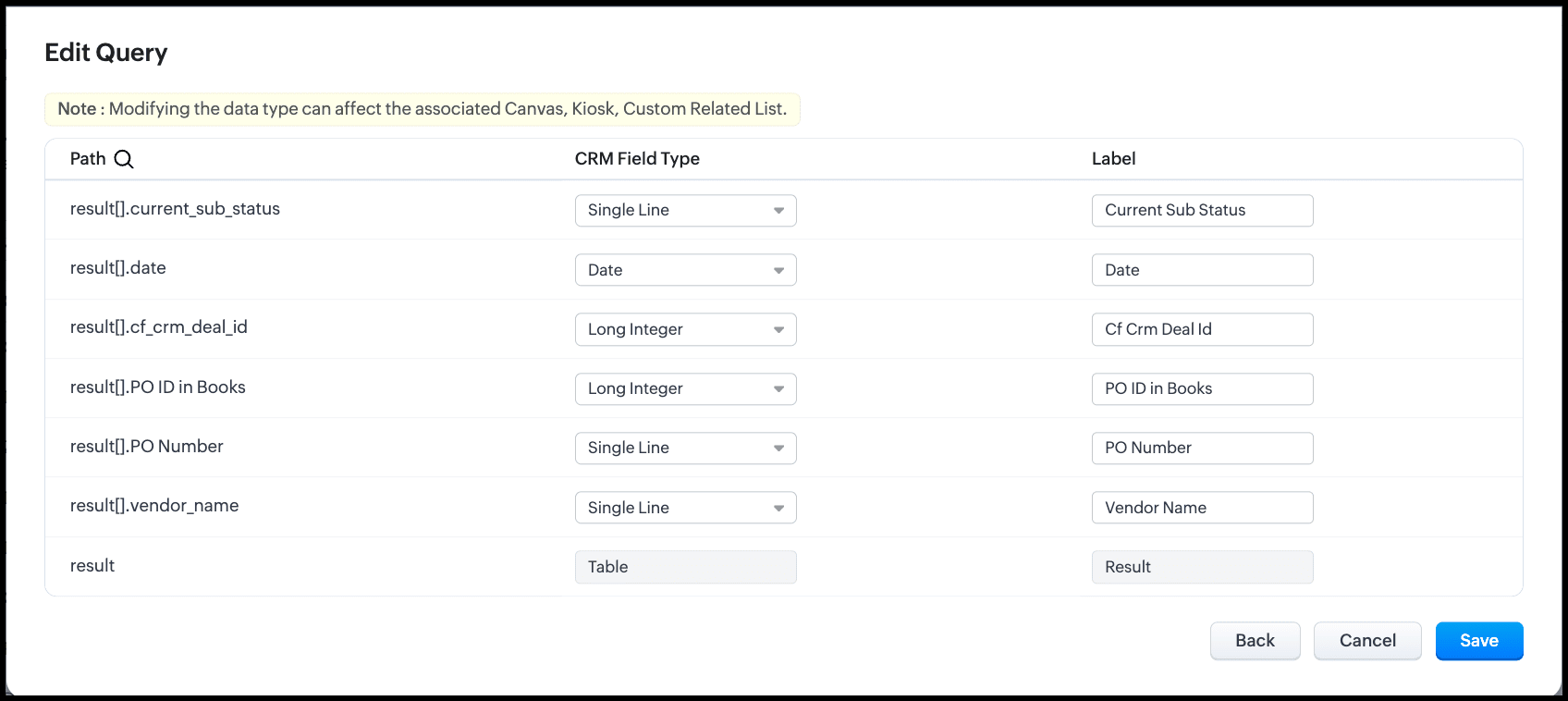

Click Save to save the query.

6. Adding the Query to a Related List

Now that we have the query ready, let's associate this with a related list in the Deals module in CRM to contextually view the POs of the Deal in Books.
  1. Navigate to the Deals module in CRM.
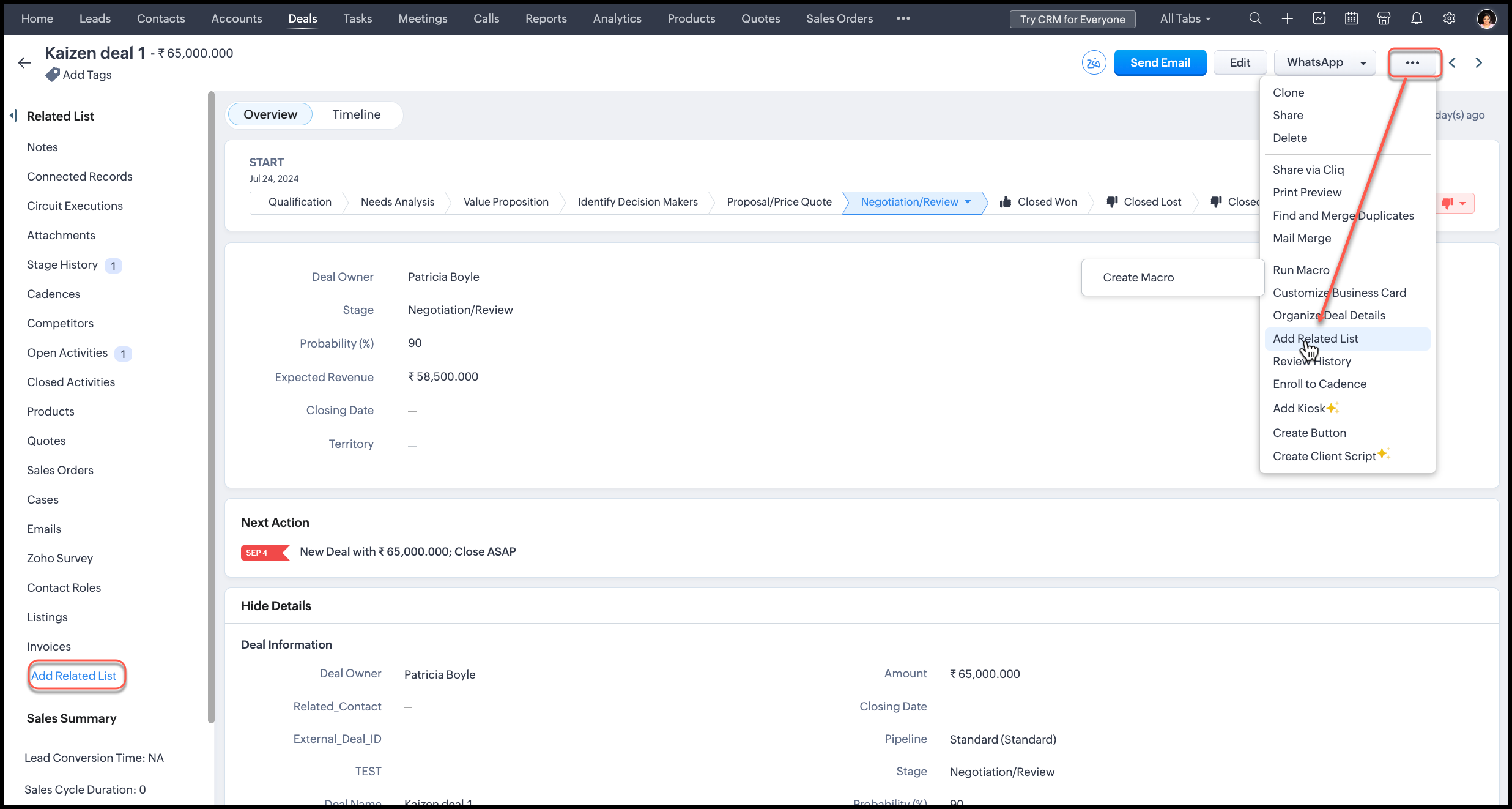
  2. Click the three-dot icon on the right corner of the record, and click Add Related List. Alternatively, you can also click the Add Related List option on the left in the Related List pane.
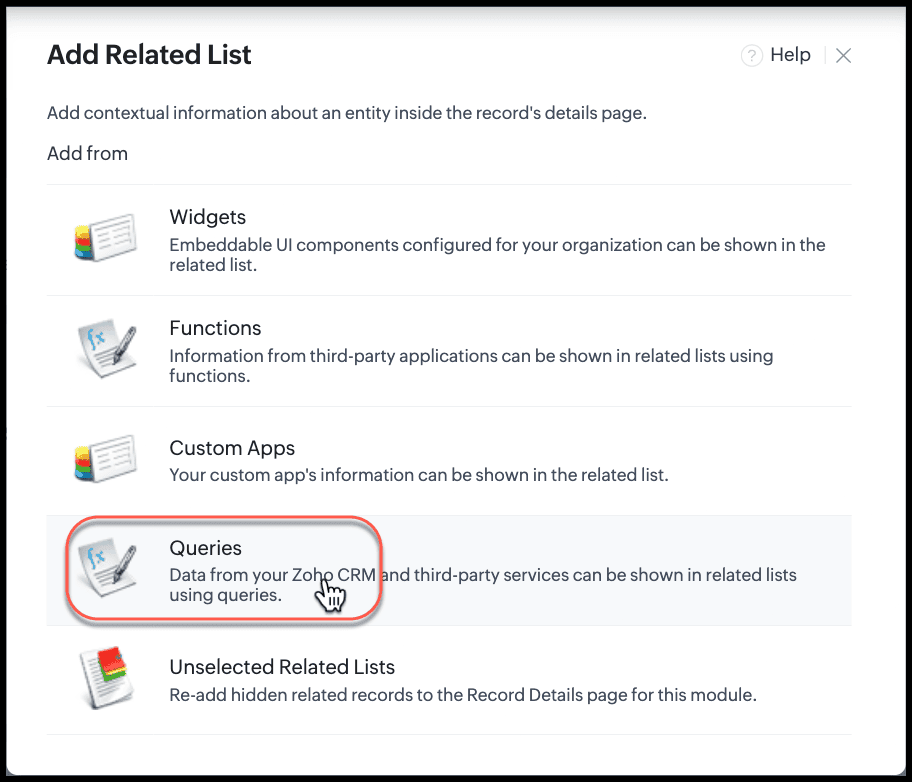
  3. From the pop-up, select Queries.

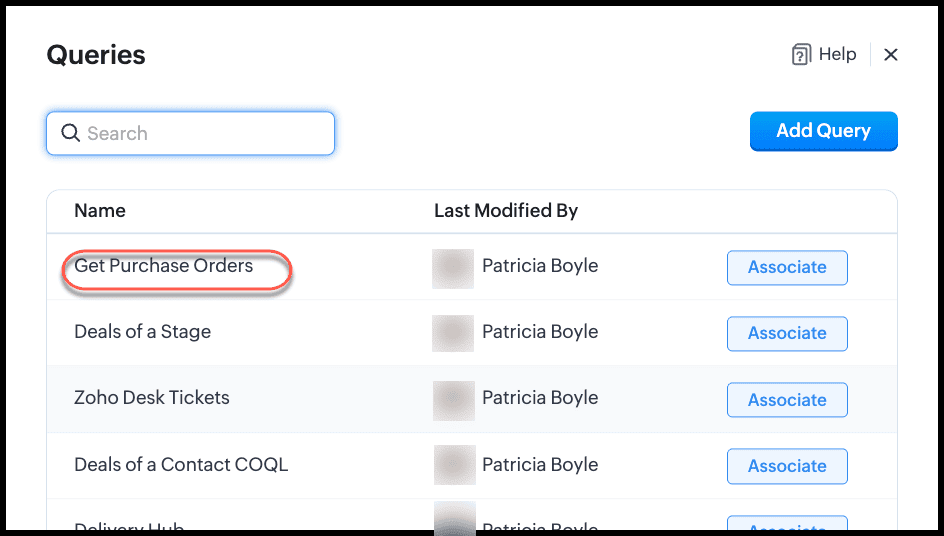
  4. From the list of available queries, select the Get Purchase Orders query you created and click Associate.
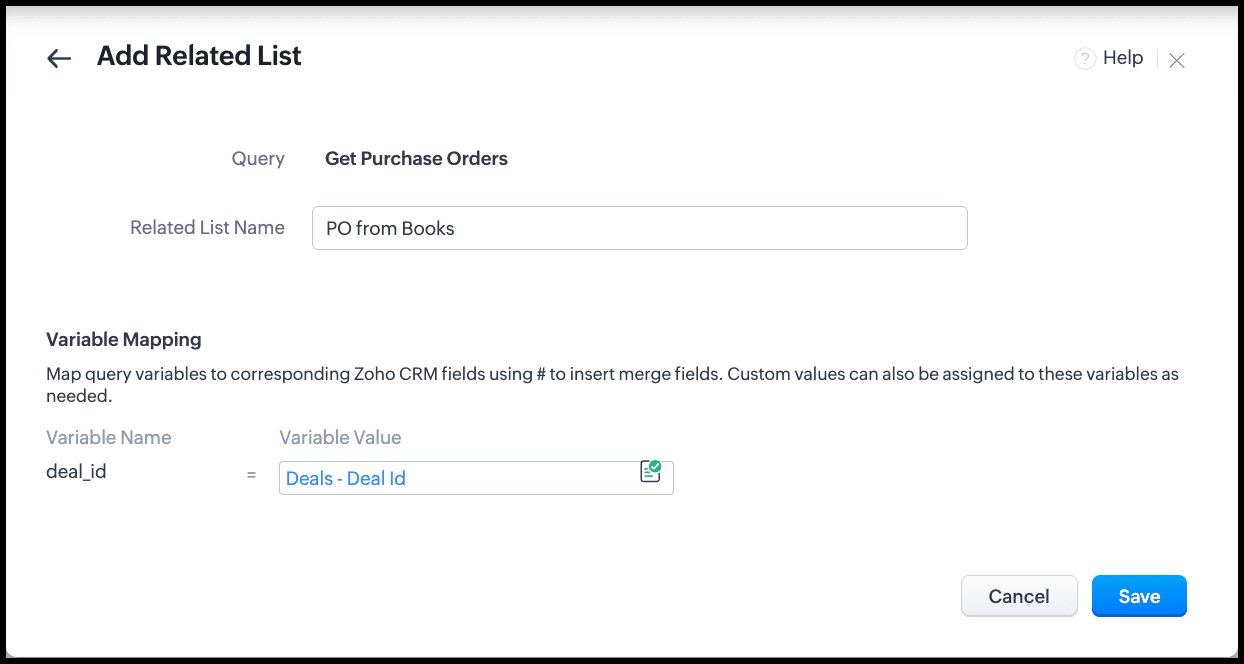
  5. Give a name for the related list.
  6. Under Variable Mapping, type #(to view merge fields) to get the list of modules available. Choose Deals and the Deal Id field. This means that the record ID of the deal will be passed as the value of the cf_crm_deal_id variable at runtime. The query will then fetch the list of POs for this Deal ID from Books, and display it in this related list.
  7. Click Save and you will see the related list under the Related Lists section of the record.
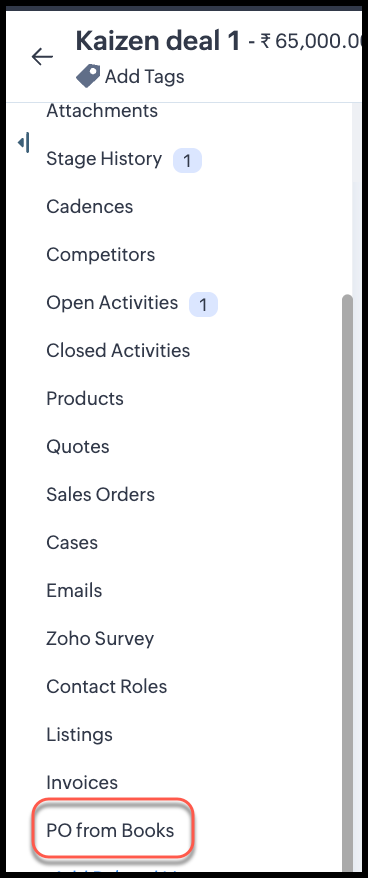
  8. Reload the page to see the query in action.

Automation Options

You can automatically update the CRM Deal ID in Books POs when a deal is created or a PO is raised.

1. Using Function

  • Function triggers on deal creation or a button click in CRM.
  • Fetches the PO in Books and updates the CRM Deal ID field using the Books connection.

2. Using Zoho Flow

  • Event: Deal created or updated in CRM.
  • Action: Update the corresponding PO(s) in Books.
  • Works without writing Deluge code.
Both methods require the Books connection and organization ID.

Summary/Best Practices

  • Single Deal, Multiple POs: Use single-line CRM Deal ID field in Books.
  • Queries and serializer: Filter POs based on cf_crm_deal_id == {{deal_ID}}.
  • Automation: Use functions or Zoho Flow for real-time updates.
  • Multi-Deal, Single PO: Not supported for related lists; use custom reporting instead.

This setup ensures that sales and finance teams can see all POs for a deal directly in CRM without manual reconciliation.


We hope this post answered your question and you found this useful.
Let us know what you think in the comments or write to us at support@zohocrm.com.


Cheers!


--------------------------------------------------------------------------------------------------------------------------


    • Sticky Posts

    • Kaizen #217 - Actions APIs : Tasks

      Welcome to another week of Kaizen! In last week's post we discussed Email Notifications APIs which act as the link between your Workflow automations and you. We have discussed how Zylker Cloud Services uses Email Notifications API in their custom dashboard.
    • Kaizen #216 - Actions APIs : Email Notifications

      Welcome to another week of Kaizen! For the last three weeks, we have been discussing Zylker's workflows. We successfully updated a dormant workflow, built a new one from the ground up and more. But our work is not finished—these automated processes are
    • Kaizen #152 - Client Script Support for the new Canvas Record Forms

      Hello everyone! Have you ever wanted to trigger actions on click of a canvas button, icon, or text mandatory forms in Create/Edit and Clone Pages? Have you ever wanted to control how elements behave on the new Canvas Record Forms? This can be achieved
    • Kaizen #142: How to Navigate to Another Page in Zoho CRM using Client Script

      Hello everyone! Welcome back to another exciting Kaizen post. In this post, let us see how you can you navigate to different Pages using Client Script. In this Kaizen post, Need to Navigate to different Pages Client Script ZDKs related to navigation A.
    • Kaizen #210 - Answering your Questions | Event Management System using ZDK CLI

      Hello Everyone, Welcome back to yet another post in the Kaizen Series! As you already may know, for the Kaizen #200 milestone, we asked for your feedback and many of you suggested topics for us to discuss. We have been writing on these topics over the
    • Recent Topics

    • Introducing recipient authentication via Stripe Identity

      Hi everyone! It's important to authenticate your recipient's identity before they access and sign important documents to ensure the highest level of compliance. Zoho Sign already helps businesses do this with various authentication methods: SMS OTP Email
    • Introducing Multi-Asset Support in Work Orders, Estimates, and Service Appointments

      We’re excited to announce a highly requested enhancement in Zoho FSM — you can now associate multiple assets with Work Orders, Estimates, and Service Appointments. This update brings more clarity, flexibility, and control to your field service operations,
    • Open a record to edit based on another form being edited

      Hi all, I am trying to edit a record based on another record being edited. It works out like this: When I create a Monthly_Update and then submit I open the Monthly_Levels form and pass the ID from the Monthly_Update to a field called mu. I want it to
    • CRM: hosting a single html file in Zoho and displaying it as a widget

      I have seen that CRM offers the option of uploading a web project to Zoho itself and displaying it as a widget in CRM. The instructions then talk about setting a development environment with Node and developing an application to upload to Zoho. But I
    • Keep Converted Leads

      How do I keep the converted leads in the Leads Module after conversion (converting it to account, contact, deal). I want to add it in a converted stage in the leads module in order to get a report or dashboard and see all converted leads from my pip
    • Customizing Global Search Settings for All Users

      Hi Our team use the brilliant global search functionality within CRM many many times daily. But, we struggle with the out-of-the box columns that CRM gives you. We are always telling users to customize this look to more suit our business, to show the
    • Zoho CRM Kiosk issues

      Firstly this is for a system on the AU servers if that makes a difference. Issues are as follows (For Kiosk): 1. Re-ordering fields in the screen builder is broken. The fields seem to be re-ordering themselves, unless you order everything by moving the
    • Presenting ABM for Zoho CRM: Expand and retain your customers with precision

      Picture this scenario: You're a growing SaaS company ready to launch a powerful business suite, and are looking to gain traction and momentum. But as a business with a tight budget, you know acquiring new customers is slow, expensive, and often delivers
    • Introducing Formula Fields for performing dynamic calculations

      Greetings, With the Formula Field, you can generate numerical calculations using provided functions and available fields, enabling you to derive dynamic data. You can utilize mathematical formulas to populate results based on the provided inputs. This
    • From Zoho CRM to Paper : Design & Print Data Directly using Canvas Print View

      Hello Everyone, We are excited to announce a new addition to your Canvas in Zoho CRM - Print View. Canvas print view helps you transform your custom CRM layouts into print-ready documents, so you can bring your digital data to the physical world with
    • Tip of the Week #77– Stay informed of the activities happening in your organization

      Whenever a message is handled in Zoho TeamInbox, every action is recorded in the Activity Log. This ensures you always know what’s happening across your teams and inboxes. To access it, simply click the Audits icon on the left pane’s top bar after logging
    • Let us add Lookup fields in the Blueprint Transitions

      We are unable to add Lookup Fields in the blueprint transitions in Zoho Desk, we wanted to make it a requirement for our workflow but since it's not available in the transition we cannot. The lookup field exists in the Layout: But it cannot be added/selected
    • Zoho Logs - Not seeing logs since 30 Nov

      Hi, we have a few functions running, I am testing some new ones and noticed that although I can see executions, I cannot see any logs, even when the first line on the functions is a log. I reviewed some existing functions, one of which is invoked on a
    • Workdrive MS Office integration

      Have installed subscribed version of Zoho WorkDrive VSTO runtime not found is the error when I try to install Zoho_WorkDrive_For_Office Unable to open work files in Excel and Word Urgent, since I have migrated all my OneDrive files to work drive already
    • How do I create an update to the Cost Price from landed costs?

      Hi fellow Zoho Inventory battlers, I am new to Zoho inventory and was completely baffled to find that the cost price of products does not update when a new purchase order is received. The cost price is just made up numbers I start with when the product
    • Checkbox Field Mapping Zoho Forms to Zoho Sign

      I have an application that will be filled out via Forms that I am mapping into a PDF Filler on Zoho Sign. I need to have a series of checkboxes mapped to the corresponding fields in Sign and I only see single checkboxes available via the mapping, though
    • How to change Zoho Vault password

      I am searching where I can change the Vault Password after having changed the Zoho account password. I don't see this option anywhere in my account. It should be simple and accessible! Please help. Thanks!
    • Zoho Workdrive - Communication / Chat Bar

      Hi Team, Please consider adding an option to allow admins to turn on or off the Zoho Communication Bar. Example of what I mean by Communication Bar: It's such a pain sometimes when I'm in WorkDrive and I want to share a link to a file with a colleague
    • Prefered Bin Missing in android APP

      Andoroid app dosent show preferred bin in the picklist. The workaround support reccomend is to use the computre to create the picklist. it shuld be information to be shown aas basic for the pciker.
    • When Marking a Multiple Choice Answer Exclusive - Not Following My Survey Disqualification Logic

      Using a multiple choice (many answers) question and I created survey disqualification logic that was working as intended. My question: Disqualification page logic is: If (QUESTION) is "any one of the following" then (OPTIONS) - a custom message populates
    • Where to Add Machines as Products to Map with Assets in Zoho FSM?

      implementing Zoho FSM for a clinical equipment supply company. The business sells and installs clinical machines in hospitals and clinics, and they also handle service requests, scheduled maintenance, calibration visits, and general machine upkeep. In
    • Changing Department often causes the Firefox tab to freeze

      Title, it doesn't seem to happen with neither Opera nor Chrome. And even in Firefox, sometimes it just lets me change the department I'm in no problem, even to All Departments which is probably the most, like, resource heavy? But most of the time, the
    • Show Zoom Link in Recipient's Calendar

      We set up meetings within a record, selecting the "Make this an online meeting".  We use Zoom. Most of the recipients go to their calendar (usually Gmail or Outlook, corporate) to join the Zoom meeting, but there is no Zoom link in the calendar. Can this
    • Creating multiple CRM leads from a Zoho Forms subform

      Hi all, We have a heavily used intake form that is used for new leads as a part of our intake. There is a subform that allows the lead to add additional team members, their titles and other basic info. That form submission creates a new Lead and the subform
    • Passing the CRM

      Hi, I am hoping someone can help. I have a zoho form that has a CRM lookup field. I was hoping to send this to my publicly to clients via a text message and the form then attaches the signed form back to the custom module. This work absolutely fine when
    • Zoho CRM for Everyone's NextGen UI Gets an Upgrade

      Hello Everyone We've made improvements to Zoho CRM for Everyone's Nextgen UI. These changes are the result of valuable feedback from you where we’ve focused on improving usability, providing wider screen space, and making navigation smoother so everything
    • Zoho Bigin - should be able to link a "contact" to multiple "companies"

      Hello Support, I called into telephone support and was told that a contact can only be linked to one company. We have situations were director are contacts of and directors of multiple companies so that seems a basic weakness in Bigin. When go to add
    • Does Thrive work with Zoho Billing (Subscriptions)?

      I would like to use Thrive with Zoho Billing Subscriptions but don't see a way to do so. Can someone point me in the right direction? Thank you
    • Using IMAP configuration for shared email inboxes

      Our customer service team utilizes shared email boxes to allow multiple people to view and handle incoming customer requests. For example, the customer sends an email to info@xxxx.com and multiple people can view it and handle the request. How can I configure
    • Radio button data won't update

      Wondering if anyone is experiencing the same problem. I tried bulk updating our data on Zoho Creator using API and noticed that the radio button field wasn't updated. I have tried updating it manually, it didn't work. When I tried updating a text field
    • Register the 'Contact Role' addition and change as a Potential edition so it can trigger Workflows

      We are trying to use "Contact Roles" in Potentials. Contact Roles are special and different than the other Related lists, so, it may have a special behavior. Something to keep in mind is that you will never have 100 Contact Roles as you can have 100 Tasks, Calls, or any other Related list. In our case we will have 2 in average and up to 4 or 5 maximum. The problem is that we need to bring information from 3 key Contact Roles to the Potential and adding a Contact to the Contacts Roles area never trigger
    • Synchronise item image between Zoho Commerce and Zoho Books/Inventory/CRM

      Here is a blindingly simple idea to tie several Zoho products together. Zoho - please include a method to synchronise the item image (or images) from one Zoho application to another. For example, if you upload an item image in Zoho Inventory, a user should
    • Using a CRM Client Script Button to create a Books Invoice

      Hello, I need help handling error messages returned to my client script from a function. The scenario I have setup a client script button which is available from each Deal. This CS executes a crm function, which in turn creates an invoice based on the
    • Accessing shared mailboxes through Trident (Windows)

      Hi, I have a created a couple of shared mailboxes. The mailboxes are showing up on the browser based Zoho workplace, but I cannot seem to figure out how to access my shared inboxes through Trident (Windows). Am I missing something or is this feature not
    • Introducing Global Sets for easy management of similar picklists in CRM

      [Update | Sep 2024] We've increased the maximum count limit for global sets. These new limits are now live for AU and JP data centers and will be gradually opened to all. Please check this link for the updated limits. Latest update (December 2025): You
    • Uploading a signed template from Sign to Creator

      Good day, Please help me on how to load a signed document back into Creator after the process has been completed in Sign. Below is the code that I am trying, pdfFile = response.toFile("SignedDocument_4901354000000372029.pdf"); info pdfFile; // Attach
    • MCP > Creator connection failing with Claude

      I'm trying to get claude to access any of my Zoho Creator apps and it keeps failing. I have enabled all tools for creator and ensured in claude settings that everything is authorised. Here is what claude says : Unfortunately, the error messages I'm receiving
    • No Ability to Rename Record Template PDFs in SendMail Task

      As highlighted previously in this post, we still have to deal with the limitation of not being able to rename a record template when sent as a PDF using the SendMail Task. This creates unnecessary complexity for what should be a simple operation, and
    • New in CPQ: Smarter suggestions for Product Configurator by Zia, and additional criteria in Price Rules

      Hello everyone! CPQ's Product Configurator in Zoho CRM allows sales teams to define structured product bundles through configuration rules, ensuring that the right product combinations are applied consistently in quotes. Admins set up these configurations
    • Feature Request: Dynamic Dimension Control for zc_LoadIn Popups

      As detailed in this community discussion, Zoho Creator's zc_LoadIn parameter is a vital tool for opening components (forms, reports, or pages) in modal dialogs via HTML snippets, Notes, or Rich Text Fields. While powerful, this feature suffers from a
    • Next Page