Kaizen 238 Fetching Employee Data from Microsoft SQL Server into Zoho CRM Using Queries

Kaizen 238 Fetching Employee Data from Microsoft SQL Server into Zoho CRM Using Queries


Hello everyone!
Welcome back to the Kaizen series!

Many organizations manage workforce data such as employee designations, contact details, salary bands, and joining dates in an HRMS backed by Microsoft SQL Server, while their sales teams work in Zoho CRM. When a deal needs an assigned pre-sales engineer or a CSM hand off, reps must leave CRM, open the HR portal, and manually look up the right person.

This post shows how to use the Queries feature in Zoho CRM to connect to a Microsoft SQL Server database, fetch employee records with a parameterized SQL query, and display them directly on a Deal Canvas without leaving CRM. We will cover source creation, SSL and Read-Only configuration, writing the query, serializing the response, and a brief overview of how the same query can be reused across Canvas, Custom Related List, and Kiosk.

Prerequisites

  1. Zoho CRM Enterprise or Ultimate edition (SQL sources require Enterprise or above)
  2. A running Microsoft SQL Server instance with a database user that has SELECT privileges on the EMPLOYEE table
  3. The SQL Server instance must be reachable from Zoho CRM either publicly or Zoho CRM IP ranges must be whitelisted in the firewall rules
  4. The SQL Server hostname must be added to Trusted Domains in Zoho CRM (Setup > Developer Hub > Trusted Domains) if using a DNS hostname
  5. Developer role or System Administrator access in Zoho CRM
  6. A custom "Employee ID" field (Single Line) on the relevant CRM module (e.g., Deals or Contacts) to store the external employee reference if passing a single employee ID as a variable. Not required if the query fetches the full list (no variable).

Use Case

Sales reps at a professional services firm need to assign internal team members (solutions engineers, CSMs) to deals, but employee contact and designation data lives only in a Microsoft SQL Server HRMS requiring a manual lookup outside CRM every time.

Solution

Connect Zoho CRM Queries to the HRMS database. A parameterized SELECT on the EMPLOYEE table filtered by {{EMP_ID}}, resolved from a custom field on the Deal record, fetches the assigned employee's profile and displays it on the Deal Canvas in real time.

Follow the steps to implement this solution.

Step 1: Whitelist Zoho CRM IPs in SQL Server Firewall

Before creating the source in Zoho CRM, ensure the SQL Server instance can accept inbound connections from Zoho CRM's servers.
  1. The SQL Server instance must be accessible over the internet on port 1433 (SQL Server default).
  2. Zoho CRM's IP ranges must be whitelisted in the firewall rules governing the SQL Server. Refer to the Zoho CRM IP Whitelist guide for the full list of IP ranges for your data center.
  3. Ensure SQL Server Browser service is running and TCP/IP is enabled in SQL Server Configuration Manager.
  4. If the SQL Server uses a DNS hostname, also add it to Setup > Developer Hub > Trusted Domains in Zoho CRM.

Step 2: Create a Dedicated Read-Only SQL Server Login

On your SQL Server instance, create a login with the minimum permissions needed.
Do not use 'sa' (SQL Server's built-in System Administrator login) or any admin account. 'System Administrator login has unrestricted access to all databases and server settings. 

Step 3: Add Microsoft SQL Server as a Database Source

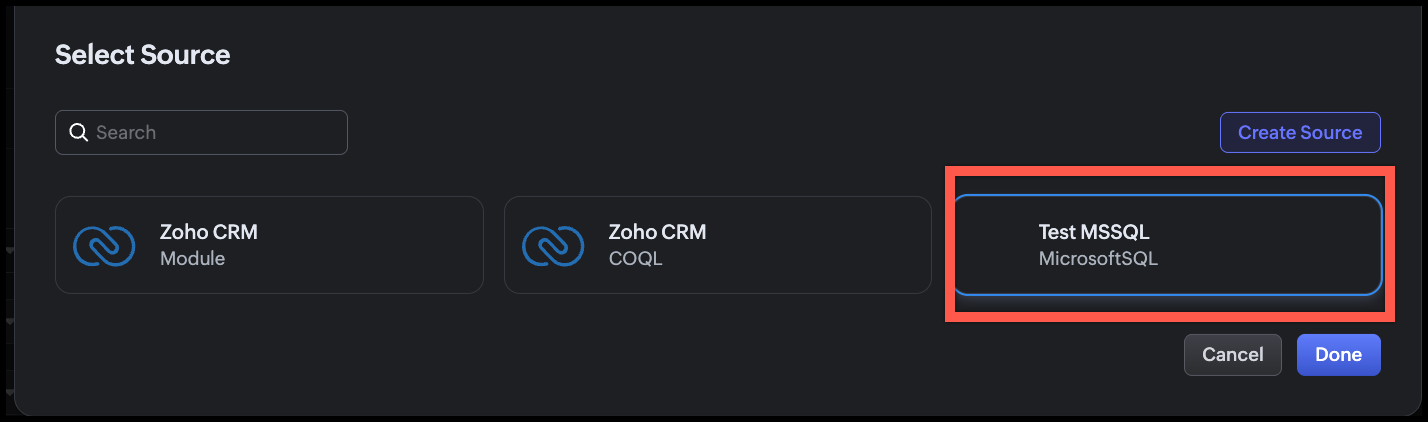
  1. In Zoho CRM, go to Setup > Developer Hub > Queries.
  2. Click the Sources tab.
  3. Click Add Source.
  4. From the list of source types, select Database.
  5. From the available database options, choose MicrosoftSQL.
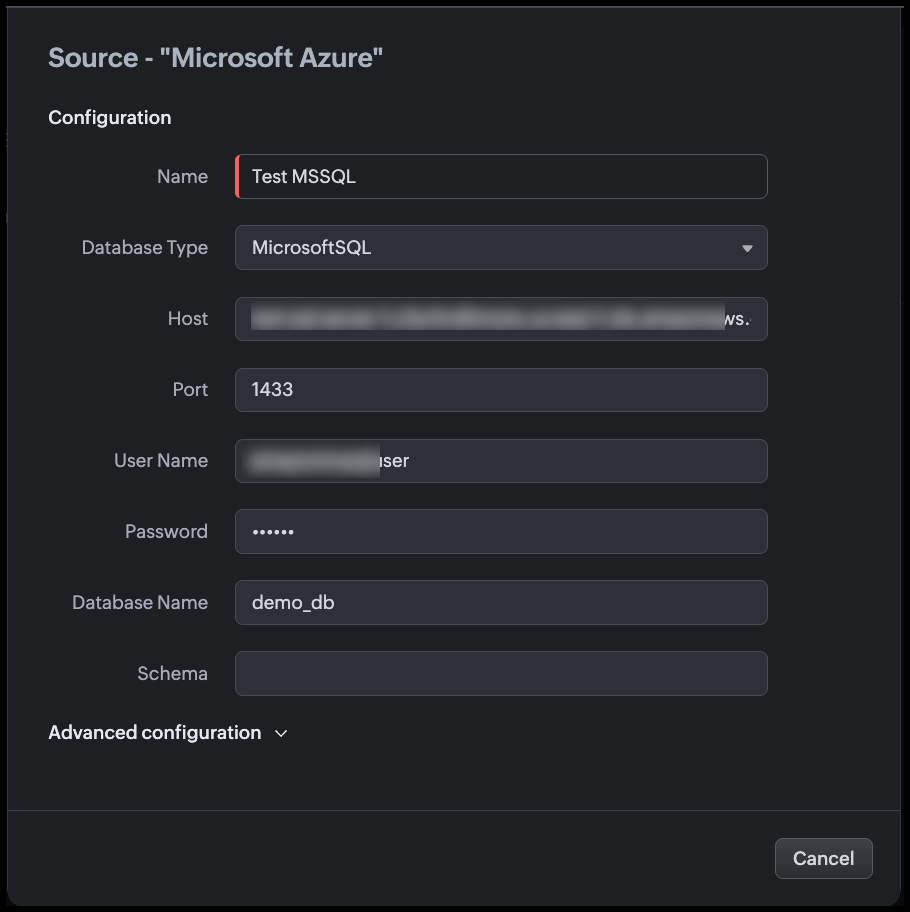
  6. Fill in the source configuration as shown in the following image.
Step 4: Configure Advanced Settings

Expand the Advanced configuration section before saving.

Use SSL

Enable the Use SSL toggle. This action,
  1. Encrypts the connection between Zoho CRM and SQL Server using TLS.
  2. When a DNS hostname is used, the system also validates the server certificate and hostname match before establishing the connection.
  3. SQL Server supports SSL/TLS natively. Ensure the SQL Server instance has a valid TLS certificate configured or that the certificate is trusted by the host.

Notes
Note
  1. The SSL setting is IMMUTABLE after the source is successfully created. If your SSL configuration needs to change, you must delete and recreate the source.
  2. If you add the hostname to Trusted Domains, the system bypasses certificate and hostname verification. Only add genuinely trusted hosts.
Read Only
Enable the Read Only toggle. This action,
  1. Restricts this source to only SELECT operations at the Zoho CRM level.
  2. Blocks INSERT, UPDATE, and DELETE queries even if the zoho_crm_reader SQL login is later granted write permissions at the database level.
Since this source is used purely to display employee information in CRM views, you must enable Read-Only.
You can change this setting after the source is created, unlike SSL.

Time Zone
Set Time Zone to match the time zone of your SQL Server instance (e.g., UTC, or the server's local time zone).
The DATE_OF_JOIN and MODIFIED_ON columns are stored as DATETIME in SQL Server (without time zone information). Setting the correct source time zone allows Zoho CRM to convert these values to each viewing user's local time zone for accurate display.
Example: If the server stores MODIFIED_ON = 2026-04-15T18:30:00 in IST, a user in UTC will see 2026-04-15 13:00.

Connection Timeout
Set Connection timeout to 10 seconds. This action defines how long Zoho CRM waits for the SQL Server to accept the connection before giving up.
10 seconds accommodates typical network latency while preventing the CRM UI from hanging indefinitely during server downtime or network issues.


Click Validate and Save.
Zoho CRM tests the connection. On success, the source is saved and available for queries.

Step 5: Create the Query

  1. Go to Setup > Developer Hub > Queries.
  2. Click Create Query.
  3. In the dialog box enter the name of the query.
  4. Click Next.
  5. Under Configuration, click Change and select the source we added.
  6. Click Done.

Step 6: Write the SQL Query

In the query editor, enter the following query.
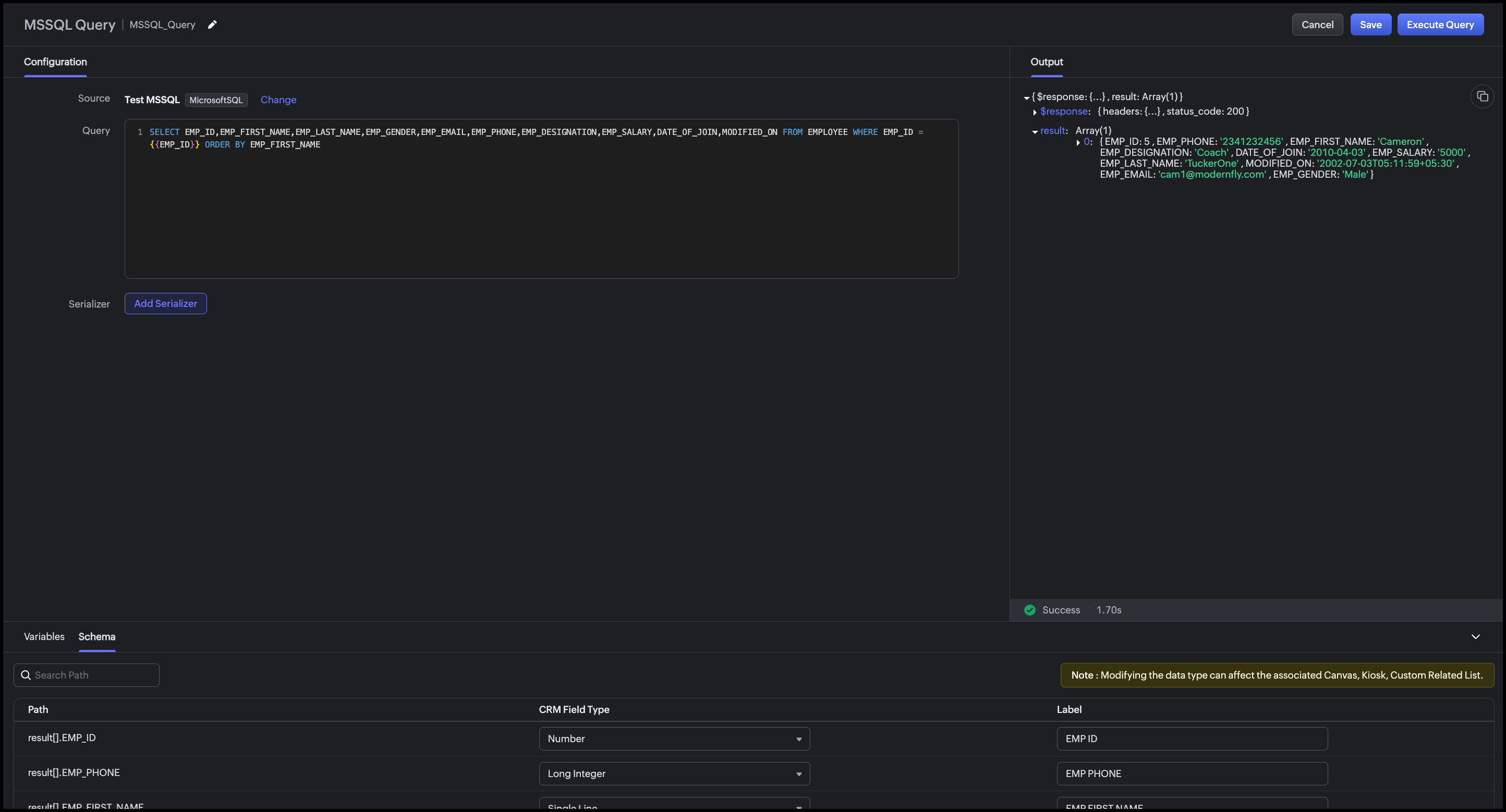
SELECT EMP_ID,EMP_FIRST_NAME,EMP_LAST_NAME,EMP_GENDER,EMP_EMAIL,EMP_PHONE,EMP_DESIGNATION,EMP_SALARY,DATE_OF_JOIN,MODIFIED_ON FROM EMPLOYEE WHERE EMP_ID = {{EMP_ID}} ORDER BY EMP_FIRST_NAME

Zoho CRM automatically detects {{EMP_ID}} as a query variable. At runtime, the value of the "Employee ID" custom field on the Deal record is passed to this variable.

Step 7: Execute and Validate the Query

  1. Click Execute Query.
  2. Enter a valid employee ID from your SQL Server database.
  3. Click Next.
  4. Review the raw response.
  5. Review the Schema panel and verify CRM Field Type mapping.
Step 8: Add a Serializer

The serializer combines the first and last name, formats dates, and computes the employee's tenure.
  1. Click Add Serializer.
  2. Enter the following JavaScript.
    return result.map(record => {
    // Compute tenure in years from DATE_OF_JOIN
    const joinDate = new Date(record.DATE_OF_JOIN);
    const today = new Date();
    const tenureYears = Math.floor(
    (today - joinDate) / (1000 * 60 * 60 * 24 * 365)
    );

    return {
    emp_id: record.EMP_ID,
    full_name: record.EMP_FIRST_NAME + " " + record.EMP_LAST_NAME,
    gender: record.EMP_GENDER,
    email: record.EMP_EMAIL,
    phone: record.EMP_PHONE,
    designation: record.EMP_DESIGNATION,
    date_of_join: record.DATE_OF_JOIN
    ? String(record.DATE_OF_JOIN).split("T")[0]
    : "N/A",
    tenure: tenureYears + (tenureYears === 1 ? " year" : " years"),
    last_modified: record.MODIFIED_ON
    ? String(record.MODIFIED_ON).split("T")[0] + " " + String(record.MODIFIED_ON).split("T")[1].slice(0, 5)
    : "N/A"
    };
    });

This serializer:
  1. Combines EMP_FIRST_NAME and EMP_LAST_NAME into a single full_name field
  2. Computes tenure in years from DATE_OF_JOIN to today, a derived field not stored in the database
  3. Formats date_of_join as YYYY-MM-DD (strips the time component)
  4. Formats last_modified as YYYY-MM-DD HH:MM.
Click Execute Query again to preview the serialized output.


Click Save to save the query.

Conclusion

The Queries feature in Zoho CRM makes it straightforward to surface employee records from an external Microsoft SQL Server HRMS directly within CRM without any middleware, scheduled sync, or manual copy-paste. The advanced configuration options (SSL, Read-Only, Time Zone, Connection Timeout) ensure the connection is secure, non-destructive, and accurate across time zones.

With a single parameterized query and a lightweight serializer, sales reps can see the full profile of an assigned employee such as designation, contact info, tenure etc., right on the Deal Canvas when they need it most. The same query can be reused across multiple CRM UI components for different team workflows.

This approach is best suited when:

  1. The employee data is authoritative in an external HRMS and should not be duplicated into CRM fields.
  2. Real-time accuracy matters (recently onboarded or transferred employees are immediately visible).
  3. The organization wants to avoid building and maintaining a custom sync integration.

Associating the query with CRM's UI components

You can associate a query with multiple UI components such as Canvas, Kiosk, Custom Related Lists based on the workflow.

Canvas List View

Associate the query with the Canvas List View of the Deals (or Contacts) module.
Map {{EMP_ID}} to the "Employee ID" custom field on the record. When a sales rep opens a Deal, the assigned employee's full profile, including name, designation, phone, email, tenure etc., appears as an "Assigned Employee" panel on the canvas. Refer to our Kaizen post for associating a query with Canvas List View.

Kiosk

Associate the query with a Kiosk Decision component to build an internal lookup screen, say a self-service screen, where a sales rep types an Employee ID, and the Kiosk fetches and displays that employee's profile from the HRMS. The Decision component evaluates the query response (e.g., checking if EMP_DESIGNATION matches a required role) and branches the Kiosk flow accordingly.
Map {{EMP_ID}} to a Kiosk input variable collected in a preceding Screen component.
For more details, refer to our Kaizen post on Handling Query variables in Zoho CRM and associating it in Kiosk.

Custom Related List

Use a modified version of the query (filtered by ACCOUNT_ID instead of EMP_ID) to display a related list of all employees assigned to a given account on the Account record. This is useful when multiple internal team members like solutions engineers, CSMs, support contacts, are mapped to an account in the HRMS.
Map {{ACCOUNT_ID}} to the Account record's identifier during association, and the related list will show all employees assigned to that account, updated automatically as the HRMS changes.
For step-by-step instructions on associating a query with a Custom Related List, refer to this Kaizen post.

We hope you found this post useful.
Writer to us at support@zohocrm.com or let us know your thoughts in the comments.

Cheers!

=================================================================================


    • Sticky Posts

    • Kaizen #198: Using Client Script for Custom Validation in Blueprint

      Nearing 200th Kaizen Post – 1 More to the Big Two-Oh-Oh! Do you have any questions, suggestions, or topics you would like us to cover in future posts? Your insights and suggestions help us shape future content and make this series better for everyone.
    • Kaizen #226: Using ZRC in Client Script

      Hello everyone! Welcome to another week of Kaizen. In today's post, lets see what is ZRC (Zoho Request Client) and how we can use ZRC methods in Client Script to get inputs from a Salesperson and update the Lead status with a single button click. In this
    • Kaizen #222 - Client Script Support for Notes Related List

      Hello everyone! Welcome to another week of Kaizen. The final Kaizen post of the year 2025 is here! With the new Client Script support for the Notes Related List, you can validate, enrich, and manage notes across modules. In this post, we’ll explore how
    • Kaizen #217 - Actions APIs : Tasks

      Welcome to another week of Kaizen! In last week's post we discussed Email Notifications APIs which act as the link between your Workflow automations and you. We have discussed how Zylker Cloud Services uses Email Notifications API in their custom dashboard.
    • Kaizen #216 - Actions APIs : Email Notifications

      Welcome to another week of Kaizen! For the last three weeks, we have been discussing Zylker's workflows. We successfully updated a dormant workflow, built a new one from the ground up and more. But our work is not finished—these automated processes are
    • Recent Topics

    • How has Zoho still not resolved Daylight Savings Time?

      According to these forums Zoho has been working on DST for 12 years. Totally unacceptable. Am I missing something? Why are other customers who observe DST not screaming for this to be fixed? Are there reasonable workarounds? This is a must-have for us. 
    • ZOHO Desk attachments support

      Hi I just setup MCP with claude, it works well, but it can't read attachments... which makes it kind of useless... Will you be adding attachment capabilities anytime soon?
    • Very limited support for MCP

      Has anyone else noticed how limited the MCP support for Zoho People currently is? Right now only a small set of read-only actions (exactly 15) seem to be available. At the same time Zoho CRM supports over 700+ functions. It makes it almost impossible
    • How to Generate Separate Labels for Each Invoice SKU Line Item in Zoho Books?

      Hi everyone, I’m trying to implement a requirement in Zoho Books where separate labels need to be generated for each SKU/item from an invoice. Scenario: One invoice can contain multiple products/SKU items Each item/box should have its own separate label
    • HTML PDF Templates / Build From Scratch option not visible for Custom Modules

      Hi everyone, I am working with Zoho Books Custom Modules and trying to create a custom 4x4 package label PDF template using HTML/CSS. According to the official Zoho Books documentation for HTML PDF Templates, there should be an option like: Settings →
    • Updating Sales orders on hold

      Surely updating irrelevant fields such as shipping date should be allowed when sales orders are awaiting back orders? Maybe the PO is going to be late arriving so we have to change the shipment date of the Sales order ! Not even allowed through the api - {"code":36014,"message":"Sales orders that have been shipped or on hold cannot be updated."}
    • Direct Integration Between Zoho Cliq Meetings and Google Calendar

      Dear Zoho Team, We’d like to submit the following feature request based on our current use case and the challenges we’re facing: 🎯 Feature Request: Enable meetings scheduled in Zoho Cliq to be automatically added to the host's Google Calendar, not just
    • billable_expense_id in Invoice API does not set invoiced=true on bill line items — causes duplicates in Projects > Create Invoice

      Hi Zoho Community, We are running an automated batch invoicing system using the Zoho Books API and have hit two critical bugs that are causing duplicate invoice risk in production. Raising this here for visibility alongside a support ticket already filed.
    • New fields : radio button

      Hi, when customizing a module (eg: Candidates), we are able to select different types of fields (check box, currency, list, ...). However there is no "radio-button" component. This type of fields is often used in Web pages and will be certainly a plus-value
    • Huge confusion in zoho crm and zoho analytics

      Context => We have reporting based hierarchy in zoho crm and basically there will be one sales head and couple sales managers and 10 pre sales excutives divided between 2 sales managers we have maintained that in zoho crm and there is complex reporting
    • Huge confusion in zoho crm and zoho analytics

      Context => We have reporting based hierarchy in zoho crm and basically there will be one sales head and couple sales managers and 10 pre sales excutives divided between 2 sales managers we have maintained that in zoho crm and there is complex reporting
    • Import KB template OR Export template for zoho desk?

      Greetings. Can you tell me if there is a way to get an EXPORT of my KB articles? OR is there a template you supply for importing KB articles into my zoho desk? I am looking for a method of understanding what fields can be imported, and what their possible
    • Choice Availability Reset

      If an entry is deleted which included a response to a field with choice availability enabled does that increase the number of remaining times the choice can be selected?
    • Rich Text Type Format for Notes Field

      Has it been discussed or is there a way to insert a table in the notes field? We sometimes receive information in a table format, and it would be beneficial to have it in the same format as a note on a record.
    • [Bug] WebAuthn passkey registration blocked on rpIds with TLDs longer than 6 characters (.accountant, .technology, etc.) — isValidDomain regex too strict

      Hi, Filing on behalf of an enterprise customer where Zoho Vault is deployed across the company. The Chrome extension blocks WebAuthn passkey registration on legitimate sites whose Relying Party ID (rpId) has a TLD longer than 6 letters. This affects every
    • [Heads Up] Upcoming update to field values in Zoho Books - Zoho Analytics integration

      Hello Users, We'd like to inform you of an upcoming update to the Account Type field values in the Zoho Books integration for Zoho Analytics from June 1, 2026. What's Changing? The following values under the Account Type field are being renamed to align
    • Important update: Migrate to the new SalesIQ live chat widget before May 15, 2026

      The old SalesIQ live chat widget will be deprecated on May 15, 2026. This is a final reminder to migrate to the new SalesIQ live chat widget before this date. After May 15, 2026, the old widget will no longer be maintained, which can lead to slower performance
    • Zia Agent built in ChatKit UI does not render markdown

      Hi, You have a major shortcoming in the Zia Agent UI. The test UI that is embedded in agents.zoho.com allows you to test the agent has full support for rendering markdown, but your ChatKit UI does not have support for rendering markdown. If I embed it
    • Team folder not created when creating project using zoho flow

      When I try to automate project creation using zoho flow, and I have enabled workdrive integration to automatically create team folders to attach to the project, this only works when I create a new project through the UI. But I am trying to automate project
    • Zoho Projects - Email notification relabelling of modules not present on default templates

      Hi Projects Team, I noticed that in the default email template notification, the word "bug" was not renamed to the lable I am using in my system. As many users may used the Bugs modules for various purposes including Changes, Revisions, Issues, etc...
    • GLM 5 not available

      Hello, I am trying to setup a Zia Agent using agents.zoho.com. The settings says that GLM5 is among the list of free zoho hosted models available. However, when I try to setup an agent and pick a model from the list only GLM 4.7 Flash is available. How
    • Set Custom Icon for Custom Modules in new Zoho CRM UI

    • Can not send or reply to mails

      Hello, I can not send mails or reply. If I try to send a mail i get "Unable to send message;Reason:553 Replaying disallowed. Invalid Domain - invata-programare.ro" Can you help me, please? Thank you!
    • Kaizen #241: Automating Deal risk escalation using Workflow APIs, Connected Workflows, and Functions

      Hello everyone! Welcome to another Kaizen week. In many organizations, sales teams work in Zoho CRM, finance teams manage invoices in Zoho Books, and support teams handle customer issues in Zoho Desk. Now consider this scenario: A sales representative
    • Upload own Background Image and set Camera to 16:9

      Hi, in all known online meeting tools, I can set up a background image reflecting our corporate design. This doesn't work in Cliq. Additionally, Cliq detects our cameras as 4:3, showing black bars on the right and left sides during the meeting. Where
    • Allow Super Admins to Edit Task “Created By” and Issue “Reporter” Fields

      Hello Zoho Projects Team, We hope you are doing well. We would like to submit a feature request regarding the ability to manage and correct system ownership fields in Zoho Projects, specifically: Task → Created By Issue → Reporter / Reported By Current
    • The Social Wall: April 2026

      Hello everyone, This month, we’re excited to bring you a set of new updates for Threads in Zoho Social, designed to make publishing, monitoring, and managing your content much easier Threads updates You’ll now see a few useful improvements in the compose
    • Sort or filter CRM report by count value

      Hi there, I'm trying to create a report that will show me high frequency bookings (leads) coming through within a time period for any particular account - this is so we can proactively reach out to these accounts. I have a report that shows the information
    • Error when changing user permission from read only to user.

      Hi there, Ive tried to change one of my users to be able to edit, however i kept getting the error user license exceed.
    • Marketing Tip #30: Promote your brand differently on each social platform

      Not all social platforms work the same way. Posting the same content in the same way across every channel can limit your reach. Each platform has its own discovery system, and understanding what it prioritizes can dramatically improve how your brand is
    • Whatsapp Limitation Questions

      Good day, I would like to find out about the functionality or possibility of all the below points within the Zoho/WhatsApp integration. Will WhatsApp buttons ever be possible in the future? Will WhatsApp Re-directs to different users be possible based
    • **Building Role-Appropriate Accountability Layers in Zoho Projects - Looking for Real-World Experience**

      We're a small ISP/telecom operator on Zoho One and I'm trying to solve what I think is a common organizational problem. Would love to hear from others who've tackled it. **The Core Problem** Staff will only consistently use a project management system
    • Duplicate entries for contacts birthdays

      Good morning I have recently started to use my Zoho calendar and noticed that there are multiple birthday events showing for some of my contacts. I have checked my contacts and there were duplicates for some contacts which I have now rectified but the
    • Using IMAP configuration for shared email inboxes

      Our customer service team utilizes shared email boxes to allow multiple people to view and handle incoming customer requests. For example, the customer sends an email to info@xxxx.com and multiple people can view it and handle the request. How can I configure
    • What's New in Zoho Billing | March 2026

      March is here with a fresh wave of updates to Zoho Billing. From making compliance easier, reporting more flexible, to making day-to-day workflows smoother across the board. Here's everything that's new this month. Introducing Usage-Based Billing Reports
    • Subforms in Creator-Lookup Price

      I've got a modular called Price List with items and prices. Ive got another module called Estimates with a subform that looks up that Price List. I am trying to get the "Price" to auto-enter based on the Lookup field of the item name. Anyone know how
    • Feature request - pin or flag note

      Hi, It would be great if you could either pin or flag one or more notes so that they remain visible when there are a bunch of notes and some get hidden in the list. Sometimes you are looking for a particular name that gets lost in a bunch of less important
    • Tip #20 - Three things you probably didn't know you can do with picklists

      Hello Zoho Sheet users! We’re back with another quick tip to help you make your spreadsheets smarter. Picklists are a great tool to maintain consistency in your spreadsheet. Manually entering data is time-consuming and often leaves typos and irregular
    • Map Dependency Upgrades in Zoho CRM

      Map Dependency Fields enhancements are available in CA, SA, JP, CN, UAE, AU and EU DCs. Latest update: Also available in IN and US DCs. Hello everyone, We’ve introduced a set of enhancements to Map Dependency Fields to make setup simpler, faster, and
    • CRM to FSM Setup

      Good Afternoon, I am trying to connect CMS to FSM. My current field mapping is: Companies ↔ Accounts Contacts ↔ Contacts Service And Parts ↔ Products I'm setting this up for an elevator service company. The idea is that: Accounts represent Companies.
    • Next Page