Kaizen #262 - Using Zoho CRM Skill to build Queries

Hello everyone!
Welcome back to another edition of the Kaizen series, where we uncover powerful ways to extend and customize Zoho CRM.
In the previous Kaizens, we explored how the zoho-crm skill can help developers work with Zoho CRM APIs, Client Scripts and COQL.
In this Kaizen, let's take this further and see how the skill can help us build Zoho CRM Queries using natural language.
Queries provide a flexible way to retrieve data from Zoho CRM and transform the response before using it in CRM features such as Canvas, Kiosk, and other custom UI components. A Query can use a CRM module, COQL, or other supported sources, and its response can also be modified using a serializer.
In this Kaizen, we will cover:
- About Zoho CRM Skill
- How the Skill Helps with Queries
- Business Scenario
- Requirement 1 - Retrieving CRM Data Using Queries
- Requirement 2 -Transforming Query Responses with Serializers
- Requirement 3 -Calculating Derived Values with Query Serializers
- Summary
- Related Links
1. About Zoho CRM Skill
The zoho-crm skill acts as an orchestration layer across different Zoho CRM developer capabilities, including REST APIs, Deluge Functions, Client Scripts, Widgets, COQL, Queries, and Connections.
The skill follows a five-step approach:
- Understand the requirement.
- Identify the appropriate CRM capability.
- Load the relevant references.
- Generate the solution.
For Queries, you can describe the data you need in natural language, and the skill can help determine the appropriate Query configuration, source, fields, criteria, sorting, and serializer logic.
For example, instead of manually determining how to configure a Query, you can provide a requirement such as:
"Fetch all upcoming events that are currently open for registration and sort them by event date."
The skill can then help build the corresponding Query.
Refer to Kaizen#258 : Getting Started with zoho-crm SKILL.md for more details.
2. How the Skill Helps with Queries
The zoho-crm skill simplifies Query development by helping you translate a natural-language requirement into the appropriate Query configuration. It can help with:
- Identifying the Query source - such as Module, COQL, or other supported data sources.
- Building the Query - defining the fields, criteria, sorting, and other required configurations.
- Configuring variables - identifying values that need to be passed dynamically to the Query.
- Defining the schema - structuring the Query response based on the required output.
- Creating serializers - transforming the Query response and performing calculations or deriving additional values.
- Following Zoho CRM Query guidelines - using the relevant Query and CRM references while generating the solution.
- Validating the implementation - helping identify missing fields, incorrect configurations, and potential edge cases.
- Associating Queries - help you understand how a Query should be associated with the appropriate CRM component based on the requirement.
This allows developers to focus on describing what data they need and how it should be processed, while the skill helps determine how to implement the Query.
The user needs to:
Verify the CRM setup → Create/configure the Query → Associate it with the required component → Test and validate the result

3. Business Scenario

Zylker Events, an event management company that conducts workshops, conferences, and training programs, uses a custom module called Programs to manage its events.
The event management team wants to use Queries to display useful event information in CRM. Let's consider three requirements using the same Programs module, with each requirement introducing an additional level of Query configuration and complexity.
4. Retrieving CRM Data Using Queries
Let's start with a straightforward requirement.
Requirement 1
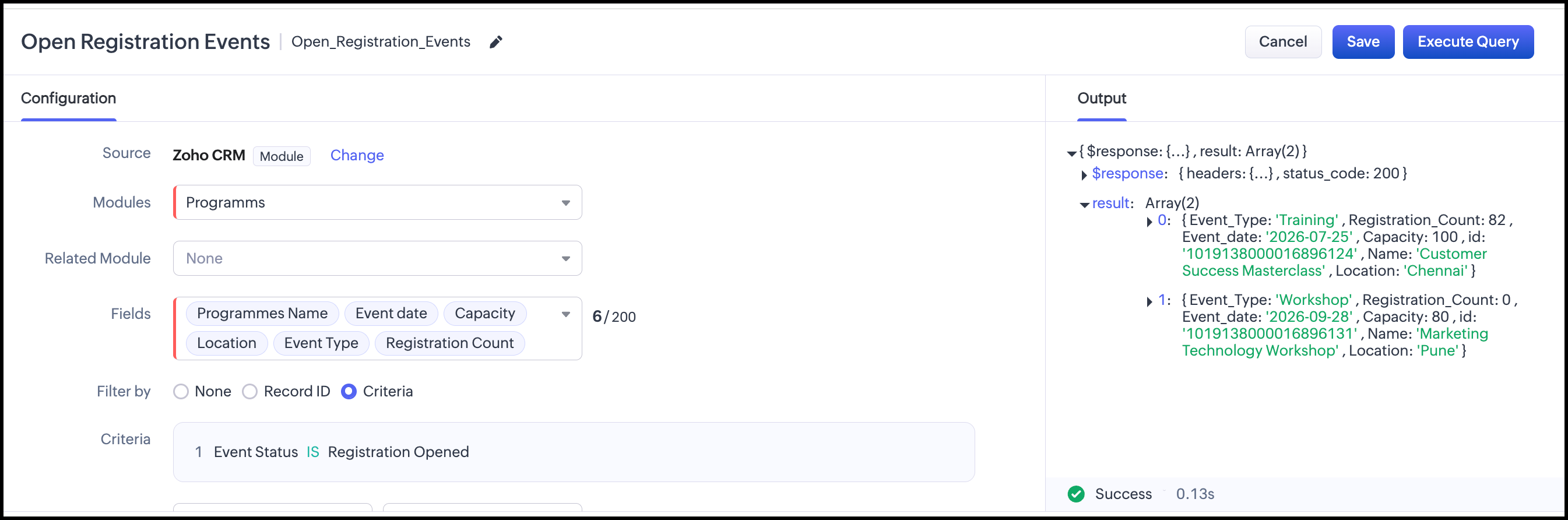
The event manager wants to see all upcoming events for which registration is currently open in a Kiosk.
The results should contain:
- Program Name
- Event Type
- Event Date
- Location
- Capacity
- Registration Count
The events should be displayed in ascending order of the Event Date.


Prompt
/zoho-crm
Create a Zoho CRM Query for the Programs custom module. Fetch events where Event Status is "Registration Opened".Return the following fields: Program Name, Event Type, Event Date, Location, Capacity, and Registration Count. Sort the results by Event Date in ascending order and associate with Kiosk.

The API names may differ, so we need to verify them against our API names as this is a custom module.
What did the skill do?
- Read the Query documentation: Reviewed Query sources, configuration, and Kiosk association guidance.
- Analyzed the requirement:
- Fetch Programs with Event Status = Registration Open.
- Sort by Event Date ascending.
- Retrieve the required programme and event fields.
- Use the Query in a Kiosk.
- Selected the Query source: Chose the Module source since the requirement involves retrieving and filtering records from a single CRM module.
- Configured the Query: Mapped the requirement to the module, criteria, sort order, and required fields.
- Considered Kiosk association: Identified that the Query should be associated with a Kiosk screen to display multiple Program records.
- Verified assumptions: Noted that the API names should be verified against the actual CRM setup before implementation.
5. Transforming Query Responses Using a Serializer
Now let's make the requirement slightly more useful.
Requirement 2
The event manager wants to know:
- How many seats are remaining?
- What percentage of the capacity has already been filled?
- Is the event nearly full?
Instead of storing these values as additional fields in CRM, we can calculate them when the Query executes.
Prompt
/zoho-crm
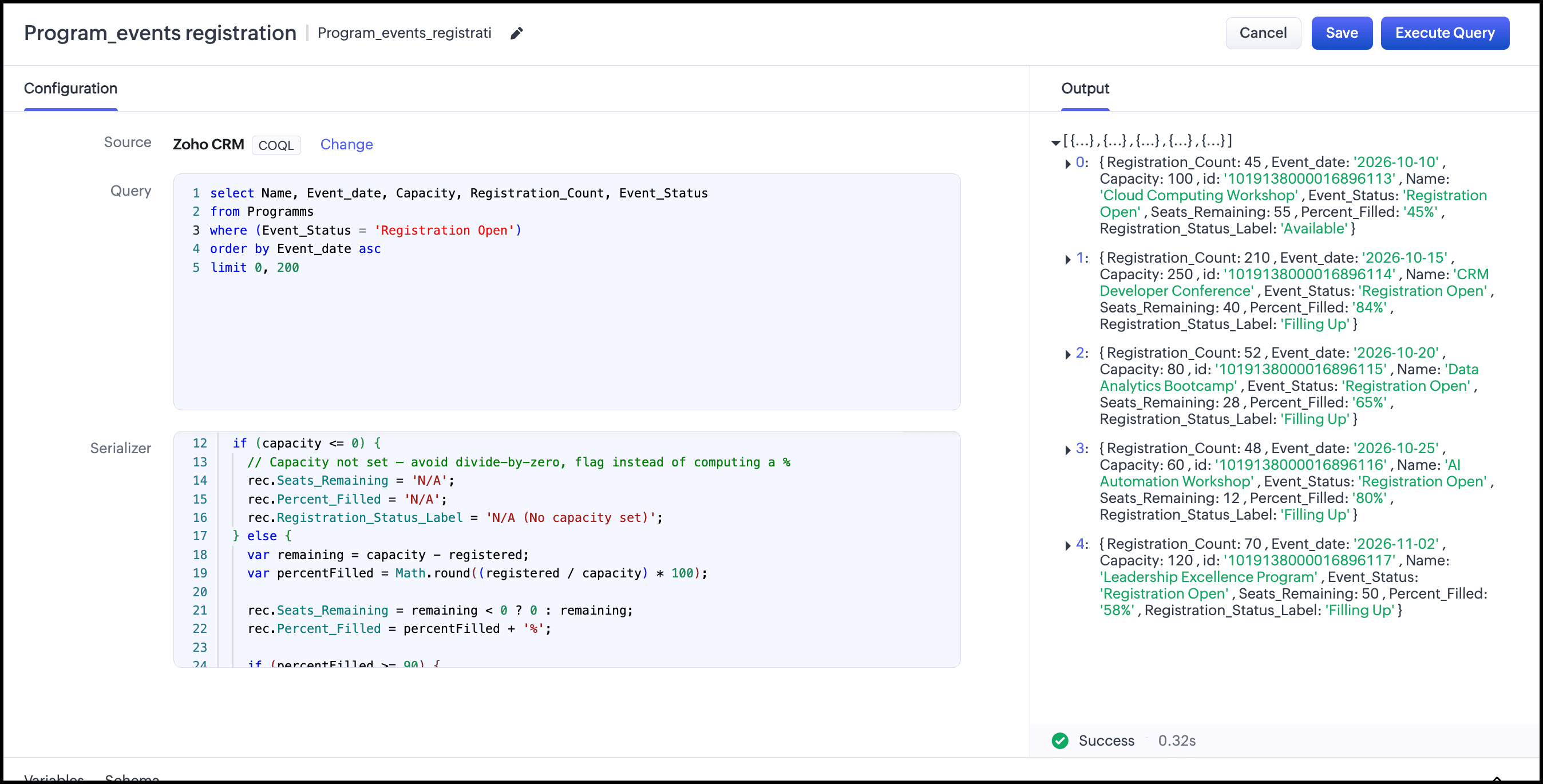
For the custom module "Programs", using Queries, help me understand the current registration status of events that are open for registration.
For each event, I want to know:
How many seats are remaining?
What percentage of the event capacity has been filled?
Is the event Nearly Full, Filling Up, or Available?
Also show the Program Name, Event Type, Event Date, Location, Capacity, and Registration Count.
Show the earliest events first.
What Did the Skill Do?
- Selected COQL as the Query source based on the filtering, sorting, and field requirements.
- Created the COQL query to fetch registration-open programs sorted by Event Date.
- Mapped the required fields such as Program Name, Event Type, Event Date, Location, Capacity, and Registration Count.
- Designed the serializer to calculate Remaining Capacity, Registration Percentage, and Registration Status.
- Handled edge cases, including zero capacity and division-by-zero errors.
- Defined the response schema to include both CRM and calculated fields.
- Identified API-name dependencies that must be verified in the target CRM.
- Considered Query association with components such as Canvas, Kiosk, or Custom Related List.
In short: The skill converted the requirement into a COQL Query → Serializer → Schema → Component association workflow.
6. Calculating Derived Values with Query Serializers
Let's take the same scenario one step further.
The event manager now wants to analyze events that have already been completed.
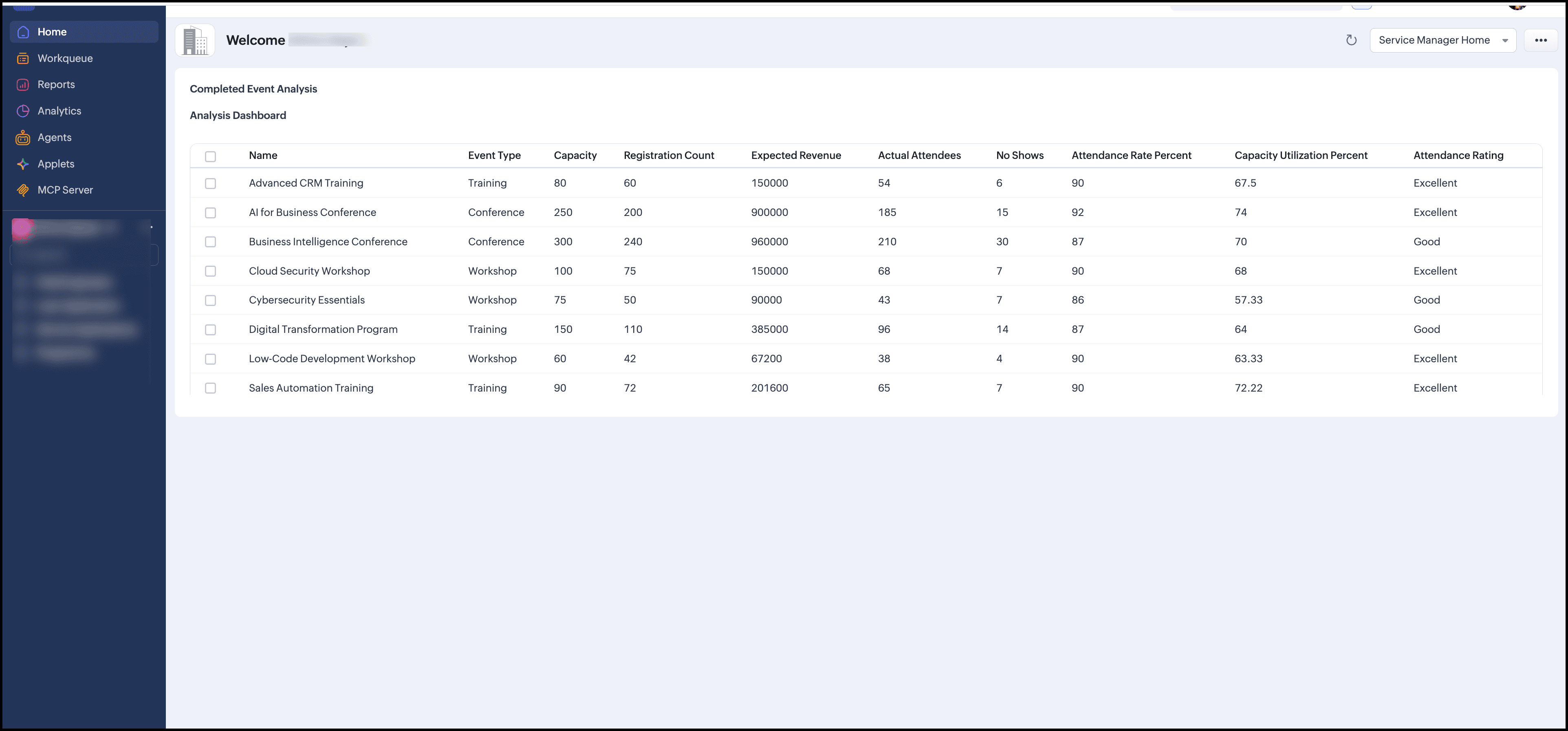
Requirement 3: Completed Event Analysis
For each completed event:
- Expected Revenue = Registration Count × Registration Fee
- Attendance Rate = Actual Attendees / Registration Count × 100
- Capacity Utilization = Actual Attendees / Capacity × 100
- No-show Count = Registration Count − Actual Attendees
- No-show Rate = No-show Count / Registration Count × 100
- Attendance Classification:
- Excellent: ≥ 90%
- Good: 70–89%
- Needs Attention: < 70%
Prompt
/zoho-crm
For the custom module "Programs", using Queries, help me understand how completed
events performed.
For each completed event, I want to know:
How much revenue was expected from registrations?
What percentage of registered participants attended?
What percentage of the event capacity was utilized?
How many registered participants did not attend?
Was the attendance Excellent, Good, or in Need of Attention?
Also show the Program Name, Event Type, Capacity, Registration Count and Actual Attendees.
What did the skill do?
The skill converted the requirement into a COQL-based Query with a Serializer and worked through the complete configuration.
- Loaded the relevant Query references for structure, sources, and serializers.
- Selected the Module source with Event_Status = Completed.
- Identified the required CRM fields such as Event Type, Event Date, Capacity, Registration Count, Registration Fee, and Actual Attendees.
- Designed the serializer to calculate Expected Revenue, Attendance Rate, Capacity Utilization, No-show Count, No-show Rate, and Attendance Performance.
- Added zero-value checks and error handling to prevent calculation errors.
- Defined the schema to expose both CRM and calculated fields.
- Prepared the implementation steps for Query creation, source, schema, serializer, and associating to Kiosk.
- Noted that API names must be verified against the actual CRM setup.
In short:Module Query → Filter → Retrieve data → Serializer calculates derived values → Schema exposes the results.

This is how it looks after implementing it through Kiosk:
7. Summary
In this Kaizen, we used a single Event Management scenario to explore three levels of Query development with the zoho-crm skill.
What the User Does
- Define the requirement: Specify the data, source/module, fields, filters, sorting, and target component.
- Provide the requirement to the AI coding agent: Give the requirement to an AI coding agent with the zoho-crm skill enabled. The skill analyzes it and suggests a Query implementation.
- Review the Query configuration: Verify the source, fields, criteria, sorting, variables, and other configuration.
- Review the serializer: If needed, provide the expected transformation logic and verify the serializer's filtering, formatting, renaming, or calculations.
- Verify CRM details: Confirm the actual module names, field API names, and field types in the target CRM organization.
- Configure the Query in Zoho CRM: Create and validate the Query using the reviewed source, schema, serializer, and other configuration.
- Associate the Query: Add the Query to the required component, such as a Kiosk, Canvas, or related list.
- Test and validate: Verify the data, filtering, sorting, serialized output, and displayed fields against the original requirement.
The zoho-crm skill simplifies this workflow by helping developers turn natural-language requirements into appropriate Query configurations and implementations.
Have an advanced scenario you’d like to see solved using the skill? Drop it in the comments or write to us at support@zohocrm.com.
Happy Querying!
Related Links
Kaizen #258 – Getting Started with zoho-crm SKILL.md - Introduction to the zoho-crm skill and how it works across Zoho CRM developer capabilities.
Kaizen #259 – Working with Zoho CRM APIs using the zoho-crm skill - Using the skill to work with Zoho CRM APIs.
Kaizen #260 – Using Zoho CRM Skill to generate Client Script - Using the skill to generate Client Scripts.
Zoho CRM Queries – Developer Documentation - Learn more about Query sources, variables, serializers, and schema management.
Topic Participants
Athira Rajan
Sticky Posts
Announcing the new SKILL.md for Zoho CRM and the updated OAS repository!
We are introducing a new zoho-crm skill to make working with Zoho CRM Developer tools (like APIs, functions, widgets, client scripts, queries etc) easier and faster, with the help of AI in your preferred AI harness like Claude Code, Codex, Cursor, VSCodeKaizen #261 : Using Zoho CRM Skill to generate complex COQL queries
Hello everyone, In the previous Kaizen posts, we introduced the zoho-crm SKILL.md and discussed how it can help you when you are working with Zoho CRM APIs and Client Script. In this Kaizen, we will focus on using the Zoho CRM `SKILL.md` with GitHub CopilotKaizen #256 - Build an Arrival Readiness Web Tab in Zoho CRM
Hi everyone! Welcome back to the Kaizen series! In the post, we discuss a use case in hospitality industry: how an Arrival Readiness web tab widget can be used to let reception staff identify and resolve issues before arrival of guests. Use case In theKaizen #198: Using Client Script for Custom Validation in Blueprint
Nearing 200th Kaizen Post – 1 More to the Big Two-Oh-Oh! Do you have any questions, suggestions, or topics you would like us to cover in future posts? Your insights and suggestions help us shape future content and make this series better for everyone.Kaizen #226: Using ZRC in Client Script
Hello everyone! Welcome to another week of Kaizen. In today's post, lets see what is ZRC (Zoho Request Client) and how we can use ZRC methods in Client Script to get inputs from a Salesperson and update the Lead status with a single button click. In this
Recent Topics
Service Account Admin for API Calls and System Actions
Hello, I would like to request the addition of a Service Account Admin option in Zoho product. This feature would allow API calls and system actions to be performed on behalf of the system, rather than an active user. Current Issue: At present, API callsTrigger workflows from SLA escalations in Zoho Desk?
Hey everyone, I’m currently working with SLA escalation rules in Zoho Desk and ran into a limitation that I’m hoping someone here has solved more elegantly. As far as I can tell, SLA escalations only support fairly limited actions (like changing the ticketTrident Missing
No way you guys get so close to having trident complete for over a year then just kill it off. Wow just wowZoho One - Can I add a Custom View to All Departments
We have been using Desk for several years but are just making the leapt to using multiple departments. I have a custom view that is our default view. I'd like to apply that to All Departments. When I try to add a view when viewing All Departments I getA way to create kits (groups of items) that do not require bundling and are added to an order as the individual items
We are evaluating moving off of Sage BusinessWorks (which handles accounting, order entry, inventory control, accounts receivable, etc) to Zoho Books/Inventory. One of the things we heavily use is a feature called Kits, which allows creating a group ofIssue While Rescheduling Interviews in Zoho Recruit
Dear Zoho Support Team, We are facing an issue with the Interview Rescheduling functionality in Zoho Recruit integrated with Microsoft Teams. Problem Description When an interview is rescheduled through Zoho Recruit: The new interview is created successfullyGlobal Constants / Variables
It would be great if there were a Global Constant feature. The idea here is for managing constants that are used in multiple Flows and Subflows, but might change over time. The idea is that the change could be made in one place and cascade to all futureZoho Campaigns 3.0 is here
Zoho CampaignsAnnouncements We're excited to introduce the all-new Zoho Campaigns, where we have introduced our biggest update yet. Marketing has evolved far beyond email. Today's campaigns span email, SMS, and WhatsApp, customers expect personalizedTip #95 – Collect support requests right from your website with Web Forms – 'Insider Insights'
Hello Zoho Assist Community! When a customer needs help, the first step often decides how smooth the rest goes. They email a vague description, a technician asks follow-up questions, and the real details only surface after several rounds of back and forth.Unable to integrate Whatsapp Messaging into Zoho CRM - Business Messaging
Hello, I want to set up Business Messaging in our Zoho CRM and am struggling to set it up. I have logged into the account and our facebook business page, our business shows in the dropdown for WhatsApp Business Account but does not for WhatsApp BusinessE-Invoicing Automation
Do you have an API endpoint for pushing the invoice through the e-tims for KenyaPhone system to integrate with Zoho CRM
I am looking for phone software that would allow my agency to do the following within Zoho CRM: Make calls from zoho Track calls and notes Leave pre-recorded messages after reaching voicemail of lead Only 2 members, so need company who will allow justAutomation Series: Automate Project File Uploads from Zoho WorkDrive
Project documents are often prepared before development begins. When files such as product requirements, design files, guidelines, or plans are stored in a shared folder in Zoho WorkDrive, teams can automate copying them to the corresponding project teamIs it possible to report on Task Duration in minutes/hours rather than by start and due date?
I'm currently evaluating the free version of CRM and I like lots of things about it, it will definitely help my business with sales automation and I will upgrade to a paid version once the evaluation is finished. However, I also want to use CRM for existing clients (accounts) where I can track how much time is being spent on tasks for these clients. I can see clearly that both calls and events for each account have time tracking in minutes / hours but tasks do not have this. Is it possible in oneWhy is it so hard to get a fiscal YTD P&L report in Zoho Books?
Yes I know that it could be done in Zoho Analytics, but I would have expected this default report view to be easily accessible in the list of Books accounting reports. Just like any other basic accounting system, I'm looking for monthly columns of the¡Nuevo Meetup en Barcelona! - Automatiza procesos con los agentes de Zia en Zoho
¡Hola a todos! Estamos encantados de anunciaros que el próximo 3 de diciembre estaremos en Barcelona con un nuevo Meetup de Español Zoho Community. Estos encuentros son una oportunidad fantástica para conectar con otros usuarios de Zoho, ampliar conocimientosStock count by bin location
Is there a configuration to make a stock count by bin or area and not by product. these is useful to manage count by area RegardsBank Feeds - Again
Bank feeds broken again for me. I don't see other recent posts on this, so maybe it's just us? Tried: refresh update cred/ deact./react. feeds chat support Nothing. On day 2 without zoho as a result, which is crippling for us. We've used zoho for a yearIntroducing Auto Check-out for Attendance
We are pleased to announce the release of the Auto Check-out feature in Zoho People. Auto Check-out is now available as a built-in setting under Shifts to automatically check out employees who have not recorded their check-out for the day. AdministratorsIssue with SalesIQ Chats Automatically Closing Due to the 24-Hour Idle Timeout?
Hello, I am experiencing a significant issue with SalesIQ automatically closing chats due to the Idle Timeout setting. I use SalesIQ through the integration between SalesIQ and Line App. To be honest, this issue has become extremely frustrating. ProblemsChatGPT Plugin / MCP Server auth error
Hi all I'm trying to connect the ChatGPT plugin for Zoho CRM but after username stage of the auth process, I get this error from the URL https://mcp.zoho.eu/mcp-client/ {"error_description":"Invalid request url, Request is not as per defined in oauthZoho Amount Cell Greyed Out
I noticed a few days ago that the 'amount' cell on my Zoho App software in my windows PC is greyed out and I can't click on it to add an amount figure when recording invoice or expenses. Wheareas on mobile I can do it easily申請メール、まだ一件ずつ確認していませんか?― Zoho Formsで申請業務を効率化
ユーザーの皆さま、こんにちは。ゾーホージャパンの友田です。 「備品を購入したいので申請します」 「イベントに参加したいです」 「経費の申請をお願いします」 このような社内申請を、メールやチャットで受け付けていませんか? メールでも申請はできますが、 「必要な情報が書かれていない」 「申請内容をあとから一覧にまとめている」 「誰がどこまで確認したのか分からない」 といった手間が発生することも。 そんな申請業務にも、Zoho Formsを活用できます。 必要な情報を、フォームでまとめて入力 例えば、備品購入の申請なら、URGENT: Zoho Wiki searches return garbled nonsense
For at least the past few days, the Search function in Zoho Wiki has been returning only strings of random characters. Example search result: The page name is readable, but the context body text is gibberish. So something is obviously broken with eitherIs it really true that I can't set the default 'deposit to' account in 2025?
I've been using Books for 7 years and the default account has never been a problem. I usually manually reconcile invoices and have never had a thought about which account. It has always been my account. However, I recently noticed that for the past 4Zoho CRM gets a new email compose and lot more
Dear Customers, [UPDATE October 21, 2021: We have started opening these features to some of the customers already. And, it will be available to all the customers before November 2nd Week, 2021. Sorry for the delay caused] [UPDATE February 21, 2022:#19 What about the money I spend on the job?
Meera buys props for a shoot, keeps the receipt in her bag, and expects to photograph it on the way back and never think about it again. The props get billed to the client at cost. The usual way to do this Covered in our published Expenses FAQ. The shortBNZ Bank Feeds No Longer Available
The BNZ (New Zealand) bank feeds are still failing and it's been months since they last worked! Uploading bank statements (CSV's) mean waiting to the end of the month when they become available. It is unacceptable to keep my clients waiting for paymentHow To Implement an Auto-Check-out Feature for Attendance?
If an employee forgets to check out, the system should automatically check out the employee at 6:30 PMWorkDrive Desktop Sync Is Being Deprecated: Move to WorkDrive TrueSync for a Smarter Experience
Hi everyone, We are excited to share a better, smarter way to access and manage your files directly from your computer! We’re transitioning from our legacy Desktop Sync app to WorkDrive TrueSync, designed to give you faster performance,greater flexibility,Bookings Notifications for Staff
Good afternoon. We are currently working on the trial version of Bookings as we review its usage for our client needs to schedule with specific team members. We set everything up and it appears to be working, with the exception of sending an email toIs COQL known to have read delays?
Hello, I'm experiencing stale data returned by COQL from time to time. Most of the time it returns up-to-date data right after I update a record, but sometimes the change only shows up after several seconds or even minutes. Neither the COQL documentation#18 Billing for the Hours, Not the Job
A consultant in the comments last month put it plainly: her client pays by the hour and wants to see every hour on the invoice, including the dates. She was maintaining a spreadsheet and manually copying the totals into her invoices. If you bill by theWhatsApp con bot en Make y derivación a una persona en Zoho CRM
Estamos implementando en Zoho CRM un flujo de atención por WhatsApp con un bot en Make y una derivación a una persona. Necesitamos que cada mensaje quede registrado, que me avise cuando requiere atención y poder seguir la misma charla con el cliente.Webhooks for Bigin
Hello everyone, Say hello to webhooks in Bigin—a way to send information to other applications automatically the moment something happens to a record. Whether it's a deal moving stage, a contact being created, or a field changing, Bigin can now send anGiving someone access to my FSM to develop + scope.
Good evening, I’m new to Zoho, and had a CRM/Creator customized and it was missing something and not working. I realized it’s the functions and process and FSM was the missing link. I am trying to get FSM setup and all I have to do connect to CRM, Books,Set Custom Icon for Custom Modules in new Zoho CRM UI
Reassign a team member's follow-up tasks without moving their customers | Kiosk Studio Session #13
Hello folks, It's almost year-end, and a lot of people on your team will take time off. Their customers will still need things while they're away. Say Amanda is out next week (on leave). She has a renewal purchase order to chase for Grace, a quote VikramWorkDrive and CRM not in sync
1/ There is a CRM file upload field with WorkDrive file set as the source: 2/ Then the file is renamed in WorkDrive (outside CRM): 3/ The File in CRM is not synced after the change in WorkDrive; the file name (reference) in CRM record is not updated (hereShort product videos on Zoho Commerce product pages: what works?
Short product videos are becoming a normal part of online store pages, and I have been thinking about how to use them well on a Zoho Commerce store. A few points that seem to matter: Keep them short. 6 to 15 seconds showing the product from a few anglesNext Page