Manage WhatsApp Conversations Across Zoho Services Using One Phone Number

Manage WhatsApp Conversations Across Zoho Services Using One Phone Number

If your teams use multiple Zoho services to handle different business functions, such as support, sales, or other Zoho tools, you might have asked this question:

Can we manage all WhatsApp conversations using the same business phone number across these services?

The answer is yes.  You can now use a single WhatsApp Business number and associate it across multiple Zoho services.


What changes when customers and teams use one WhatsApp number across services 

  1. Customers interact with one number, regardless of which team responds
  2. Teams across different Zoho products can work on the same conversation thread
  3. Agents can see the conversation timeline, even if it started in another service
This keeps the interaction continuous, instead of splitting it across multiple channels or numbers.

Note: While the timeline is visible across services, the full message content may not always be displayed.   

How a single WhatsApp number keeps conversations in sync across multiple Zoho services 
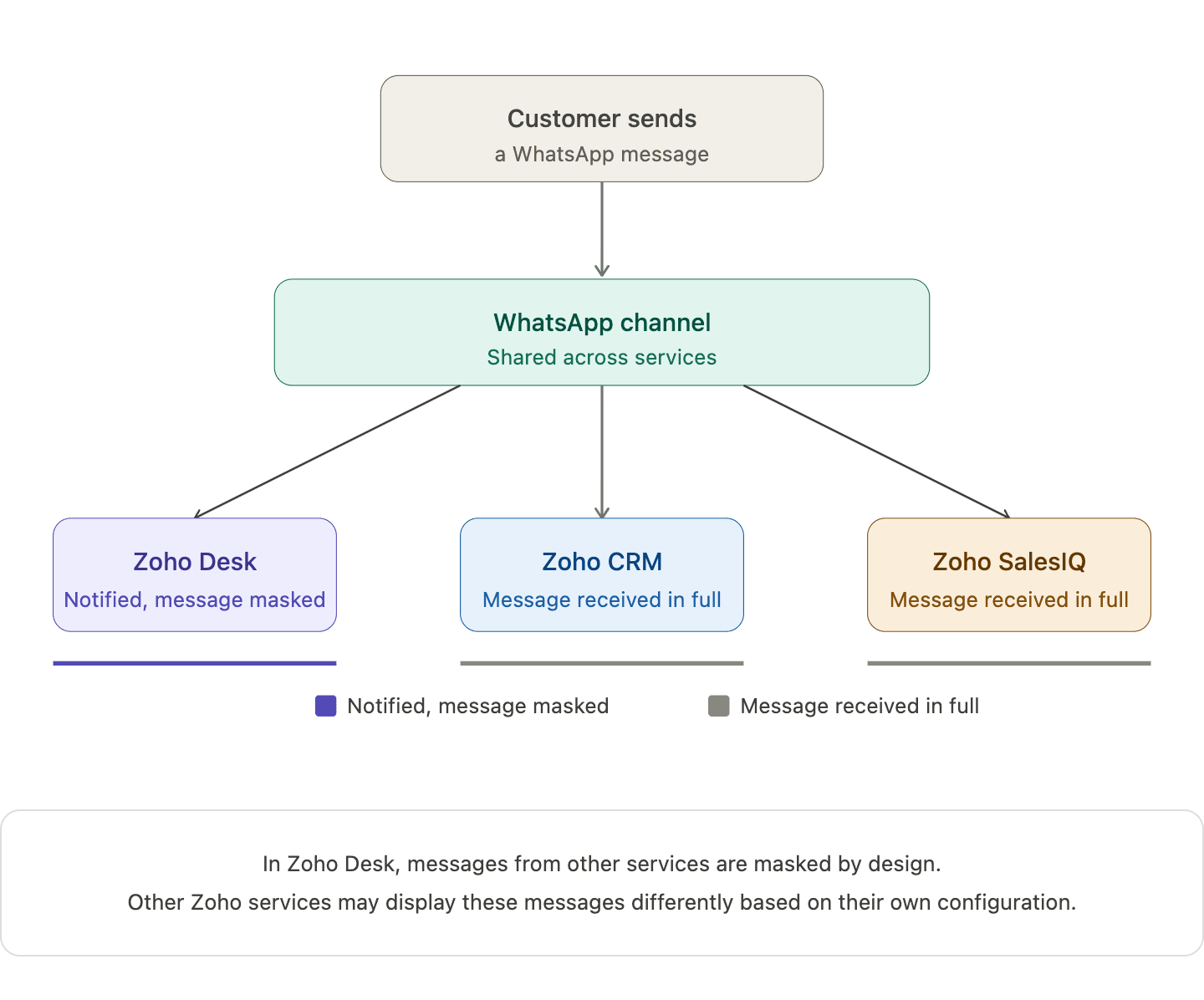
When you connect one WhatsApp number across multiple Zoho services, a single WhatsApp channel is created and shared across those services. Incoming messages appear in all connected services, and the underlying WhatsApp conversation continues as one unified thread.

When an agent replies from one service, that response is reflected in others as well. For example, in Zoho Desk, replies from other services appear in a masked format. This helps teams stay aware of the interaction without exposing the full message content.

What your team actually sees when different Zoho services handle the same conversation 

Action
What happens
Customer sends a WhatsApp message
Appears in all connected Zoho services
Agent replies from one service
Reply appears in Zoho Desk in masked form (Masked replies indicate that a response was sent from another service, without showing the full message content)
Another agent opens the conversation
The conversation timeline is visible, while message content may remain masked
Two agents attempt to handle the same conversation
The system shows a warning but does not block access
   
 Note:   In Zoho Desk, messages from other services are masked by design. Other Zoho services may display these messages differently based on their own configuration. 

How one Zoho service becomes the owner of the shared WhatsApp channel  


When a WhatsApp number is connected across multiple Zoho services, the first service where the number is configured becomes the parent service.

Other Zoho services that use the same number are automatically subscribed to this channel, allowing different teams to stay connected to the same conversation.

If the parent service is removed later, another subscribed service is automatically assigned as the new parent, without affecting ongoing conversations or message history.

What the parent service actually controls in this setup

The parent service is the Zoho service where the WhatsApp number is first configured. Once your WhatsApp number is shared across Zoho services, this parent service becomes the control point for automation.

This is where automation such as chatbots (including Guided Conversations), auto-replies, workflow-triggered messages, and outbound notifications are managed.

Other services can still participate in conversations, but they don’t control or trigger automation on that number.

How different types of automation behave across services   


Chatbots
  1. Bots run only from the parent service
  2. Customer messages trigger bot responses from that service
  3. Other services can see the interaction but cannot run their own bots
 
Auto-Replies 
  1. Only the parent service can send automatic replies
  2. Auto-replies configured in other services will not trigger
 
Workflow-Based Messages  
  1. Messages triggered by workflows (like ticket creation or lead updates) run only from the parent service
  2. Workflows in other services cannot send WhatsApp messages using the shared number
 
Notifications and Outbound Messages  
  1. Scheduled or event-based messages are sent only from the parent service
  2. Other services cannot use the same number for outbound automation


What changes when one service disconnects from the shared WhatsApp number 

When one Zoho service disconnects from the shared WhatsApp number, only that service is unsubscribed from the channel. Other subscribed services continue to receive incoming messages, and customer conversations remain active without any disruption.
Note: WhatsApp connectivity stops only if the number is removed from all connected services. 
 
The following Zoho bundles support shared WhatsApp numbers :
  1. Zoho One
  2. Zoho CRM Plus
  3. Other Zoho bundles with appropriate access
 
A few products, plans, or portals currently have restrictions:
  1. Standalone Zoho product licenses
  2. Portals upgraded from standalone plans
  3. Applications like Zoho Books, Inventory, Invoice, Subscriptions, Expense, Commerce, Checkout, and Payroll 
Note: The same WhatsApp number can still be connected the above-listed services, but each product maintains its own Channel and conversation history. 
   

What teams should align on before and after sharing a WhatsApp number 

Identify which service will act as the parent before setup. You can check this in Zoho Desk under the WhatsApp channel configuration, where the parent service is indicated.

Ensure agents understand what it means when another service has already picked up a conversation.

Define how conversations should move between support, sales, and other teams.

If your teams are already working across multiple Zoho services, this setup can simplify how conversations are handled day to day.

We're curious to know how others are approaching this. Are you already using a shared WhatsApp number across teams, or planning to try it out?
 

FAQ
Does this create multiple WhatsApp conversations for the same customer?
No. There is only one underlying WhatsApp conversation shared across the connected services.

Can two agents reply at the same time from different services?
The system shows a warning if another agent has already picked up the conversation, which helps reduce duplicate replies.
 
Why do replies appear as masked in other services?
Masked replies help other teams stay aware that a response was sent, without exposing the full message content across services.
 
Which service controls automation and bot behavior?
Automated features such as chatbots, auto-replies, and workflows are controlled by the parent service where the WhatsApp number was first configured.


    • Sticky Posts

    • Zoho Desk Partners with Microsoft's M365 Copilot for seamless customer service experiences

      Hello Zoho Desk users, We are happy to announce that Zoho Desk has partnered with Microsoft's M365 to empower customer service teams with enhanced capabilities and seamless experiences for agents. Microsoft announced their partnership during their keynote
    • WhatsApp pricing changes: Pay per message starting July 1, 2025

      Starting July 1, 2025, WhatsApp is shifting from conversation-based pricing to per-message billing. That means every business-initiated message you send will count. Not just the first one in a 24-hour window. Pricing updates on the WhatsApp Business Platform
    • Live Webinar - Work smarter with Zoho Desk and Zoho Workplace integration

      Hello customers! Zoho Desk and Zoho Workplace are coming together for a webinar on 14th May, 2024. Zoho Workplace is a suite of productivity apps for email, chat, docs, calls, and more at one single place. Zoho Desk is closely integrated with a few tools
    • Apple iOS 17 and iPadOS 17 updates for Zoho Desk users

      Hello Zoho Desk users! Apple recently announced the release of iOS 17 and iPad OS 17. These latest OS updates will help you stay productive and efficient, through interactive and seamless user experiences. Zoho Desk has incorporated the updates to help
    • Zoho Desk Cheat Sheet For The Year-End

      Check out these Zoho Desk best practices to end this year on a high and have a great one ahead! #1 Set Business (Holiday) Hours - If you have limited working hours, please make sure you restrict your business hours or set them as holidays for the coming days. Let your customers know when you will, and won't, be available. #2 Update the Annual Holiday List - Check the holidays for the new year and update the holiday schedule. Usually, holidays from the current year will be carried over for the next
    • Recent Topics

    • Bank Feeds Missing some transactions and duplicating some

      Hello, I have been using Zoho or a number of years and have never had a real problem with bank feeds, however in the last month the feeds have not picked up all transactions, and sometimes a transaction is being duplicated. For example, the bank statement
    • Direct URL to "View Record"

      I would like to create a button (Deluge Script) to jump to the "view record" without passing by the record menu, but I can not aford to find the right url. I don't want the "view record" as a single page. I want the "view record" in the application like the picture below: Thanks in advance for your help
    • Introducing Built-in Telephony in Zoho Recruit

      We’re excited to introduce Built-in Telephony in Zoho Recruit, designed to make recruiter–candidate communication faster, simpler, and fully traceable. These capabilities help you reduce app switching, handle inbound calls efficiently, and keep every
    • Allowed IP Addresses: Manage where users access your organization's email from

      Securing organizational email takes more than strong passwords and multi-factor authentication. The location from which a user signs in is just as important as the credentials they use, especially when the account holds sensitive business information.
    • How to set up on-demand badge printing?

      Hello, on the introduction page (https://www.zoho.com/backstage/check-in-and-badging.html), it is stated that on-demand badge printing is possible, i.e. printing the corresponding badge after check in via scanning the attendee's QR code. How can I set
    • Enhance Barcode/QR Code scanner with bulk scanning or continuously scanning

      Dear Zoho Creator, As we all know, after each scan, the scanning frame closes. Imagine having 100 items; we would need to tap 100 times and wait roughly 1 second each time for the scanning frame to reopen on mobile web. It's not just about wasting time;
    • What’s New in Zoho Inventory — Latest Features, Integrations & Updates | December 2025

      Zoho Inventory has evolved significantly over the past months, bringing you smarter, faster, and more connected tools to streamline your operations. Whether you’re managing multichannel sales, complex fulfillment workflows, or fast-moving stock, our newest
    • Creating Email template that attaches file uploaded in specific field.

      If there's a way to do this using Zoho CRM's built-in features, then this has eluded me! I'm looking to create a workflow that automatically sends an email upon execution, and that email includes an attachment uploaded in a specific field. Email templates
    • Edit 'my' Notes only

      The permissions around Notes should be more granular, and allow to user to be able to edit the notes he created only. The edit Notes permission is useful as it allows the user to correct any mistakes or add information as needed. However, with this same
    • Restrict Ticket Movement to Specific Departments in Zoho Desk

      Hello Zoho Desk Team, Greetings, and hope you are doing well. We would like to submit a feature request regarding the ability to control ticket movement between departments in Zoho Desk. Current Limitation: At present, Zoho Desk allows agents to move
    • GEO and Zoho Desk

      Has anyone done anything with GEO (generative engine optimization) and zoho desk KB? Are there any plans from Zoho on adding the ability in inject GEO scripts in KB Articles?
    • Incoming Threads Report

      From data to decisions: A deep dive into ticketing system reports Customers raise questions and issues through multiple channels, such as email, chat, or tickets. To monitor the number of queries received on a specific day from each channel, leads can
    • Block opening tickets vía email DESK

      Hello, I want to block the functionality of opening tickets when someone send an email to our support email address. Actually everybody in the world can open a ticket in our systen just sending an email to our support email address I don´t want this feature!!!!
    • Autocomplete by email address

      Hi, Is it possible to add contacts via autocomplete using the email address? I have tried a number of contact option variations and cannot seem to get it to work, having this as an option would speed up composing an email greatly. thanks Ben
    • Switch between multiple LLMs instantly for tailored Zia experiences

      Availability Editions: Professional , Enterprise, Ultimate , CRMPlus , ZohoOne Release Plan: Available for all DCs Hello everyone. Earlier, the Multi-LLM feature supported only one LLM at a time for Zia Record Assistant bot restricting flexibility from
    • Subscriptions for service call

      So we install products and we want to offer a service contract for the customers yearly service calls to be billed monthly. So ideally at some point we want to email them a quote for their needs. WE will choice it our end based on the equipment. It would
    • PHPMailer "Connection refused (111)" Error Despite Outbound Ports Being Open

      Hello everyone, I'm trying to send emails via Zoho SMTP using PHPMailer on my shared hosting environment. I've tried both port 465 (ssl) and 587 (tls), and I even added SMTPOptions to bypass SSL verification just in case it was an SSL certificate issue.
    • Power up your Kiosk Studio with Real-Time Data Capture, Client Scripts & More!

      Hello Everyone, We’re thrilled to announce a powerful set of enhancements to Kiosk Studio in Zoho CRM. These new updates give you more flexibility, faster record handling, and real-time data capture, making your Kiosk flows smarter and more efficient
    • Cliq iOS can't see shared screen

      Hello, I had this morning a video call with a colleague. She is using Cliq Desktop MacOS and wanted to share her screen with me. I'm on iPad. I noticed, while she shared her screen, I could only see her video, but not the shared screen... Does Cliq iOS is able to display shared screen, or is it somewhere else to be found ? Regards
    • Rename system-defined labels in Zoho CRM

      Renaming system-defined labels is now available across all DCs. Hello everyone, Zoho CRM includes predefined system fields across modules to support essential CRM operations. Until now, the labels of these fields were fixed and could not be edited from
    • What happens to my current site SEO if i opt for zoho creator?

      I have an existing website and I need to use Zoho creators for the rapid creation of my webpage creation. Currently, my IT team is creating the web pages, but I am concerned about the SEO of my current website if I shift to zoho will i loose it all?
    • Filter Pivot Chart by Criteria

      Hey There Amazing Zoho Team, I wanted to see if there is a way to filter criteria a "Pivot Chart" report in the same way I can filter "List", "Calendar", & "Summary" reports. Example: I can filter a normal report like this: http://monosnap.com/image/y5q0XGzDSGZpsnOjuBYpdeUOFtSmFd I would like to do the same with a "Pivot Chart".  What I've Tried: Filters and User filters are not what I am looking for. That just filters the data. I want to be able to filter criteria the data by connected forms. Like
    • Big Time HELP

      I am old, disabled and need to speak to a person. I needed to use a service to copy my zoom contacts to. I think I signed up for a security service, which I do not need. I don't know enough to choose from your many lists or how to see what I have and
    • #4 Setting Up Your Client the Right Way

      Creating invoices without properly setting up the customer can quickly lead to several inconsistencies, such as duplicate records, missing billing details, and poor customer management. This becomes even more important for businesses that use a connected
    • Functionality based URL to find records due today or in the next week

      I need to construct a URL to filter a view to records where the evaluation is due soon (i.e. in the next 7 days). To me, that includes today, but Zoho has a different opinion. Zoho defines 39 as NEXT_7_DAYS but this gives unexpected results. https://creatorapp.zoho.eu/...#Report:My_Evaluations?Evaluation_due_by_op=39
    • Email Parameter in Create Lead API

      In the Create Lead API , the email parameter as mandatory. This is creating issues because many leads only have mobile numbers and no email address. This is especially a problem for businesses focusing on WhatsApp marketing in Zoho Marketing Automation,
    • Automatic Email Alerts for Errors in Zoho Creator Logs

      Hello, We would like to request a feature enhancement in Zoho Creator regarding error notifications. Currently, Zoho Creator allows users to view logs and errors for each application by navigating to Zoho Creator > Operations > Logs. However, there is
    • Filter our rejected quote items from the inventory quote template

      Hello, I am trying to have rejections at the line level on my quotes so I can track what items are often removed, I do not want to claim the whole quote as lost just the individual items for better data tracking. However I cannot figure out how to filter
    • Configuring ZMA Webhook for Zoho Flow : Missing Key Information Error

      I'm looking to send a webhook to Zoho Flow at the end of a Marketing Automation journey in order to perform more actions that I can't do with just a journey. I have the Webhook created in Flow and set up in ZMA, however when I test it I get the error
    • Improve Zoho Vault search

      Hello, we started using Zoho Vault and we really appreciate the app. At the moment, when searching passwords, the search query only targets the password name. I think having the query search among Name, User name, URL, Notes and Tag would be a better
    • Introducing the New Zoho Assist Quick Support Plugin

      We are thrilled to announce the new Zoho Assist Quick Support Plugin, the upgraded and enhanced version of the Zoho Assist Customer Plugin. This new plugin allows organizations and IT administrators to deploy it directly onto their customers’ devices,
    • NEED HELP

      I have below data po no invoice no Party inv date value status 1 aa1 ABC 01-May-26 100 Under Cr 2 aa2 XYZ 02-May-26 200 Over Due 3 aa3 ABC 02-May-26 300 Under Cr 4 aa4 XYZ 03-May-26 400 Under Cr I need result as below using formulas (not Pivot table)
    • Ask the Experts 29: Knowledge Base, Community, and AI for smarter user education

      Hi Everyone, Welcome to Ask the Experts (ATE) 29, a live panel discussion. After the engaging text-based discussions in ATE 27 on onboarding and managing agents and ATE 28 on handling customer support with AI, we’re bringing you the next round of ATE
    • Bigin, more powerful than ever on iOS 26, iPadOS 26, macOS Tahoe, and watchOS 26.

      Hot on the heels of Apple’s latest OS updates, we’ve rolled out several enhancements and features designed to help you get the most from your Apple devices. Enjoy a refined user experience with smoother navigation and a more content-focused Liquid Glass
    • Tables for Europe Datacenter customers?

      It's been over a year now for the launch of Zoho Tables - and still not available für EU DC customers. When will it be available?
    • Smart Feature Compatibility Indicators for CRM Field

      Zoho CRM offers a wide range of field types and advanced customization options. However, several field types have feature-specific limitations that are currently documented only in help articles. For example, while configuring a Rich Text field, admins
    • 📢 Coming Soon: Daily Rate Projects

      Hello everyone, We're excited to announce a long-awaited, new billing type for projects: Daily Rate! Until now, projects supported Fixed Cost and Hourly Rate billing. With this update, you can now create projects billed on a daily rate, making it easier
    • 📢 Coming Soon: Daily Rate Projects

      Hello everyone, We're excited to announce a long-awaited, new billing type for projects: Daily Rate! Until now, projects supported Fixed Cost and Hourly Rate billing. With this update, you can now create projects billed on a daily rate, making it easier
    • Cannot find IMAP/SMTP enable toggle in new Mail Admin UI - Mail Lite plan

      Hi Zoho team, I'm the org Super Admin for owlmind.dev (Mail Lite plan, 3 paid users): - champ@owlmind.dev (Super Admin) - isfand@owlmind.dev - team@owlmind.dev I need to enable IMAP and SMTP access for all 3 users (we're integrating with Smartlead for
    • Kaizen #242 - Enabling In-Context Order Creation from Deals Using SlyteUI

      Hello everyone! Welcome to another interesting Kaizen post. Today’s spotlight is on SlyteUI, the new UI builder designed to create powerful, intuitive user interfaces in minutes. Built for speed and simplicity, SlyteUI empowers teams to deliver high-impact
    • Next Page