Marketer’s Space - Automating CRM Actions with Journeys - Part 1

Marketing and sales go hand in hand, yet teams often struggle with inefficiencies in lead management. Leads may go cold due to delayed follow-ups, and valuable prospects might get lost in the shuffle. This is where integrating Zoho CRM with Zoho Marketing Automation (ZMA) comes into play. By utilizing CRM actions in Journeys, businesses can automate lead nurturing, push only engaged leads to sales, and ensure seamless collaboration between the marketing and sales teams. This integration helps marketers target the right prospects at the right time while allowing sales teams to act on high-intent leads without delays.
In this post, we’ll explore how leads that originate in Zoho CRM are nurtured through ZMA before being handed off back to sales.
Syncing Leads from Zoho CRM, Engaging Them, and Automating Sales Follow-Ups
Many businesses capture leads first in Zoho CRM—through website forms, inbound inquiries, or sales outreach. However, not all leads are immediately ready for sales engagement. That’s where marketing steps in, using Zoho Marketing Automation to nurture these leads until they show clear interest. Here’s how you can set up a CRM-integrated Journey to automate this process from start to finish.
Sync Leads from Zoho CRM to Zoho Marketing Automation
To ensure a smooth transition of records between Zoho CRM and ZMA, you first need to sync your CRM leads into Marketing Automation. This allows marketers to send targeted campaigns to the right audience. Ensure all relevant fields (such as Name, Email, Lead Source, and Lead Stage) are mapped properly. Once synced, these leads will now be available in ZMA for segmentation and targeted campaigns.
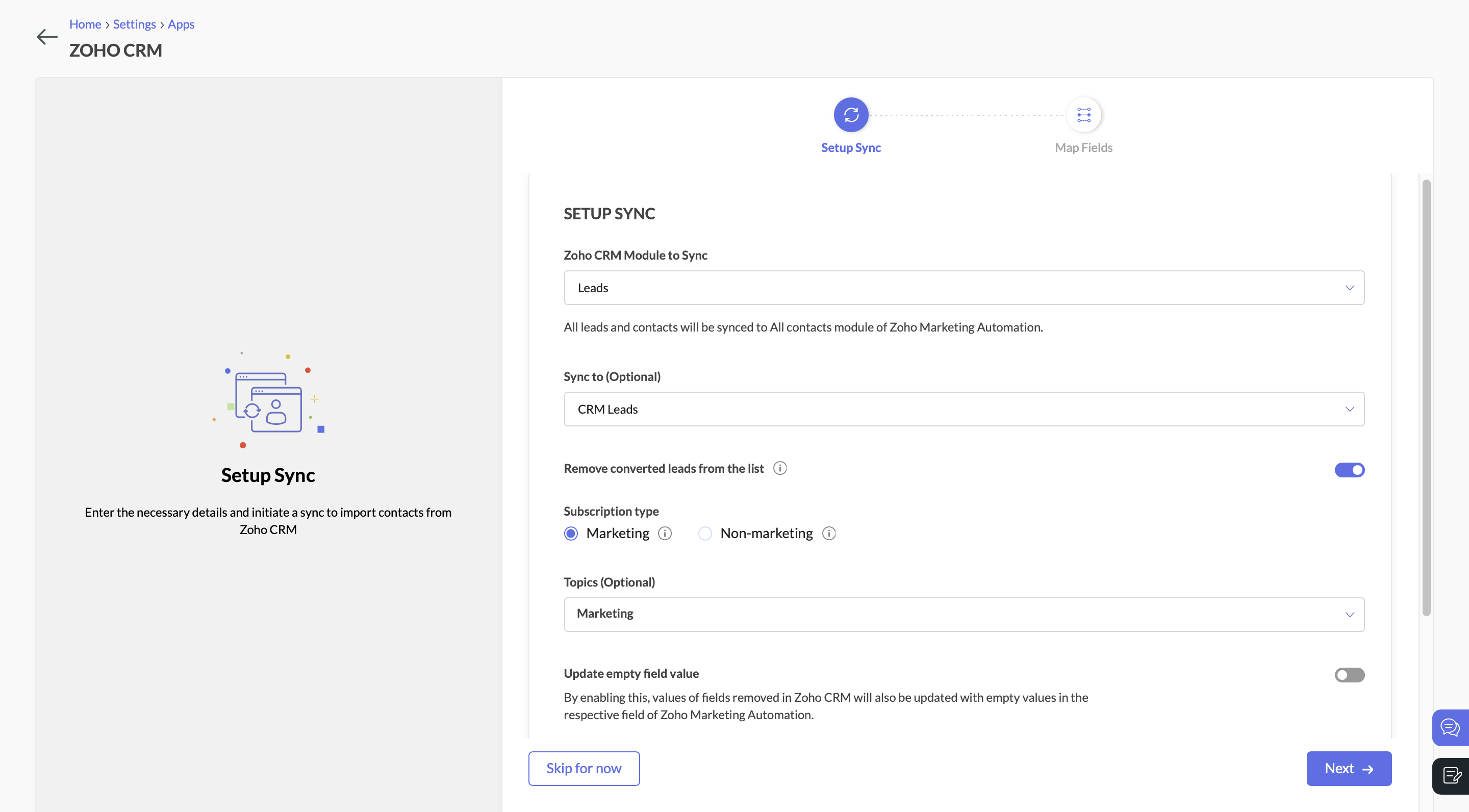 Sync Leads from Zoho CRM to Zoho Marketing Automation
Send a Marketing Campaign to Engage CRM Leads
With the leads synced, you can now target them with an email campaign. Let’s say you’re promoting a product demo or a free consultation. You send an email with a call-to-action (CTA) button, inviting leads to learn more.
Create a Journey to Target Interested Leads
Navigate to the Journeys section in Zoho Marketing Automation and create a new Journey. This Journey will track engagement and ensure that interested leads are identified, categorized, and updated in both ZMA and Zoho CRM.
- Add the Email Action Trigger . Click on “Specific Email” and choose the email campaign.
- Then select the email action “Specific link clicked” and choose the CTA that you included in the campaign.
- Specify the exact URL you want to track (e.g., a demo request page, a pricing page, or a consultation booking link).
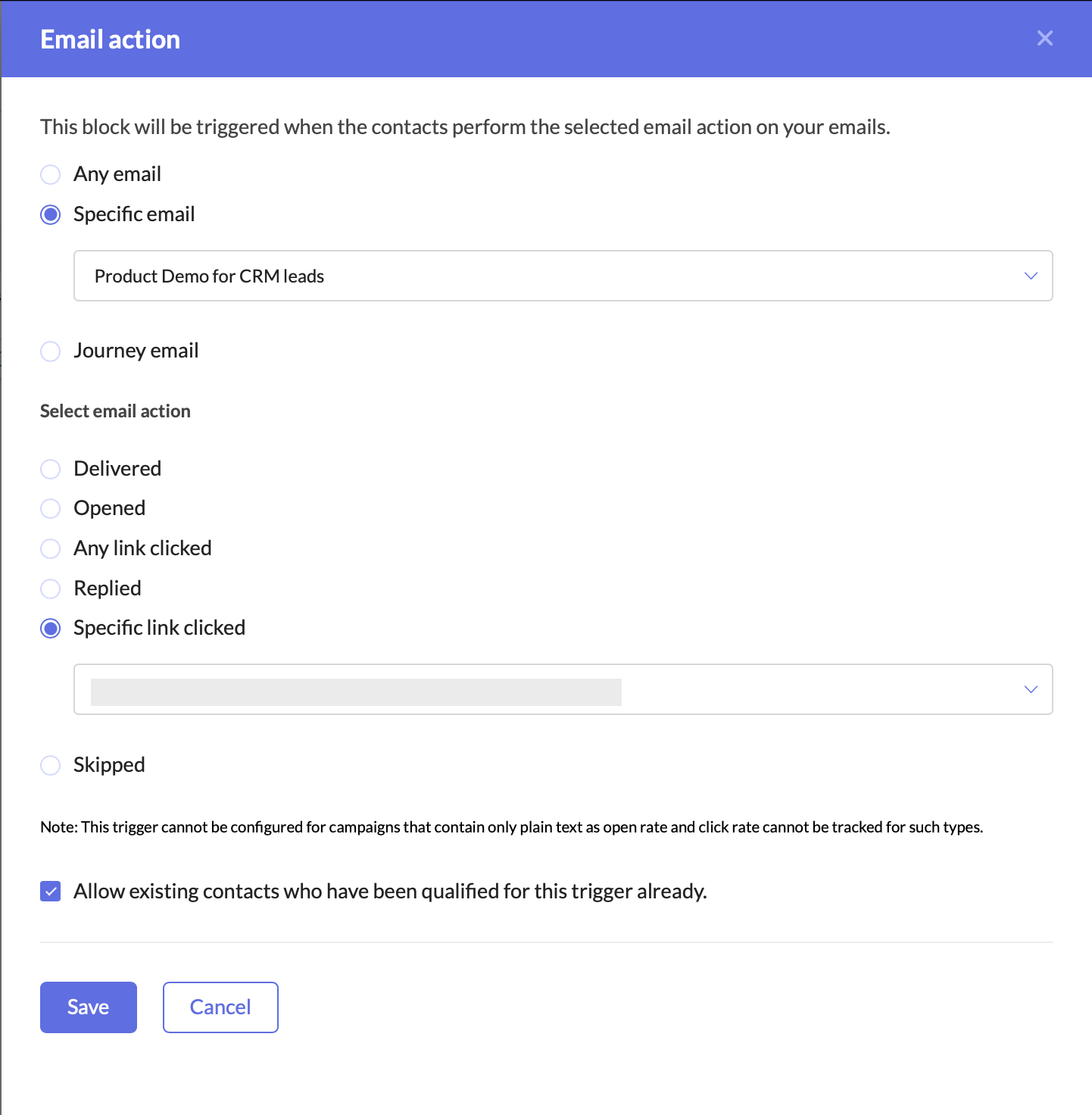 Create a Journey to target interested leads
Adding this trigger ensures that your Journey only targets leads who have shown clear intent by clicking on your email’s CTA. This helps you:
- Identify engaged leads who are actively interested in your offering.
- Filter out unresponsive leads, allowing marketing and sales teams to focus their efforts on high-potential prospects.
- Automate lead qualification without manual tracking.
Once a lead clicks on the CTA, they enter the Journey, signaling that they are engaged and should be prioritized for further marketing and sales efforts.
Update the Lead Stage in Zoho Marketing Automation
Now that the lead has clicked on the CTA and entered the Journey, the next step is to update their lead stage to reflect this new level of engagement.
- Add the Update Lead Stage action component right after the Email Action Trigger.
- Configure it to move these contacts to the “Marketing Engaged” stage in ZMA.
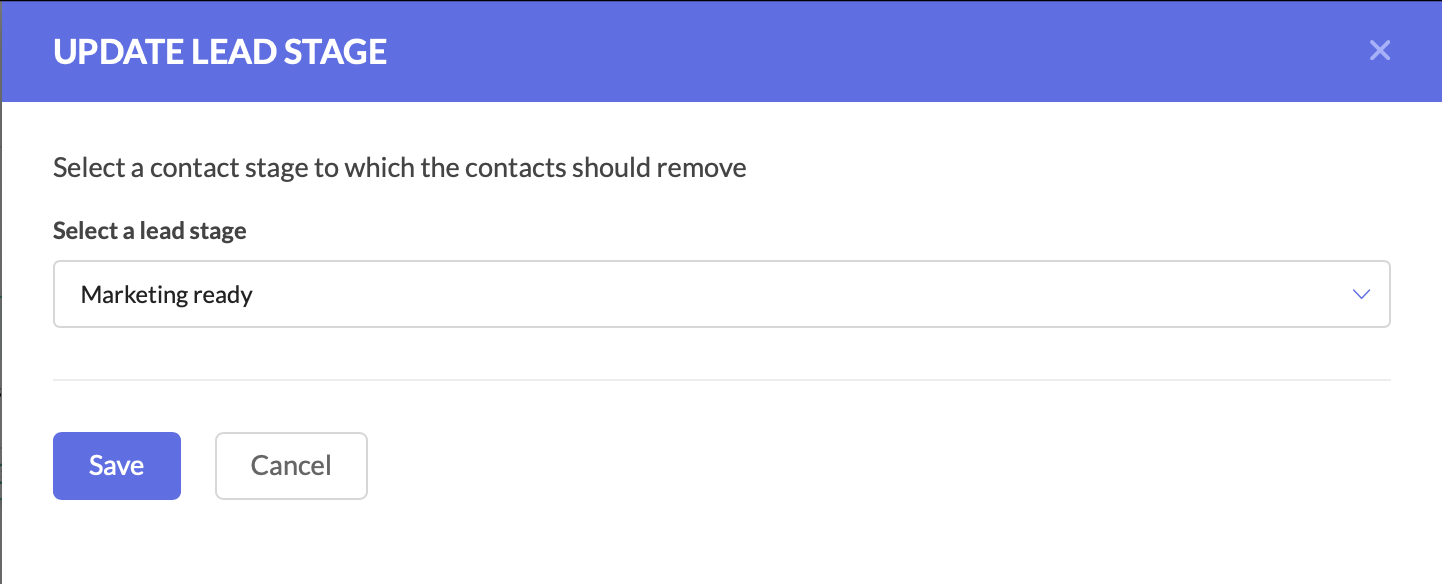 Update the Lead Stage in Zoho Marketing Automation
By moving them to the Marketing Engaged stage, you’re ensuring that these leads are recognized as actively interested, making it easier to track their Journey through your funnel.
Push the Updated Lead Data to Zoho CRM
At this stage, the lead stage has been updated in Zoho Marketing Automation, but we also need to reflect these changes in Zoho CRM. Since both platforms need to have the latest details, we now push the updated lead information back to Zoho CRM.
- Add the Push Data to CRM action component after the Update Lead Stage action.
- Configure it to push the lead’s latest details into the Leads module in Zoho CRM.
- Ensure that all relevant fields are mapped correctly.
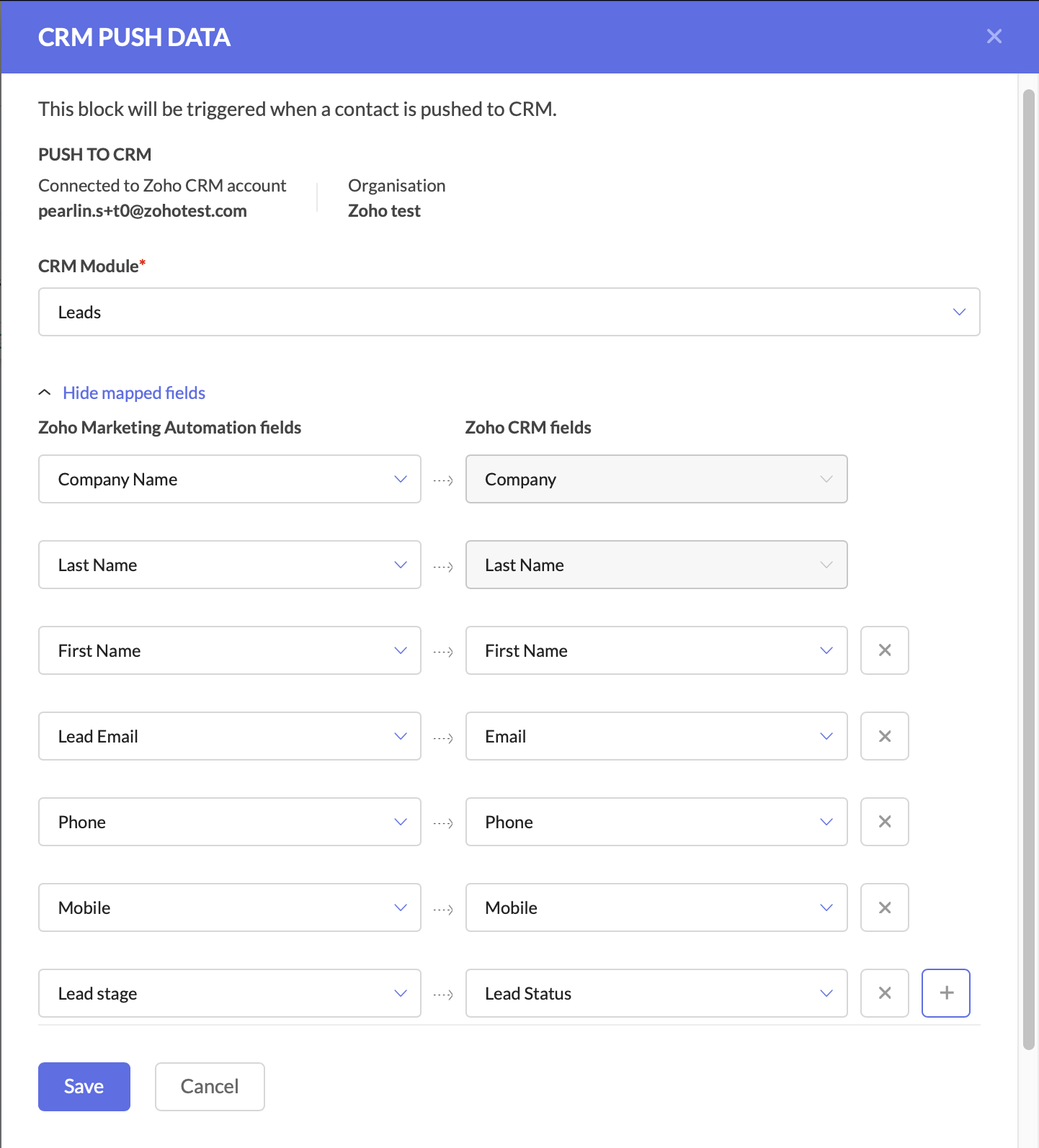 Push the Updated Lead Data to Zoho CRM
Keeping Zoho CRM up to date is critical for sales teams, as it ensures they are always working with the latest information.
At this point, your Journey has:
- Tracked engaged leads through the Email Action Trigger.
- Updated the lead stage in ZMA to “Marketing Engaged.”
- Pushed the updated lead data back to Zoho CRM.
With these foundational steps in place, you are now ready to take the next action—automating deal creation and assigning follow-up tasks to the sales team.
Create a Deal for the Interested Lead
At this stage, the lead has shown interest, so we should automatically create a deal in Zoho CRM.
- Add the Create Deal CRM Action Component and configure the deal name, due date, stage, amount, and deal assignment.
- You can also map fields at this stage.
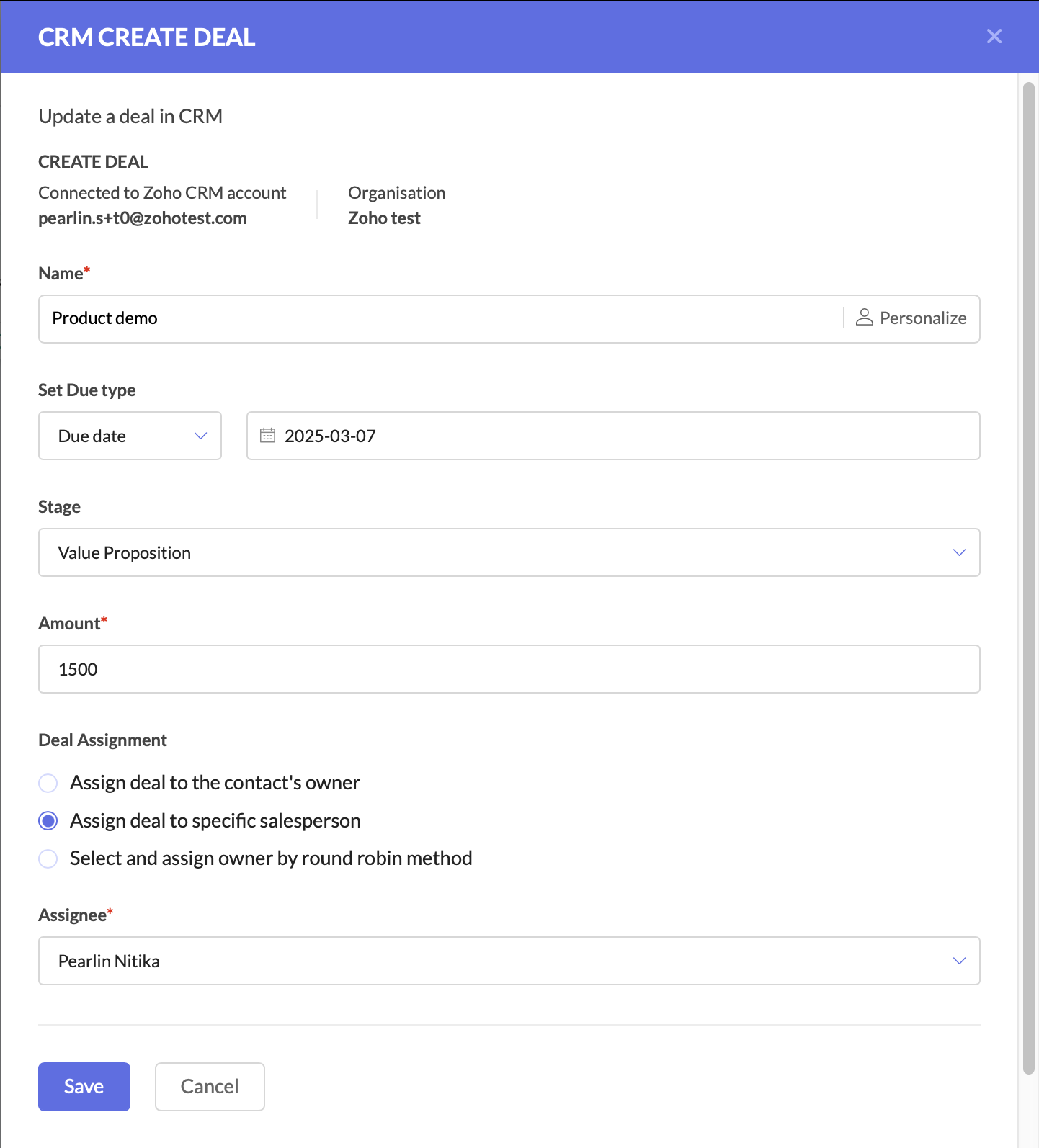 Create a deal for the interested lead
Create a Task for Follow-Up
The final step is to ensure a salesperson takes action on the newly created deal.
- Add the Create Task CRM Action Component.
- Configure the CRM module, subject and description, due date, priority, status, and assign the task to the deal owner in CRM.
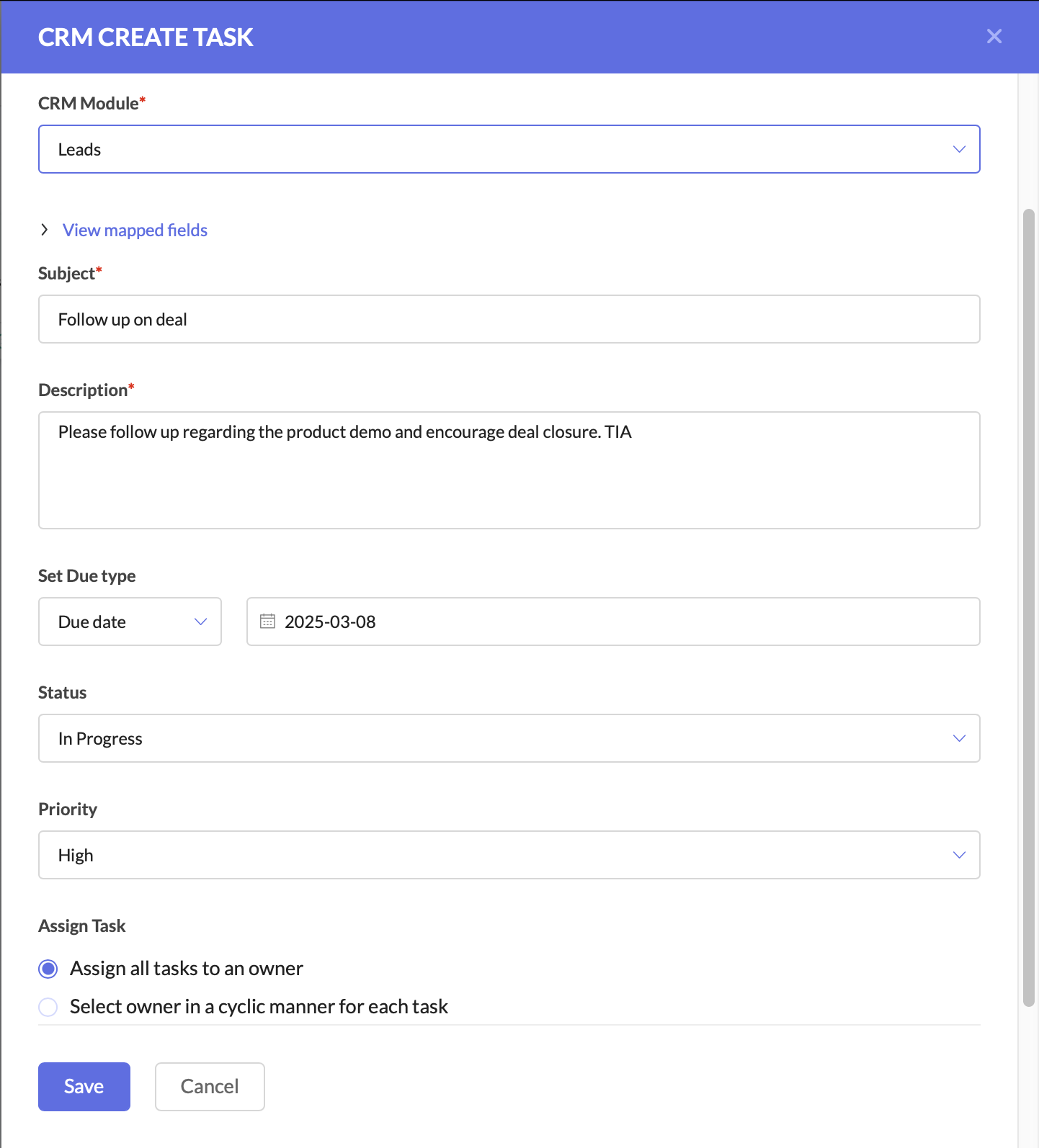 Create a task for follow-up
After this, you can connect the components to ensure a seamless flow.

This setup ensures that leads are not just nurtured, but also seamlessly handed off to sales when they show interest. The sales team receives up-to-date CRM records, active deals, and clear follow-up tasks, increasing their chances of closing the deal faster.
Why This Matters for Businesses
By using Zoho CRM and ZMA together, marketing and sales teams need not waste time on cold outreach, and can focus on high-intent leads.
For businesses, this means:
- Higher revenue by focusing only on engaged leads.
- Stronger collaboration between marketing and sales.
- Better customer experience with timely follow-ups.
This is just one of the many ways you can use Zoho CRM actions in ZMA Journeys to refine your lead management process and ensure that only high-intent prospects reach your sales team. In the next post, we’ll explore another powerful use case—how to handle leads that originate in ZMA and transition them seamlessly into Zoho CRM for sales follow-up. Stay tuned for part two, and until then, happy marketing!
Regards,
Pearlin Nitika
User education | Zoho Marketing Automation
Topic Participants
Pearlin Nitika S
Sticky Posts
Gmail is ramping up its email sender policy from November 2025
Hello marketers, As you may be aware, Gmail introduced a guideline for bulk senders starting February 2024. If not, here's a quick refresher straight from Google: After this policy was announced first in 2023 and soft-implemented in February 2024, weMarketer’s Space - WhatsApp Pricing Update: What Marketers Need to Know and Do
Hello Marketers, Welcome back to Marketer’s Space! WhatsApp made changes to their pricing model on July 1, 2025, moving from conversation-based pricing to a per-message pricing model. This week’s post focuses on what these changes mean for your WhatsAppWhatsApp Message Pricing Changes (Effective July 1, 2025)
Starting July 1, 2025, Meta will introduce a per-message pricing model on the WhatsApp Business Platform, replacing the current conversation-based billing. This update affects all WhatsApp messages sent through Zoho Marketing Automation. We’ve brokenMarketer's Space: Leveraging CRM Data for Dynamic Content and Personalized Campaigns
Hello Marketers! Welcome back to another post in Marketer’s Space! We’re excited to continue our series on the many advantages of integrating Zoho CRM with Zoho Marketing Automation (ZMA). This series is designed to help you unlock the full potentialMarketer’s Space - Automating CRM Actions with Journeys - Part 1
Marketing and sales go hand in hand, yet teams often struggle with inefficiencies in lead management. Leads may go cold due to delayed follow-ups, and valuable prospects might get lost in the shuffle. This is where integrating Zoho CRM with Zoho Marketing
Recent Topics
How can I assign courses to Spaces?
How can I make courses show up here in this space?:When will Zoho Learn be able to support SCORM files on the mobile app?
When I click the SCORM content, I just get a message saying it's not possible yet. Yet implies that it will be coming soon. All I'm asking for is a realistic timeline so I know whether or not to invest my time in using it. If it will be soon, then I willAnnouncing new features in Trident for Windows (v.1.35.6.0)
Hello Community! Trident for Windows just got better with an update that makes working with your emails even more efficient. Let’s dive into what’s new! Work with PST files more efficiently. You can now do more than just view mounted PST files. You canMarketing Tip #9: Track your traffic sources
Not all marketing channels work equally well. Knowing whether your visitors come from Google, Instagram, or email helps you focus on what actually drives sales. Try this today: Check your Zoho Commerce reports or connect Zoho PageSense to see your topGoogle Analytics import data inaccurate (as of October 11, 2025)
We have Zoho Analytics connected to GA4 to import daily event data. This has been running without issue for a couple of years. However, a month ago we started noticing discrepancies. All data until October 10 lines up perfectly - October 11 onward isE-Invoicing in Belgium with Zoho Billing
Starting January 1, 2026, Belgium is introducing mandatory electronic invoices (e-invoicing) for all B2B transactions between VAT-registered businesses. Invoices and credits notes must be exchanged in a prescribed digital format. How E-Invoicing worksZoho Recruit Slow and Freezing on all screens
We have had an issue with Zoho Recruit for weeks being extremely slow and at times freezing. We have 100 mega internet, and I went into each computer and updated the virtual memory so there is more available. Also restarted all computers daily. Still having the issues. Almost unable to work.Prevent accidental duplicate entry of Customer Ordersome
Zoho Support has confirmed that Zoho currently does not have any method (using Deluge, flow or any other method) to alert a user when a sales order has been entered twice using the same customer reference number (i.e. a duplicate). Most ERP platformsZoho Books | Product updates | November 2025
Hello users, We’ve rolled out new features and enhancements in Zoho Books. From translating email notification templates to the new transaction locking restrictions, explore the updates designed to enhance your bookkeeping experience. Making Tax DigitalInsert Image into Notebook page
Prior to today, I could add images to my notebook pages. Today when I tried to do this I got an error message that said something like, "There's been a problem on our end. Try again later." So, I've tried all the ways I know how, but I can't insert an【開催報告】名古屋 ユーザー交流会 Vol.2 2025/11/21 Zoho Analytics / Inventory で実現する在庫の"未来予測"
ユーザーの皆さま、こんにちは。コミュニティチームの中野です。 11/21(金)に名古屋 ユーザー交流会 を開催しました。 本投稿では、当日実施したセッションの様子及び投影資料をお届けします。 会場にて参加できなかった皆さまも、ぜひご参照ください。 (Zoho 社員セッションの登壇資料については、11/28(金)開催の東京回の開催報告で共有いたします) 今年2回目の開催となる名古屋 ユーザー交流会では、株式会社エンツナクリエイト 野末さんによる Zoho Analytics / InventoryIs there a way to automatically add Secondary Contacts (CCs) when creating a new ticket for specific customers?
Some of our customers want multiple contacts to receive all notifications from our support team. Is there a way to automatically add secondary contacts to a ticket when our support team opens a new ticket and associates it with an account? This wouldImproved RingCentral Integration
We’d like to request an enhancement to the current RingCentral integration with Zoho. RingCentral now automatically generates call transcripts and AI-based call summaries (AI Notes) for each call, which are extremely helpful for support and sales teams.Edit Pinned Comments in Zoho Desk
It's great that private comments can now be pinned to the top of the ticket but what would be extremely helpful would be to allow for the pinned comment to be edited vs. having to find the comment in the ticket to edit it.Updating Secondary Contact (CCs)
We use Zoho Forms to capture the user request and integrated with Zoho Desk to raise tickets. Active Microsoft login is captured in our Zoho forms and registered as Primary contact in Zoho desk ticket. We also an have an option to raise ticket on behalfblank page after login
blank page after logging into my email account Thanks youWriterTh
After every space Writer goes to capital letters mode in my Android tablet. The cap mode stays till the second letter is typed in the word then it comes to normal mode.Zoho writer unable to merge documents to PDF with basic fonts in Hebrew or fonts from my computer
I created several forms that will be merged into PDF files through Zoho Writer and I am unable to receive the PDF in the basic fonts of the Hebrew language or in the fonts I have on my computer. The writer exports to PDF an exchange font that looks veryI have already created some Bots, Commands, and Widgets in Cliq, but I am still not seeing the “Create Extension” option in my account. Could you please help me enable or access this option?
Infinite loop of account verification
Hi I can't do anything on my zoho account. I always get this message Hi Sheriffo Ceesay As a security measure, you need to link your phone number with this account and verify it to proceed further. When ever I supply the details, it displays that the number is associated with another account. I don't have any other account on zoho so this is really annoying.How we cut CRM updates from ~20 minutes down to 2, our real workflow
Updating the Zoho CRM after every call used to be one of the biggest time sucks for our team. By the time you write your notes, clean them up, fill in the fields, and log everything properly… you’ve easily lost 15–20 minutes per call. We started experimentingProblem in Zoho POS frontend ERP.
We are facing some difficulties in our billing and inventory processes and require your support to resolve them at the earliest. Customer Advance Payments We receive advance payments from customers for upcoming sales. Please guide us on how to recordArattai App Features Update
1. Offline Messaging & Sync Enable users to compose messages without internet and deliver them automatically via peer-to-peer methods (Bluetooth/WiFi Direct) when nearby users are available. This would be a game-changer for rural India with unreliableZoho Books Sandbox environment
Hello. Is there a free sandbox environment for the developers using Zoho Books API? I am working on the Zoho Books add-on and currently not ready to buy a premium service - maybe later when my add-on will start to bring money. Right now I just need aHow to add Product Add-Ons, Mandatory Forms, and Auto-Save Address in Zoho Commerce
Hi all, I need help setting up several behaviors in Zoho Commerce. I can’t find the correct configuration options, so I want to confirm whether these are supported or if there is a workaround. 1. Product-Specific Add-Ons (Example: GWB Subscription) WhenRequest for Auto PO - Min–Max based Automated Purchase Feature
Dear Zoho POS Team, I’m writing to request a feature enhancement that would significantly streamline inventory management for businesses using Zoho POS — particularly supermarkets, FMCG retail, and multi-store operations like ours. Feature Requested:Zohomail
Im trying to setup email address zohoPROBLEMA
Salve, non riesco a inviare email, e mi esce una tabela errore temporaneo. come posso risolvere il problema ?Forever FREE Business Email with Zoho Mail
Forever FREE Business Email with Zoho Mail: is it available?Weekly Tips : Make collaboration effortless with Whiteboard in Zoho Mail
Working with your team often means switching between emails, notes, and other applications just to explain an idea. Maybe you are trying to sketch a layout, plan a workflow, or quickly brainstorm ideas—with text alone, things can get confusing. So howFormula field number of days between 2 dates
Hi, I want to have a formula field which calculates the following: IF EndDate < TODAY and Oproep is true (this is a checkbox field) than EndDate - StartDate, otherwise TODAY - StartDate It should calculate the number of days How can I write this for'email address already exists'
I deleted a user from my organization and want to use the same email address that user had, but the email address seems to still exist somewhere as I get 'email address already exists' when I try and create it. I have deleted the entire organization andZOHO reporting DKIM entries are not configured, when they have been configured and verified by 3rd parties
Why is ZOHO reporting to my organisation users the following: "The DKIM entries in your domain's DNS records are not configured. Please contact your administrator for configuring DKIM to ensure optimal RSVP invite delivery." When I have configured theManage Bookings directly from Zoho Mail
Greetings from the Zoho Bookings team! We’re introducing the new Zoho Bookings extension for Zoho Mail, designed to help you view appointments, copy time slots and share booking links without leaving your inbox. This integration brings scheduling rightMy notes from the past 2 months have disappeared
Hola, necesito ayuda urgente. Hoy, al iniciar sesión en mi Zoho Notebook como todos los días, me llevé una gran sorpresa al descubrir que todas mis notas de los últimos dos meses habían desaparecido. Estas notas son muy importantes para mí, ya que usoHow can I load a network into the cliq desktop app?
I have both the standard cliq log in for my org and I am part of a cliq network. In the browser I can choose which I log in to. However, in teh desktop app if I log in it will alwasy load my org's cliq. Can I switch this to the network I have createAbility to modify what displays in calendar invite?
I am a long time calendly user and want to make the switch to bookings. I understand that there is not currently a meets/hangouts integration, is one on the roadmap? Is there anyway I can modify the calendar invite to include the meet link? I can add it to the emails no problem, but I would also like it to display on their calendar. Is there some work around I can do to get it on the calendar? Also am I able to modify the calendar event title?Issue with Booking Confirmation Page Not Displaying, Leading to Customer Anxiety and Unnecessary Support Calls
I am writing to express my growing concern regarding the confirmation process in Zoho Bookings, particularly the inconsistent display of the confirmation page after a successful payment. As a mobile service provider, I rely on Zoho Bookings platform forIs it possible to turn off all capabilities for a customer to schedule, reschedule or cancel an appointment?
Is it possible to turn off all capabilities for a customer to schedule, reschedule or cancel an appointment? I would like to set it up so only staff can schedule appointments. Is this possible?Is there a way to generate a virtual meeting for a group service in Zoho Bookings?
Are virtual meetings not supported for group services/meetings? I have integrated Zoom with one-on-one services, but I need a way to create an online group meeting. ThanksNext Page