Native QuickBooks integration for Zoho CRM: Connecting sales and finance

I hope all of you are doing well. We're excited to announce Zoho CRM's integration with QuickBooks Web, which is designed to synchronize your CRM data with your QuickBooks accounting records and bridge the gap between sales and finance.
This integration addresses a challenge many organizations face today: Every customer conversation—just like every closed deal—eventually finds its way into finance. But in many organizations, that journey isn't seamless.
Sales teams spend their days in Zoho CRM, moving deals forward and building relationships. Finance teams work out of accounting systems, where they track invoices, payments, and revenue. Data is forced to move in between these systems via spreadsheet imports, manual re-entry, or third-party connectors.
Over time, this disconnect leads to:
Duplicate records across sales and finance systems
Sync delays between CRM and accounting data
Limited visibility into invoice and payment status for sales teams
Increased time spent reconciling data instead of focusing on customers
Today, we're taking a meaningful step toward changing that.
With Zoho CRM's native integration with QuickBooks Online, sales and finance teams are no longer separated by systems and workarounds. This integration is built to connect both teams through a single, continuous flow, where customer data, financial records, and workflows move together.
What's new with the native Zoho CRM and QuickBooks integration
With this integration, we focused on making data sync and automation feel seamless between Zoho CRM and QuickBooks Online, while fully using CRM's native modules. The idea was simple: Everything should work where teams already spend their time.
We've built in flexible data synchronization so information stays consistent without extra effort. Core record modules like Contacts, Accounts, Vendors, and Products sync both ways, while key financial document modules like Estimates, Invoices, and Purchase Orders flow one way from QuickBooks into Zoho CRM. This keeps customer and product data aligned across both systems, without confusion about what lives where.
Another big priority for us was visibility. Sales teams can now view QuickBooks financial documents directly in Zoho CRM, with all relevant details clearly available on each CRM record's detail page. When necessary, a QuickBooks Record Link is also provided, which allows users to open and view the corresponding record directly in QuickBooks.
Also, because this is a native CRM integration, all synced fields are available across workflows, blueprints, reports, and notifications. That means teams can build automation around real financial events, like invoice status changes, estimate acceptance, or overdue payments, and manage sales and finance processes end to end—without ever leaving CRM.
Now that we've covered what the integration enables, let's take a quick look at how it works in practice.
Connect Zoho CRM with QuickBooks and configure your sync
Start by installing the QuickBooks integration from the Zoho CRM Marketplace and authorizing your QuickBooks account.
During installation:
Go to Marketplace > Integrations > QuickBooks > Install.
Authorize your QuickBooks account; if you have multiple QuickBooks companies, select the one you want to connect
Choose the CRM modules you want to sync.
Next, configure how data flows between the two systems:
Set the sync direction:
Two-way sync: Contacts, Accounts, Vendors, Products
One-way sync (QuickBooks > CRM): Estimates, Invoices, Purchase Orders
Map fields between QuickBooks and Zoho CRM.
Create new CRM fields directly from the mapping screen if required.
Outcome: Zoho CRM is connected to the right QuickBooks company, with full control over which data syncs and how it appears in CRM.
Once the integration is in place, sales teams can start working with QuickBooks data directly from Zoho CRM.
When a user clicks Create Estimate / Create Invoice / Create Purchase Order:
They're redirected to QuickBooks.
The record is created and saved in QuickBooks.
It automatically syncs back to Zoho CRM and appears as read-only (locked).
Any changes must be made directly in QuickBooks. For example, if you update the quote status in QuickBooks, the change will automatically be reflected in Zoho CRM.
Outcome: Zoho CRM becomes the central hub for sales operations and financial visibility, allowing teams to act on real-time data without switching systems.
Sales teams no longer need to toggle between multiple systems to track post-deal activity.
From within Zoho CRM, they can now:
View the status of invoices and estimates in real time.
Create financial documents directly from CRM.
Trigger follow-ups automatically based on financial events.
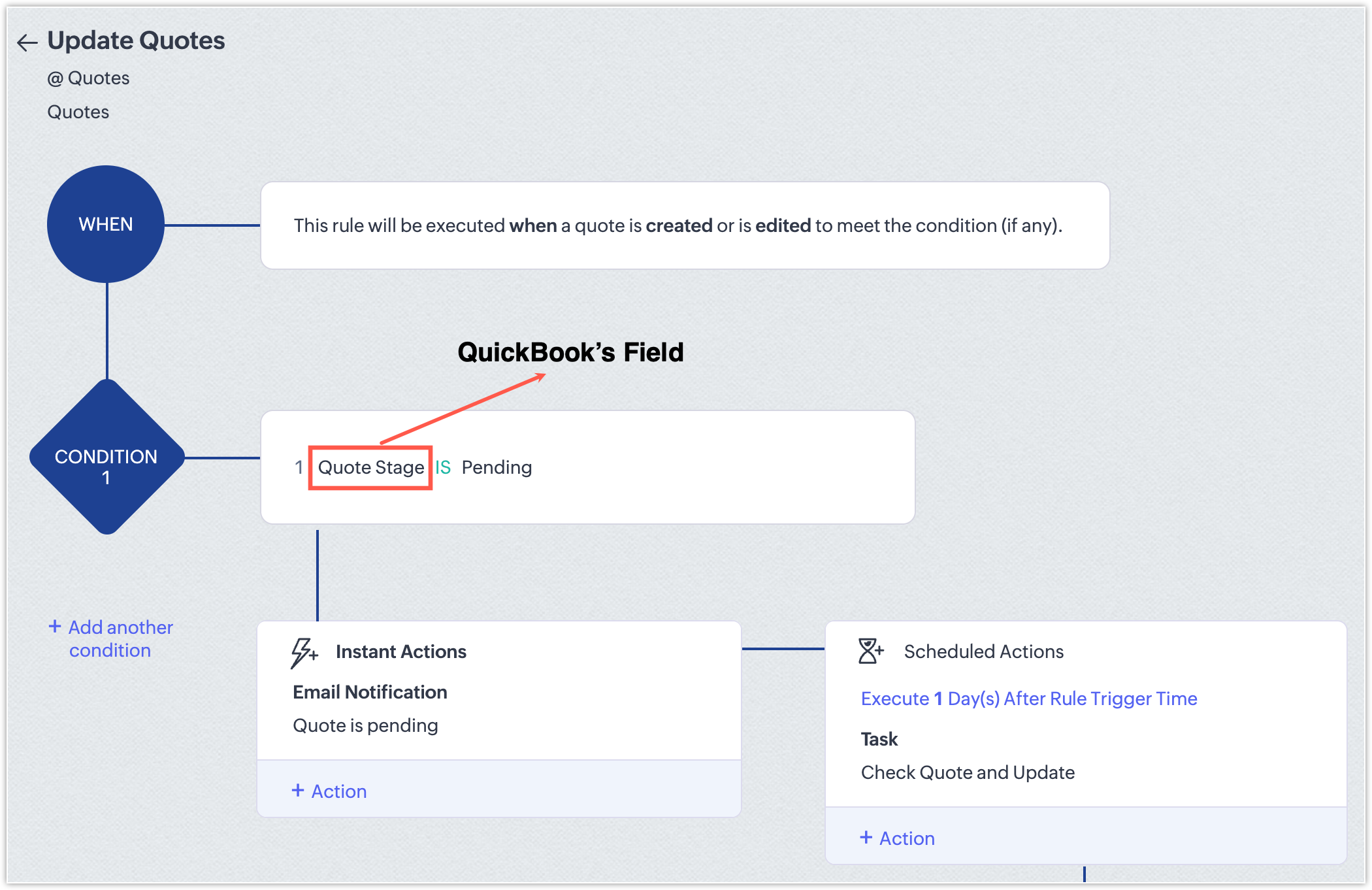
Generate reports that combine pipeline and billing information.
With this integration, CRM evolves beyond a simple pipeline tracker; it becomes a central hub for revenue operations that gives teams full visibility and control over sales and finance workflows.
 Points to be noted
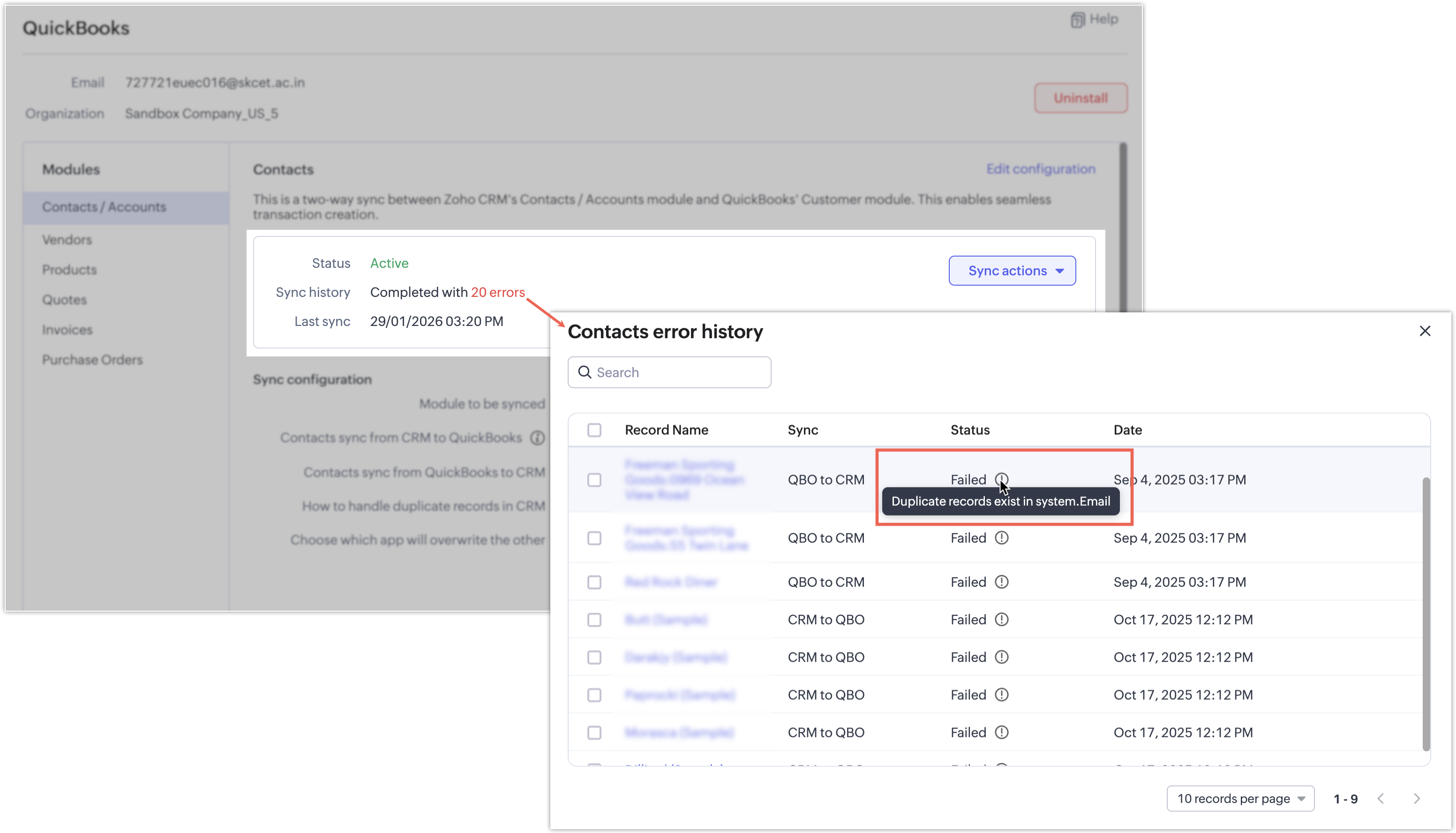
If a synchronization attempt fails, the record won't be synced and a clear error message will indicate the reason for the failure.
 Availability and pricing
Editions: Supported for Professional and above editions of Zoho CRM.
Pricing: The integration is currently available at no additional cost. Pricing may be introduced in the future.
That's all for this enhancement! We hope this integration helps you manage your sales and finance operations more efficiently. Please give it a try and share your feedback in the comments below.
Thanks and have a great day!
Nizamuddin