New Zoho CRM mobile updates: date sync, Zia analytics support, and subform permissions
Hello Everyone!
Hope you're doing great! We’re excited to share some new updates to the Zoho CRM Mobile app that are designed to make your experience even smoother and more efficient. We've included a summary of these updates so that you can take a closer look at them.
1. Unified date format for iOS app
We've made it easier to keep the date format consistent across your web and mobile devices. Any changes you make to the date format (dd-mm-yyyy) in the Zoho CRM web version can now be synced to the mobile app. After updating the date format on the web, open the iOS app > go to any module > More Settings ( ) > Sync changes now.
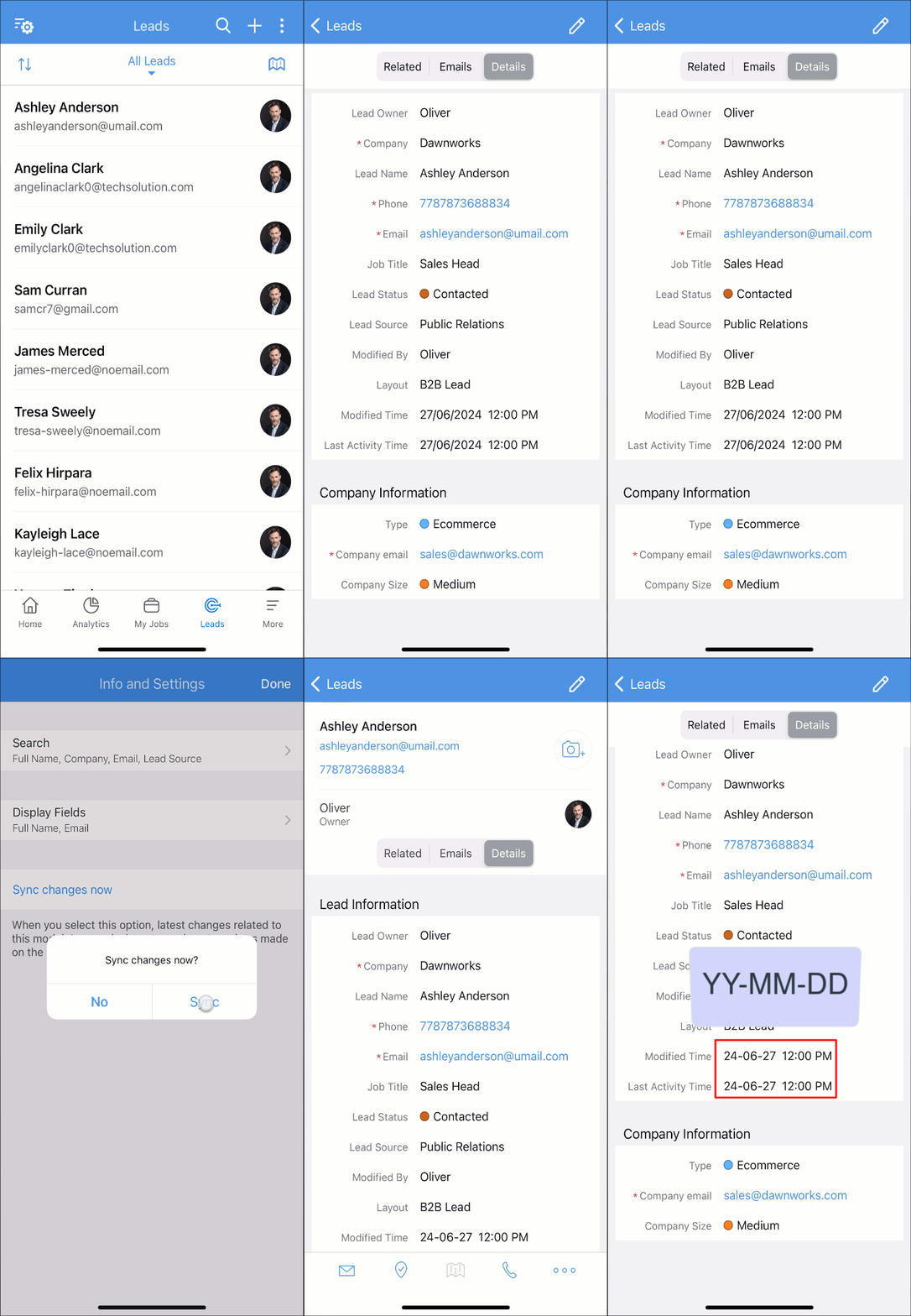
) > Sync changes now.2. Analytics support in Zia for Android & iOS
Zia now supports analytics components on both Android and iOS devices. This means that when you ask Zia for a specific analytical component by name, such as "Deals by stages" in your deals module, Zia will provide you with detailed analytics data instantly. This enhancement allows you to conveniently access and use comprehensive insights directly from your mobile device, improving your decision-making within Zoho CRM.

3. Subform permission in Android app
Permissions set for subforms (view, edit, create, delete) in the Zoho CRM web version are now reflected in the mobile app. This means only users with the appropriate permissions can view, edit, add, or delete subform sections. After setting up these permissions in the web version, you can sync them to the mobile app. To do this, open the iOS app > go to any module > More Settings ( ) > Sync changes now.
) > Sync changes now.For example: If a user is only granted view permission for a subform, they will be able to view that subform in the mobile app, but won't be able to edit, create, or delete entries.

We hope that these updates will enhance your user experience within Zoho CRM. Feel free to drop any questions or concerns in the comments below; we're here to assist you every step of the way!
Stay tuned for more exciting updates from Zoho CRM Mobile.
Have a great day !