Présentons Zoho Directory : la plateforme sécurisée de gestion des comptes et des accès des employés

Présentons Zoho Directory : la plateforme sécurisée de gestion des comptes et des accès des employés


La plupart des entreprises se connectent à des applications à des fins professionnelles variées, ce qui permet d'améliorer considérablement la productivité. Toutefois, cette amélioration de la productivité s'accompagne de questions relatives à la gestion d'accès et de sécurité, notamment :
Notre système permet-il de gérer en toute sécurité les échanges entre les applications, les appareils et les identifiants ?
Nos contrôles de sécurité sont-ils robustes pour protéger l'organisation contre le risque croissant de hacking ?

Pour y répondre, est mis en place Zoho Directory, une solution de gestion d'identité et d'accès pour les employés, destinée aux entreprises amenées à gérer leurs activités sur cloud. 

Un moyen sûr et pratique de se connecter au travail


L'authentification unique (SSO- Single sign on) facilite largement l'accès à plusieurs applications sans avoir à se connecter à chacune de ces dernières. Il permet aux employés d'économiser le temps qu'ils consacrent à la saisie quotidienne des identifiants tout en évitant les pratiques inadaptées aux mots de passe.
Zoho Directory vous permet d'accéder facilement et en toute sécurité à toutes vos applications professionnelles à l'aide d'un seul et même identifiant, ce qui améliore l'expérience de connexion de vos employés et leur productivité. Cela permet également de réduire le nombre de changements de mots de passe gérés par votre équipe informatique. Le catalogue d'applications vous permet de choisir parmi plus de 350 applications et d'y accéder en toute sécurité. 

Élargir le pouvoir du SSO à tous vos appareils


Les employés se connectent en utilisant des mots de passe différents pour leurs appareils et leurs applications. Imaginez que nous puissions éliminer l'utilisation de mots de passe différents pour les appareils et les applications.
L'authentification des appareils de Zoho Directory vous permet d'accéder à vos applications et à vos appareils avec le même ensemble d'identifiants. Elle permet également aux administrateurs informatiques d'enregistrer et de désactiver facilement les appareils, et de consacrer des ressources moindres au changement de mot de passe. Grâce au SSO sécurisé et à l'authentification des appareils de Zoho Directory, les employés ont la possibilité de se connecter plus aisément. 

Politiques de sécurité détaillées pour une meilleure sécurité au travers de l'organisation
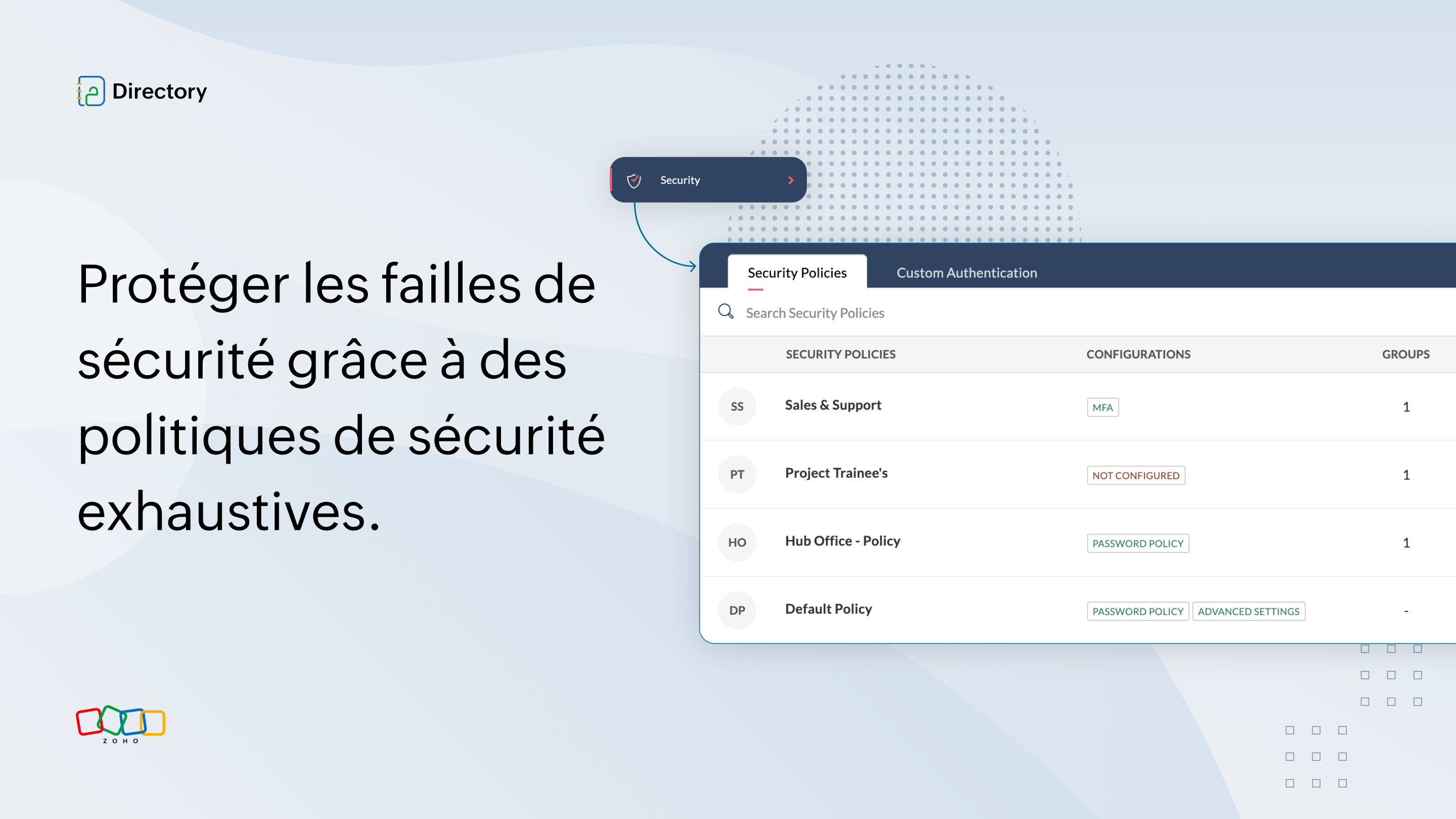

Les failles de sécurité sont l'une des plus grandes préoccupations de toutes les entreprises, de toutes tailles. Dans cette optique, Zoho Directory vous permet de définir des politiques de sécurité exhaustives pour protéger votre organisation. Par exemple, il est possible d'activer l'authentification multi-facteur avec Zoho OneAuth, notre propre application d'authentification, afin d'ajouter une couche de sécurité supplémentaire à vos mots de passe.
Vous pourrez également configurer des politiques de mot de passe, gérer les sessions web, limiter les appareils en fonction de l'adresse IP, et bien plus encore.

Gérer toutes vos applications à partir d'un seul endroit


Les employés rejoignent, quittent ou changent d'équipe en permanence. Dans une entreprise en pleine croissance, il n'est pas pratique d'avoir à fournir et modifier l'accès aux applications à chacun individuellement, et de modifier les données des applications séparément.
L'app provisioning de Zoho Directory vous permet de créer des profils d'utilisateurs et de gérer des opérations telles que la création, la mise à jour et la suppression d'applications à partir de Zoho Directory. De cette façon, vos administrateurs TI passent moins de temps à créer et à gérer des profils d'utilisateurs individuellement pour chaque application. 

Utiliser des répertoires externes à l'aide de bibliothèques


Les entreprises utilisent des répertoires locaux et d'autres répertoires "cloud" pour gérer leur équipe. Ces multiples sources d'annuaires entraînent une duplication des informations sur les utilisateurs et sont difficiles à gérer. Si vous faites partie de ces entreprises, cette solution est faite pour vous.
 
Le Directory Store vous permet de synchroniser les données des utilisateurs entre les différents répertoires et de maintenir une source unique pour toutes les informations relatives aux utilisateurs.
Ainsi, Zoho Directory vise à faciliter le travail des administrateurs informatiques, qui peuvent synchroniser toutes les informations sur les utilisateurs et éviter les incohérences entre les services. 

Une vue d'ensemble de l'identité de votre personnel grâce à des rapports


Les rapports de Zoho Directory vous permettent de suivre toutes les interactions au sein de votre entreprise. Vous pouvez ainsi surveiller les comportements d'utilisateurs et d'applications à risque et agir avant qu'il ne soit trop tard.
Vous pouvez également vous préparer à des audits tels que SOC 2 et ISO 27001 grâce aux rapports détaillés de Zoho Directory sur l'activité de connexion, le MFA, et plus encore. 

Définir les rôles des administrateurs et structurer l'accès


Au fil de la croissance d'une organisation, les équipes informatiques et les administrateurs sont amenés à gérer un grand nombre d'utilisateurs, d'appareils et de données. Le fait de concentrer tous les privilèges d'administration sur une seule personne constitue une forte contrainte de sécurité.
La possibilité de définir des rôles précis pour chacun de vos administrateurs informatiques peut contribuer à structurer l'organisation.
Zoho Directory permet désormais de définir des rôles explicites pour les administrateurs, tels que l'administrateur d'application, l'administrateur d'organisation et l'administrateur de centre d'assistance. Ainsi, vous pouvez spécifier les applications et les groupes d'utilisateurs sur lesquels chaque administrateur a le contrôle.
 
En effet, avec Zoho Directory, les entreprises peuvent enfin avoir une vision à 360 degrés de l'identité de leurs employés et protéger leur organisation contre les menaces de sécurité grâce à une solution cloud à la fois conviviale et exhaustive.
 
Découvrez Zoho Directory ici .

L'équipe Zoho France


    • Sticky Posts

    • Recommandez Zoho CRM Plus à vos amis et gagnez des crédits !

      Bonjour à tous,   Vous aimez travailler avec Zoho CRM Plus ? Et bien vous avez maintenant la possibilité de le recommander autour de vous pour aider votre réseau à améliorer son expérience client. Et bien sur c'est gagnant-gagnant ! Comment cela fonctionne
    • Découvrez Zoho Workplace

      Bonjour à tous ! Un domaine personnalisé est devenu une nécessité absolue, non seulement pour les grandes entreprises, mais aussi pour les petites ou, dans certains cas, les familles. Nous avons toujours pensé que se lancer ne devrait pas coûter cher,
    • Découvrez Zoho Learn

      Bonjour à tous, Nous sommes très heureux de vous présenter Zoho Learn ! Commençons par vous expliquer ce qu'est Zoho Learn et comment il peut vous accompagner dans vos processus de formation. Qu'est-ce que Zoho Learn ? Zoho Learn est une solution complète
    • Recent Topics

    • Ability to Edit YouTube Video Title, Description & Thumbnail After Publishing

      Hi Zoho Social Team, How are you? We would like to request an enhancement to Zoho Social that enables users to edit YouTube video details after the video has already been published. Your team confirmed that while Zoho Social currently allows editing the
    • How do I remove a data source from Zoho Analytics?

      I am unable to find a delte option on a datasource that i put in the system as an error. On teh web it refers to a setup icon but I do not see that on my interface?
    • Add Employee Availability Functionality to Zoho People Shift Module

      Hello Zoho People Product Team, Greetings and hope you are doing well. We would like to submit a feature request to enhance the Zoho People Shift module by adding employee availability management, similar to the functionality available in Zoho Shifts.
    • Bigin, more powerful than ever on iOS 26, iPadOS 26, macOS Tahoe, and watchOS 26.

      Hot on the heels of Apple’s latest OS updates, we’ve rolled out several enhancements and features designed to help you get the most from your Apple devices. Enjoy a refined user experience with smoother navigation and a more content-focused Liquid Glass
    • Really want the field "Company" in the activities module!

      Hi team! Something we are really missing is able to see the field Company when working in the activities module. We have a lot of tasks and need to see what company it's related to. It's really annoying to not be able to see it.🙈 Thx!
    • Delay in rendering Zoho Recruit - Careers in the ZappyWorks

      I click on the Careers link (https://zappyworks.zohorecruit.com/jobs/Careers) on the ZappyWorks website expecting to see the job openings. The site redirects me to Zoho Recruit, but after the redirect, the page just stays blank for several seconds. I'm
    • Is Desk Down?

      Across department - always an error. [Status Mode] - error [Table View and the rest] - working
    • We Asked, Zoho Delivered: The New Early Access Program is Here

      For years, the Zoho Creator community has requested a more transparent and participatory approach to beta testing and feature previews. Today, I'm thrilled to highlight that Zoho has delivered exactly what we asked for with the launch of the Early Access
    • Can the Product Image on the Quote Template be enlarged

      Hello, I am editing the Quote Template and added ${Products.Product Image} to the line item and the image comes up but it is very tiny. Is there anyway that you can resize this to be larger? Any help would be great! Thanks
    • How do I change the wording of the tile of SignForm?

      When my user opens a SignForm url, the title that is presented is always "SignForm signer Information" and a form is displayed asking for the username and email address. This can be confusing to the end user. How can I change the title at least (Or at
    • How to link tickets to a Vendor/Vendor Contact (not Customer) for Accounting Department?

      Hi all, We’re configuring our Accounting department to handle tickets from both customers and vendors (our independent contractors). Right now, ticket association seems to be built around linking a ticket to a Customer / Customer Contact, but for vendor-originated
    • Problem with CRM Connection not Refreshing Token

      I've setup a connection with Zoom in the CRM. I'm using this connection to automate some registrations, so my team doesn't have to manually create them in both the CRM and Zoom. Connection works great in my function until the token expires. It does not refresh and I have to manually revoke the connection and connect it again. I've chatted with Zoho about this and after emailing me that it couldn't be done I asked for specifics on why and they responded. "The connection is CRM is not a feature to
    • Automatic Matching from Bank Statements / Feeds

      Is it possible to have transactions from a feed or bank statement automatically match when certain criteria are met? My use case, which is pretty broadly applicable, is e-commerce transactions for merchant services accounts (clearing accounts). In these
    • Clone Recurring Expenses

      Our bookkeeping practices make extensive use of the "clone" feature for bills, expenses, invoices, etc. This cuts down significantly on both the amount of typing that needs to be done manually and, more importantly, the mental overhead of choosing the
    • Unify Overlapping Functionalities Across Zoho Products

      Hi Zoho One Team, We would like to raise a concern about the current overlap of core functionalities across various Zoho applications. While Zoho offers a rich suite of tools, many applications include similar or identical features—such as shift management,
    • Automation #7 - Auto-update Email Content to a Ticket

      This is a monthly series where we pick some common use cases that have been either discussed or most asked about in our community and explain how they can be achieved using one of the automation capabilities in Zoho Desk. Email is one of the most commonly
    • Ticket to article and Ticket to template

      Hello! I would like to know if it is possible (and how) to do the following actions: 1. To generate an article from a ticket (reply + original message) 2. Easy convert an answer to an email template
    • Is there API Doc for Zoho Survey?

      Hi everyone, Is there API doc for Zoho Survey? Currently evaluating a solution - use case to automate survey administration especially for internal use. But after a brief search, I couldn't find API doc for this. So I thought I should ask here. Than
    • Windows Desktop App - request to add minimization/startup options

      Support Team, Can you submit the following request to your development team? Here is what would be optimal in my opinion from UX perspective: 1) In the "Application Menu", add a menu item to Exit the app, as well as an alt-key shortcut for these menus
    • Creating Parent Child relationship in Accounts

      We have customers with multiple locations, I setup the HQ as an account, then I setup the different sites marking the HQ as the parent to that location. If I then do a Deal for one of the locations, is there a way to show by looking at the parent account
    • Kaizen #225 - Making Query-based Custom Related Lists Actionable with Lookups and Links

      Hello everyone! Welcome back to another post in the Kaizen series! This week, we will discuss an exciting enhancement in Queries in Zoho CRM. In Kaizen #190, we discussed how Queries bridge gaps where native related lists fall short and power custom related
    • WebDAV / FTP / SFTP protocols for syncing

      I believe the Zoho for Desktop app is built using a proprietary protocol. For the growing number of people using services such as odrive to sync multiple accounts from various providers (Google, Dropbox, Box, OneDrive, etc.) it would be really helpful
    • CRM x WorkDrive: We're rolling out the WorkDrive-powered file storage experience for existing users

      Release plan: Gradual rollout to customers without file storage add-ons, in this order: 1. Standalone CRM 2. CRM Plus and Zoho One DCs: All | Editions: All Available now for: - Standalone CRM accounts in Free and Standard editions without file storage
    • Non-responsive views in Mobile Browser (iPad)

      Has anyone noticed that the creator applications when viewed in a mobile browser (iPad) lost its responsiveness? It now appears very small font size and need to zoom into to read contents. Obviously this make use by field staff quite difficult. This is not at all a good move, as lots of my users are depending on accessing the app in mobile devices (iPads), and very challenging and frustrating. 
    • [Free Webinar] Learning Table Series - AI-Enhanced Logistics Management in Zoho Creator

      Hello Everyone! We’re excited to invite you to another edition of Learning Table Series, where we showcase how Zoho Creator empowers industries with innovative and automated solutions. About Learning Table Series Learning Table Series is a free, 45-60
    • Learner transcript Challenges.

      Currently i am working on a Learner Transcript app for my employer using Zoho Creator. The app is expected to accept assessment inputs from tutors, go through an approval process and upon call up, displays all assessments associated with a learner in
    • Customizable UI components in pages | Theme builder

      Anyone know when these roadmap items are scheduled for release? They were originally scheduled for Q4 2025. https://www.zoho.com/creator/product-roadmap.html
    • Feature Request - Set Default Values for Meetings

      Hi Zoho CRM Team, I would be very useful if we could set default values for meeting parameters. For example, if you always wanted Reminder 1 Day before. Currently you need to remember to choose it for every meeting. Also being able to use merge tags to
    • Analytics <-> Invoice Connection DELETED by Zoho

      Hi All, I am reaching out today because of a big issue we have at the moment with Zoho Analytics and Zoho Invoice. Our organization relies on Zoho Analytics for most of our reporting (operationnal teams). A few days ago we observed a sync issue with the
    • How to use Rollup Summary in a Formula Field?

      I created a Rollup Summary (Decimal) field in my module, and it shows values correctly. When I try to reference it in a Formula Field (e.g. ${Deals.Partners_Requested} - ${Deals.Partners_Paid}), I get the error that the field can’t be found. Is it possible
    • Zoho Creator to Zoho CRM Images

      Right now, I am trying to setup a Notes form within Zoho Creator. This Notes will note the Note section under Accounts > Selected Account. Right now, I use Zoho Flow to push the notes and it works just fine, with text only. Images do not get sent (there
    • CRM gets location smart with the all new Map View: visualize records, locate records within any radius, and more

      Hello all, We've introduced a new way to work with location data in Zoho CRM: the Map View. Instead of scrolling through endless lists, your records now appear as pins on a map. Built on top of the all-new address field and powered by Mappls (MapMyIndia),
    • Error Logs / Failure logs for Client Scripts Functions

      Hi Team, While we are implementing client scripts for the automation, it is working fine in few accounts but not working for others. So, it would be great if we can have error Logs for client scripts also just like custom functions. Is there any way that
    • Automate pushing Zoho CRM backups into Zoho WorkDrive

      Through our Zoho One subscription we have both Zoho CRM and Zoho WorkDrive. We have regular backups setup in Zoho CRM. Once the backup is created, we are notified. Since we want to keep these backups for more than 7 days, we manually download them. They
    • Zoho Books blocks invoicing without VeriFactu even though it is not mandatory until 2027

      I would like to highlight a very serious issue in Zoho Books for Spain. 1. The Spanish government has postponed the mandatory start of VeriFactu to January 1st, 2027. This means that during all of 2026 businesses are NOT required to transmit invoices
    • Problem : Auto redirect from zoho flow to zoho creator

      Hi there, I've been waiting for zoho team to get back on this for last couple of days. Anyone else have the problem to access zoho flow? everytime I click on zoho flow it redirects me to zoho creator. I tried incognito mode but it still direct me to zoho
    • Client and Vendor Portal

      Some clients like keeping tabs on the developments and hence would like to be notified of the progress. Continuous updates can be tedious and time-consuming. Zoho Sprints has now introduced a Client and Vendor Portal where you can add client users and
    • #7 Tip of the week: Delegating approvals in Zoho People

      With Zoho People, absences need not keep employees waiting with their approval requests. When you are not available at work, you can delegate approvals that come your way to your fellow workmate and let them take care of your approvals temporarily. Learn more!
    • Trouble with using Apostrophe in Name of Customers and Vendors

      We have had an ongoing issue with how the system recognizes an apostrophe in the name of customers and vendors. The search will not return any results for a name that includes the mark; ie one of our vendors names is "L'Heritage" and when entering the
    • Why am I seeing deleted records in Zoho Analytics syncing with Zoho CRM?

      I have done a data sync between Zoho CRM and Zoho Analytics, and the recycle bin is empty. Why do I see deleted leads/deals/contacts in Zoho Analytics if it doesn't exist in Zoho CRM? How can I solve this problem? Thanks
    • Next Page