The Social Playbook - February edition: Why moment marketing works (and how brands use it)
Imagine the final season of your favorite series is about to drop. Your entire feed is talking about it. Trailers everywhere. Fan theories. Hype at 100%.
Now your go-to burger place launches a limited-edition meal box themed around that series—custom packaging, a collectible character inside, and a menu inspired by the show.
Be honest… you’re not just hungry anymore. You want it. You need it. That feeling? That’s not random. That’s "moment marketing."
What's happening here?
Moment marketing is when you start creating content around what’s actually happening in the world. It’s about tapping into real-time moments like a new series drop, a big match, or even a pop culture wave, and using that excitement to connect with your audience in a way that feels natural, fun, and timely. When a brand launches a limited-edition product, a themed post, or even just a clever content during a big moment, it’s not just marketing. It’s joining the conversation.
In the February edition of The Social Playbook, we break down what moment marketing is, how brands use real-time moments to create buzz, iconic examples that worked, and how you can apply it to your own content.
Why moment marketing works
When you connect your content or product to something people already care about, you stop feeling like an ad and start feeling like part of their world.
Here’s how using moments elevates your marketing:
- It builds brand recall and trust
When your audience sees your brand talking about something that’s happening right now, it feels relatable. Over time, this builds both brand recall and trust.
- It increases reach and shares
If your post taps into a moment in a clever way, your audience is more likely to send it to friends, post it on stories, or talk about it. That’s how your reach grows.
- It drives fast sales with FOMO (Limited-edition products)
When brands launch something exclusive around a hyped-up event (a series finale, a tournament, a festival) like limited-edition products, fans don’t want to miss out on something tied to what they love. It’s no longer just a product. It’s part of their passion. And that’s how brands build emotional connections.
Now let's take a look at an example;
During the Cricket World Cup, boAt launched a World Cup–themed edition watch.
It worked because:
- It showed up during a moment cricket fans truly cared about -> built recall and trust
- Fans shared it because it felt cool and personal -> boosted reach
- It was a limited-edition product at the right time -> created FOMO and quick sales
That’s moment marketing done right: right time, right idea, right emotion.

How brands use moment marketing (with real examples)
Brands adapt to moments based on what fits their brand voice, audience, and product. Some go big with campaigns, some keep it simple with packaging or social posts, but the goal stays the same: stay relevant and memorable.
Let’s look at a few popular ways brands have done this really well.
- Limited-edition products and themed packaging
When a big show, movie, or cultural moment drops, some brands create products and packaging inspired by it. When Bridgerton released a new season, several brands jumped in creatively. Brands like Kimirica, Dove, Nykaa, and others launched Bridgerton-inspired packaging and limited-edition products. The designs, colors, and themes matched the vibe of the series This makes fans feel like they were owning a piece of the moment. The launch of Nykaa’s Bridgerton collection resulted in a significant and record-setting boost in sales.

Similarly, when Stranger Things dropped a new season, brands like KFC, Burger King, Kinder Joy, and Miniso introduced themed meal boxes, collectibles, and special products. These weren’t just products, they were experiences fans wanted to be part of.

- Timely and relatable social media content
Some brands use the moments just by showing up at the right time with the right content. Whether it's creating posts, visuals, or captions linked to trending shows, events, or pop culture moments, brands insert themselves into conversations audiences are already having. This makes the content feel less like advertising and more like participation.

The most iconic moment marketing move in history
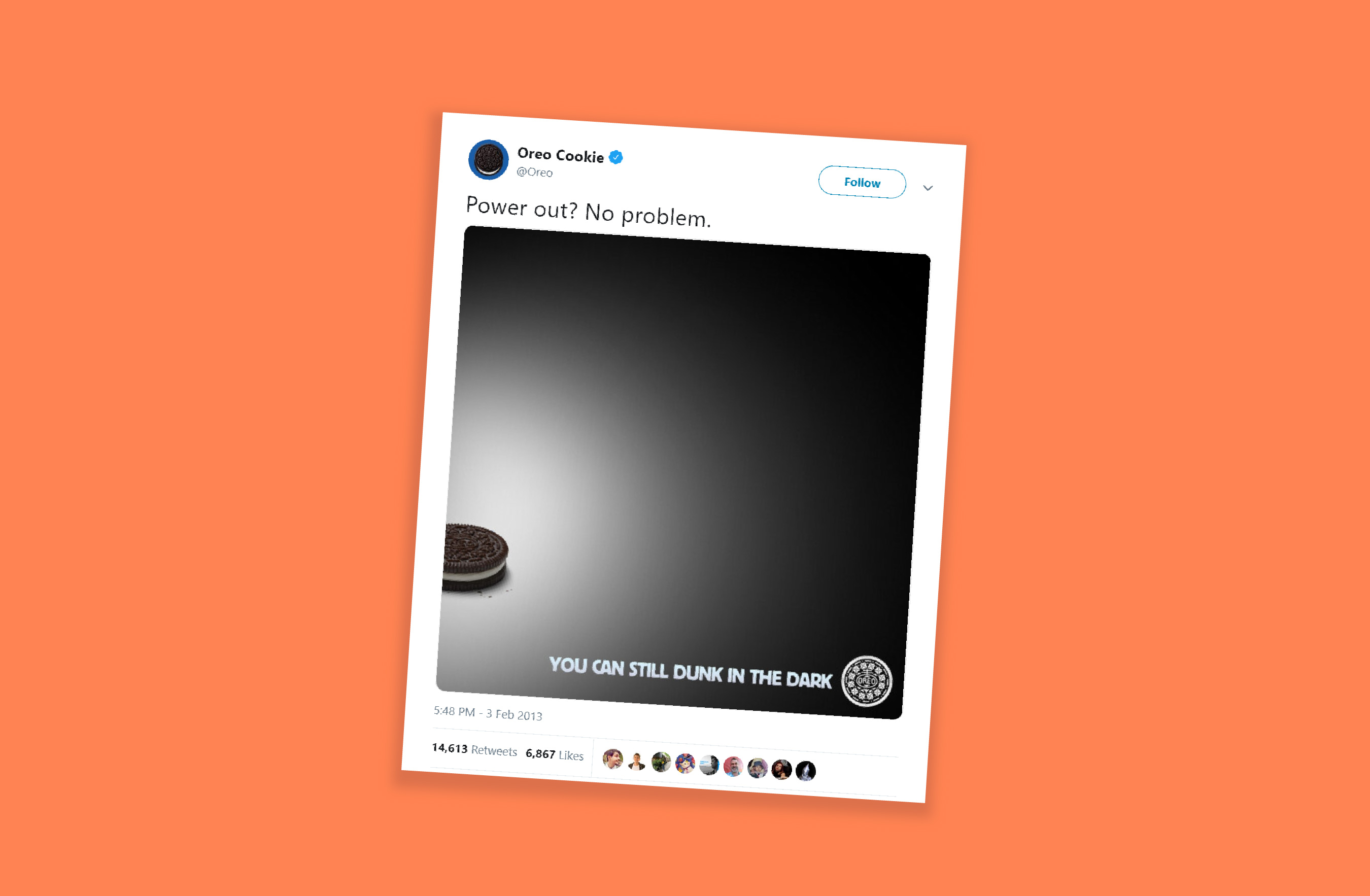
If there’s one example that perfectly defines moment marketing, it’s Oreo’s “Dunk in the Dark” moment during the 2013 Super Bowl.
During the Super Bowl, the stadium suddenly went dark due to a power outage. The game paused. The audience waited. And within minutes, Oreo’s social team posted a simple Tweet: “You can still dunk in the dark.” That’s it. No long copy. Just perfect timing and creativity.
The Tweet went viral, won multiple marketing awards, and is still talked about today as the most iconic moment marketing example ever.
- The Impact: The post received nearly 15,000 retweets and over 20,000 likes on Facebook within the first night.
- Social Growth: Oreo's Twitter following increased by 8,000, and Instagram followers grew from 2,000 to over 36,000 (reaching over 85,000 later that month).
- Media Value: The campaign generated approximately USD 525 million in earned media impressions.
How to use moment marketing the right way
Moment marketing works best when three things come together:
Perfect timing -> smart idea -> creative execution
- Get the timing right
- Keep an eye on what’s trending using tools like Google Trends, X, and social media analytics
- Watch for events, shows, matches, and cultural moments
- React fast, because the earlier you join the moment, the more attention you get
- Build a smart idea
- Your idea should connect naturally to the trend
- It should match your brand’s tone and personality
- Don’t force-fit yourself into a moment that doesn’t fit
- Add creative execution
- Use crisp copy
- Keep visuals clean and simple
- Add a witty or relatable twist
- Make people smile and think
For example, during the Women’s Premier League, Amul used the cricket buzz at the right time and created a fun post in their usual style. Even though they sell dairy products, the content felt natural and not forced. It worked because the timing was right, the idea made sense, and the creativity matched their brand.

Common mistakes in moment marketing
- Jumping on every trend without checking if it fits your brand
- Posting too late and missing the moment
- Using sensitive, political, or emotional topics for humor
- Being unclear or confusing in your message
- Trying to fit into trends that don’t suit your brand style
In moment marketing, you’re not chasing attention—you’re meeting your audience where their attention already is. When brands show up at the right moment, people notice and remember.
Stay tuned for the March edition of The Social Playbook.
Topic Participants
Stephania Beverly
Sticky Posts
The Social Playbook - February edition: Why moment marketing works (and how brands use it)
Imagine the final season of your favorite series is about to drop. Your entire feed is talking about it. Trailers everywhere. Fan theories. Hype at 100%. Now your go-to burger place launches a limited-edition meal box themed around that series—customThe Social Playbook - January edition: Getting started with content creation
Social media isn’t just about posting some random content. It’s about why certain content works, how brands stand out, and what makes people pause mid-scroll. The Social Playbook is a monthly community series where we break all of that down. Through real
Recent Topics
Zoho Inventory. Preventing Negative Stock in Sales Orders – Best Practices?
Dear Zoho Inventory Community, We’re a small business using Zoho Inventory with a team of sales managers. Unfortunately, some employees occasionally overlook stock levels during order processing, leading to negative inventory issues. Is there a way toAutomation #10 - Auto Assign Ticket based on Keywords
This is a monthly series designed to help you get the best out of Desk. We take our cue from what's being discussed or asked about the most in our community. Then we find the right use cases that specifically highlight solutions, ideas and tips on optimizingAutomate attendance tracking with Zoho Cliq Developer Platform
I wish remote work were permanently mandated so we could join work calls from a movie theatre or even while skydiving! But wait, it's time to wake up! The alarm has snoozed twice, and your team has already logged on for the day. Keeping tabs on attendanceReusable Custom Functions Across Department Workflows
Dear Zoho Desk Team, We appreciate the powerful workflow automation capabilities in Zoho Desk, particularly the ability to create and use custom functions within workflows. However, we have encountered a limitation that impacts efficiency and maintainability.Don't Allow Customer to Edit Values After Submitting Ticket
After a customer submits a ticket through the customer portal, they can go into the ticket and see some of the values from the questions they answered in the sidebar. Currently, a customer can edit these values even after they submitted them. This makes no sense. We ask very specific questions that we don't want customers to later change! Please disable the ability for customers to edit the values to their submission questions in the portal. Screenshot attached.Analytics <-> Invoice Connection DELETED by Zoho
Hi All, I am reaching out today because of a big issue we have at the moment with Zoho Analytics and Zoho Invoice. Our organization relies on Zoho Analytics for most of our reporting (operationnal teams). A few days ago we observed a sync issue with thetext length in list report mobile/tablet
Is there a way to make the full text of a text field appear in the list report on mobile and tablet? With custom layouts, the text is always truncated after a certain number of characters.Automation #4 - Auto Delete Tickets based on Rules
This is a monthly series in which we pick some common use cases that have been either discussed or most asked about in our community and explain how they can be achieved using one of the automation capabilities in Zoho Desk. Unwanted tickets spammingZoho Community Digest — Enero 2026
¡Hola, comunidad! 🌟 Aquí os traemos las novedades más interesantes de Zoho durante este mes de enero, incluyendo actualizaciones de productos, integraciones y un recordatorio sobre los workshops certificados que vuelven a España. 🎓 Eventos y ComunidadAutomation #3 - Auto-sync email attachments to tickets
This is a monthly series where we pick some common use cases that have been either discussed or most asked about in our community and explain how they can be achieved using one of the automation capabilities in Zoho Desk. Most of our customers use emailAutomation #11 - Auto Update Custom Fields with Values from Emails
This is a monthly series designed to help you get the best out of Desk. We take our cue from what's being discussed or asked about the most in our community. Then we find the right use cases that specifically highlight solutions, ideas and tips to optimizeAutomation #13 - Auto assign tickets based on agent shift time
This is a monthly series designed to help you get the best out of Desk. We take our cue from what's being discussed or asked about the most in our community. Then we find the right use cases that specifically highlight solutions, ideas and tips to optimizeAutomation #14: Capture Jira Issue Key/ID in a Ticket Custom Field
Hello Everyone! This month's edition brings you a custom function to consolidate your records associated with Jira integration. Jira integration enables support engineers and R&D units to collaborate seamlessly on feature development, product improvement,Automation #16: Automate Ticket Reopening on Scheduled Timestamp
Hello Everyone! This edition uncovers the option to schedule reopening a ticket automatically. Zylker Finance tracks insurance policyholder activities through Zoho Desk. For policyholders who pay monthly premiums, tickets are closed upon payment completion.Automation#19:Auto-Close Tickets Upon Task Completion
Hello Everyone! We’re excited to bring you another custom function this week. In this edition, we’ll show you how to automatically close tickets when all associated tasks are marked as completed. Let’s see how ZylkaPure, a leading water filter company,Automation #15: Automatically Adding Static Secondary Contacts
Rockel is a top-tier client of Zylker traders. Marcus handles communications with Rockel and would like to add Terence, the CTO of Zylker traders to the email conversations. In this case, the emails coming from user address rockel.com should have TerenceImproved UX design for Projects CRM integration
The current integration embeds the entier projects inteface into the CRM this is confusing and allows users to get lost. For example as a user i navigate to an account and go down to the related projects list and want to get information about a specificTransformer vos stocks en décisions intelligentes avec Zoho Inventory et Zoho Analytics
Zoho Inventory permet de suivre facilement les niveaux de stock et d’anticiper les restockages. Pour de nombreuses entreprises, cela suffit à gérer les opérations au quotidien. Mais à mesure que l’activité se développe, cette clarté peut commencer à montrerSecurity Enhancements | Migrate to the Updated Policies
Hello everyone, Zoho Directory's security policies have been updated and reorganized into three new policies with features that enhance the overall organization security. These policies provide a stronger and more secure sign-in methods and improve theBring Zoho Shifts Capabilities into Zoho People Shift Module
Hello Zoho People Product Team, After a deep review of the Zoho People Shift module and a direct comparison with Zoho Shifts, we would like to raise a feature request and serious concern regarding the current state of shift management in Zoho People.How to block a WhatsApp user for sending spam
Is there a way to block those whatsapp users that just come to play and annoy our service, they also spam us. We have a waba service with sales iqInquiry regarding auto-save behavior for Zoho Sign Embedded Sending
Dear Zoho Support Team, I am currently integrating Zoho Sign's Embedded Sending functionality using iframes on my website. I would like to know if there is a way to ensure that the document state (including any added fields) is automatically saved asIntroducing Connected Records to bring business context to every aspect of your work in Zoho CRM for Everyone
Hello Everyone, We are excited to unveil phase one of a powerful enhancement to CRM for Everyone - Connected Records, available only in CRM's Nextgen UI. With CRM for Everyone, businesses can onboard all customer-facing teams onto the CRM platform toAutomation#17: Auto-Create Tasks in Zoho Projects Upon Ticket Creation in Zoho Desk
Hello Everyone, This edition delivers the solution to automatically create a task in Zoho Projects when a ticket is created in Zoho Desk. Zylker Resorts uses Zoho Desk for bookings and handling guest requests. Zylker resorts outsources cab bookings toAutomation#20 : Auto-Add Ticket Tags based on Keywords
Hello Everyone! Welcome to unveiling custom functions on our Community series. This week's post lets you add tags to your tickets automatically based on the keywords in the ticket subject and the ticket thread. Discover how this custom function helpsAutomation#21: Track Ticket Transfers Across Departments
Hello Everyone! With Halloween just around the corner, we'd like to let you know the Zoho Desk team is always there to sweep away your customer service troubles! This week, we’re excited to introduce a custom function that tracks tickets moved betweenEmail Integration - Zoho CRM - OAuth and IMAP
Hello, We are attempting to integrate our Microsoft 365 email with Zoho CRM. We are using the documentation at Email Configuration for IMAP and POP3 (zoho.com) We use Microsoft 365 and per their recommendations (and requirements) for secure email we haveHomepage not assignable to group
MS Teams for daily call operations
Hello all, Our most anticipated and crucial update is finally here! Organizations using Microsoft Teams phone system can now integrate it effectively with Zoho CRM for tasks like dialling numbers and logging calls. We are enhancing our MS Teams functionalityAutomation#22 Track Ticket Duration at Specific Status
Hello Everyone! Welcome back to the Community Learning Series! Today, we explore how Zylker Techfix, a gadget servicing firm, boosted productivity by tracking the time spent at a particular ticket status in Zoho Desk. Zylker Techfix customized Zoho Desk’sAutomation#23: Automate Guided Conversations in Zoho Desk with Business Hours
Hello Everyone, This week's edition introduces a custom function designed to automate Guided Conversations in Zoho Desk, based on your business hours. With this feature, you can align the bot's behavior with your business schedule, ensuring a smooth andAddress changes in quote form
When entering a quote, the first piece of information required is the Account, which properly populates the billing and shipping address fields. Then I use the lookup function to select a contact, and when I do, the billing and shipping addresses areAutomation#24: Auto-Update custom field from Accounts to Tickets
Hello Everyone! Welcome back to the Community Learning Series! This episode dives into how Zylker Techfix streamlines account-related ticket references. Previously, employees had to manually check account details to retrieve specific customer information,Kaizen #227 : Client Script Support for List Page (Canvas)
Hello everyone! Welcome to another week of Kaizen. In today's post lets see how Client Script can be used in Canvas List Page to mask sensitive information from specific roles and add colors to Canvas List Page records based on custom criteria.This useAutomation#25: Move Tickets to Unassigned When the Owner Is Offline
Hello Everyone, Welcome to this week's Community Series! 'Tis the holiday season—a time when work often takes a brief pause. The holiday spirit is in full swing at Zylker Techfix too, with employees taking some well-deserved time off. During this period,Automation#27: Retain Ticket Owner on Moved Tickets
Hello Everyone! This week, we present to you a custom function that retains the ticket owner when a ticket is moved from one department to another. Here’s more to help you understand the custom function: At Zylker Techfix, Alex, the Support Engineer managesAutomation#28 Notify Agents on Article Expiry
Hello Everyone! This week, we’re bringing you a feature that notifies your team when articles in the Knowledge Base are set to expire to keep your content relevant and helpful for customers. The Zoho Desk's Knowledge Base is an asset for customers toAutomation#29 Retain ticket status on moved tickets
Hello Everyone, Hear out Zylker Techfix’s Success Story on Smoother Ticket Transitions! Zylker Techfix, a gadget servicing firm committed to quick repairs and timely deliveries, faced a challenge when ticket statuses changed automatically while movingAutomation#32:Auto Add New Portal Users to the Help Center User Groups
Hello Everyone, Introducing a custom function that automates the process of adding new portal users to Help Center user groups, making user management effortless! By default, Zoho Desk allows you to assign new portal users to groups manually. But withAutomation#34 : Automate Email threading for Ticket notification
Hello Everyone, It's been a while since we've presented an automation. However, our community has been buzzing with ideas, use cases, and discussions with our community experts and Ask the Experts session. So, here we are again, presenting an automationNext Page