Tip #10: Various time zone settings on the bookings page
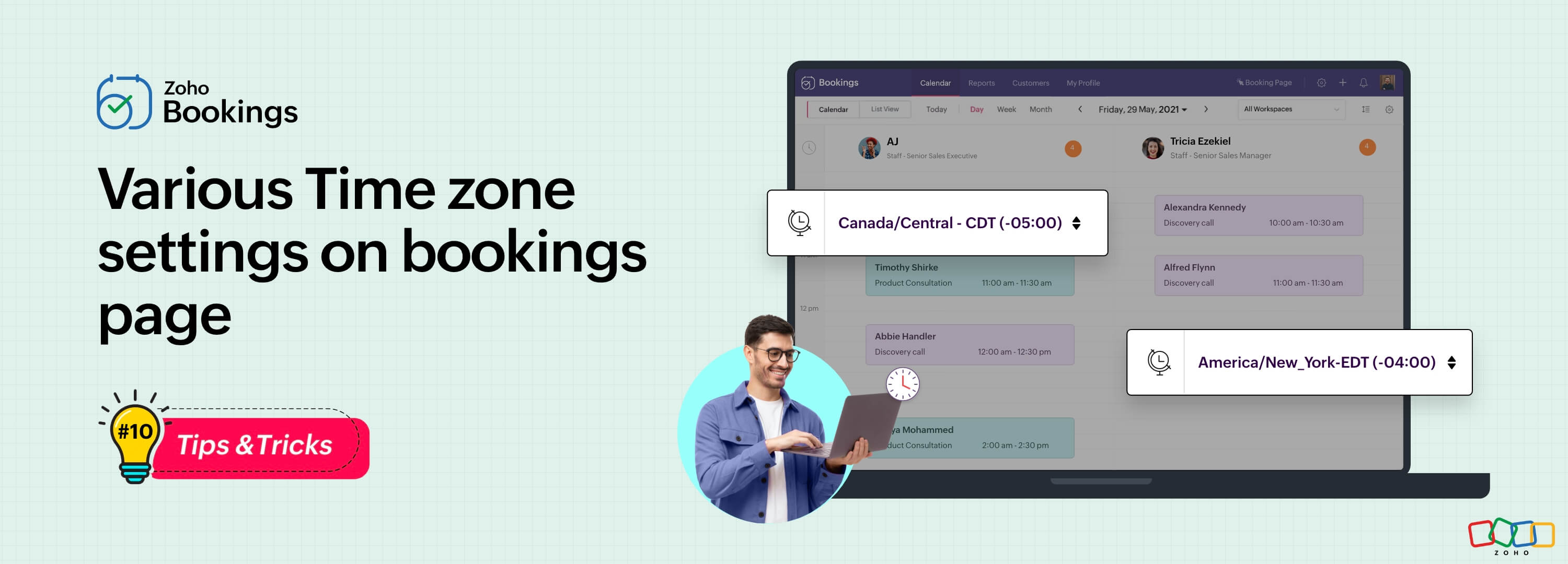
Let's assume you are an IT consultant who works with clients in multiple countries. To schedule appointments and avoid any time-zone related complications, your booking platform should provide automatic time zone conversion. Additionally, your clients should have the option to select their preferred time zones for appointments. This feature can greatly benefit consultants who frequently travel or meet clients and experience varying time zones on different days.
Likewise, a yoga studio can effortlessly arrange online sessions for its global clients, regardless of their time zones.
Zoho Bookings offers a range of time zone settings, simplifying the appointment scheduling process regardless of service provider and customer location.
Benefits
Minimized errors: Automatic time zone conversion reduces the risk of scheduling errors caused by manual time zone calculations.
Time zone selection control: Admins can determine whether the time zone option on the booking should be displayed, hidden, or made editable, offering greater flexibility that is tailored to specific needs.
Time zone-based notifications: Email notifications will be sent to both the staff and customers, according to their preferred time zones. For instance, if the staff works in an Australian time zone and the customer books in an American time zone, appointment emails will be sent to each party based on their selected time zones.
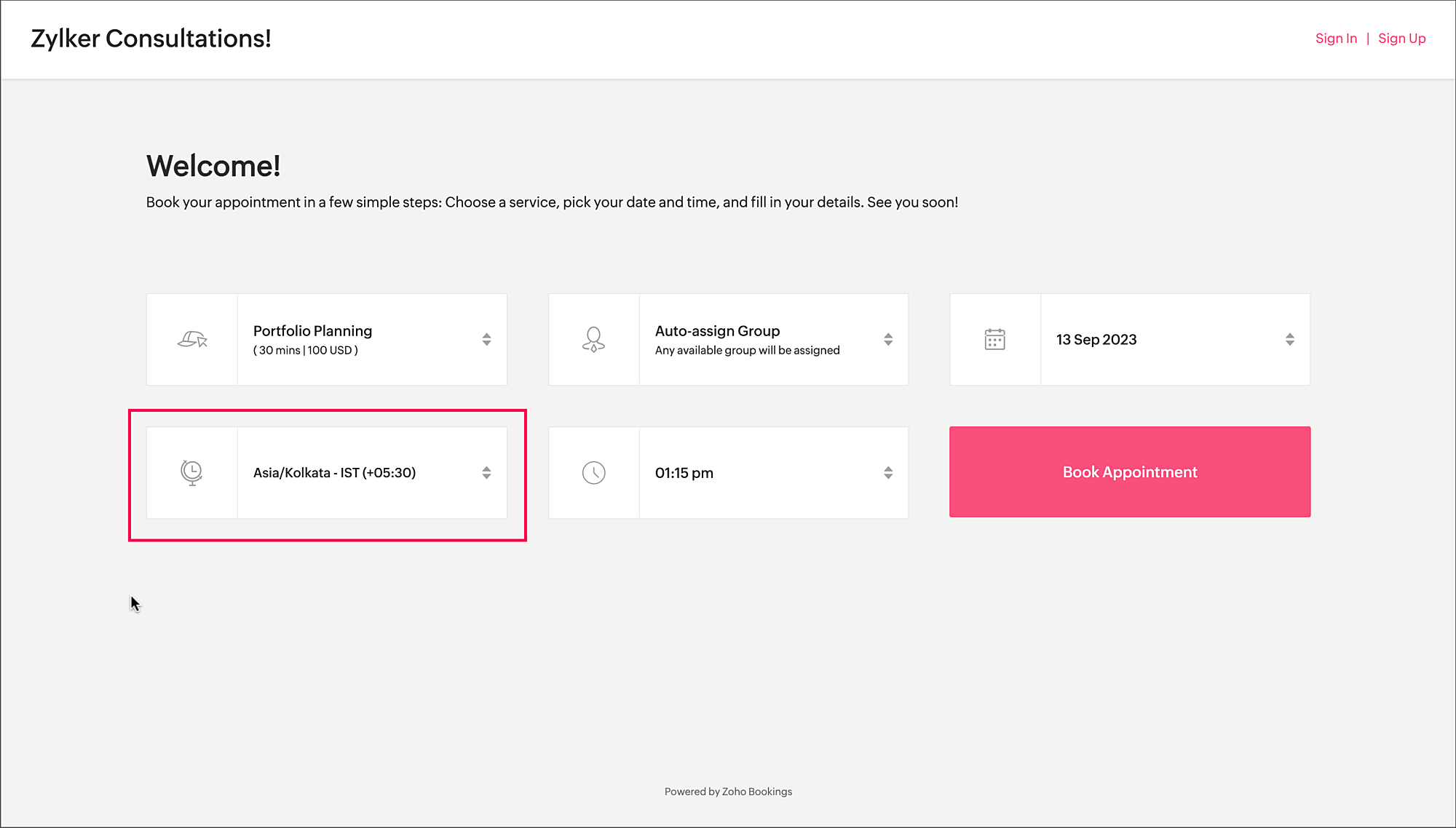
To access the time zone settings
- Navigate to Services > Select the required service > Service Preferences.
Note: For group and resource booking, the time zone settings can to be configured under Workspaces > Policies and Preferences. - Under General section, click the edit icon against Time Zone Presets.
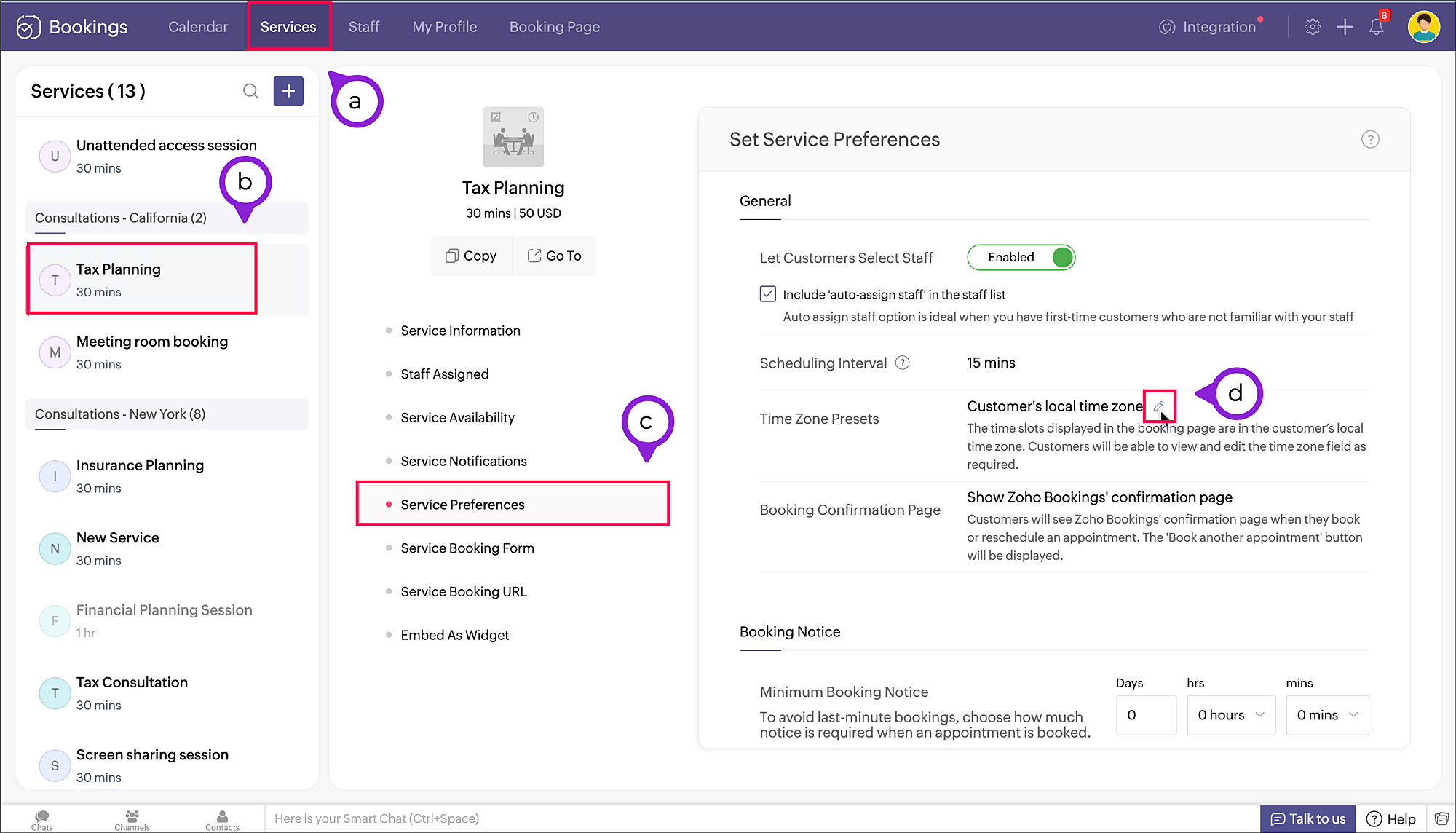
- A pop-up appears where you can configure the time zone settings.
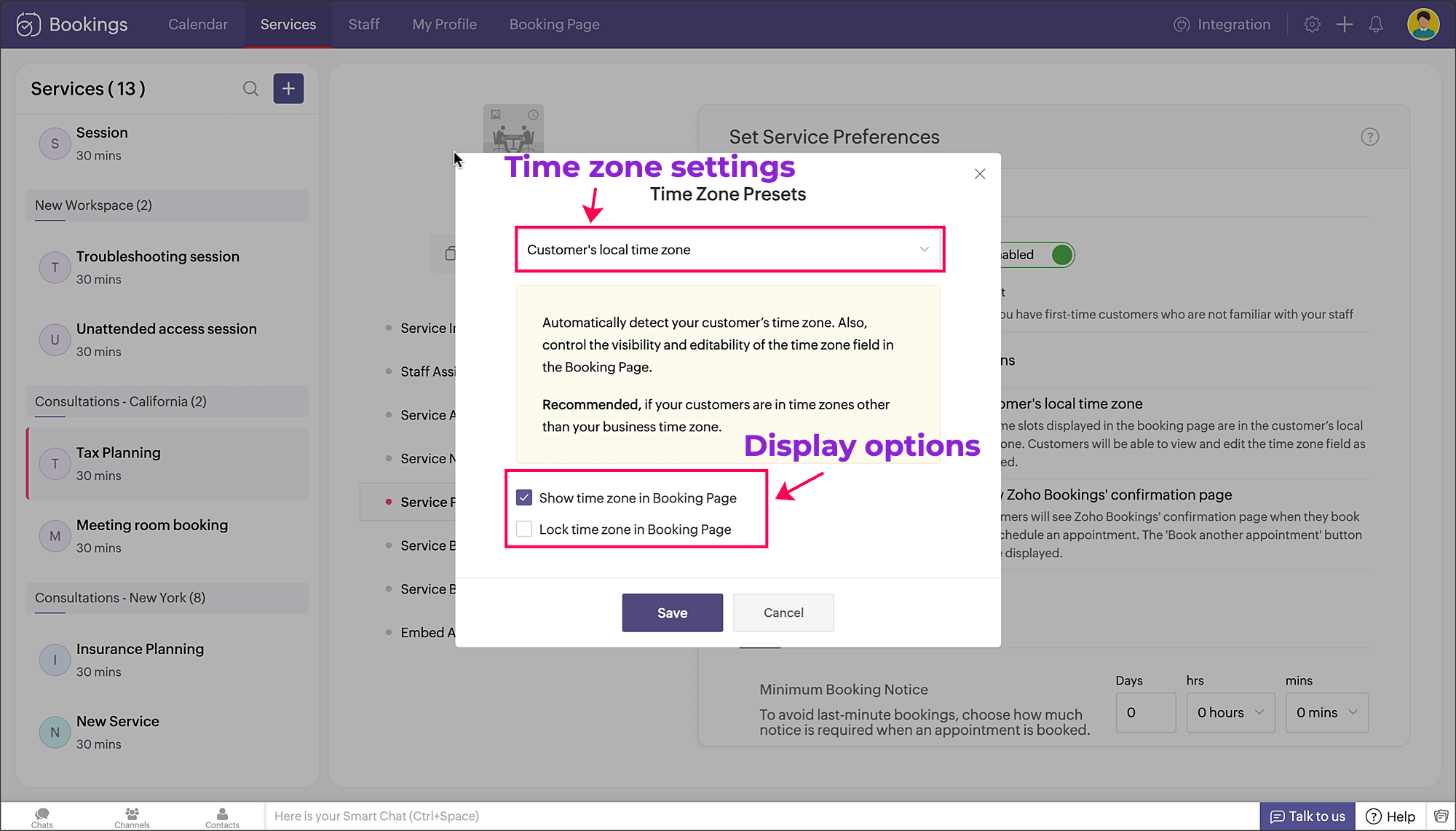
a. Time zone settings: The first dropdown is for choosing the time zone on the booking page. You have three options to choose from.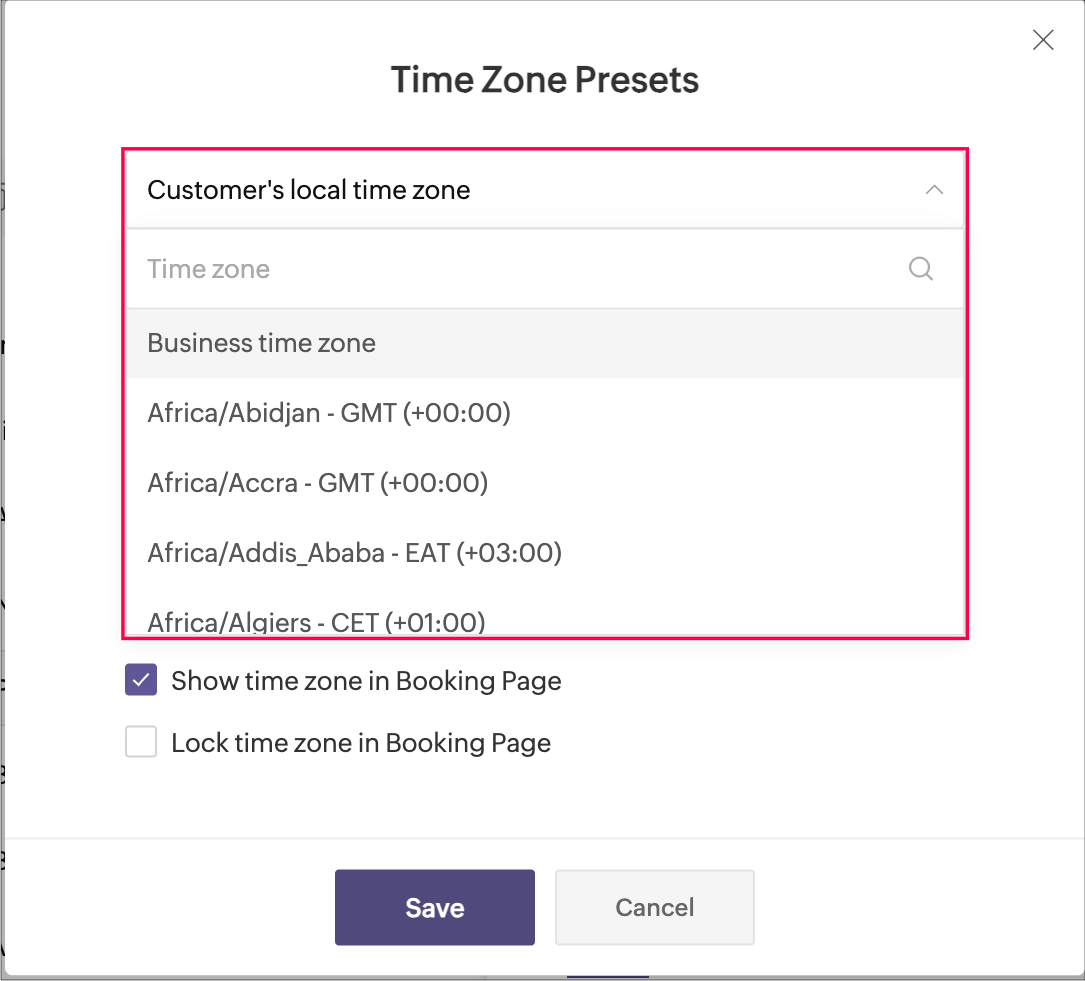
- Customer's local time zone: By choosing this, the customer's location will be detected and the corresponding time zone will be shown on the booking page.
- Business time zone: By choosing this, the default time zone of the business will be shown. This can be accessed under Settings > General > Basic Information > Time Zone.
- Any other time zone: You can choose any other time zone from the list of all time zones.

Visibility options:
- Show time zone: To show the time zone option on the booking page, select the checkbox next to Show time zone in Booking Page. This displays the time zone which is selected in the above pop-up.
- Hide time zone: To hide the time zone dropdown option on the booking page, deselect the checkbox next to Show time zone in Booking Page.
This means that the time zone selected on the above pop-up is suitable for the appointment. However, it's essential to ensure that all parties involved are on the same page regarding the appointment's timing, which might require additional communication or clarification.
Locking options:
- Lock time zone: To prevent the customer from changing the time zone, you can select the checkbox next to Lock time zone in Booking Page.
Here, the booking system displays the specified time zone without the option for customers to modify it. This can be beneficial when strict scheduling adherence is crucial, ensuring that all appointments are synchronized according to a predetermined time zone. - Unlock time zone: To allow the customer to edit/change the time zone, you can deselect the checkbox next to Lock time zone in Booking Page.
This option provides flexibility, allowing customers to select their preferred time zones, which can be particularly useful for businesses with a global customer base. It empowers customers to book appointments that align with their local time, reducing confusion and scheduling errors.
Combining the visibility and locking options, there are three display options as shown below.
Show | Lock | Result |
✓ | ✗ | Shows the time zone and allows customer to modify the time zone on the booking page |
✓ | ✓ | Shows the time zone but restricts the customer from modifying the time zone on the booking page |
✗ | N/A | Hides the time zone |
To conclude, implementing time zone settings and providing visibility or locking options on the booking page can greatly enhance user convenience, minimize scheduling errors, and ensure a smoother experience for both customers and service providers.
Hope this tip is useful, let us know your thoughts in the comments section.
Happy scheduling!
Topic Participants
Praveena Chandran
Michael Tarver
Akshara Amarnath
Sticky Posts
Tip #13: Identify where your bookings come from with Source Tracking
Source tracking is the practice of identifying where your bookings originated. This is important, because online bookings come from a wide variety of sources like social media platforms, your website, email and ad campaigns, partner websites, organicTip #17: How to mandate partial payment for your appointments
When you require partial payments during the booking process, customers can only schedule with you after paying a certain amount in advance. This deposit acts as a commitment between both parties. Apart from that, it has many more advantages. BenefitsTip #18: Organize a group workshop in a few steps
It's the season for workshops—they're everywhere, catering to diverse interests and needs. Whether for more professional goals like leadership development or creative endeavors like painting, there's an abundance of workshops offered every day. A schedulerTip #16: Custom labels for staff, service, and resources
Every industry uses its own jargon. Take healthcare, for example; when you visit a doctor, it's not just an appointment, it's a consultation. The people who provide consultations are the providers. Similarly, in the tranquil world of a spa, a massageTip #15: Customize service prices for each staff member
It's common practice for a service to be priced differently based on the staff member providing it. For example, an experienced hair stylist may charge more for a haircut compared to the other stylists. This pricing strategy allows businesses to charge
Recent Topics
Unlocking New Levels: Zoho Payroll's Journey in 2025
Every year brings its own set of challenges and opportunities to rethink how payroll works across regulations and teams. In 2025, Zoho Payroll continued to evolve with one clear focus: giving businesses more flexibility, clarity, and control as they grow.Introducing Connected Records to bring business context to every aspect of your work in Zoho CRM for Everyone
Hello Everyone, We are excited to unveil phase one of a powerful enhancement to CRM for Everyone - Connected Records, available only in CRM's Nextgen UI. With CRM for Everyone, businesses can onboard all customer-facing teams onto the CRM platform toSend Supervisor Rule Emails Within Ticket Context in Zoho Desk
Dear Zoho Desk Team, I hope this message finds you well. Currently, emails sent via Supervisor Rules in Zoho Desk are sent outside of the ticket context. As a result, if a client replies to such emails, their response creates a new ticket instead of appendingform data load issue when saving as duplicate record is made
Hello. I have a form with a lookup when a value is selected the data from the corresponding record is filled into all of the fields in the form. But the form is loaded in such a state that if any value is changed it will take all of the values pre loadedCRM project association via deluge
I have created a workflow in my Zoho CRM for closing a deal. Part of this workflow leverages a deluge script to create a project for our delivery team. Creating the project works great however, after or during the project creation, I would like to associateZoho Browser??
hai guys, this sounds awkward but can v get a ZOHO BROWSER same as zoho writer, etc. where i can browse websites @ home and continue browsing the same websites @ my office, as v have the option in Firefox, once i save and close the browser and again when i open it i will be getting the same sites. If u people r not clear with my explanation, plz let me know. Thanks, SandeepWhere can we specify custom CSS in Zoho Forms custom theme ?
I'm using a form with a dark theme. The OTP popup window is unreadable, because for some reason, the OTP popup background fixes color to white, but still takes the font color specified in the custom theme. This ends up as white on white for me, renderingMCP no longer works with Claude
Anyone else notice Zoho MCP no longer works with Claude? I'm unable to turn this on in the claude chat. When I try to toggle it on, it just does nothing at all. I've tried in incognito, new browsers, etc. - nothing seems to work.Enable History Tracking for Picklist Values Not Available
When I create a custom picklist field in Deals, the "Enable History Tracking for Picklist Values" option is not available in the Edit Properties area of the picklist. When I create a picklist in any other Module, that option is available. Is there a specific reason why this isn't available for fields in the Deals Module?The reason I switched away from Zoho Notebook
My main reason for switching to Zoho was driven by three core principles: moving away from US-based products, keeping my data within India as much as possible, and supporting Indian companies. With that intent, I’ve been actively de-Googling my digitalAdd RTL and Hebrew Support for Candidate Portal (and Other Zoho Recruit Portals)
Dear Zoho Recruit Team, I hope you're doing well. We would like to request the ability to set the Candidate Portal to be Right-to-Left (RTL) and in Hebrew, similar to the existing functionality for the Career Site. Currently, when we set the Career SiteAbility to Edit YouTube Video Title, Description & Thumbnail After Publishing
Hi Zoho Social Team, How are you? We would like to request an enhancement to Zoho Social that enables users to edit YouTube video details after the video has already been published. Your team confirmed that while Zoho Social currently allows editing theFree Webinar : Unlock AI driven business insights with Zoho Inventory + Zoho Analytics
Are you tired of switching between apps and exporting data to build customized reports? Say hello to smarter & streamlined insights! Join us for this exclusive webinar where we explore the power of the Zoho Inventory–Zoho Analytics integration. LearnCritical Issue: Tickets Opened for Zoho Support via the Zoho Help Portal Were Not Processed
Hi everyone, We want to bring to your attention a serious issue we’ve experienced with the Zoho support Help Portal. For more than a week, tickets submitted directly via the Help Portal were not being handled at all. At the same time no alert was postedHide/Show Subform Fields On User Input
Hello, Are there any future updates in Hide/Show Subform Fields "On User Input"?Cloning Item With Images Or The Option With Images
Hello, when I clone an item, I expect the images to carry over to the cloned item, however this is not the case in Inventory. Please make it possible for the images to get cloned or at least can we get a pop up asking if we want to clone the images asArchiving Contacts
How do I archive a list of contacts, or individual contacts?WorkDrive and CRM not in sync
1/ There is a CRM file upload field with WorkDrive file set as the source: 2/ Then the file is renamed in WorkDrive (outside CRM): 3/ The File in CRM is not synced after the change in WorkDrive; the file name (reference) in CRM record is not updated (hereCustom validation in CRM schema
Validation rules in CRM layouts work nicely, good docs by @Kiran Karthik P https://help.zoho.com/portal/en/kb/crm/customize-crm-account/validation-rules/articles/create-validation-rules I'd prefer validating data input 'closer to the schema'Adding Default Module Image into mail merge field
As with most people finding their way to these forums i have a specific requirement that doesn't seem to be supported by Zoho I have created 2 custom modules to suit my purpose 1 is an inventory type module that lists aluminium extrusions, and all relevantSync Data from MA to CRM
Currently, it's a one-way sync of data from the CRM to MA. I believe we should have the ability to select fields to sync from MA to the CRM. The lead score is a perfect example of this. In an ideal world we would be able to impact the lead score of aIs it possible to roll up all Contact emails to the Account view?
Is there a way to track all emails associated with an Account in one single view? Currently, email history is visible when opening an individual Contact record. However, since multiple Contacts are often associated with a single Account, it would be beneficialUpdate CRM record action
Currently, MA only offers a "Push Data" action to push data to a CRM module. This action is built to cover the need to both create a new record and update an existing record. Because it has been implemented this way all required fields on the CRM moduleNotes badge as a quick action in the list view
Hello all, We are introducing the Notes badge in the list view of all modules as a quick action you can perform for each record, in addition to the existing Activity badge. With this enhancement, users will have quick visibility into the notes associatedWhat's new in Zoho One 2025
Greetings! We hope you have all had a chance by now to get hands-on with the new features and updates released as part of ZO25. Yes, we understand that you may have questions and feedback. To ensure you gain a comprehensive understanding of these updates,Good news! Calendar in Zoho CRM gets a face lift
Dear Customers, We are delighted to unveil the revamped calendar UI in Zoho CRM. With a complete visual overhaul aligned with CRM for Everyone, the calendar now offers a more intuitive and flexible scheduling experience. What’s new? Distinguish activitiesAdd deluge function to shorten URLs
Zoho Social contains a nice feature to shorten URLs using zurl.co. It would be really helpful to have similar functionality in a Deluge call please, either as an inbuilt function or a standard integration. My Creator app sends an email with a personalisedEdit default "We are here to help you" text in chat SalesIQ widget
Does anyone know how this text can be edited? I can't find it anywhere in settings. Thanks!Quick way to add a field in Chat Window
I want to add Company Field in chat window to lessen the irrelevant users in sending chat and set them in mind that we are dealing with companies. I request that it will be as easy as possible like just ticking it then typing the label then connectingHow to create a two way Sync with CRM Contacts Module?
Newbie creator here (but not to Zoho CRM). I want to create an app that operates on a sub-set of CRM Contacts - only those with a specific tag. I want the app records to mirror the tagged contacts in CRM. I would like it to update when the Creator appZoho Sheet for Desktop
Does Zoho plans to develop a Desktop version of Sheet that installs on the computer like was done with Writer?Allow Manual Popup Canvas Size Control
Hello Zoho PageSense Team, We hope you're doing well. We would like to request an enhancement to the PageSense popup editor regarding popup sizing. Current Limitation: Currently, the size (width and height) of a popup is strictly controlled by the selectedWhere is the settings option in zoho writer?
hi, my zoho writer on windows has menu fonts too large. where do i find the settings to change this option? my screen resolution is correct and other apps/softwares in windows have no issues. regardsHow to set page defaults in zoho writer?
hi, everytime i open the zoho writer i have to change the default page settings to - A4 from letter, margins to narrow and header and footer to 0. I cannot set this as default as that option is grayed out! so I am unable to click it. I saved the documentDevelop and publish a Zoho Recruit extension on the marketplace
Hi, I'd like to develop a new extension for Zoho Recruit. I've started to use Zoho Developers creating a Zoho CRM extension. But when I try to create a new extension here https://sigma.zoho.com/workspace/testtesttestest/apps/new I d'ont see the option of Zoho Recruit (only CRM, Desk, Projects...). I do see extensions for Zoho Recruit in the marketplace. How would I go about to create one if the option is not available in sigma ? Cheers, Rémi.How to import data from PDF into Zoho Sheet
I am looking to import Consolidated Account Statement (https://www.camsonline.com/Investors/Statements/Consolidated-Account-Statement) into zoho sheet. Any help is appreciated. The pdf is received as attachment in the email, this document is passwordZoho Projects Android app: Integration with Microsoft Intune
Hello everyone! We’re excited to announce that Zoho Projects now integrates with Microsoft Intune, enabling enhanced security and enterprise app management. We have now added support for Microsoft Intune Mobile Application Management (MAM) policies throughCant't update custom field when custom field is external lookup in Zoho Books
Hello I use that : po = zoho.books.updateRecord("purchaseorders",XXXX,purchaseorder_id,updateCustomFieldseMap,"el_books_connection"); c_f_Map2 = Map(); c_f_Map2.put("label","EL ORDER ID"); c_f_Map2.put("value",el_order_id); c_f_List.add(c_f_Map2); updateCustomFieldseMapWrapping up 2025 on a high note: CRM Release Highlights of the year
Dear Customers, 2025 was an eventful year for us at Zoho CRM. We’ve had releases of all sizes and impact, and we are excited to look back, break it down, and rediscover them with you! Before we rewind—we’d like to take a minute and sincerely thank youAbout Zoneminder (CCTV) and Zoho People
Hi team I would like to implement a CCTV service for our branches, with the aim of passively detecting both the entry and exit of personnel enrolled in Zoho Peeple, but my question is: It is possible to integrate Zoho People with Zoneminder, I understandNext Page