We’re transitioning from Zoho ShowTime to TrainerCentral

We’re transitioning from Zoho ShowTime to TrainerCentral

Hello everyone,

Zoho ShowTime was originally built as a training platform to serve training agencies, HR teams, and individual trainers. As the platform grew, we realized that more creators and businesses could benefit from its capabilities. That’s why we launched a new brand, TrainerCentral, a full-featured training platform that handles everything from course creation to live sessions. With a host of new features and added capabilities in TrainerCentral, we’re saying goodbye to Zoho ShowTime and transitioning to a more advanced, comprehensive platform.

With TrainerCentral, you can design multimedia-rich courses that combine videos, documents, quizzes, and assignments to offer self-paced training. Built-in live session tools allow you to host interactive sessions including polls, chats, and surveys, to keep learners engaged. The platform simplifies learner management with detailed progress tracking, analytics, and automated certificates, helping trainers measure performance and learning outcomes with ease.

It also offers a no-code website builder that enables users to create a professional, fully branded academy website to strategize and market their online courses effectively to learners. With its robust, integrated payment gateway system, it facilitates secure, frictionless transactions across global markets.

This migration from Zoho Showtime to TrainerCentral will provide you with access to enhanced features, improved performance, and a unified training experience.

How to migrate from Zoho ShowTime to TrainerCentral.
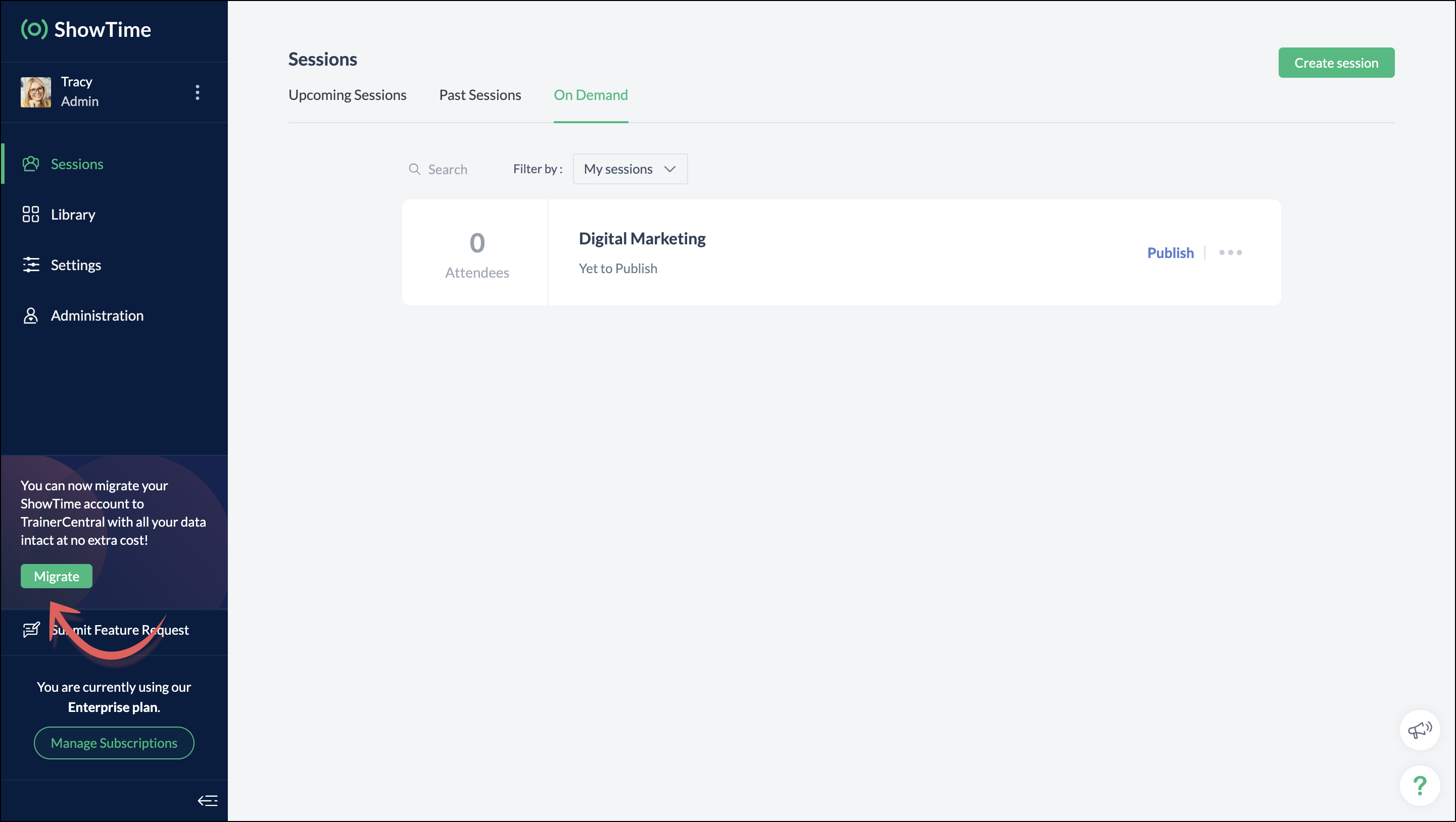


You can migrate your account from Zoho ShowTime to TrainerCentral anytime by clicking the Migrate button in the left pane and following the on-screen instructions. Once migrated, you’ll receive a notification, through which you can access your TrainerCentral account.


  1. Only the super admin of a Zoho ShowTime portal can migrate their portal's data to TrainerCentral.
  2. We’ll be disabling remote session scheduling and learner registration for on-demand sessions starting December 1, 2025. With this transition, Zoho ShowTime will reach its End of Life (EOL) on December 31, 2025.

To avoid any disruptions to your live classes, please move to TrainerCentral before December 31, 2025.

We hope this will elevate your experience to the next level.

If you have any questions, take a look at the FAQ section below, reach out to us at support@zohoshowtime.com, or just leave a comment here.  

FAQ
1. How long will the migration take? 
The migration of your Zoho ShowTime data and account portal is expected to take approximately one to two hours. In the event of any technical issues or glitches during the migration, the product team will address them immediately. In such rare cases, the migration will be completed within 24–48 hours.

2. What will happen to my Zoho ShowTime account if it is not migrated before the sunset?
If you fail to migrate before the sunset, i.e., December 31, 2025, active Zoho ShowTime accounts will be automatically migrated to TrainerCentral.

 3. What will happen after migration? 
You will be able to access TrainerCentral with your Zoho ShowTime credentials and continue your teaching journey seamlessly, with the added benefit of new features.

 4. Will there be any changes to my payment after migration? 
No, there will be no changes to your payment. The amount you currently pay for your Zoho ShowTime subscription will remain the same after migration.

 5. I am a Zoho ShowTime customer or Zoho One user. How will I be mapped to the TrainerCentral plan? 
If you are a Zoho ShowTime customer or a Zoho One user, you will be mapped to the equivalent TrainerCentral plan automatically to ensure a seamless transition.

 6. What happens if I choose not to migrate? 
You can back up your data, including materials, recordings, and analytics associated with your account, and then contact our support team to delete your account.

 7. I am a Zoho One user and purchased paid attendee add-ons. How do I enable them in TrainerCentral? 
You’ll need to reach out to support team to enable it again in TrainerCentral.

8. Will my configured payment gateway and ticket settings in Zoho ShowTime be migrated to my TrainerCentral account automatically?  
All of the sessions and tickets created in Zoho ShowTime will be migrated without any changes to your TrainerCentral account. However, for any new sessions you create in TrainerCentral, you will need to set up your payment gateway and ticketing options again.
Kindly refer to this help link to see the list of payment gateways supported by TrainerCentral.

 9. Where can I find my past sessions and library content from Zoho ShowTime in TrainerCentral after migration?


     Remote session: You can find previously created/conducted Zoho ShowTime remote sessions in Live WorkshopsPast Sessions.

     On-demand session: You can find previously created/conducted Zoho ShowTime on-demand sessions in Live WorkshopsOn demand.

     All materials hosted in your ShowTime library will be moved to TrainerCentral's library.
 10. Will my current integrations like Zoho CRM, Zapier, and Zoho Flow function seamlessly? 
All of your Zoho CRM, Zapier, and Zoho Flow integrations and their functionalities will be migrated seamlessly to TrainerCentral. In Zapier and Zoho Flow, several additional triggers and actions are available for all courses and live workshops.

 11. If I cancel my TrainerCentral subscription after migration, will I get the same plan when I resubscribe to a new TrainerCentral account? 
No. The equivalent plan is provided only if you migrate from Zoho ShowTime. If you resubscribe for a new TrainerCentral account, you’ll be mapped to a new plan.

12. What if I can't see the Migrate button on my 
Zoho ShowTime portal?
If the Migrate button isn’t visible, please contact our support team to help you migrate from Zoho ShowTime to TrainerCentral.

    • Sticky Posts

    • Video tip 02: Customize your feedback and evaluation forms in Zoho ShowTime

      Hello everyone,  Here's a new video tip for all our ShowTime users. Today we will learn few quick, effective ways to evaluate your participants and assess your trainings conducted on Showtime, like MCQs (multiple choice questions), text-boxes, and ratings scale.   Watch the below video to learn how these assessment systems help you effectively evaluate course-related knowledge and skills of your trainees on a regular basis.      Follow this page to learn more such tips and stay updated on all the
    • Video tip 05: Host training courses under your own personalized domain and white-label your email communications.

      Hello everyone,  As a trainer, having your own domain name increases your brand's positioning and reach through search results on top search engines like Google, Yahoo, and Bing. Prospective customers will more readily pay for courses from an organization with a professional, established online presence. A custom domain establishes you as a leader in your area of subject expertise, helping you promote your courses and build brand recognition with your global audience.   In today's video tip, we at
    • Video tip 04: Do you want to set up repeated training sessions at regular intervals? Learn how.

      Hello everyone,    Sometimes it is difficult to organize and manage your everyday work and training sessions. Scheduling recurring or repeated sessions can be even more time-consuming as you need to create and maintain the training content, schedule multiple time slots for the training, manage registrants across each session, and more.    Zoho ShowTime offers a smarter option for these cases that only takes a few clicks. Play the video below to learn how to use the same presentation content and set
    • Spotlight 03: Connect and deliver more effective trainings with ShowTimes' Viewer app

      With the growing need for virtual classroom learning, the use of mobile and tablet software is quickly becoming the most convenient way to share knowledge between educators and students. According to a 2018 study, nearly 67% of digital learners now use mobile devices to complete their online coursework. Additionally, smartphone learners complete course material 45% faster than those using a computer.  Considering these facts, we now introduce our next community spotlight series that will focus on Zoho
    • Video tip 1: Record and share trainings on Zoho ShowTime.

      Hello everyone,   We are excited to launch our video tip of the month series within our ShowTime's community, aimed to help our trainers and educators with brief and practical tips on delivering more effective and comprehensive training.   In this month's video tip, we will show you how to record your training sessions quickly and share them with your attendees and other prospective learners externally. We hope this tip was useful. ShowTime also allows you to automatically record your live trainings
    • Recent Topics

    • Weekly Tips : Save Time with Saved Search

      Let's assume your work requires you to regularly check emails from important clients that have attachments and were sent within a specific time period. Instead of entering the same conditions every time—like sender, date range, and attachments included—you
    • Remove 'This is an automated mail from Zoho Sign' in footer

      Hi there, Is it possible to remove or change the text under the e-mail templates? I can't figure out how to do that: Would love to hear from you. Kind regards, Tristan
    • How can I link Products in a Deal Subform to the Products Module

      Hello, I have a pricing subform on our Deals page and use a lookup field to associate a product with each line. I want to be able to look at a product page within the Products module and see a list of the deals connected to that product. I have this working
    • Organize and manage PDFs with Zoho PDF Editor's dashboard

      Hello users, Zoho PDF Editor's dashboard is a one-stop place to upload, sort, share PDF files, and more. This article will explore the various capabilities that Zoho PDF Editor's dashboard offers. A few highlights of Zoho PDF Editor's dashboard: Upload
    • Updating records through Zoho Sheets View doesn't update timeline or trigger workflow rules

      I have noticed that when i update a series of record with the zoho sheets view (see here http://d.pr/i/ahnR) it doesn't update timeline history or trigger workflow rules. I am using it in the Deals module. Looking forward for some more info. Denis
    • Zoho Invoice Customer Login Portal

      Are there any plans for a customer portal to Zoho Invoice, ala Freshbooks?  I would like customers that I invoice to be able to login to review invoices and invoice history.  I have not switched from Freshbooks for this very reason.
    • Passing Info from Function to Client Script

      Hello, I have recently started making use of client script for buttons, allowing me to give the user information or warnings before they proceed. This is great. However, I have never quite managed to pass back any extra information from the function to
    • Automatically Update Form Attachment Service with Newly added Fields

      Hi, When I have a Form Setup and connected to a 3rd Party Service such as OneDrive for Form Attachments, when I later add a new Upload Field I have to remove and redo the entire 3rd Party Setup from scratch. This needs to be improved, such as when new
    • Cannot get code to work with v2.mergeAndStore!

      Please can someone help me pass subform items into a repeating mail merge table row using v2.mergeAndStore? I have a mail merge template created in Writer and stored in Workdrive. This template is referenced by a custom CRM function which merges all of
    • Drag 'n' Drop Fields to a Sub-Form and "Move Field To" Option

      Hi, I would like to be able to move fields from the Main Page to a Sub-Form or from a Sub-Form to either the Main Page or another Sub-Form. Today if you change the design you have to delete and recreate every field, not just move them. Would be nice to
    • Zoho Payroll for Canada

      Is anyone else having problems getting setup for Canada?
    • Passing the CRM

      Hi, I am hoping someone can help. I have a zoho form that has a CRM lookup field. I was hoping to send this to my publicly to clients via a text message and the form then attaches the signed form back to the custom module. This work absolutely fine when
    • API credit COQL COUNT

      The docs describe API credits in COQL from the LIMIT perspective: https://www.zoho.com/crm/developer/docs/api/v8/COQL-Overview.html When using aggregate functions such as `COUNT` or `SUM`, is that billed as 1 API credit?
    • Super Admin Logging in as another User

      How can a Super Admin login as another user. For example, I have a sales rep that is having issues with their Accounts and I want to view their Zoho Account with out having to do a GTM and sharing screens. Moderation Update (8th Aug 2025): We are working
    • One Contact with Multiple Accounts with Portal enabled

      I have a contact that manages different accounts, so he needs to see the invoices of all the companies he manage in Portal but I found it not possible.. any idea? I tried to set different customers with the same email contact with the portal enabled and
    • User Automation: User based workflow rules & webhooks

      User management is an undeniable part of project management and requires adequate monitoring. As teams grow and projects multiply, manual coordination for updating users & permissions becomes difficult and can give way to errors. User automation in Zoho
    • Disable Zoho Contacts

      We don't want to use this app... How can we disable it?
    • Default Ticket View - Table?

      Guys, We mostly use the table view to queue tickets. Maybe I am missing it - but how can I set that view as 'default" for all our agents? Thanks JV
    • Zoho One IS BUGGY

      Here are some things that just don't work: - Disabling applications from certain Spaces - Adding users (probably only for me) - Renaming applications in Zoho One Portal (fixed by now) - Reordering applications in Spaces When I try to reorder: It feels
    • Paid Support Plans with Automated Billing

      We (like many others, I'm sure) are designing or have paid support plans. Our design involves a given number of support hours in each plan. Here are my questions: 1) Are there any plans to add time-based plans in the Zoho Desk Support Plans feature? The
    • Merge Fields that previously worked are now giving an Error!

      Saving a URL Link button on the Deal module. The below fields used to save without issue at all, but now produce an error of "URL contains unsupported merge field!" ${Contacts.Mailing Street} ${Contacts.Mailing City} ${Contacts.Mailing State} ${Contacts.Mailing
    • Move email between inboxes?

      Is it possible to move emails from one team inbox to another? We would like to be able to have a single "catch-all" inbox for incoming requests, and then move the email to the appropriate department inbox. I was hoping we would be able to accomplish this
    • Clarification on Zoho Forms 1-User Plan: Multiple Submitters and Approvers

      Question Content (Copy–Paste Ready) Hello Zoho Team, I would like clarification regarding Zoho Forms pricing and user limits. I am planning to subscribe to the ₹700/month (1 user) plan. My use case is as follows: Only 1 person (myself) will create and
    • CRM Cadences recognise auto-responses

      I have leads in a Cadence. I get an auto-responder reply "I'm out of the office..." Normally Cadences seems to know that isn't a real reply and keeps the lead enrolled in the cadence. However, today, Cadences has UNENROLLED a Lead who sent an auto-reponse
    • App for Mac OS X please!

      It would be awesome to have a mail app for Mac OS X that included all the cool features such as steams, calendar, tasks, contacts, etc. Most people prefer native apps, rather than running it through a web browser. I know that we can use the IMAP, CalDAV,
    • Facing Issues with Sites Mobile font sizes

      my page renediaz.com is facing issues mobile view, when i try to lower font sizes in home page, instead of changing the size, it changes the line space
    • Zoho Books Payroll

      How am I supposed to do payroll and pay my employees with Zoho Books? I think it's pretty strange that an accounting software doesn't have the ability to perform one of the most common functions in business; paying your employees. Am I missing something,
    • Different Task Layouts for Subtasks

      I was wondering how it would be possible for a subtask to have a different task layout to the parent task.
    • 60 Days Into Zoho - Tiktok Branding Startup -7 Questions?!

      Wsp Everybody I co-own a TikTok Branding / Consulting Startup & have been using Zoho for the past 60 days - Am now looking to make our overall operations & processes more Efficient & Effective! Curious to know how others are using the platform & what's
    • Notifications in Cliq client for Linux

      If I got it right, Cliq desktop client for Linux does not use the generally accepted notification method via org.freedesktop.Notification interface. For this reason, Cliq notifications do not look and behave as all other notifications. Is it possible
    • Canvas templates can now be shared with different CRM organizations

      ----------------------------------------Moderated on 14th February, 2023------------------------------------------- Dear all, This feature is now open for all users in all DCs. To learn more about importing and exporting canvas templates, read our help
    • Unable to produce monthly P&L reports for previous years

      My company just migrated to Books this year. We have 5+ years financial data and need to generate a monthly P&L for 2019 and a monthly P&L YTD for 2020. The latter is easy, but I'm VERY surprised to learn that default reports in Zoho Books cannot create
    • Change Last Name to not required in Leads

      I would like to upload 500 target companies as leads but I don't yet have contact people for them. Can you enable the option for me to turn this requirement off to need a Second Name? Moderation update (10-Jun-23): As we explore potential solutions for
    • Reply to Email for SO/PO

      Hello, We are new to Zoho Books and running into an issue. Our support@ email is our integration user. When our team is sending out PO/SO's we are updating the sender email, but for some reason many of our responses are coming back to our support@ email
    • ZOHO Payroll Canada

      Any plans on the roadmap for Canada?
    • What's New in Zoho Billing | January 2026

      Excited about the latest enhancements in Zoho Billing? Our January updates bring an intelligent AI assistant, smarter subscription management, and improved tax compliance, saving you time and reducing manual work. Dive into the details below to see how
    • Zoho Books Sandbox environment

      Hello. Is there a free sandbox environment for the developers using Zoho Books API? I am working on the Zoho Books add-on and currently not ready to buy a premium service - maybe later when my add-on will start to bring money. Right now I just need a
    • Multi-currency and Products

      One of the main reasons I have gone down the Zoho route is because I need multi-currency support. However, I find that products can only be priced in the home currency, We sell to the US and UK. However, we maintain different price lists for each. There
    • Cliq iOS can't see shared screen

      Hello, I had this morning a video call with a colleague. She is using Cliq Desktop MacOS and wanted to share her screen with me. I'm on iPad. I noticed, while she shared her screen, I could only see her video, but not the shared screen... Does Cliq iOS is able to display shared screen, or is it somewhere else to be found ? Regards
    • ZOHO Writer Folders

      Hi We would love to have ability to create folders on the left hand side. We would then be able create and store our documents within each folder Hope you can provide this feature soon ! dux.centra
    • Next Page