February brings a powerful set of updates to Zoho Billing, from smarter subscription management and flexible payment options to better reporting and more control over your hosted pages. Here's everything that's new this February.
Create Subscriptions for Items
You can now create subscriptions for items in Zoho Billing. You can pause, resume, cancel, or reactivate these subscriptions just like any other subscriptions. Zoho Billing applies unused credits automatically when generating invoices from these subscriptions.
Note: This feature is available only on certain Zoho Billing plans.
To create subscriptions for items, go to Subscriptions > create or edit a subscription > then select Items in the Create Subscription For option.
Create Subscriptions with Days as Billing Frequency [Early Access]
You can now create subscriptions that renew based on a specific number of days, such as every 18 or 90 days, or even daily. This gives you flexibility to match your customers' billing preferences precisely.
To set this up, go to Plans or Addons, create or edit a record, then set the Billing Frequency to Days and specify the number of days. When creating the subscription, specify the number of renewal cycles in the Billing Cycles field.
Generate Renewal Payment Links for Manual Renewals
You can now generate advance renewal payment links for manual or offline subscriptions. Share these links with customers to collect renewal payments proactively instead of waiting for the next billing cycle.By default, the link expires one day before the Next Billing Date, but you can adjust this if needed.
Note: This feature is available only on certain Zoho Billing plans.
To generate a renewal payment link, go to the subscription and click Renew Subscription, then select Generate Renewal Payment Link.
Disable Advance Invoice Failure Alerts
You can now disable notifications when Advance Invoices fail to generate due to subscription configuration conflicts.
Note: This preference applies only to Advance Invoices.
To disable the alerts, go to Settings > Subscriptions > Advance Billing and enable the Disable Advance Invoice Failure Emails preference.
Save Payment Method on Hosted Payment Pages
Your customers can now save their payment method directly from your Hosted Payment Pages so future invoices are collected automatically. Configure the Save Payment Method checkbox in your Hosted Payment Page template. Payment method saving behaviour varies by gateway.
To enable this, go to Settings > Hosted Payment Pages, edit your template, and configure the preference.
Download Invoices from Thank You Pages
Customers can now download their invoice directly from the Thank You Page after a successful subscription purchase on your Hosted Payment Pages.
To enable this, go to Settings > Hosted Payment Pages, edit your template, and under the Thank You Page settings, check Allow customers to download invoice. Optionally, customize the button label to match your brand.
Configure Multi-Currency Discount Values in Coupons
You can now configure currency-specific discount values for flat-rate coupons. When a coupon is applied to a subscription, Zoho Billing automatically uses the discount amount that matches the customer's billing currency.
Note: This feature is available only for organizations with Advanced Coupons enabled
To set this up, go to Product Catalog > Coupons, create a coupon and set Discount By to Flat Rate. Click Add Currency to define discount values for each currency.
Add Quick Reply Buttons to WhatsApp Messages for Quotes
When sending quotes via WhatsApp, you can now include quick reply buttons that let customers accept or reject the quote in a single tap.
To enable this, go to Settings > Quotes > General and enable the quick reply button preference. The quick reply buttons will appear on your WhatsApp message templates automatically once enabled.
Mark Projects as Completed
You can now mark projects as Completed in Zoho Billing to easily differentiate them from active ones. To mark a project as Completed, go to Time Tracking > Projects, select the project, click the More option, and select Mark as Completed.
View Activity History for Reports
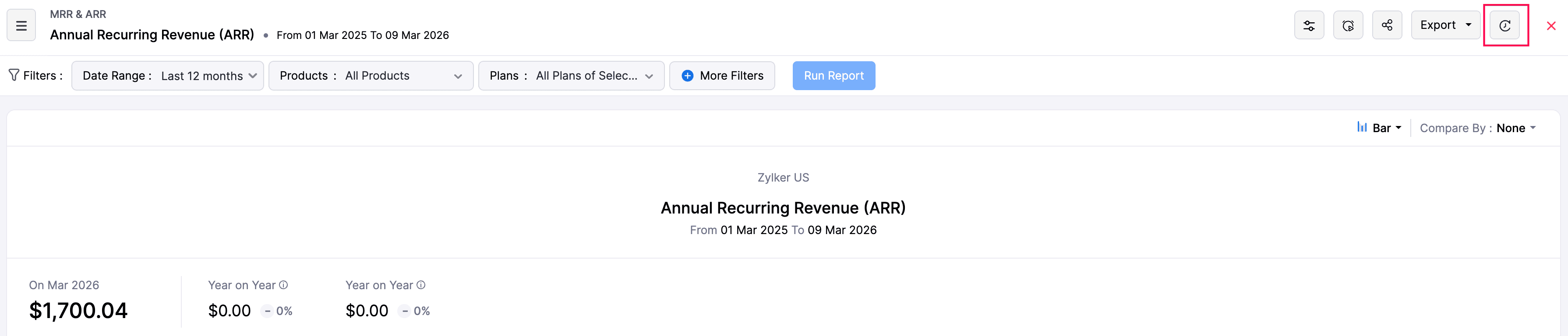
You can now view a full activity history for your reports. Zoho Billing automatically captures actions like Print, Export, Share, Create/Edit (for custom reports), and Schedule, giving you a clear audit trail.
To view the history, open any report and click the Show History icon at the top.
Toggle Net and Gross Revenue Retention Metrics
The Revenue Retention Rate report now lets you toggle between Net and Gross retention metrics in a single view. Net retention shows revenue from existing customers; Gross retention excludes expansion revenue. This lets you see whether growth comes from expansion or retention.
To access it, go to Reports > Retention > Revenue Retention Rate and select the metric from the Retention Type dropdown.
Ready to dive in? Start exploring these updates today and let us know how they transform your workflow. Have questions? Our support team at
support@zohobilling.com is here to help every step of the way!
Recent Topics
Number of decimal places
Hi Latha, I have added the following three fields to the Company module. Currently, these fields only allow a maximum of 2 decimal places. However, for some of our requirements, we need to enter values with up to 10 decimal places. Could you please help
zoho imap connection stopped working 05/28 12pm EST
Hi, beginning Thursday, 5/28, ~12 pm est imap to siteground stopped working. When I tried to reconnect the account, connection was failing with the following message: Unable to connect SMTP server:gvam1107.siteground.biz, Port: 587. I did notice that
Request to Increase URL Field Character Limit
Hi Arthi, Hope you are doing well. I'm trying to save a URL in the Work Order (WO) module using the URL field, but I receive the following error message: "Please enter a valid Repair File. Maximum 450 characters are allowed." The issue is that the URL
User Name in Zoho Cliq Not Updating Across Apps?
We updated the name of a user in Zoho. (From Sue to Taylor) Her name has not been updated in Cliq on all apps. When in Zoho One, if I go to Cliq directly, it is correct, but if I am in another app, and the Cliq bar pops up on the bottom, it will be the
Service currently unavailable
The Zoho Mail Webmail is working, the Mail Admin Console is not: "Our service is temporarily unavailable, please try after sometime." How long must I wait to retry? edit: To add to this, the Webmail is not working 100% - I can open mail in the inbox,
Service currently unavailable
Service currently unavailable It is not possible to access email; the entire Zohoworkplace platform is down
User Permission Log
Our external auditors are asking for a way to view changes made to user permissions (basically, a user permission change log). Is this feature built into Creator?
E-mail down
We cannot get into our email inboxes, are you affected by a Microsoft update issue? How long do you think as to restoration?
ZOHO MAIL SERVICE NOT WORKING
Hello i've a problem my zoho mail account says a display with this text "our service is temporally unavaible"
ايميل مجانى
Can I create a free email account on Zahoo?
Sign up for email for a domain
Hi - I thought I had signed up for a domain of <domain>.com, but only see the email of @zohomail.com . How do I get the <domain.com> domain linked to my email?
Feature Request: Include Creator-applicable Deluge updates in the Creator Release Notes
I'd like to put forward a suggestion about how Deluge updates are surfaced to Zoho Creator developers, and I'm hoping the Creator team will consider it. Zoho Creator is built on Deluge. Every workflow, custom function, validation and schedule we write
Deluge sendmail in Zoho Desk schedule can't send email from a verified email address
I am trying to add a scheduled action with ZDesk using a Deluge function that sends a weekly email to specific ticket client contacts I've already verified the email address for use in ZDesk, but sendmail won't allow it in its "from:" clause. I've attached
Zoho Books | Product updates | June 2026
Hello users, Welcome to this month's roundup of what's new in Zoho Books! We have an exciting line-up this time. The highlight is the launch of the all-new France Edition with full ISCA compliance. We're also introducing features such as Layout Rules
Partner with HDFC And Sbi Bank.
Hdfc and sbi both are very popular bank if zoho books become partner with this banks then many of the zoho books users will benefit premium features of partnered banks.
name change of company in same GSTIN registration . how to retain historical company name for past transactions?
hello I have recently change my company name from BHANU DIAM to BHANUMATI IMPEX in same GSTIN registration number While i have update the company name in profile name that change all my historic data like sale invoices and purchase bill , i would like
AUTOMATION OF INVOICE PROCESSING
Dear Zoho Books Product Team, I hope this message finds you well. I’m reaching out as a dedicated Zoho Books user with a product idea that I genuinely believe could transform how businesses handle purchase invoicing — and set Zoho Books apart as the smartest
Zoho Books | Product updates | July 2026
Hello users, We’re excited to bring you the latest updates in Zoho Books for July 2026! This month's release introduces Terminal Payments, CMP-08 filing for composition taxpayers, SEPA Credit Transfer support, the new Receipts and Payments Report for
Zoho ERP | Product updates | June 2026
Hello users, We launched Zoho ERP on January 23, and since then, our goal has been to help businesses streamline and manage their operations with greater efficiency, flexibility, and control. Since the launch, we've continued to enhance the platform every
Zoho CRM Layout Rules: Nine New Actions, Profile-Based Execution, and Interactive Preview
Hello everyone, Availability: This feature is now available for customers in the JP and SA DCs. It is planned to be released for other customers in soon. We’re excited to announce powerful new enhancements to Layout Rules in Zoho CRM - a feature built
Solution to Import OST File into Office 365.
In today’s digital workplace, organizations are rapidly moving toward cloud-based email systems for better flexibility, security, and collaboration. Microsoft 365 has become one of the most widely used platforms for business communication. A common requirement
Zia AI capabilities now available in all paid editions
Hello everyone, We are expanding the availability of AI-powered features in Desk to the other paid subscriptions from 7th July 2026. Right now, the following AI-based features are available for Enterprise edition users: Intelligence: Sentiment analysis,
Zoho Contacts *Web Interface Does Not Load* (Tested in Firefox, Safari)
When trying to load https://contacts.zoho.com the error shown in the console is: The resource from “https://static.zohocdn.com/zmail/zm/newContactsChange11/js/main.js” was blocked due to MIME type (“application/json”) mismatch (X-Content-Type-Options:
Introducing Color Coding of Picklist Values
Dear Everyone, Greetings!! Zoho CRM is uplifting the user experience. Recently, we had some notable aesthetic improvements in CRM like Kanban View UI enhancement, New List view UI enhancement, color coding of tags, and color coding of picklists in meetings.
Do Not Disturb status not respected when Cliq bar is enabled across Zoho apps
Hi Zoho Cliq team, I want to report what appears to be a bug with how the Do Not Disturb status interacts with the embedded Cliq bar in other Zoho apps. **Issue:** When my Cliq status is set to Do Not Disturb, I continue to receive notification tones
Admin-Side Calendar Delegation from the Admin Console (Parity with Zoho Mail Mailbox Delegation)
Summary Zoho Mail already lets organization admins delegate a user's mailbox to another user directly from the Admin Console — no approval from the mailbox owner required (Users > select user > Mail Settings > Delegated to > + Add). Zoho Calendar has
Desk Contact Name > split to First and Last name
I am new to Zoho and while setting up the Desk and Help Center, I saw that new tickets created or submitted from the Help Center used the Contact Name field. This would create a new Contact but put the person's name in the Last Name field only. The First
Cliq iOS can't see shared screen
Hello, I had this morning a video call with a colleague. She is using Cliq Desktop MacOS and wanted to share her screen with me. I'm on iPad. I noticed, while she shared her screen, I could only see her video, but not the shared screen... Does Cliq iOS is able to display shared screen, or is it somewhere else to be found ? Regards
How to change column headings in pivot table?
Hi, Is there a way to rename the column headers of a pivot table? Now some the columns are named with value labels: 'SUM of .....'. We would like to rename those headers. As of now we couldn't find any direct solution to adjust the headers, besides copying and reformat. We want to avoid these extra steps. Best, Tiemen
How use .PK12 certifcate for sign
Hello! Is it possible to use my personal digital certificate (as a COMMODO .pk12) to sign documents? Thank you
Automating CRM backup storage?
Hi there, We've recently set up automatic backups for our Zoho CRM account. We were hoping that the backup functionality would not require any manual work on our end, but it seems that we are always required to download the backups ourselves, store them,
Restrict Zoho Cliq Webinars and Announcements to Admins Only
Hi Zoho Team, We hope you're doing well. We would like to raise a feature request regarding in-app announcements in Zoho Cliq, such as the recent webinar popup about the Cliq Developer Platform: While these announcements are useful, they are not always
Blueprint - Mandatory file upload field
Hi, File upload (as we as image upload) field cannot be set as mandatory during a blueprint transition. Is there a workaround? Setting attachments as mandatory doesn't solve this need as we have no control over which attachments are added, nor can we
Completed Calls don't associate with Scheduled Calls
I schedule calls at specific times so that they are easily viewable on my phone. I open a given call on my phone and use the call icon at the bottom of the screen. I complete the call and select "yes" when asked if I want to log the call. I enter the
Integrations of freelancing websites
It is a customized effort which we require to be implemented on our Zoho recruit. We want that Upwork and Freelancer and other such freelancing websites get integrated into our Zoho Recruit, so that, any communication which we do with the candidates from those websites gets directly recorded on our Zoho recruit and we don't have to move back and forth by opening any other application other than Zoho. If this can be done, we think of managing the entire communication through Zoho recruit and use it
Workflow Preventing others from editing
Using workflows in WorkDrive to implement a document review process has been extremely helpful in my organization. The only problem is that other users who have access to the document via standard document sharing rules are unable to edit the document.
MCP > Creator connection failing with Claude
I'm trying to get claude to access any of my Zoho Creator apps and it keeps failing. I have enabled all tools for creator and ensured in claude settings that everything is authorised. Here is what claude says : Unfortunately, the error messages I'm receiving
Zoho Analytics UI Bug
Hello, all, The Aggregate Formulas in Zoho Analytics' list of fields have a 3-dot menu: If the formula has a long name, the name is not fully visible in the list, and a 3-dot menu is not accessible from it: This is not convenient, especially when the
Poor Zoho Support
Been trying to reach support via telephone and email. The support has always been slow to respond but now its been two weeks without a return call. I have even sent them screen shots of the problem I've having with no results. Is anyone had the same problem.
Help me recover my account
business@heymods.mobi is an account I registered two years ago. My domain is no longer valid, and I cannot access the admin page. I also subscribed to a $12 service, but I cannot configure the domain. Please help me set xunmeng.app@gmail.com as the admin,
Next Page