What's New in Zoho Inventory | July & August 2026
Hello users,
The July and August 2026 releases bring a range of new features and improvements across the product. From the Nigeria Edition and Super Admin enhancements to Sri Lanka IRD-compliant invoicing, Loyalty Program Management, and improvements to the Android app, there’s plenty to explore in this release.
New Releases
Nigerian Edition of Zoho Inventory Is Now Live
We’re excited to announce the successful launch of the Nigerian Edition of Zoho Inventory, expanding our inventory management solution to businesses in Nigeria. With this launch, Zoho Inventory continues to expand its regional availability and provide businesses with inventory management capabilities tailored to their local requirements. Explore the help documentations
Custom Dashboards for Zoho Inventory
Custom Dashboards are now available in Zoho Inventory, along with entity-level permissions for Reports within Roles. Users can personalize their dashboards by adding the required predefined panels and report panels, while role-based permissions ensure they can access only the reports and data they’re authorized to view. This provides a more flexible dashboard experience, giving users faster access to the inventory insights most relevant to their day-to-day operations.
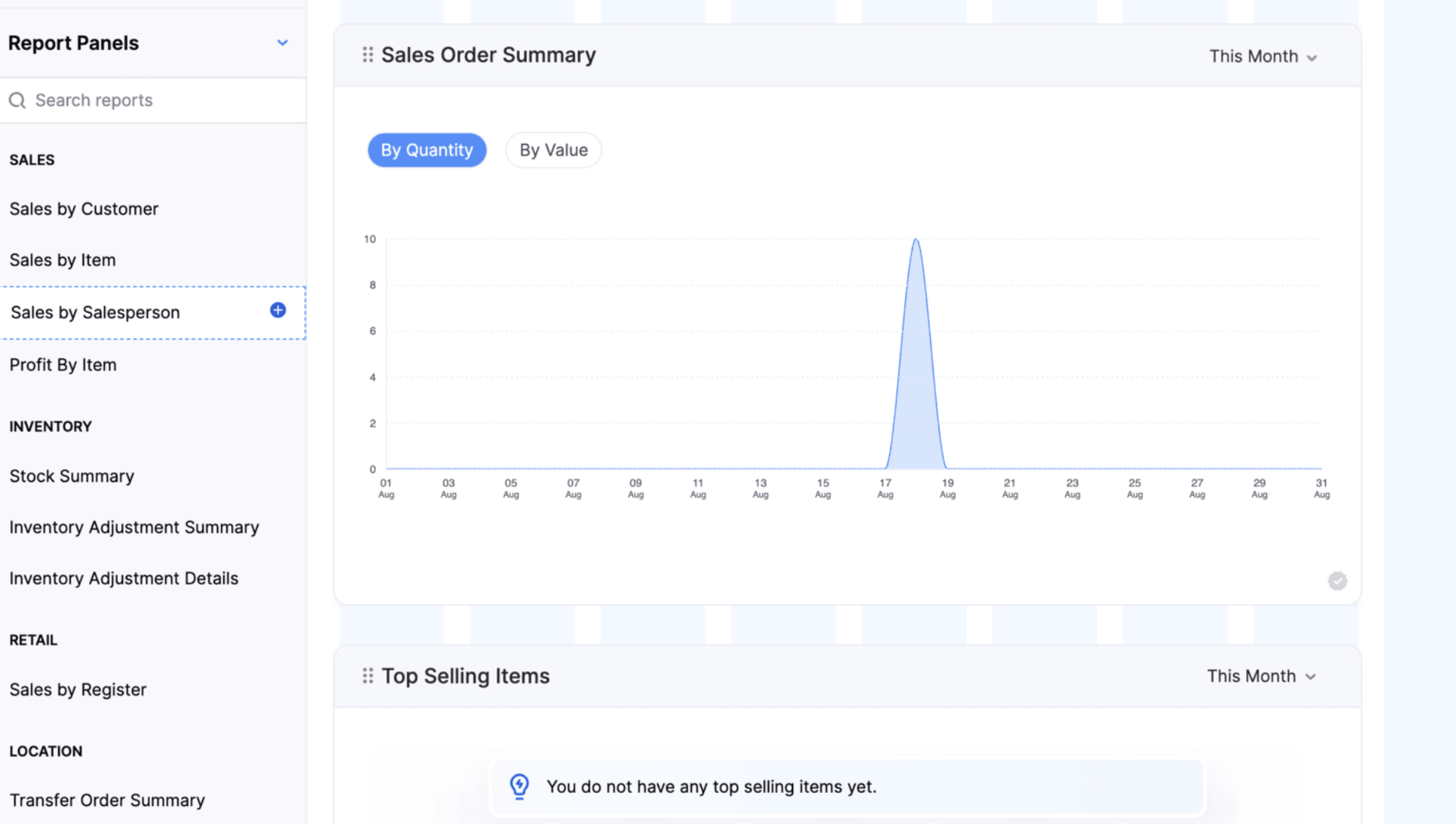
Note: This feature is available only on the Enterprise plan.
Introducing Super Admin
Super Admin is a high-level privilege assigned to an administrator, giving them exclusive control over other admins and the ability to set up and manage the organization across all Zoho Finance applications. Learn More
Customer & Users Management
Loyalty Program Management
Create and manage loyalty programs and associate them with customers to reward purchases with loyalty points. Customers can earn and redeem points across supported sales channels, helping businesses improve customer retention and engagement.
Configure organization-wide loyalty preferences, including point adjustments, rounding rules, redemption behavior, return handling, and the loyalty points tracking account. Set up individual programs with earning and redemption rules, schedules, minimum redemption points, and redemption windows. Customers earn points automatically on eligible sales based on their associated loyalty program. Points earned from the original sale are automatically reversed when a Credit Note is created for a return. Customers can redeem available points partially or fully on invoices and during Retail Store checkout, and pay the remaining balance using other payment methods.
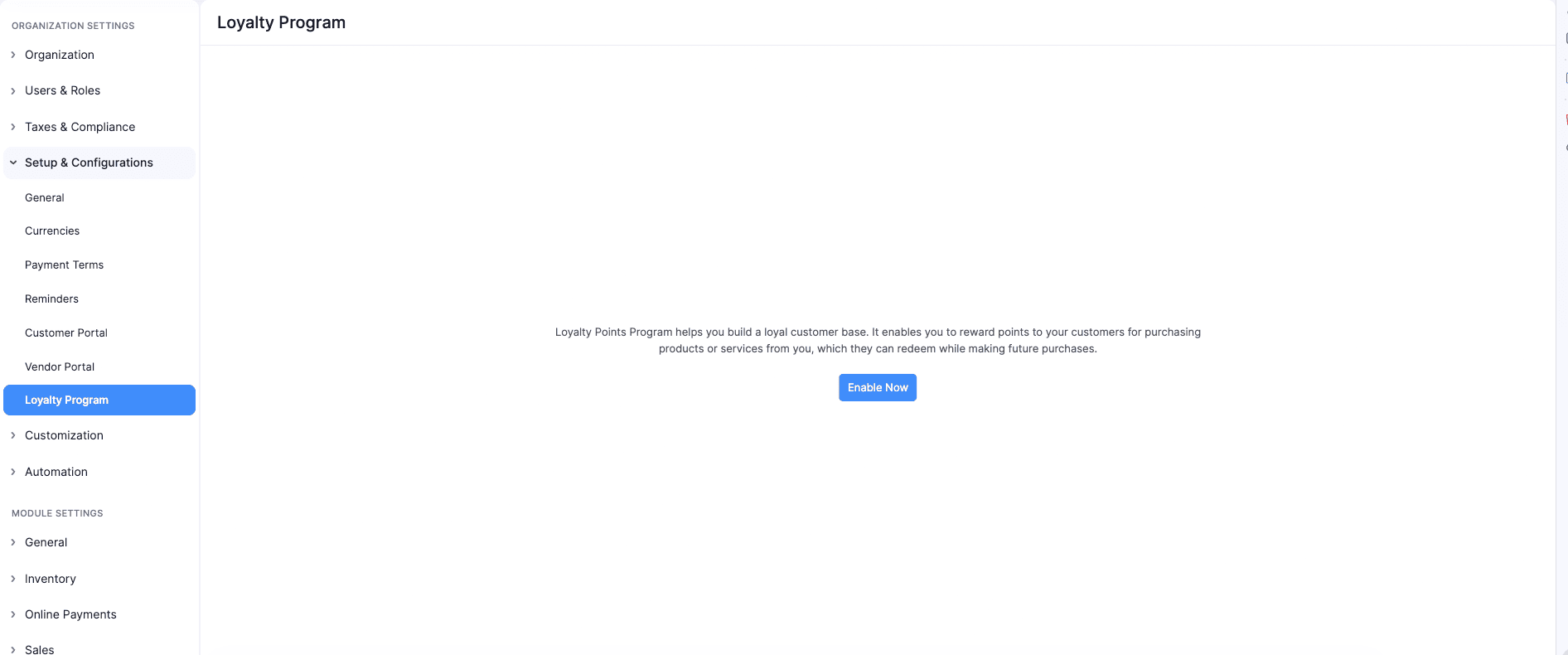
To enable Loyalty Program Management > Go to Settings > Navigate to Setup & Configurations > Click Loyalty Program > Click Enable Now.
Role-Based Access for Extension Installations
You can now control which user roles can access an extension during installation. Administrators can select the roles that can access the extension components and restrict access for others. Access can also be modified later from the extension details page. Organization-wide backend components are not covered by role-based access.
Vendor Hierarchy
You can now organize related vendors into a hierarchy by associating sub-vendors with a parent vendor. This makes it easier to manage and track transactions across vendors from a single parent vendor.
Note: Vendor Hierarchy is available in Early Access on the Enterprise plan. Contact support@zohoinventory.com to enable it for your organization.
Contact Person Custom Fields
You can now create custom fields for Contact Persons to capture additional information specific to your business needs. Custom fields can be created and managed from the Customer and Vendor Custom Fields page and are available for both primary and other contact Persons. You can also display Contact Person custom fields on the Customers and Vendors details page, list view page, and portals.
The custom fields are also supported in Contact Person import and export, audit trails, and integrations with Zoho Analytics, Microsoft, Zoho CRM, and Bigin.
Items & Item Setup
Create and Sell Item Groups [Early Access]
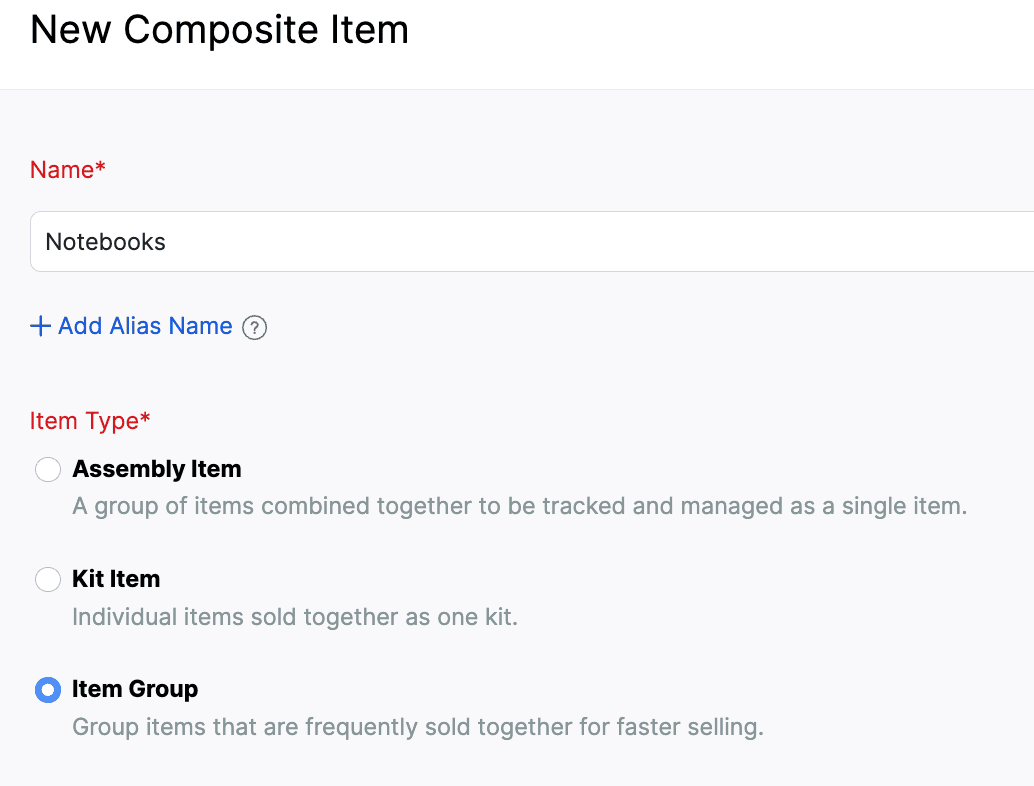
Create Item Groups to combine individual items that are commonly sold together. Add the group to sales transactions to automatically include its components with predefined quantities.
Item Groups do not have standalone pricing, taxes, inventory tracking, or accounting. These are managed for individual components. You can add or remove components, edit their quantities, rates, taxes, and discounts, and rearrange them during transaction creation. In packages, picklists, purchase returns, backorders, dropshipments, and reports, only the individual components are considered. You can display group components in transaction PDFs using the Show Item Components option in PDF customization.
To create an Item Group > Go to Inventory > Composite Items > Click + New > Select Item Group > Enter the group details and add component items > Click Save.
Create and Manage Item Modifiers
We’ve introduced a new Item Modifiers module that lets you customize items during transactions using predefined options. Create reusable modifier groups, configure selection rules and additional prices, and associate them with one or more items.
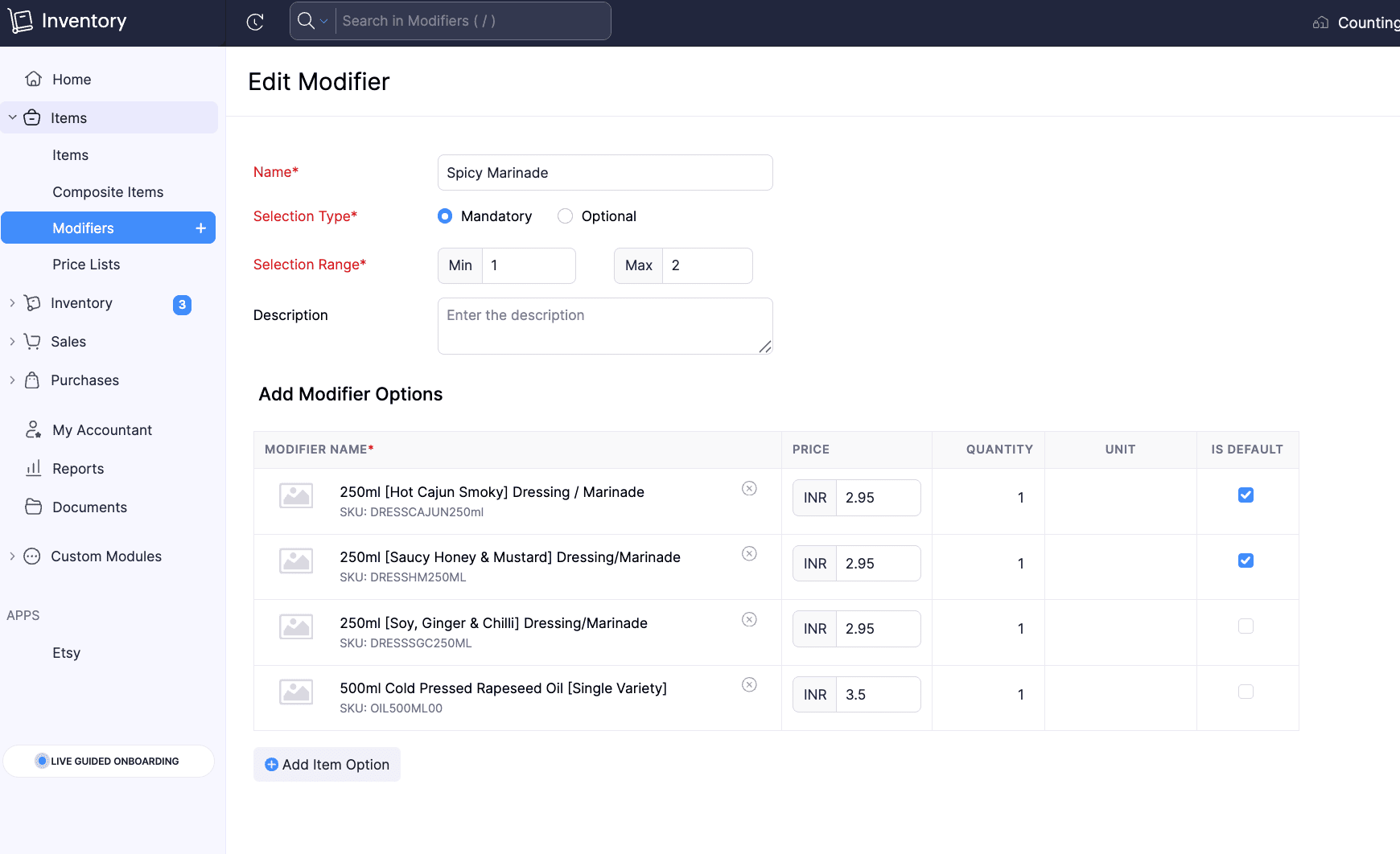
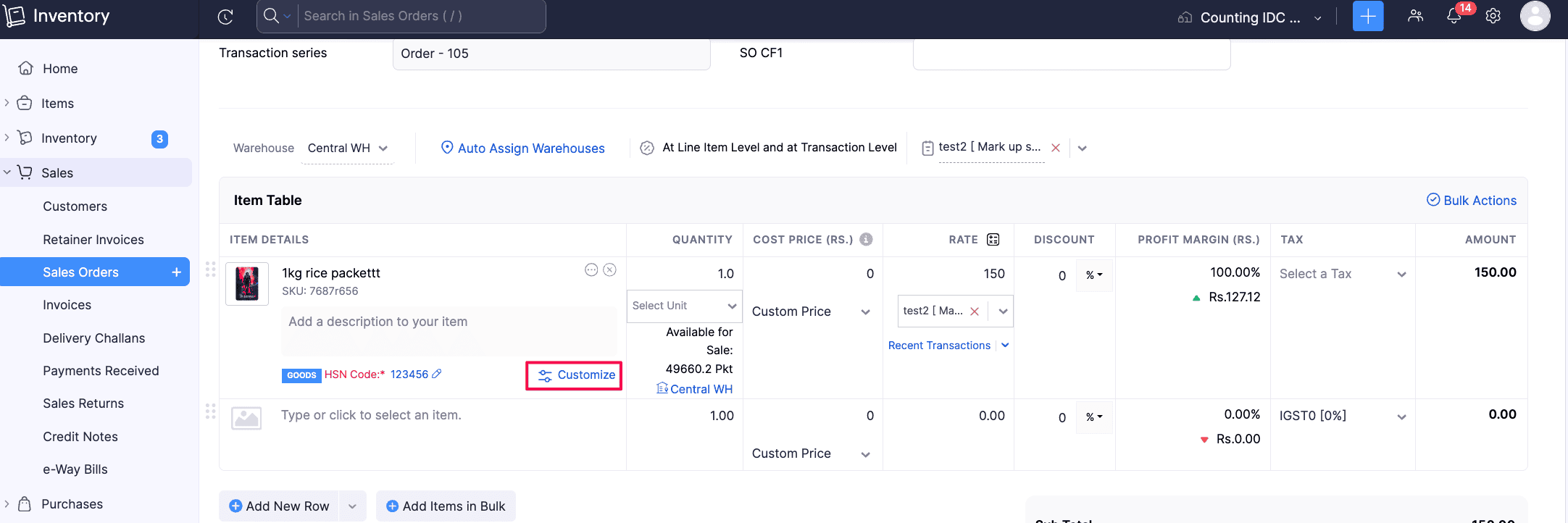
Selected modifiers are displayed under the parent item and are included separately in packages, picklists, returns, PDFs, and the Sales by Item report.
To create Item Modifiers: Go to Items > Click Modifiers > + New, configure the modifier group and options, associate it with items, and save.
Note: This feature is in Early Access and is available only to users on the Enterprise plan. Contact support@zohoinventory.com to enable it for your organization.
Customize Item Identifier Fields and Access
Customize the UPC, EAN, MPN, and ISBN item identifier fields, including their display names. Configure each field to be mandatory, active, or inactive, and set role-based access to show or hide them. The SKU field is also included in this customization framework.
To customize item identifier fields > Go to Settings > Module Settings > General > Items > Navigate to Item Identifier Fields (UPC, EAN, MPN, ISBN, SKU) > Mark fields as Mandatory
Introducing Combo Items [Early Access]
You can now create Combo Items, a new Composite Item Type that lets you sell multiple products together while providing flexibility in the components included. Unlike Kits, where all components are predefined, Combo Items allow you to configure multiple component groups with different options. During a transaction, you can select one option from each group to create the combo. You can also customize the selected components, manage their quantities and tracking details, and handle packing, backorders, returns, PDFs, and reports for Combo Items.
Note: This feature is in Early Access and is available only to users on the Enterprise plan. Contact support@zohoinventory.com to enable it for your organization.
Purchases
Create Purchase Returns [All Editions]
The Purchase Returns module is now available for all editions. Create returns as standalone documents or directly from existing Purchase Orders with pre-filled details. Once confirmed, generate picklists, packages, shipments, and vendor credits to track physical movement and financial adjustments. The Purchase Return Summary and Purchase Return Details reports provide visibility into return transactions and item-level data. Learn More
To enable the Purchase Returns module: Go to Settings > Click General under Setup & Configurations > Enable Purchase Returns
Filter Purchase Receives by Approval Status
Filter Purchase Receives by their approval status to quickly locate and manage records. You can filter records by Draft, Pending Approval, Approved, In Transit, Billed or Rejected status from the Purchase Receive list page, custom views, advanced search, Item transaction details, and Vendor transaction details.
Sales & Returns
Configure Approval Workflows for Sales Returns
Configure simple multilevel and custom approval workflows for sales returns to control their status changes. Set approvers, manage the movement of returns to Accepted or Declined status, and filter the Sales Returns lists view page and history reports by approval status. Users with the necessary permissions can save, submit, or accept returns based on the configured workflow.
To configure Sales Return approvals > Go to Settings > Preferences > Approvals > Select Sales Returns > Choose Simple, Multi-Level, or Custom workflow > Add approvers and conditions > Save and Enable
Allocate Stock to Sales Orders [Early Access]
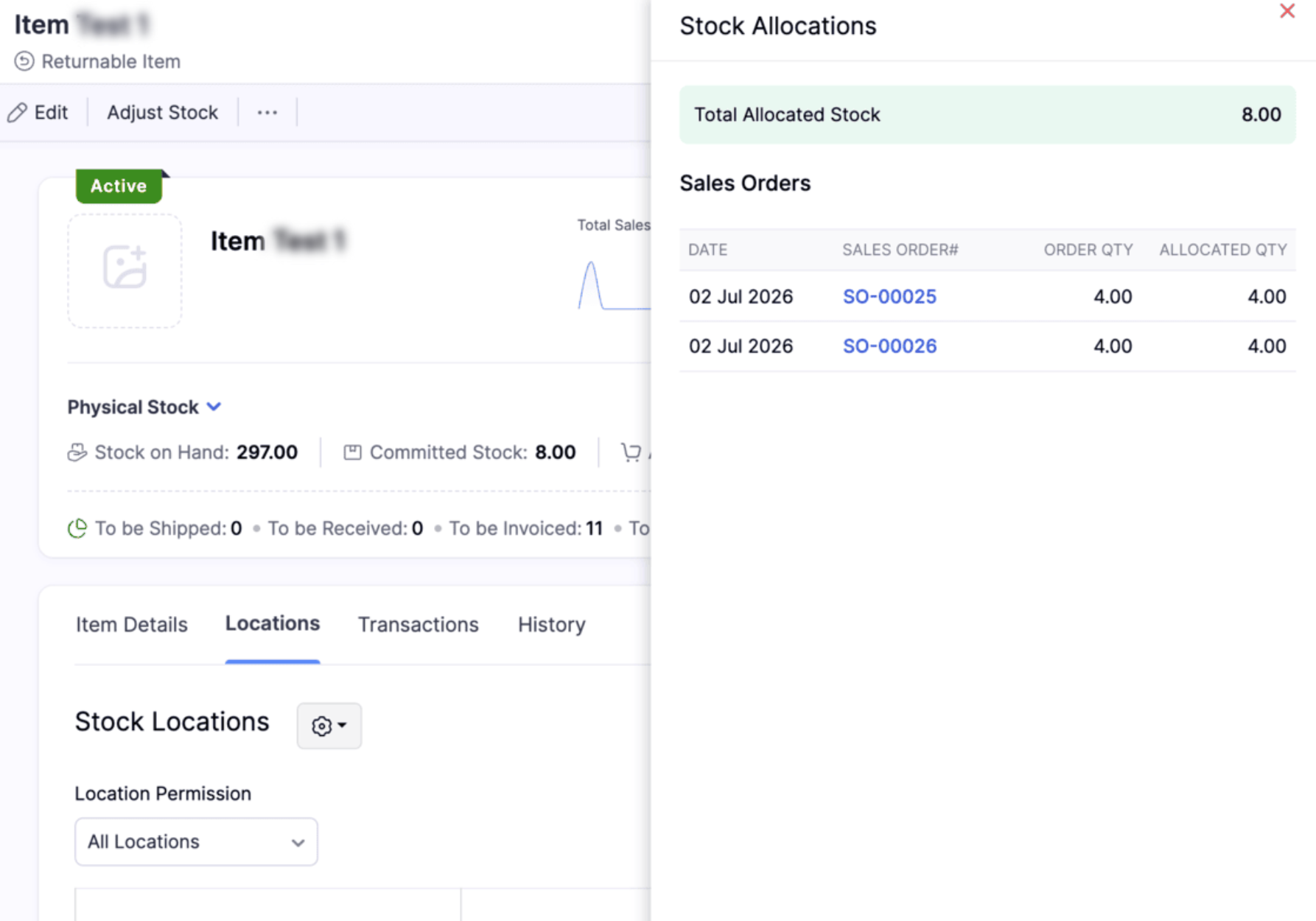
Allocate available inventory to confirmed sales orders to reserve stock for specific customers. This prevents the same stock from being allocated to multiple sales orders. You can track allocated quantities for each order and item, including batch and serial-tracked items. Allocated stock remains available in your physical inventory until it is shipped. Allocations are automatically updated as items are fulfilled, and you can remove allocations before picking or packing starts. You can also filter Sales Orders by allocation status and view allocation details by item and location.
To view the available stocks for an item, Go to Items > Select the item > Click Allocated Stock in the details page
Inventory Operations and AI Enhancements
Adjust Inventory Value to Zero
You can now adjust an item's total stock value to zero using Value Adjustment. Previously, adjusted values of zero or below were restricted. With this enhancement, only negative values are restricted, allowing you to accurately reflect inventory with no remaining financial value, such as damaged, obsolete, expired, or fully written-off stock.
Role Permissions for Assemblies
Assembly permissions are now available as a separate entity under Roles & Permissions. Admins can now manage access to each Assembly action separately instead of assigning all Assembly permissions together under the Composite Items module.
Manage Inventory with CoCreate Agent
We’ve introduced the CoCreate Agent, which helps you create sales transactions such as sales orders, invoices, and credit notes using simple prompts. Instead of entering details in each field manually, you can describe the transaction in simple English, and the agent creates it for you. Learn More
Note: This feature is available only on the Enterprise plan.
Templates & Customization
Sri Lanka IRD-Compliant Invoice Template [Global Edition]
You can now generate Sri Lanka IRD-compliant invoices from the Templates Gallery under the Global Edition. The template reflects the mandatory Tax Invoice requirements set by the Sri Lanka Inland Revenue Department and includes supplier and purchaser details, invoice serial number, date of supply, tax values, and total consideration in Sri Lankan Rupees.
Create Custom Barcode Templates
Create fully customizable barcode labels using HTML and CSS. Design flexible layouts, define custom label sizes, and use placeholders to display organization details, item custom fields, batch custom fields, and serial custom fields. Create separate templates for item, batch, and serial number barcodes based on your requirements.
To create a custom barcode template > Go to Settings > PDF Templates > Item Barcodes > Click New Template > Select Build from Scratch > Open the Code Editor
Note: This feature is available only for the Premium and Enterprise plans
Currency Support in Oman
Currency symbol support is now available for the Omani Rial (OMR) or transactions with up to 200 line items, the respective currency symbol will be displayed automatically. For transactions exceeding 200 line items, the currency codes SAR, AED, and OMR will continue to be displayed.
Enhanced Zoho Analytics Integration
Enable Weighted Average Cost Module in Zoho Analytics
Enable the Weighted Average Cost (WAC) module in Zoho Analytics to access inventory transaction valuation details. The module includes a Current WAC column that provides the valuation cost of outward inventory transactions for custom reports and queries. Organizations using the WAC valuation method can use this data for accurate Profit and Loss, inventory valuation, and other accounting reports.
To enable the WAC module: Go to Settings > Integrations & Marketplace > Zoho Apps > Zoho Analytics > Click Edit for the Analytics configuration > Select the Weighted Average Cost module > Click Save.
Sync Picklists, Move Orders, and Putaways with Zoho Analytics
Sync picklists, move orders, and putaways with Zoho Analytics to access and analyze their data in custom reports and dashboards.
Report Enhancements
Purchase Order By Item Report
The new Purchase Order By Item report provides an overview of purchase order data by item for a selected date range. Use customizable columns, advanced filters, multi-level grouping, and export options to analyze purchase order details. You can also create custom reports and schedule the report for automatic delivery.
View In-Transit Quantities in Inventory Summary Report
View the quantity of purchase receives that are in transit in the In-Transit column of the Inventory Summary Report. When the Shipment and Receipts filter is selected, this column displays the combined quantity of in-transit purchase receives and Transfer Order stock.
Minor Enhancements
Include Credit Notes in the Profit by Item Report using the Report By filter. This ensures that returns are considered when calculating item-level profit.
Select months or years as the time interval in the Inventory Aging Summary Report to analyze inventory age over longer periods.
Schedule the Batch Details Report to generate and send automatically at your preferred intervals. Set a recurring frequency schedule and select the recipients for report delivery.
The Order Fulfillment by Item Report now includes Sales Order Number, Customer Name, and Sales Order Custom Fields in the Advanced Filters. Users can apply specific filters to quickly identify and analyze order fulfillment data based on sales orders, customers, and business-specific custom fields.
The FIFO Cost Lot Tracking Report now includes an Age column under the Product In section. It shows how long each stock has been held based on its received date, providing better visibility into stock age under the FIFO valuation method.
Taxes & Payments
Terminal Payments
Terminal Payments via Zoho Payments are now available in the India edition. You can accept customer payments through supported terminal devices directly from the web, Windows app, and Retail app.
Import and Export TDS Rates
Import and export TDS and TDS Group tax rates to manage tax rates more efficiently.
To import or export TDS rates > Go to Settings > Direct Taxes > Income TDS Rates > Import or Export the required tax rates
TDS Summary in Invoice and Bill PDFs [IN Edition]
Invoice and Bill PDFs can now include a dedicated TDS Summary table, displaying the TDS rate, taxable amount, TDS amount, and total taxable & TDS amount. The table appears when Show TDS Summary is enabled in the PDF template and the transaction contains TDS, making it easier to view the complete TDS breakdown directly in the generated PDF.
E-Way Bill Support for Purchase Transactions [IN Edition]
E-Way Bills can now be created for Bills and Vendor Credits in the India edition, including purchase transactions that exceed the applicable threshold. You can also select the required address while generating the E-Way Bill, making it easier to create and manage E-Way Bills for purchase transactions.
Direct Avalara Integration Updates [US & CA Editions]
The direct Avalara integration now supports customer codes. You can use customer codes to match the correct customer record in Avalara when customers have branches, partner customers, or naming differences across systems. This ensures the correct exemption certificate is applied during tax calculation without manual adjustments.
Android App Updates
Picklist Item Grouping: The Picklist module now supports item grouping, so users can view items grouped by sales order and filter by sales order or assignee.
Credit Note Template Selection: Users can now change the template directly in the Credit Notes module, making it easier to align templates with their document needs.
Alias Name for Items: Items can now include an alias name, and that value can be used during item search for quicker lookups.
Onboarding Dashboard Order: The onboarding dashboard now follows the sequence of sales order, package, shipment, and purchase order for a clearer workflow view.
That's a wrap for now, folks! We hope these updates make your inventory management smoother and more powerful. Try these features out and let us know what you think in the comments below. If you have any questions, feel free to reach out to us at support@zohoinventory.com.
Best regards,
The Zoho Inventory Team
Topic Participants
Rithiga devi S
jason
Sonny Jelinek
Ashley Bell
Dinesh
Recent Topics
Europäische Zeichen: Komma "," anstatt Punkt "." möglich?
In alle Betragsfelder müssen wir mit dem Punkt "." die Beträge erfassen wie 123.34 EUR. Das müssen wir nur in Zoho so machen, weil in anderen Applikationen wird in "Europa" mit dem Komma 123,34 EUR gearbeitet. Das Datumsformat kann kann in Books eingestelltWhatsApp Business Calling API
Dear Zoho SalesIQ Team, I would like to request a feature that allows users to call WhatsApp numbers directly via Zoho SalesIQ. This integration would enable sending and receiving calls to and from WhatsApp numbers over the internet, without the needDecoupling Email Sending from Storage in CRM & Email Storage Add-on Purchases
Hello everyone, We are excited to announce the rollout of the second phase of our email storage management, designed around a simple principle: your business communication should never be disrupted by storage limits. We've decoupled email sending fromConvert Number into Ordinal
Hello Developers, Here is the solution for converting the Number into Ordinal. For Example: This Idea can be used when lets say you are creating the Dashboard where you are showing upcoming celebrations like work Anniversary for you HRMS Application.Closing the Loop: Why Lookup Asymmetry is Harming Data Integrity in Creator
TL;DR: Lookup fields allow users to add new related records inline via the "+" icon, but there's no equivalent ability to edit an existing related record without navigating away and losing form context. Adding a native "Edit" icon—with automatic User"Allow New Entries" button for lookup field enhancement
Hi, When using the "Allow New Entries" option for a lookup field it is sometimes necessary to default certain fields in the related form based on field values in the current form. Would it be possible to add an option to set field values in the Field Properties of the lookup when "Allow New Entries" is selected? This would insure data integrity. Thanks, Damien Cregan Hire an ExpertHow to merge duplicate products?
merge duplicate productsEmail-Data Synchronization with Zoho Analytics
Hello everyone, Thanks to Chad and everyone who shared their feedback. We're excited to announce support for email data synchronization with Zoho Analytics. We have been working hard to bring this highly requested feature to life, and we'd like to walkFeature Request: Soft validation – Alert with Continue/Cancel on form submission
I'd like to propose a soft validation option for Zoho Creator forms. This would be an alert on submission that the user can either continue past or cancel. Today the alert can only cancel. The request has come up in the community for over 15 years (WhatCustomer portal: recommended way to scope lookup fields to the logged-in client?
Hi all, I'm building a customer portal on Creator for our clients (we're a esting lab, so each client has their own sites, contacts and jobs). Planning stage, so I'd rather get the approach right before I build it. The portal forms need several lookupAttachment icon on Meetings and Calls
Hi all One of these meetings has an attachment on it....but which one? Who knows...... Can I ask that if there is an attachment on a meeting, on the Closed Activities it shows an attachment icon? Would make it easier to know we haven't missed something.more native app support for linux
Dear zoho,pls build additional apps like zoho valt,zoho sheets,zoho show,zoho authenticator apps for linux ,because more and more people are increasing switching to linux this days,Kaizen #229: Email-Deal Associations in Zoho CRM
Hi All, Welcome back to another week of Kaizen! Emails are a core channel for customer communication in any CRM system. In Zoho CRM, emails can be associated with records across multiple modules. In this post, we will focus on email associations withThis user is not allowed to add in Zoho. Please contact support-as@zohocorp.com for further details
Hello, Just signed up to ZOHO on a friend's recommendation. Got the TXT part (verified my domain), but whenever I try to add ANY user, I get the error: This user is not allowed to add in Zoho. Please contact support-as@zohocorp.com for further details I have emailed as well and writing here as well because when I searched, I saw many people faced the same issue and instead of email, they got a faster response here. My domain is: raisingreaderspk . com Hope this can be resolved. Thank youSalesInbox attach e-mail to deal
Hello, I have setup and started using the SalesInbox feature in Zoho. I could not figure how to attach an e-mail to a deal in the SalesInbox. Our company is dealing with a lot of partners, and I will for example receive in the same day 5 e-mails from the same contacts but that should be associated with 5 different deals, how would I go about that? At the moment, it seems that the only solution is to use the Outlook Plugin in Outlook to attach those e-mails.Problem with currency field in Zoho CRM
Hi Guys Zoho Books has a feature in currency fields that automatically converts decimal numbers with commas ( , ) to period format ( . ) when pasting them. For example: R$ 2,50 --> R$ 2.50 Is this behavior available in Zoho CRM? I couldn't find any configurationEmail-Data Synchronization with Zoho Analytics
Hello, Enterprise Support Community! We're excited to announce the availability of Email Data Synchronization with Zoho Analytics! This highly requested enhancement allows you to sync email data from Zoho CRM into Zoho Analytics, making it easier to analyzeAction Required: Allowlist New IP Ranges for the EU Data Center
Dear Users, We are adding new IP ranges for the Zoho Analytics EU data center (https://analytics.zoho.eu). These ranges will come into effect in the last week of December 2026. If you connect Zoho Analytics to cloud databases (both Live Connect and Import),Workflows failing / fields not updating by function or action
Any one else having issues like this? All was working fine last week, now all of a sudden the system doesn't like 3 fields in one of my (most important) forms, and won't update these by workflow / deluge / action. Only by manually editing, or bulk edits.Mass Update Option for Changing Work Order Owner
Hello FSM Team/Mr. Abid, We would like to inquire if there is an option to mass update or bulk change the Owner of Work Orders in Zoho FSM. Current Situation: At the moment, the Owner of a Work Order can only be changed individually, which becomes time-consumingZoho Projects - Auto Populate Project on Project Invoices
Hi Projects team, I noticed that when creating an invoice from a Project in Zoho Projects, the project is not selected on the invoice. Is this something which you would consider as a feature request? It seems silly that when you create an invoice fromCloud to cloud folder migration from Sharepoint to Workdrive
I am aware of OneDrive migration: https://help.zoho.com/portal/en/kb/workdrive/migrations/microsoft/articles/migrate-from-onedrive-to-zoho-workdrive#Whats_migrated would this cover a Sharepoint migration meaning I can move a whole Sharepoint (team) folderDYK 16: Set Approval Rules for Timesheet
Did you know you can decide who approves timesheets based on criteria? Yes, enable Time log or Timesheet approval from Set up to create approval rules that govern their approval processes. Approval rules for Time logs and Timesheet help avoid errors inIntroducing Seek Profile & Seek Ad Sync in Zoho Recruit
Hiring on SEEK usually means working in two places. You check a candidate's SEEK Profile in one tab to confirm their work history and credentials, then switch back to Zoho Recruit to move them forward. When you post a new role, you rebuild the ad forZoho Bookings 1.0 is being retired – Switch to Bookings 2.0 by December 2, 2026
Hello everyone! Zoho Bookings 2.0 was launched on April 17, 2025, introducing a simpler, workspace-based interface for managing appointments and scheduling activities. As part of the transition to the new version, Zoho Bookings 1.0 is being retired. If[Webinar] AI-powered writing and automation in Zoho Writer
Live webinar on November 12, 2026 | Time: 2 PM IST | 2 PM EST Hi, When organizations create documents, they often start from scratch. Then they need to proofread and translate them. Doing all of this manually takes time, and errors and hard-to-read writingFeature Request - Ability to Customise Contact Info Card on Ticket Details View
Hi Desk Team, I've added a "Contact Priority" and "Account Prioirty" field and it would be very useful to agents if they could see that information in the Contact Info card on the Ticket Details view. It would be great if we could choose some fields toChatGPT Plugin / MCP Server auth error
Hi all I'm trying to connect the ChatGPT plugin for Zoho CRM but after username stage of the auth process, I get this error from the URL https://mcp.zoho.eu/mcp-client/ {"error_description":"Invalid request url, Request is not as per defined in oauthCriteria-based follow-ups , and additional email response signals in Cadences
Hello all, We've got a couple of updates for Cadences. Until now, the next follow-up in a Cadence was triggered based on the response to the previous follow-up. With this update, when the previous step is a call or a task, you can now also trigger theIntroducing Vibe in CRM: Turn Your Ideas to Live Experience
Hello Partners! AI is changing the way we work and build things every day. Everyone is using AI to build widgets and front-end apps, turning their ideas and requirements into working experiences faster than ever. Imagine simply describing what you wantCan Zoho CRM Emails be used in Zoho Analytics in any capacity?
We're wanting to display details about Lead Activity in regular reports through Zoho Analytics but we're having difficulty integrating Emails at all. We'd like to be able to note when an email is received and when it is sent somewhere other than justShow discounted amount on sales order / invoice against MRP when using Price List
Zoho has this great feature of having different Price Lists. The only thing missing perhaps is that MRP isn't shown when a price list is selected and discounted amount isn't shown on Sales Order / Invoice. This simple feature could be a great tool forTitle: How Are You Managing Sales Order Stock Allocation, Backorders, and Purchase Orders for Multiple Sales Orders in Zoho Inventory?
Title: How Are You Managing Sales Order Stock Allocation, Backorders, and Purchase Orders for Multiple Sales Orders in Zoho Inventory? Hi Zoho Community, We are using Zoho Inventory under our Zoho One subscription, and we are facing challenges with managingZoho CRM mobile updates: Display field settings, query support for kiosks, quick navigation button, and more
Hello everyone, We've made a few updates to the Zoho CRM mobile app to enhance your mobile CRM experience and efficiency. Here's a quick look at what's new: Display field customization (Android) Query support in Kiosk (Android) Quick navigation buttonZoho Inventory – Stock Allocation and Warehouse ManagementAs we implement Zoho One in our organization, we are currently facing a challenge with stock allocation and warehouse management. While the wa
As we implement Zoho One in our organization, we are currently facing a challenge with stock allocation and warehouse management. While the warehouse management part can be handled in Zoho Inventory, our main requirement is the customer-wise stock allocationZoho Desk MCP doesn't expose all functions
Hello, I'd like to be able to draft (rather than send) ticket replies using Claude Cowork. However, the Zoho Desk MCP doesn't currently offer that, despite it being available in the API (https://desk.zoho.com/DeskAPIDocument#Threads#Threads_DraftEmailReply).Total Outstanding via Whatsapp?
Is there a way to Send an automated WhatsApp message to all the customers (for whom outstanding is above 0) on daily basis from Zoho Books directly??Important update regarding public wikis
Hello everyone, We would like to share an important update regarding public access to wikis created under the Zoho Wiki Free plan. Public access was initially available as part of the Zoho Wiki Free plan. Over time, to improve and optimize our services,【開催報告】大阪 Zoho ユーザー交流会 2026 NEXUS|少人数でマーケティング・営業を回すZoho×AI活用
Zoho ユーザーの皆さん、こんにちは。 ゾーホージャパンの中野です。 11月12日(木)、AP大阪にて「大阪 Zoho ユーザー交流会 2026 NEXUS」を開催しました。 今回は、ZohoとAIを活用して、少人数でもマーケティング・営業・顧客対応を回していくための実践例を中心にご紹介しました。 ご登壇いただいた小園さん、アダルシさん、そしてご参加いただいた皆さん、ありがとうございました! ユーザー活用事例 聞き直さない、追いかけない、思い出さない 〜ZohoとAIで一人営業を回す方法〜 登壇者:株式会社ジーニアスウェブHiding old CRM Contacts in Desk
I have an issue with contacts in Desk. We sync contacts from CRM with DESK and we have old contacts, eg staff members that have left businesses. The issue is when adding a ticket (most of our tickets are raised over the phone), staff sometimes pickNext Page