What's New - January 2026
Hello Users!
We are starting the year with a strong lineup of updates, marking the beginning of many improvements planned to enhance your analytics experience. Explore the latest improvements built to boost performance, simplify analysis, and help you extract more value from your data.

Archive Data
No more querying all records while generating reports! Analyze data faster and optimize workspace performance with Archive Data. Move older or less-frequently used records out of active tables, and store them securely.
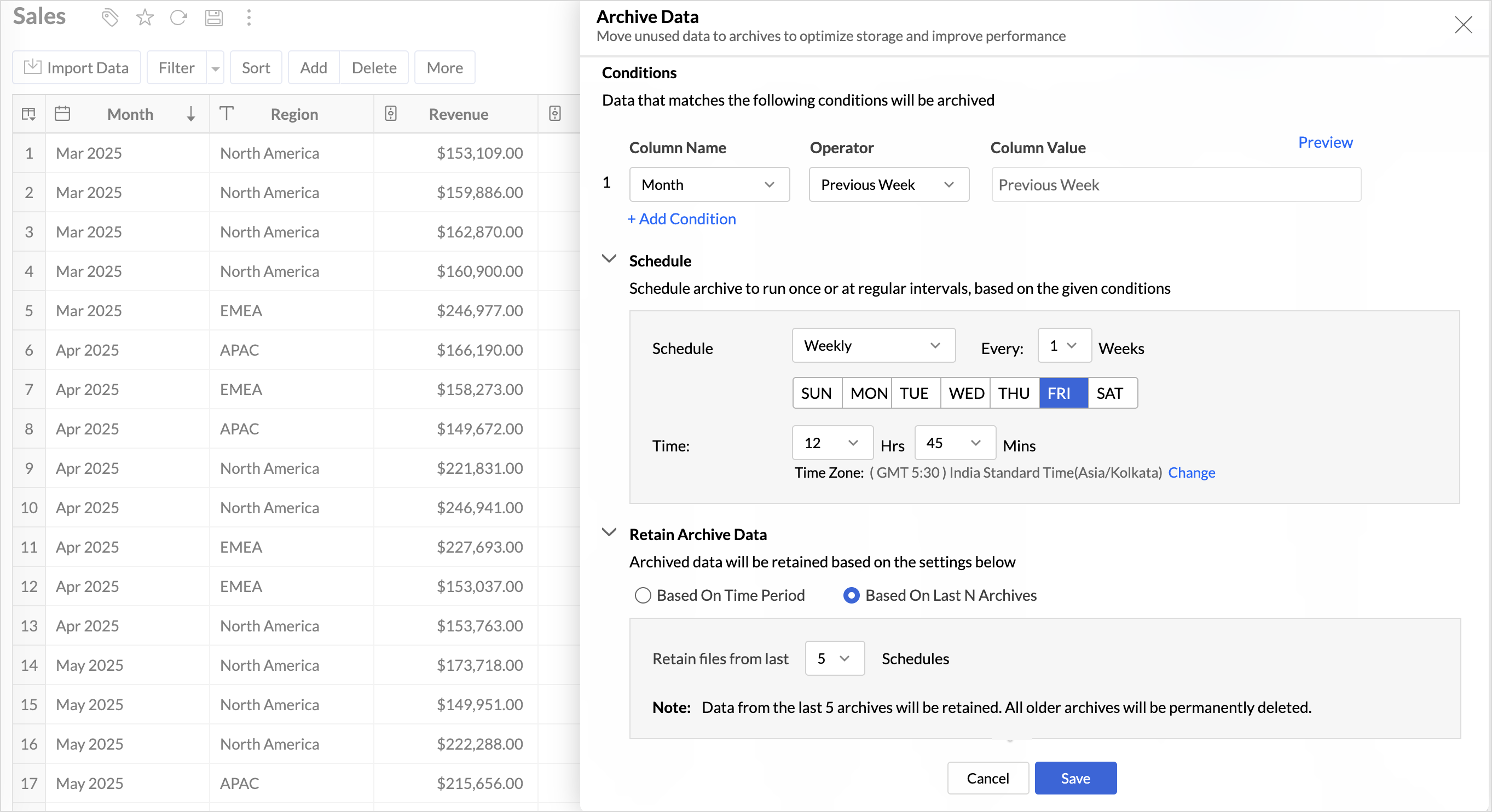
Key Benefits
- Pay only for what you analyze: Active data is reserved for analysis, while historical data is retained without impacting usage limits.
- Improved Querying and Faster Analysis: By limiting queries to relevant data, report generation and dashboard loading times are significantly reduced, resulting in faster insights and a more responsive analytics experience.
- Optimized Storage Usage: Archiving older data helps control table size, preventing unnecessary growth, and better management of row limits.
Organize Views with Tags
Group related views, and manage reports and dashboards effortlessly. Use tags to organize views by teams, departments, projects, or specific use cases, making it easy for users to navigate large workspaces.
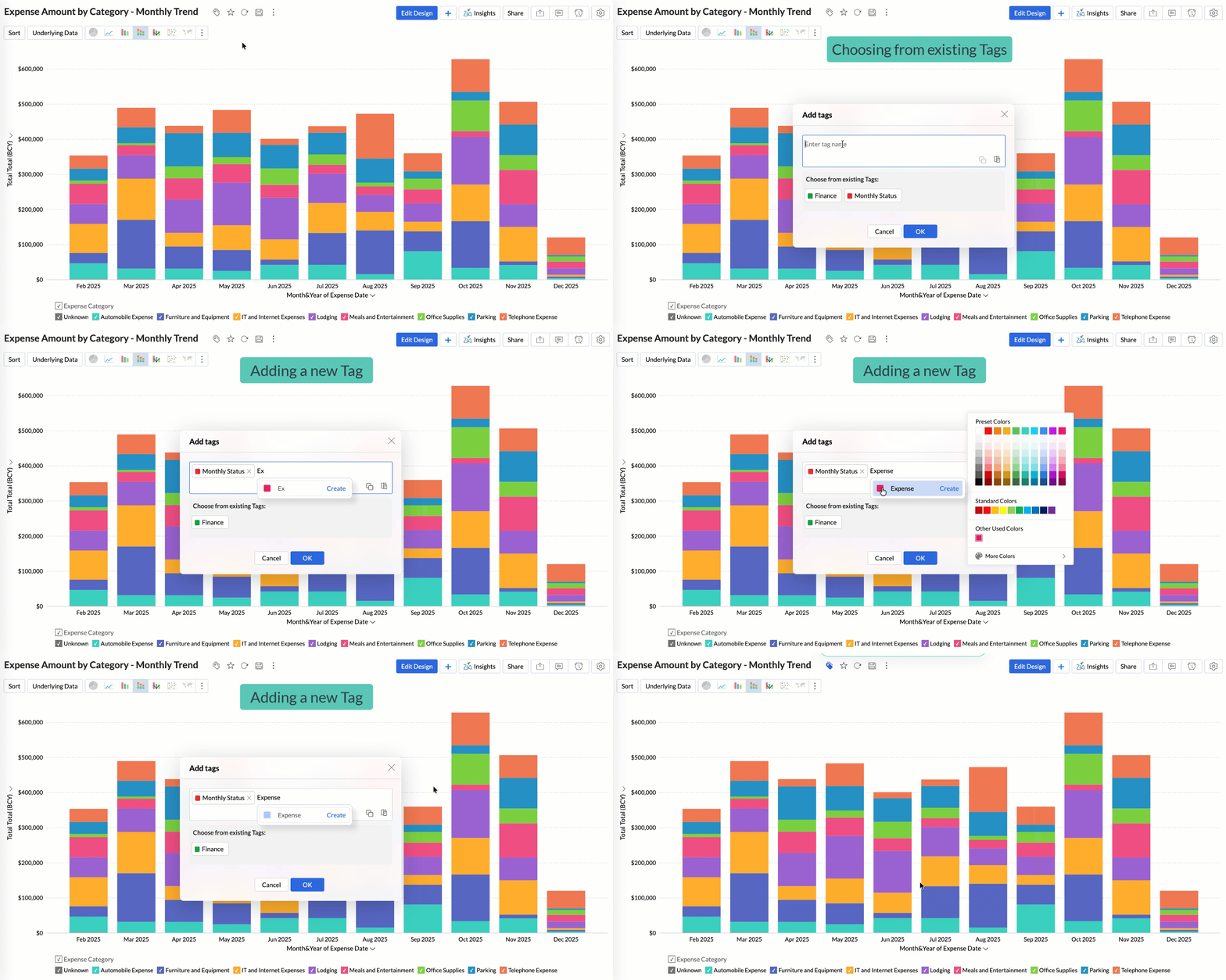
Quickly filter and find the right reports and dashboards, reduce clutter, and ensure teams always have access to the views that matter most to them.
Global Custom Sort
Custom sort was limited to individual reports previously. With recent enhancements, you can now define the sort order for text data types at the workspace level.
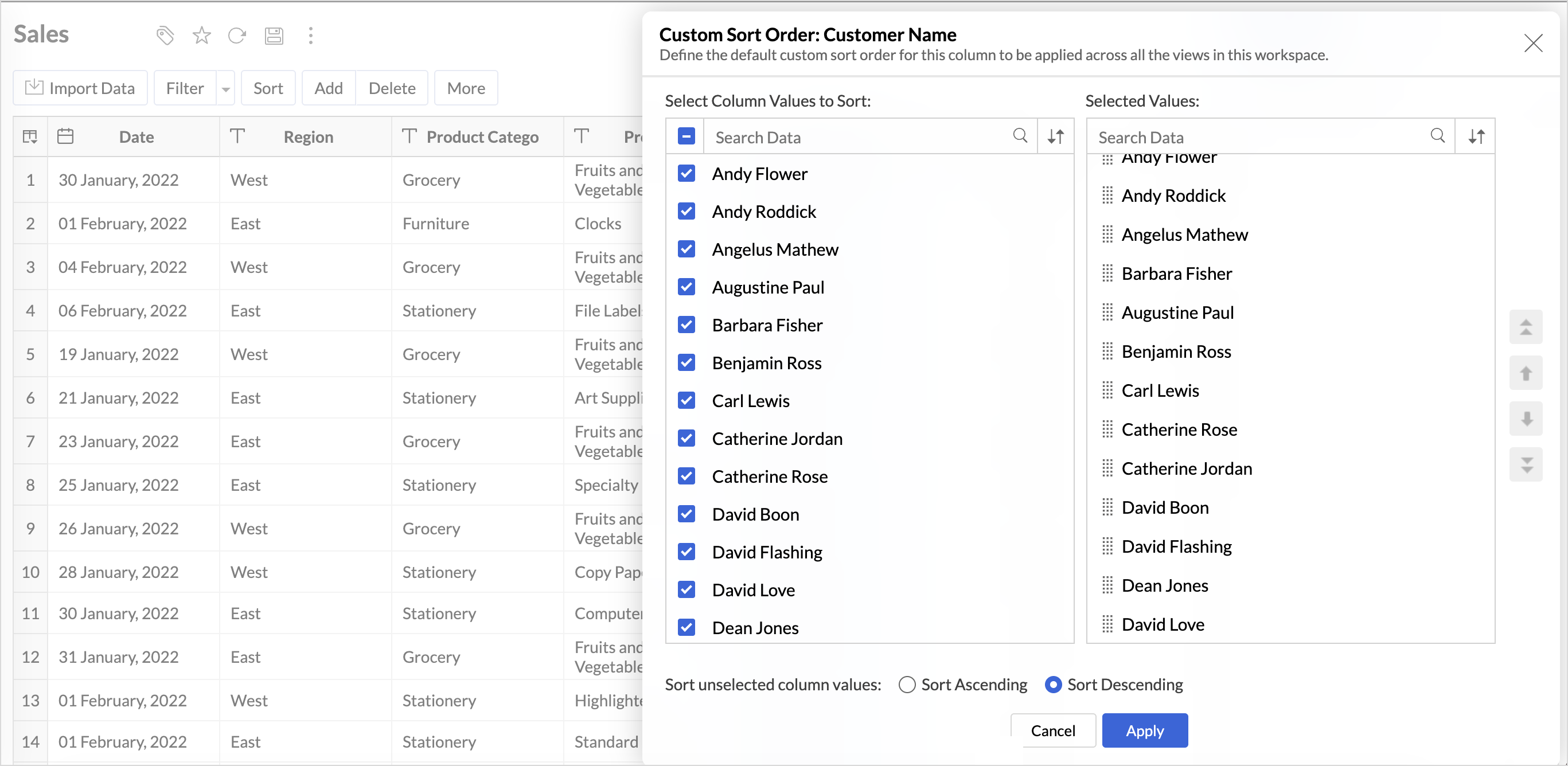
This improvement helps you maintain a consistent sorting across all reports, reduces repetitive setup, and saves time. It also ensures a standardized view of your data throughout the workspace.
Timeframe Selection for Overview Charts
Overview charts now offer flexible timeframe selection, allowing you to focus on relevant periods for deeper trend analysis.
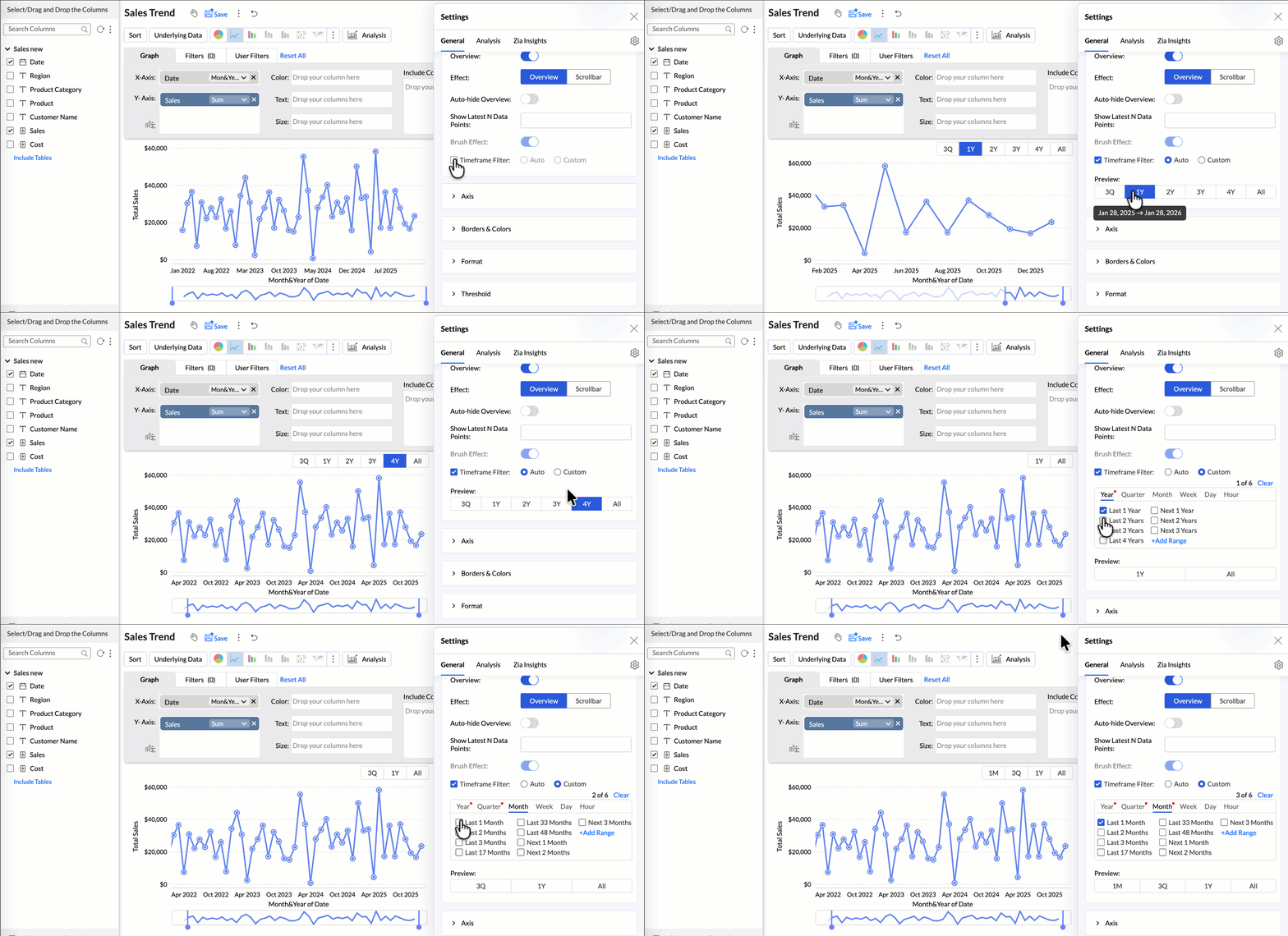
By narrowing the time range, you can better compare performance, identify patterns, and gain clearer insights without distraction from older data.
Customize Zia Insights placement in Dashboards
Choose where and how the insights are displayed, so that they complement your analysis without disrupting your dashboard layout. This gives you greater flexibility to present insights in the way that best suits your audience and reporting style.
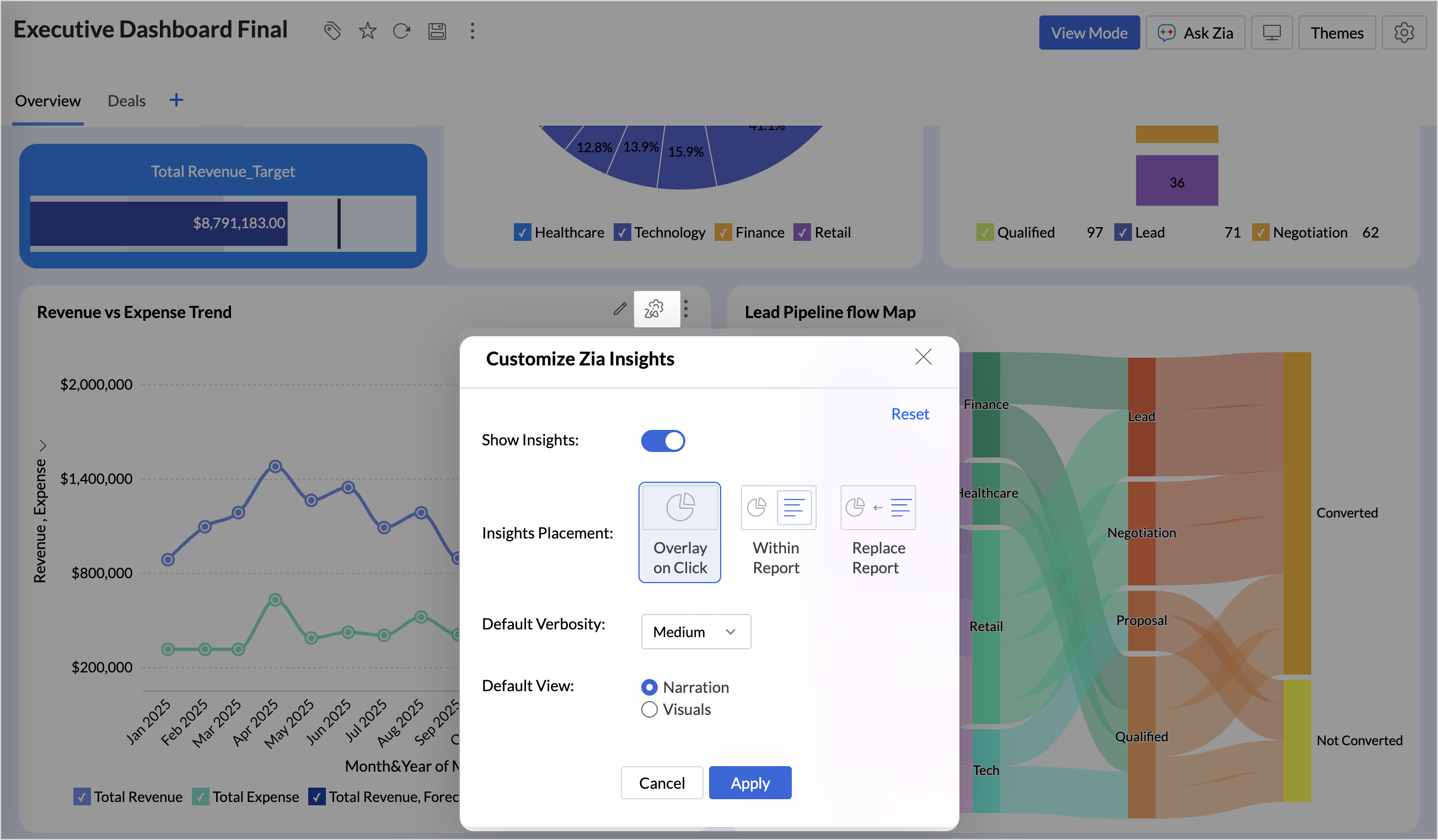
- Overlay: Displays insights in a floating panel that opens on demand, allowing users to review insights without leaving or altering the report view.
- Within Report: Embeds insights directly within the report, enabling users to view data and insights together in a single, continuous view.
- Replace Report: Displays insights as the primary view by replacing the report entirely, offering an insight-first experience focused on conclusions, rather than raw data.
Customize Image Size in Dashboards
Dashboards now support image size settings that let you control how images are displayed.
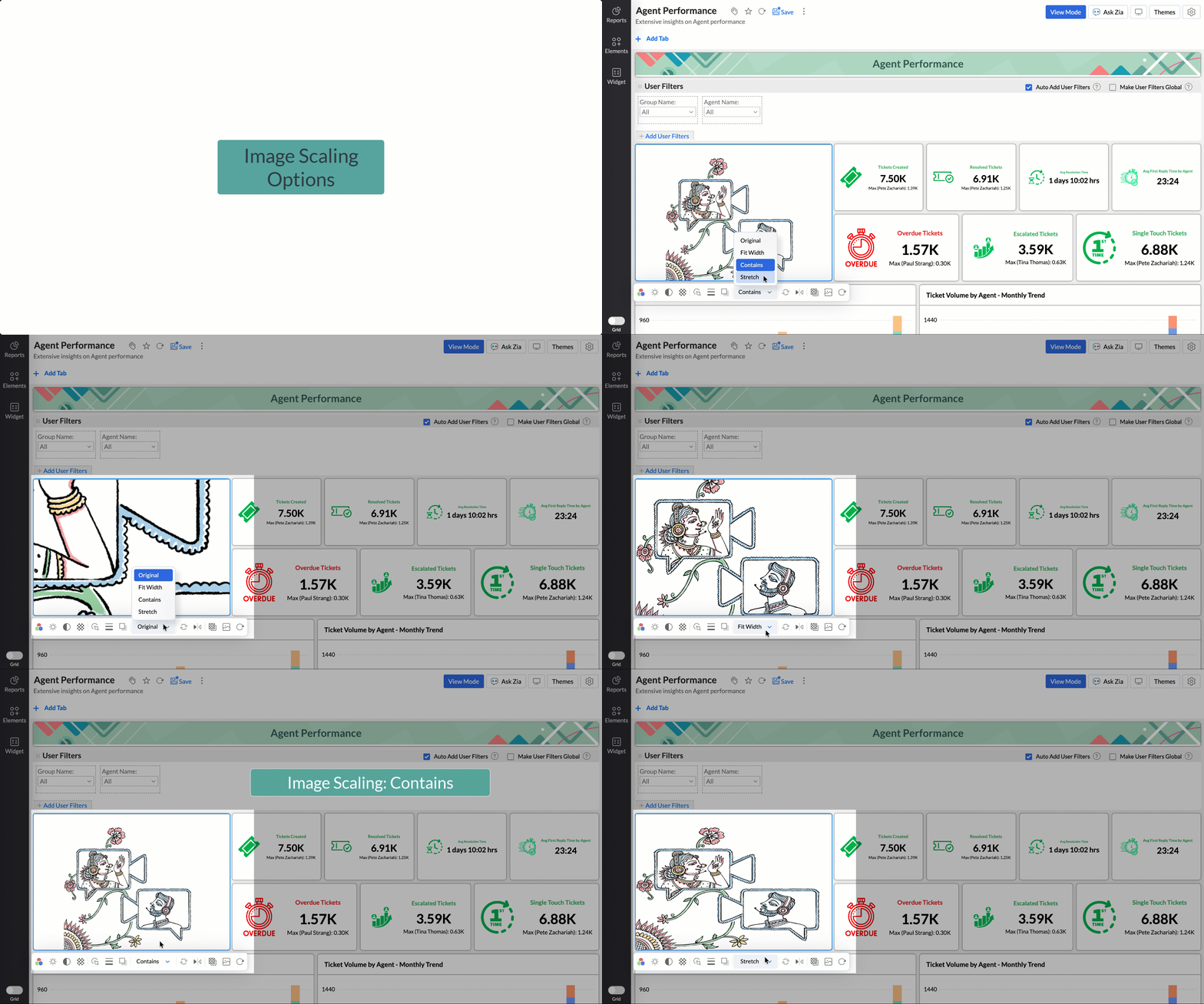
Choose from options like Original, Fit to width, Contain, or Stretch to ensure images align well with your dashboard layout, and thus improve visual clarity.
Tabular View Enhancements
- With this enhancement, all tables linked via lookup columns are now available in the Filter Criteria tab. This makes it easier to share views with users using associated filters, ensuring the specified criteria are automatically applied to the shared report.
- You can now customize lookup columns and the join paths used within Tabular View. This enhancement gives you control over how related tables are connected, helps avoid incorrect or ambiguous joins, and ensures more accurate and reliable data representation in your tabular reports.
New Business App Connectors
We have now introduced integration with two new business connectors Zoho FSM and Magento.
Zoho FSM
Connect your Zoho FSM Data with Zoho Analytics to analyze your field service operations in depth. Identify bottlenecks, optimize resource allocation with interactive reports and dashboards. Analyze revenue, service costs, and customer trends to improve profitability and service quality.
Adobe Commerce (Magento)
Analyze sales, orders, customers, and product performance with ready-made reports and dashboards. Track key metrics like revenue trends, average order value, and top-selling products. Gain insights into customer behavior and regional sales patterns. Make faster, data-driven decisions to optimize store performance and growth.
Topic Participants
Nisha Angel J
Sticky Posts
What's New in Zoho Analytics - January 2026
Hello Users! We are starting the year with a strong lineup of updates, marking the beginning of many improvements planned to enhance your analytics experience. Explore the latest improvements built to boost performance, simplify analysis, and help youWhat's New in Zoho Analytics - November 2025
We're thrilled to announce a significant update focused on expanding your data connectivity, enhancing visualization capabilities, and delivering a more powerful, intuitive, and performant analytics experience. Here’s a look at what’s new. Explore What'sWhat's New in Zoho Analytics - October 2025
Hello Users! We're are back with a fresh set of updates and enhancements to make data analysis faster and more insightful. Take a quick look at what’s new and see how these updates can power up your reports and dashboards. Explore What's New! ExtremeWhat’s New in Zoho Analytics – September 2025
Hello Users!! In this month’s update, we’re raising the bar across multiple touchpoints, from how you bring in data, plan and track projects to how you design and brand your dashboards. We’ve added the all-new Gantt chart for project visualization, expandedAnnouncing Agentic AI - Ask Zia!
We are delighted to roll out the new agentic AI capabilities in Ask Zia, where every stage of the BI workflow is assisted by AI. With a human-in-the-loop approach, Ask Zia ensures that you’re in command of the decision, while AI handles the complexity.
Recent Topics
Sync Creator form submissions to WorkDrive folder
I've made 10 Creator applications, and need to sync my each application's submissions into a WorkDrive folder. I need the form submissions to be PDF file type and sync to a specific folder for documentation purposes. I have tried to use a workflow, butAdd Voting Polls Feature Similar to WhatsApp to Zoho Cliq
Hi Zoho Cliq Team, Hope you're doing well. We are using the Voting Polls feature in WhatsApp (see: WhatsApp Voting Polls FAQ), and we believe a similar functionality would be extremely valuable in Zoho Cliq. Currently, when our teams want to quickly gatherZML Snippet: Auto Refresh Section
Is there a way that I can set an auto refresh on each of the ZML snippet only and not the entire page? Just wondering..Availability of the Custom Sort Order feature for Windows and Mac platforms??
Notebook Team, I hope this message finds you well. I am reaching out to inquire about the current status and planned updates for the Custom sort order feature within your application. A year ago, it was mentioned that this feature is supported on iOS,Have you checked your Email headers for DKIM Failure?
Have you taken a look at your email headers for DKIM failures even with DKIM set up properly? I've had DKIM successfully set up for many months. My account currently shows Email Verified and Authenticated. Big green check marks. Email Relay is also showingWizard Form
I would like the option to create a wizard that works when you create a record and contacts that are already in the CRM captured with a web 2 lead form (field data inserted in to the wizard). Having the option to create up to 3/4 segments per screenPivot Table - Zoho Analytics
I'm creating a Profit and Loss chart in Zoho Analytics using the Pivot Chart feature. While Net Profit can be calculated using the total value, I also need to calculate and display the Gross Profit/Loss directly within the chart. To do this, I need toFetch function not working for CRM Contacts
I've created a flow that checks if a contact exists in CRM (based on form input), and if it does, then it updates one of the fields for the contact. In my test, the fetch function correctly identifies that a contact exists (based on email address), butClone a project
To whom it may concern, I did a quick search of the forum and found nothing relating to this idea, so am posting fresh. The service that our company provides means that we follow an essentially identical process for each new job, and this includes the time frames for each stage. Ideally we would have a complete "template" project, with all the task lists and tasks in place with associated start dates, due dates (and by extension, duration) and - most importantly - the dependencies between tasks soAdd Sequential Processing Option in Zoho Flow
Hi Zoho Team, I hope you're doing well. We would like to request a new feature for Zoho Flow: the ability to configure a flow to run in Sequential Processing mode — meaning, each instance of the flow waits until the previous execution is fully completedZoho Sign URL cannot be embedded in an iframe on the React side.
The Zoho Sign URL cannot be embedded inside an iframe within a React application (or any web application) because Zoho enforces a Content Security Policy (CSP) that explicitly prevents iframe embedding from external origins. When attempting to load theZoho CRM Developer Series - Queries
Hey everyone! We’re excited to invite you to our next Zoho CRM Developer Series focused on Zoho CRM Queries, happening on June 5, 2025 and June 26, 2025. Whether you're working on CRM customizations, integrating with third-party services, or just curiousCan Clients have Access to their record Attachments in Client Portal
Is there a way to have allow clients access to attachments in their client portal? Attachments is currently hidden in the client portal and I cannot find a way to allow client access. Thank you!Canvas: how can I edit theme?
This says "Theme Colours", and I would like to edit theme colors (and styles ala CSS). How can I edit these "Theme Colours"? I'm a software developer, so just point me in a direction where I can alter code if needed.are Zoho Meeting and Zoho Webinar two separate products?
hey all, i'm new to Zoho One and I'm trying to figure out what's the best platrofrm to do a Webinar for my subscribers. I see that Meeting have a Webinar option, but i see there's also a separate product (?) called Zoho Webinar. Are these two actuallyVery Worst Experience = Screen sharing was Awful. There is a huge lag. I switched to Google meet, with same network speed, there is no lag at all.
Very Worst Experience = Screen sharing was Awful. There is a huge lag. I switched to Google meet, with same network speed, there is no lag at all. Requesting you to work on your improvements. Otherwise this will give a very poor experience. Thanks,Enable Native Zia Integration in Zoho Mail Without Requiring OpenAI API Key
Hello Zoho Team, We hope you're doing well. We would like to request a feature enhancement for Zoho Mail's integration with Zia, specifically concerning the AI-powered capabilities like: Auto-complete sentences Generate email content Summarize email Currently,Email policy not working?
Hi, I created an email policy called "default", under which I created a "default" entry for the access items (the third icon with the key). I've set everything to "ON" (POP, IMAP, ActiveSync, etc.). But then when I create a new user and check it in MailOne notebook is on my Android phone app, but not on Web or PC app.
This problem started in stages. At first my phone was occasionally failing to sync. Then I noticed two things added to my Phone App. One was an existing notebook had a new cover, and the other was a new Note Card with an odd text in it. These were onlyAdmin Training
Hello, I would like to get admin training on Zoho Projects. Has anyone had success in finding a class or resource for something like this? Are there any partners out there that offer this kind of training?Why can't we change or delete the first page of a Zoho PDF?
I've noticed that it's not possible to move or delete the first page of a Zoho PDF, why is that?Latência
Estou com bastante latência 200ms em São Paulo Brasil para o endereço mail.zoho.com, e email demora para carregar as vezes trava como está por ai ? segue print sabem se é normal ? pingZoho Flow connection to Zoho CRM
I connected to Zoho CRM when I test it, but when I save that step in Flow I get this error. {"code":"INVALID_URL_PATTERN","details":{},"message":"Please check if the URL trying to access is a correct one","status":"error"} Hopefully someone has an ideaHow to change the module for contact sync from Accounts to Accounts & their Contacts?
Hi, My ZOHO CRM integration is broken and pushing the errors for sales orders and invoices, the error message is: "The customer associated to this record is not linked to module chosen in the current contact sync configuration." So, Now I'm trying toTop Menu Disappeared from Blog Page
Hi, Our top menu disappeared at Blog Posts page. However, it's still visible any other page on the website. I attached two screenshots, so it can be understood clearly. How can we bring back top menu? Thanks, K.VOIP integration
I emailed this question to rishi but never got a response. I notice when I mouse over phone number it has a link to launch into SKYPE. We dont use SKYPE we use Xlite SIP client. Is it possible to change that link to launch our client API? If so how? If not any plans to make that VOIP integration customizable?Add "Ask Zia" Functionality for Report Creation in Zoho Desk
Hi, How are you? We’ve noticed that Zoho CRM offers a very useful feature called "Ask Zia", which allows users to enter natural language prompts to generate reports quickly and easily using Zia's AI capabilities. Currently, Zoho Desk does not supportI can't use zoho in my personal computer
Facing error on monitor Oops! An error occurredMy Zoho Account Not Working, Suddenly its stoped
Hello Team, our company email account is not working, we are not receiving email. Website: www.urgentdubaivisaonline.com Email: social@urgentdubaivisaonline.comMX verification
Dear All I face a difficulties to verify MX records in my domain alfagrouptrading.sk it is since two days. records are correct and I am waiting for 48 hour I send email shown in the error message with no reply.in addition, it supposed to be propagatedI'm not receiving emails.
Hello. I'm having an issue in which I am able to send emails using my zoho mail, but I seem to be unable to receive them. please help.Change zoho email address
I am displeased with the email address I created. It's too long.Departments Limit
There is a limit of departments that i can have on zoho desk?How to create a form using both contact and account fields?
I am sending a prefilled form from CRM with fields mapped, to update records in CRM. If I link the CRM field to the Contacts module, the Account Name field doesn't come up as an option in CRM. If I added it under Related Fields, my understanding it wouldAre Zoho Help Center Email Notifications Customisable?
Hi, I would like to find out if the Zoho Help Center email notifications can be customised to add our own styling and branding? These are the notifications that get sent when a client adds a new topic, adds a comment, signs up to the help center, etc?Sharing and Converting Custom Reports Across Departments in Zoho Desk
Hello, We initially started using Zoho Desk with a single department (Department "A"), which included multiple teams. Nearly a year later, we identified several limitations that led us to create three additional departments ("B", "C", and "D") with replicatedDelivery note from order or from offer
Hello, in our company and in a lot of companies in Italy, the standard workflow is (in order): 1) Offer 2) Customer order 3) Delivery note. We can have also more delivery notes in one month. 4) Invoice at the end of the month from delivery note (so onlySesiones 1:1 en Zoholics España 2025
Una de las experiencias más valoradas por los asistentes a Zoholics son las sesiones 1:1 con nuestros expertos técnicos. Este 2025, las traemos de vuelta con aún más fuerza: cada entrada a Zoholics España 2025 incluye una sesión individual gratuita de"The email sending domain must have an active and functional website so that we can proceed with the review."
I've requested the approval of my account, and got the following response back: "The email sending domain must have an active and functional website so that we can proceed with the review." This is absolutely false. The website I have provided has beenUpload File via email
Will there be an option to upload a file via email?Next Page