What's New - January 2026
Hello Users!
We are starting the year with a strong lineup of updates, marking the beginning of many improvements planned to enhance your analytics experience. Explore the latest improvements built to boost performance, simplify analysis, and help you extract more value from your data.

Archive Data
No more querying all records while generating reports! Analyze data faster and optimize workspace performance with Archive Data. Move older or less-frequently used records out of active tables, and store them securely.
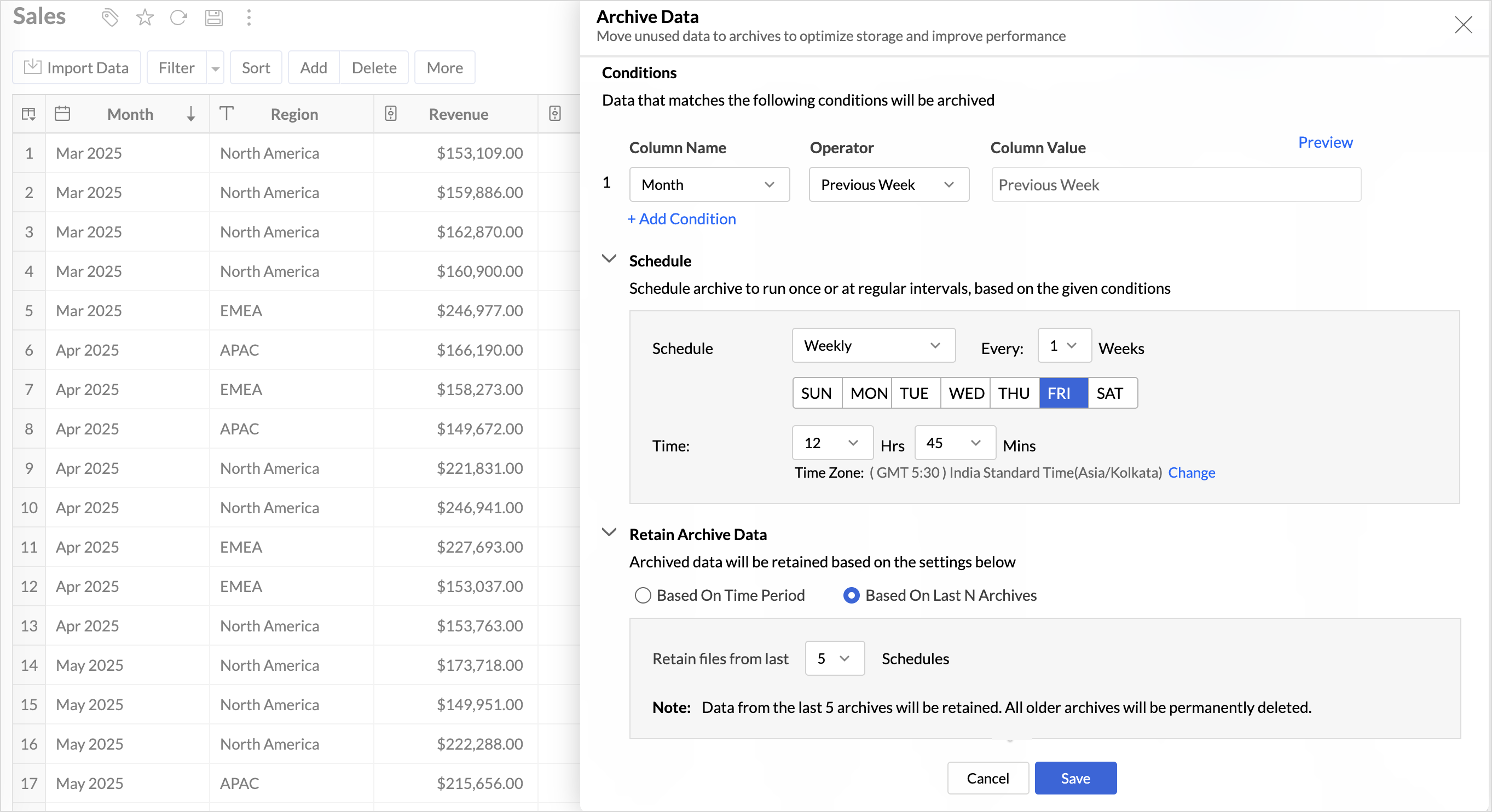
Key Benefits
- Pay only for what you analyze: Active data is reserved for analysis, while historical data is retained without impacting usage limits.
- Improved Querying and Faster Analysis: By limiting queries to relevant data, report generation and dashboard loading times are significantly reduced, resulting in faster insights and a more responsive analytics experience.
- Optimized Storage Usage: Archiving older data helps control table size, preventing unnecessary growth, and better management of row limits.
Organize Views with Tags
Group related views, and manage reports and dashboards effortlessly. Use tags to organize views by teams, departments, projects, or specific use cases, making it easy for users to navigate large workspaces.
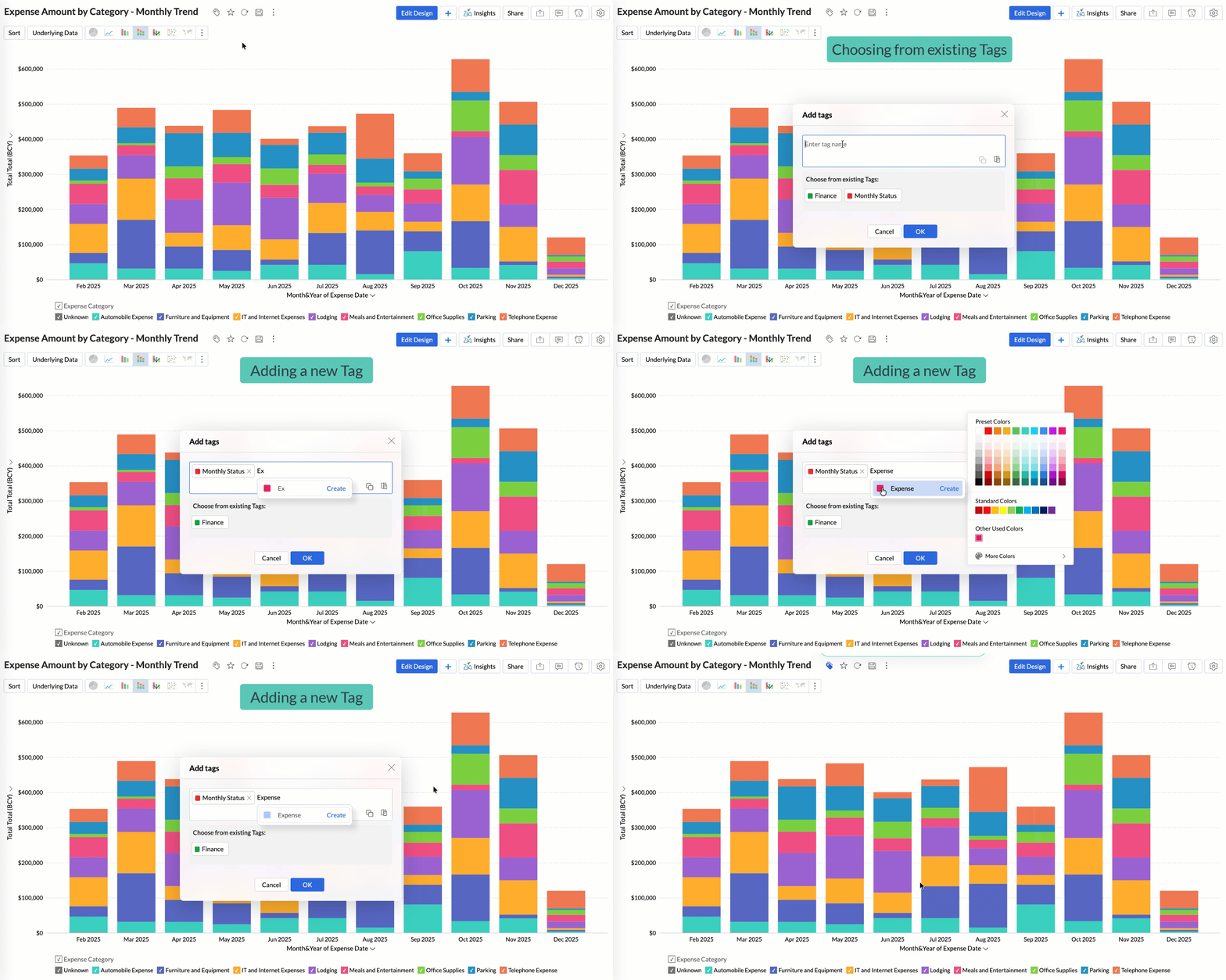
Quickly filter and find the right reports and dashboards, reduce clutter, and ensure teams always have access to the views that matter most to them.
Global Custom Sort
Custom sort was limited to individual reports previously. With recent enhancements, you can now define the sort order for text data types at the workspace level.
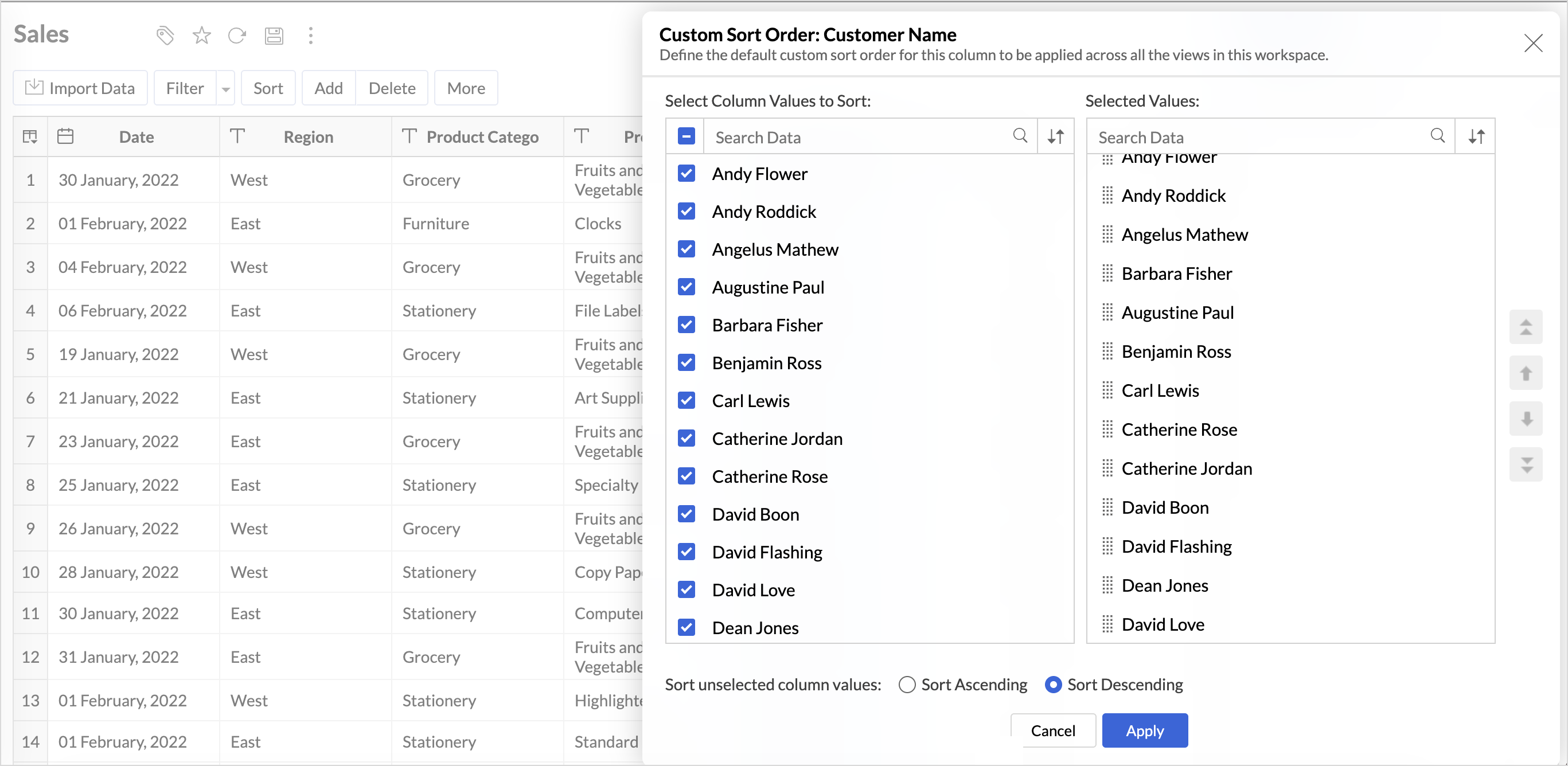
This improvement helps you maintain a consistent sorting across all reports, reduces repetitive setup, and saves time. It also ensures a standardized view of your data throughout the workspace.
Timeframe Selection for Overview Charts
Overview charts now offer flexible timeframe selection, allowing you to focus on relevant periods for deeper trend analysis.
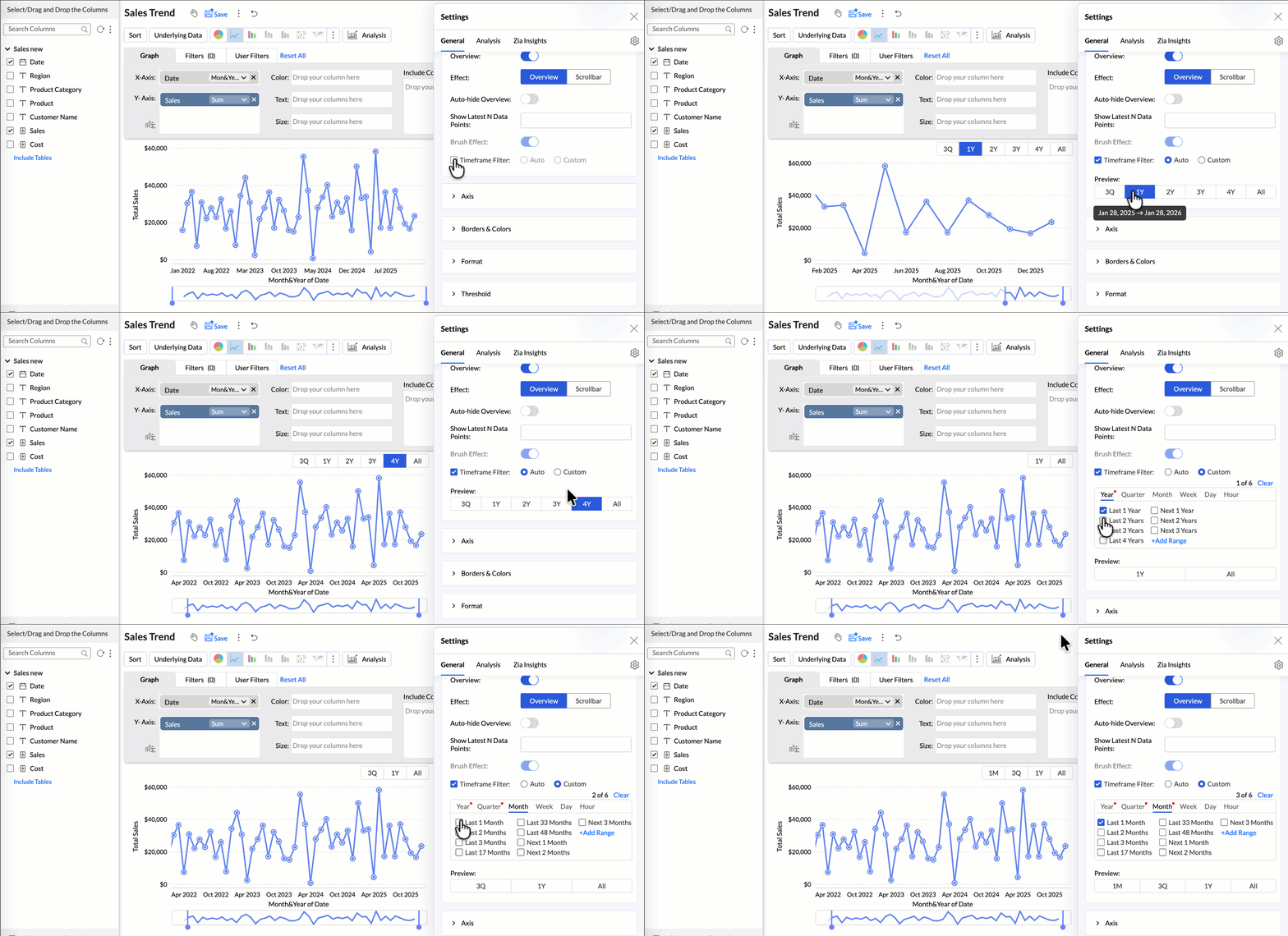
By narrowing the time range, you can better compare performance, identify patterns, and gain clearer insights without distraction from older data.
Customize Zia Insights placement in Dashboards
Choose where and how the insights are displayed, so that they complement your analysis without disrupting your dashboard layout. This gives you greater flexibility to present insights in the way that best suits your audience and reporting style.
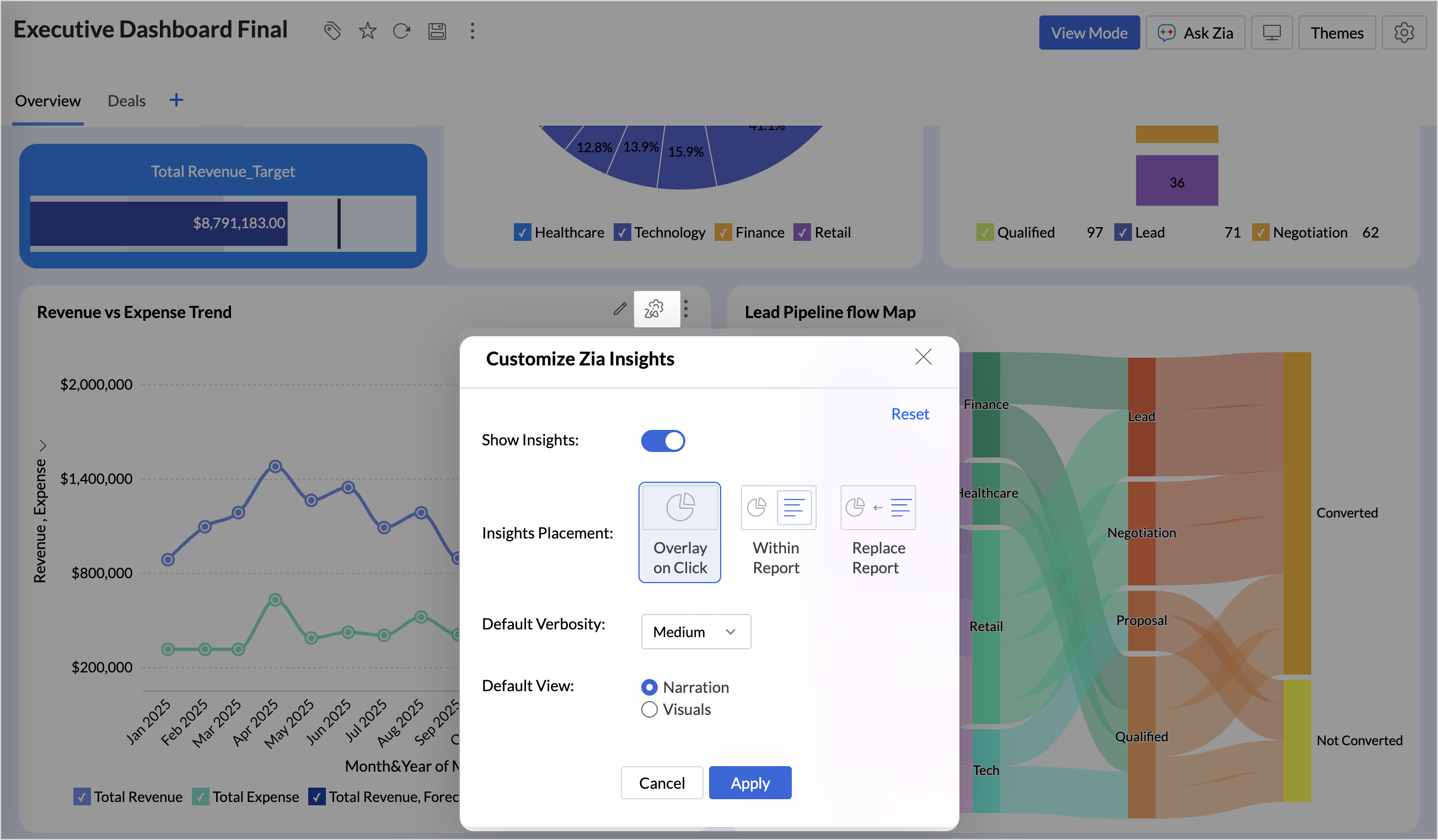
- Overlay: Displays insights in a floating panel that opens on demand, allowing users to review insights without leaving or altering the report view.
- Within Report: Embeds insights directly within the report, enabling users to view data and insights together in a single, continuous view.
- Replace Report: Displays insights as the primary view by replacing the report entirely, offering an insight-first experience focused on conclusions, rather than raw data.
Customize Image Size in Dashboards
Dashboards now support image size settings that let you control how images are displayed.
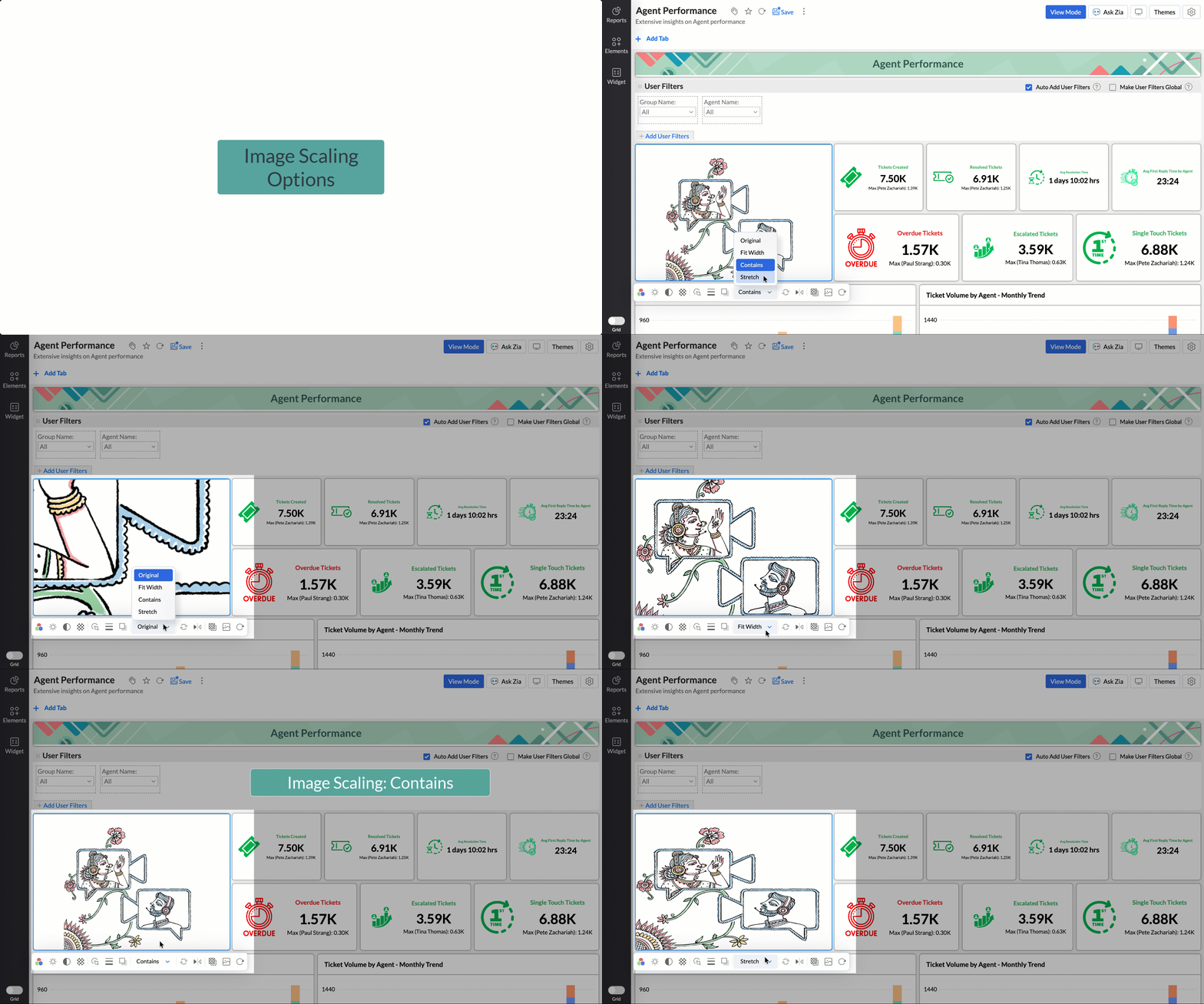
Choose from options like Original, Fit to width, Contain, or Stretch to ensure images align well with your dashboard layout, and thus improve visual clarity.
Tabular View Enhancements
- With this enhancement, all tables linked via lookup columns are now available in the Filter Criteria tab. This makes it easier to share views with users using associated filters, ensuring the specified criteria are automatically applied to the shared report.
- You can now customize lookup columns and the join paths used within Tabular View. This enhancement gives you control over how related tables are connected, helps avoid incorrect or ambiguous joins, and ensures more accurate and reliable data representation in your tabular reports.
New Business App Connectors
We have now introduced integration with two new business connectors Zoho FSM and Magento.
Zoho FSM
Connect your Zoho FSM Data with Zoho Analytics to analyze your field service operations in depth. Identify bottlenecks, optimize resource allocation with interactive reports and dashboards. Analyze revenue, service costs, and customer trends to improve profitability and service quality.
Adobe Commerce (Magento)
Analyze sales, orders, customers, and product performance with ready-made reports and dashboards. Track key metrics like revenue trends, average order value, and top-selling products. Gain insights into customer behavior and regional sales patterns. Make faster, data-driven decisions to optimize store performance and growth.
Topic Participants
Nisha Angel J
Sticky Posts
What's New in Zoho Analytics - January 2026
Hello Users! We are starting the year with a strong lineup of updates, marking the beginning of many improvements planned to enhance your analytics experience. Explore the latest improvements built to boost performance, simplify analysis, and help youWhat's New in Zoho Analytics - November 2025
We're thrilled to announce a significant update focused on expanding your data connectivity, enhancing visualization capabilities, and delivering a more powerful, intuitive, and performant analytics experience. Here’s a look at what’s new. Explore What'sWhat's New in Zoho Analytics - October 2025
Hello Users! We're are back with a fresh set of updates and enhancements to make data analysis faster and more insightful. Take a quick look at what’s new and see how these updates can power up your reports and dashboards. Explore What's New! ExtremeWhat’s New in Zoho Analytics – September 2025
Hello Users!! In this month’s update, we’re raising the bar across multiple touchpoints, from how you bring in data, plan and track projects to how you design and brand your dashboards. We’ve added the all-new Gantt chart for project visualization, expandedAnnouncing Agentic AI - Ask Zia!
We are delighted to roll out the new agentic AI capabilities in Ask Zia, where every stage of the BI workflow is assisted by AI. With a human-in-the-loop approach, Ask Zia ensures that you’re in command of the decision, while AI handles the complexity.
Recent Topics
what is the header code and footer code, do you provide it for my website
I am unable to understand few terms in making website, i need your help in header code, footer code, face book pixel integration etc..Zoho DataPrep
Zoho DataPrep is not updating the dataset. I post the updated dataset in Zoho WorkDrive under the same file name. (I delete the old file and upload the updated file with the same filename.) Zoho DataPrep is supposed to pull the dataset from Zoho WorkDrive,Zoho Assist Unattended Access prevent my Windows 10 Pro business computers to sleep (ever)!
Since I begin my trial period of Zoho Assist (Unattended Access) for business, I have sleep mode issues on all my business computer. In fact none of the sleep delay worked or even if I manually click the "Sleep" button into the Start Menu... After using the "powercfg -requests" command from Microsoft to troubleshoot sleep issues, I see that Zoho was responsible to all my sleep issues. Of course after uninstalling Zoho Assist Unattended Access from my test computer, the sleep mode returned to normalzoho notebook won't let me sign in on arch linux
just gives me an eternal loop when i try to sign in within the app. signing in with google does the same, showing the blank white screen in browser at the same timeWhere to find User Performance Page in CRM?
Hi all Just googling answers to another forum post I've just put here when I found this page; https://help.zoho.com/portal/en/community/topic/forecast-performance-analysis-public-early-access-2023 It shows this User Performance Page screenshot. I can'tZoho Payroll: Product Updates | April 2025
At Zoho Payroll, we’re always working to make every payday feel effortless. And sometimes, that means listening closely to your unique needs. This month, we’ve focused on adding features that give you the flexibility to pay your employees based on yourHow to mass update member status in a CRM Campaign?
Does anybody knows how to mass update member status of the contacts (or leads) associated to a campaign. I can click on a campaign record and go to the Contacts in the Related List fields but then it shows only 10 contacts per page at once. It is hardCRM API w/ Self Client (Administrator): You do not have sufficient permission to associate this record. Contact your administrator.
I am using the CRM API and am having an issue creating a contact. I've successfully created a contact linking to an existing account by ID, but then when I created a separate test account (which succeeded) and tried to create a contact linked to thatAllow non admins to create folders
I want to allow users in my company to create their own reporting based upon selected Datasources, however they currently can't create folders to save their work in. This can only be done by admins, which seems excessive. Is this possible ?Filter a report for a specific bank and a specific transaction type (interest income)
I am trying to run a report - any report - on a specific bank account for the interest income. I do not see it as an option. I can see the Bank Account under Account in the Filters, and I can see the Interest Income under Account in the Filters But IHow to launch ZohoIQ by clicking on URL
I want to add an option for visitors to launch the chat by clicking a hyperlink.Error: Unable to save integration in Desk
Hi, Problem here. When I try to integrate Zoho CRM with Zoho Desk, I get an error when saving: Unable to save integration in Desk. See print screen below. I'm selecting the right accounts and fields, so not sure what's going wrong.Sendmail based on individual subform rows on form submission
Salut, My order form has an product subform with items that can be bought from different suppliers. I would like every suppliers to receive an email saying "you have an order" with all items (records) of the order associated with them. The suppliers'Can't attach a file with ZOHO Mail
I am a new user of ZOHO mail. The attachment feature of the mail does not work. I get the dialog box to choose the file, then nothing happens and it does not attach the file. Please fix.Gmail to Zoho Mail: Filters
I'm considering a switch from Gmail (using its Workspace with a custom domain) to Zoho Mail. Reading the tutorials but didn't find the info on Gmail's filters. I have tons of them to auto-label my incoming emails. I know that those labeled emails willContracts Management
Hello, We are implementing Zoho FSM for our field service operations and, one of the features we are lacking is Service Contract Management. I was told that such feature might be in the pipeline but an estimated launch date for this is not available atFiltering on header content
I get a lot of spoofed emails which are usually filtered out but some slip through. At the moment I'm getting a load from this ip Received: from [221.162.176.78] (helo=akita-pu.ac.jp) which I'd like to filter out. Is there a way to filter on specific content in the email header?Zoho Rentals
Team, Zoho Inventory provides great features for Retail Sales and Purchases. On a similar note, There are significant portion of Rental industry would be missed out, if not looked into. Can we have a Zoho Rentals which can integrate with Zoho Inventory? Thanks!Script on Page used as dashboard don't work anymore
Salut, I have a page used as dashboard that worked fine, but recently the workflows don't seem to work, I have the icons like on a page for portal user when I try to look at it as admin. See screen shot : Anybody knows what could have happen ? The onlyView Expenses in Zoho Books Without Approval or Reports in Zoho Expense
Hello, I’m using both Zoho Books and Zoho Expense (on the free plan for both). I would like to view the expenses recorded in Zoho Expense within Zoho Books, but I read that they need to be approved first. Since I manage a small freelance business, I don’tChange default "Sort by"
Is there a way to change the default "sort by" when searching across modules?" in Zoho CRM? Currently the default sort method is "Modified time" but i would like to utilize the second option of "relevance" as the sort by default and not have to changeCan Zoho CRM JS SDK Send Notifications, Create Tasks & Calendar Events?
Hello everyone! I’m just starting to explore this topic, so please excuse my beginner-level questions! Is it possible to use the JS SDK (https://help.zwidgets.com/help/latest/index.html) to: Send messages (signals, notifications) to specific employees,Restricting Printing
Hi Is it possible to stop users printing documents?Backup and Restore of Projects
Hi Guys, my boss asked me "do we store regulary offline Backups of Zoho Projects" and i could only answer "no way". Is there really no way to backup and restore a project manualy? As Projects is the main Product we decided to use Zoho it could be thatEnable Zia Bot for Intelligent Conversations in Zoho Cliq
Hi Zoho Cliq Team, We would like to request a new feature: the ability to interact with Zia via a dedicated bot in Zoho Cliq, in a way similar to how users interact with GPT-based assistants. Use Case: We're looking for functionality beyond the existingData types in custom fields
Hi, I've been trying to create a custom field to enter purchase order dates , but there is only one data type in the drop down to choose from which is a "Text Box ( Single Line )". I need the "Date" Data type. Please give me a solution regarding thiNo Non-Color Highlighting
I highlight in pink for important things I need to do in a note, and when those are completed I would choose the no highlight option. It used to be one of the options at the end of the color list. It was no color with a cross through it. After using aCan't attach
I am having problems sending attachments. I am trying to attach some PDFs to an email (as I do several times every day) but the progress bar on the attached file gets stuck somewhere between 20%-70% and when I hit send I get the error message 'AttachmentButton on Deal screen to automate changing deal dates?
Hi I spend a lot of time working with our accounts managers here moving deals around the calendar, qualifying things etc. I'd like to have an easy way to change the closing date on a deal, from the deal screen table, rather than either click in to theHow to authenticate my domain on ovh
I don't succeed in adding an domain authentification on ovh. Should i first create a subdomain? But this doesn't work either, ti gi ves te same screen and the next button is greyed out when adding the info received from zohoUndelivered Mail Returned to Sender
commerciale@etruriadesign.it, ERROR CODE :550 - "The mail server detected your message as spam and has prevented delivery." I have been corresponding with the receiver and they wrote "Ciao, ho fatto verificare ma purtroppo non è un problema che derivaNotifications no longer being sent to my email address for any scheduled events
The last few weeks, I stopped receiving email notifications to my email for events I have scheduled and have a selected reminder option checked.Group to shared mailbox conversion
Is it possible to convert a group in Zoho mail to a shared mailbox?why do I get error message each time I open zoho mail
why do I get error message each time I open zoho mailCross-department Parent-Child ticketing for faster and efficient ticket resolution
Hello everyone, Organizations frequently need to have multiple departments set up in their customer service ticketing system. However, when a customer raises an issue or an internal process that requires agents to collaborate with their peers, a lackCan't setup email on outlook (Android Phone)
Dear All Support, I have tried many time to setup this zoho mail over the android phone (outlook app) . But it's always show me to check username/password of my email . But i can login from the webmail , that's why i confuse , How can i able to accessHaving problem with MX records and SPF
Hi there, I have been facing a problem that my zoho mail doesn't receive mail. See Error in below The MX Records of your domain(s) mydomain.com are not pointed to Zoho and you may not receive emails in Zoho SPF entries in your domains DNS are not configuredAccount with own domain, IMAP vs IMAPPRO
Hi, I have email account with my own domain. I use Em Client email plan and when I use IMAPPRO incoming host, email comes in Em Client only when I restart program. If I use IMAP incoming host everything is ok. Port is 993 both option. Why so? What´s differentAutomatic Display the Price from CPQ
Is it possible to display the discounted price from CPQ that I created for my customer? For example, when the customer selects Product A, instead of showing the default price, it should display the discounted CPQ price.Enhancement - Financial Reports
Hello Everyone, As part of enhancing reports in Zoho Books, we have added an option`Compare With` in Financial reports. Using this, you can compare the current period with Previous Year(s)/Previous Period(s) (Maximum 3 periods). This option is available in the following Financial Reports: * Profit and Loss * Cash Flow Statement * Balance Sheet Please feel free to share your feedback. We are glad to hear from you. Regards, Nithya - Zoho Books Team.Next Page