What's New - January 2026
Hello Users!
We are starting the year with a strong lineup of updates, marking the beginning of many improvements planned to enhance your analytics experience. Explore the latest improvements built to boost performance, simplify analysis, and help you extract more value from your data.

Archive Data
No more querying all records while generating reports! Analyze data faster and optimize workspace performance with Archive Data. Move older or less-frequently used records out of active tables, and store them securely.
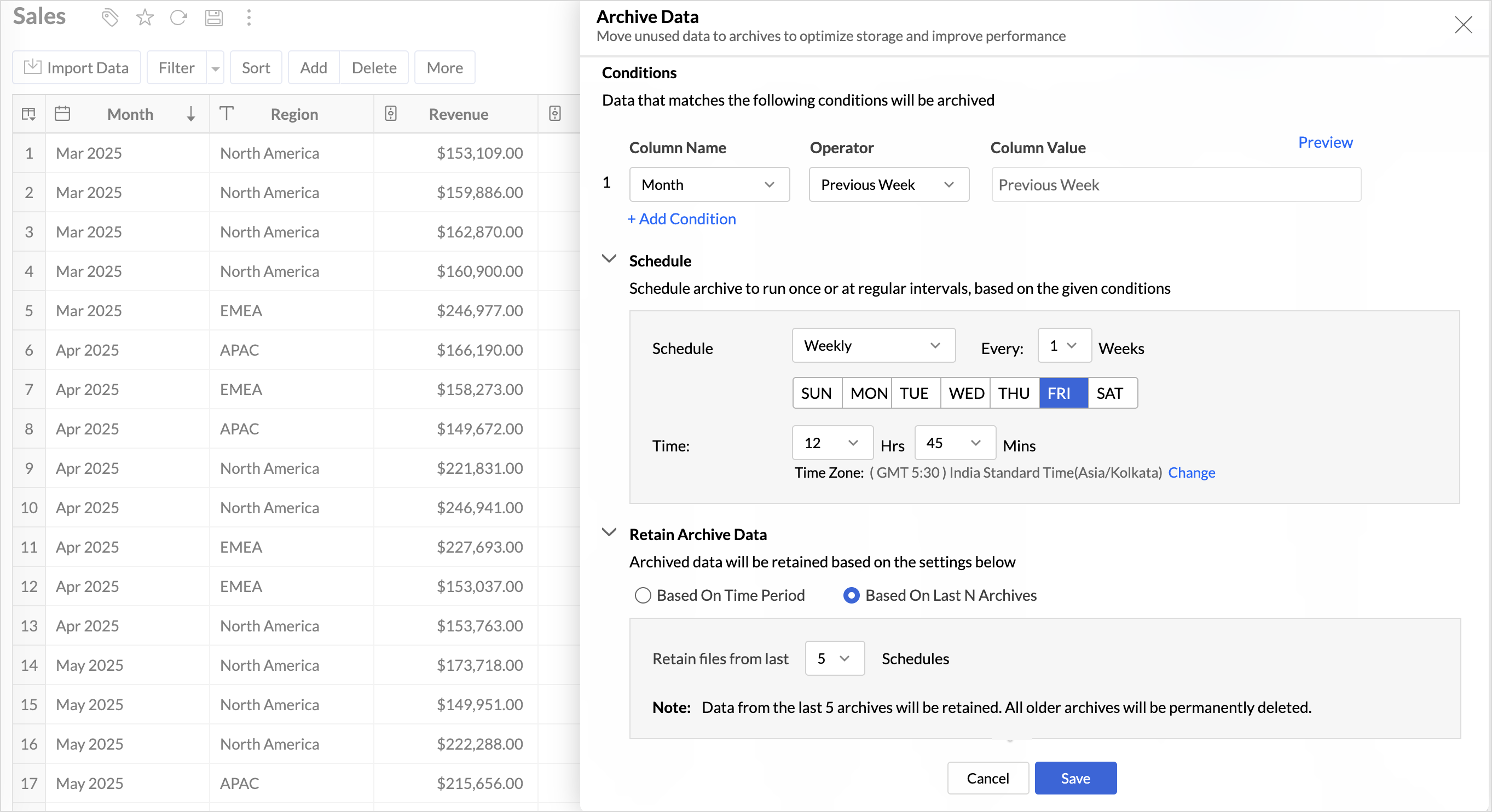
Key Benefits
- Pay only for what you analyze: Active data is reserved for analysis, while historical data is retained without impacting usage limits.
- Improved Querying and Faster Analysis: By limiting queries to relevant data, report generation and dashboard loading times are significantly reduced, resulting in faster insights and a more responsive analytics experience.
- Optimized Storage Usage: Archiving older data helps control table size, preventing unnecessary growth, and better management of row limits.
Organize Views with Tags
Group related views, and manage reports and dashboards effortlessly. Use tags to organize views by teams, departments, projects, or specific use cases, making it easy for users to navigate large workspaces.
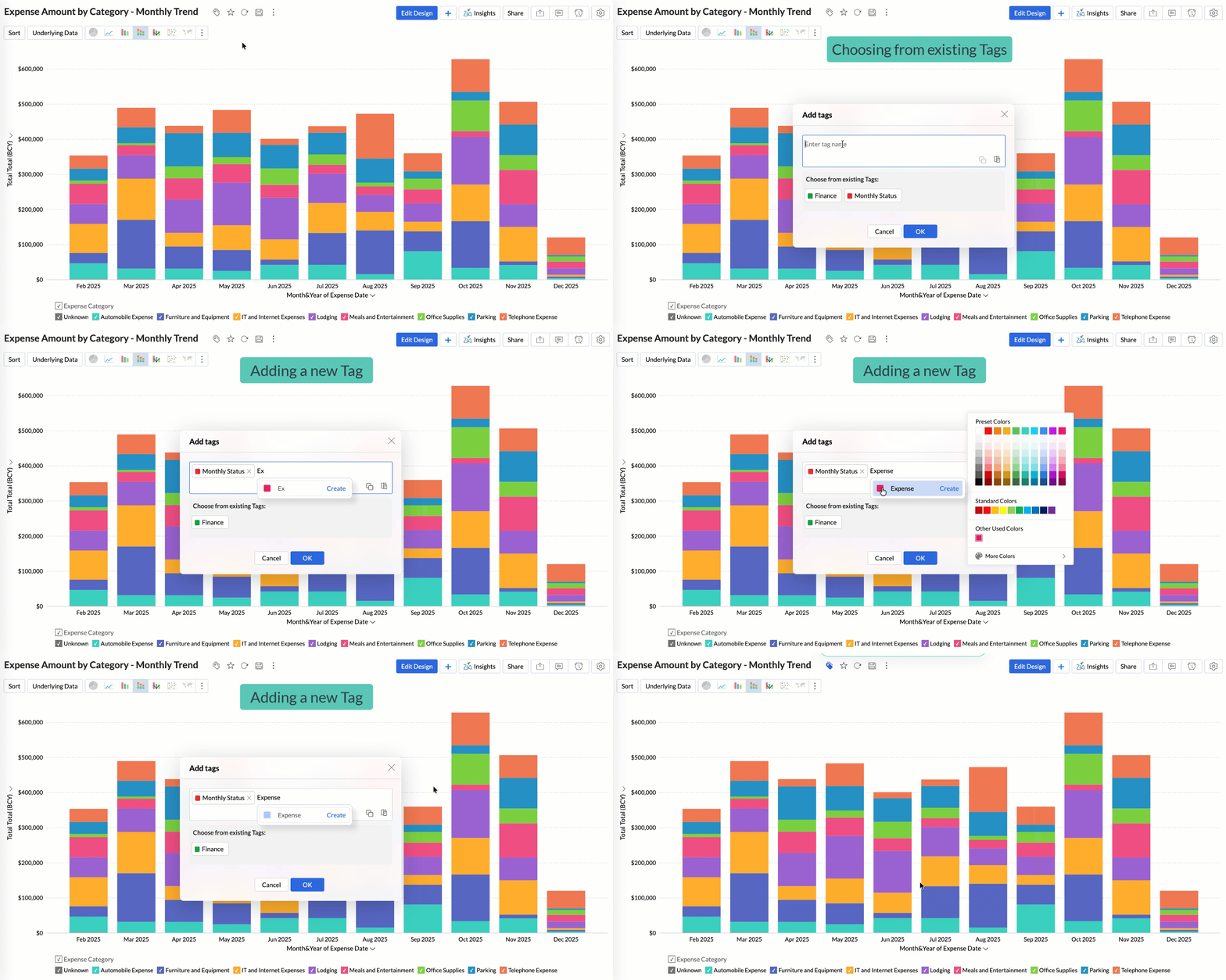
Quickly filter and find the right reports and dashboards, reduce clutter, and ensure teams always have access to the views that matter most to them.
Global Custom Sort
Custom sort was limited to individual reports previously. With recent enhancements, you can now define the sort order for text data types at the workspace level.
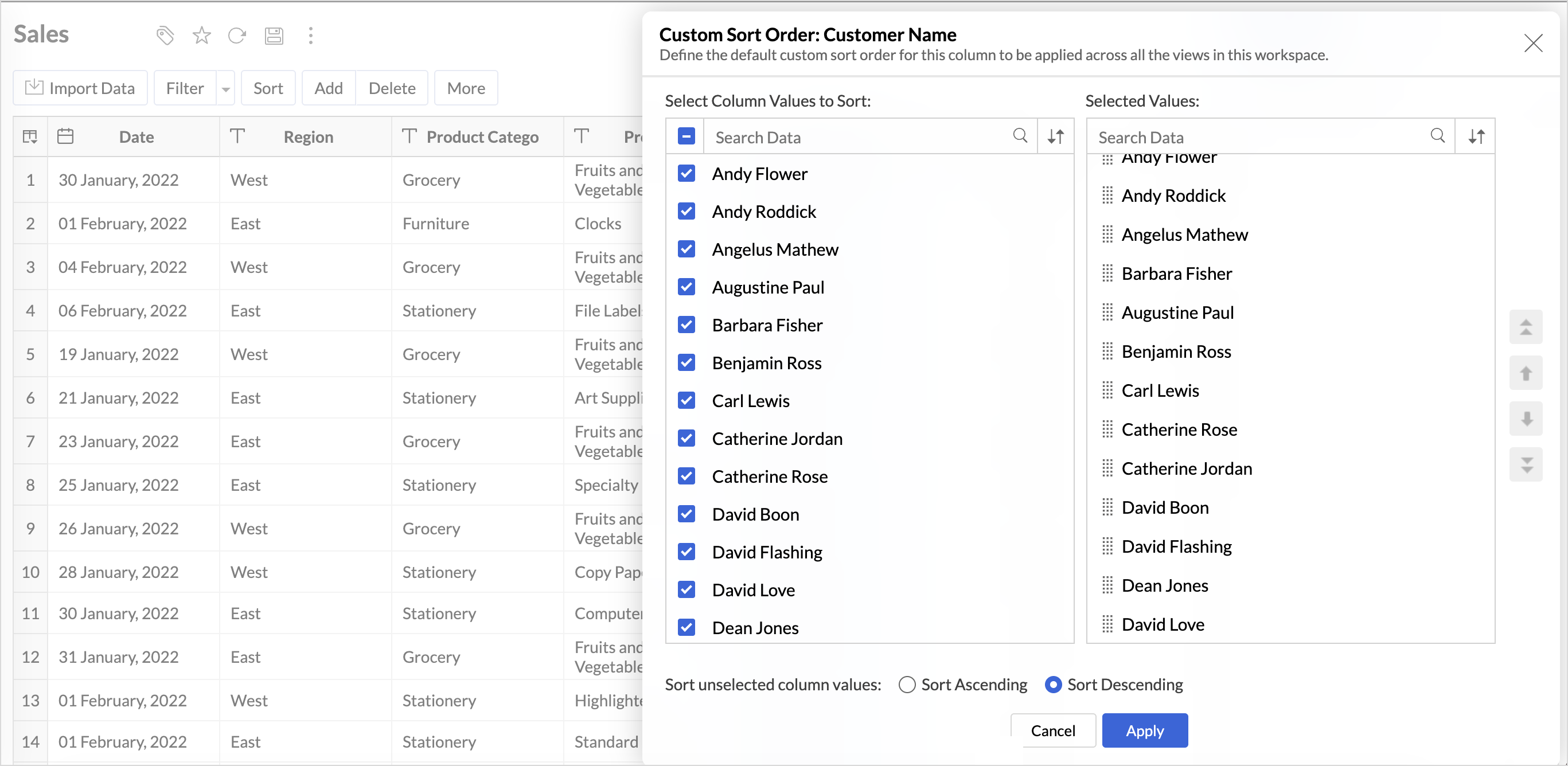
This improvement helps you maintain a consistent sorting across all reports, reduces repetitive setup, and saves time. It also ensures a standardized view of your data throughout the workspace.
Timeframe Selection for Overview Charts
Overview charts now offer flexible timeframe selection, allowing you to focus on relevant periods for deeper trend analysis.
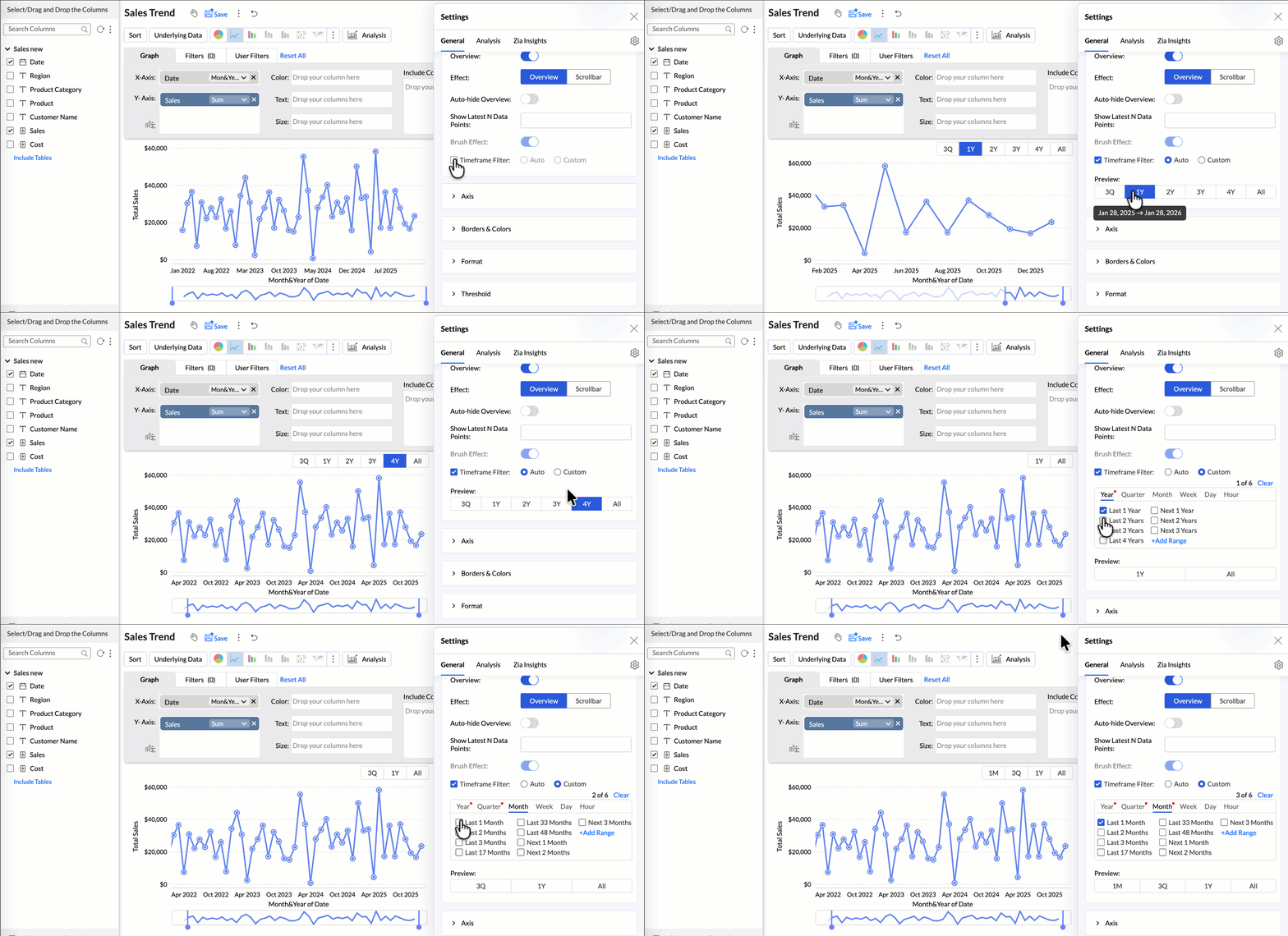
By narrowing the time range, you can better compare performance, identify patterns, and gain clearer insights without distraction from older data.
Customize Zia Insights placement in Dashboards
Choose where and how the insights are displayed, so that they complement your analysis without disrupting your dashboard layout. This gives you greater flexibility to present insights in the way that best suits your audience and reporting style.
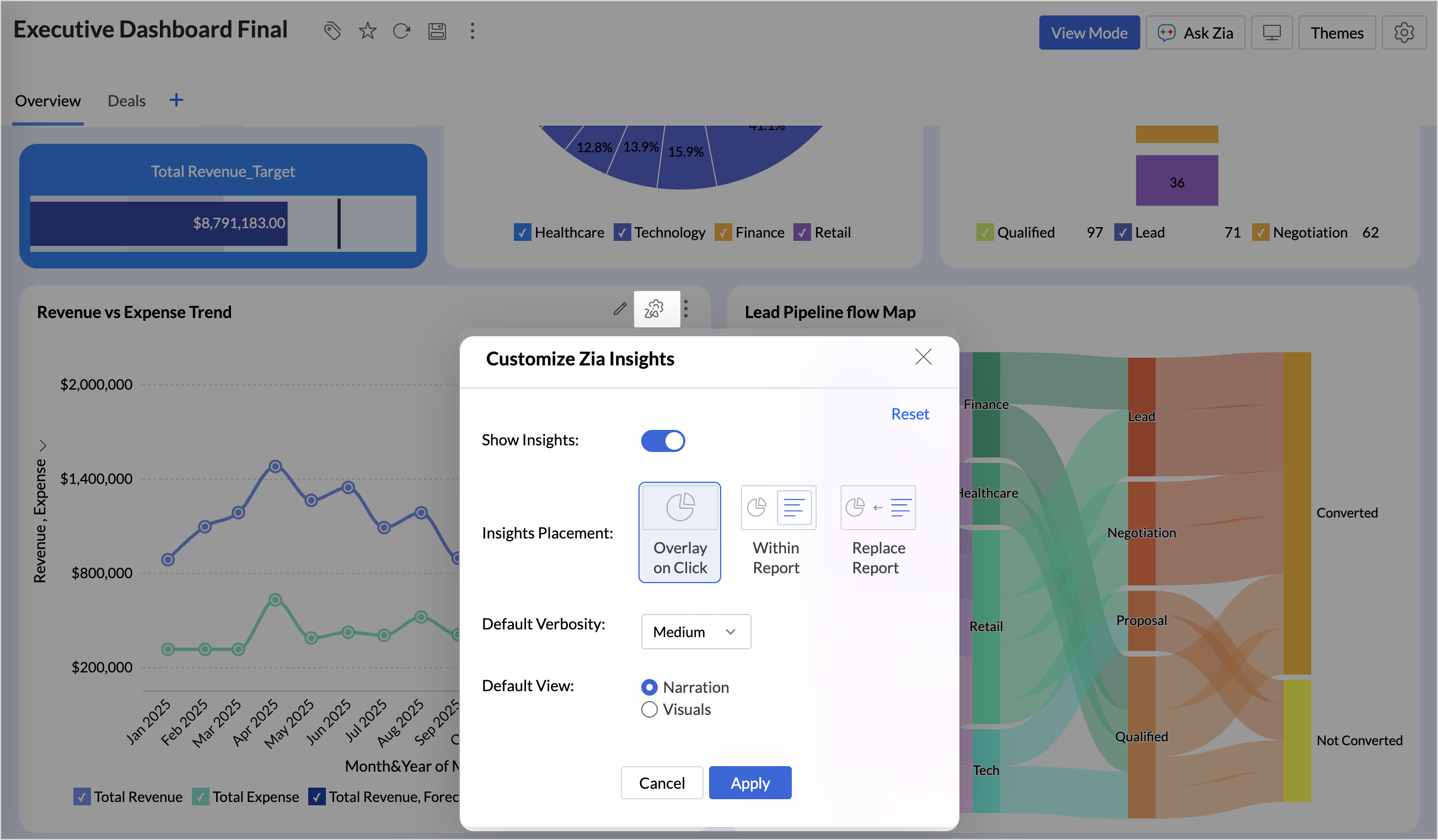
- Overlay: Displays insights in a floating panel that opens on demand, allowing users to review insights without leaving or altering the report view.
- Within Report: Embeds insights directly within the report, enabling users to view data and insights together in a single, continuous view.
- Replace Report: Displays insights as the primary view by replacing the report entirely, offering an insight-first experience focused on conclusions, rather than raw data.
Customize Image Size in Dashboards
Dashboards now support image size settings that let you control how images are displayed.
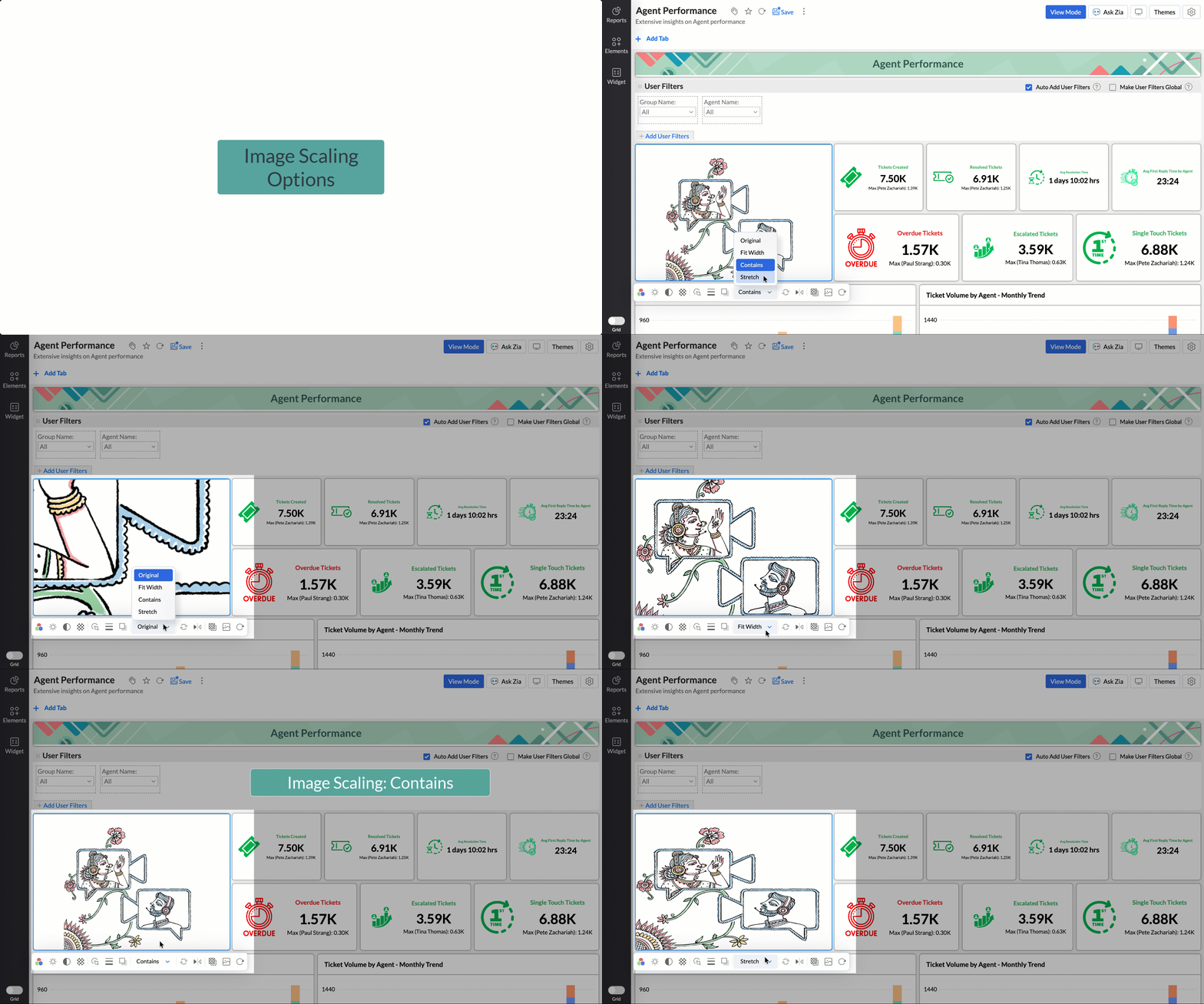
Choose from options like Original, Fit to width, Contain, or Stretch to ensure images align well with your dashboard layout, and thus improve visual clarity.
Tabular View Enhancements
- With this enhancement, all tables linked via lookup columns are now available in the Filter Criteria tab. This makes it easier to share views with users using associated filters, ensuring the specified criteria are automatically applied to the shared report.
- You can now customize lookup columns and the join paths used within Tabular View. This enhancement gives you control over how related tables are connected, helps avoid incorrect or ambiguous joins, and ensures more accurate and reliable data representation in your tabular reports.
New Business App Connectors
We have now introduced integration with two new business connectors Zoho FSM and Magento.
Zoho FSM
Connect your Zoho FSM Data with Zoho Analytics to analyze your field service operations in depth. Identify bottlenecks, optimize resource allocation with interactive reports and dashboards. Analyze revenue, service costs, and customer trends to improve profitability and service quality.
Adobe Commerce (Magento)
Analyze sales, orders, customers, and product performance with ready-made reports and dashboards. Track key metrics like revenue trends, average order value, and top-selling products. Gain insights into customer behavior and regional sales patterns. Make faster, data-driven decisions to optimize store performance and growth.
Topic Participants
Nisha Angel J
Sticky Posts
What's New in Zoho Analytics - January 2026
Hello Users! We are starting the year with a strong lineup of updates, marking the beginning of many improvements planned to enhance your analytics experience. Explore the latest improvements built to boost performance, simplify analysis, and help youWhat's New in Zoho Analytics - November 2025
We're thrilled to announce a significant update focused on expanding your data connectivity, enhancing visualization capabilities, and delivering a more powerful, intuitive, and performant analytics experience. Here’s a look at what’s new. Explore What'sWhat's New in Zoho Analytics - October 2025
Hello Users! We're are back with a fresh set of updates and enhancements to make data analysis faster and more insightful. Take a quick look at what’s new and see how these updates can power up your reports and dashboards. Explore What's New! ExtremeWhat’s New in Zoho Analytics – September 2025
Hello Users!! In this month’s update, we’re raising the bar across multiple touchpoints, from how you bring in data, plan and track projects to how you design and brand your dashboards. We’ve added the all-new Gantt chart for project visualization, expandedAnnouncing Agentic AI - Ask Zia!
We are delighted to roll out the new agentic AI capabilities in Ask Zia, where every stage of the BI workflow is assisted by AI. With a human-in-the-loop approach, Ask Zia ensures that you’re in command of the decision, while AI handles the complexity.
Recent Topics
Ajust quantities in another form based on subform, on form submission
Hello, I have an Order form with a LineItems subform. The LineItems subform has many lookups that import data from various other forms. I want to deduct the quantity offered in one of those other form, called Offer. In another application I used the followingWorkdrive connection in Zoho CRM not working
Hi, in https://crm.zoho.com.au/crm/orgXXXXXX/settings/connections i have set up the connection for WorkDrive which is pretty much setting up the name and the scopes. But I get "WorkDrive API test response: {"errors":[{"id":"F7003","title":"Invalid OAuthBest Way to Update Subscriber Preferences for an Existing List?
We currently have a mailing list of over 43,000 contacts in Zoho Campaigns, and we’re looking to segment our list based on subscriber content preferences—things like Free Webinars, Local Training, Store Specials, and New Product Announcements. We’d likeYou are forced to store/manage custom functions redundantly | Any solutions?
Hello there, you are forced to store code (custom functions) redundantly if you want to use the same functionality in multiple departments. I don't understand that you can't define global functions. When I make a change to a function I may have to doIntegrating Zoho CRM with Quickbooks Enterprise?
Does anyone have any experience of integrating Zoho CRM with Quickbooks Enterprise? The Zoho pages refer to the Quickbooks Premier edition, and I wanted to know if the same works with the Quickbooks Enterprise version.in Desk - Why can't I find where to enable multi-branding?
I'm looking at the knowledge base article & it says to go to settings / general / rebranding / multi-branding. But there's no multi-branding there!How to undo a reconciliation?
I need to update the "Expense Account" field on a bunch of expenses that I've already reconciled. However, the system will not allow this field the be changed since it is reconciled. I haven't found a way to remove the reconciliation status for theZoho support Can not send invitation email to portal user
I try to use Zoho support but have a problem. I don't know why. - When a customer sign up at the portal user they don't receive the invitation email. - When I go to contact manu, choose 1 user and click invite --> they don't receive the invitation email.remove()function to remove characters
Hi there, I'm trying to use the remove function to remove characters from a variable. I have a Lead source that comes in as [Google] or [Facebook] etc. in Flow I need te to remove the square bracket. Tried a function that looks something like this: stringSharing files without download option
Hi Team We want to share folders and subfolder which has files(doc, .PPT , excel and PDF) in zoho Docs. When we share the directory to a member in the organization or external to the organization There are able to download. How do we prevent users from download. Regards Krishna V.KBasic Lookup Field Update Function
Hi! So I have no idea what I'm doing in Deluge but I need to get a custom function to run On Create or Edit that sets the value of a Lookup Field based on the contents of another field. Seems simple enough, but I have looked through dozens of other similarWeekly Tips: Schedule Your Emails with Zoho Mail
As a business, it is recommended to consider the best time to send an email, taking into account the recipient's time-zone or their work hours to have your email on top of their inbox. Sending an email when your recipient is most likely to check theirData Source Request : More Zoho Marketing Automation and Zoho Pagesense
I'm currently trying to replicate the reports shown in ZMA for stats over time for individual forms. The reports exist only in ZMA, but I want to use in wider company presentations and can't find the relevant data in Analytics : Example I also note thatZoho Mail - support email
Hi I sent an email to support more than 48 hours ago and still have not heard back! What's up? How long am I supposed to wait for a replay? ThanksSyntax for <criteria> field in zoho.crm.searchRecords() function when the value to check against is a variable?
I want to search for records in the Tasks module whereby the value of a field (called field1) matches the value stored in a variable in the Deluge script (called variable1). From the sample code in https://www.zoho.com/deluge/help/crm/search-records.html,Page - Gauge - Target Values
Is there a way to make the Target and Maximum values say a formula or query? For example, total sales for the month = 109 and I want to make my gauge today's percentage.Multiple Organizations w/Books
Does Zoho One allow for more than 1 organization in Zoho Books? I see my default company says "Zoho One Enterprise"next to it but another company says "Trial". We have one company, but multiple lines of business that we keep separate for various financialLOST ALL NOTES AFTER SIGNING IN AGAIN
I lost all my notes which I prepared from long time after sigingout and signing in againOutgoing Email Being Blocked
Hi, I have an email ID wherein the outgoing mail are being blocked the user get an email which is as follows: ----------------- Dear User, Mail Outgoing blocked. Reason :Mail rate exceeded limit However, we realize that this might have been unintentional.Sending Email With SMTP python
Hi, I am trying to send email with stmplib python lib. Code... server = smtplib.SMTP_SSL('smtp.zoho.com', 465) server.login('username','password') server.sendmail('from_mail','to_mail', 'message') server.quit() Log send: 'ehlo [127.0.1.1]\r\n' reply:Duplicating Forms doesn't duplicate Forms attachment path to workdrive
Hi, I have this user, who uses one forms and duplicates it when needed and update the content. For him, it's important to have the submission forms saved in a specific folder inside Workdrive (as this PDF is transmitted later to another team). However,Company with ZohoOne, notebook ask to upgrade to collaborate in notecards.
Hello, we as a company have ZohoOne as our Zoho choice, but Zoho Notebook asks us to upgrade in order to collaborate in notecards, is this correct? Acording to what I've read in Zoho Notebook help, it should be included in ZohoOne, can you please clarifyHow to reach the official Zoho Support channels and avoid fake ones.
Dear Customers, Thanks a lot for choosing Zoho! Our applications are built to help achieve your day-to-day business goals. We are committed to engaging with you, to understand and develop solutions that enhance your productivity. We are happy and ready to help you use our services effectively. Understanding and avoiding fake support Just like using popular bank names and financial applications for phishing purposes, using Zoho and claiming to be providing Zoho Support or services with false numbersLost my notes
Hi while re installing the notebook app, I have lost 2 most important notes and I am not able to find them anywhere. Can you help. Those were very important for my businesses, it had all the important transaction info, and the other were my log ins. IUnable to connect to smt servers.
Unable to connect to smtp.zoho.eu servers. Therefore, I cannot send emails via smtp.Problem Pasting Into Notes
Occasionally I want to create a note by copying and pasting a few paragraphs from an article on line. When I create a new note and paste in the section the newly created note winds up with each paragraph in white text on a dark background rather thanNot receive mail
I just made my Zoho mail but I cannot receive any mail at all. What happenPossible to reorder Pipelines position?
I have multiple Pipelines and want to reorder their positions, so that in the Deals module record for the Pipeline field, I have them ordered in a certain way. Is there a way to reorder the position of the Pipelines without deleting existing PipelinesHow do you pre-fill Form fields using URL parameters, for embedded forms?
Is this possible? This is something that can be done on most major Form platforms (JotForm, TypeForm etc). Currently if pre-filled fields are a necessity for your business, you cannot use embedded forms.Unable to delete Attachment on Modules/Record
Hi Team, Could you please check the backend. Looks like today, CRM decided not to allow deletion of Attachment on Modules or Records. No error message but when you click Delete > Move to recycle bin, nothing happens. Please fix ASAP.Filter Multi-Line Properties with Plain Large Text
To be able to filter fields that feature Plain large text, I am only able to filter on plain small text when you offer 3 separate options.Update date field from one module to the another
Hi, I have a module called "Cargo". In this module there is a date field called "Fecha ETA". Api name = Fecha_ETA I have another module called "Deals". In this module there is a date field called "ETA 2". Api name = Fecha_Madrid I need to create a functionDelete completed tasks
My completed tasks will not delete. I have tried deleted them all together and one by one. It says they are deleted but they are still showing on my list. HelpOne user multiple access?
Hi, I want to know if t is possible to have just one Zoho account for the business and have multiple users access this at the same time?Notebook not working on Windows 11/Atlas OS
Hello, I jave bought gamer laptop in used condition to make some AI application. I installed Atlas OS to improved performanceds and it is working very well. I have Avast Secutiy as firewall. The whole system is really fast and all my apps work well....butWhy are you taking functionality out of notebook?
We were able to choose a custom sort, in free version. Now it seems that feature is only available if I upgrade. Not a nice trick, shame.Is Zoho Notebook available in any other languge besides english?
There seems to be no option to change the language of the UI in the web browser version of Notebook, is this the case for all other versions? iOS Android Windows App MacOSCompletely blank window
When I open my notebook application on Windows 10 I get a completely blank window, see the attached .png file. There is no notebook or any hint that notebooks exist. Furthermore, the application always asks me to sign in again *every* time I start it.To be able to create a report sub folder
Hello Can we request the ability to create subfolders in report folders.Default Lookup Field Value based on Picklist
How do I change a lookup field value based on another field's value, while creating/editing a record using form? I have a picklist of different types of Loans. For example: PPP, EDIL, Term, etc. When I create a record using the form, if I choose PPP fromNext Page