What's New - January 2026
Hello Users!
We are starting the year with a strong lineup of updates, marking the beginning of many improvements planned to enhance your analytics experience. Explore the latest improvements built to boost performance, simplify analysis, and help you extract more value from your data.

Archive Data
No more querying all records while generating reports! Analyze data faster and optimize workspace performance with Archive Data. Move older or less-frequently used records out of active tables, and store them securely.
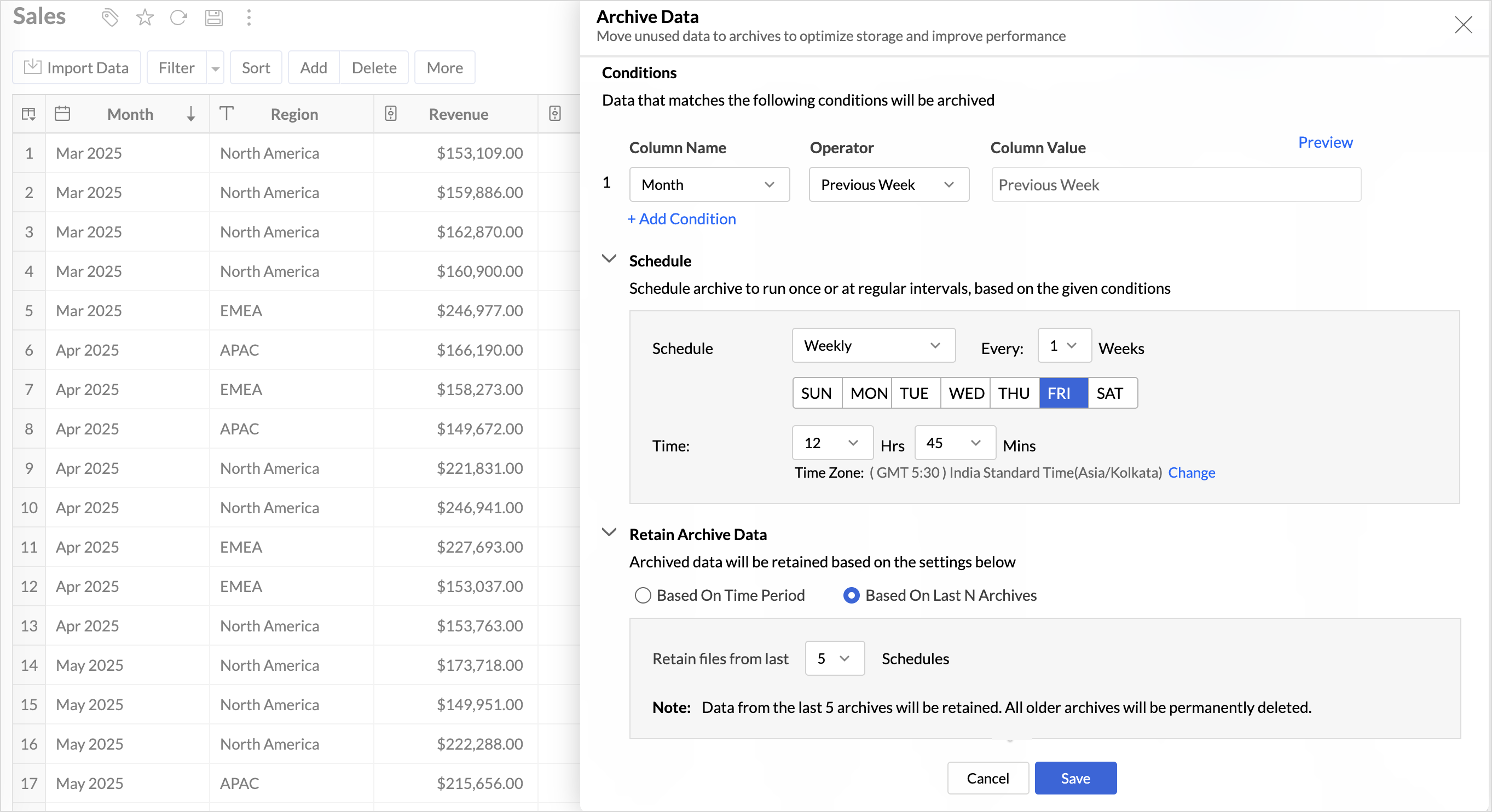
Key Benefits
- Pay only for what you analyze: Active data is reserved for analysis, while historical data is retained without impacting usage limits.
- Improved Querying and Faster Analysis: By limiting queries to relevant data, report generation and dashboard loading times are significantly reduced, resulting in faster insights and a more responsive analytics experience.
- Optimized Storage Usage: Archiving older data helps control table size, preventing unnecessary growth, and better management of row limits.
Organize Views with Tags
Group related views, and manage reports and dashboards effortlessly. Use tags to organize views by teams, departments, projects, or specific use cases, making it easy for users to navigate large workspaces.
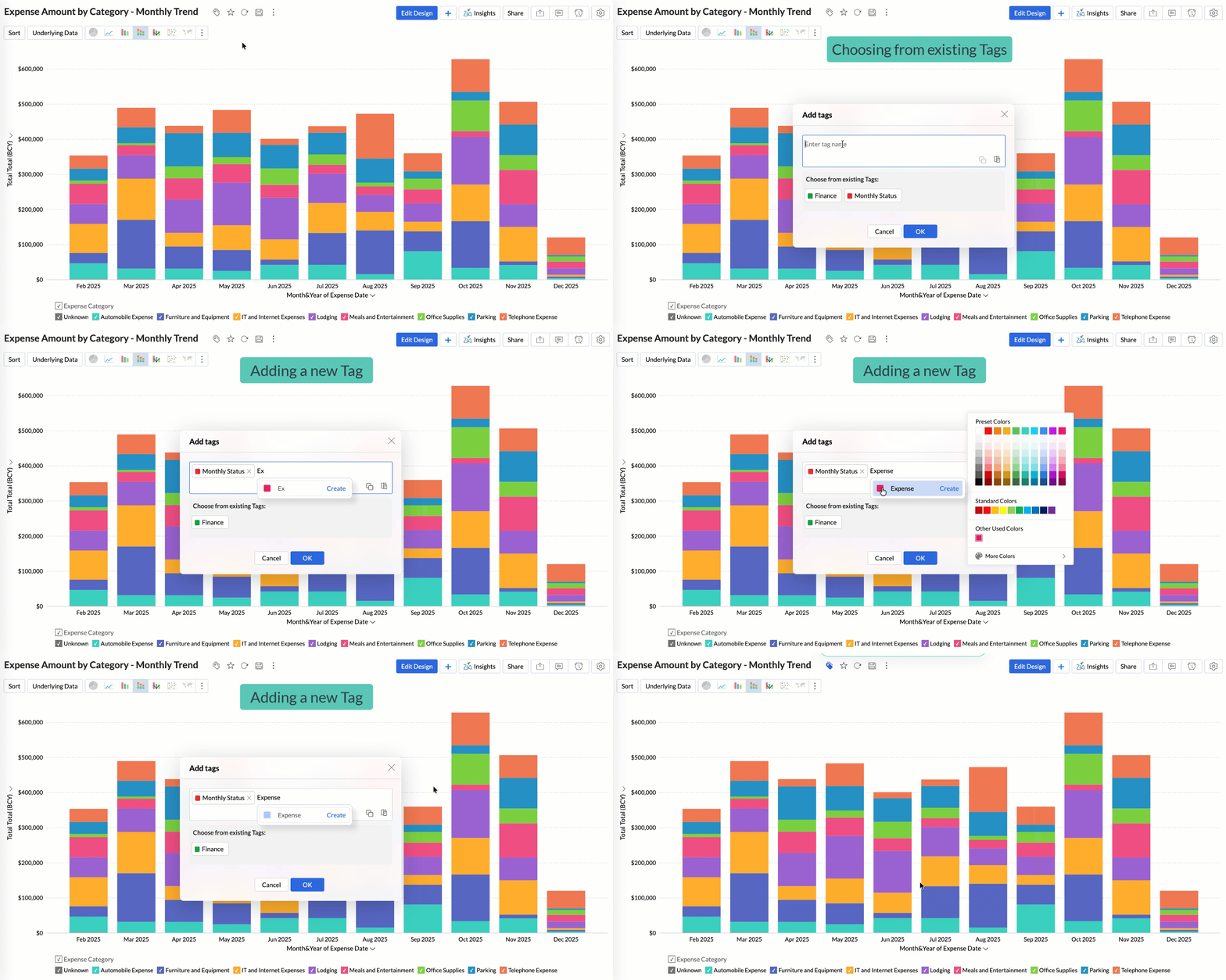
Quickly filter and find the right reports and dashboards, reduce clutter, and ensure teams always have access to the views that matter most to them.
Global Custom Sort
Custom sort was limited to individual reports previously. With recent enhancements, you can now define the sort order for text data types at the workspace level.
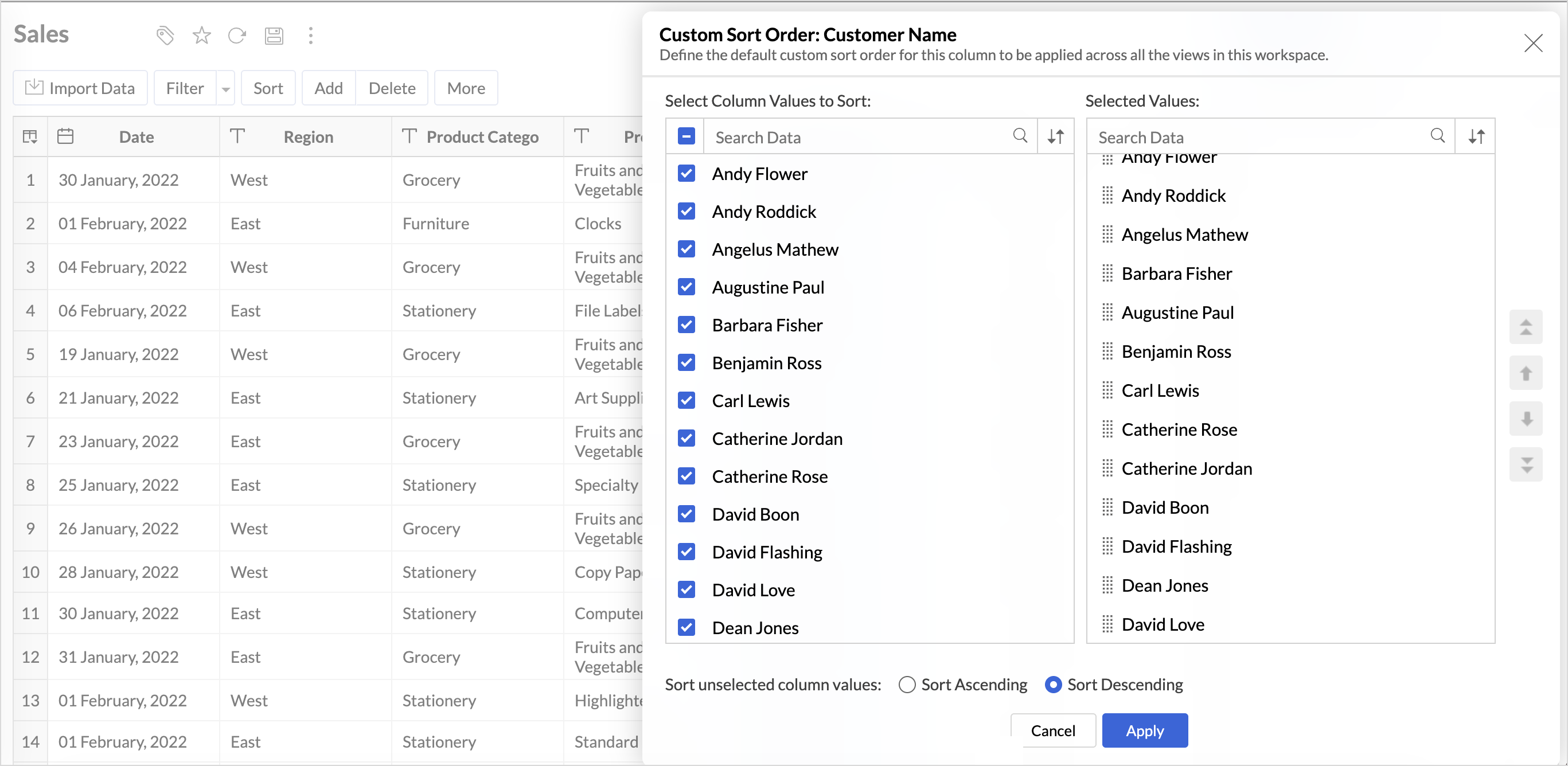
This improvement helps you maintain a consistent sorting across all reports, reduces repetitive setup, and saves time. It also ensures a standardized view of your data throughout the workspace.
Timeframe Selection for Overview Charts
Overview charts now offer flexible timeframe selection, allowing you to focus on relevant periods for deeper trend analysis.
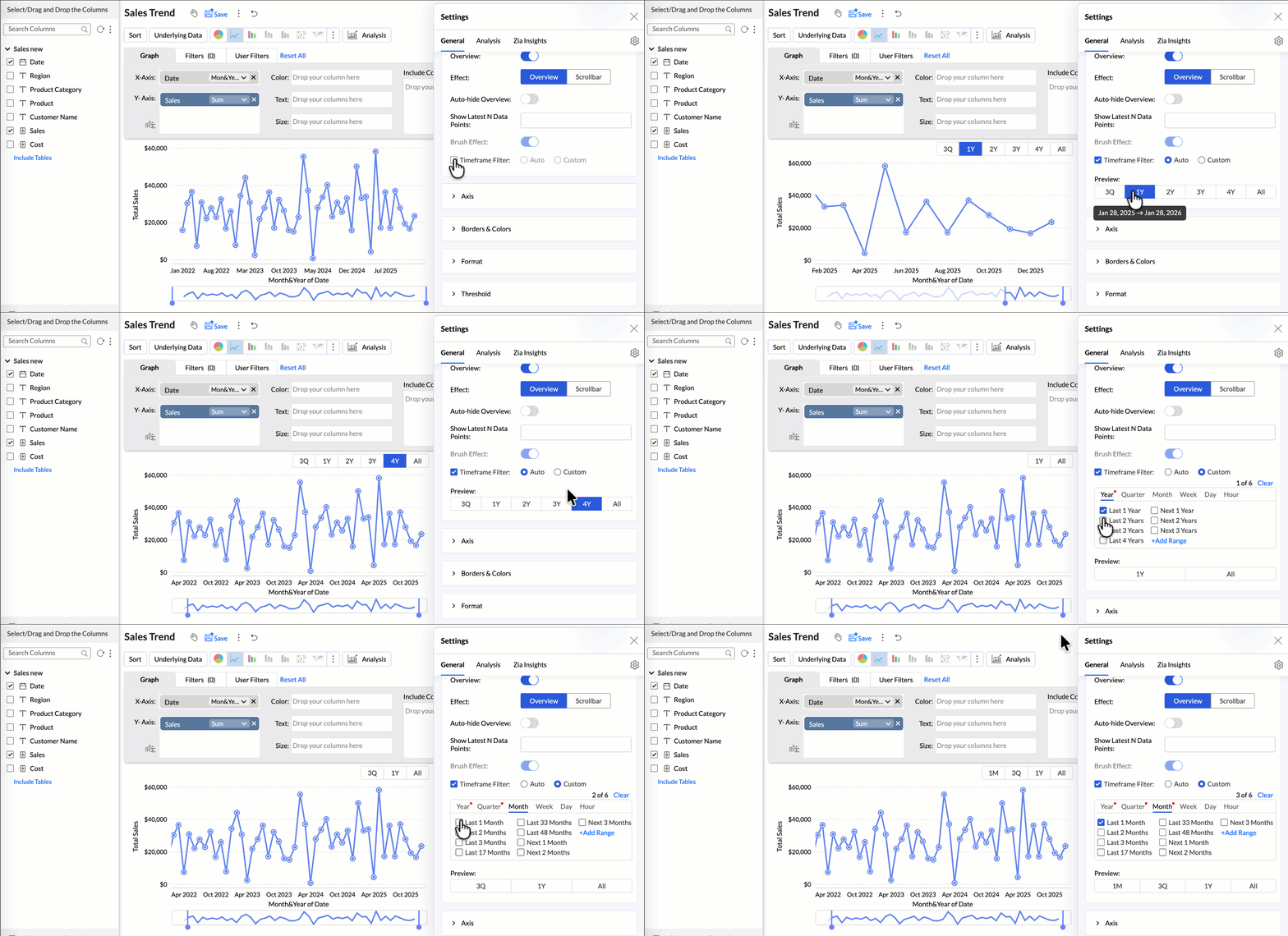
By narrowing the time range, you can better compare performance, identify patterns, and gain clearer insights without distraction from older data.
Customize Zia Insights placement in Dashboards
Choose where and how the insights are displayed, so that they complement your analysis without disrupting your dashboard layout. This gives you greater flexibility to present insights in the way that best suits your audience and reporting style.
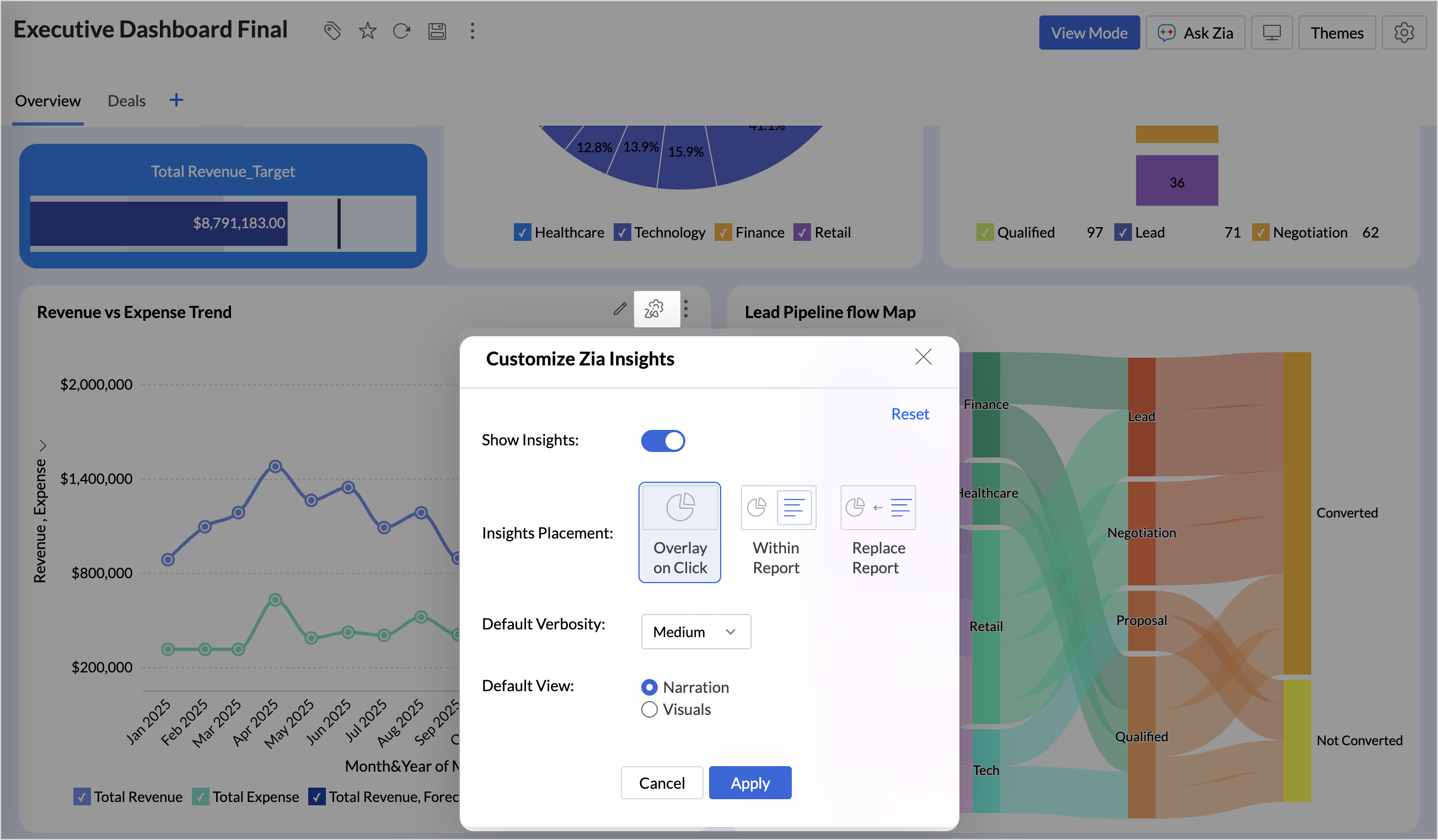
- Overlay: Displays insights in a floating panel that opens on demand, allowing users to review insights without leaving or altering the report view.
- Within Report: Embeds insights directly within the report, enabling users to view data and insights together in a single, continuous view.
- Replace Report: Displays insights as the primary view by replacing the report entirely, offering an insight-first experience focused on conclusions, rather than raw data.
Customize Image Size in Dashboards
Dashboards now support image size settings that let you control how images are displayed.
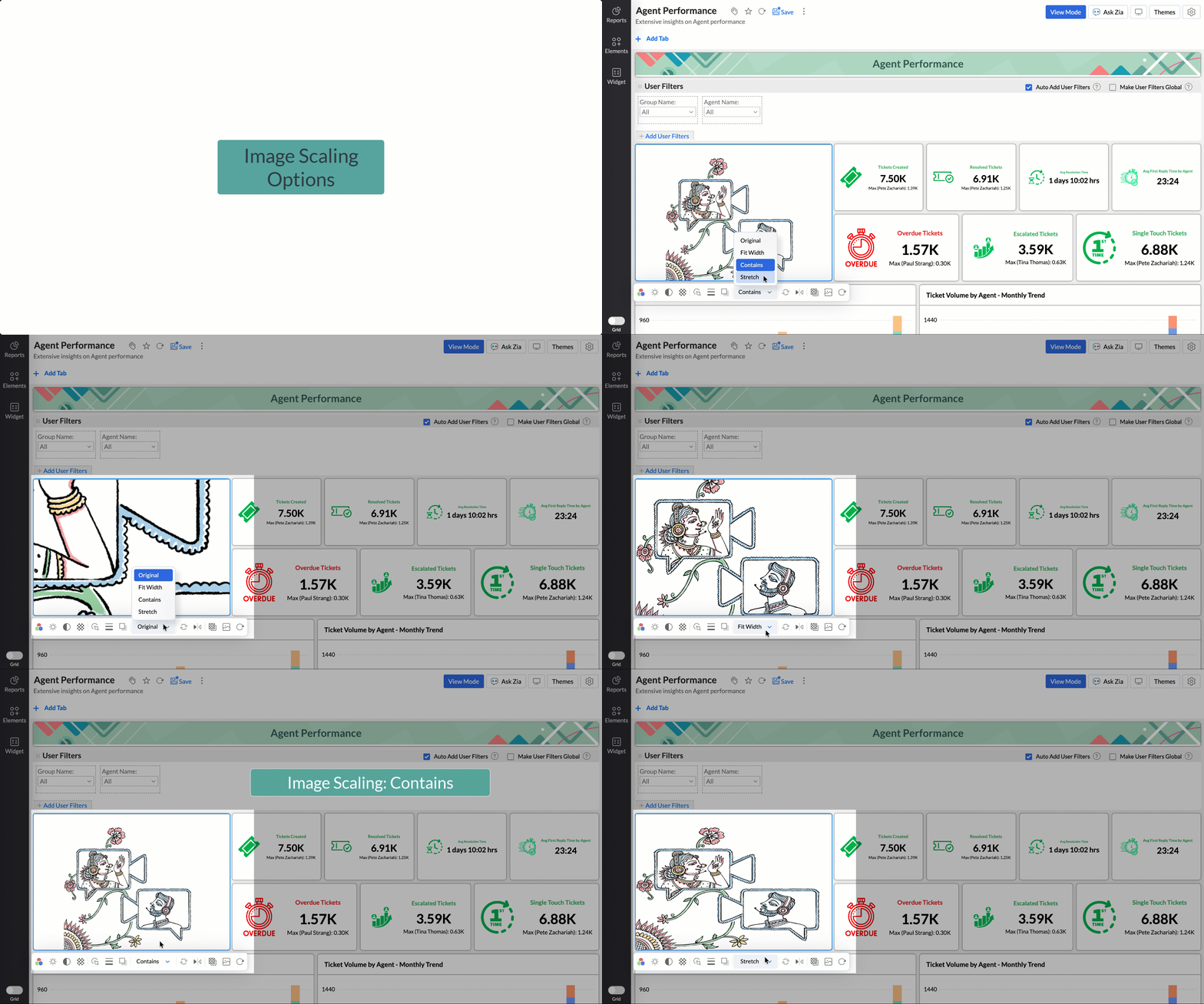
Choose from options like Original, Fit to width, Contain, or Stretch to ensure images align well with your dashboard layout, and thus improve visual clarity.
Tabular View Enhancements
- With this enhancement, all tables linked via lookup columns are now available in the Filter Criteria tab. This makes it easier to share views with users using associated filters, ensuring the specified criteria are automatically applied to the shared report.
- You can now customize lookup columns and the join paths used within Tabular View. This enhancement gives you control over how related tables are connected, helps avoid incorrect or ambiguous joins, and ensures more accurate and reliable data representation in your tabular reports.
New Business App Connectors
We have now introduced integration with two new business connectors Zoho FSM and Magento.
Zoho FSM
Connect your Zoho FSM Data with Zoho Analytics to analyze your field service operations in depth. Identify bottlenecks, optimize resource allocation with interactive reports and dashboards. Analyze revenue, service costs, and customer trends to improve profitability and service quality.
Adobe Commerce (Magento)
Analyze sales, orders, customers, and product performance with ready-made reports and dashboards. Track key metrics like revenue trends, average order value, and top-selling products. Gain insights into customer behavior and regional sales patterns. Make faster, data-driven decisions to optimize store performance and growth.
Topic Participants
Nisha Angel J
Sticky Posts
What's New in Zoho Analytics - January 2026
Hello Users! We are starting the year with a strong lineup of updates, marking the beginning of many improvements planned to enhance your analytics experience. Explore the latest improvements built to boost performance, simplify analysis, and help youWhat's New in Zoho Analytics - November 2025
We're thrilled to announce a significant update focused on expanding your data connectivity, enhancing visualization capabilities, and delivering a more powerful, intuitive, and performant analytics experience. Here’s a look at what’s new. Explore What'sWhat's New in Zoho Analytics - October 2025
Hello Users! We're are back with a fresh set of updates and enhancements to make data analysis faster and more insightful. Take a quick look at what’s new and see how these updates can power up your reports and dashboards. Explore What's New! ExtremeWhat’s New in Zoho Analytics – September 2025
Hello Users!! In this month’s update, we’re raising the bar across multiple touchpoints, from how you bring in data, plan and track projects to how you design and brand your dashboards. We’ve added the all-new Gantt chart for project visualization, expandedAnnouncing Agentic AI - Ask Zia!
We are delighted to roll out the new agentic AI capabilities in Ask Zia, where every stage of the BI workflow is assisted by AI. With a human-in-the-loop approach, Ask Zia ensures that you’re in command of the decision, while AI handles the complexity.
Recent Topics
Identify, Qualify and Retarget Potential Leads Using Zoho SalesIQ & Campaigns
Finding the right leads can often feel like guesswork. Because not all your website visitors are worth targeting — some may just be browsing, while others may have landed in there by accident. So how do you filter out the noise and focus on those whoDon't Receive Email
Hi, I would like to report a problem . One of registered email in my organization is info@kedata.id . that email is used to register into MongoDB atlas. But for that case, i have a problem which the email of verification code from MongoDB atlas haven'tLaravel - Failed to authenticate on SMTP server
For some reason, I cant send e-mails from my Laravel app Error: Failed to authenticate on SMTP server with username "myuser" using the following authenticators: "LOGIN", "PLAIN". Authenticator "LOGIN" returned "Expected response code "235" but got codeCustom View Row Limit?
Is there a way to view more than 5 rows on a "Custom View" component on a user's homepage? I didn't see an option when creating or editing it. I'd like to be able to show the users 10 tasks at a time if possible.Unable to import canvas template to canvas forms
I'm unable to import exported canvas template to canvas form, the canvas form not recognizing the template code plus the canvas import prompt title is (Create your own form page) instead of import, find the attached screenshot Please advisePower of Automation :: Automatically Approve/Reject the associated timelogs of Issues
Hello Everyone, A custom function is a software code that can be used to automate a process and this allows you to automate a notification, call a webhook, or perform logic immediately after a workflow rule is triggered. This feature helps to automateZoho Desk iOS and Android app update: Attachment restriction
Hello, everyone! We are excited to introduce an option to restrict uploading certain attachment types on the Zoho Desk app. This feature allows you to specify the types of attachments are allowed to be uploaded and shared within the Zoho Desk. This canZoho CRM Outlook integration: no option showing up even after installation
I followed the instructions on this page to install the add-in: https://help.zoho.com/portal/en/kb/crm/integrations/microsoft/ms-outlook-add-in-for-zoho-crm/articles/outlook-add-in-for-zoho-crm#Understanding_the_add-in But I don't see the options in OutlookPortal URL Not Working?
When I view my Company Profile, it shows my portal URL as being not created although it has been. For example my profile shows the following: https://meeting.zoho.com/a/.. The directory name that I chose is missing and it appears that I need to create a new Portal URL although one already exists for my organization. When I try to visit the URL that I previously created, I receive a "Page Not Found" error.Improve user efficiency with Automated reminders
When it comes to business, keeping up with the deliverables is imperative. Automated reminders help you just with that, allowing you to set up notifications that are automatically triggered to your workspace users to remind them about important updates,Setup Outlook for domain email address fails
I am trying to setup outlook for one of my domains email addresses and I am unable to add the account in Outlook I get "Operation could not be completed" errors. I am using the imap.zoho.com 993 for incoming and smtp.zoho.com 465 for outgoing email. IFree webinar alert! Empower Customer Experience in a Changing World with Zoho Desk and Zoho Workplace
Hello Zoho Workplace Community! We’re back with another exciting webinar—and this time, it’s all about delivering exceptional customer experiences. Join us for "Empower Customer Experience in a Changing World with Zoho Desk and Zoho Workplace," wherePortal permission for report only
Hello, I have a hard time setting portal permission for my users. I have a form that is an order subform for items. I use that subform to create a filtered report for sellers to see their own orders, but at the same time I have to give them access toHow to modify query from a DataBridge Connection
Hello, I just installed the new DataBridge tool to import data to our Zoho Analytycs account from our local database. It works well so far, and data gets sync every day. The only issue that I found is that we do not know how to modify the query that importsTip of the Week #55 – Assign roles to inbox members
Ever heard the phrase, "Right people, right access"? That’s exactly what you can achieve in Zoho TeamInbox by assigning roles to your inbox members! In any team, not everyone needs the same level of access to your shared inboxes. Some members may neediOS 18 is here! Discover the enhanced Bigin app with iOS 18, iPadOS 18 and macOS Sequoia.
Hello, everyone! We are excited to be back with new features and enhancements for the Bigin app. Let us take a look at the new iOS 18 and iPadOS 18 features. The following is the list of features covered in this update: Control widgets. New app icons.Fourth Insight - The power of Multi-Layouts
The Wheels of Ticketing - Desk Stories The power of Multi-Layouts In the previous insights, we have established that layouts are the foundation for a ticketing system, and fields are the building blocks for the same system. Fundamentals of layouts FieldsApp Crash on MacBook Pro
Hi Zoho, I am still struggling to keep Zoho Notebook stable on my Mac platform. I have sent in a couple of crash logs and I am making sure I have the latest version from the Mac App store. I love this application and really want to get it stable. TheAutomating Sales Order Confirmation & Picklist Generation in Zoho Inventory
Hi everyone, I’m looking to automate the sales order creation and confirmation process in Zoho Inventory, along with the automatic generation of picklists with bin-level details. Here’s what I need: Sales orders should be automatically created and confirmedSpotlight series #7: Path animation
Animating objects on your slide helps make your presentations lively and interesting. Animations add movement to an otherwise static deck, which helps grab your audience's attention. While you can animate your objects' entry and exit, or use animationZoho Forms to Zoho Projects
Can Zoho Forms be used to collect task details and automatically create a new task under a specific project in Zoho Projects upon submission?campaings flagging domain error but crm says OK
campaings flags error with domain buy crm says notig wrong - this is new, helpZoho Books - Currency Conversion
I am trying to convert all the transactions into another currency such as converting multiple currencies into global USD Currencies. How Can I do this ?Singup Form Embed code won't load
I created a new signup form, and can't seem to get the code to load in to make it usable. It is constantly stuck with the loading image. The only code I can access is the iFrame code.Workflow : Update a multiline text field
Hello, I'm creating a workflow to update a multiline text field. But it looks like I only can format my text as a one-line. How can I format the text to multiple lines ? Thankshow to prevent double entry
How to set up a form so that someone cannot fill it out twice or more Thanks a lot"The data you have entered already exists" when trying to create contac@mydomain.com
Hi all, Our domain is ananasjuicebar.com. Working as admin in the control panel: When I try to add the email account "contact@ananasjuicebar.com" I get the error: "The data you have entered already exists" I've tried creating a new user or creating a new group with this address associated. To my knowledge this address has never been added and I can also not find any reference to it. (Shopify used this address to send customer notifications BEFORE setting up Zohomail.) Any ideas? are there any restrictionsIncoming Emails Are Delayed by 20 Minutes
Emails are showing up in my Zoho email 20 minutes after they were received. Is Zoho having problems with their servers at the moment? This started happening about 3 weeks ago.Sharing shreadsheets
My wife and I each have zoho accounts. If She creates a spreadsheet and shares it with me using my email that is associated with my account, zoho shows a warning that I do not have a zoho account and the only way I can access this file is via the linkFilter Vendors/Suppliers from Campaigns
We are unable to filter out our vendors/suppliers from any mass campaigns we send out. When synching our CRM contacts within Campaigns, we are unable to map the "Vendor Name" field. We have tried to create a segment from our all contacts list but to noField Validation and Profile restrictions bypassed using Mass Actions
We have a Validation Rule that prevents ticket closure if the "Subcategory" field is blank. This has been working fine, but recently we noticed a few tickets per day somehow being closed without a "Subcategory". Upon further investigation we found theAny Companies using HubSpot for Marketing integrated to Zoho CRM ? - Looking for Feedback
Our company is using HubSpot for Marketing looking at moving from our presently working Z-CRM to hubspot for CRM. I am looking for any companies that are successfully integrating HubSpot Marketing functions with Zoho CRM. Upsides/Downsides/Effort/etc.Customize Thank You message for native forms
While it allows me to add a personalized message when completing a form, it would be nice to be able to customize the title (Thank You) and the button text (Close). In my case, the page is in Spanish, and those texts are in English, so I can't edit them.Customize forms validation for native forms
I'd like to be able to edit and/or translate the validation messages of a native form. My page is in Spanish, but the messages appear in English, and I couldn't find a place to edit what I want to display. Perhaps they can be edited when adding fieldsAdd picklist in subform lookup
Hello, I am trying to rewrite a script that works on a from as parent form, to the same form when is is a subform. Here is what I did in the form itself : RefCat = Offre_de_produits.distinct(Categorie_OFFRE); clear Categorie_LIGNE; for each Record inLooking for basic script structure course
Hi, I am not a programmer, but try to learn on my own. I get a lot of good advises in this forum, and thanks, but I tend to ask the same questions since I do not remember comparable answers I already received. Is there a basic course of "scripting structure"How to let only account-bound products visible to users
Hello friends, I'm trying to leave only the Products linked to the accounts visible to Zoho Portal users. If the user clicks "All Products," they can open tickets incorrectly for products that do not belong to the account that are registered. Is it possibleRTL Support on iPad
hi I have this issue that when I create notes on my android app [in hebrew] all the text is aligned correctly to the right because I’m typing in Hebrew. But then when I open it up on my iPad, everything is suddenly aligned to the left and there is noNo sync
I have amended a note on my PC, startet syncing but on the smart phne sync starts und runs for minutes. The note amendment ist not shown, but when I go to version the new version is shown but not possibility to accepte the new versionDark mode
Because the whole world talks about it and iOS also will get this option. Please make a real dark mode happen. It is very cool to switch the navigational color, but the content always stays in light colors.Next Page