What's New - January 2026
Hello Users!
We are starting the year with a strong lineup of updates, marking the beginning of many improvements planned to enhance your analytics experience. Explore the latest improvements built to boost performance, simplify analysis, and help you extract more value from your data.

Archive Data
No more querying all records while generating reports! Analyze data faster and optimize workspace performance with Archive Data. Move older or less-frequently used records out of active tables, and store them securely.
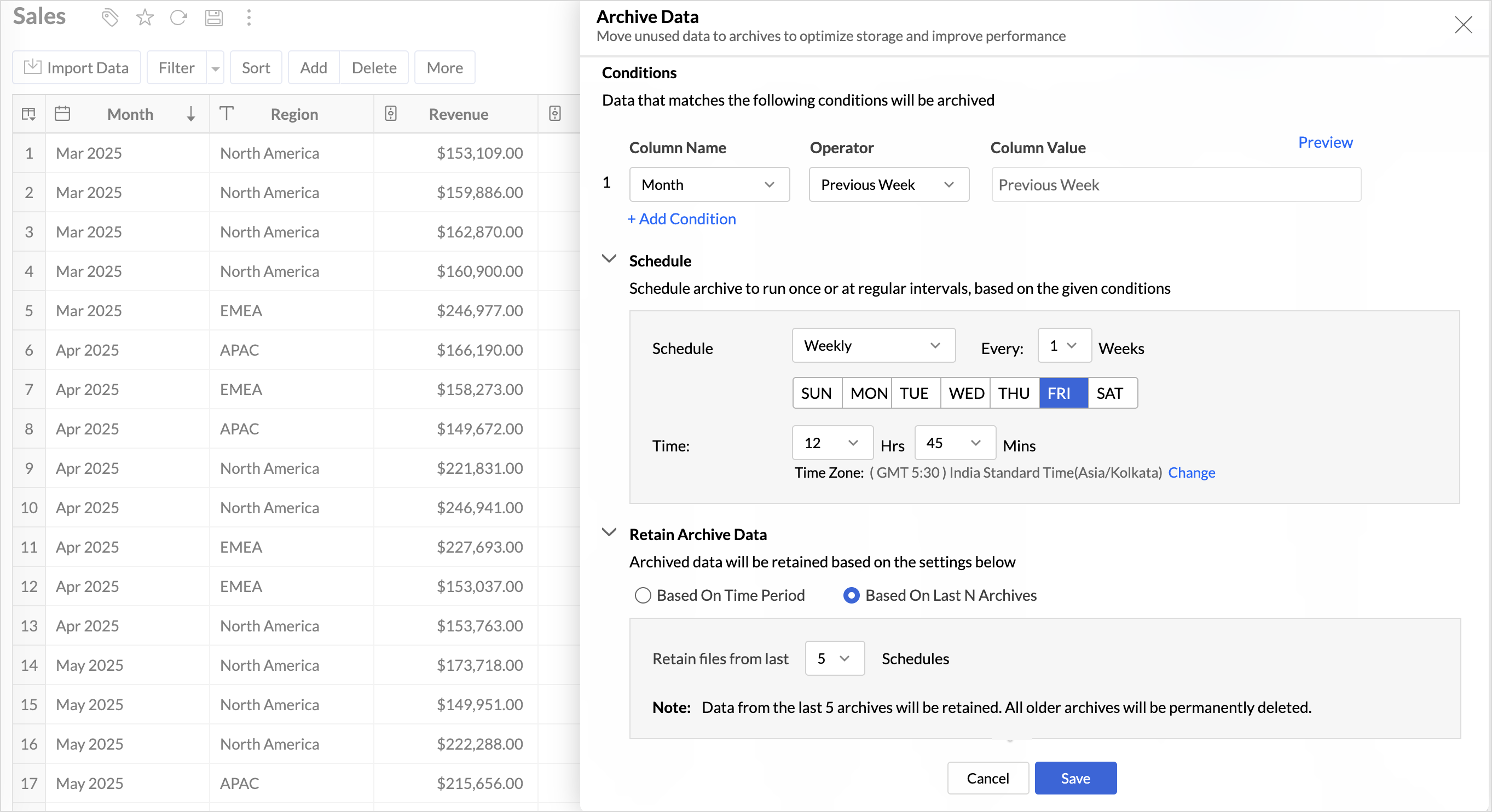
Key Benefits
- Pay only for what you analyze: Active data is reserved for analysis, while historical data is retained without impacting usage limits.
- Improved Querying and Faster Analysis: By limiting queries to relevant data, report generation and dashboard loading times are significantly reduced, resulting in faster insights and a more responsive analytics experience.
- Optimized Storage Usage: Archiving older data helps control table size, preventing unnecessary growth, and better management of row limits.
Organize Views with Tags
Group related views, and manage reports and dashboards effortlessly. Use tags to organize views by teams, departments, projects, or specific use cases, making it easy for users to navigate large workspaces.
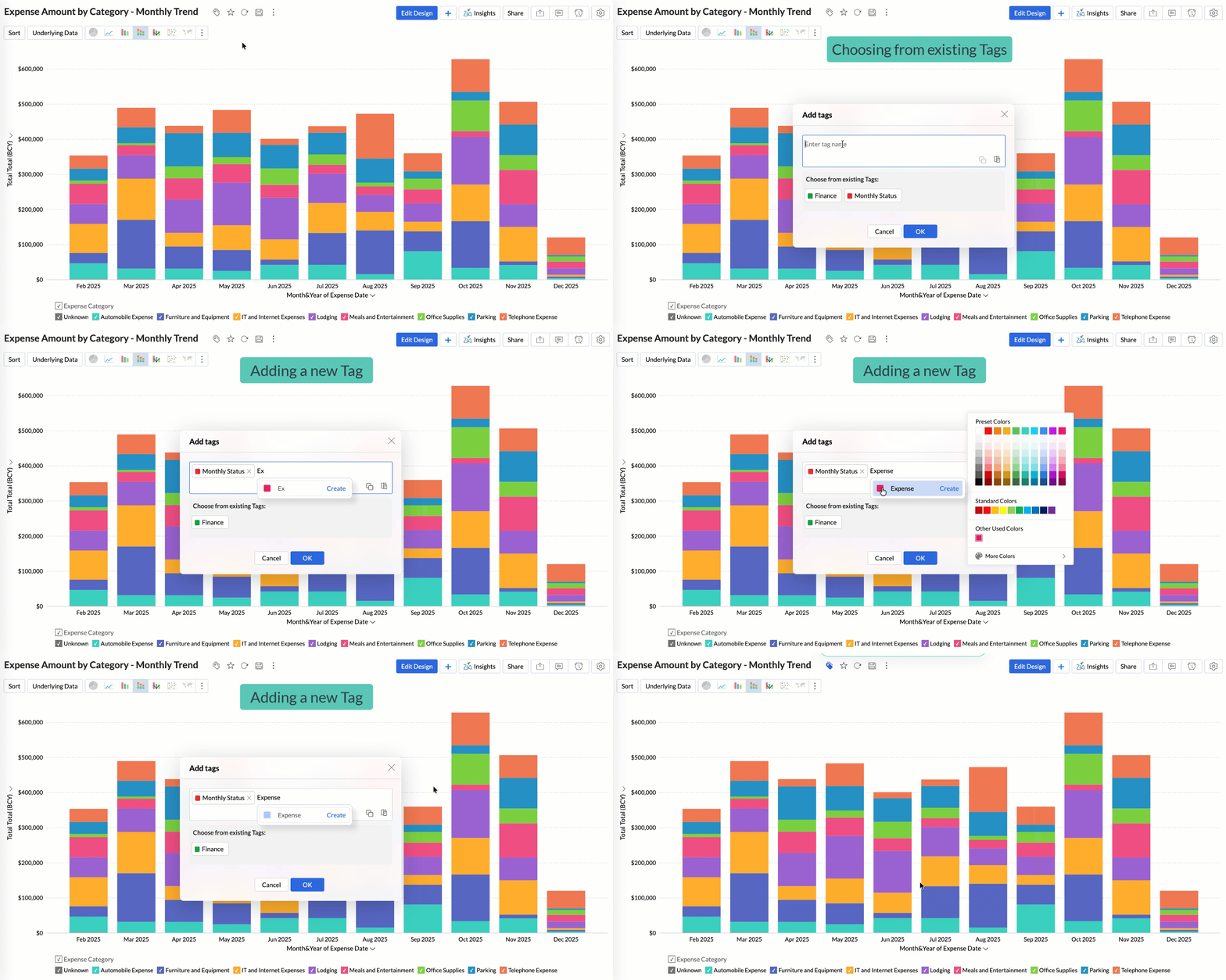
Quickly filter and find the right reports and dashboards, reduce clutter, and ensure teams always have access to the views that matter most to them.
Global Custom Sort
Custom sort was limited to individual reports previously. With recent enhancements, you can now define the sort order for text data types at the workspace level.
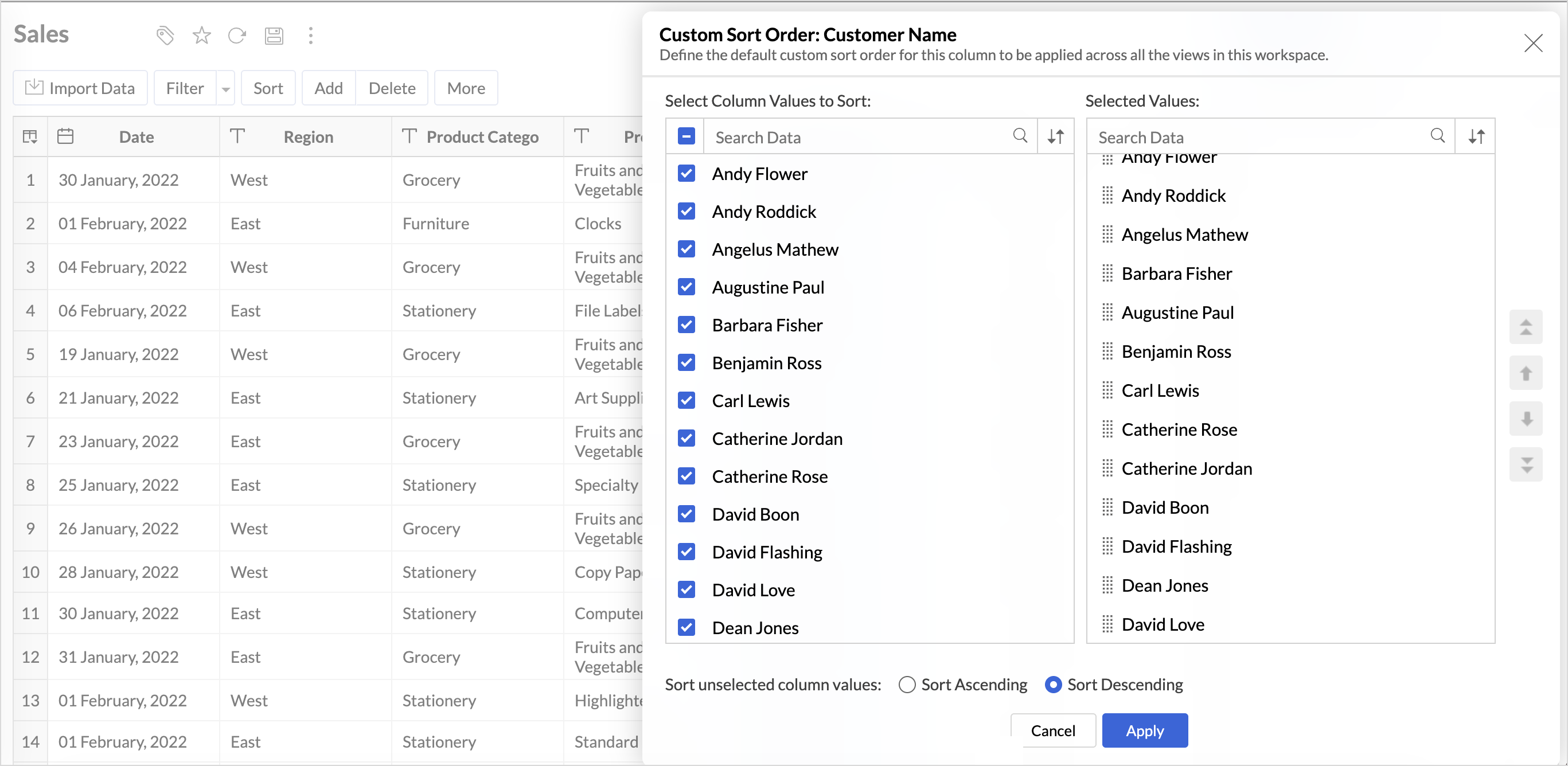
This improvement helps you maintain a consistent sorting across all reports, reduces repetitive setup, and saves time. It also ensures a standardized view of your data throughout the workspace.
Timeframe Selection for Overview Charts
Overview charts now offer flexible timeframe selection, allowing you to focus on relevant periods for deeper trend analysis.
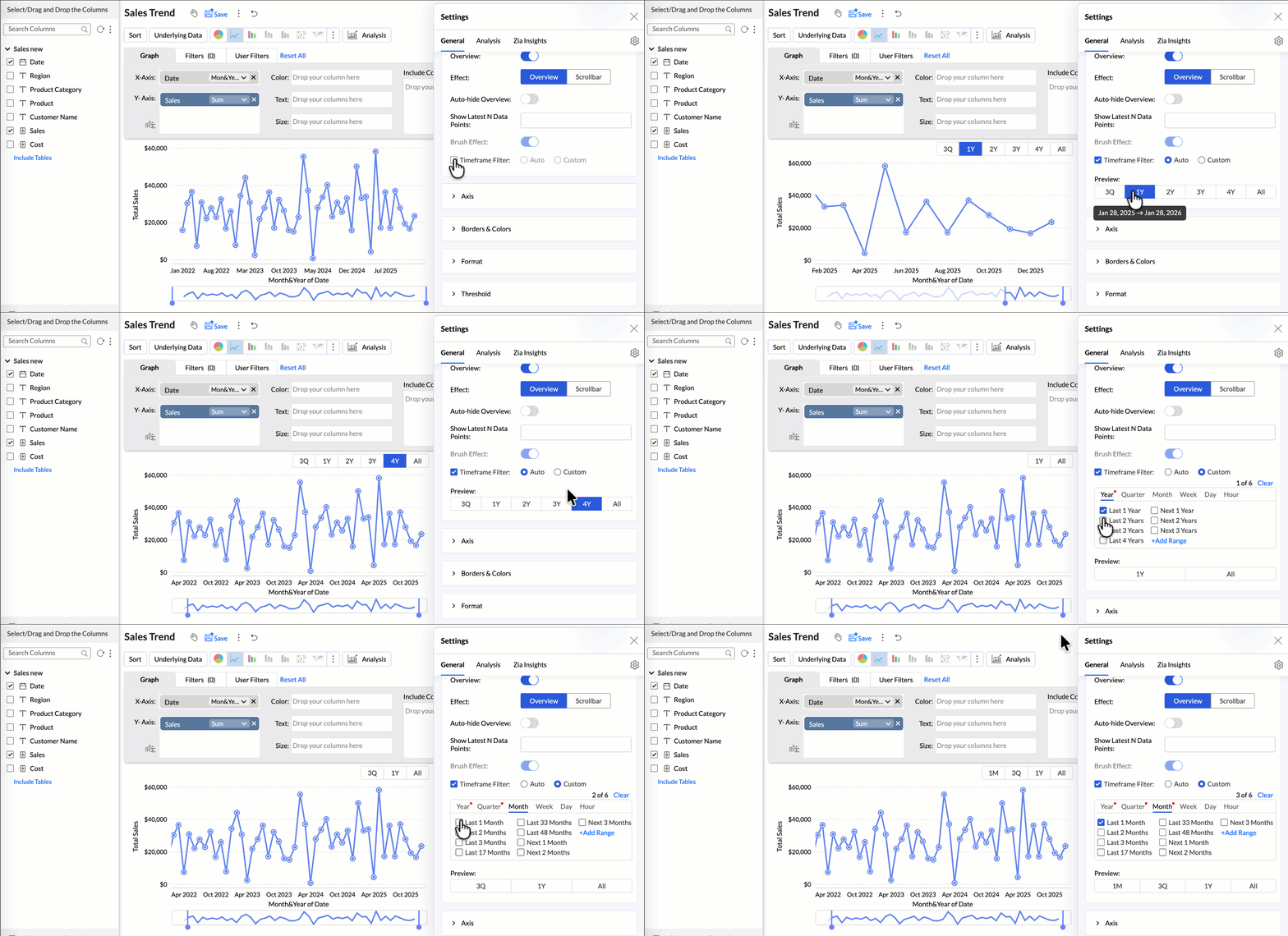
By narrowing the time range, you can better compare performance, identify patterns, and gain clearer insights without distraction from older data.
Customize Zia Insights placement in Dashboards
Choose where and how the insights are displayed, so that they complement your analysis without disrupting your dashboard layout. This gives you greater flexibility to present insights in the way that best suits your audience and reporting style.
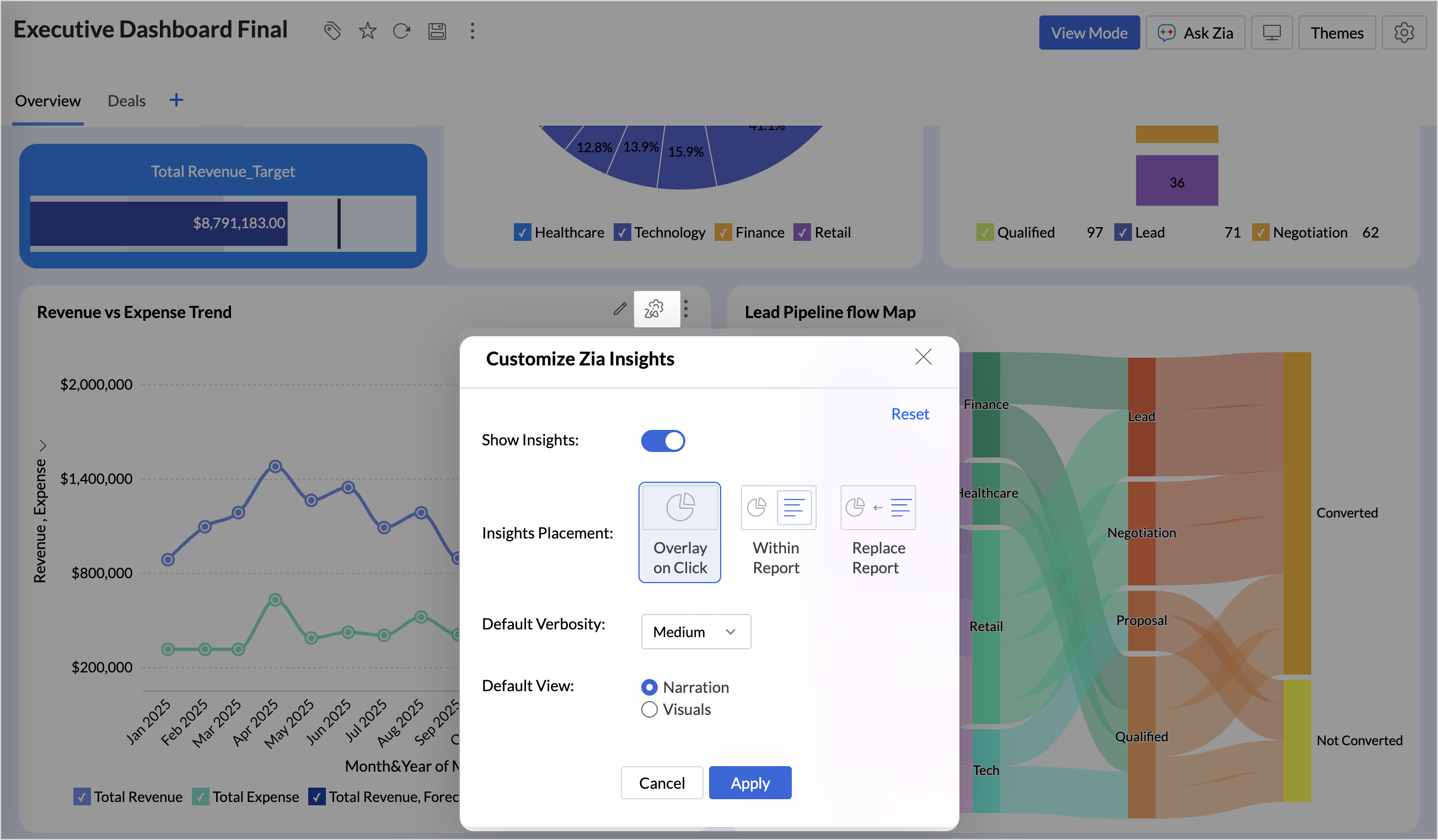
- Overlay: Displays insights in a floating panel that opens on demand, allowing users to review insights without leaving or altering the report view.
- Within Report: Embeds insights directly within the report, enabling users to view data and insights together in a single, continuous view.
- Replace Report: Displays insights as the primary view by replacing the report entirely, offering an insight-first experience focused on conclusions, rather than raw data.
Customize Image Size in Dashboards
Dashboards now support image size settings that let you control how images are displayed.
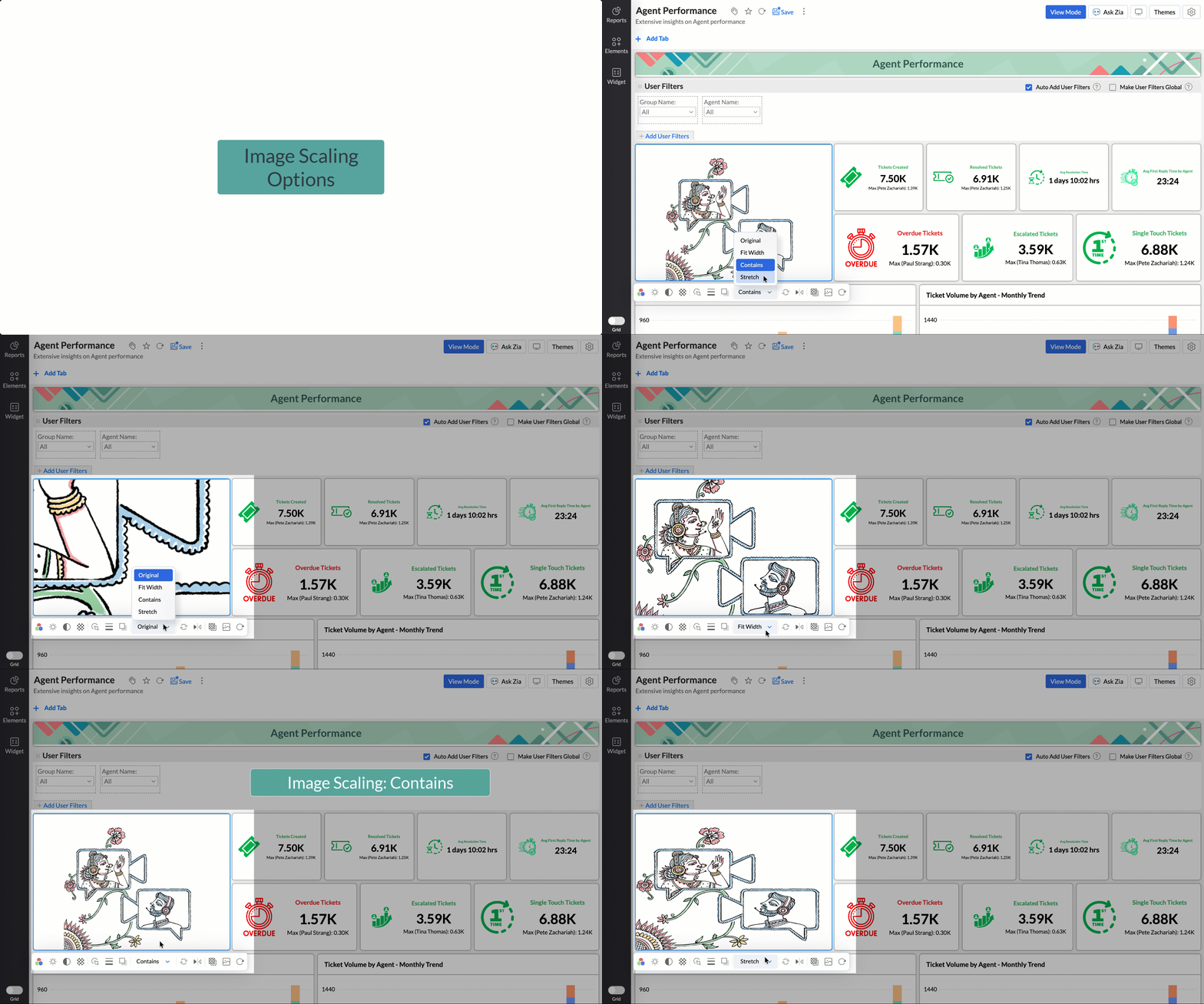
Choose from options like Original, Fit to width, Contain, or Stretch to ensure images align well with your dashboard layout, and thus improve visual clarity.
Tabular View Enhancements
- With this enhancement, all tables linked via lookup columns are now available in the Filter Criteria tab. This makes it easier to share views with users using associated filters, ensuring the specified criteria are automatically applied to the shared report.
- You can now customize lookup columns and the join paths used within Tabular View. This enhancement gives you control over how related tables are connected, helps avoid incorrect or ambiguous joins, and ensures more accurate and reliable data representation in your tabular reports.
New Business App Connectors
We have now introduced integration with two new business connectors Zoho FSM and Magento.
Zoho FSM
Connect your Zoho FSM Data with Zoho Analytics to analyze your field service operations in depth. Identify bottlenecks, optimize resource allocation with interactive reports and dashboards. Analyze revenue, service costs, and customer trends to improve profitability and service quality.
Adobe Commerce (Magento)
Analyze sales, orders, customers, and product performance with ready-made reports and dashboards. Track key metrics like revenue trends, average order value, and top-selling products. Gain insights into customer behavior and regional sales patterns. Make faster, data-driven decisions to optimize store performance and growth.
Topic Participants
Nisha Angel J
Sticky Posts
What's New in Zoho Analytics - January 2026
Hello Users! We are starting the year with a strong lineup of updates, marking the beginning of many improvements planned to enhance your analytics experience. Explore the latest improvements built to boost performance, simplify analysis, and help youWhat's New in Zoho Analytics - November 2025
We're thrilled to announce a significant update focused on expanding your data connectivity, enhancing visualization capabilities, and delivering a more powerful, intuitive, and performant analytics experience. Here’s a look at what’s new. Explore What'sWhat's New in Zoho Analytics - October 2025
Hello Users! We're are back with a fresh set of updates and enhancements to make data analysis faster and more insightful. Take a quick look at what’s new and see how these updates can power up your reports and dashboards. Explore What's New! ExtremeWhat’s New in Zoho Analytics – September 2025
Hello Users!! In this month’s update, we’re raising the bar across multiple touchpoints, from how you bring in data, plan and track projects to how you design and brand your dashboards. We’ve added the all-new Gantt chart for project visualization, expandedAnnouncing Agentic AI - Ask Zia!
We are delighted to roll out the new agentic AI capabilities in Ask Zia, where every stage of the BI workflow is assisted by AI. With a human-in-the-loop approach, Ask Zia ensures that you’re in command of the decision, while AI handles the complexity.
Recent Topics
Dataprep est-ce que zoho est sérieux ??
Nous venons encore de passer plus de 2 heures avec le support zoho qui est incapable de résoudre le problème rencontré dans la mise en place d'un pipeline de données entre le C>>RM et DataPrep Celà fait 5 mois que nous essayons de faire fonctionner leSTOCK COUNT - How is this even possible
Dear Zoho One, We have a lot of products from Zoho but I really don't understand this. We mainly use ZOHO FSM with ZOHO INVENTORY because we are in service and maintenance for electric charging stations for cars All employees of Zoho FSM have their ownChanging sequence of buttons
How can I change the sequence of these buttons? I want the 'Versturen referral campagne' to be displayed as the default buttonUnapproved Articles for Review?
What is this feature and how do I use it? I'm not seeing any option to mark articles as unapproved and needing review.Trying to fetch related list data from deals module
I need to fetch stage history data which comes in related list in deals module using coql. How can I achieve that? { "select_query": "SELECT Technical_Survey_Date as system_order_confirmation_date, Stage,Created_By, Latest_Quote_Creation_Date,Originating_Source,Stage-Probability Mapping
How do I answer this question in analytics? What is the Closed-Won percentage of all Deals that reach a given stage? Another way: Of all Deals that reach a given stage (eg. Artwork/Price Quote), what percentage of them become Closed-Won? I want to populateFollow-up Sequences
For following up with leads based on open/click status.How do I change the sort order of items in the User Filter?
I have a chart for which I have set a custom sort order for a field. I noticed that in the user filter for this field, the order is shown as alphabetical. It does not reflect the custom sorting that I configured. I even tried selecting the checkbox "MakeAutomate Zoho Projects Task Data Export and Email Delivery (for Non-Users)
In many real-world scenarios, we need to share Zoho Projects task updates with clients or team members who don’t use Zoho or don’t have access to the platform. Since there’s no built-in way to export and email tasks directly within Zoho Projects, I putBulk Add notes
I think that it's an absolute need and basic feature to add. I know we can import notes from an xls spreasheet, but that's not what I'm talking about. We should be able the same way that we can bulk send email, bulk add activities, we should be able toHow to use CRM custom button and client script?
Here's what I need. I know how to handle each step in isolation. I do not understand how to intercept a Button interaction, pass it to the client-script for the user prompt, and remainder of the processing. User Clicks Button on Details Page Client-SideMatch one bank transaction to multiple customer with TDS dedcuction
Hi team, Just wanted to know. How can i match one bank entry to multiple customer invoices with tds.Zoho Product Sync between Books and CRM is a mess
The syncing of products between Zoho Books and CRM is completely broken. Why is ZOHO CRM the center of all products? Surely it should be Books or Inventory that is the central focal point of all things to do with a business backend (i.e. not marketingZoho Campaign low open rate
I have been using Zoho One, Zoho CRM and Zoho Campaign to make my web application, but since I started using zoho campaign to send emails, it has low open rate (actually zero for the latest campaign for 2 days) For people who have more experience or knowMore Workflow Triggers
We utilize a lot of workflows in our organization. Recently we've identified two use cases where we would like a workflow to run a function. Upon further checking, the workflow trigger wasn't available, or the only option was to run the workflow moreサブフォームアップデート 静的サブフォームについて
昨年のアップデートにある「静的サブフォーム」の詳細についてご存じの方はおられませんでしょうか? Zoho CRM - 2024年10月〜12月のアップデート https://www.zoho.com/jp/crm/blog/q4-2024-update.html 画像をみると項目を固定できるようですが、2025年5月現在、こちらの USデータセンター環境では設定箇所がみあたりません。 設定方法や設定箇所などご存じの方おられましたら共有いただけると幸いです。IP Address List > Sigma
We have developed a ZohoCRM extension that utilizes API calls to our server from Deluge scripts and Widgets. Our API server has IP restrictions in place. To ensure successful communication, we require a list of IP addresses utilized by Zoho's platformHave One Custom Function Run After Another Custom Function Finishes - ZoHo Desk
Hello, From what I'm seeing in ZoHo Desk. If there are multiple custom functions that run when a ticket is initially created, the custom functions seem to run simultaneously. Is there a way to have one custom function finish before starting another customSerious question: Are there actually "solo-preneurs"/small business owners who made Zoho-one work well for them?
L.S. After already many years of continued struggle with Zoho-One, I am seriously wondering if there are actually solo-preneurs (one person small business owners - without a large, dedicated IT dept.) who got it (Zoho-One) to work well for their businesses.email templates are a mess with fonts
Any time I edit a template or adjust the content of an email while using it the fonts change. Previewing does no good as it appears one way but is sent another. for example .. this was made using Tomaha 2nd size with NO BOLDING. and this is what my clientNew Style for multilevel list numbering
Hi, in my country most of legal contracts are numbered in top level as First, Second.. (Primero, Segundo, Tercero...). I suggest include this style for multilevel lists. Thanks in advance.integration with Notion
Hi. I'm tryng to use zapier for syncing notes between Zoho and my Notion Database. But when creating a zap with their models, I get an error wih this kind of message : Step 1 - New Note Card in Notebook in Zoho Notebook request to https://notebook.zoho./%7B%7Bsel_dc%7D%7D/api/v1/notification/filtered/register?JSONString=%7B%22resource_type%22%3A%22NOTEBOOK%22%2C%22filter_type%22%3A%22ID%22%2C%22filter_value%22%3A%22lovap7e4ebb0fdbaf4ac697d9218619d32fbf%22%2C%22action%22%3A%22UPDATE%22%2C%22url%22%3A%22https%3A%2F%2Fzapier.com%2Fhooks%2Fstandard%2F19820952%2Fcf840faec6aa42c5acdf1f5775131ec6%2F%22%7DIs A Coloured Picklist with Dynamic Automation possible?
Hey All, Just wondering if it is possible to setup a coloured dynamic picklist, Example below. Automating colour for ticket age based on creation date, So it is dynamic and changes as the ticket ages? 24 Hrs > Green 48 Hrs > Orange 72 Hrs > RedEnable Mixed Channels with Employees, Guest Users, and External Users
Hi Zoho Cliq Team, We would like to request the ability to create a channel in Zoho Cliq that includes all three types of users: Internal employees (organization users) Guest Users (non-Zoho users joining via guest chat) External Users (users from otherAssociate email to deal and multiple contacts to deals
Hi any news in how to associate emails to deal and to varios contacts in Bigin CRM? This feature would help in having deal and conversation all in one place so that when we open the deal or contact we have all the information in regard to deal that weChequered lines in notebooks
Can the notebooks also be used with chequered lines or only with ruled lines? Or is it only available in blank? Thanks for the info! Greetings AndreasHow to add/remove tag to a ticket with function?
Hi, I have had to create a function in Zoho Desk. However, it appears that the syntax differs from that in CRM. I realized that it is necessary to add organization ID in some commands what is not necessary when you create a funciotn in CRM. Could youERROR CODE554 5.1.8: unable to send message reason 554 5.1.8 email out going blocked
Dear Zoho Mail Support, It's been nearly 24 hours and we still can't send emails. Our outgoing emails are blocked with the error message "554 5.1.8 Email Outgoing Blocked." This restriction is and will severely impact our business operations and causingZoho Desk Onboarding Assistance - How to do bulk taging
Hi How to apply a particular tag to multiple tickets in one go.New Assembly Screen - Doesn't Search by SKU
When one wants to make an Assembly by clicking the plus sign from the "Assemblies" tab, the first step is to enter the Composite Item that one wishes to assemble. Logical, but the problem is that one cannot search that by SKU, only product name. ThisCRM Client Script Buttons
Hello, Client Script ZDK list button functions, but I am not sure how to interact with them. I tried a few methods of getting the API name for a custom button, but no luck. Any ideas where the button API names are stored? Also, custom buttons must beAnnouncement - Custom Function Series
Hi folks! One of the key attributes of Zoho Books that we're really proud of is the ability to automate your routine accounting tasks in an efficient manner. For most businesses, accounting would involve a set of repetitive tasks that consume a good chunkZoho CRM Create Client script using Custom Buttons
Client script has become quite sophisticated and it's really useful. There is a missing simple functionality: To create script should be able to be called in the details page using a custom button. If we have this feature for Field Event, shouldn't weClient Script event on any field of a Detail page
Hi everyone! I'd like to trigger a Client Script when a user modifies a field - any field - from the Account Details page, how can I do this? I don't want to trigger it on a specific field, but on all of them. Thanks in advance!Move Quote/Deals from a Contact to Another
In our business contacts often move to different accounts, and it is simple to reassign the contact, but not so easy to move their quotes/deals to another contact at the account they are no longer with. Looking to see if there is a function to move quote/dealsFeature Request – Support for Saskatchewan PST Self-Assessment in Zoho Books
I’d like to suggest a feature enhancement for Zoho Books regarding Saskatchewan PST (SK PST) self-assessment. Currently, when filing the SK PST return using Zoho Books’ return generator, there is a field labelled “Consumption Tax”, which is intended forConnect and Engage On the Go: How Zoho SalesIQ's Mobile App Empowers Sales Teams?
In sales, timing is crucial. It makes a huge difference. What if a prospect is checking out your pricing page? Or a high-value lead revisits your business' website or mobile app while you're at lunch? You can’t afford to miss that opportunity, and youAny timeline for these features?
Hello! Was wondering if there was a timeline to for the following features: Increased API Access for automations. The Rules are nice, but really need more automation, such as adding things to CRM, automating task creation, forwarding emails, etc. "negative"Projects Timesheets integration with Quickbooks
When will Zoho Projects Time-sheets be integrated with Quickbooks? This will make us move to Zoho for all business needs (except for Quickbooks)Unable to send a message to a contact from Zoho CRM
From menu Contacts I choose a contact, on the right vertical menu i have five different choices: Add a potential, Add an activity Add an event Add a call Send a message. All af them works exept "Send a message". If i click on it I don't get nothing, noNext Page