What's New - March 2025 | Zoho Backstage
Hello there,
We’re thrilled to introduce a much-awaited lineup of powerful features and enhancements designed to fulfill your event management needs. Here's a round-up of the latest updates that will enhance your experience with Zoho Backstage this month.
Offer Tickets
Early bird and limited-time offers are powerful tools to boost ticket sales and generate early revenue. With the new Offer Tickets feature, you can create multiple offers as tiers within a single ticket class, making the process more streamlined and automated.
Previously, you had to create separate ticket classes for each offer and manually manage their availability. Now, you can:
- Add multiple offers under a single ticket class
- Automate the offer start and stop conditions
- Reduce manual intervention
Key benefits
- Increased marketing impact: Time-sensitive discounts create a sense of urgency, encouraging faster ticket purchases.
- Early revenue and cash flow: Early sales provide immediate cash flow to cover event expenses like venue deposits, marketing, and logistics.
- Leverage Psychological Triggers:
- FOMO (Fear of Missing Out): Limited-time availability compels attendees to act quickly.
- Perceived Savings: Attendees feel they are getting a deal, making them more likely to buy.
How to use
Setting up offers

You can add offers as tiers within a ticket class and configure their availability based on:
- Time: Set specific start and end dates for the offer.
- Quantity: Define the number of tickets available at the offer price.
Flexible offer progression
From the second offer onward, you can choose to automatically start the next offer when the previous one ends. Or, set a custom start date for the new offer.
Customizing offer display
You can customize how offers are displayed on your event website using the Website Designer. The offer card can show:

- Current Offer
- Previous Offer
- Next Offer
- Both Previous and Next Offers
This flexibility helps you highlight the most relevant deals and enhance visibility.
Good to know
- During the ticket purchase process, the offer name appears alongside the ticket class name. The order summary clearly displays the applied offer.
- After attendees purchase their tickets, the "Your Orders" section displays the offer name along with the ticket class name. The invoice also reflects the offer name for transparency.
- When manually adding an order, any valid offers associated with the ticket class are applied automatically. There's no need for manual price adjustments.
- During check-in, only the original ticket class amount is displayed.
- Offer-tiered tickets cannot be selected during manual check-in.
Click here to learn more.
Tax Rules - Canada (Early access)
Accurate tax calculation is essential for ensuring compliance and transparency in event management. With the new Tax Rules feature for Canada, you can automatically apply the correct tax rates based on your event location, making tax management simpler and more efficient. Zoho Backstage now allows you to create tax rules for all 10 provinces and 3 territories, which can be selected and applied to an event automatically, ensuring the correct tax rates are applied without manual adjustments. This feature supports in-person, hybrid, and online events, offering flexibility and accuracy.
The Canadian tax rule engine covers 10 provinces, 3 territories, multiple tax agencies, and 12 sales tax rates, providing a comprehensive solution for handling event-related taxes.

How do taxes work on Canadian events?
For in-person and hybrid events, the tax rate is determined by the event’s physical location, based on the Place of Supply, in compliance with Canada Revenue Agency (CRA) regulations. This ensures attendees are charged the appropriate tax rate according to the province or territory where the event takes place.
For online events, where no physical venue exists, the tax is calculated based on the attendee’s location. This ensures the correct sales tax is applied, even when attendees purchase tickets from different provinces or countries.
How to use
To enable Canada Tax Rules, configure your organization’s location:
- Go to Portal Settings > Payments and Tax.
- Select Canada as the organization location.
Once configured, the system automatically populates:
- 12 default tax rates covering all provinces and territories.
- 13 tax rules (one for each region).
- A default rule for online events, applying the correct tax based on the attendee’s location.
- 5 tax agencies for accurate tax handling.
You can create new tax rates, groups, and authorities to meet your event’s specific needs. Additionally, you can add custom tax rules for both in-person/hybrid and online events, giving you full control over how taxes are applied.
Applying Tax Rules to In-Person and Hybrid events
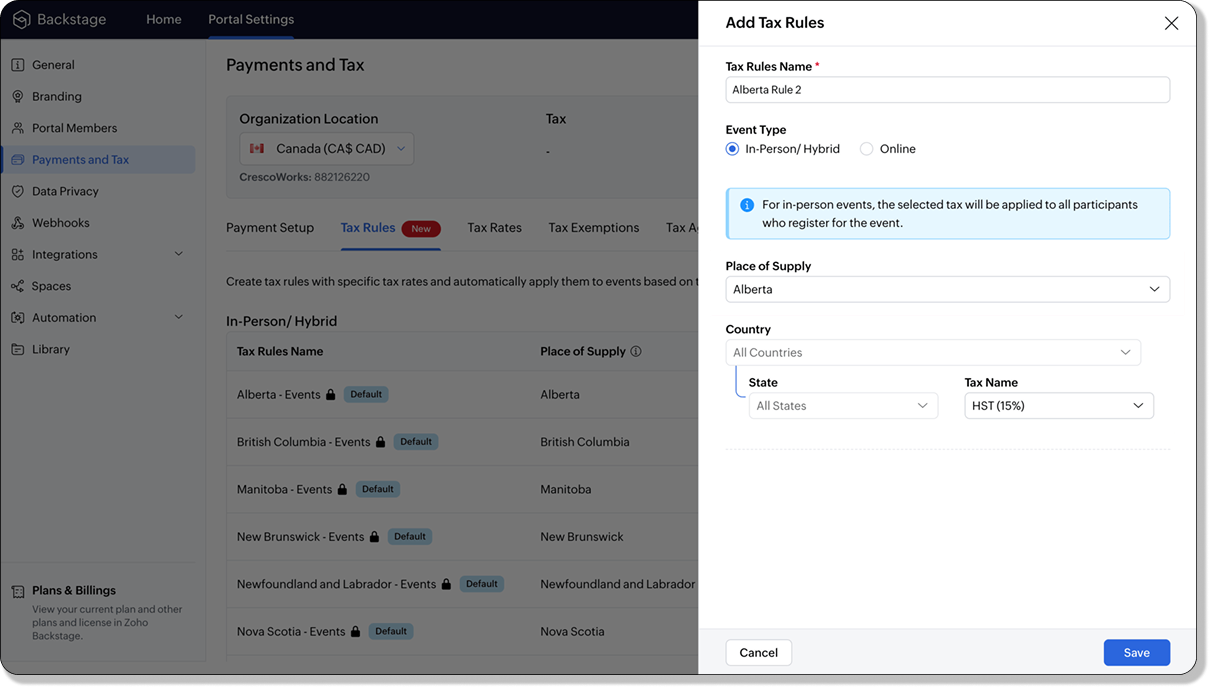
For in-person and hybrid events, Zoho Backstage automatically suggests tax rules based on the event location. The 13 default tax rules cover all Canadian provinces and territories. If the event location changes, the system automatically updates the relevant tax rules to reflect the new region’s rates.
You can also create custom tax rules by selecting a specific province or territory and applying a custom tax rate, offering greater flexibility for managing event taxes.
Applying Tax Rules to Virtual events
For online events, the system uses a default tax rule that covers all Canadian provinces and territories. Taxes are applied based on the attendee's location.
Canadian attendees are charged the applicable provincial tax rate.
International attendees are assigned a zero tax rate by default.
If you need to apply taxes to international attendees, you can create new tax rules tailored for online events, ensuring compliance with international tax regulations.

- Tax rules in Zoho Backstage are flexible and dynamic. You can modify them at any time during your event setup. However, changes will only apply to new transactions. Existing transactions will retain the original tax rule, ensuring previous purchases remain unaffected.
- If you select a non-Canadian location for your event, the Canada Tax Rule will not be applied. This ensures taxes are only charged where applicable, preventing errors in cross-border events.
Event Category

Categorize and filter events based on custom classifications for organizers and attendees to find and manage events easily. This new addition is aimed at improving event management by giving organizers the flexibility to create, manage, and filter events using custom categories. Organizers can now create up to 100 custom categories when setting up an event, giving them the freedom to define categories that suit their specific needs.
Previously, categories selected in Event Info were not utilized elsewhere, and there was no option to add new/manage categories.
Now, organizers can tailor categories to their specific needs and filter them on the Event Directory.
To access:
- While Creating an Event: On the Event Info page.
- For Category Management: Under Portal Settings > Branding > Event Category.
Permissions:
Portal Owners & Admins:
- Add, edit, and delete custom categories.
- Cannot edit or delete default categories.
Event Organizers:
- Can only add new categories.
- Cannot edit or delete existing custom or default categories.
Other Enhancements
Floor plan Focus Area

The Focus Area in the floor plan refers to designated spaces within the event venue that are visually highlighted to draw attention to specific sections, such as booths, stages, or key locations. These areas allow organizers to emphasize important spots, making navigation easier for attendees and improving the overall flow of the event. Focus areas help guide visitors to essential parts of the venue, enhancing their event experience.
Custom Dates for ticket classes (Early access)
In cases where smaller sessions or events (like welcome events, after-event parties, etc.) occur before or after the main event, this feature allows organizers to assign specific dates to separate ticket classes, ensuring tickets are only valid for the selected dates.
Custom dates can be set within 30 days before or after the main event.
New WhatsApp triggers and templates
The WhatsApp Integration, designed to enhance communication and engagement with all event stakeholders, now includes new triggers and templates to facilitate messaging and ensure timely updates for everyone.
For Purchasers:
- Send Registration Confirmation: Instantly confirm registration to enhance the attendee experience.
- Order Canceled: Notify purchasers promptly in case of any order cancellations.
For Speakers:
- Welcome Speaker: Extend a warm welcome to our speakers and set a positive tone for their participation.
- Speaker Added to a Session: Inform speakers when they’re added to a session, ensuring they are well-prepared.
- Speaker Removed from a Session: Provide timely updates should there be any changes to their session involvement.
For Sponsors:
- Thank a Sponsor Before Website is Live: Show appreciation early on, fostering positive relationships with sponsors.
- Welcome and Thank Sponsor After Website is Live: Acknowledge sponsors publicly once the event website goes live.
- Deny Sponsor Proposal: Deliver sensitive information with professionalism and clarity.
- Acknowledge Sponsor Proposal: Confirm receipt of sponsor proposals, keeping communication open and transparent.
For Participants:
- Event Canceled: Quickly inform participants in the event of cancellations, ensuring they’re kept in the loop.
We are continuously refining Zoho Backstage to make your event management experience even more powerful and intuitive. Stay tuned for more updates in the coming months!
If you have any questions, please contact support@zohobackstage.com.
Topic Participants
Jithan Raghuraj
Recent Topics
Blueprint Not Triggering When Lead Status Is Updated by Workflow (IndiaMART Integration)
I have set up a blueprint that triggers when a lead’s status is “New Lead.” Our CRM is integrated with IndiaMART, and when leads are created from IndiaMART, their Lead Status is initially set to None. To handle this, I created a workflow that automaticallyUpdate Subform in specific field(Status) without affecting other fields in Zoho CRM using Deluge?
Scenario: PRODUCT Module(change name Plot) in any product status change From Available to Booked then on PROJECT Custom Module have Subform So, Subform name is Property Details now in that Subform 1 field is STATUS that update according to product statusYouTube Live #2: Agreement Intelligence with Zoho Sign's eSign AI assistant
Hi there, We're back again with our YouTube live series and this time, we'll take you through our holistic agreement intelligence powered signature workflows. Struggling to draft an agreement? Need help double-checking clauses and going through complicatedCan I Build a POS using ZOHO creator and integrate it with ZOHO Books?
Hello, I have a Zoho Books account and I was wondering if I can have a POS system that integrates with it. Primarily with Inventory, Customers and Payment and ofcourse Create invoices and credit notes. So, would Zoho creator provide me with this solution? Thank you,An important update for Zoho Cliq desktop users
The latest version of the Zoho Cliq desktop app (v1.8.0) will no longer be supported on macOS 10.15 Catalina and earlier versions. This is because the framework we use (Electron) no longer supports some older macOS versions. If you’re using macOS 10.15New Toolbar in Zoho Sheet
We have revamped our toolbar design in this new version of Zoho Sheet. Below are some screenshots to help you get accustomed to this new interface. Click on the picture below to view the animated image in its original size. Scroll down this post to learn about the changes. Highlight of Changes: The previous format tab is now split into 2 tabs - Home and Format. The Home tab contains the commonly used functions and the Format tab holds formatting related options. Under the Home tab towards the farZoho inbuilt Telephony made a lot of issues!
Hi there, I am a user that I am working with zoho inbuilt telephony around 1 month. Non of my colleagues are happy with this app! most of the time customer cannot hear my customer service team, customers say our voice is breaking. whenever Telephony supportSending workflow notifications using popular chat services
Hello everyone, We have introduced instant and scheduled notifications on some of the most popular chat platforms to facilitate easy collaboration, quick action, and wider reach. Workflow notifications can be sent to the following chat platforms: ZohoWebhook not firing.
I created a webhook using the Web UI, it looks very nice and the testing worked without an issue, but when i save/ update a ticket, the webhook is not firing. Here are the details of the web-hook i get from using the API "modifiedTime": "2019-10-22T09:23:37.380Z",Adding Images to a Quote in Zoho CRM
We are currently preparing to use Quotes in Zoho CRM and we are building out our Quote templates. We came across an issue of not being to add Images of the products to the Quote - specifically in the body of the Quote templates. This is a problem,Applications built with Zoho Creator
Hi, I’m really interested in seeing how others have built their application using Zoho Creator, especially those designed for external users (clients, vendors, or the public). If you’ve developed something along those lines and don’t mind sharing, I’dIs it posssible to add Asap Widget on Wordpress?
I have tried to add the ASAP widget so users could iniciate chats and see the KB information but nothings seems to work. I have tried to add the script using a php snippet that adds the to the footers and also tried one for the header in the functioRequire ticket resolution
Hi Zoho team, Is there a way to require resolution even if an agent did not use a blueprint? for example, our blueprint has a "resolve" transition but what if agent revoked blueprint and manually set the status of ticket to closed? Is there a way whereTables from ZohoSheets remove images when updated from source
I have a few tables from a ZohoSheet in a ZohoWriter document that will remove the images in the cells when I refresh from the source. The source still has the images in the table when I go to refresh. After updating from the source, as you can see theAPI Pagination Error: 'from' Parameter Limit
Hello, I am encountering an error while paging through the Zoho Desk API results: Status code: 422 - {"errorCode":"UNPROCESSABLE_ENTITY","message":"The value passed for field 'from' exceeds the range of '0-4999'."} Is 5000 the maximum number of recordsHow to go to the next open ticket in the queue when agents closes ticket
Zoho Desk When agent closes a ticket - eg when they choose 'Send and Close" - where is the setting that automatically redirects them to the next open ticket in the queue?CRM verify details pop-up
Was there a UI change recently that involves the Verify Details pop-up when changing the Stage of a Deal to certain things? I can't for the life of me find a workflow or function, blueprint, validation rule, layout rule ect that would randomly make itCustom templates for calendar report
What about being able to design custom templates for the calendar report, as well as for other types of reports? I think more users are waiting for this.Disable payment thank-you emails
Hello, can someone please tell me how to disable sending of the "Payment Thank-You" emails?Maximum tags possible in Contacts Records
I read in some documentation that Zoho allows a total of 200 tags across all records. Is this correct? So is it not possible to have one tag per record for 500 records?Any way to "Pay with Check" or "Refund with Check" for Credit Notes?
When we have a Bill in Zoho Books, we can select the "Pay with Check" option which then allows us to print/cut the check directly out of Zoho Books. When we created a Credit Note and want to refund the customer, is there any way to Refund with Check,CRM Mobile reports
When our engineers finish a job they like to email the customer a job report. This is best done todate as an email template but we can find no way to include an image field from that module. Is there any other options?When Zoho Tables Beta will be open to EU data center
Hello all, We in EU are looking at you all using and testing and are getting jealous :) When we will be able to get into the beta also? We don't mind testing and playing with beta software. Thank you!Start Form on a different page (i.e., hide form pages)?
I have a Zoho form that uses the `Field Alias - Prefill URL` feature. My goal is to have a pre-filled field that directs the user to a specific starting page in the form. For example: The URL will have a field alias that will auto-populate a field withHow can we disable "My Requests"?
We are not using this functionality in our system at all and our users get confused.PayPal payment received recording problem
Hi, A little while back one of our customers used the PayPal payment option to pay an invoice For some reason though the payment is showing up twice within the Payments section of the invoice! Instead of setting the invoice value to ZERO, it now shows a negative value Anyone else face this problem? I've checked PayPal and there is only 1 payment in reality... A bug? Actonia ps: for anyone from Zoho Customer Service or tech team, its Invoice 785 in our accountserver response: 451.4.7.1
Good day. Some email clients of our domain receive an error about sending and receiving letters. while for the rest everything works fine. access to the mail made by pop protocol. Bless the mistakes: "server response: 451.4.7.1 System error".string(87) "{"code":"INVALID_TOKEN","details":{},"message":"invalid oauth token","status":"error"} " grtting this error
Using access token i am trying to add sales orders through api but it is throwing errors like the above i have mentioned. Please help me for thatHow to mute chat notification sound by default in Zoho SalesIQ?
We’ve recently embedded the Zoho SalesIQ chatbot on our website, and we’ve noticed that notification sounds sometimes play even when the visitor hasn’t interacted with the chat widget yet. We’re trying to understand two things: Why do these sounds occurKanban View for Projects.
At our organization, we describe active projects with various statuses like "In Proofing" or "Printing" or "Mailing". In the Projects view, one can set these project statuses by selecting from the appropriate drop-down. While this works, it's difficult to view and comprehend the progress of all of your projects relative to each other in a table. Creating a Kanban view for projects where I can move them from one status to another allows me to see where each project is in the order of our workflow.How to Hide Article Links in SalesIQ Answer Bot Responses
I have published an article in SalesIQ, and the Answer Bot is fetching the data and responding correctly. However, it is also displaying the article link, which I don’t want. How can I remove the link so that only the message is shown?Add RECURRING option when adding email to calendar events
When you add an email to a calendar event, there is no option to make that new calendar event into a recurring event. It is counterproductive to make an event from your email to then have to go to your calendar, find the event, and make it recurring.LINE Auto Message Connect to Zoho
When I integrated LINE into the CRM, I was prompted to disable “Chat,” “Auto Response,” and “Greeting Messages,” and to enable the webhook. However, since I have already set up some auto-reply features in LINE, including Rich Messages and greeting automation,Option to block bookings from specific email address or ip adresss in zoho booking
Sometime few of our client keep booking irrelevant booking service just to resolve their queries and they keep booking it again and again whenever they have queries. Currently its disturbing our current communication process and hierarchy which we haveThreaded conversations for emails sent via automation
Hi Guys, I hope you are doing well. Don't you guys think we should have an option in a workflow to notify users either as a new email or the previous email thread. For example, if you have one deal in the process and there are 10 different stages duringCreate folder is fetch fails
coming from zapier... zapier has a google drive task that searches for a specific folder in google drive, and if it fails to find the folder it will create a folder based on the search criteria, and contine along the singluar path of the flow. TryingMeetups de Usuarios de Zoho - Noviembre 2025
¡Hola, Comunidad! Durante el mes de noviembre celebraremos los Meetups de usuarios de Zoho, encuentros presenciales pensados para quienes queráis mejorar vuestras estrategias de lead nurturing y aprender a sacar el máximo partido a herramientas como ZohoIntroducing 8 New Connectors in Zoho DataPrep!
We’ve just made data management even easier - Zoho DataPrep now supports 8 new external connectors to help you build more robust, scalable ETL pipelines. Why it matters: ✅ Broader data access ✅ More automation, less manual work ✅ Smarter pipelines, betterSales Order, Invoice and Payment numbers
Hi zoho friends, it is me again, the slow learner. I'm wondering if there is a way to have it so the Sales order, invoice and payment numbers are all the same? It would be easier for me if they were the same number so there is not so many reference numbersFirst day of trying FSM in the field.
What we found. 1. with out a network connection we were unable to start a service call? 2. if you go to an appointment and then want to add an asset it does not seem possible. 3. disappointed not to be able to actually take a payment from within the appNext Page