What's New - March 2025 | Zoho Backstage
Hello there,
We’re thrilled to introduce a much-awaited lineup of powerful features and enhancements designed to fulfill your event management needs. Here's a round-up of the latest updates that will enhance your experience with Zoho Backstage this month.
Offer Tickets
Early bird and limited-time offers are powerful tools to boost ticket sales and generate early revenue. With the new Offer Tickets feature, you can create multiple offers as tiers within a single ticket class, making the process more streamlined and automated.
Previously, you had to create separate ticket classes for each offer and manually manage their availability. Now, you can:
- Add multiple offers under a single ticket class
- Automate the offer start and stop conditions
- Reduce manual intervention
Key benefits
- Increased marketing impact: Time-sensitive discounts create a sense of urgency, encouraging faster ticket purchases.
- Early revenue and cash flow: Early sales provide immediate cash flow to cover event expenses like venue deposits, marketing, and logistics.
- Leverage Psychological Triggers:
- FOMO (Fear of Missing Out): Limited-time availability compels attendees to act quickly.
- Perceived Savings: Attendees feel they are getting a deal, making them more likely to buy.
How to use
Setting up offers

You can add offers as tiers within a ticket class and configure their availability based on:
- Time: Set specific start and end dates for the offer.
- Quantity: Define the number of tickets available at the offer price.
Flexible offer progression
From the second offer onward, you can choose to automatically start the next offer when the previous one ends. Or, set a custom start date for the new offer.
Customizing offer display
You can customize how offers are displayed on your event website using the Website Designer. The offer card can show:

- Current Offer
- Previous Offer
- Next Offer
- Both Previous and Next Offers
This flexibility helps you highlight the most relevant deals and enhance visibility.
Good to know
- During the ticket purchase process, the offer name appears alongside the ticket class name. The order summary clearly displays the applied offer.
- After attendees purchase their tickets, the "Your Orders" section displays the offer name along with the ticket class name. The invoice also reflects the offer name for transparency.
- When manually adding an order, any valid offers associated with the ticket class are applied automatically. There's no need for manual price adjustments.
- During check-in, only the original ticket class amount is displayed.
- Offer-tiered tickets cannot be selected during manual check-in.
Click here to learn more.
Tax Rules - Canada (Early access)
Accurate tax calculation is essential for ensuring compliance and transparency in event management. With the new Tax Rules feature for Canada, you can automatically apply the correct tax rates based on your event location, making tax management simpler and more efficient. Zoho Backstage now allows you to create tax rules for all 10 provinces and 3 territories, which can be selected and applied to an event automatically, ensuring the correct tax rates are applied without manual adjustments. This feature supports in-person, hybrid, and online events, offering flexibility and accuracy.
The Canadian tax rule engine covers 10 provinces, 3 territories, multiple tax agencies, and 12 sales tax rates, providing a comprehensive solution for handling event-related taxes.

How do taxes work on Canadian events?
For in-person and hybrid events, the tax rate is determined by the event’s physical location, based on the Place of Supply, in compliance with Canada Revenue Agency (CRA) regulations. This ensures attendees are charged the appropriate tax rate according to the province or territory where the event takes place.
For online events, where no physical venue exists, the tax is calculated based on the attendee’s location. This ensures the correct sales tax is applied, even when attendees purchase tickets from different provinces or countries.
How to use
To enable Canada Tax Rules, configure your organization’s location:
- Go to Portal Settings > Payments and Tax.
- Select Canada as the organization location.
Once configured, the system automatically populates:
- 12 default tax rates covering all provinces and territories.
- 13 tax rules (one for each region).
- A default rule for online events, applying the correct tax based on the attendee’s location.
- 5 tax agencies for accurate tax handling.
You can create new tax rates, groups, and authorities to meet your event’s specific needs. Additionally, you can add custom tax rules for both in-person/hybrid and online events, giving you full control over how taxes are applied.
Applying Tax Rules to In-Person and Hybrid events
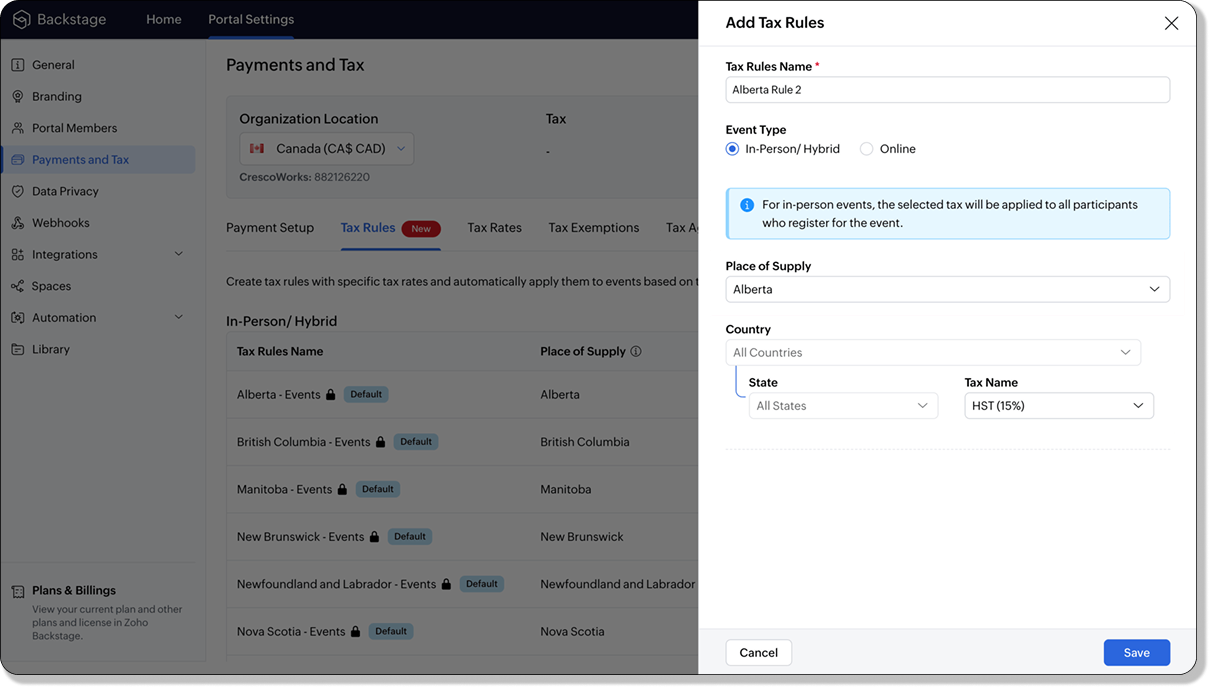
For in-person and hybrid events, Zoho Backstage automatically suggests tax rules based on the event location. The 13 default tax rules cover all Canadian provinces and territories. If the event location changes, the system automatically updates the relevant tax rules to reflect the new region’s rates.
You can also create custom tax rules by selecting a specific province or territory and applying a custom tax rate, offering greater flexibility for managing event taxes.
Applying Tax Rules to Virtual events
For online events, the system uses a default tax rule that covers all Canadian provinces and territories. Taxes are applied based on the attendee's location.
Canadian attendees are charged the applicable provincial tax rate.
International attendees are assigned a zero tax rate by default.
If you need to apply taxes to international attendees, you can create new tax rules tailored for online events, ensuring compliance with international tax regulations.

- Tax rules in Zoho Backstage are flexible and dynamic. You can modify them at any time during your event setup. However, changes will only apply to new transactions. Existing transactions will retain the original tax rule, ensuring previous purchases remain unaffected.
- If you select a non-Canadian location for your event, the Canada Tax Rule will not be applied. This ensures taxes are only charged where applicable, preventing errors in cross-border events.
Event Category

Categorize and filter events based on custom classifications for organizers and attendees to find and manage events easily. This new addition is aimed at improving event management by giving organizers the flexibility to create, manage, and filter events using custom categories. Organizers can now create up to 100 custom categories when setting up an event, giving them the freedom to define categories that suit their specific needs.
Previously, categories selected in Event Info were not utilized elsewhere, and there was no option to add new/manage categories.
Now, organizers can tailor categories to their specific needs and filter them on the Event Directory.
To access:
- While Creating an Event: On the Event Info page.
- For Category Management: Under Portal Settings > Branding > Event Category.
Permissions:
Portal Owners & Admins:
- Add, edit, and delete custom categories.
- Cannot edit or delete default categories.
Event Organizers:
- Can only add new categories.
- Cannot edit or delete existing custom or default categories.
Other Enhancements
Floor plan Focus Area

The Focus Area in the floor plan refers to designated spaces within the event venue that are visually highlighted to draw attention to specific sections, such as booths, stages, or key locations. These areas allow organizers to emphasize important spots, making navigation easier for attendees and improving the overall flow of the event. Focus areas help guide visitors to essential parts of the venue, enhancing their event experience.
Custom Dates for ticket classes (Early access)
In cases where smaller sessions or events (like welcome events, after-event parties, etc.) occur before or after the main event, this feature allows organizers to assign specific dates to separate ticket classes, ensuring tickets are only valid for the selected dates.
Custom dates can be set within 30 days before or after the main event.
New WhatsApp triggers and templates
The WhatsApp Integration, designed to enhance communication and engagement with all event stakeholders, now includes new triggers and templates to facilitate messaging and ensure timely updates for everyone.
For Purchasers:
- Send Registration Confirmation: Instantly confirm registration to enhance the attendee experience.
- Order Canceled: Notify purchasers promptly in case of any order cancellations.
For Speakers:
- Welcome Speaker: Extend a warm welcome to our speakers and set a positive tone for their participation.
- Speaker Added to a Session: Inform speakers when they’re added to a session, ensuring they are well-prepared.
- Speaker Removed from a Session: Provide timely updates should there be any changes to their session involvement.
For Sponsors:
- Thank a Sponsor Before Website is Live: Show appreciation early on, fostering positive relationships with sponsors.
- Welcome and Thank Sponsor After Website is Live: Acknowledge sponsors publicly once the event website goes live.
- Deny Sponsor Proposal: Deliver sensitive information with professionalism and clarity.
- Acknowledge Sponsor Proposal: Confirm receipt of sponsor proposals, keeping communication open and transparent.
For Participants:
- Event Canceled: Quickly inform participants in the event of cancellations, ensuring they’re kept in the loop.
We are continuously refining Zoho Backstage to make your event management experience even more powerful and intuitive. Stay tuned for more updates in the coming months!
If you have any questions, please contact support@zohobackstage.com.
Topic Participants
Jithan Raghuraj
Recent Topics
Zoho Desk app update: AI powered features
Hello everyone! We’ve introduced various AI-powered services on the Zoho Desk app. Let's take a look at what's new. Generate Content: Generate Content uses AI to formulate responses based on the your query and provides a ready-to-use reply which can beHow to Automate Email Sequence
I'm having trouble trying to set up a workflow to automate an email sequence. Once a group of emails in a Task has been tagged by a certain tag, I want an instant email template to be sent. After 7 days with no response, another email template would beTurning off the new UI
Tried the new 'enhanced' UI and actively dislike it. Anyone know how to revert back?Zoho Sprints Android v2.0.4 app update: Item reminders, archive Epics, Kanban projects, Epic progress
Hello everyone! In the latest version(v2.0.4) of the Zoho Sprints Android app update, we have introduced various new features. Let's take a look at what's new! Item Reminder Stay organized and never miss an important date with the all-new Item ReminderCredit Management: #3 Setting Credit Limit for Customers
Think about that one familiar customer of yours who always buys on credit. They usually pay on time, maybe a little late here and there, but not alarming. So, you are fine saying, "Sure, pay later." Then, one day, they place a significantly bigger orderUpdate on the client portal URL for Guest users
We’re updating the way Guest users access their Connect network. As part of this change, all client organization portals used by Guest users will now be accessible through a dedicated domain specific to each data center. The access URLs mentioned herePreserve Ticket Issue Mapping When Migrating from Jira to Zoho Projects
Hello Zoho Projects Team, We hope you are doing well. We are currently exploring a full migration from Jira to Zoho Projects, and we identified a critical limitation during the migration process involving Zoho Desk integration. Current Situation: We useUnable to see Zoho contacts in Zoho app on ios
Hi Support Team, I am a new user, I have created my account and installed zohomail app on iOS 16 which works. I was also able to import my Gmail contacts into Zoho Contacts, which I can see. The problem is that I can’t see these imported cobalts in ZohomailTask Due Date greater than 10 years.
We use recurring tasks in Projects where every week, month, year etc Some of our projects are greater than 10 years and we are unable to set a new due date because the difference between start date and due date is greater than 10 years. As an exampleExternal User onboarding for zoho connect is not really intuitive.
So the external user is sent an invite, which has a button that directs them to login to zoho to view the invite, but if they don't have a zoho account, they cannot access that invite, which seems kinda silly, as there is not real way on for them to createHosting external websites on Zoho?
How can I host my external website on zoho? Do we have that option? I am currently with hostinger and am looking to switch to zoho. Kindly help. Thanks.How to Add Time Formula Duration (hh:mm)
Hi everyone — I’m trying to create a formula field in Zoho CRM that calculates the difference between a “Call Start Time” and “Call End Time” and displays the duration in HH:MM format (for example: 1:04 for one hour and four minutes). My current setupHow can I calculate the physical stock available for sale?
Hey Zoho Team, I've tried to calculate the physical stock on hand in various ways - but always receive a mismatch between what's displayed in Zoho Inventory & analytics. Can you please let me know how the physical stock available for sale is calculated?Set Custom Icon for Custom Modules in new Zoho CRM UI
Marketing Tip #4: Build your email list early
Email marketing has one of the highest returns on investment. Don’t wait until later; start collecting subscribers now. When you've got their attention, you can send them emails about offers, new product launches, seasonal greetings, and more. Try thisIs anyone else having trouble saving a custom image in their email signature, or is it just me?
When I try to save the image I get an error that says "Operation Failed" I opened a support ticket two weeks ago and received a response that it would be debugged, but it still isn’t workingUnify Overlapping Functionalities Across Zoho Products
Hi Zoho One Team, We would like to raise a concern about the current overlap of core functionalities across various Zoho applications. While Zoho offers a rich suite of tools, many applications include similar or identical features—such as shift management,Zoho Desk Domain mapping / Cloudflare CNAME not recognized
Hello, my website is behind Cloudflare and SSL. From the Cloudflare control panel I added a CNAME record such as support.mydomain.com pointing to desk.cs.zohohost.com but I'm stuck with the message "Make sure you've mapped the CNAME entry..."Create an Eye-Catching Announcement Widget for Your Help Center
Hello Everyone! In this week’s edition, let’s explore how to keep your customers updated with exciting news in the Help Center. See how ZylkerMobile wowed their customers by bringing updates right to their portal. ZylkerMobile, the renowned brand forI want to add my other zoho account in same pc
why does zoho restrict me doing many things as i also want to add my second mail account bit its not allowing me to do thatSearch in Zoho Community Not Working
I realize this is a bit of a meta topic, but the search for the various Zoho Communities appears to not be working. I'm under the impression that they run on some version of the Zoho Desk platform, so I'm posting this here.Capture Stripe’s Customer ID
Does anyone know of a way to capture Stripe’s customer ID that is created when the form/payment is processed? I would like to have the customer ID stored in our CRM so we could utilize in some custom functions down the road.Custom Modules - Where are Comments??
In the standard ticket module and in the tasks module, we have an interactive comment box that we can post important details/notes and can tag others if needed. Where is this functionality for Custom Modules? Ideally, custom modules would have very similar,Zoho Mail will not set up in Thunderbird
I am using Thunderbird 13.0.1 in Linux Mint 13 64-bit. I cannot set up my Zoho IMAP email in this client. This is evidently a common problem as evidenced by these postings in the Thunderbird forum: thunderbird can't seem to "find the settings" I cannot configure it for my zoho.com email account I can not get ZOHO to configure. Any suggestions? The best T-bird seems to be able to do is to refer these users to the Zoho forum. I believe the instructions in the Zoho help wiki are correct, althoughZoho ShowTime: Certificates of Completion - Award your learners with a sense of achievement
In our increasingly competitive market, professional trainers need to differentiate themselves if they are to survive. One way to do this is to focus on innovation and deliver an ideal learning experience. By developing a renowned certificate program that provides learners with a specialized skill set for a particular industry, both trainees and future prospects will recognize the trainer's leadership in that field. This can help with long-term growth, revenue generation, and even marketing and branding.IMAP Migration from Gmail
I have been trying to import my email from a Gmail server and keep receiving the following error. I have reduced the security, activated imap and no improvement. The link to the Google support item has not helped. Unable to connect to your account. PleaseYour Incoming has been blocked and the emails will not be fetched in your Zoho account and POP Accounts Click here to get unblocked.
When entering my account, this error is thrown at me, and I deleted a good part of my deleted messages, but I still can not unblock it, I would appreciate your help. reservas@lineasperutravel.comRequest for Creating Multiple Email Accounts on One Mobile Number
Dear Zoho Team, I am planning to shift all my work-related communication to Zoho Mail because of its reliability and features. For my work, I need to create 3–4 separate email accounts for different purposes. Could you please confirm if it is possibleSignature issue
Problem: The signature does not appear when replying or forwarding an email. solve issue: settintgs/Signature Check option place a signature above the content with quotation marksmail admin not loading
i am trying to login to mailadmin ... gears keeps rotating forever... its not a password issue whats so ever ... not cookies issues whatsoever from android app i can login but there so few things to do from there .. i changed ip address the same... iUnify All Zoho Video Meeting Experiences into One Standardized Platform
Hi Zoho Team, We would like to share an important user experience concern regarding the current state of video meeting functionality across the Zoho ecosystem. The Problem Within Zoho, there are multiple ways to initiate or schedule a video meeting: ZohoChanging Account in Quote form does not update address information.
I am trying to update the address information in a quote I've created. I corrected the address in the "Account" but that did not change in the quote. If I re-enter the Account Name in the Quote form, nothing updates. How do I fix this?Zoho One Backup of entire account
Hello, When using Zoho one is there a way to backup your entire account of all apps that you are using \ activively using in a single step or do you have to backup each applications data individually? Thanks,Issue with “CC” and “Subject Details” of the initial mail when reply / replied all / forward using Zoho Mail Client (Desktop / Web Mail / Mobile App)
It is observed that when I reply / reply all / forward a mail using Zoho Mail Client (Desktop / Web Mail / Mobile App), the “CC” and “Subject Details” are omitted from the mail which was replied/forwarded. However this is not the case with outlook mailUnable to send Emails - 452 4.3.1 Temporary System Error
Whene ever i request smtp server to send the email (without attachment). i recieve error "452 4.3.1 Temporary System Error"I can't receive email
I cannot receive any email sent to my Zoho email after the free upgrade plan trial is finished.Help for the alisa adding
Sorry, I would like to add a paypal alias on my domain email address. However, the system blocked it. How can I do it?Lite plan attachment said 250mb but actually 25mb ?
Lite plan attachment said 250mb but actually 25mb ? I can't attach over 25mb files, and can't receive mails has attached files over 25mb tooAny update on much requested feature, to delete attachments without deleting the e-mail body?
People have been requesting the ability to delete e-mail attachments without deleting the e-mail for more than ten years now. The latest I see is marked "Working On It" and a year ago it was supposedly being added, see here: https://help.zoho.com/portal/en/community/topic/is-there-a-way-to-delete-mail-attachments-without-deleting-the-textOld vs New Value for Deleted Lookup Values
Suppose the following scenario, where a value in a lookup is deleted: 1. User has countries form 2. Form A has a lookup to countries form 3. User selects Italy in Form A and saves it with the Italy ID 4. Form A report shows Italy 5. Italy is inadvertentlyNext Page