What's New - March 2025 | Zoho Backstage
Hello there,
We’re thrilled to introduce a much-awaited lineup of powerful features and enhancements designed to fulfill your event management needs. Here's a round-up of the latest updates that will enhance your experience with Zoho Backstage this month.
Offer Tickets
Early bird and limited-time offers are powerful tools to boost ticket sales and generate early revenue. With the new Offer Tickets feature, you can create multiple offers as tiers within a single ticket class, making the process more streamlined and automated.
Previously, you had to create separate ticket classes for each offer and manually manage their availability. Now, you can:
- Add multiple offers under a single ticket class
- Automate the offer start and stop conditions
- Reduce manual intervention
Key benefits
- Increased marketing impact: Time-sensitive discounts create a sense of urgency, encouraging faster ticket purchases.
- Early revenue and cash flow: Early sales provide immediate cash flow to cover event expenses like venue deposits, marketing, and logistics.
- Leverage Psychological Triggers:
- FOMO (Fear of Missing Out): Limited-time availability compels attendees to act quickly.
- Perceived Savings: Attendees feel they are getting a deal, making them more likely to buy.
How to use
Setting up offers

You can add offers as tiers within a ticket class and configure their availability based on:
- Time: Set specific start and end dates for the offer.
- Quantity: Define the number of tickets available at the offer price.
Flexible offer progression
From the second offer onward, you can choose to automatically start the next offer when the previous one ends. Or, set a custom start date for the new offer.
Customizing offer display
You can customize how offers are displayed on your event website using the Website Designer. The offer card can show:

- Current Offer
- Previous Offer
- Next Offer
- Both Previous and Next Offers
This flexibility helps you highlight the most relevant deals and enhance visibility.
Good to know
- During the ticket purchase process, the offer name appears alongside the ticket class name. The order summary clearly displays the applied offer.
- After attendees purchase their tickets, the "Your Orders" section displays the offer name along with the ticket class name. The invoice also reflects the offer name for transparency.
- When manually adding an order, any valid offers associated with the ticket class are applied automatically. There's no need for manual price adjustments.
- During check-in, only the original ticket class amount is displayed.
- Offer-tiered tickets cannot be selected during manual check-in.
Click here to learn more.
Tax Rules - Canada (Early access)
Accurate tax calculation is essential for ensuring compliance and transparency in event management. With the new Tax Rules feature for Canada, you can automatically apply the correct tax rates based on your event location, making tax management simpler and more efficient. Zoho Backstage now allows you to create tax rules for all 10 provinces and 3 territories, which can be selected and applied to an event automatically, ensuring the correct tax rates are applied without manual adjustments. This feature supports in-person, hybrid, and online events, offering flexibility and accuracy.
The Canadian tax rule engine covers 10 provinces, 3 territories, multiple tax agencies, and 12 sales tax rates, providing a comprehensive solution for handling event-related taxes.

How do taxes work on Canadian events?
For in-person and hybrid events, the tax rate is determined by the event’s physical location, based on the Place of Supply, in compliance with Canada Revenue Agency (CRA) regulations. This ensures attendees are charged the appropriate tax rate according to the province or territory where the event takes place.
For online events, where no physical venue exists, the tax is calculated based on the attendee’s location. This ensures the correct sales tax is applied, even when attendees purchase tickets from different provinces or countries.
How to use
To enable Canada Tax Rules, configure your organization’s location:
- Go to Portal Settings > Payments and Tax.
- Select Canada as the organization location.
Once configured, the system automatically populates:
- 12 default tax rates covering all provinces and territories.
- 13 tax rules (one for each region).
- A default rule for online events, applying the correct tax based on the attendee’s location.
- 5 tax agencies for accurate tax handling.
You can create new tax rates, groups, and authorities to meet your event’s specific needs. Additionally, you can add custom tax rules for both in-person/hybrid and online events, giving you full control over how taxes are applied.
Applying Tax Rules to In-Person and Hybrid events
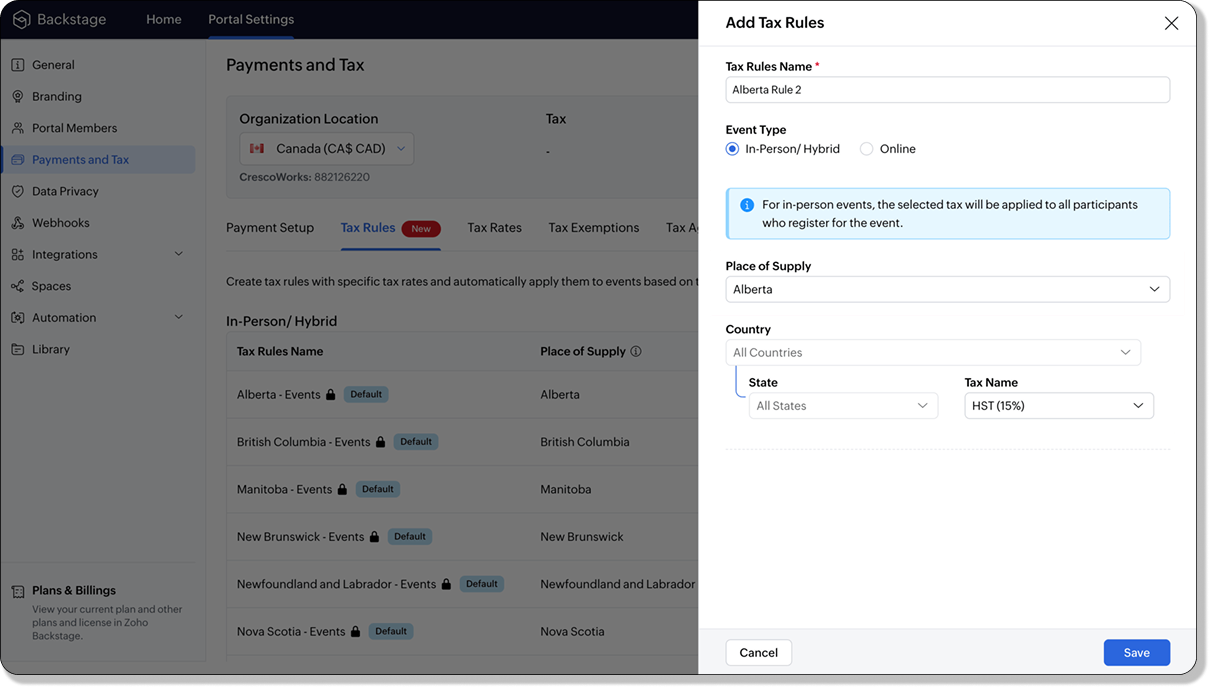
For in-person and hybrid events, Zoho Backstage automatically suggests tax rules based on the event location. The 13 default tax rules cover all Canadian provinces and territories. If the event location changes, the system automatically updates the relevant tax rules to reflect the new region’s rates.
You can also create custom tax rules by selecting a specific province or territory and applying a custom tax rate, offering greater flexibility for managing event taxes.
Applying Tax Rules to Virtual events
For online events, the system uses a default tax rule that covers all Canadian provinces and territories. Taxes are applied based on the attendee's location.
Canadian attendees are charged the applicable provincial tax rate.
International attendees are assigned a zero tax rate by default.
If you need to apply taxes to international attendees, you can create new tax rules tailored for online events, ensuring compliance with international tax regulations.

- Tax rules in Zoho Backstage are flexible and dynamic. You can modify them at any time during your event setup. However, changes will only apply to new transactions. Existing transactions will retain the original tax rule, ensuring previous purchases remain unaffected.
- If you select a non-Canadian location for your event, the Canada Tax Rule will not be applied. This ensures taxes are only charged where applicable, preventing errors in cross-border events.
Event Category

Categorize and filter events based on custom classifications for organizers and attendees to find and manage events easily. This new addition is aimed at improving event management by giving organizers the flexibility to create, manage, and filter events using custom categories. Organizers can now create up to 100 custom categories when setting up an event, giving them the freedom to define categories that suit their specific needs.
Previously, categories selected in Event Info were not utilized elsewhere, and there was no option to add new/manage categories.
Now, organizers can tailor categories to their specific needs and filter them on the Event Directory.
To access:
- While Creating an Event: On the Event Info page.
- For Category Management: Under Portal Settings > Branding > Event Category.
Permissions:
Portal Owners & Admins:
- Add, edit, and delete custom categories.
- Cannot edit or delete default categories.
Event Organizers:
- Can only add new categories.
- Cannot edit or delete existing custom or default categories.
Other Enhancements
Floor plan Focus Area

The Focus Area in the floor plan refers to designated spaces within the event venue that are visually highlighted to draw attention to specific sections, such as booths, stages, or key locations. These areas allow organizers to emphasize important spots, making navigation easier for attendees and improving the overall flow of the event. Focus areas help guide visitors to essential parts of the venue, enhancing their event experience.
Custom Dates for ticket classes (Early access)
In cases where smaller sessions or events (like welcome events, after-event parties, etc.) occur before or after the main event, this feature allows organizers to assign specific dates to separate ticket classes, ensuring tickets are only valid for the selected dates.
Custom dates can be set within 30 days before or after the main event.
New WhatsApp triggers and templates
The WhatsApp Integration, designed to enhance communication and engagement with all event stakeholders, now includes new triggers and templates to facilitate messaging and ensure timely updates for everyone.
For Purchasers:
- Send Registration Confirmation: Instantly confirm registration to enhance the attendee experience.
- Order Canceled: Notify purchasers promptly in case of any order cancellations.
For Speakers:
- Welcome Speaker: Extend a warm welcome to our speakers and set a positive tone for their participation.
- Speaker Added to a Session: Inform speakers when they’re added to a session, ensuring they are well-prepared.
- Speaker Removed from a Session: Provide timely updates should there be any changes to their session involvement.
For Sponsors:
- Thank a Sponsor Before Website is Live: Show appreciation early on, fostering positive relationships with sponsors.
- Welcome and Thank Sponsor After Website is Live: Acknowledge sponsors publicly once the event website goes live.
- Deny Sponsor Proposal: Deliver sensitive information with professionalism and clarity.
- Acknowledge Sponsor Proposal: Confirm receipt of sponsor proposals, keeping communication open and transparent.
For Participants:
- Event Canceled: Quickly inform participants in the event of cancellations, ensuring they’re kept in the loop.
We are continuously refining Zoho Backstage to make your event management experience even more powerful and intuitive. Stay tuned for more updates in the coming months!
If you have any questions, please contact support@zohobackstage.com.
Topic Participants
Jithan Raghuraj
Recent Topics
Migrate Your Notes from OneNote to Zoho Notebook Today
Greetings Notebook Users, We’re excited to introduce a powerful new feature that lets you migrate your notes from Microsoft OneNote to Zoho Notebook—making your transition faster and more seamless than ever. ✨ What’s New One-click migration: Easily importneed to upload from airtable to google drive
I have a zapier zap that automates between airtable and google drive. When a customer uploads a new file into airtable via a client portal interface, zapier uploads that file into a folder linked to that customer's project record. I need to replicateCan't delete functions that are associated with deleted workflow rules
We have a handful of functions that were once associated with a workflow rule, but the rule has been deleted. The function still thinks it is associated so I can't assign it to a new rule. It is starting to get really messy because we have a list of functionsDefault Sorting on Related Lists
Is it possible to set the default sorting options on the related lists. For example on the Contact Details view I have related lists for activities, emails, products cases, notes etc... currently: Activities 'created date' newest first Emails - 'createdCredit Management: #1 Credit You Owe vs Credits Owed to the Business
Think about the last time you ordered food online. You might have paid in advance through your card, but you received a $20 refund because your order got delayed or cancelled. In most apps, refunds don't go into the bank account directly; instead, they'reTip #46- Turn Every Session into an Insight with Zoho Assist survey report- 'Insider Insights'
Delivering exceptional remote support isn’t just about resolving issues, it’s about understanding how both customers and technicians experience each session. That’s where Survey Report in Zoho Assist come in. You can configure and customize survey questionsCRM/Bookings integration edits Contact names
Hi there, I've installed the extension that connects Zoho CRM and Zoho Bookings. When we get a new appointment from Bookings from an existing Contact, that Contact's record shows this: First Name was updated from asd to blank value Last Name was updatedDomain Change
“Please update my Email-in domain from @biginmail.biginmail.in to @biginmail.zoho.com. Messages to the .in domain are bouncing.”Webhooks Limit Exceeded
Today, I received an error message saying, 'Total number of Webhook call exceeded', but when I look at Manage > Billing, it doesn't look like any of my invokeURL calls are being logged. Following the advice from this thread: https://help.zoho.com/portal/en/community/topic/webhooks-daily-limits-in-zoho-creatorAuto select option in CRM after Zoho Form merge
Hi, I have a dropdown field in Zoho CRM that is filled with a Zoho Form. The data is filled but not automatically shown. After selecting the right value in the dropdown the information a second field is shown. So the question is; how can I make the dropdownBring your CRM data straight into your presentations in Zoho Show
Let's say you are working on a presentation about your team's sales pipeline for an upcoming strategy meeting. All the information you need about clients and leads is in Zoho CRM, but you end up copying details from the CRM into your slides, adjustingZoho People 2.0 Help Manual
Hello All, Zoho People Help Documentation is now available at this link. Please go through and get in touch with us at support@zohopeople.com in case of any questions. Regards, Hemalatha Chandrasekaran | Zoho PeopleIntroducing New APIs in Zoho Contracts
We are excited to announce the release of new APIs in Zoho Contracts to help you automate and manage every stage of your contract lifecycle more efficiently. Here’s a quick overview of what’s new: 1. Complete Contract Draft You can use this API to completeVimeo
For me Vimeo is the most important video social channel for media and filmmakers. Would others agree and like it added to Zoho Social.Delete a department or category
How do I delete a Department? Also, how do I delete a Category? This is pretty basic stuff here and it's impossible to find.Organization Emails in Email History
How can I make received Org Emails to show up here?How to setup pricing in Zoho
Hi everyone, I am relatively new here and have just moved from my old inventory system to the Zoho one. I am trying to get my head around how it all works. I am mostly setup connected to a shopify store, but I do manual sales also For manual invoicing,Prefilled Date fields auto-changed and then locked when using “Edit as new”
If a document out for signature has date fields (not SignedDate fields) that were pre-filled before sending, and then you use “Edit as new” to create a new version of the same document, the value of those date fields gets automatically changed to todayIs there a way to update all the start and end dates of tasks of a project after a calendar change?
Hi! Here's my situation. I've built a complete project planning. All its tasks have start dates and due dates. After completing the planning, I've realized that the project calendar was not the right one. So I changed the project calendar. I now haveAccess Phone Field Components (Country Code) Directly
Hello everyone, I'd like to propose an enhancement for the Phone field in Zoho Creator. The Problem: The Phone field captures the country code and local number separately, but stores them as a single string (e.g., +1234567890). To get the country code,Send mass messages through WhatsApp from the Tickets module
Hi Everyone! Effective communication is key to delivering prompt and reliable customer support. Because WhatsApp is one of the most widely used and familiar messaging platforms, it's an effective channel for agents to reach customers who have submittedLead Owner Signature Merge Field
I want to automatically insert a signature (i.e. contact info usually found at the bottom of an email) into an email template, depending on who the lead owner is. What is the merge code for the Signature from a Users profile? CRM > Settings > Customization > Templates There is a popup near the bottom of the edit screen which says: "You can insert a Signature, which is available as a merge field in the users section." It is also referenced on this page: https://help.zoho.com/portal/en/kb/crm/customize-crm-account/customizing-templates/articles/template-builder#Merge_FieldsHow do I create a time field?
I want a field that only records time. I can only see how to create a date-time field. If I do that and enter a time, without a date, nothing is recorded. If I create a number or decimal field, I cannot use it in time calculations. All I want is a fieldAlternating columns - How to reverse order on mobile - Responsive template
Can the order of alternating columns be reversed on mobile so that image comes before the text? Example: Desktop Row 1 column Left (image) , column right (text) Row 2 column Left (text) , column right (image) Mobile Currently Row 1 Image over text RowInvokeURL butchering JSON for OpenAI API calls
My organization works with mostly educational institutions. We have a custom module called "Schools", which is the user-entered school name they put when using our service (which they enter along with their state and zip code). We want to map this toCustom order for Current Stage (Blueprint field)
Hi! I suggest adding the option to set a custom order in reports for the Blueprint field ‘Current Stage’. Currently, these fields can only be sorted in ascending or descending order. Thanks!CRM E-mail Sync from Outlook
We are exploring Zoho as a possible new solution for our company. We are trying to understand further on how e-mail sync works. We use outlook. Our current CRM logs anytime we e-mail a customer so we can see in the CRM the message sent to the customer.Run your help desk on your schedule
In business, time is of the essence. This is especially true in a function like customer service, where KPIs such as response time and agent availability are the measures of success. Perhaps the most crucial consideration one needs to make about time is your hours of operation. These set expectations for your customer and for employees. To make communicating this information easier, we've revamped the way business hours and holiday lists work in Zoho Desk. In order to accommodate teams that workThe Customer Happiness REST API is broken
1. We are unable to extract the customerHappiness ( https://desk.zoho.com/DeskAPIDocument#CustomerHappiness#CustomerHappiness_ListallcustomerHappiness) object using the ticketNumber criteria. We keep getting HTTP 429 even when we limit to 60 calls perAutomatic Department and Employee Sync Between Zoho One and Zoho People
Dear Zoho Support, I'm writing to propose a valuable feature request that would streamline data management and improve user experience within the Zoho ecosystem: automatic synchronization between departments and employees in Zoho One and Zoho People.Zoho Expense and Chase Bank Visa credit cards - Direct Feed?
Our company uses JP Morgan Chase Visa credit cards. We can't be the first to try and use a combination of Zoho Expense + Chase Bank + Visa Credit Cards --- anyone successful with this combination? 1. The direct feed automation isn't working. When I goImpossibile inviare il messaggio;Motivo:554 5.1.8 Indirizzo del mittente bloccato
" Impossibile inviare il messaggio;Motivo:554 5.1.8 Indirizzo del mittente bloccato" Hi need to send email, how can fix this? Thanks, AliceImage inputed in Zoho Form were displayed to small in exported version
Good evening, my name is athallah, i am a trainee in government office Right now, i use Zoho form to digitalize an airfield monitoring form. my problem is, the image were to small to displayed in exported version. it really bad for formal presentationAPI. How do I get responses submitted to the form?
Hi, I'm trying to retrieve a list of form responses via the API. I've created a Self Client application in API Console. What scoup should I enter? What are the endpoints? Is there documentation on this anywhere? I've wasted a lot of time searching. GPTQuestion about Zoho CRM Professional plan users
Hello! I have a question about the Zoho CRM Professional plan. Is the pricing charged per user or per organization? Are there any free users included in this plan, or do I need to pay for each additional user separately? Thank you!Communicating with emojis
On July 17, we celebrate World Emoji Day! We're a bit late 😐 sharing insights about this day. But we just couldn't let it pass without a mention 😊 because emojis have a meaningful connection with customer service 💬 🤝. We do not want to miss out onHelp integrating Aircall into Zoho CRM
Hi all, We are need to get better AirCall integration into Zoho. We have configured in the Aircall dashboard but we have not done the Zoho side. We cannot see Zoho CRM information on incoming calls. And we calls and text's are not being logged. SpecificallyShopify Extension no longer working in CRM
Zoho CRM and Extension are no longer working properly. We have used Shopify Basic for years. All of the sudden it stopped working, then started working again, and now no longer working again. There are several ways for Personal Information to sync fromHow to keep track of bags, cans, drums of inventory?
We buy and sell products that are packaged in bags 🛍️, cans🥫, drums🛢️, etc. with batch numbers. When we get a shipment of one of the products, how do we track we received (say) 10 cans each of 5L of a product and maybe we received 10 cans of anotherEasy third party collaboration: Zoho Flow Integration
Third-party integrations extend your project functionality with improved workflow, and data processing. With Zoho Flow integration you can include multiple third party actions into your project or task automation. Add Zoho Flow action in Workflow rulesNext Page