What's New - March 2025 | Zoho Backstage
Hello there,
We’re thrilled to introduce a much-awaited lineup of powerful features and enhancements designed to fulfill your event management needs. Here's a round-up of the latest updates that will enhance your experience with Zoho Backstage this month.
Offer Tickets
Early bird and limited-time offers are powerful tools to boost ticket sales and generate early revenue. With the new Offer Tickets feature, you can create multiple offers as tiers within a single ticket class, making the process more streamlined and automated.
Previously, you had to create separate ticket classes for each offer and manually manage their availability. Now, you can:
- Add multiple offers under a single ticket class
- Automate the offer start and stop conditions
- Reduce manual intervention
Key benefits
- Increased marketing impact: Time-sensitive discounts create a sense of urgency, encouraging faster ticket purchases.
- Early revenue and cash flow: Early sales provide immediate cash flow to cover event expenses like venue deposits, marketing, and logistics.
- Leverage Psychological Triggers:
- FOMO (Fear of Missing Out): Limited-time availability compels attendees to act quickly.
- Perceived Savings: Attendees feel they are getting a deal, making them more likely to buy.
How to use
Setting up offers

You can add offers as tiers within a ticket class and configure their availability based on:
- Time: Set specific start and end dates for the offer.
- Quantity: Define the number of tickets available at the offer price.
Flexible offer progression
From the second offer onward, you can choose to automatically start the next offer when the previous one ends. Or, set a custom start date for the new offer.
Customizing offer display
You can customize how offers are displayed on your event website using the Website Designer. The offer card can show:

- Current Offer
- Previous Offer
- Next Offer
- Both Previous and Next Offers
This flexibility helps you highlight the most relevant deals and enhance visibility.
Good to know
- During the ticket purchase process, the offer name appears alongside the ticket class name. The order summary clearly displays the applied offer.
- After attendees purchase their tickets, the "Your Orders" section displays the offer name along with the ticket class name. The invoice also reflects the offer name for transparency.
- When manually adding an order, any valid offers associated with the ticket class are applied automatically. There's no need for manual price adjustments.
- During check-in, only the original ticket class amount is displayed.
- Offer-tiered tickets cannot be selected during manual check-in.
Click here to learn more.
Tax Rules - Canada (Early access)
Accurate tax calculation is essential for ensuring compliance and transparency in event management. With the new Tax Rules feature for Canada, you can automatically apply the correct tax rates based on your event location, making tax management simpler and more efficient. Zoho Backstage now allows you to create tax rules for all 10 provinces and 3 territories, which can be selected and applied to an event automatically, ensuring the correct tax rates are applied without manual adjustments. This feature supports in-person, hybrid, and online events, offering flexibility and accuracy.
The Canadian tax rule engine covers 10 provinces, 3 territories, multiple tax agencies, and 12 sales tax rates, providing a comprehensive solution for handling event-related taxes.

How do taxes work on Canadian events?
For in-person and hybrid events, the tax rate is determined by the event’s physical location, based on the Place of Supply, in compliance with Canada Revenue Agency (CRA) regulations. This ensures attendees are charged the appropriate tax rate according to the province or territory where the event takes place.
For online events, where no physical venue exists, the tax is calculated based on the attendee’s location. This ensures the correct sales tax is applied, even when attendees purchase tickets from different provinces or countries.
How to use
To enable Canada Tax Rules, configure your organization’s location:
- Go to Portal Settings > Payments and Tax.
- Select Canada as the organization location.
Once configured, the system automatically populates:
- 12 default tax rates covering all provinces and territories.
- 13 tax rules (one for each region).
- A default rule for online events, applying the correct tax based on the attendee’s location.
- 5 tax agencies for accurate tax handling.
You can create new tax rates, groups, and authorities to meet your event’s specific needs. Additionally, you can add custom tax rules for both in-person/hybrid and online events, giving you full control over how taxes are applied.
Applying Tax Rules to In-Person and Hybrid events
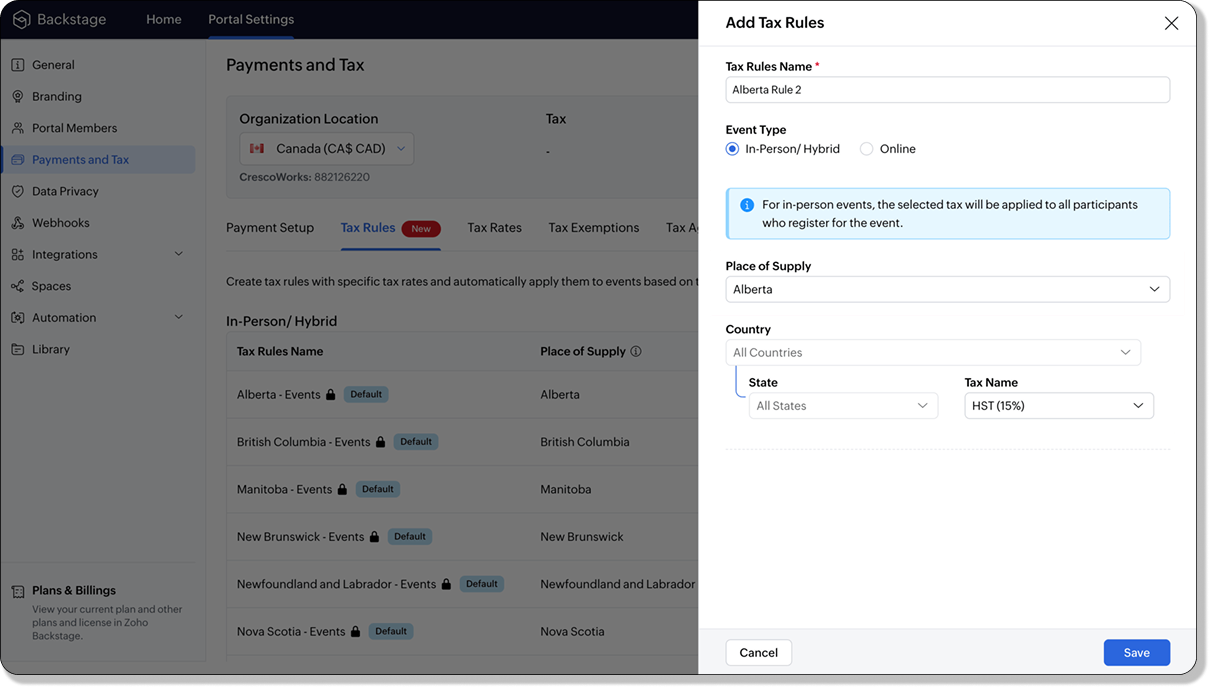
For in-person and hybrid events, Zoho Backstage automatically suggests tax rules based on the event location. The 13 default tax rules cover all Canadian provinces and territories. If the event location changes, the system automatically updates the relevant tax rules to reflect the new region’s rates.
You can also create custom tax rules by selecting a specific province or territory and applying a custom tax rate, offering greater flexibility for managing event taxes.
Applying Tax Rules to Virtual events
For online events, the system uses a default tax rule that covers all Canadian provinces and territories. Taxes are applied based on the attendee's location.
Canadian attendees are charged the applicable provincial tax rate.
International attendees are assigned a zero tax rate by default.
If you need to apply taxes to international attendees, you can create new tax rules tailored for online events, ensuring compliance with international tax regulations.

- Tax rules in Zoho Backstage are flexible and dynamic. You can modify them at any time during your event setup. However, changes will only apply to new transactions. Existing transactions will retain the original tax rule, ensuring previous purchases remain unaffected.
- If you select a non-Canadian location for your event, the Canada Tax Rule will not be applied. This ensures taxes are only charged where applicable, preventing errors in cross-border events.
Event Category

Categorize and filter events based on custom classifications for organizers and attendees to find and manage events easily. This new addition is aimed at improving event management by giving organizers the flexibility to create, manage, and filter events using custom categories. Organizers can now create up to 100 custom categories when setting up an event, giving them the freedom to define categories that suit their specific needs.
Previously, categories selected in Event Info were not utilized elsewhere, and there was no option to add new/manage categories.
Now, organizers can tailor categories to their specific needs and filter them on the Event Directory.
To access:
- While Creating an Event: On the Event Info page.
- For Category Management: Under Portal Settings > Branding > Event Category.
Permissions:
Portal Owners & Admins:
- Add, edit, and delete custom categories.
- Cannot edit or delete default categories.
Event Organizers:
- Can only add new categories.
- Cannot edit or delete existing custom or default categories.
Other Enhancements
Floor plan Focus Area

The Focus Area in the floor plan refers to designated spaces within the event venue that are visually highlighted to draw attention to specific sections, such as booths, stages, or key locations. These areas allow organizers to emphasize important spots, making navigation easier for attendees and improving the overall flow of the event. Focus areas help guide visitors to essential parts of the venue, enhancing their event experience.
Custom Dates for ticket classes (Early access)
In cases where smaller sessions or events (like welcome events, after-event parties, etc.) occur before or after the main event, this feature allows organizers to assign specific dates to separate ticket classes, ensuring tickets are only valid for the selected dates.
Custom dates can be set within 30 days before or after the main event.
New WhatsApp triggers and templates
The WhatsApp Integration, designed to enhance communication and engagement with all event stakeholders, now includes new triggers and templates to facilitate messaging and ensure timely updates for everyone.
For Purchasers:
- Send Registration Confirmation: Instantly confirm registration to enhance the attendee experience.
- Order Canceled: Notify purchasers promptly in case of any order cancellations.
For Speakers:
- Welcome Speaker: Extend a warm welcome to our speakers and set a positive tone for their participation.
- Speaker Added to a Session: Inform speakers when they’re added to a session, ensuring they are well-prepared.
- Speaker Removed from a Session: Provide timely updates should there be any changes to their session involvement.
For Sponsors:
- Thank a Sponsor Before Website is Live: Show appreciation early on, fostering positive relationships with sponsors.
- Welcome and Thank Sponsor After Website is Live: Acknowledge sponsors publicly once the event website goes live.
- Deny Sponsor Proposal: Deliver sensitive information with professionalism and clarity.
- Acknowledge Sponsor Proposal: Confirm receipt of sponsor proposals, keeping communication open and transparent.
For Participants:
- Event Canceled: Quickly inform participants in the event of cancellations, ensuring they’re kept in the loop.
We are continuously refining Zoho Backstage to make your event management experience even more powerful and intuitive. Stay tuned for more updates in the coming months!
If you have any questions, please contact support@zohobackstage.com.
Topic Participants
Jithan Raghuraj
Recent Topics
Employees in Leave Policy exceptions
In the Leave Policies we should be able to add specific employees to the exception list So it will be like All Employees except A,B,C in the exception list, currently we can only add departments etcHow get stock name from other column ?
How get stock name from other column ? e.g. =STOCK(C12;"price") where C12 is the code of the stockAdding a developer for editing the client application with a single user license
Hi, I want to know that I as a developer I developed one application and handed over to the customer who is using the application on a single user license. Now after6 months customer came back to me and needs some changes in the application. Can a customerDownload an email template in html code
Hello everyone, I have created an email template and I want to download it as html. How can i do that? I know you can do it via the campaigns-first create a campaign add the template and download it as html from there. But what if i don't want to createAttachment is not included in e-mails sent through Wordpress
I have a Wordpress site with Zeptomail Wordpress plugin installed and configured. E-mails are sent ok through Zeptomail but without the included attachment (.pdf file) Zeptomail is used to send tickets to customers through Zeptomail. E-Mails are generatedUpcoming Changes to the Timesheet Module
The Timesheet module will undergo a significant change in the upcoming weeks. To start with, we will be renaming Timesheet module to Time Logs. This update will go live early next week. Significance of this change This change will facilitate our nextBest way to schedule bill payments to vendors
I've integrated Forte so that I can convert POs to bills and make payments to my vendors all through Books. Is there a way to schedule the bill payments as some of my vendors are net 30, net 60 and even net 90 days. If I can't get this to work, I'll haveCant update image field after uploading image to ZFS
Hello i recently made an application in zoho creator for customer service where customers could upload their complaints every field has been mapped from creator into crm and works fine except for the image upload field i have tried every method to makeBilling Management: #4 Negate Risk Free with Advances
In the last post, we explored how unbilled charges accumulate before being invoiced. But what happens when businesses need money before service begins? Picture this: A construction company takes on a $500,000 commercial building project expected to lastIs there an equivalent to the radius search in RECRUIT available in the CRM
We have a need to find all Leads and/or Contacts within a given radius of a given location (most likely postcode) but also possibly an address. I was wondering whether anyone has found a way to achieve this in the CRM much as the radius search in RECRUITZoho CRM Inventory Management
What’s the difference between Zoho CRM’s inventory management features and Zoho Inventory? When is it better to use each one?Cannot Enable Picklist Field Dependency in Products or Custom Modules – Real Estate Setup
Hello Zoho Support, I am configuring Zoho CRM for real estate property management and need picklist field dependency: What I’ve tried: I started by customizing the Products module (Setup > Modules & Fields) to create “Property Type” (Housing, Land, Commercial)Get Workflow Metadata via API
Is there a way to get metadata on workflows and/or custom functions via API? I would like to automatically pull this information. I couldn't find it in the documentations, but I'm curious if there is an undocumented endpoint that could do this. ModerationZoho Projects - Q2 Updates | 2025
Hello Users, With this year's second quarter behind us, Zoho Projects is marching towards expanding its usability with a user-centered, more collaborative, customizable, and automated attribute. But before we chart out plans for what’s next, it’s worthFSM setup
So we have been tinkering with FSM to see if it is going to be for us. Now is the time to bite the bullet and link it to our zoho books and zoho crm. The help guides are good but it would really help if they were a bit more in depth on the intergrations.Upcoming Updates to the Employees Module in Zoho Payroll (US)
We've made a couple of updates to the Employees module in Zoho Payroll (latest version of the US edition). These changes will go live today. While creating an employee Currently, the Compensation Details section is part of the Basic Details step, wherePossible to Turn Off Automatic Notifications for Approvals?
Hello, This is another question regarding the approval process. First a bit of background: Each of our accounts is assigned a rank based on potential sales. In Zoho, the account rank field is a drop-down with the 5 rank levels and is located on the accountZOHO Creator subform link
Dear Community Support, I am looking for some guidance on how to add a clickable link within a Zoho Creator subform. The goal is for this link to redirect users to another Creator form where they can edit the data related to the specific row they clickedAllow Resource to Accept or Reject an Appointment
I have heard that this can be done, is there any documentation on how?Create new Account with contact
Hi I can create a new Account and, as part of that process, add a primary contact (First name, last name) and Email. But THIS contact does NOT appear in Contacts. How can I make sure the Contact added when creating an Account is also listed as a Contact?How To Insert Data into Zoho CRM Organization
Hi Team I have this organization - https://crm.zoho.com/crm/org83259xxxx/tab/Leads I want to insert data into this Leads module, what is the correct endpoint for doing so ? Also I have using ZohoCRM.modules.ALL scope and generated necessary tokens.Where can I get Equation Editor por Zoho Writer?
I need to use Math Formulas in my document. Thank you.Filtering repport for portal users
Salut, I have a weird problem that I just cannot figure out : When I enter information as administrator on behalf of a "supplier" portal user (in his "inventory" in a shared inventory system), I can see it, "customer" portal users can see it, but theZoho Inventory. Preventing Negative Stock in Sales Orders – Best Practices?
Dear Zoho Inventory Community, We’re a small business using Zoho Inventory with a team of sales managers. Unfortunately, some employees occasionally overlook stock levels during order processing, leading to negative inventory issues. Is there a way toBUTTONS SHOWN AS AN ICON ON A REPORT
Hi Is there any way to create an action button but show it as an icon on a report please? As per the attached example? So if the user clicks the icon, it triggers an action?RFQ MODEL
A Request for quotation model is used for Purchase Inquiries to multiple vendors. The Item is Created and then selected to send it to various vendors , once the Prices are received , a comparative chart is made for the user. this will help Zoho booksProduct Updates in Zoho Workplace applications | August 2025
Hello Workplace Community, Let’s take a look at the new features and enhancements that went live across all Workplace applications this August. Zoho Mail Delegate Email Alias Now you can let other users send emails on your behalf—not just from your primaryWant to use Zoho Books in Switzerland. CHF support planned?
Hi, We're a Swiss company using other Zoho suite software and I discovered Zoho Books and other accounting SaaS when looking for an accounting tool. Do you intend to cover Switzerland and CHF based accounting anytime soon? RoyCelebrating Connections with Zoho Desk
September 27 is a special day marking two great occasions: World Tourism Day and Google’s birthday. What do these two events have in common (besides the date)? It's something that Zoho Desk celebrates, too: making connections. The connect through tourismAdding Overlays to Live Stream
Hello folks, The company I work for will host an online event through Zoho Webinar. I want to add an overlay (an image) at the bottom of the screen with all the sponsors' logos. Is it possible to add an image as an overlay during the live stream? If so,Email Sending Failed - SMTP Error: data not accepted. - WHMCS Not sending emails due to this error
I have been trying to figure out a fix for about a week now and I haven't found one on my own so I am going to ask for help on here. After checking all the settings and even resetting my password for the email used for WHMCS it still says: Email Sending Failed - SMTP Error: data not accepted. I have no clue how to fix it at this point. Any insight would be lovely.Zoho Flow - Update record in Trackvia
Hello, I have a Flow that executes correctly but I only want it to execute once when a particular field on a record is updated in TrackVia. I have the trigger filters setup correctly and I want to add an "update record" action at the end of the flow toAdd Comprehensive Accessibility Features to Zoho Desk Help Center for End Users
Hello Zoho Desk Team, We hope you're doing well. We’d like to submit a feature request to enhance the client-facing Help Center in Zoho Desk with comprehensive accessibility features, similar to those already available on the agent interface. 🎯 CurrentZoho CRM mobile: Support for rich text in multi-line fields, Image upload field, and more
Hello everyone, We've made a few enhancements to the Zoho CRM mobile app to improve your experience. Here's what's new: Rich text support for multi-line fields (iOS) Image upload field support (iOS and Android) Tool tip markdown (iOS) Rich text supportin zoho creator Sales Returns form has sub form Line Items return quantity when i upate the or enter any values in the sub form that want to reflect in the Sales Order form item deail sub form field Q
in zoho creator Sales Returns form has sub form Line Items return quantity when i upate the or enter any values in the sub form that want to reflect in the Sales Order form item deail sub form field Quantity Returned\ pls check the recording fetch_salesorderEstimates with options and sub-totals
Hi It seems it would be great to be able to show multiple options in an estimate. For instance I have a core product to which I can add options, and maybe sub-options... It would be great to have subtotals and isolate the core from the not compulsory items. ThanksOptional Items Estimate
How do you handle optional items within an estimate? In our case we have only options to choose with. (Like your software pricing, ...standard, professional, enterprise) How can we disable the total price? Working with Qty = 0 is unprofessional....Important Update : Zendesk Sell announced End of Life
Hello Zendesk users, Zendesk has officially announced that Zendesk Sell will reach its End of Life (EOL) on August 31, 2027 (Learn more). In line with this deprecation, Zoho Analytics will retire its native Zendesk Sell connector effective October 1,Zoho Sheets
Hi, I am trying to transition into Zoho sheets, I have attached the issues encountered. Server issues, file trying to upload for more than 30 mins, even once uploaded my data aren't loaded. Simple calculations are not working I have attached the sample.Zoho CRM + Zoho FSM : alignez vos équipes commerciales et techniques
La vente est finalisée, mais le parcours client ne fait que commencer ! Dans les entreprises orientées service, conclure une vente représente seulement la première étape. Ce qui suit — installation, réparation ou maintenance régulière — influence grandementNext Page