Zoho Projects Coming to CRM Teamspaces

Zoho Projects Coming to CRM Teamspaces

Alert
Availability: The US DC Standard Edition is now available. It will be rolled out to customer accounts in all DCs in phased manner.

Hello all,

You are probably already familiar with Teamspaces, the dedicated workspaces where teams organize the CRM modules they rely on and collaborate on records tied to their specific function or initiative.

While modules help teams manage operational data, many teams also work on projects that involve planning, coordination, and task execution. Previously, these projects were managed outside of the Teamspace environment, typically through Zoho Projects and accessed from individual record contexts such as Accounts or Contacts.


To extend the scope of collaboration within Teamspaces, projects can now be brought directly into a Teamspace. This allows teams to work on their ongoing projects alongside the modules already present in their workspace. This enhancement helps teams manage both record-based work and project-based collaboration within a single workspace, improving coordination and overall team productivity.

Know more about Teamspaces and Project Integration in Zoho CRM.


Why bring Zoho Projects into Teamspaces?

With this enhancement, teams can now bring projects directly into their Teamspace, making them accessible alongside the modules already present in the space.

This helps teams:

  • Access project work from their shared Teamspace

  • Collaborate on tasks without switching between multiple views

  • Keep project execution aligned with CRM records and team activities

  • Organize both internal and customer-related initiatives within the same workspace


When would teams use Projects in a Teamspace?

Projects become especially useful in Teamspaces where teams already manage operational modules and need a structured way to track execution and collaboration.


Marketing Teamspace:

A marketing Teamspace may include modules such as Campaigns, Case Studies, Influencer Outreach, and Customer Feedback.

Projects can be used to manage campaign execution and related activities. For example:

  • Product Launch Campaign – Tracks tasks such as campaign planning, content creation, ad deployment, and partner outreach.

  • Customer Case Study Initiative – Coordinates activities like customer outreach, content drafting, and publication schedules.

These projects allow the team to manage campaign records while tracking execution progress within the same workspace.


Customer Delivery Teamspace:

Customer-facing teams often manage modules such as Accounts, Deals, Case Studies, and Customer Feedback.

Projects can help coordinate customer onboarding or implementation work. For example:

  • Customer Implementation Project – Tracks setup activities, milestone completion, and delivery timelines for a customer.

  • Customer Onboarding Project – Manages onboarding tasks such as configuration, training sessions, and adoption monitoring.

This enables delivery teams to monitor milestones and collaborate on project tasks alongside the relevant customer records.


When working with a key customer on implementation or onboarding activities, the team can bring the related customer project into their Teamspace. This allows the delivery team to monitor milestones and collaborate on project tasks alongside the relevant customer records.


Types of projects supported

Projects added to a Teamspace can fall into two categories.

Client Projects : Client projects are projects that are already associated with CRM accounts or contacts.

Within a Teamspace:

  • Existing client projects can be brought into the space

  • Teams can monitor project progress directly from their workspace.

  • The project continues to remain associated with the related CRM records.

This helps teams working with key customers track ongoing implementation or delivery projects without repeatedly navigating to individual records.


Internal Projects Internal projects are projects that are not associated with any external client or CRM record. They are created purely for collaboration among CRM users within the team. These projects are typically used to plan and track internal initiatives such as feature development, documentation updates, campaign planning, or operational improvements.

Example: Sales Enablement Teamspace

A Sales Enablement Teamspace may include modules such as Leads, Deals, Sales Collateral, and Customer Feedback.

In addition to managing sales records, the team may work on several internal initiatives that require structured coordination. For example:

  • Sales Playbook Development – Organizes the creation and updates of sales scripts, pitch decks, and competitive positioning guides.

  • Quarterly Sales Training Program – Plans internal training sessions, certification programs, and onboarding materials for new sales representatives.

  • Lead Qualification Framework Update – Tracks improvements to lead scoring rules and qualification guidelines used by the sales team.

By creating these internal projects within the Teamspace, the team can coordinate training, documentation, and process improvements while working alongside their CRM data.


How Projects work inside a Teamspace

Projects can be added to a Teamspace in two ways:
  • Create a new project directly from the Teamspace

  • Bring an existing project into the Teamspace
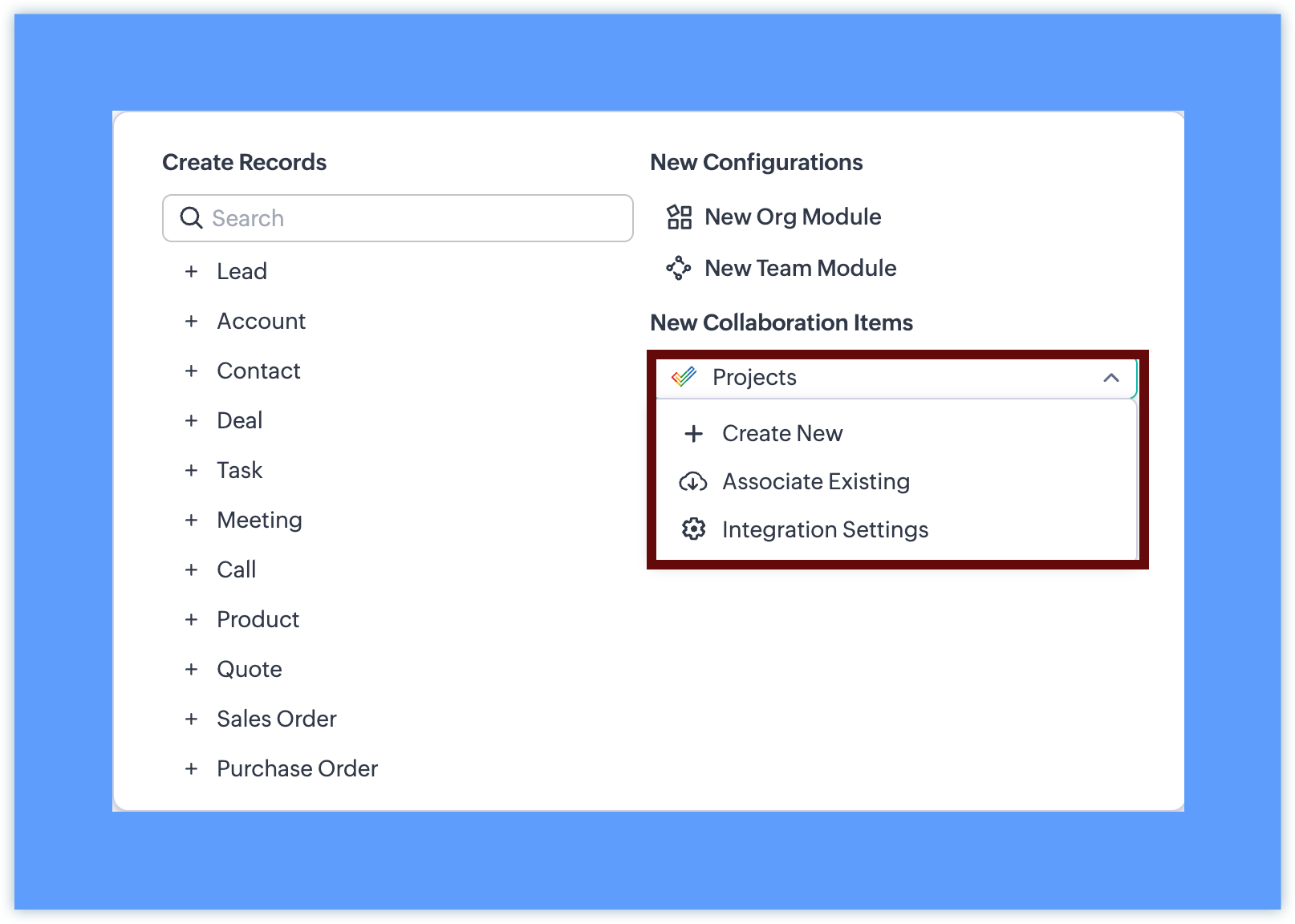

Once a project is added:


  • Once added, the project appears in the Teamspace navigation panel. Projects can be placed inside any folder within the Teamspace, alongside modules or other projects.
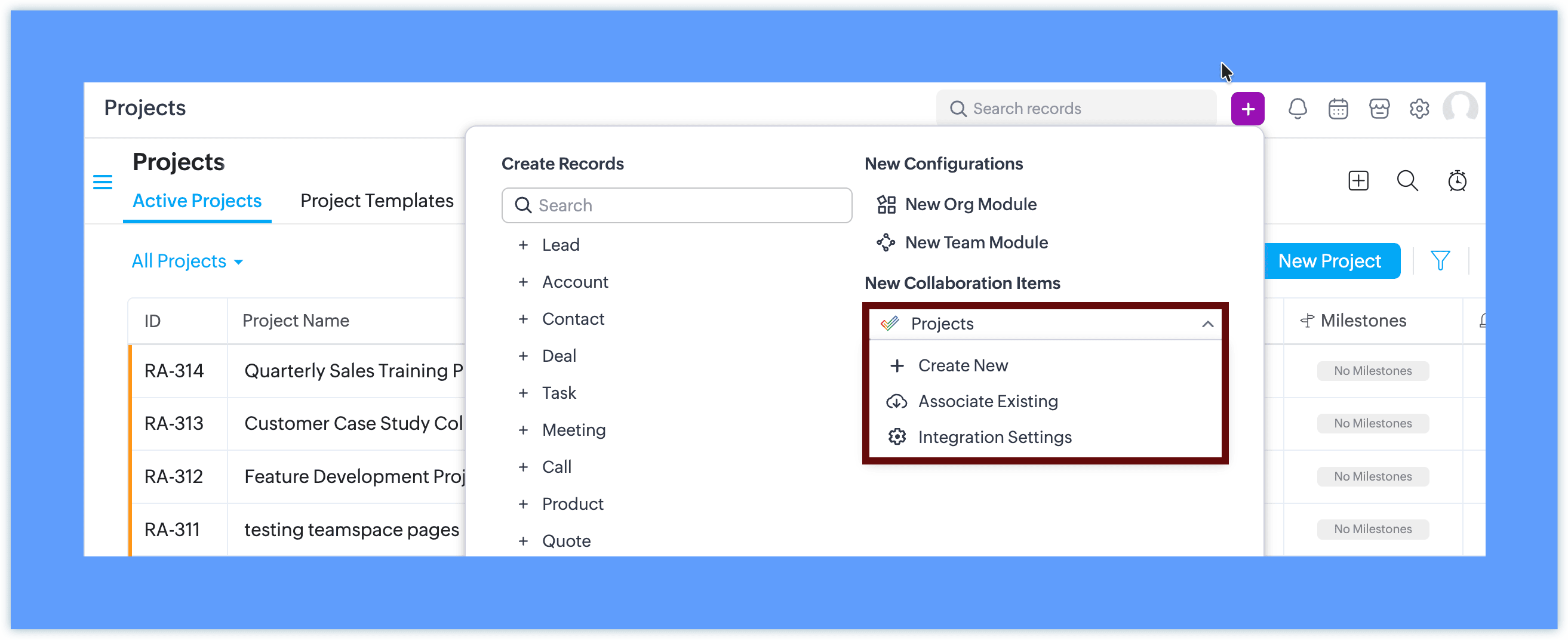
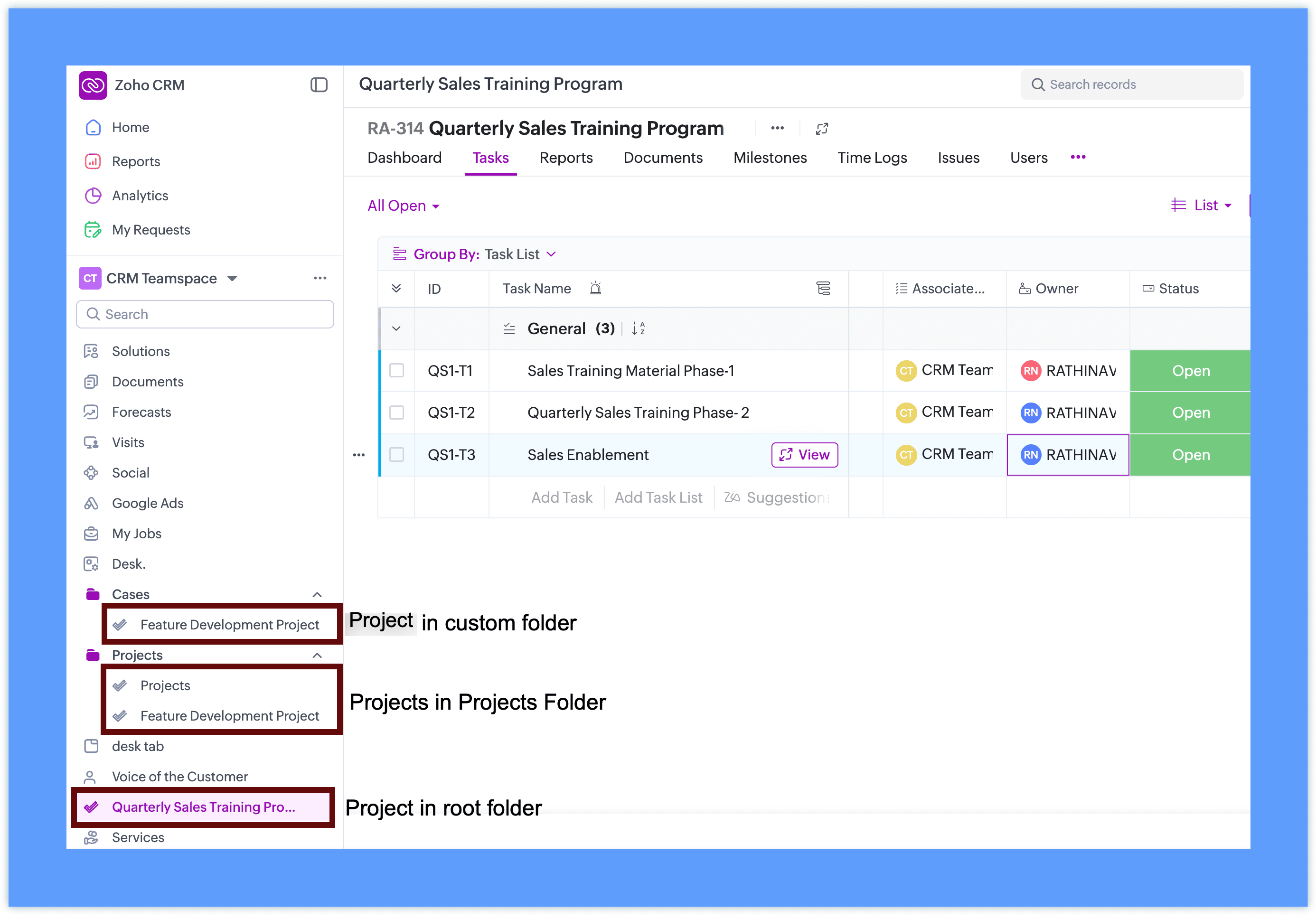

  • Team members can open and work on the project without leaving CRM

  • The project interface is displayed within the Teamspace using the Zoho Projects view
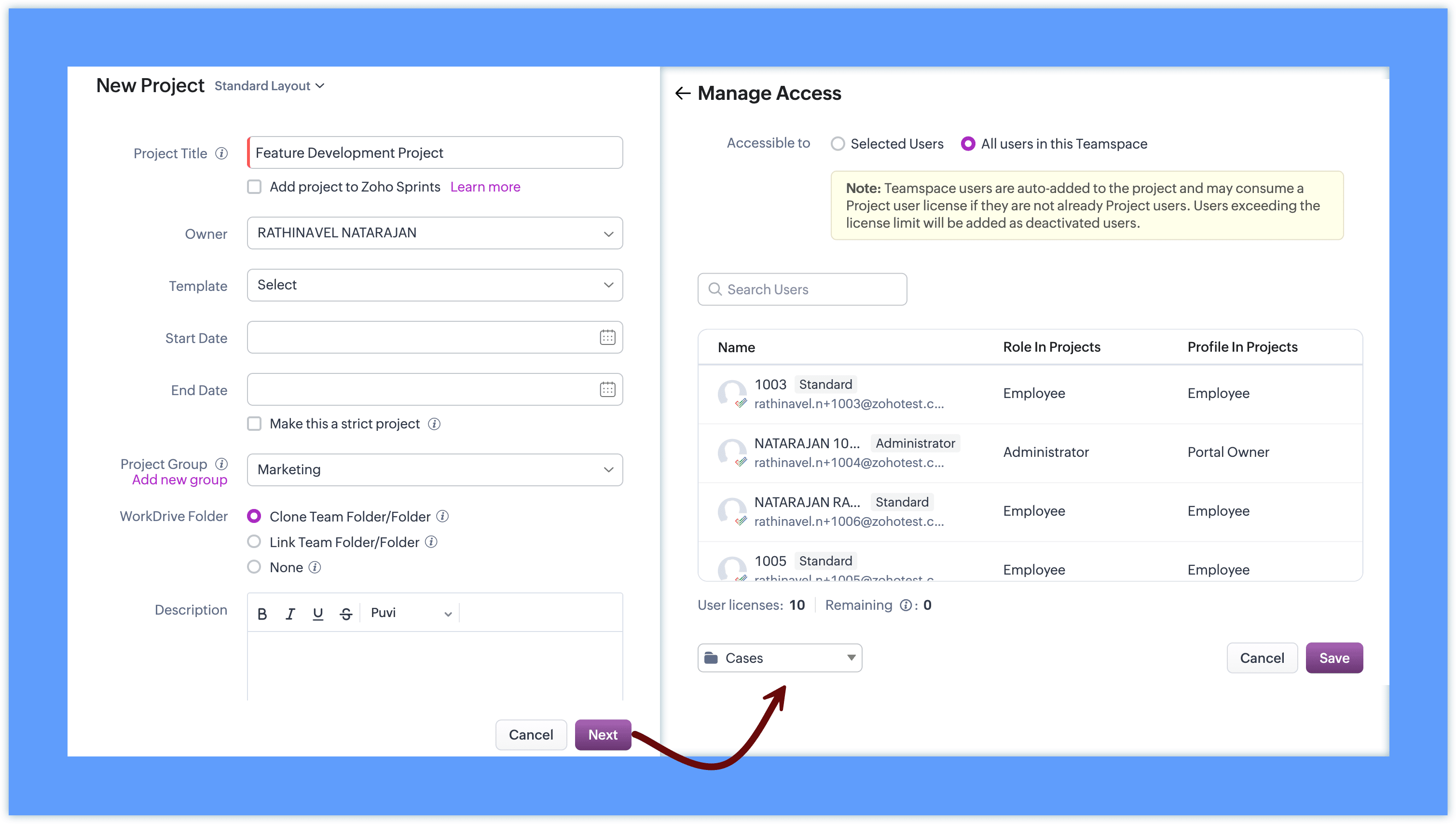
This allows teams to work with familiar project capabilities while accessing them directly from their workspace.


Project behavior inside CRM

Projects added to Teamspaces continue to follow the existing Zoho Projects behavior.

  • Projects remain managed through Zoho Projects

  • CRM surfaces the project interface inside the Teamspace

  • Client projects retain their association with CRM records

  • Internal projects can be created without selecting a client


This ensures that teams can continue using the same project functionality while accessing it within their Teamspace.

Access and collaboration

To add projects to a Teamspace, integration with Zoho Projects is required. If it is not already configured, you can set it up directly from the Teamspace in a single step.
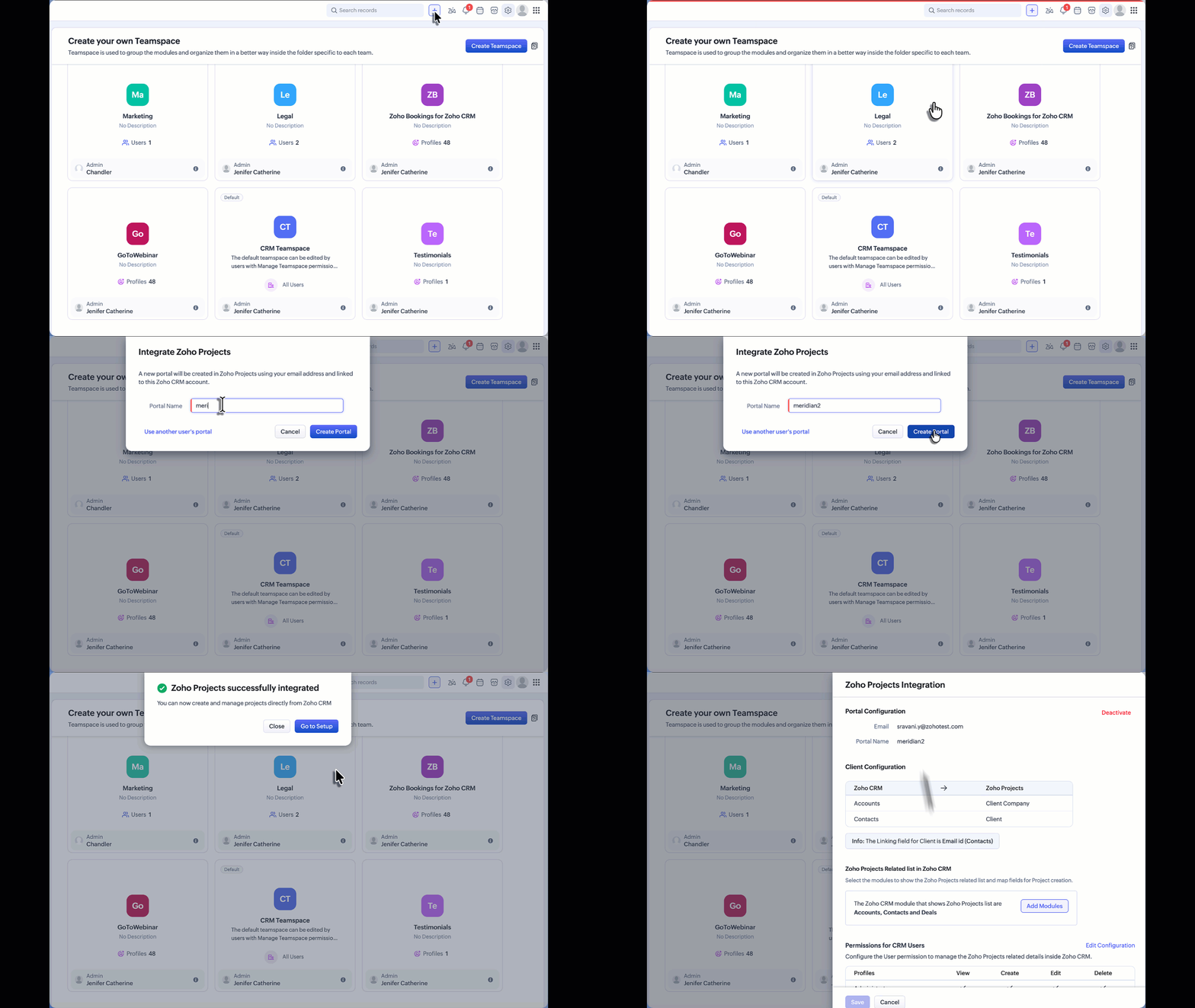

For detailed instructions on the complete setup and how Zoho Projects works, refer to the Zoho Projects integration help documentation. If Zoho Projects is available for the CRM account:

  • Users can create or associate projects within the Teamspace.

  • Project visibility follows Zoho Projects user access permissions.

  • Team members can collaborate on tasks and monitor project progress directly from the Teamspace.

Additional Notes:

  • User Access: Project user access depends on the number of available user licenses in Zoho Projects. If the license limit has been reached, Teamspace users will be added as inactive users in Zoho Projects. These users can be activated later once additional licenses are available through subscription.

  • Updated Project UI: The Create Project and Associate Project interfaces accessed from the Accounts or Contacts related list have also been updated to align with the new Teamspace project UI. This ensures a consistent project creation and association experience across CRM.


    • Recent Topics

    • What's New in Zoho Inventory | April & May 2026

      Hello users, We're excited to roll out the latest Zoho Inventory updates for April and May 2026. These enhancements are designed to make your daily operations smoother and more efficient, from advanced inventory management and flexible pricing to automated
    • Introducing Spotlight Forms

      Hey form builders! If someone opens your form, sees the wall of fields ahead, and quietly closes the tab. It may not be because the questions were hard. It could be because the experience felt like too much. Which is why we have now introduced a new form
    • Workflow Assistance in Zoho CRM

      Our client's sales team visits customers on-site and currently fills a physical paper form to capture customer details, and then separately re-enters the same data into Zoho CRM via the mobile app — resulting in double data entry. We want the salesperson
    • Blueprint Not Triggering When Lead Status Is Updated by Workflow (IndiaMART Integration)

      I have set up a blueprint that triggers when a lead’s status is “New Lead.” Our CRM is integrated with IndiaMART, and when leads are created from IndiaMART, their Lead Status is initially set to None. To handle this, I created a workflow that automatically
    • Related products & AI product recommendations through commerce API.

      Hello Zoho team I’m looking to add related products and AI product recommendations to my Zoho Commerce webshop with custom storefront. Is this supported through the API? And if not, is this on your roadmap? Thanks in advance David
    • Why don't Zia agents support file uploads?

      I am trying to build a Zia Agent that allows uploading of a PDF file and uses the GLM5 model to process it and extract information. But agents.zoho.com has no way to enable file uploads on the agent. Additionally, GLM5 based agents keep outputting their
    • Pasting Images in Zoho Desk ignores cursor location

      My team has reported an issue which started recently where when we paste an image into a new or existing reply or comment, the pasted image seems to ignore the current cursor location instead paste itself at the last character present in the reply/comment,
    • 'Pinned' notes feature of a pipeline record

      Hi team, Could you please implement a feature which will allow users to pin different notes so that they will appear at the very top of the notes tab in a pipeline record. Sometimes we have a wide range of notes on a record which means more important
    • Canvas Detail View Related List Sorting

      Hello, I am having an issue finding a way to sort a related list within a canvas detail view. I have sorted the related list on the page layout associated with the canvas view, but that does not transfer to the canvas view. What am I missing?
    • Announcing new features in Trident for Mac (1.37.0)

      Hello everyone! We’re excited to introduce the latest updates to Trident, which are designed to take workplace communication to the next level. Let’s dive into the details. Import EML archives directly into Trident. You can now import EML archives into
    • Zia Agent activation in Zoho Desk forces new Organization creation instead of deploying to existing one

      While attempting to complete the deployment and activation sequence of a new Zia Agent within our existing Zoho Desk environment, the activation process failed on the user interface, throwing a generic error (see print). However, despite the activation
    • #10 Bill While You Sleep

      A consultant is reviewing last month's work. Client meetings? Done. Deliverables? Sent. Support requests? Resolved. Then they realize something. "I have completed the work... but I haven't billed the client yet." The work was completed. The client was
    • Team Module Issues?

      We are testing Team Licenses for use by our Customer Service staff. I created a Teamspace called CSR and only assigned two users to this space: Administrator (me) and “Team License Test.” Team License Test is assigned to the Team User profile, with a
    • Access images from form submission in power automate

      Images from form submission show up as links in power automate. How do I access the image data?
    • Forms cannot be accessed.

      https://forms.zoho.com/ is not available, please help to fix
    • Associate records via the Multi-select lookup RELATED LIST via API

      In the REST API, is there a way to associate records for a multi-select lookup related list other than via the linking module? There are two methods for the lookup: 1. via insert records API 2. via the linking module ...as described in https://help.zoho.com/portal/en/community/topic/kaizen-125-manipulating-multi-select-lookup-fields-mxn-using-zoho-crm-apis
    • Problem with CRM Connection not Refreshing Token

      I've setup a connection with Zoom in the CRM. I'm using this connection to automate some registrations, so my team doesn't have to manually create them in both the CRM and Zoom. Connection works great in my function until the token expires. It does not refresh and I have to manually revoke the connection and connect it again. I've chatted with Zoho about this and after emailing me that it couldn't be done I asked for specifics on why and they responded. "The connection is CRM is not a feature to
    • How do I post a new question in Zoho Community forums?

      Hi everyone, I’m new to the Zoho Community and I’m trying to figure out how to properly create and publish a new topic in the forum. When I visit the community page, I can’t clearly find the option like “Add Topic” or “Post Question.” Could someone guide
    • Kaizen #245 - Real Time Signal Alerts for High-Value Abandoned Checkouts

      Howdy, Tech Wizards! Welcome back to another week of Kaizen. In this post, we will build a real-time abandoned checkout notification system using Stripe, Zoho CRM Functions, Sales Signals, and Widgets. When a customer abandons a high-value purchase, Zoho
    • Unable to attach Fillable File Upload field to Merge Template ever since UI update

      Ever since the new UI update, the field for Attachments for sending document for Signing in Writer has had an issue where trying to add a Fillable item in the Attachment field ends up always becoming a "Choose a File From Drive" option instead. No matter
    • Latest updates in Zoho Meeting | An improved Analytics tab and user interface, an invite pop-up revamp, an enhanced Zoho Meeting iOS app, a recording feature in the Android app, and more

      Hello everyone, We’re excited to share a few updates and enhancements in Zoho Meeting. Here's what we've been working on lately: Improved analytics for meetings, an invite pop-up revamp, a multi-video feed interface in the iOS app, a recording feature
    • Inquiry Regarding Automated Assignment of Zoho TeamInbox Messages using Zoho Flow and Deluge

      Hello, Our company is currently using Zoho TeamInbox, and we are interested in automating the assignment of responsible parties using tools such as ZOHO Flow and Deluge. Is it possible to achieve this? Allow me to provide more details. Currently, when
    • Kaizen #125 Manipulating Multi-Select Lookup fields (MxN) using Zoho CRM APIs

      Hello everyone! Welcome back to another week of Kaizen. In last week's post in the Kaizen series, we discussed how subforms work in Zoho CRM and how to manipulate subform data using Zoho CRM APIs. In this post, we will discuss how to manipulate a multi-select
    • Number of Reopn

      Hi Zoho, Is there any appropriate API call for This URL "http://support.zoho.com/api/v1/dashboards/reopenedTickets?...." what I thought is the resulting output of this call has data for number of reopen... "https://desk.zoho.com/api/v1/tickets/" + Ticket_ID
    • [Bug] WebAuthn passkey registration blocked on rpIds with TLDs longer than 6 characters (.accountant, .technology, etc.) — isValidDomain regex too strict

      Hi, Filing on behalf of an enterprise customer where Zoho Vault is deployed across the company. The Chrome extension blocks WebAuthn passkey registration on legitimate sites whose Relying Party ID (rpId) has a TLD longer than 6 letters. This affects every
    • Celebrating the businesses behind Bigin: Customer Awards 2026

      Hello Biginners, We're excited to announce the very first Bigin Customer Awards! If Bigin has played a role in your organization's journey, we'd love to hear about it. Share your story for a chance to be recognized among the best Bigin users across industries.
    • Client Script Button in Related List become invalid

      Hi, I am the admin of our organization. And I setup a client script button in related list to raise payment refund request While this button become non selectable recently. I believe there is something wrong from zoho as this button had run for a year.
    • Send Email Directly to Channel

      Hi, We are coming from Slack. In Slack each channel has a unique Email address that you can send emails too. I currently forward a specific type of email from my Gmail InBox directly do this channel for Verification Codes so my team doesn't have to ask
    • Zoho Desk: Auto-resizing of the "Description" textarea when creating a ticket.

      I would like to suggest an improvement for Zoho Desk regarding the Auto-Height-Resizing for Description field on the “Create a Ticket” page. It would be highly beneficial if the editor supported auto-resize functionality, allowing it to adjust dynamically
    • [URGENT] Cannot access Functions tab in CRM

      Navigating to /settings/functions/myFunctions gives this error message: "Sorry, something went wrong. Please try again later." I raised this issue with Zoho Support on Monday (3 days ago) but have not heard back. I'm sure it's clear how important it is
    • Not able to see appointements when the territory permission is activated

      Hello, I created different territories to separate the various departments within the company that will be working on different projects. The issue I am currently experiencing is that when I enable territory-based permissions, I can see the work order
    • Accepting Event from Outlook Client

      I've noticed this behavior for a few years now. If an Event is created from CRM and sent to participants and the participant accepts the invitation using Outlook client, Zoho event won't be updated as "Going" it only works if the recipient accepts it
    • Is there an API endpoint to retrieve the remaining email credit balance?

      Hi everyone, Is there any way to retrieve the remaining email credit balance programmatically through the API? I've gone through the full API documentation and it seems like there's no endpoint for this — everything related to credits is only visible
    • Switch between multiple LLMs instantly for tailored Zia experiences

      Availability Editions: Professional , Enterprise, Ultimate , CRMPlus , ZohoOne Release Plan: Available for all DCs Hello everyone, Previously, the multi-LLM feature supported only one LLM at a time for Zia Record Assistant, which restricted users' flexibility
    • Zoho CRM Community Digest - April 2026 | Part 2

      Hello Everyone! We're back with Part 2 of the April Zoho CRM Community Digest to wrap up our monthly roundup. This week, the spotlight is on smart database connections, proactive error tracking, and optimizing subform line items without breaking your
    • 【西日本初開催】「AI and DX Summit 2026」のご案内

      ユーザーの皆さま、こんにちは! 西日本初開催となるZoho ユーザー / 検討中の方々向けイベントのご紹介です。 AI・DX大型カンファレンス「AI and DX Summit 2026」を、2026年7月16日(木)に開催します。 会場は、ウォルドーフ・アストリア大阪。 グラングリーン大阪直結のラグジュアリーな空間で、AIとDXの最新トレンド、実践事例、 展示、ネットワーキングが集結する、特別な1日をお届けします。 👉イベントページを見る ━━━━━━━━━━━━━━━ AIとDXの“今”を、体感。
    • Zoho Desk MCP doesn't expose all functions

      Hello, I'd like to be able to draft (rather than send) ticket replies using Claude Cowork. However, the Zoho Desk MCP doesn't currently offer that, despite it being available in the API (https://desk.zoho.com/DeskAPIDocument#Threads#Threads_DraftEmailReply).
    • Stop by and explore our six updates in ABM for Zoho CRM

      Dear Customers, We hope you're well! ABM for Zoho CRM is built to sharpen your database so that you engage with the right set of customer accounts. To fine-tune it further, we have six new updates: New access location for ABM Refined account entry criteria
    • Tracking Emails sent through Outlook

      All of our sales team have their Outlook 365 accounts setup with IMAP integration. We're trying to track their email activity that occurs outside the CRM. I can see the email exchanges between the sales people and the clients in the contact module. But
    • Enhancement in Zoho CRM: Introducing New Return Types for String Fields Based on Character Length

      Dear Customers, We hope you’re well! In Zoho CRM, formula field with string return type is used in various scenarios where text is involved like concatenating customers’ first and last names, trimming characters from texts, performing find and replace
    • Next Page