Suite à l'article précédent, nous continuons la découverte des différents modules dans Zoho Projects. Dans cet article, découvrons les variétés de données en termes de diagrammes de Gantt et de rapports pour les tâches, les bugs et les feuilles de temps afin de vous aider à mesurer efficacement la productivité et la progression du travail. Intérêt
- Garder la trace de toutes les tâches d'un projet.
- Gérer les activités qui se chevauchent et la surcharge des ressources.
- Gérer les dépendances des tâches.
Les différents types de rapports disponibles dans Zoho Projects comprennent :
- Les diagrammes de Gantt
- L'utilisation des ressources
- Planifié contre réel
- Les rapports de projet
- Les rapports de tâche
- Les rapports de feuilles de temps
Les diagrammes de Gantt
Un diagramme de Gantt est une représentation visuelle du déroulement du projet. Il affiche des informations sur la progression, le propriétaire, le statut de la tâche et d'autres données liées à cette tâche. Dans Zoho Projects, vous pouvez visualiser le diagramme de Gantt par deux moyens :
Gantt des jalons : Les jalons, les listes de tâches et les tâches sont affichés en fonction de leur hiérarchie dans le projet. Les jalons sont représentés par un panneau, les listes de tâches par des barres horizontales noires et les tâches de différentes couleurs par des barres de Gantt horizontales.
Que pouvez-vous faire avec le Gantt des jalons ?
- Modifiez n'importe quelle tâche dans le jalon de Gantt lui-même.
- Faites défiler l'écran vers la droite pour afficher d'autres détails sur les tâches, comme le pourcentage d'achèvement, la durée, la date de début, la date de fin, le propriétaire et la priorité. Vous pouvez également voir le pourcentage d'achèvement des jalons et des listes de tâches.
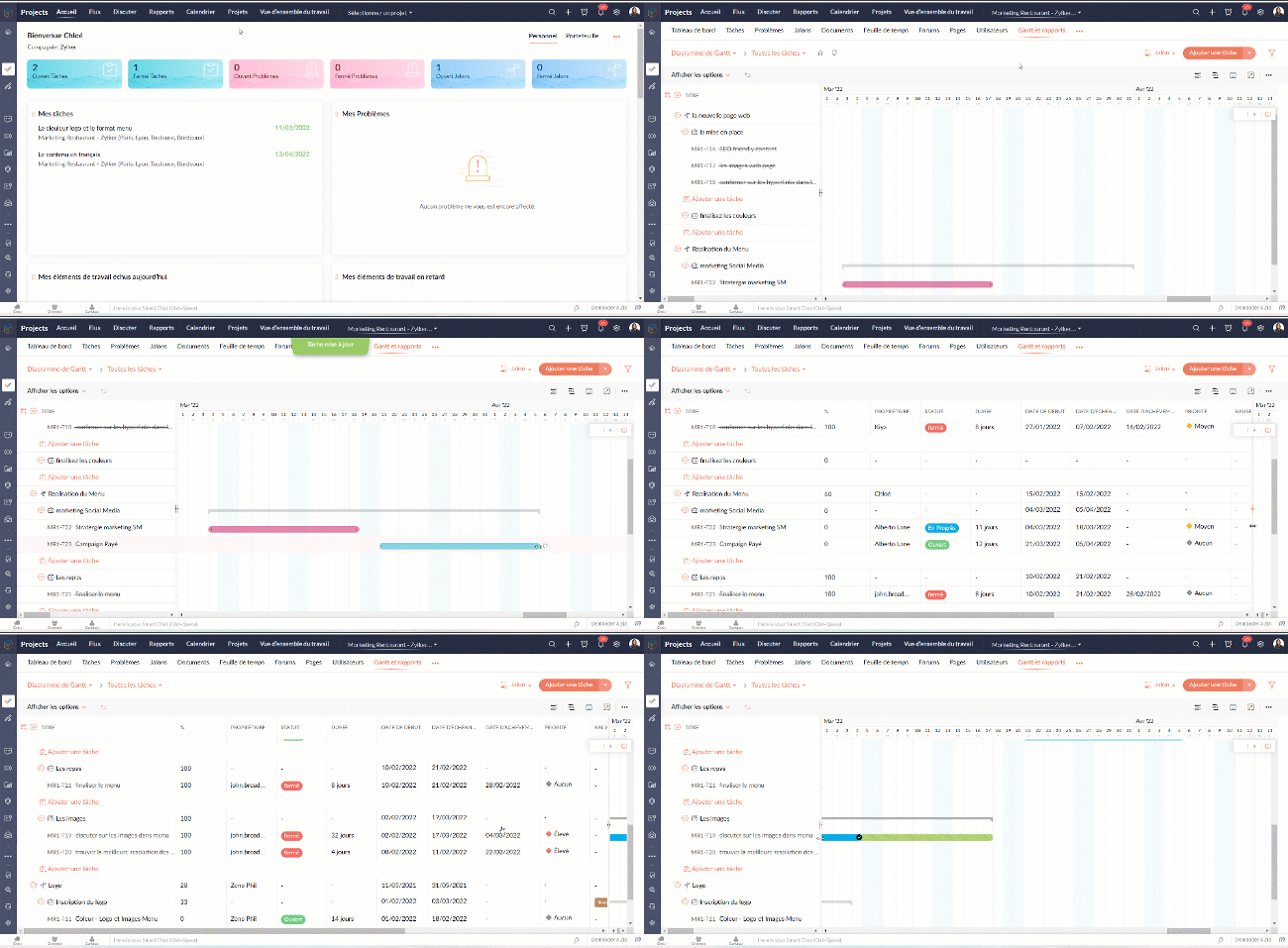
- Définissez la dépendance entre les tâches.
- Sur l'axe vertical, les jours fériés sont affichés en rouge et les week-ends en bleu.
- Pour accéder au jalon de Gantt à travers les projets, naviguez vers Accueil >> Rapports >> Jalon de Gantt. Dans cette section, vous pouvez consulter les jalons de Gantts pour tous les projets de votre entreprise. Si vous souhaitez afficher les résultats d'un projet spécifique ou d'un ensemble spécifique de projets, cliquez dans le coin en haut à droite pour filtrer les données en fonction du projet.
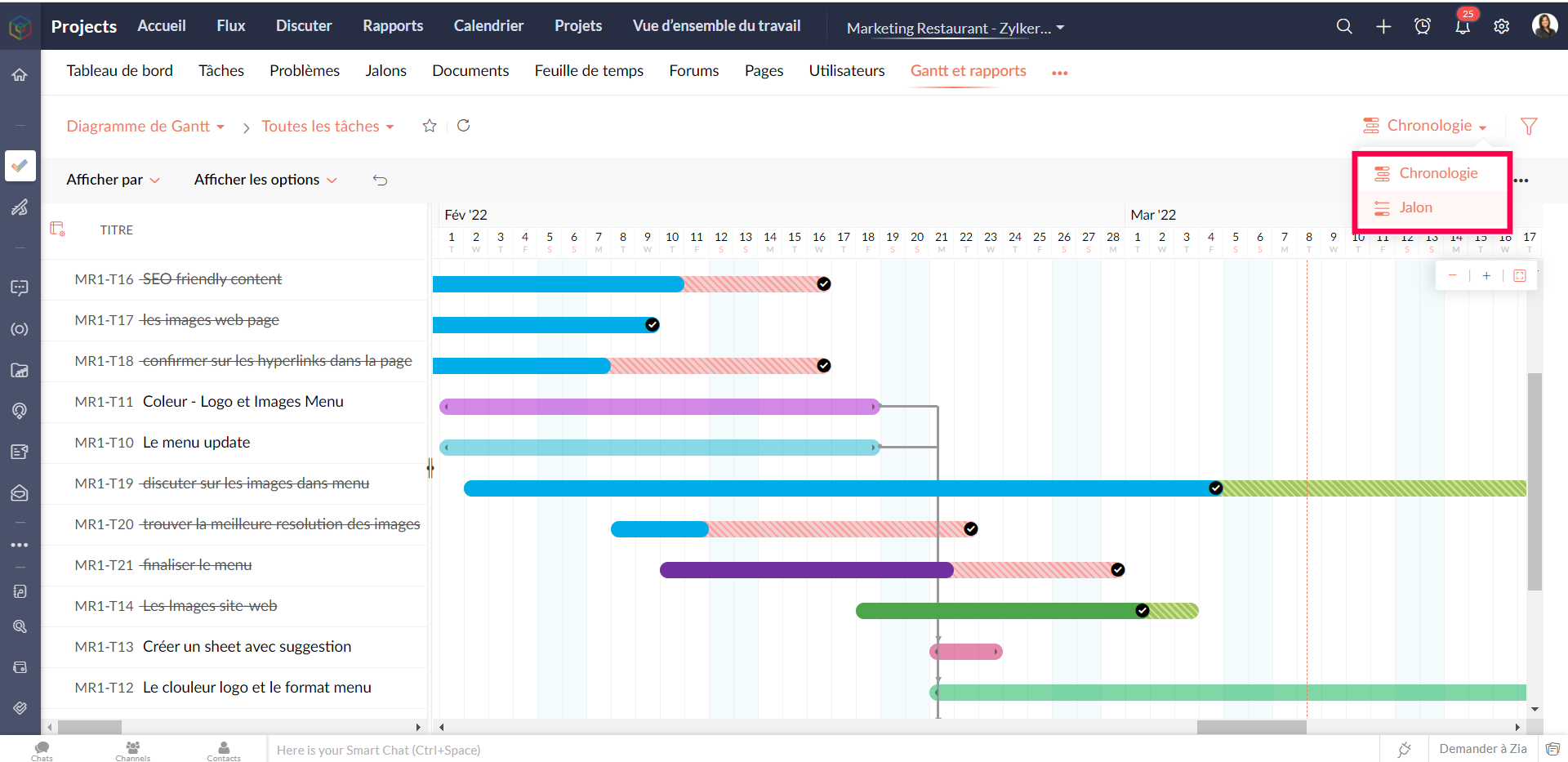
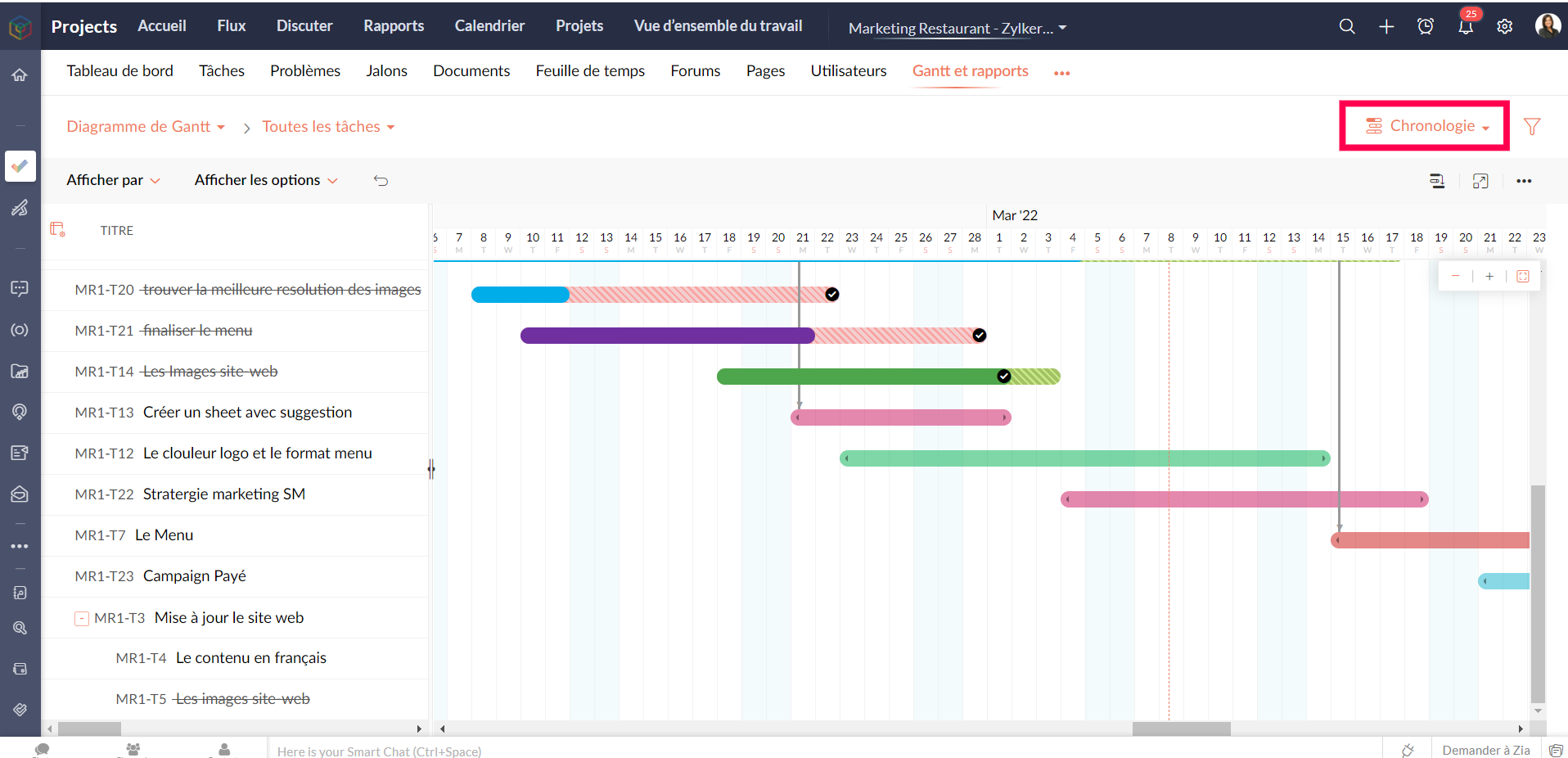
Gantt chronologique : Les barres de Gantt sont affichées en fonction de l'ordre de la date de début dans le projet. Les tâches et sous-tâches sont représentées par des barres de Gantt horizontales dans des couleurs différentes.
Personnaliser le diagramme de Gantt
Vous pouvez personnaliser les colonnes de Gantt depuis le bouton "Personnaliser colonne". Vous pouvez réorganiser l'ordre des colonnes ou même activer ou désactiver les champs à partir de ce bouton.
Pour personnaliser la couleur de la barre des tâches, survolez une barre de tâches, cliquez sur l'icône de personnalisation des couleurs et sélectionnez la couleur. La couleur de la barre est modifiée.
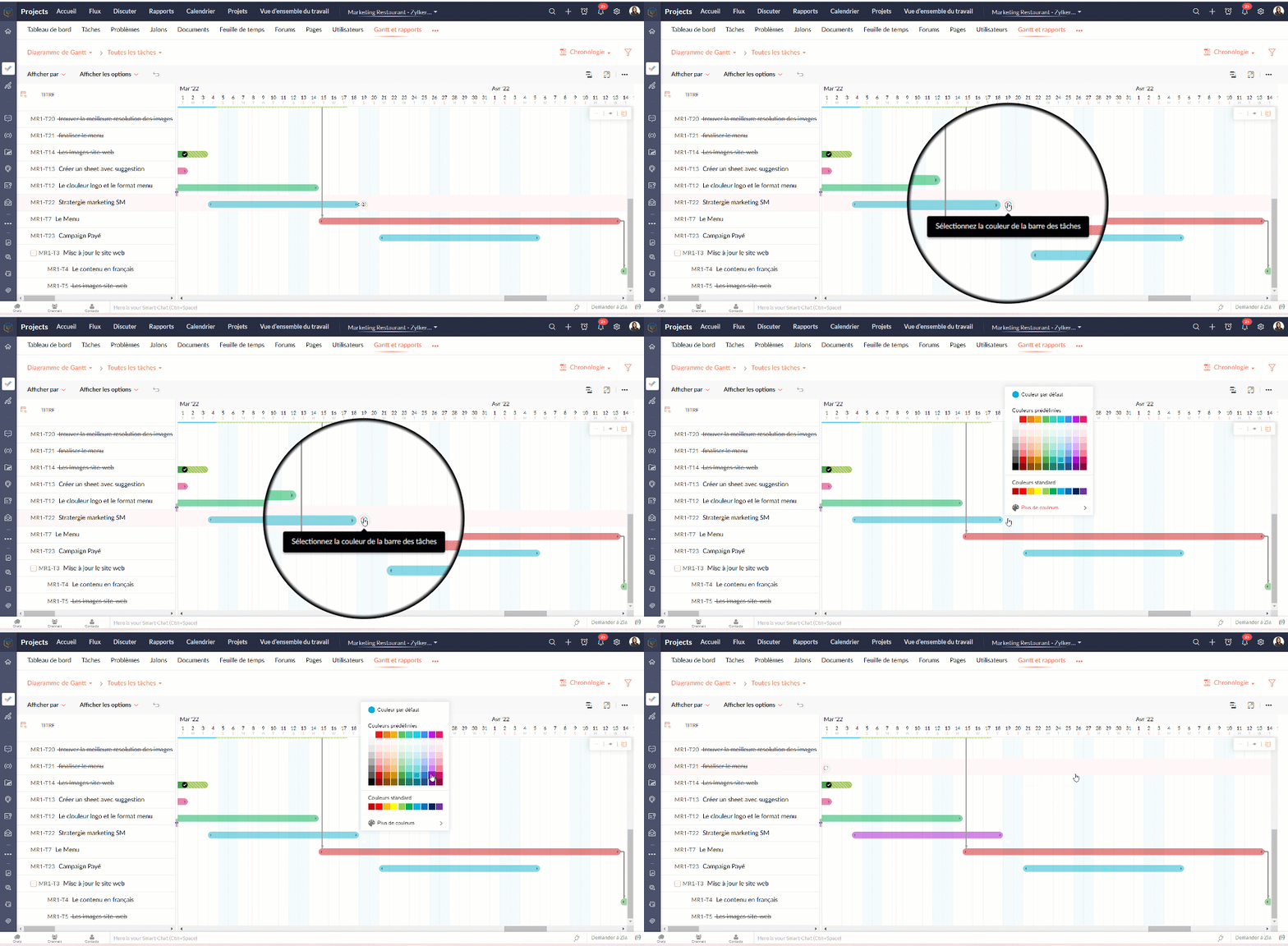
Tableau d'utilisation des ressources
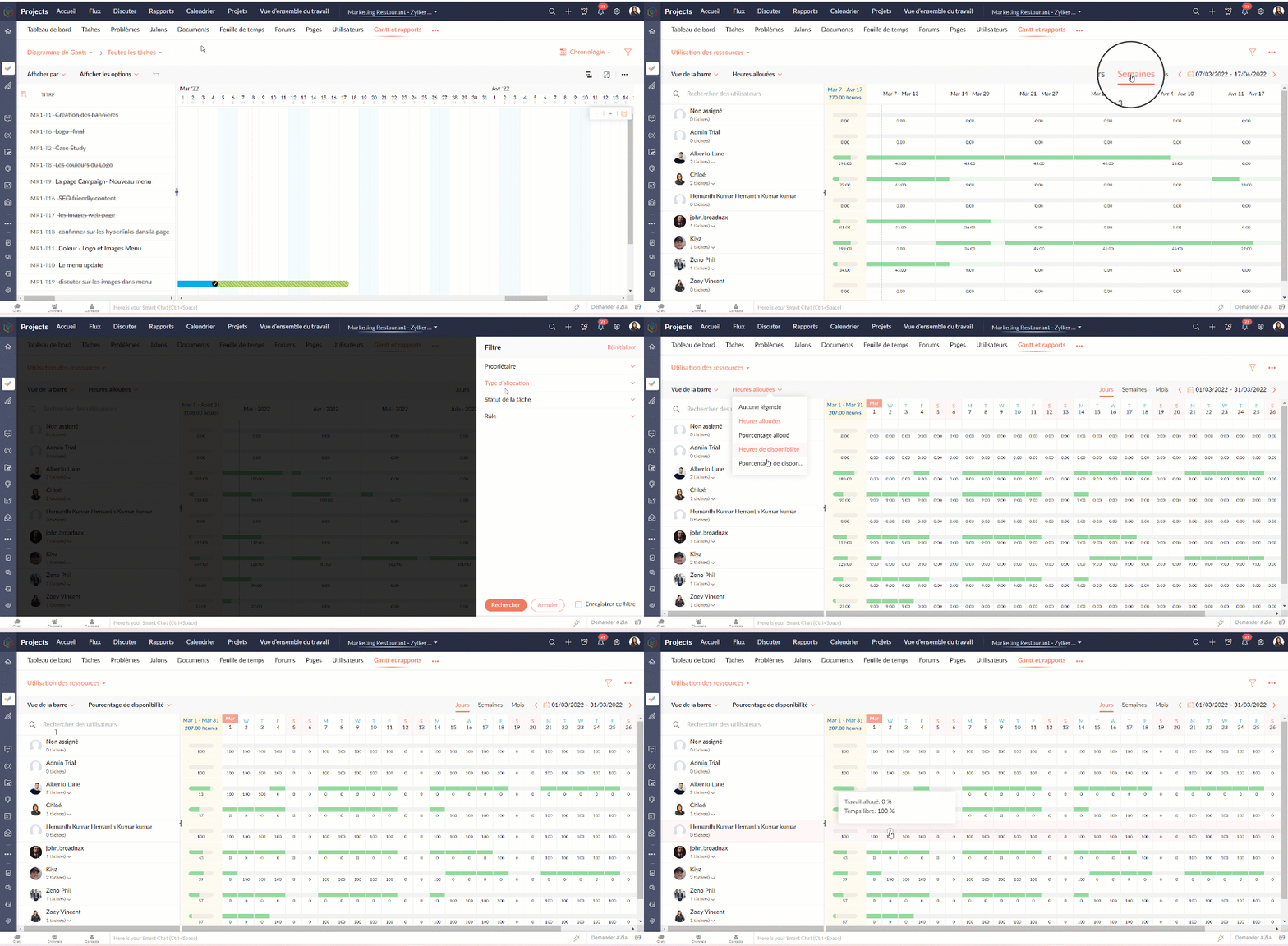
Le graphique d'utilisation des ressources montre visuellement le travail réparti en heures et en pourcentage. Le temps d'inactivité est reflété. Lorsqu'une ressource est surchargée, vous pouvez la reprogrammer soit vers une autre ressource, soit vers un autre jour avec des heures de travail disponibles. Vous pouvez ajouter directement des tâches sur le graphique pour tout usager sélectionné.
Attribuer les tâches à partir du tableau d’utilisation des ressources
- Allez dans "Rapports"
- Sélectionnez "Utilisation des ressources" dans la liste déroulante du graphique.
- Cliquez sur la barre de planification des tâches dans le graphique pour ouvrir la fenêtre pop-up "Attribuer un utilisateur".
- Sélectionnez les heures de travail standards ou flexibles dans la fenêtre pop-up "Attribuer un utilisateur".
- Remplissez les détails demandés.
- Cliquez sur "Soumettre" pour mettre à jour le propriétaire de la tâche.
Heures planifiées vs. réelles pour les tâches
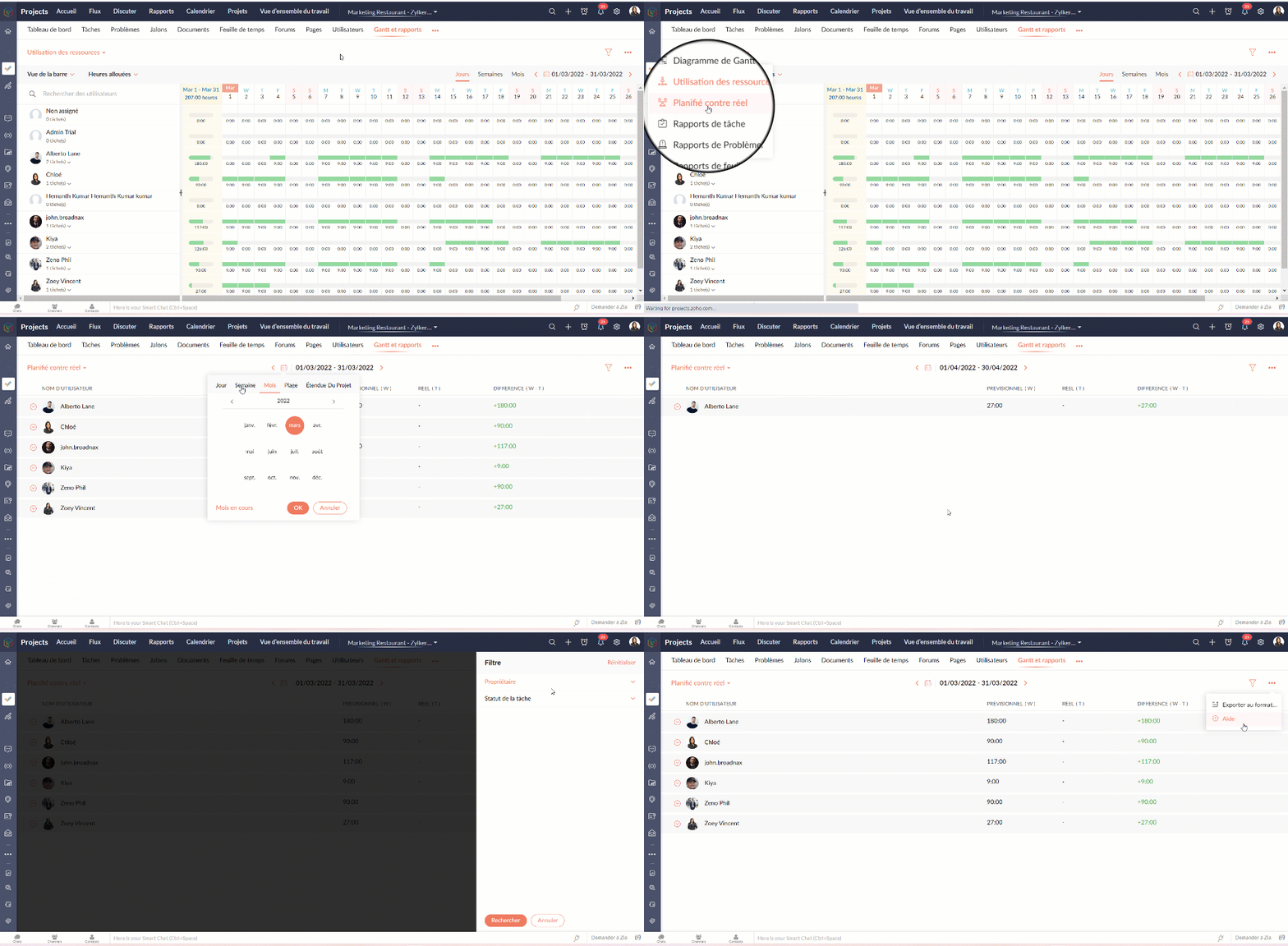
Planifié vs Réel est une fonctionnalité qui indique la progression du travail de l'utilisateur en fonction de la différence entre ses heures planifiées et ses heures réelles. Vous pouvez visionner à la fois le total des heures planifiées d'un utilisateur et les heures réelles passées par l'utilisateur dans un projet. La différence entre les heures planifiées et les heures réelles indique la progression de l'utilisateur du projet.
Rapports de tâche
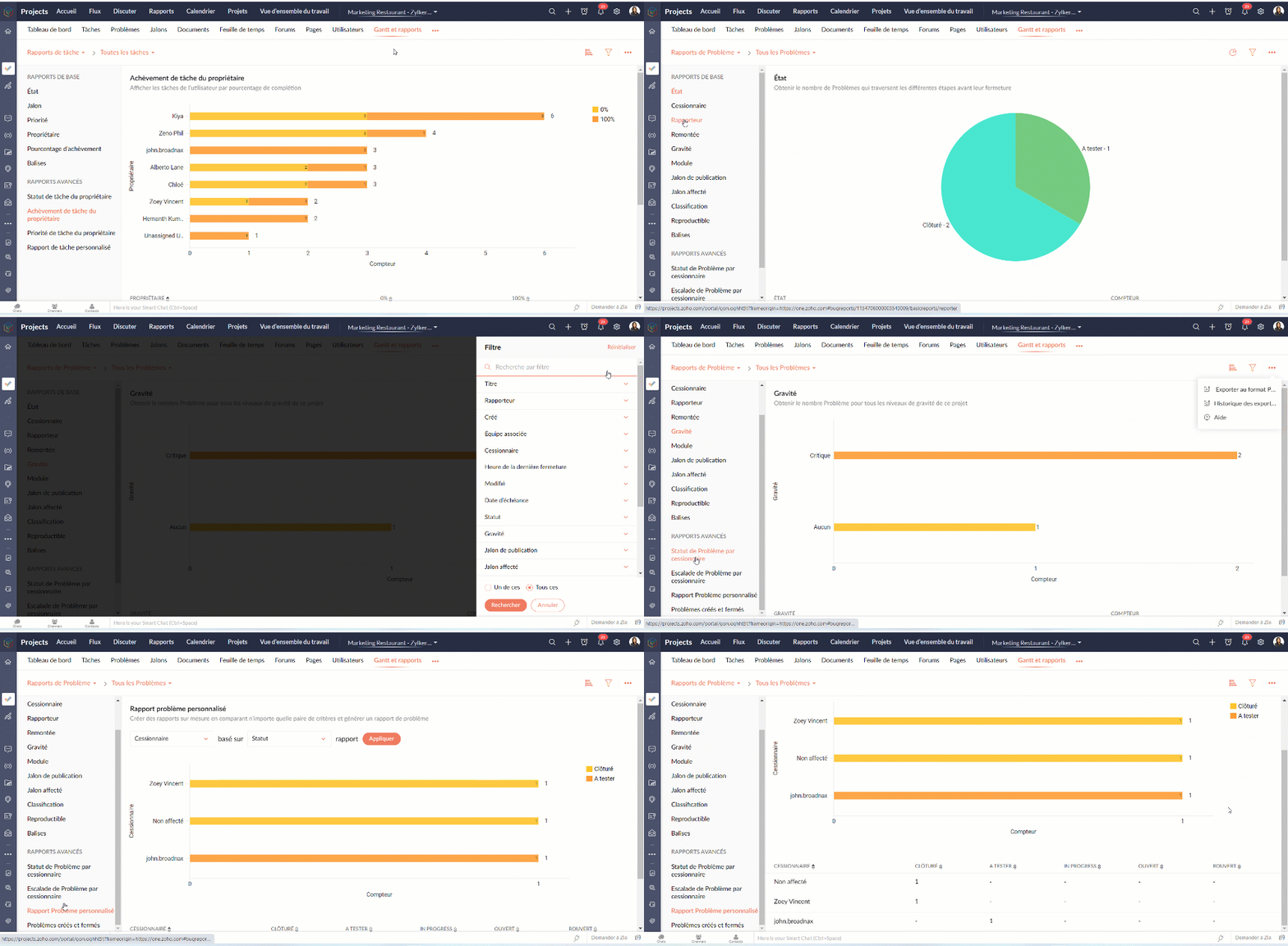
La vue des rapports de tâches fournit une vue consolidée de toutes les tâches d'un projet en fonction de leur statut, de leur jalon, de leur priorité, de leur propriétaire et de leur pourcentage d'achèvement.
Avantages
- Obtenir le nombre de tâches en fonction du pourcentage d'achèvement.
- Visualiser les tâches de chaque utilisateur en fonction du pourcentage d'achèvement.
- Créer des rapports sur mesure en comparant deux critères et en générant un rapport sur les tâches.
Types de rapports de tâches
Les rapports de base
Les rapports de base vous donnent le nombre de tâches par rapport à cinq critères différents : statut, priorité, balises, propriétaire, ou pourcentage de réalisation.
- Statut - Rapport généré pour afficher le nombre de tâches basé sur le statut des tâches.
- Propriétaire - Rapport généré pour afficher le nombre de tâches en fonction du propriétaire.
- Priorité - Rapport généré pour afficher le nombre de tâches en fonction de la priorité des tâches.
- Pourcentage de réalisation - Rapport généré pour afficher le nombre de tâches en fonction du pourcentage d'achèvement des tâches.
- Balises - Rapport généré pour afficher le nombre de tâches en fonction des balises.
- Projet - Rapport généré pour afficher le nombre de tâches dans chaque projet.
Les rapports avancés
Les rapports avancés vous donnent le nombre de tâches par propriétaire selon le statut, la priorité ou la réalisation. Vous pouvez également créer des rapports de tâches personnalisés basés sur différents critères.
- Owner-wise Task Status - Rapport généré pour afficher le nombre de tâches en fonction du statut défini par le propriétaire.
- Achèvement des tâches par le propriétaire - Rapport généré pour afficher le nombre de tâches en fonction du pourcentage d'achèvement défini par le propriétaire.
- Priorité de la tâche par le propriétaire - Rapport généré pour afficher le nombre de tâches en fonction de la priorité définie par le propriétaire.
- Rapport de tâche personnalisé - Rapport généré pour visualiser le nombre de tâches en comparant deux critères quelconques.
Vous pouvez changer le type de graphique à partir de la liste déroulante dans le coin supérieur droit. Cliquez pour personnaliser vos critères de filtrage et obtenir les résultats en conséquence.
Rapports sur les problèmes
Les rapports sur les problèmes donnent un aperçu détaillé de l'état des problèmes. Les problèmes peuvent être analysés en fonction de nombreux paramètres.
Rapports de base
Les rapports de base montrent l'état des problèmes en utilisant les paramètres les plus courants tels que le statut, la gravité, la balise, le rapporteur, renvoi à l'échelon supérieur, etc
Rapports avancés
Les rapports avancés répondent à des questions telles que "Combien de problèmes un propriétaire a-t-il à chaque étape ?" ou "Combien de problèmes ont été remontés et à quel niveau ?".
Rapports sur les feuilles de temps
Les rapports sur les feuilles de temps vous aident à suivre les heures enregistrées pour les tâches et les problèmes. Les rapports avancés montrent les heures approuvées, rejetées et en attente pour chaque utilisateur. Le rapport sur les feuilles de temps facturables et non facturables montre, bien entendu, combien d'heures sont facturables et non facturables par utilisateur.
Nous continuerons d'en découvrir dans nos prochains articles. En attendant, n'hésitez pas à poser vos questions en commentaire.
L'équipe Zoho France
Recent Topics
PDF Attachment Option for Service Reports
Hello Team, I would like to check with you all if there is an option to attach PDF documents to the service reports. When I try to attach a file, the system only allows the following formats: JPEG, JPG, and PNG. Could you please confirm whether PDF attachments
ZOHO Work Drive Back Up
I am looking for a ZOHO Work Drive backup solution. Something that is cloud based. There's lots of these kinds of options for Google Drive and other providers, but I have not seen anything for WorkDrive. Any suggestions?
Wrapping up 2025 on a high note: CRM Release Highlights of the year
Dear Customers, 2025 was an eventful year for us at Zoho CRM. We’ve had releases of all sizes and impact, and we are excited to look back, break it down, and rediscover them with you! Before we rewind—we’d like to take a minute and sincerely thank you
Calling the new 'Custom API' feature from within a Custom Widget
From what I've learned it is not possible to call an endpoint from the new "Custom API" feature within a Creator Widget. The SDK's doesn't support it yet, when calling it natively you end up with CORS issues or at least I couldn't get it working even
Issue with Zoho Creator Form Full-Screen View in CRM Related List Integration
Hi Team, We have created a custom application in Zoho Creator and integrated it into Zoho CRM as a related list under the Vendor module, which we have renamed as Consignors. Within the Creator application, there is a form named “Pickup Request.” Inside
Restrict Users access to login into CRM?
I’m wanting my employees to be able to utilize the Zoho CRM Lookup field within Zoho Forms. For them to use lookup field in Zoho Forms it is my understanding that they need to be licensed for Forms and the CRM. However, I don’t want them to be able to
Introducing workflow automation for the Products module
Greetings, I hope all of you are doing well. We're happy to announce a few recent enhancements we've made to Bigin's Products module. The Products module in Bigin now supports Workflows, enabling you to automate routine actions. Along with this update,
Zoho Browser??
hai guys, this sounds awkward but can v get a ZOHO BROWSER same as zoho writer, etc. where i can browse websites @ home and continue browsing the same websites @ my office, as v have the option in Firefox, once i save and close the browser and again when i open it i will be getting the same sites. If u people r not clear with my explanation, plz let me know. Thanks, Sandeep
Task/Activity indicator in SalesPipeline overview has disappeared
I Just logged in my ZOHO CRM first 2026 checking my salespipeline overview , Every record card used to show an indication that there was an open task (Yellow if the expiry date was close, red if the expiry date was today and grey when it had expired).
Notes badge as a quick action in the list view
Hello all, We are introducing the Notes badge in the list view of all modules as a quick action you can perform for each record, in addition to the existing Activity badge. With this enhancement, users will have quick visibility into the notes associated
SMS to customers from within Bigin
Hi All, Is there anyone else crying out for Bigin SMS capability to send an SMS to customers directly from the Bigin interface? We have inbuilt telephony already with call recordings which works well. What's lacking is the ability to send and receive
Add multiple users to a task
When I´m assigning a task it is almost always related to more than one person. Practical situation: When a client request some improvement the related department opens the task with the situation and people related to it as the client itself, the salesman
Admins cannot see each others' Scheduled Reports?!
Very frustrating that as an admin I cannot see what my reports my fellow admins have created and scheduled. After asking about this on the help chat, I was told the issue is trust and security. By giving someone Admin status, it means we trust them with those responsibilities. Please change this, it is not a good process to have to bother other users to change a report or change users within a report.
Automatically CC an address using Zoho CRM Email Templates
Hi all - have searched but can't see a definitive answer. We have built multiple email templates in CRM. Every time we send this we want it to CC a particular address (the same address for every email sent) so that it populates the reply back into our
Writer update results in BitDefender blocking it as malware
After updating Writer to latest update, Bitdefender blocked the app and writer no longer runs.
Is there a way to invoke deluge function from within a widget?
Hi! I have custom functions in deluge and I was wondering whether there is any way to call this function through a widget? Something like on click of a button inside a widget, run the deluge custom function. Would this be possible?
Missing Import Options
Hello, do I miss something or is there no space import option inside of this application? In ClickUp, you can import from every common application. We don't want to go through every page and export them one by one. That wastes time. We want to centralize
Zoho CRM Portal Field Level Permission Issue
Hi Support Team, I am using the Zoho CRM Portal and configuring field-level editing permissions. However, we are unable to restrict portal users from editing certain fields. We have created a portal and provided View and Edit (Shared Only) access for
Why am I seeing deleted records in Zoho Analytics syncing with Zoho CRM?
I have done a data sync between Zoho CRM and Zoho Analytics, and the recycle bin is empty. Why do I see deleted leads/deals/contacts in Zoho Analytics if it doesn't exist in Zoho CRM? How can I solve this problem? Thanks
Zoho Tables is now live in Australia & New Zealand!
Hey everyone! We’ve got some great news to share — Zoho Tables is now officially available in the Australian Data Center serving users across Australia and New Zealand regions! Yes, it took us a bit longer to get here, but this version of Zoho Tables
CRM project association via deluge
I have created a workflow in my Zoho CRM for closing a deal. Part of this workflow leverages a deluge script to create a project for our delivery team. Creating the project works great however, after or during the project creation, I would like to associate
Custom Fonts in Zoho CRM Template Builder
Hi, I am currently creating a new template for our quotes using the Zoho CRM template builder. However, I noticed that there is no option to add custom fonts to the template builder. It would greatly enhance the flexibility and branding capabilities if
Introducing the Zoho Projects Learning Space
Every product has its learning curve, and sometimes having a guided path makes the learning experience smoother. With that goal, we introduce a dedicated learning space for Zoho Projects, a platform where you can explore lessons, learn at your own pace,
Unknown table or alias 'A1'
I would like to create a subquery but i am getting the following error: Unknown table or alias 'A1' used in select query. This is the sql statement: SELECT A1.active_paying_customers, A1.active_trial_customers, A1.new_paying_signup, date(A1.date_active_customers),
All new Address Field in Zoho CRM: maintain structured and accurate address inputs
The address field will be available exclusively for IN DC users. We'll keep you updated on the DC-specific rollout soon. It's currently available for all new sign-ups and for existing Zoho CRM orgs which are in the Professional edition. Latest update
Create PO from an invoice
We are a hardware and software sales company which receives orders over the internet. We drop ship most of our products from a warehouse outside of our company. Our orders get sync'd into Zoho from our store via onesaas as invoices. It would be great
Import Function: ONLY update empty fields
When setting up an import from a spreadsheet to CRM, there is a checkbox "Don't update empty values for existing contacts" (see screenshot below). While I see some limited benefit from this functionality, I think there should also be an "ONLY update empty
Collaboration with customers made easy with Zoom Meeting and Zoho Desk integration
Hello everyone! We are happy to announce that you can now integrate your Zoho Desk account with Zoom Meeting. The integration bridges the gap between digital communication and human connection, empowering teams to deliver timely support when it matters
CRM Canvas - Upload Attachments
I am in the process of changing my screens to Canvas. On one screen, I have tabs with related lists, one of which is attachments. There doesn't appear to be a way to upload documents though. Am I missing something really obvious? Does anyone have
TrueSync regularly filling up my local disk
Seems that WorkDrive's TrueSync randomly starts filling up my local hard drive space. None of the folders have been set as "Make Offline" but still it seems to randomly start making file offline. The settings of the app is so minimal and is of no real
Kaizen #194 : Trigger Client Script via Custom buttons
Hello everyone! Welcome back to another interesting and useful Kaizen post. We know that Client Scripts can be triggered with Canvas buttons and we discussed this with a use case in Kaizen#180. Today, let us discuss how to trigger Client Script when a
[Webinar] A recap of Zoho Writer in 2025
Hi Zoho Writer users, We're excited to announce Zoho Writer's webinar for January 2026: A recap of Zoho Writer in 2025. This webinar will provide a recap of the features and enhancements we added in 2025 to enhance your productivity. Choose your preferred
Picklist field shows "none" as default
Hello, Is there an option to avoid showing "none" as the default value in a picklist field? I also don't want to see any option displayed. My expectation is to have a blank bar, and then when I display the drop-down list, I can choose whichever I wa
Stage-probability mapping feature in custom module
Hi, I'm building a custom module for manage projects. I would like to implement the stage-probability feature that Potentials has. Is this possible?
Create static subforms in Zoho CRM: streamline data entry with pre-defined values
Last modified on (9 July, 2025): This feature was available in early access and is currently being rolled out to customers in phases. Currently available for users in the the AU, CA, and SA DCs. It will be enabled for the remaining DCs in the next couple
Field Description is very small
Hello, The field Description in the activity is very small. Why don't try open a new window, or a bigger popup, or increase the width of the "popup". Example:
StatusIQ
Please add StatusIQ to data sources. We using site24x7 and StatusIQ together and site24x7 integration is already there. Thanks and regards, Torsten
In Zoho People, the Operations buttons are frequently not visible or do not appear consistently.
In Zoho People, the Operations buttons are frequently not visible or do not appear consistently. We request you to please investigate and address this issue, as it is affecting daily HR operations and user access.
Marketing Tip #14: Increase cart value with product bundles
Bundling products is a great way to increase average order value while giving customers more convenience. Think “camera + tripod + memory card” or “soap + lotion + bath salts.” Bundles make shopping easier and feel like a better deal. It’s a win-win for
Problem with Workdrive folders
I'm having a problem a problem accessing files in a Zoho work drive folder when using the Zoho writer app. The problem folder appears grayed out in the Zoho work drive window in both the online and writer application. However I can open the folder in
Next Page