Zoho Projects - Rapports

Suite à l'article précédent, nous continuons la découverte des différents modules dans Zoho Projects. Dans cet article, découvrons les variétés de données en termes de diagrammes de Gantt et de rapports pour les tâches, les bugs et les feuilles de temps afin de vous aider à mesurer efficacement la productivité et la progression du travail.
Intérêt
- Garder la trace de toutes les tâches d'un projet.
- Gérer les activités qui se chevauchent et la surcharge des ressources.
- Gérer les dépendances des tâches.
Les différents types de rapports disponibles dans Zoho Projects comprennent :
- Les diagrammes de Gantt
- L'utilisation des ressources
- Planifié contre réel
- Les rapports de projet
- Les rapports de tâche
- Les rapports de feuilles de temps
Les diagrammes de Gantt
Un diagramme de Gantt est une représentation visuelle du déroulement du projet. Il affiche des informations sur la progression, le propriétaire, le statut de la tâche et d'autres données liées à cette tâche. Dans Zoho Projects, vous pouvez visualiser le diagramme de Gantt par deux moyens :
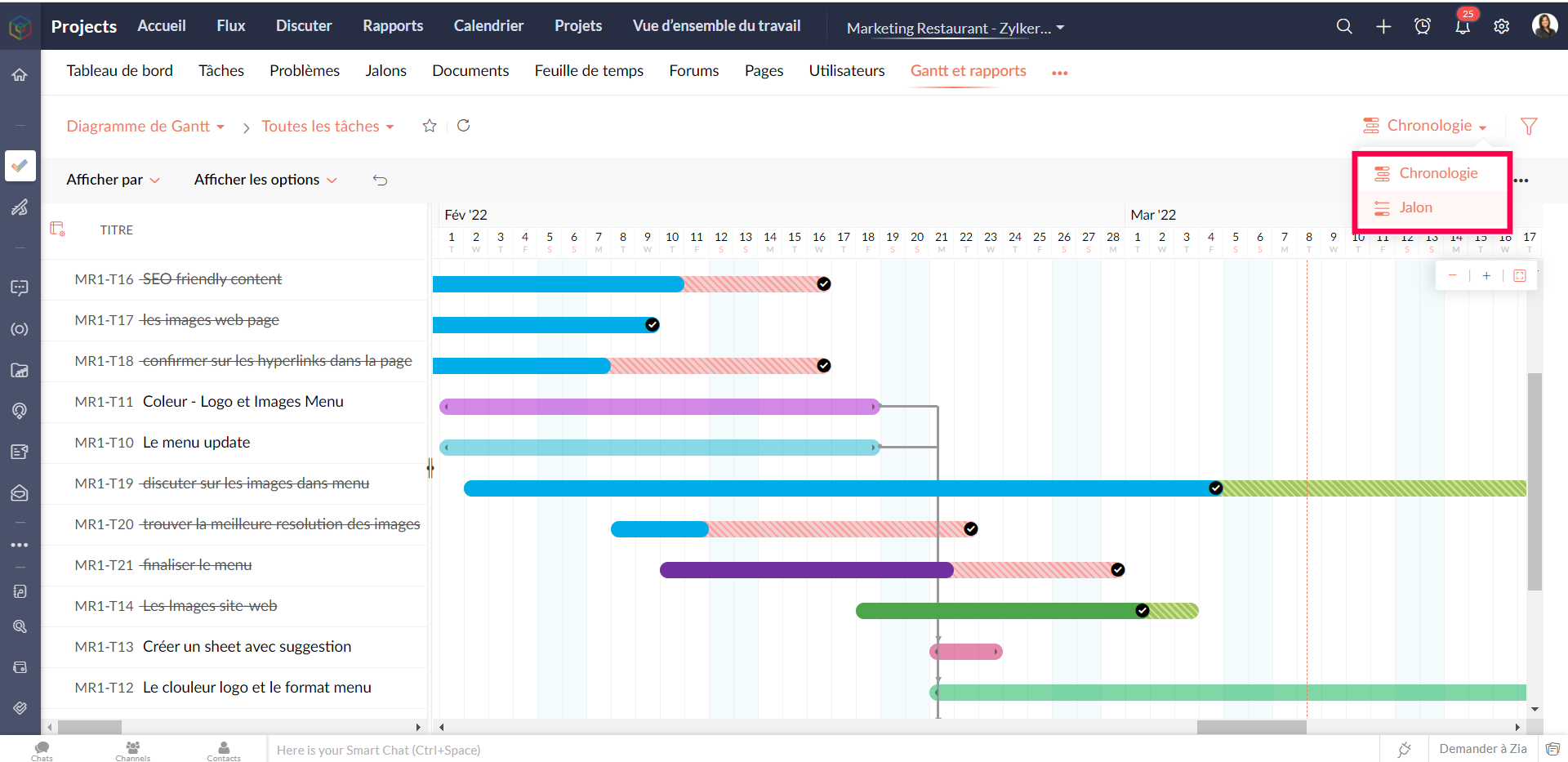
Gantt des jalons : Les jalons, les listes de tâches et les tâches sont affichés en fonction de leur hiérarchie dans le projet. Les jalons sont représentés par un panneau, les listes de tâches par des barres horizontales noires et les tâches de différentes couleurs par des barres de Gantt horizontales.
Que pouvez-vous faire avec le Gantt des jalons ?
- Modifiez n'importe quelle tâche dans le jalon de Gantt lui-même.
- Faites défiler l'écran vers la droite pour afficher d'autres détails sur les tâches, comme le pourcentage d'achèvement, la durée, la date de début, la date de fin, le propriétaire et la priorité. Vous pouvez également voir le pourcentage d'achèvement des jalons et des listes de tâches.
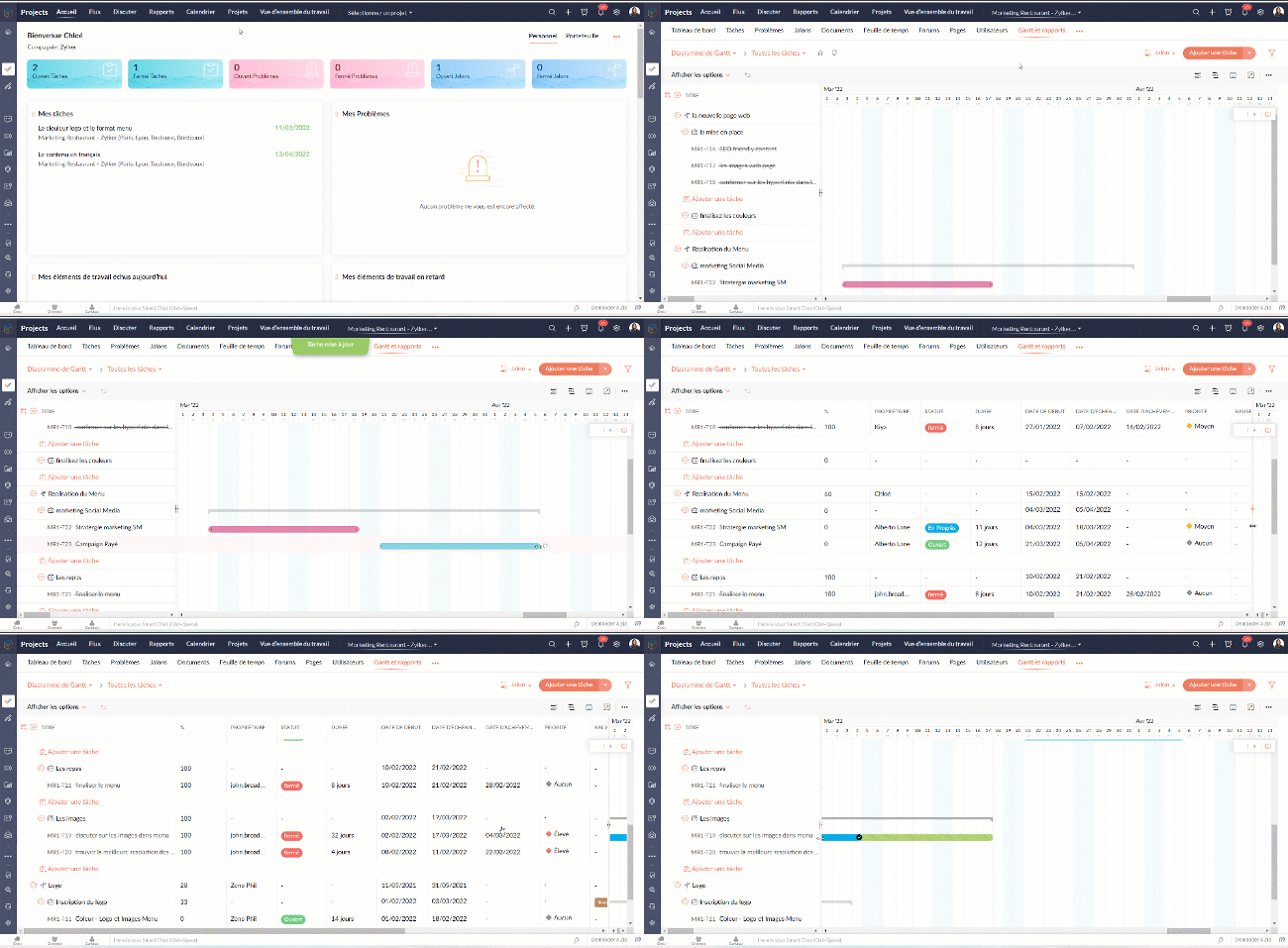
- Définissez la dépendance entre les tâches.

- Sur l'axe vertical, les jours fériés sont affichés en rouge et les week-ends en bleu.
- Pour accéder au jalon de Gantt à travers les projets, naviguez vers Accueil >> Rapports >> Jalon de Gantt. Dans cette section, vous pouvez consulter les jalons de Gantts pour tous les projets de votre entreprise. Si vous souhaitez afficher les résultats d'un projet spécifique ou d'un ensemble spécifique de projets, cliquez dans le coin en haut à droite pour filtrer les données en fonction du projet.
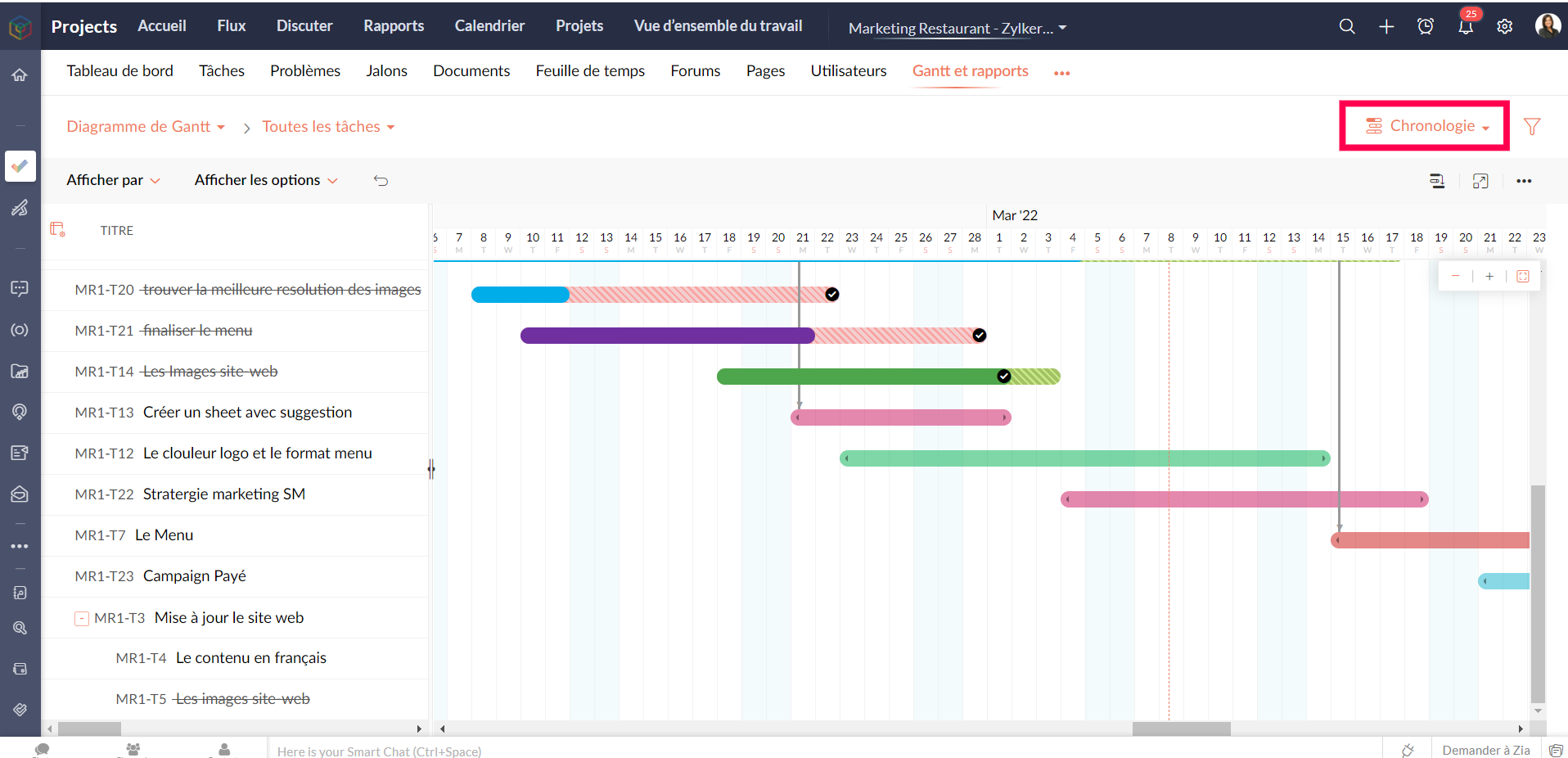
Gantt chronologique : Les barres de Gantt sont affichées en fonction de l'ordre de la date de début dans le projet. Les tâches et sous-tâches sont représentées par des barres de Gantt horizontales dans des couleurs différentes.
Personnaliser le diagramme de Gantt
Vous pouvez personnaliser les colonnes de Gantt depuis le bouton "Personnaliser colonne". Vous pouvez réorganiser l'ordre des colonnes ou même activer ou désactiver les champs à partir de ce bouton.

Pour personnaliser la couleur de la barre des tâches, survolez une barre de tâches, cliquez sur l'icône de personnalisation des couleurs et sélectionnez la couleur. La couleur de la barre est modifiée.
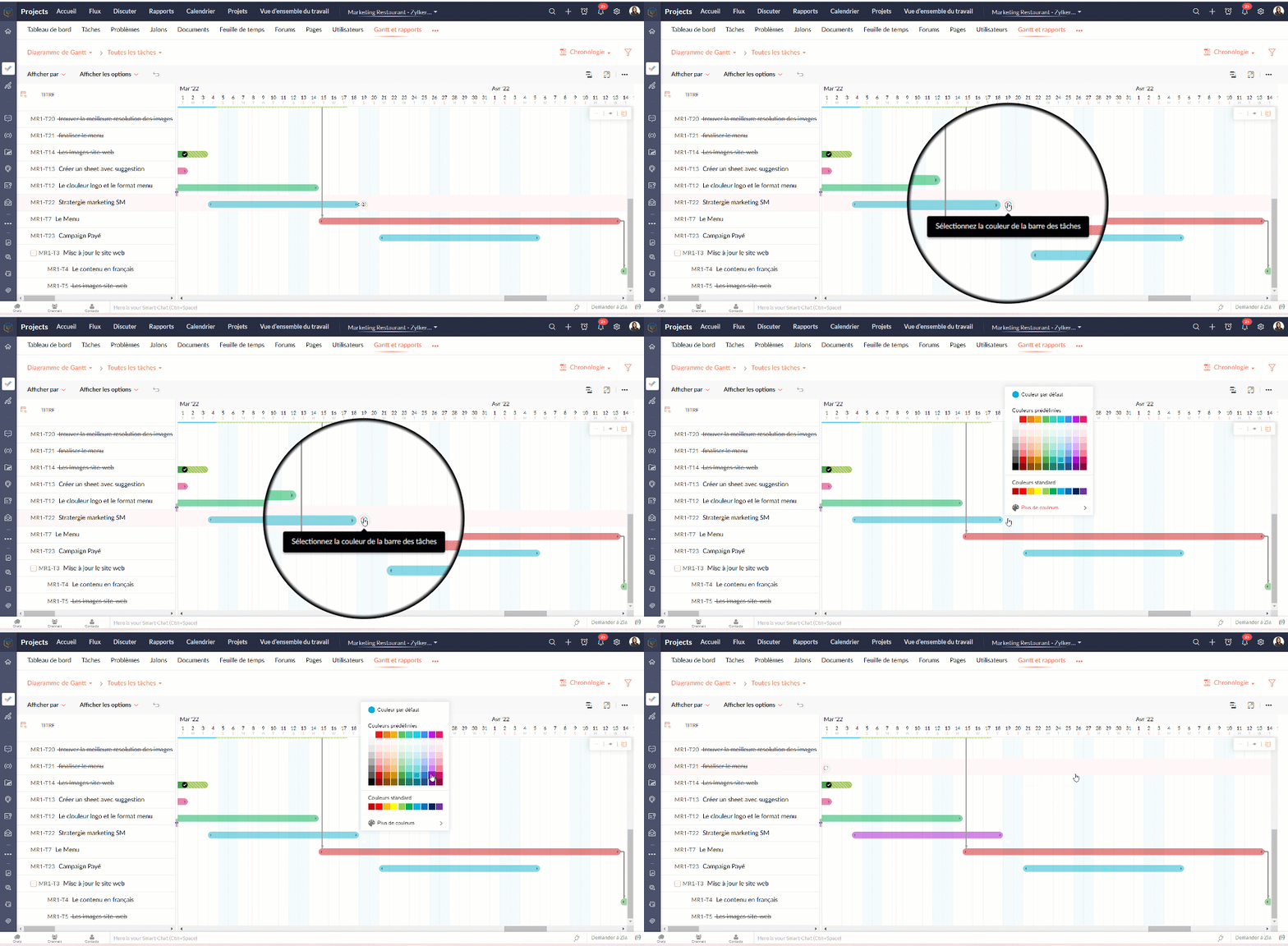
Tableau d'utilisation des ressources
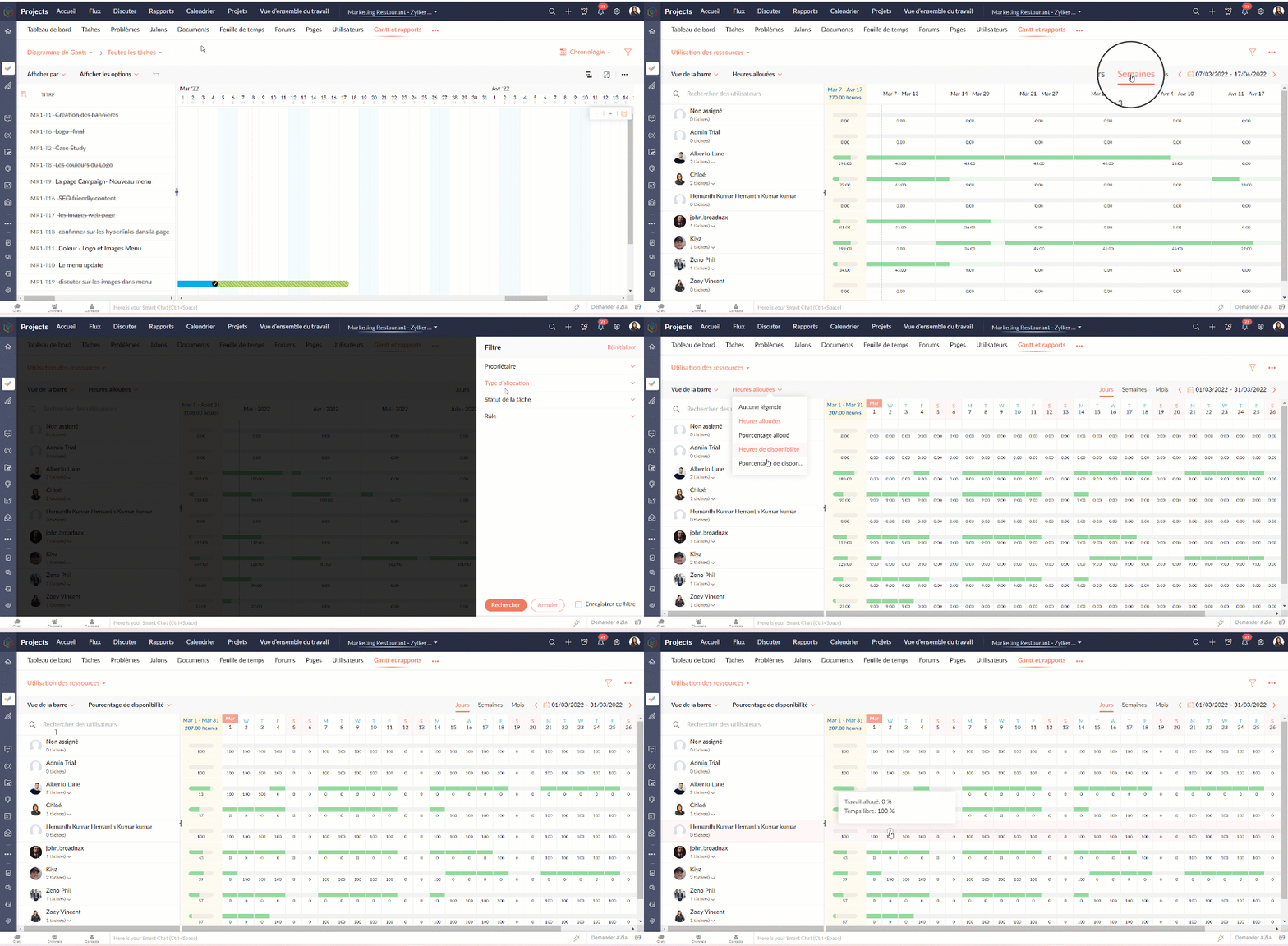
Le graphique d'utilisation des ressources montre visuellement le travail réparti en heures et en pourcentage. Le temps d'inactivité est reflété. Lorsqu'une ressource est surchargée, vous pouvez la reprogrammer soit vers une autre ressource, soit vers un autre jour avec des heures de travail disponibles. Vous pouvez ajouter directement des tâches sur le graphique pour tout usager sélectionné.
Attribuer les tâches à partir du tableau d’utilisation des ressources
- Allez dans "Rapports"
- Sélectionnez "Utilisation des ressources" dans la liste déroulante du graphique.
- Cliquez sur la barre de planification des tâches dans le graphique pour ouvrir la fenêtre pop-up "Attribuer un utilisateur".
- Sélectionnez les heures de travail standards ou flexibles dans la fenêtre pop-up "Attribuer un utilisateur".
- Remplissez les détails demandés.
- Cliquez sur "Soumettre" pour mettre à jour le propriétaire de la tâche.
Heures planifiées vs. réelles pour les tâches
Planifié vs Réel est une fonctionnalité qui indique la progression du travail de l'utilisateur en fonction de la différence entre ses heures planifiées et ses heures réelles. Vous pouvez visionner à la fois le total des heures planifiées d'un utilisateur et les heures réelles passées par l'utilisateur dans un projet. La différence entre les heures planifiées et les heures réelles indique la progression de l'utilisateur du projet.
Rapports de tâche
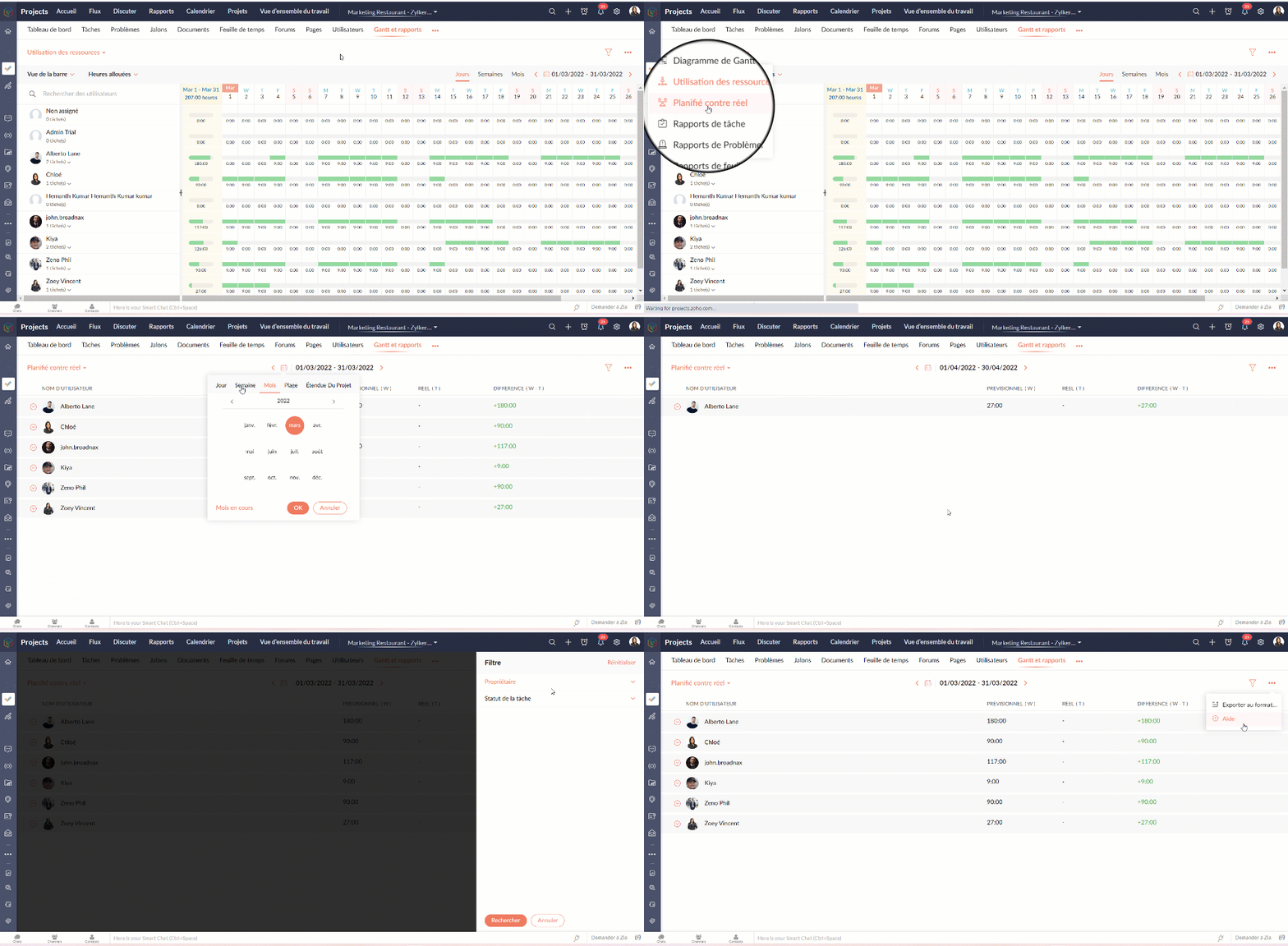
La vue des rapports de tâches fournit une vue consolidée de toutes les tâches d'un projet en fonction de leur statut, de leur jalon, de leur priorité, de leur propriétaire et de leur pourcentage d'achèvement.
Avantages
- Obtenir le nombre de tâches en fonction du pourcentage d'achèvement.
- Visualiser les tâches de chaque utilisateur en fonction du pourcentage d'achèvement.
- Créer des rapports sur mesure en comparant deux critères et en générant un rapport sur les tâches.
Types de rapports de tâches
Les rapports de base
Les rapports de base vous donnent le nombre de tâches par rapport à cinq critères différents : statut, priorité, balises, propriétaire, ou pourcentage de réalisation.
- Statut - Rapport généré pour afficher le nombre de tâches basé sur le statut des tâches.
- Propriétaire - Rapport généré pour afficher le nombre de tâches en fonction du propriétaire.
- Priorité - Rapport généré pour afficher le nombre de tâches en fonction de la priorité des tâches.
- Pourcentage de réalisation - Rapport généré pour afficher le nombre de tâches en fonction du pourcentage d'achèvement des tâches.
- Balises - Rapport généré pour afficher le nombre de tâches en fonction des balises.
- Projet - Rapport généré pour afficher le nombre de tâches dans chaque projet.
Les rapports avancés
Les rapports avancés vous donnent le nombre de tâches par propriétaire selon le statut, la priorité ou la réalisation. Vous pouvez également créer des rapports de tâches personnalisés basés sur différents critères.
- Owner-wise Task Status - Rapport généré pour afficher le nombre de tâches en fonction du statut défini par le propriétaire.
- Achèvement des tâches par le propriétaire - Rapport généré pour afficher le nombre de tâches en fonction du pourcentage d'achèvement défini par le propriétaire.
- Priorité de la tâche par le propriétaire - Rapport généré pour afficher le nombre de tâches en fonction de la priorité définie par le propriétaire.
- Rapport de tâche personnalisé - Rapport généré pour visualiser le nombre de tâches en comparant deux critères quelconques.
Vous pouvez changer le type de graphique à partir de la liste déroulante dans le coin supérieur droit. Cliquez pour personnaliser vos critères de filtrage et obtenir les résultats en conséquence.

Rapports sur les problèmes
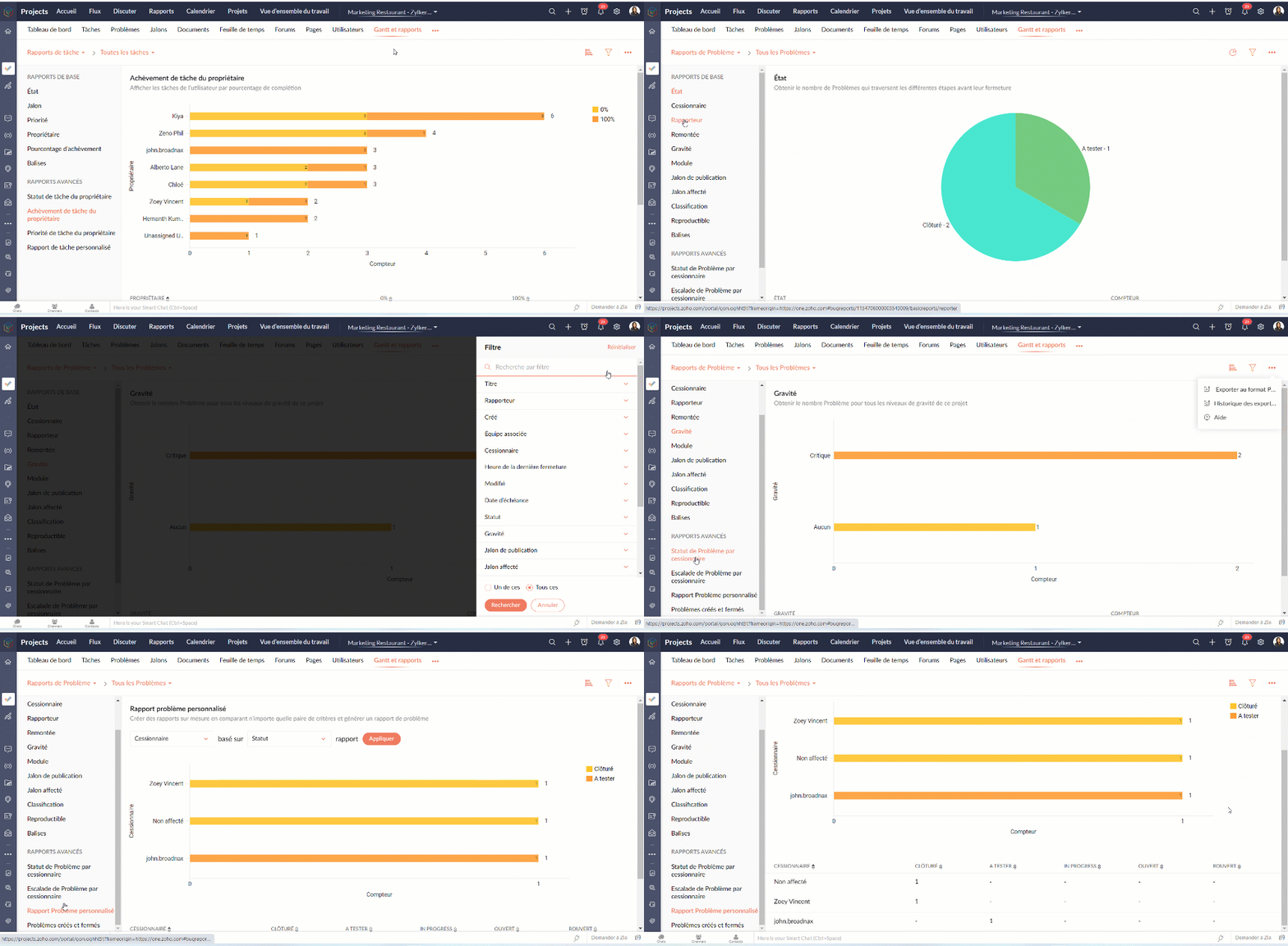
Les rapports sur les problèmes donnent un aperçu détaillé de l'état des problèmes. Les problèmes peuvent être analysés en fonction de nombreux paramètres.
Rapports de base
Les rapports de base montrent l'état des problèmes en utilisant les paramètres les plus courants tels que le statut, la gravité, la balise, le rapporteur, renvoi à l'échelon supérieur, etc
Rapports avancés
Les rapports avancés répondent à des questions telles que "Combien de problèmes un propriétaire a-t-il à chaque étape ?" ou "Combien de problèmes ont été remontés et à quel niveau ?".
Rapports sur les feuilles de temps
Les rapports sur les feuilles de temps vous aident à suivre les heures enregistrées pour les tâches et les problèmes. Les rapports avancés montrent les heures approuvées, rejetées et en attente pour chaque utilisateur. Le rapport sur les feuilles de temps facturables et non facturables montre, bien entendu, combien d'heures sont facturables et non facturables par utilisateur.
Nous continuerons d'en découvrir dans nos prochains articles. En attendant, n'hésitez pas à poser vos questions en commentaire.
L'équipe Zoho France
Topic Participants
Kinjal Lodaya
Sticky Posts
Collaboration sans faille avec Zoho One
Bonjour à tous, Dans cet article nous allons voir comment Zoho One permet une collaboration à différents niveaux . La façon dont nous travaillons évolue. À mesure que les entreprises se mondialisent, la plupart des activités sont menées en équipe.
Recent Topics
Transitioning FESCO Bill Project to Zoho Sheets and Integration Options
Hello Zoho Support, I'm considering transitioning my FESCO bill project from Google Sheets to Zoho Sheets and wanted to know if there are integration options to seamlessly migrate our existing work. You can view our platform here, any guidance would beSupport for Custom Fonts in Zoho Recruit Career Site and Candidate Portal
Dear Zoho Recruit Team, I hope you're doing well. We would like to request the ability to use custom fonts in the Zoho Recruit Career Site and Candidate Portal. Currently only the default fonts (Roboto, Lato, and Montserrat) are available. While theseLightbox Pop-up form
I would like to embed my form using the lightbox pop up. I don't want it to load automatically. I want it to load when some clicks the button. I can see this option, however when I use the "show pop-up launch button" on the website, the button automaticallyData Processing Basis
Hi, Is there a way to automate the data processing for a candidate every time an application arrives from job boards, without requiring manual intervention? That is, to automatically acquire consent for data processing. I've seen a workflow that allowsLightbox Pop-up form
I would like to embed my form using the lightbox pop up. I don't want it to load automatically. I want it to load when some clicks the button. I can see this option, however when I use the "show pop-up launch button" on the website, the button automaticallyZoho CRM for Everyone's NextGen UI Gets an Upgrade
Hello Everyone We've made improvements to Zoho CRM for Everyone's Nextgen UI. These changes are the result of valuable feedback from you where we’ve focused on improving usability, providing wider screen space, and making navigation smoother so everythingCustomer Management: #5 Never Let the Customer Slip
When Rahul started Knight's Watch Consulting, his focus was simple: deliver good work and keep clients happy. He offered one-time consulting projects, monthly advisory retainers and usage-based support for growing clients. Business was steady, and customers10GB Email Storage Limits in Zoho CRM
We’ve had Zoho One for almost 5 years and have always synced our emails from Gmail via IMAP… As of late, we’ve run into issues with our emails not syncing, due to being over the 10GB storage cap… What’s very odd is that we haven’t changed a thing? I knowZoho Projects Android and iOS app update: Mobile device permission based on user profiles
Hello everyone! We have brought in support for mobile device permissions based on the user profiles which are configured in organization level. Administrators can now configure the permissions on the web app(projects.zoho.com) by following the steps mentionedZoho Projects Android and iOS app update: Timesheet module is now renamed as 'Time Logs', delete option has been renamed to 'Trash'.
Hello everyone! We have now renamed the Timesheet module as Time Logs and the delete option as 'Trash' on the Zoho Projects Android and iOS app. Time Logs Android: Time Logs iOS: Trash option Android: Trash option iOS: Please update the app to the latestZoho Mail app update: Manage profile picture, Chinese (Traditional) language support
Hello everyone! In the latest version (v3.1.9) of the Zoho Mail app update, we have brought in support to manage profile picture. You can now set/ modify the profile picture within the app. To add a new profile picture, please follow the below steps:Reminders for Article Approval
Is there a way to send reminders for approvers to review articles and approve/deny them? I'm not seeing that option anywhere.To print Multiple delivery notes in batches
In Zoho Books, we can print a Delivery Note from an Invoice using the Print Delivery Note option, but it is non-editable and always prints all line items from the invoice. Our requirement is to deliver invoiced items in batches and print delivery notesAdd Full-Screen Viewing for Quartz Recordings in the Client Interface
Hi Zoho Team, We would like to request an enhancement to the Zoho Quartz client interface when viewing submitted recordings. Current Limitation: When viewing a Quartz recording from the client (user) interface, there is currently no option to switch the2025 Recap: A Year to Remember | Zoho Inventory
Important Update : Pipedrive deprecated fields no longer supported in Zoho Analytics
Dear Pipedrive users, We would like to inform you about a recent update related to your Pipedrive integration with Zoho Analytics. The Pipedrive team has deprecated certain fields from their application. You can find more details in the official PipedriveProduct Updates in Zoho Workplace applications | November 2025
Hello Workplace Community, Let’s take a look at the new features and enhancements that went live across all Workplace applications this November. Zoho Mail Format comments easily using Slash Commands With Slash commands, you can easily format text, insertRight-Click Pipeline to Open in New Tab
Please add the ability to right-click on a pipeline to open it in a new tabAdjusting Physical Inventory
Not getting very far with support on this one, they say they are going to fix it but nothings happened since November. Please give this a thumbs up if you would like to see this feature or comment if you have some insight. Use Case: Inventory set to beDeluge date time issue
The deluge function info zoho.currentdate.toString("MMM/YYYY") returns Dec 2026 instead of 2025Sending automated messages that appear in the ticket's conversation thread
Good morning, esteemed Zoho Desk community, warm greetings Today I am here to raise the following problem, seeking a solution that I can implement: I need to implement an automation that allows me to send reminder messages to customers when I am waitingIssue with Zoho Creator Form Full-Screen View in CRM Related List Integration
Hi Team, We have created a custom application in Zoho Creator and integrated it into Zoho CRM as a related list under the Vendor module, which we have renamed as Consignors. Within the Creator application, there is a form named “Pickup Request.” Insidesync views to sheet
Im looking to sync my views aka reports in analytics to zoho sheets, when data is updated in analytics it also should be updated in sheets, till now zoho sheets only offer raw data connection and it is not enough as these reports are difficult to re-doHow to update the Status in a custom module?
Hi, I have a custom module "cm_payment_registry" in Billing, I am trying to change the status which is "Draft" with: array = {"custom_status":"Approved"}; zoho.billing.update("cm_payment_registry",organization.get("organization_id"), XXXXXXXXXXXXXX, array,"connectionname");how to add email to existing organization i w
I am already registered my organization and i have an email id. I need one more email id but i can't find anywhere .i want the cheapest email id . how to add ?is it possible to add more than one Whatsapp Phone Number to be integrated to Zoho CRM?
so I have successfully added one Whatsapp number like this from this User Interface it seems I can't add a new Whatsapp Number. I need to add a new Whatsapp Number so I can control the lead assignment if a chat sent to Whatsapp Phone Number 1 then assignReplace Zoho Invoice with QuickBooks
We are implementing Zoho FSM for a cleaning business in the US with 50+ field workers. This business has been using Quickbooks for accounting for decades and will not migrate to Zoho Books. A major issue in the integration is the US sales tax calculation.2025 Highlights: A Year of Steady Progress and Significant Developments
As we come to the end of 2025, let's take a moment to reflect on the significant progress and developments we've made to improve your travel and expense management. In the Spotlight Introducing Online Booking (US edition only - Early access) Enable onlinee-mail bloqueado
Estou com meu e-mail lucas@peplus.me bloqueado, preciso desbloquear para retorno de usos em minhas atividades.¿Cómo puedo configurar las contraseñas creadas bajo una directiva para que nunca caduquen y no aparezcan como caducadas en los informes?
¿Cómo puedo configurar las contraseñas creadas bajo una directiva para que nunca caduquen y no aparezcan como caducadas en los informes? La razón por la cual contraseña estas no deben caducar es porque su actualización depende de mi cliente y no de mí.Function #42: Show the actual rate of items on invoices
Hello everyone, and welcome back to our series! In Zoho Books, you have the ability to create Price Lists, wherein you can mark up and mark down the item rates by a specific percentage or set custom rates. Generally, when you apply a price list to anAbility to Set Text Direction for Individual Cells in Zoho Sheet
Dear Zoho Sheet Team, We hope you are doing well. We would like to request an enhancement in Zoho Sheet that allows users to set the text direction (right-to-left or left-to-right) for individual cells, similar to what is available in Google Sheets. UseNew in CRM: Dynamic filters for lookup fields
Last modified on Oct 28, 2024: This feature was initially available only through Early Access upon request. It is now available to all users across all data centers, except for the IN DC. Users in the IN DC can temporarily request access using this formWarehouse fast processing
Hey guys, would anyone be interested in something like the attached image ? If there's any interest I'd be willing to develop it further for others to use, it's much faster than using Zohos native solutions, it can part pack, pack in full, part ship,Can't change form's original name in URL
Hi all, I have been duplicating + editing forms for jobs regarding the same department to maintain formatting + styling. The issue I've not run into is because I've duplicated it from an existing form, the URL doesn't seem to want to update with the newStart/Stop Timmer in Chrome Extension
The chrome extension is great and allows you to do allot however one of the most common things employees working on projects need to do is track their time. Having an easy start/stop timer to track time would be great.Invalid collection string
I haven't changed anything in one of my functions. I'm trying to run it manually and suddenly "Invalid collection string" appears. My code has 6 lines and the error says that the error is on 7th line. Why? What does this error mean? Nothing has been changedZoho Directory 2025: New Features | Security Enhancements | Enriched UI
Hello everyone, Greetings from the Zoho Directory team! 2025 has been a highly successful year for Zoho Directory. We are delighted to introduce a fresh set of features, an enriched UI, and major product enhancements. These updates aim to deliver a smootherBulk Schedule for Posting TikTok
Hallo, We have a client whose business is a social media agency specifically TikTok. Currently they are handling 30 TikTok accounts from. I think zoho Social can handle it with Agency License + with Add on 10 Brands. Their concern is related to postingzoho people 5 report
How do I customize my report in Zoho People Report? I understand that I can get the results of multi-table queries through SQL join statements, but I don't know the relationship between each table. I tried to create a report using Attendance User ReportNext Page