Zoho Voice est désormais en France !
Zoho Voice est désormais en France !


Nous avons des nouveautés très intéressantes qui vont transformer la façon dont vous communiquez avec vos clients. Zoho Voice, la solution de téléphonie d'entreprise et de centre de contact basée sur le cloud est arrivée en France ! Vous pouvez enfin profiter des fonctionnalités et des avantages exceptionnels de Zoho Voice. 

Acheter ou transférer des numéros adaptés à votre organisation

Vous pourrez appeler vos clients à partir de vos numéros existants ou en acheter de nouveaux à partir de notre catalogue. Les numéros locaux et numéros verts* sont disponibles dans plus de 100 pays.
(* - Les numéros verts sont disponibles sous réserve de disponibilité. Il vous suffit de contacter support@eu.zohovoice.com si vous avez besoin de numéros verts personnalisés pour vos clients).

Personnaliser et communiquer dans la langue de votre choix

Finies les barrières linguistiques, bienvenue à la communication personnalisée en adoptant les langues de toute l'Europe. Configurez vos appels entrants avec des réponses pré-enregistrées et une file d'attente avec différentes sonneries, ou attribuez des numéros de téléphone ou des extensions à des abonnés individuels. Vous pouvez également configurer des voice mails et orienter les appels en dehors des horaires de travail grâce aux configurations "Heures ouvrables" et "Jours fériés". Que ce soit des messages d'accueil, des réponses pré-enregistrées et d'enregistrement d'appels ou des commentaires et des messages de départ, Zoho Invoice permet à votre entreprise de communiquer et de se présenter sans effort dans 12 langues européennes, dont l'anglais (Royaume-Uni), l'allemand, le français, l'italien, l'espagnol, le polonais, le néerlandais, le portugais, le suédois, le danois, le finnois et le norvégien.

Profiter des minutes gratuites avec Zoho Voice

Le crédit reste intact jusqu'à expiration des minutes gratuites disponibles, ce qui vous permet d'en profiter au maximum avant que les frais d'appel ne soient déduits.
Zoho Voice offre des minutes gratuites pour les appels dans 14 pays européens : Allemagne, France, Royaume-Uni, Pays-Bas, Suède, Espagne, Italie, Belgique, Danemark, Finlande, Irlande, Norvège, Suisse et Luxembourg.
Au fur et à mesure que vous passez à un plan supérieur, la durée des minutes gratuites augmente. Chaque plan au sein de chaque édition dispose d'un nombre spécifique de minutes gratuites pour les appels entrants et sortants.

Renforcer la sécurité grâce aux mesures de conformité de Zoho Voice

Chez Zoho Voice, la confidentialité et la sécurité des données sont des priorités. Nos systèmes de chiffrement sont particulièrement bien conçus pour protéger vos données au repos, en transit et en cours d'utilisation. Les fonctionnalités de Zoho Voice vous permettent, en tant que responsable du traitement des données de vos clients, d'utiliser Zoho Voice en toute confiance et de vous conformer aux obligations et responsabilités de protection des données prévues par le RGPD et l'HIPAA.

S'intégrer à vos applications Zoho préférées

En intégrant Zoho Voice à vos applications préférées, votre entreprise améliore ses capacités d'engagement avec les clients. Il vous permet de personnaliser vos interactions avec vos clients en tirant des informations contextuelles de ces applications Zoho lors d'appels en direct, au moment où vous en avez besoin - le tout grâce à des recherches intuitives de contacts.
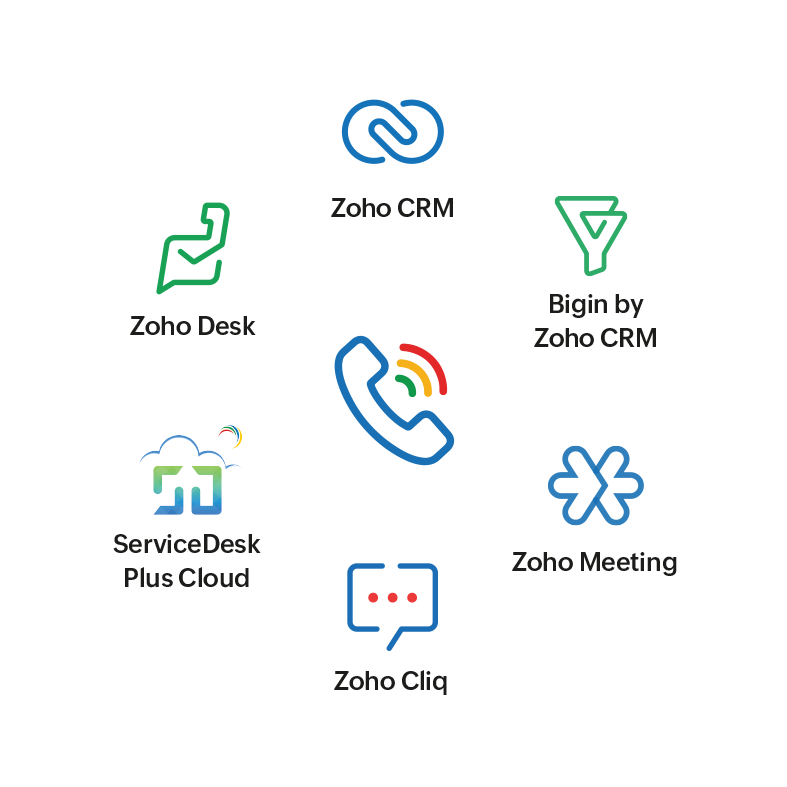
 

À l'aide de l'extension de navigateur ZDialer, vous passez des appels instantanés à l'aide des boutons d'appel situés à côté de chaque contact sur votre écran dans les applications intégrées. Après chaque appel, il suffit d'ajouter des contacts à des modules spécifiques de l'application Zoho.

Optimiser vos campagnes de vente avec Power Dialer

La solution Power Dialer vous permet de maximiser les résultats de vos campagnes de vente afin de permettre à votre équipe de ventes de mener à bien plus d'affaires grâce à l'automatisation des appels. Les appels sont centralisés à partir d'applications intégrées et la croissance de l'organisation est stimulée par la prise de contact quotidienne avec des clients potentiels accrus. Dynamiser la productivité des agents et personnaliser les délais d'attente entre les appels pour éviter la surcharge, maintenir un flux régulier d'appels et s'assurer que vos agents sont parfaitement préparés pour la prochaine interaction.

Former les nouvelles recrues en temps réel grâce au contrôle virtuel

Autorisez vos managers à évaluer les performances des agents, à fournir des conseils en temps réel pour renforcer la confiance des agents dans les situations incertaines, et à participer aux appels en cours pour améliorer les interactions avec les clients et les amener à une résolution plus rapide.

Rester connecté sur tous les appareils

Zoho Voice est accessible partout, à tout moment, que vous soyez en déplacement ou au bureau. Restez connecté grâce aux applications mobiles de Zoho Voice (Android et iOS), à l'application de bureau et à la version web sur votre navigateur avec l'extension de navigateur ZDialer.
 
Avec Zoho Voice, le pouvoir des communications professionnelles est redéfini. Inscrivez-vous maintenant !
 
L'équipe Zoho France !
    • Sticky Posts

    • Les Zoholics sont de retour !

      Bonjour à tous,  Nous avons (encore une fois) une bonne nouvelle à vous partager : nous allons enfin pouvoir nous rencontrer ! Et pas dans n'importe quel contexte, mais lors de notre conférence annuelle : les Zoholics ! Mais que sont les Zoholics me direz-vous
    • Novembre : un résumé de ce qui s'est passé le mois dernier sur Community

      Bonjour à tous,  L'année 2021 arrive presque à sa fin, mais nous continuons à avoir de nombreuses actualités à vous partager. En voici un résumé ! Nous avons eu notre première session "Ask The Experts" sur notre nouvelle version Zoho One 2021 et vous
    • Août : Un résumé de ce qui s'est passé le mois dernier sur Community

      Bonjour à tous, Et bonne rentrée ! Comme chaque mois voici un résumé de ce qui s'est passé sur Community et dans l'actualité de Zoho en général. La grande nouvelle de mois d'Août est l'arrivée de la fonction Canvas : le premier studio de conception pour
    • Juillet : Un résumé de ce qui s'est passé le mois dernier sur Community

      Bonjour à tous, Le premier mois de l'été se termine, et si certain profitent d'un repos bien mérité, sur Community on continue à en apprendre toujours plus sur nos produits Zoho. Notre série sur Zoho CRM se réinvente avec la découverte de notre fonction
    • Community Digest - Résumé de mai 2021

      Bonjour à tous, Que s'est il passé en Mai sur notre page Community France ? En plus de nos articles Trucs et Astuces, vous avez été nombreux a réagir, nous poser des questions ou encore publier vos propres conseils ! Vos les différents sujets abordés
    • Recent Topics

    • Introducing WhatsApp integration in Bigin

      Greetings! In today's business landscape, messaging apps play a significant role in customer operations. Customers can engage with businesses, seek support, ask questions, receive personalized recommendations, read reviews, and even make purchases—all
    • Why is Zoho Meeting quality so poor?

      I've just moved from Office 365 to Zoho Workplace and have been generally really positive about the new platform -- nicely integrated, nice GUI, good and easy-to-understand control and customisation, and at a reasonable price. However, what is going on
    • Allow Manual Popup Canvas Size Control

      Hello Zoho PageSense Team, We hope you're doing well. We would like to request an enhancement to the PageSense popup editor regarding popup sizing. Current Limitation: Currently, the size (width and height) of a popup is strictly controlled by the selected
    • Why does Zoho’s diff viewer highlight parts of unchanged lines?

      Hi everyone, I’ve noticed something odd in the Zoho editor’s diff view. When I delete a single line, the diff doesn’t just mark that line as removed. Instead, it highlights parts of the next line as if they changed, even though they are identical. Example:
    • All new Address Field in Zoho CRM: maintain structured and accurate address inputs

      The address field will be available exclusively for IN DC users. We'll keep you updated on the DC-specific rollout soon. It's currently available for all new sign-ups and for existing Zoho CRM orgs which are in the Professional edition. Latest update
    • CRM x WorkDrive: File storage for new CRM signups is now powered by WorkDrive

      Availability Editions: All DCs: All Release plan: Released for new signups in all DCs. It will be enabled for existing users in a phased manner in the upcoming months. Help documentation: Documents in Zoho CRM Manage folders in Documents tab Manage files
    • Wrapping up 2025 on a high note: CRM Release Highlights of the year

      Dear Customers, 2025 was an eventful year for us at Zoho CRM. We’ve had releases of all sizes and impact, and we are excited to look back, break it down, and rediscover them with you! Before we rewind—we’d like to take a minute and sincerely thank you
    • Passing the CRM

      Hi, I am hoping someone can help. I have a zoho form that has a CRM lookup field. I was hoping to send this to my publicly to clients via a text message and the form then attaches the signed form back to the custom module. This work absolutely fine when
    • Where can we specify custom CSS in Zoho Forms custom theme ?

      I'm using a form with a dark theme. The OTP popup window is unreadable, because for some reason, the OTP popup background fixes color to white, but still takes the font color specified in the custom theme. This ends up as white on white for me, rendering
    • Automating Employee Birthday Notifications in Zoho Cliq

      Have you ever missed a birthday and felt like the office Grinch? Fear not, the Cliq Developer Platform has got your back! With Zoho Cliq's Schedulers, you can be the office party-cipant who never forgets a single cake, balloon, or awkward rendition of
    • Drop Down Value

      Hi, May I know why Zoho Flow treat this drop down as number and not as string. If so, how can I fetch the right value for filtering. This field is from Creator, in Creator upon checking by default it is a string since it's not a lookup field.
    • Create PO from an invoice

      We are a hardware and software sales company which receives orders over the internet. We drop ship most of our products from a warehouse outside of our company. Our orders get sync'd into Zoho from our store via onesaas as invoices. It would be great
    • SMS to customers from within Bigin

      Hi All, Is there anyone else crying out for Bigin SMS capability to send an SMS to customers directly from the Bigin interface? We have inbuilt telephony already with call recordings which works well. What's lacking is the ability to send and receive
    • Zoho Survey reminder settings are extremely confusing

      Hi, I just want to set 3 reminders, one week apart from the first email out. Your form is too confusing and I don't understand. Can you simplify and be more specific regarding the language used on the form ?
    • Add deluge function to shorten URLs

      Zoho Social contains a nice feature to shorten URLs using zurl.co. It would be really helpful to have similar functionality in a Deluge call please, either as an inbuilt function or a standard integration. My Creator app sends an email with a personalised
    • Add specific field value to URL

      Hi Everyone. I have the following code which is set to run from a subform when the user selects a value from a lookup field "Plant_Key" the URL opens a report but i want the report to be filtered on the matching field/value. so in the report there is
    • form data load issue when saving as duplicate record is made

      Hello. I have a form with a lookup when a value is selected the data from the corresponding record is filled into all of the fields in the form. But the form is loaded in such a state that if any value is changed it will take all of the values pre loaded
    • Recurring Tasks and Reminders in Projects

      Recurring tasks are tasks that are created once, and then recreated automatically after a designated time period. For example, the invoice for your billable tasks is due every week. You can set that task to recreate itself every week. Also, the future
    • Unable to remove the “Automatically Assigned” territory from existing records

      Hello Zoho Community Team, We are currently using Territory Management in Zoho CRM and have encountered an issue with automatically assigned territories on Account records. Once any account is created the territory is assigned automatically, the Automatically
    • Track online, in-office, and client location meetings separately with the new meeting venue option

      Hello everyone! We’re excited to announce meeting enhancements in Zoho CRM that bring more clarity and structure to how meetings are categorized. You can now specify the meeting venue to clearly indicate whether a meeting is being held online, at the
    • Google Fonts Integration in Pagesense Popup Editor

      Hello Zoho Pagesense Team, We hope you're doing well. We’d like to submit a feature request to enhance Zoho Pagesense’s popup editor with Google Fonts support. Current Limitation: Currently, Pagesense offers a limited set of default fonts. Google Fonts
    • Improved Contact Sync flow in Google Integration with Zoho CRM

      Hello Everyone, Your contact sync in Google integration just got revamped! We have redesigned the sync process to give users more control over what data flows into Google and ensure that this data flows effortlessly between Zoho CRM and Google. With this
    • CRM Canvas - Upload Attachments

      I am in the process of changing my screens to Canvas.  On one screen, I have tabs with related lists, one of which is attachments.  There doesn't appear to be a way to upload documents though.  Am I missing something really obvious?  Does anyone have
    • Pro Lite Upgrade - Quick Access Tray

      Hello, I was going to upgrade to Pro Lite but the Quick Access Tray feature isn't available for Windows. Of the four features not available for Windows, the QAT is what I'm most interested in. Are there plans to add this feature for Windows anytime soon?
    • Custom Fonts in Zoho CRM Template Builder

      Hi, I am currently creating a new template for our quotes using the Zoho CRM template builder. However, I noticed that there is no option to add custom fonts to the template builder. It would greatly enhance the flexibility and branding capabilities if
    • Improved Functionality PO Bill SO Invoice

      Hello, I need to enter over 100 items, it's frustrating to scroll a few item rows and wait for more to load, then scroll again. It would be nice to have buttons that scroll to the top or bottom with one click. Furthermore, these items I'm adding are VAT
    • Camera access

      My picture doesn't appear in a group discussion. (The audio is fine.) The guide says "Click the lock icon on address bar," but I can't find it. Advise, please
    • Wishes for 2026

      Hello, and a happy new year 2026! Let's hope it's better for everyone. I'd like to share some thoughts on Zoho One and what could be useful in the short, medium, and long term. Some things are already there, but not applied to Zoho One. Others seem like
    • How to Integrate Zoho Books with Xero (No Native Connection Available)

      Hi everyone, I’m currently facing an issue with integrating Zoho Books invoices with Xero, as I’ve noticed Zoho does not provide a native integration with Xero at this time. I would like to ask: What are the common or recommended solutions for syncing
    • How to install Widget in inventory module

      Hi, I am trying to install a app into Sales Order Module related list, however there is no button allow me to do that. May I ask how to install widget to inventory module related list?
    • Picklist field shows "none" as default

      Hello, Is there an option to avoid showing "none" as the default value in a picklist field? I also don't want to see any option displayed. My expectation is to have a blank bar, and then when I display the drop-down list, I can choose whichever I wa
    • error while listing mails

      I can't access email in any of my folders: Oops, an error occurred - retry produces the second error response: error while listing mails (cannot parse null string). I've signed in and out of Zoho, restarted my iMac.
    • Unlocking New Levels: Zoho Payroll's Journey in 2025

      Every year brings its own set of challenges and opportunities to rethink how payroll works across regulations and teams. In 2025, Zoho Payroll continued to evolve with one clear focus: giving businesses more flexibility, clarity, and control as they grow.
    • Introducing Connected Records to bring business context to every aspect of your work in Zoho CRM for Everyone

      Hello Everyone, We are excited to unveil phase one of a powerful enhancement to CRM for Everyone - Connected Records, available only in CRM's Nextgen UI. With CRM for Everyone, businesses can onboard all customer-facing teams onto the CRM platform to
    • Send Supervisor Rule Emails Within Ticket Context in Zoho Desk

      Dear Zoho Desk Team, I hope this message finds you well. Currently, emails sent via Supervisor Rules in Zoho Desk are sent outside of the ticket context. As a result, if a client replies to such emails, their response creates a new ticket instead of appending
    • CRM project association via deluge

      I have created a workflow in my Zoho CRM for closing a deal. Part of this workflow leverages a deluge script to create a project for our delivery team. Creating the project works great however, after or during the project creation, I would like to associate
    • Zoho Browser??

      hai guys, this sounds awkward but can v get a ZOHO BROWSER same as zoho writer, etc. where i can browse websites @ home and continue browsing the same websites @ my office, as v have the option in Firefox, once i save and close the browser and again when i open it i will be getting the same sites. If u people r not clear with my explanation, plz let me know. Thanks, Sandeep  
    • Sync desktop folders instantly with WorkDrive TrueSync (Beta)

      Keeping your important files backed up and accessible has never been easier! With WorkDrive desktop app (TrueSync), you can now automatically sync specific desktop folders to WorkDrive Web, ensuring seamless, real-time updates across devices. Important:
    • MCP no longer works with Claude

      Anyone else notice Zoho MCP no longer works with Claude? I'm unable to turn this on in the claude chat. When I try to toggle it on, it just does nothing at all. I've tried in incognito, new browsers, etc. - nothing seems to work.
    • Enable History Tracking for Picklist Values Not Available

      When I create a custom picklist field in Deals, the "Enable History Tracking for Picklist Values" option is not available in the Edit Properties area of the picklist. When I create a picklist in any other Module, that option is available. Is there a specific reason why this isn't available for fields in the Deals Module?
    • Next Page