Zoho Writer's WordPress extensions

Zoho Writer's WordPress extensions

Hey Zoho Writer users!
 
Say goodbye to all your WordPress content publishing woes with Zoho Writer's WordPress extensions. Publish content with all your formatting and images, republish content when you update a document, and more—from a single window in Zoho Writer.
 
Before we dive into how to post your content to WordPress easily, here's a quick overview of the two types of WordPress blogs and their purposes.

WordPress.com 

WordPress.org 
Simple option for individuals to set up a blog for personal use
 
More complex option suited for organizations and professionals
 
Managed hosting is built-in
You must find and pay for a hosting provider yourself
Individuals can easily create blogs and post content
 
Admins need to add users to the self-hosted blog
 
Not dependent on any external plugin for posting content
 
Dependent on external plugins to set up and post content
 

Zoho Writer offers extensions for both types of WordPress blogs. You can install the extensions for WordPress and WordPress.org from Zoho Marketplace.

How to integrate and post documents to WordPress.org with Zoho Writer

To integrate Zoho Writer with your self-hosted WordPress blog, you need a plugin. You can use our Zoho Flow plugin for a simple, seamless process.
 
Steps to integrate WordPress.org with Zoho Writer:

1. Install the Zoho Flow plugin in your WordPress.org account.
2. Install the WordPress.org extension in Zoho Writer and complete the authentication process.

Installing the Zoho Flow plugin in WordPress.org account
 
  • To install it from the Plugins menu:
i. Open WordPress and click Add New in the Plugins menu.
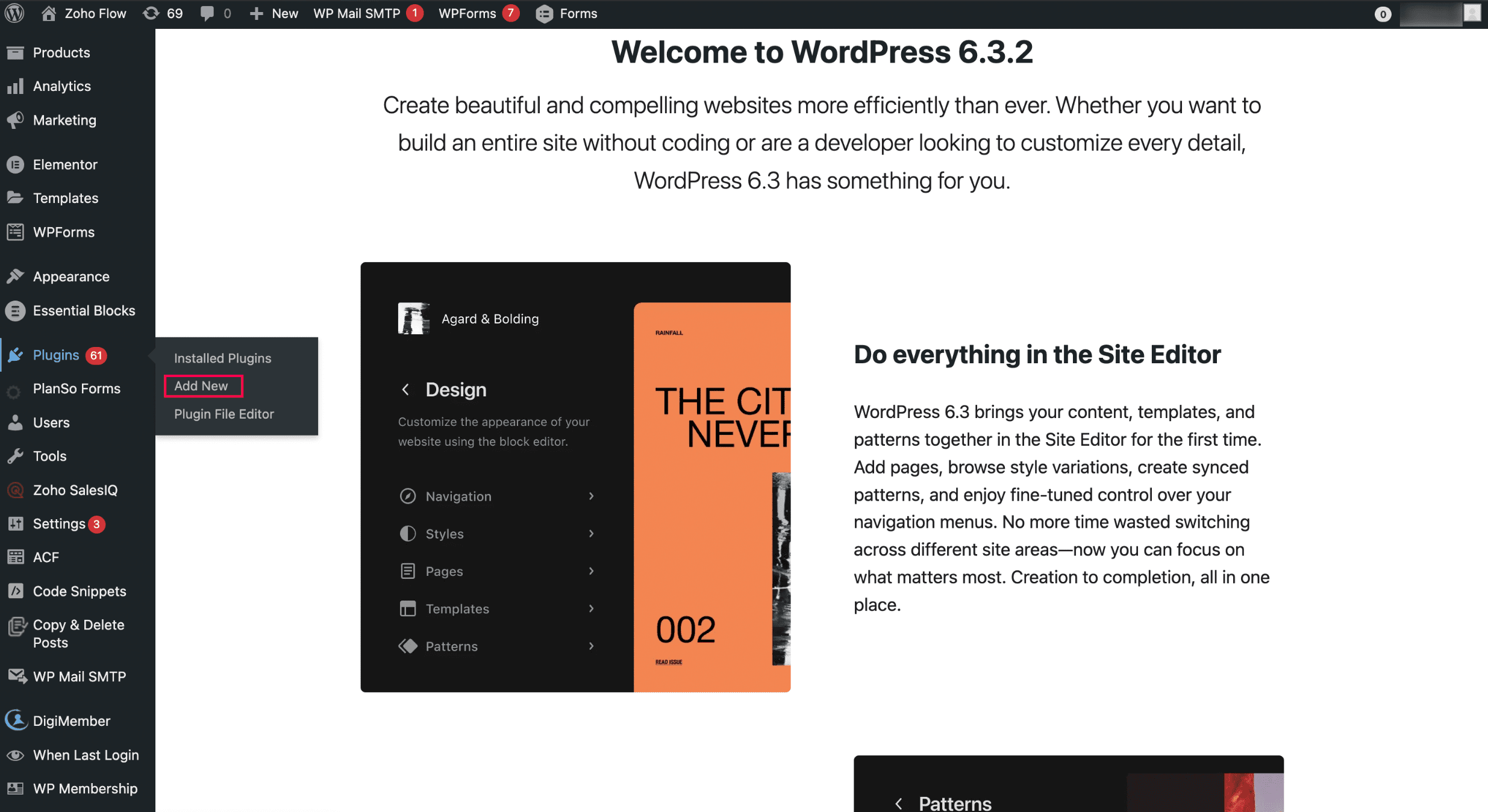
ii. Search for Zoho Flow and click Zoho Flow plugin to initiate the installation.
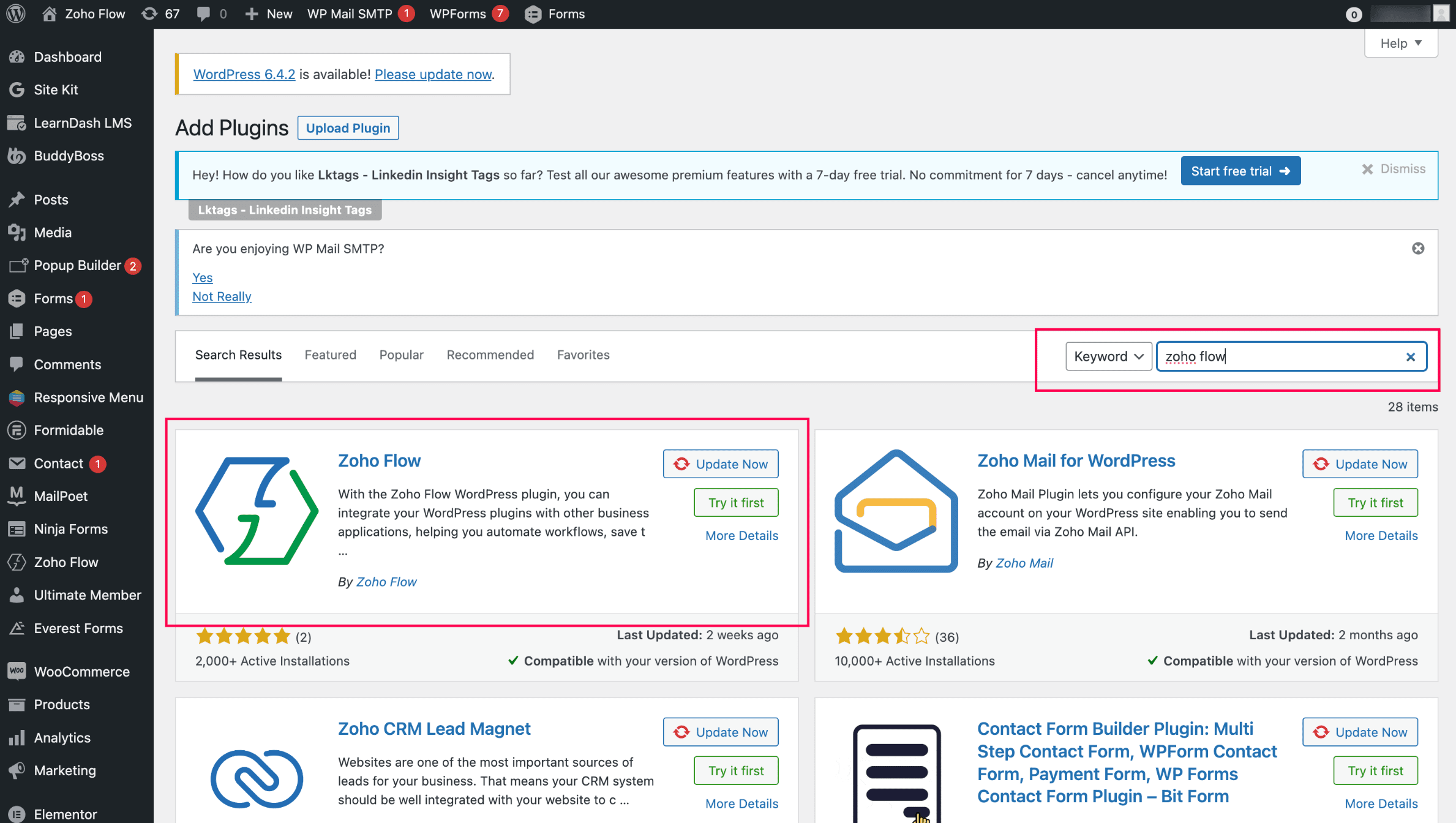

Installing the WordPress.org extension in Zoho Writer and completing the authentication: 
  1. Install the WordPress.org extension from Zoho Marketplace in Zoho Writer. (By default, it'll be pre-installed for all Zoho Writer users)
  2. Authenticate the extension with your base URL and API key. (Note: You can authenticate only one WordPress site at a time)
  3. To generate the base URL and API key, click Zoho Flow in your WordPress site and choose WordPress.org.
Posting content from Zoho Writer: 
  1. Open the WordPress.org extension from the right pane of your document in Zoho Writer.
  2. Add important metadata to your blog posts, such as title, description, and tags, and choose from a list of categories.
  3. Click Publish to publish the content. 
Info
When posting content from Zoho Writer, SEO-friendly image names will help increase visibility in search engines.
Info
You can customize and change the theme of your WordPress blog from Appearance > Themes in the right side of your WordPress blog. Choose a new design or customize the existing design by clicking the Customize button.


Updating blog content from Zoho Writer: 
  1. Click View Published History in the WordPress.org extension in your Writer document.
  2. Choose the document version you want to update the content to from the list of options displayed and click Republish Current Version.

Switch to the Zoho Flow plugin from Jetpack and continue posting to your WordPress.org from Zoho Writer. 


Try Zoho Writer's WordPress and WordPress.org extension and let us know your suggestions and feedback in the comments or email us at support@zohowriter.com or support@eu.zohowriter.com. You can also add your feedback about the Zoho Flow plugin here. It will help us improve the plugin and smoothen your experience.


Regards,

Team Writer

    • Sticky Posts

    • Easily perform calculations using dates with the new DATEDIF function

      Hey Zoho Writer users! We've enhanced Zoho Writer's formula capabilities with the new DATEDIF function. This allows you to calculate the difference between dates in days, months, and years. Function syntax: =DATEDIF(start_date, end_date, unit) Inputs:
    • Zoho Writer's WordPress extensions

      Hey Zoho Writer users! Say goodbye to all your WordPress content publishing woes with Zoho Writer's WordPress extensions. Publish content with all your formatting and images, republish content when you update a document, and more—from a single window
    • Date-based conditions and filters

      Configure conditions with date  Hi everyone! We are excited to announce that you can now compare and filter data with date-based conditions. This update lets you compare date fields in a document to a reference date and display a text or value if the
    • Introducing group by, aggregation, and repeating regions in mail merge templates

      Display data exactly the way you want and highlight key insights with Zoho Writer's enhanced merge templates. We've supercharged Zoho Writer's merge templates with the capability to dynamically group, aggregate, and repeat data as blocks. You can now
    • Say hello to an improved way to merge documents!

      Automating all your documents from start to finish is now easier than ever with Writer's new merge tools. If you haven't seen it yet, you can read the main announcement here. Here is the full list of the features we've rolled out: 1. Dynamic Table Headers
    • Recent Topics

    • Restricted Account - "This user is not allowed to add in Zoho" - citbinvestment.com.

      Hi Zoho Support Team, I am attempting to set up user mailboxes for my domain citbinvestment.com, but I am receiving the following error: "This user is not allowed to add in Zoho. Please contact support-as@zohocorp.com for further details." > My MX, SPF,
    • 👍 Zoho CRM's Notes now gets Reactions and a new look

      Available in SA and JP DCs. Rolling out to other DCs in phases. Hello everyone, Notes help users capture important updates, collaborate with teammates, and maintain context for records. Now with Note Reactions, users can quickly acknowledge updates, express
    • Contact Sharing: Hide email alias from global address list

      As the superadmin, I would like to hide my domain aliases from appearing in the global address list. Currently, my end users can see all my aliases. The aliases also appear as type-in addresses when composing a new email. This is a potential security
    • Zoho Projects - Linking CRM Deals to Projects via API without sending customer contact email invitation to project portal

      We are using the Zoho CRM and Zoho Projects APIs to automatically create a project in Zoho Projects and then associate that project with the relevant Deal in Zoho CRM. The API process is working in that the project is created successfully and appears
    • Incorrect Currency Shown

      On Bills, each line shows the rate in the wrong currency (home currency).
    • Ability to filter services and parts based on a field in the Work Order

      Hell FSM team, We have a customer with 2 value streams using Zoho FSM. Each value stream uses different products, at different price point. Currently, all of the products are accessible when creating a work order and modifying a service appointment, which
    • This user is not allowed to add in Zoho. Please contact support-as@zohocorp.com for further details

      Hello, Just signed up to ZOHO on a friend's recommendation. Got the TXT part (verified my domain), but whenever I try to add ANY user, I get the error: This user is not allowed to add in Zoho. Please contact support-as@zohocorp.com for further details I have emailed as well and writing here as well because when I searched, I saw many people faced the same issue and instead of email, they got a faster response here. My domain is: raisingreaderspk . com Hope this can be resolved.  Thank you
    • [Free webinar] Beyond prompt-to-app: Vibe coding with Zoho Creator | Creator Tech Connect (October 2026)

      Hello everyone, We are excited to invite you to another edition of the Creator Tech Connect webinar. About Creator Tech Connect The Creator Tech Connect series is a free monthly webinar consisting of purely technical sessions, where we dive deep into
    • Zoho Recruit Staffing version Interview using Zoho Meeting

      I would like to understand whether Zoho Meeting has a native integration with Zoho Recruit – Staffing Edition. As of now, I am unable to find the native Zoho Meeting integration within the Staffing Edition of Zoho Recruit. Could someone please confirm
    • Payroll needs to automatically remit taxes, not just give me the calculations

      Wagepoint, PayEvo, Waveapps, etc... All your competitors deposit employee payroll, but they ALSO remit taxes automatically. Get with the program, your Payroll app is extremely sparse.
    • New enhancements to user management

      Hello everyone, We're excited to introduce a few enhancements to user creation and user preferences in Bigin! These updates give administrators more flexibility while inviting users, and give users more control over how their data is displayed. With this
    • Public dashboard table does not load in mobile view - TypeError reading 'viewType'

      Our public dashboard links have worked for years. We made no changes. Now the table widget does not load on mobile browsers. It loads fine on desktop, and it loads on a phone when we use "Request desktop site." Chrome DevTools shows this error in mobile
    • Cannot format "start date" field in Zoho Flow

      I am trying to recreate a flow that connects Inventory package creation to Zoho projects (where a task is created in a defined project). I've been able to troubleshoot everything EXCEPT the date fields; specifically the "start date" - which is quite important
    • Bank Transactions page shows too few transactions due to large header area

      In the Banking → Uncategorized Transactions screen, a lot of vertical space is being used by the account header, balance details, tabs, buttons, etc. Because of this, on a normal desktop screen I can see only around 2 transactions at a time, even though
    • Zoho Mail Android app update (v3.6.5) - Enhancements in Email Composer and Google Meet support

      Hello everyone! We are excited to introduce new enhancements in the Zoho Mail Android app (v3.6.5). Let's dive into what's new. Drag and drop email addresses between recipient fields You can now drag and drop the email addresses across the recipient fields:
    • Migration from QuickBooks to Zoho Books for the U.S. Company

      Is there any automation tool available to migrate data from QuickBooks to Zoho Books for a U.S.-based company? If yes, could you please provide the details?
    • Feature Request: Integración con la Lista del Artículo 69-B del SAT para Zoho Books México

      Feature Request: Integración con la Lista del Artículo 69-B del SAT para Zoho Books México Hola equipo de Zoho, Durante los últimos meses he observado una necesidad recurrente entre varios clientes en México relacionada con el cumplimiento fiscal del
    • Introducing Zoho Key Service, a simpler way to access LLMs without API keys

      Available in the Professional, Enterprise, and Ultimate editions in the US, IN, AU, JP, and CA DCs. Hello everyone, We are excited to bring Zoho Key Service (ZKS) in Zoho CRM, a simpler way for organizations to access and use third party LLMs. You can
    • Single Folder Archival in Zoho Mail

      Dear Zoho Mail Community, Have you noticed and wondered what the banner is about in your Zoho Mail's Archive Policy Settings? In Zoho Mail, users have traditionally archived emails to keep their inbox and active folders clean. While this helped reduce
    • Trigger Workflow Rules from subform row actions

      Hello all, Previously, workflow rules could only be configured at the module level, which meant subform data had to be tracked and managed manually. With this update, workflow rules can now be triggered directly by actions within subform rows, giving
    • Create a single record from multiple images with ICR

      Hello all, Zia's Intelligent Character Recognition can now create a single record from multiple images. Users can upload up to three images at once, such as an ID, a passport, and a business card, and Zia will extract the relevant information from all
    • Free Plan mail accounts details

      In the zoho mail pricing there's a free plan that includes: FREE PLAN Up to 25 Users 5GB* /User, 25MB Attachment Limit Webmail access only. Single domain hosting. I need to make sure that I'm able to create multiple email accounts in the form of: name@domain.com
    • can not use my zoho mail

      i bouht domain( avta group.com) and set up mail(Avtar@avta group.com) but i cannot receive or send emails . can you please help out.
    • Display Issues

      Hello, Our company just changed General Managers and the other one was the super admin. Since deleting his profile and making our new General Manager the super admin there have been ongoing issues. One in particular, is when creating estimates, sales
    • Introducing Night Mode for Zoho Recruit [BETA]

      Late-night hiring sessions? Long hours reviewing resumes? We heard you. Night mode [BETA] is now available in Zoho Recruit, giving you a cleaner, more comfortable workspace that’s easier on the eyes while keeping the focus on what matters most: hiring.
    • Unblock ME

      info@pentekykloi.gr Unable to send message;Reason:554 5.1.8 Email Outgoing Blocked. Learn more. I purchase additional storage
    • Zoho Calendar integration for Bigin

      Hello everyone, We're excited to introduce Zoho Calendar's integration in Bigin! For a while now, users have been able to sync events in Bigin with Google Calendar and Outlook Calendar - but with this new topping, it syncs with Zoho Calendar as well.
    • Workflows, webhooks, and zero manual work: Your webinar operations, on autopilot

      Running a webinar is never just about going live. There's the flurry of registrations to track, attendees to follow up with, recordings to share, CRM records to update, and somehow, all of this has to happen on time, every time. Until now, most of it
    • Zoho Mail - More contextual actions on email list view

      Hi Zoho Mail team, I recently completed an email migration from Gmail to Zoho Mail and noticed a feature in Gmail that I think would be a great addition to the Zoho Mail interface. When you hover over an email in Gmail's list view, a number of quick actions
    • Supervisor Rules --> Custom Function

      Hello, currently I can't add a custom function to a supervise rule. Is there a reason for this? Background: We have BluePrint managed tickets and actually we have a Supervise rule which should set the ticket to "closed" after 168 hours since the last
    • Erro

      Subject: CRM Standalone Function creation returns INTERNAL_ERROR Hello Zoho Support, I am trying to create a Standalone Deluge Function in Zoho CRM for a lead intake REST API. The CRM account reports that the Standalone category is enabled, but function
    • Digest Septembre - Un résumé de ce qui s'est passé le mois dernier sur Community

      Bonjour chère communauté ! 👋 Le mois dernier a été riche en nouveautés, en échanges et en découvertes ! Retrouvez ici les contenus les plus utiles, les discussions les plus intéressantes et plus encore. En septembre, nous avons mis en lumière trois nouveautés
    • Email Forwarding to Zoho Desk Failing After Migration from Gmail to Outlook (Microsoft)

      We recently migrated from Gmail to Microsoft Outlook. Since the migration date, emails sent by our customers are no longer being received by Zoho Desk. I tried setting up the email forwarding rules in Outlook similar to what we had in Gmail, but it still
    • New Update: Convert External Users in Bulk in Zoho Directory

      Greetings to all Zoho Directory users out there! We’re excited to introduce a new update that makes user management in Zoho Directory even more efficient; you can now convert external users in bulk! Earlier, admins could convert only one external user
    • Presenting ABM for Zoho CRM: Expand and retain your customers with precision

      Picture this scenario: You're a growing SaaS company ready to launch a powerful business suite, and are looking to gain traction and momentum. But as a business with a tight budget, you know acquiring new customers is slow, expensive, and often delivers
    • How to import PST files in Office 365?

      You can import PST files into Office 365 using native Outlook applications, the Microsoft Purview network upload method, or specialized third-party migration tools. Choosing the right method depends on whether you are migrating a single mailbox or executing
    • API - Bank Accounts | Reconciliation Discrepancy

      Unless I'm reading it wrong, the documentation for the Bank Reconciliations API is inconsistent with itself. https://www.zoho.com/books/api/v3/bank-accounts/#create-a-bank-reconciliation The text definition says that the transaction_id should be a string,
    • Customer Statement Showing Incorrect Negative Balance Due to Unused Advance

      Dear Zoho Support Team, We are facing an issue with the Customer Statement in Zoho Invoice related to customer advances/mobilization advances. The issue is that when a customer has made an advance payment that has not yet been fully utilized against invoices,
    • Employment Contract / HRMS Documents - Zoho People

      How do I create customized HR documents for disbursal from Zoho People ? Example, say offer letters ? appointment letters ? Memos ? We want to be able to preset these in one or ther other form and issue them to employees who are in Zoho People.
    • Mobile authentication for Zoho Creator portals

      Note: This feature was previously available in beta for IN data center users on request. It is now generally available for all users in the IN and US data centers on paid plans of Zoho Creator. Currently, it will be available only for Indian (+91) mobile
    • Next Page