Action required: Update the Zoho Desk Client SDK URL in your extensions
Hi Developers,
To improve reliability and performance, the Zoho Desk Client SDK is now served from a new CDN domain. We request that you update your existing extensions with the new Client SDK URL given below.

Note: Going forward, all newly created extensions will use the updated Client SDK URL by default.
What to Update
Old SDK URL (Deprecated):
<script src="https://js.zohostatic.com/support/developer_sdk/v1/js/ZohoDeskClientSDK.min.js"></script>
New SDK URL:
<script src="https://static.zohocdn.com/zohodeskmarketplacesdkstatic/developer_sdk/v1/js/ZohoDeskClientSDK.min.js"></script>
 Info: The new Client SDK URL is common across all data centers (DCs). There are no changes to the SDK's functionality. Only the hosting domain has changed, so you don't need to change any code that uses the existing SDKs, such as ZOHODESK.get(), ZOHODESK.set(), and ZOHODESK.invoke(), as well as events.
How to Update
If your extension uses the old SDK URL, follow these steps:
- Open your extension project.
- Locate all references to the old SDK URL (js.zohostatic.com/support/developer_sdk) in your extension project and replace them with the new URL provided above.
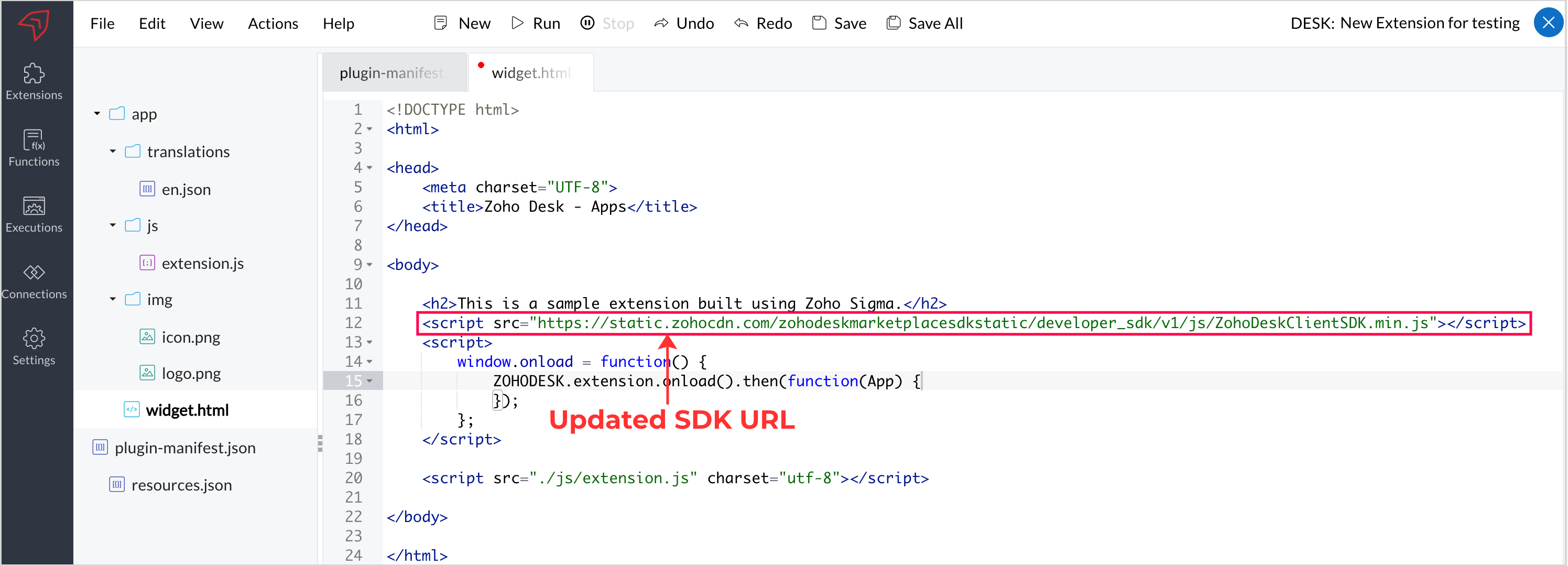 3. Verify that your extension works as expected after the update.
4. Republish the updated extension in the Zoho Marketplace.
Note: Customers must update to the latest version of the extension to ensure it continues to function properly.
We recommend including this update in your next planned extension release or maintenance update. Updating your extensions to use the new URL helps keep them running smoothly and ensures access to future SDK improvements.
We encourage you to update your extensions as soon as possible, as the old SDK URL will be retired in the future. Until then, both URLs may continue to work.
Thank you for keeping your extensions up to date!
Regards,
Monica | Zoho Desk