Add Claude in Zoho Cliq

Add Claude in Zoho Cliq


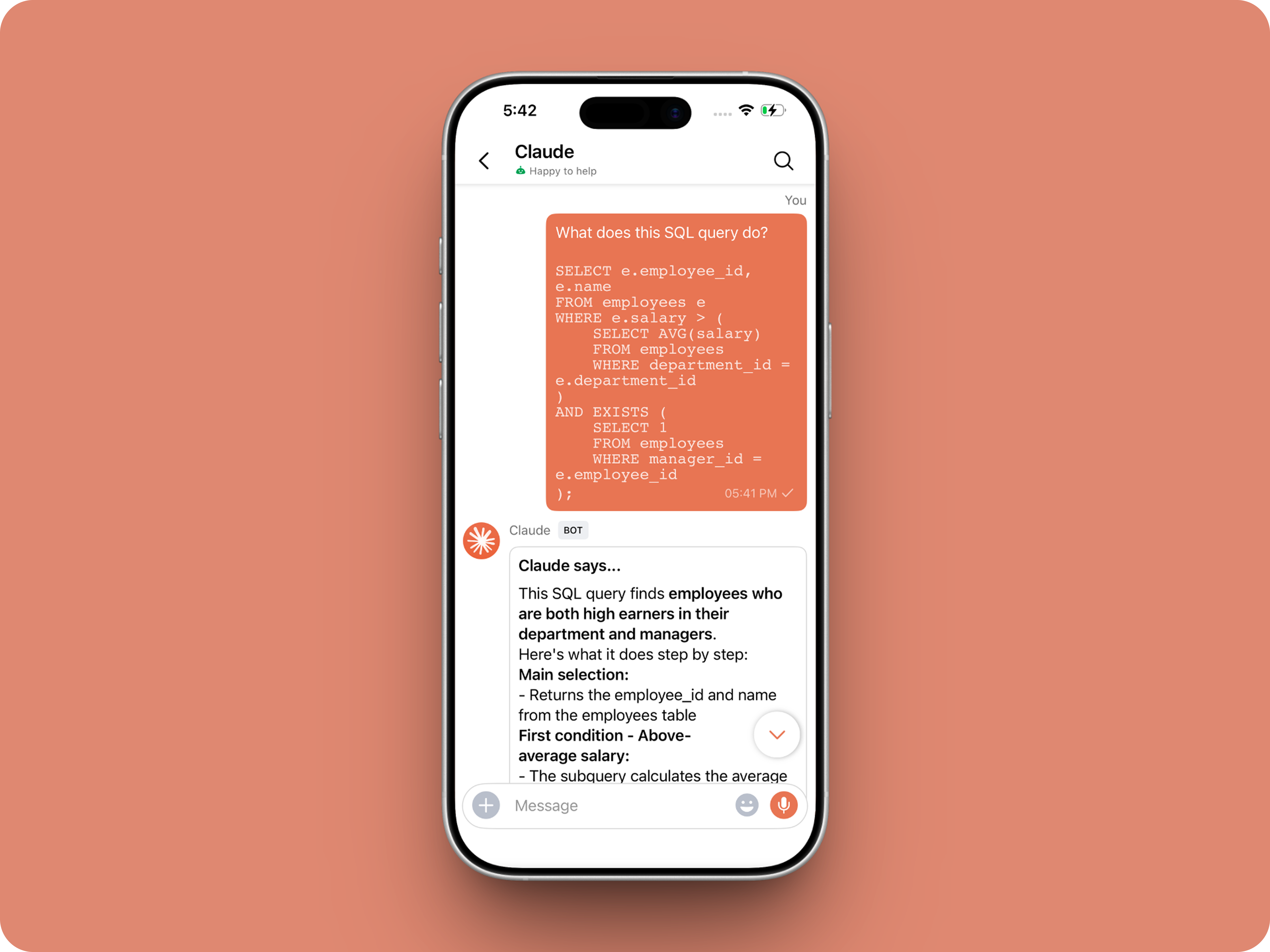
Let’s add a real AI assistant powered by Claude to your workspace this week, that your team can chat with, ask questions, and act on conversations to run AI actions on.

This guide walks you through exactly how to do it, step by step, with all the code you'll need.
Just copy, paste, replace the placeholders and you'll be good to go.


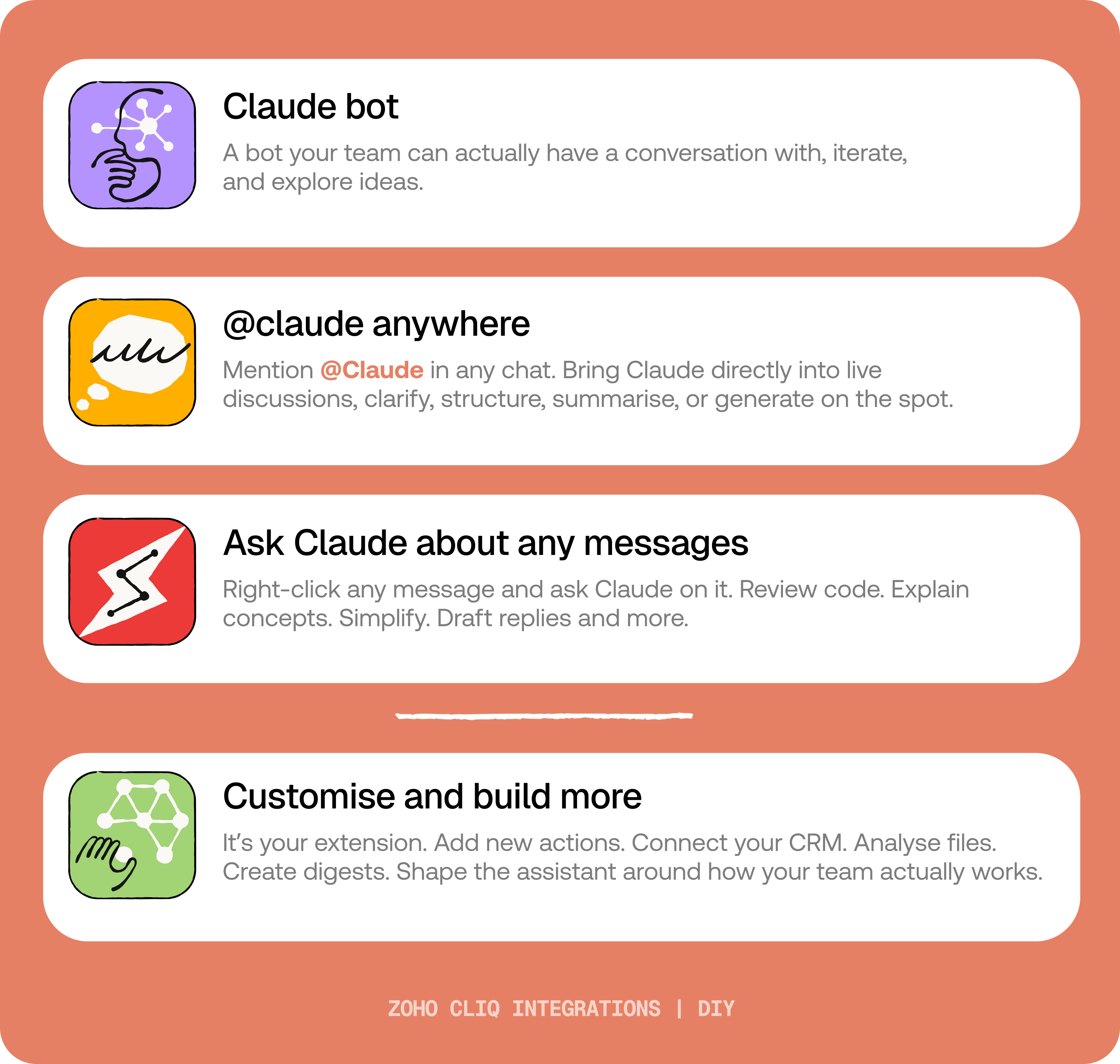
By the end of this guide, you’ll have:

  1. A Claude bot inside Zoho Cliq to have real back-and-forth conversations.
  2. The ability to @mention Claude in any channel and reply to a message and ask Claude to act on it.
  3. A message action to act on messages in Cliq by Claude. Additionally, pre-built actions to review code, generate mind maps, draft a reply for the selected message, or explain it like you’re new.
IdeaBefore you start:
1. A Zoho Cliq account with Developer access.
2. An Anthropic API key
3. Basic comfort with Deluge (optional — all code is provided
😉)

A. How to get an Anthropic API key?
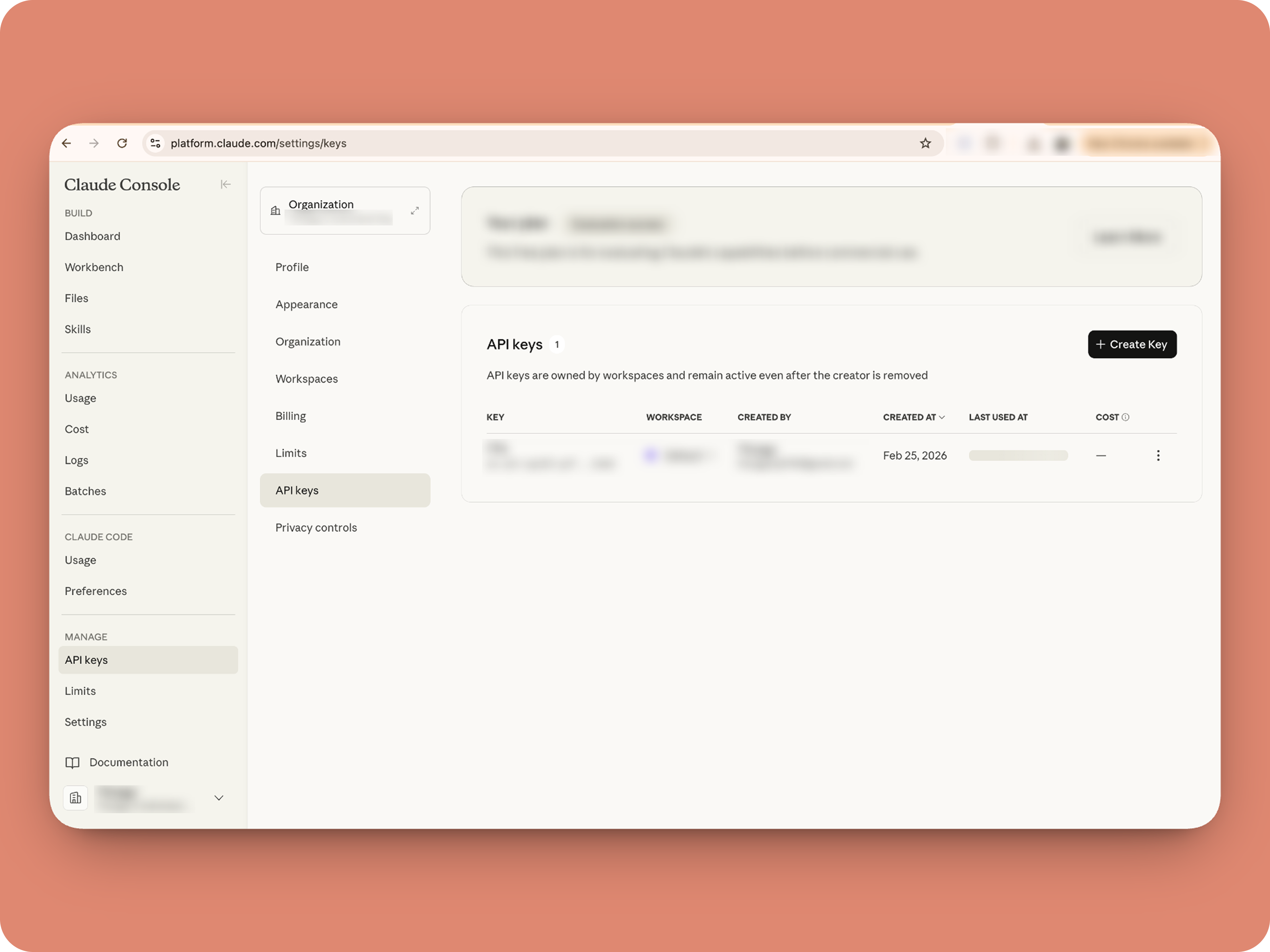


1. To get an Anthropic API key, sign up at the Anthropic Console (console.anthropic.com).
2. Navigate to the API Keys tab, and click Create Key. 
3. You must add credits via the Billing section to activate the key. Copy the key immediately, as it cannot be viewed again.

Alert
Note: In this guide, the API key is pasted directly into the code for simplicity. But never, ever share your API key to others and double-check before sharing screenshots or code.

B. Create a Connection 

Claude needs permission to: Read chat messages and Fetch attachments (like PDFs) when prompted, for that let's create a connection for it.  ⓘ Learn more about connections

1. Go to the Connections module (in Bots & Tools) → Create Connection
2. Add a Connection name, for eg. "readmessageandfile"
3. Select:
ZohoCliq.Attachments.READ
ZohoCliq.Messages.READ
4. Create
Click Create, then authorize the connection. Copy the connection name, you'll paste it into the handlers in the next steps.

How to start

Go to Zoho Cliq → Settings → Bots & Tools 

Claude Bot:
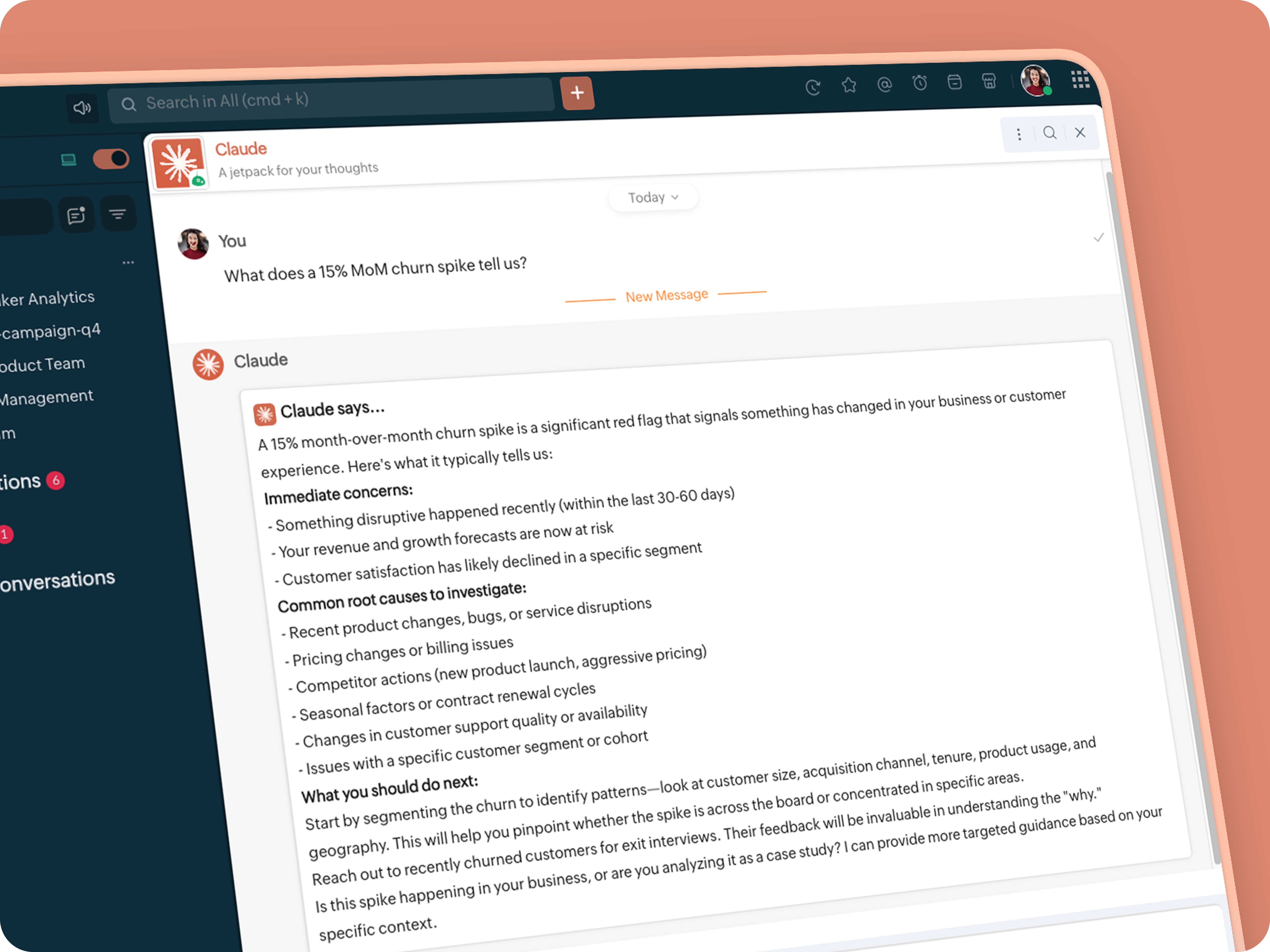


  • Go to Bots → Create Bot.

  • Name it Claude and give it any description of choice.

  • First, let's create a Message handler to handle the conversations first.

  • Click edit code and copy paste the below code in it (follow along the comments to understand what each part does)

Idea

One API endpoint. That's all.


Both the bot and the message action use the same single Anthropic endpoint: POST /v1/messages. The only thing that changes between them is the system prompt and what you put in the messages array. Once you understand that, the rest is just assembly.
Explore API docs →


Message Handler:
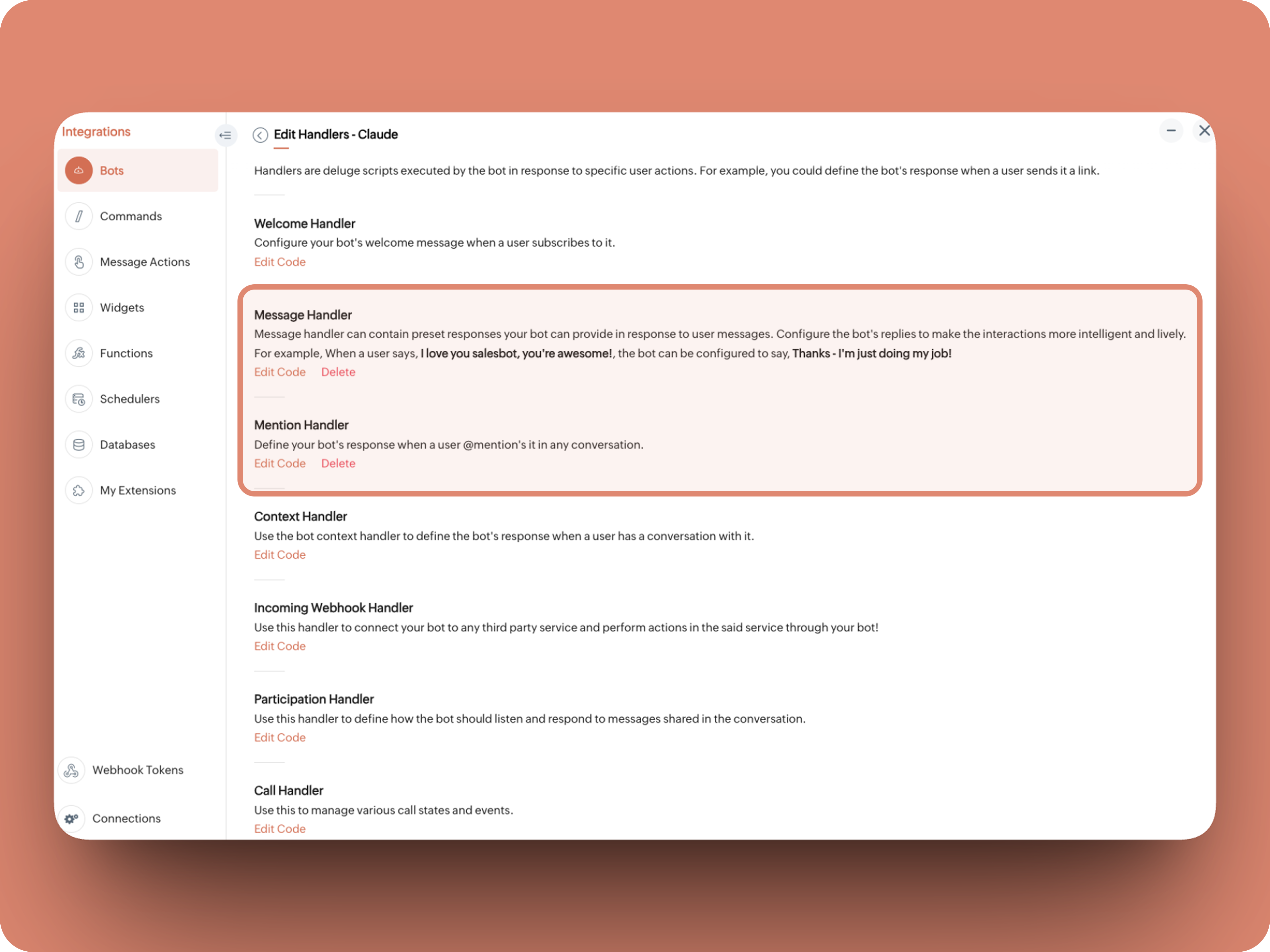


What does this do: Fetches last 10 (customizable - but keep message limit small ( around 10–15 to avoid token overuse)) chat messages for additional context and enables natural chat conversations 


  1. info environment;
  2. botUniqueName = "BOT-UNIQUE-NAME";
  3. // Replace with your bot unique name
  4. cliqBaseUrl = environment.get("base_url");
  5. fetchRecentMessages = invokeurl
  6. [
  7. url :cliqBaseUrl + "/api/v2/chats/" + chat.get("id") + "/messages?limit=10"
  8. type :GET
  9. connection:"CONNECTION-NAME"
  10. //Read below how to create a connection, and paste here:
  11. ];
  12. info fetchRecentMessages;
  13. contentList = list();
  14. contentList.add({"role":"user","content":"Act as a conversational assistant. Reply to the message below in a friendly, informative, and well-organized way.\n\nGuidelines:\n- Respond only to the message provided.\n- Do not use memory or external context.\n- Be warm but professional.\n- Be clear and structured (use short paragraphs or bullet points if helpful).\n- Provide helpful details or clarification where useful.\n- If something is unclear, ask a polite follow-up question.\n- If action is needed, suggest a simple next step.\n- Do not include meta commentary.\n- Output only the reply.\n\n\nSTRICTLY USE * FOR BOLD, AND NEVER ** FOR BOLD MARKDOWN."});
  15. allMessages = fetchRecentMessages.get("data");
  16. for each  data in allMessages
  17. {
  18. type = data.get("type");
  19. if(type == "card" || type == "text")
  20. {
  21. getMessage = data.get("content").get("text").replaceAll("\n"," ");
  22. senderID = data.get("sender").get("id");
  23. if(senderID.startsWith("b-"))
  24. {
  25. contentList.add({"role":"assistant","content":getMessage});
  26. }
  27. else
  28. {
  29. contentList.add({"role":"user","content":getMessage});
  30. }
  31. }
  32. }
  33. info contentList;
  34. // Set up API headers
  35. apiHeaders = Map();
  36. apiHeaders.put("anthropic-version","2023-06-01");
  37. apiHeaders.put("Content-type","application/json");
  38. apiHeaders.put("X-Api-Key","INSERT-API-KEY-HERE");
  39. // Don't forget your API key!
  40. model = "claude-sonnet-4-5-20250929";
  41. requestPayload = {"max_tokens":1024,"messages":contentList,"model":model};
  42. // Make API call to Claude
  43. claudeApiResponse = invokeurl
  44. [
  45. url :"https://api.anthropic.com/v1/messages"
  46. type :POST
  47. parameters:requestPayload + ""
  48. headers:apiHeaders
  49. detailed:true
  50. ];
  51. info claudeApiResponse;
  52. if(claudeApiResponse.get("responseCode") == 200)
  53. {
  54. responseBody = claudeApiResponse.get("responseText");
  55. parsedResponse = responseBody.toMap();
  56. claudeMessage = parsedResponse.get("content").get(0).get("text").replaceAll("\n\n","\n").remove("---").remove("#");
  57. if(claudeMessage.length() > 4000)
  58. {
  59. claudeMessage = claudeMessage.subString(0,4000) + "...";
  60. }
  61. info "Claude's Response: " + claudeMessage;
  62. }
  63. else
  64. {
  65. responseBody = claudeApiResponse.get("responseText");
  66. parsedResponse = responseBody.toMap();
  67. claudeMessage = "*" + parsedResponse.get("error").get("type") + "* \n" + parsedResponse.get("error").get("message");
  68. info "API Error: " + claudeApiResponse;
  69. }
  70. responseContent = {"text":claudeMessage,"card":{"title":"Claude says...","icon":"https://uxwing.com/wp-content/themes/uxwing/download/brands-and-social-media/claude-ai-icon.png"}};
  71. info responseContent;
  72. info zoho.cliq.postToBot(botUniqueName,responseContent);
  73. return Map();


⚙️ Replace These Placeholders

BOT-UNIQUE-NAME (ⓘ How to find it?)
CONNECTION-NAME
INSERT-API-KEY-HERE
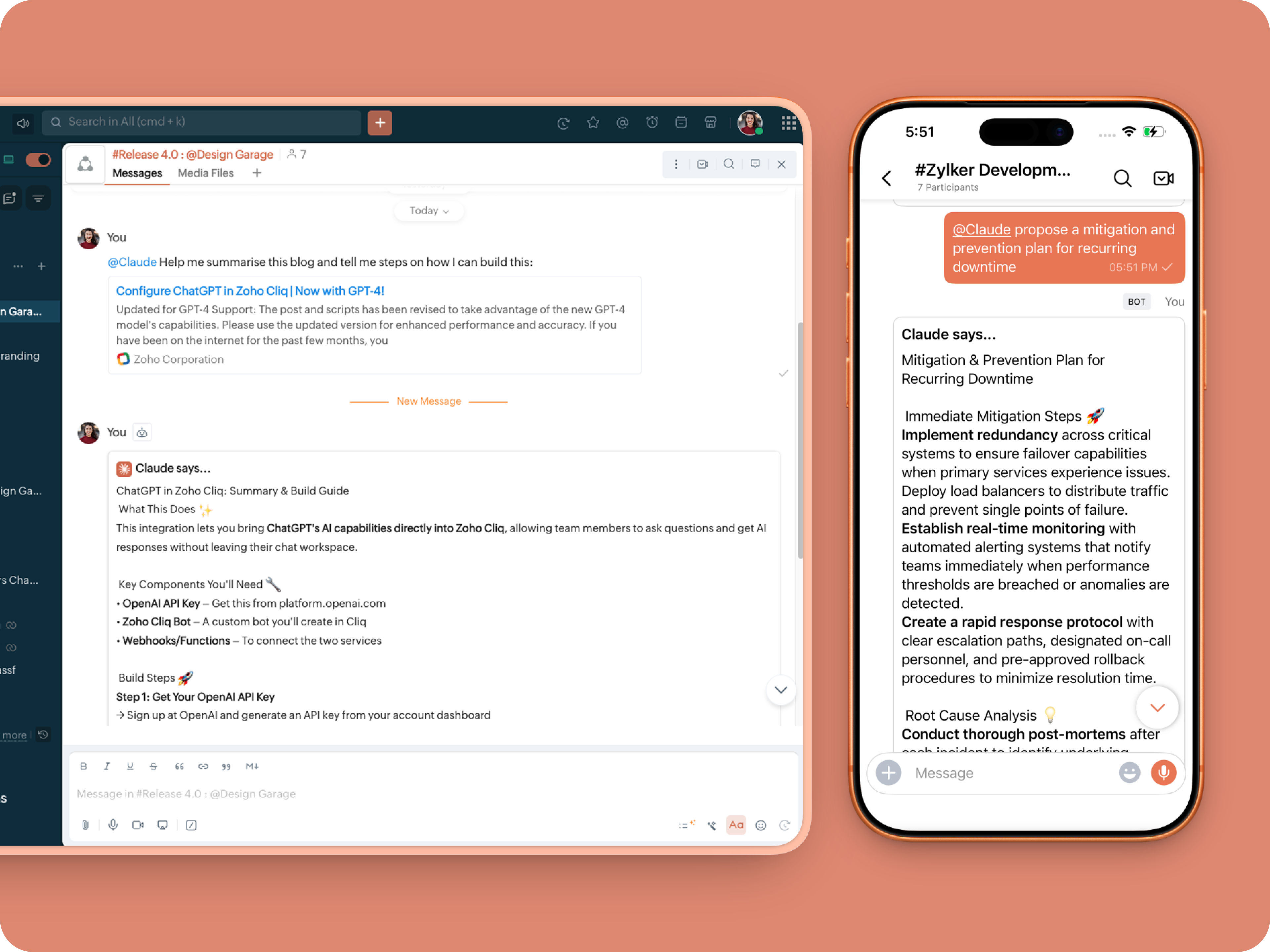


Mention Handler:


What does this do: This is to allow Claude to be @mentioned in any chat.
  1. userMessageText = "";
  2. fileAction = false;
  3. repliedMessage = false;
  4. if(message_details.get("message").containKey("replied_message"))
  5. {
  6. repliedMessage = true;
  7. replyMessageID = message_details.get("message").get("replied_message").get("id");
  8. messageType = message_details.get("message").get("replied_message").get("type");
  9. if(messageType == "text" || messageType == "card")
  10. {
  11. userMessageText = message_details.get("message").get("replied_message").get("text");
  12. }
  13. else
  14. {
  15. fileType = message_details.get("message").get("replied_message").get("file").get("type");
  16. if(fileType != "application/pdf")
  17. {
  18. return {"type":"banner","text":"Only PDF files are supported for this action","status":"failure"};
  19. }
  20. else
  21. {
  22. fileAction = true;
  23. }
  24. }
  25. }
  26. promptInstruction = "\"### Instructions ⓘ \nProvide a human-digestible, highly organized response (300-500 characters). Break down your output into bite-sized paragraphs and use bolding to guide the reader's eye. *Strictly avoid tables.* Use plenty of white space and only ### headings for a clean look. \n\n ### Formatting Protocol • \n - Bold: *text* \n - Italic: _text_ \n - Strike: ~text~ \n - Underline: __underline__ \n - Headers: ### Title \n - Quote: \"quote\" \n - Blockquote: > text \n - Bullets: Use • or → for lists \n - Emojis: Use ✨, 🚀, or 💡 to highlight key takeaways \n - Separator: --- \n\n ### and replace ** to *";
  27. userPrompt = "";
  28. if(message.trim().length() > 0)
  29. {
  30. userPrompt = "Action: " + message + "\n\n\n" + userMessageText + "\n\n\n" + promptInstruction;
  31. }
  32. else
  33. {
  34. userPrompt = "Action: " + userMessageText + "\n\n\n" + promptInstruction;
  35. }
  36. // Set up API headers
  37. apiHeaders = Map();
  38. apiHeaders.put("anthropic-version","2023-06-01");
  39. apiHeaders.put("Content-type","application/json");
  40. apiHeaders.put("ENTER-APIKEY-HERE");
  41. // Don't forget your API key!
  42. // Check if message is text-only or contains a file
  43. if(!fileAction)
  44. {
  45. // Handle text-only message
  46. requestPayload = {"max_tokens":1024,"messages":{{"content":userPrompt,"role":"user"}},"model":"claude-sonnet-4-5-20250929"};
  47. }
  48. else
  49. {
  50. // Handle message with file attachment
  51. uploadedFile = invokeurl
  52. [
  53. url :message_details.get("message").get("replied_message").get("file").get("url")
  54. type :GET
  55. connection:"ENTER-CONNECTION-NAME"
  56. ];
  57. info uploadedFile;
  58. // uploadedFile = message.get("content").get("file").get("name");
  59. base64EncodedFile = zoho.encryption.base64Encode(uploadedFile);
  60. if(message_details.get("message").get("replied_message").containKey("comment"))
  61. {
  62. comment = message_details.get("message").get("replied_message").get("comment");
  63. userPrompt = userPrompt + "\n" + comment;
  64. }
  65. else
  66. {
  67. userPrompt = userPrompt;
  68. }
  69. mediaType = "application/pdf";
  70. requestPayload = {"max_tokens":1024,"messages":{{"role":"user","content":{{"type":"document","source":{"type":"base64","media_type":mediaType,"data":base64EncodedFile}},{"type":"text","text":userPrompt}}}},"model":"claude-sonnet-4-5-20250929"};
  71. }
  72. info requestPayload;
  73. // Make API call to Claude
  74. claudeApiResponse = invokeurl
  75. [
  76. url :"https://api.anthropic.com/v1/messages"
  77. type :POST
  78. parameters:requestPayload + ""
  79. headers:apiHeaders
  80. detailed:true
  81. ];
  82. info claudeApiResponse;
  83. // Extract the actual text response
  84. if(claudeApiResponse.get("responseCode") == 200)
  85. {
  86. responseBody = claudeApiResponse.get("responseText");
  87. parsedResponse = responseBody.toMap();
  88. claudeMessage = parsedResponse.get("content").get(0).get("text").replaceAll("\n\n","\n").remove("---").remove("#");
  89. if(claudeMessage.length() > 4000)
  90. {
  91. claudeMessage = claudeMessage.subString(0,4000) + "...";
  92. }
  93. info "Claude's Response: " + claudeMessage;
  94. }
  95. else
  96. {
  97. responseBody = claudeApiResponse.get("responseText");
  98. parsedResponse = responseBody.toMap();
  99. claudeMessage = "*" + parsedResponse.get("error").get("type") + "* \n" + parsedResponse.get("error").get("message");
  100. info "API Error: " + claudeApiResponse;
  101. }
  102. responseContent = {"text":claudeMessage,"card":{"title":"Claude says...","icon":"https://uxwing.com/wp-content/themes/uxwing/download/brands-and-social-media/claude-ai-icon.png"}};
  103. info responseContent;
  104. if(repliedMessage)
  105. {
  106. responseContent.put("reply_to",replyMessageID);
  107. }
  108. info zoho.cliq.postToChat(chat.get("id"),responseContent);
  109. return Map();


Message Action
What does it do: Allow Claude to act on any message or file.

Quoteⓘ For files, we've extended this to only PDF file formats for now to keep implementation predictable and to avoid unsupported file formats

What we're adding:
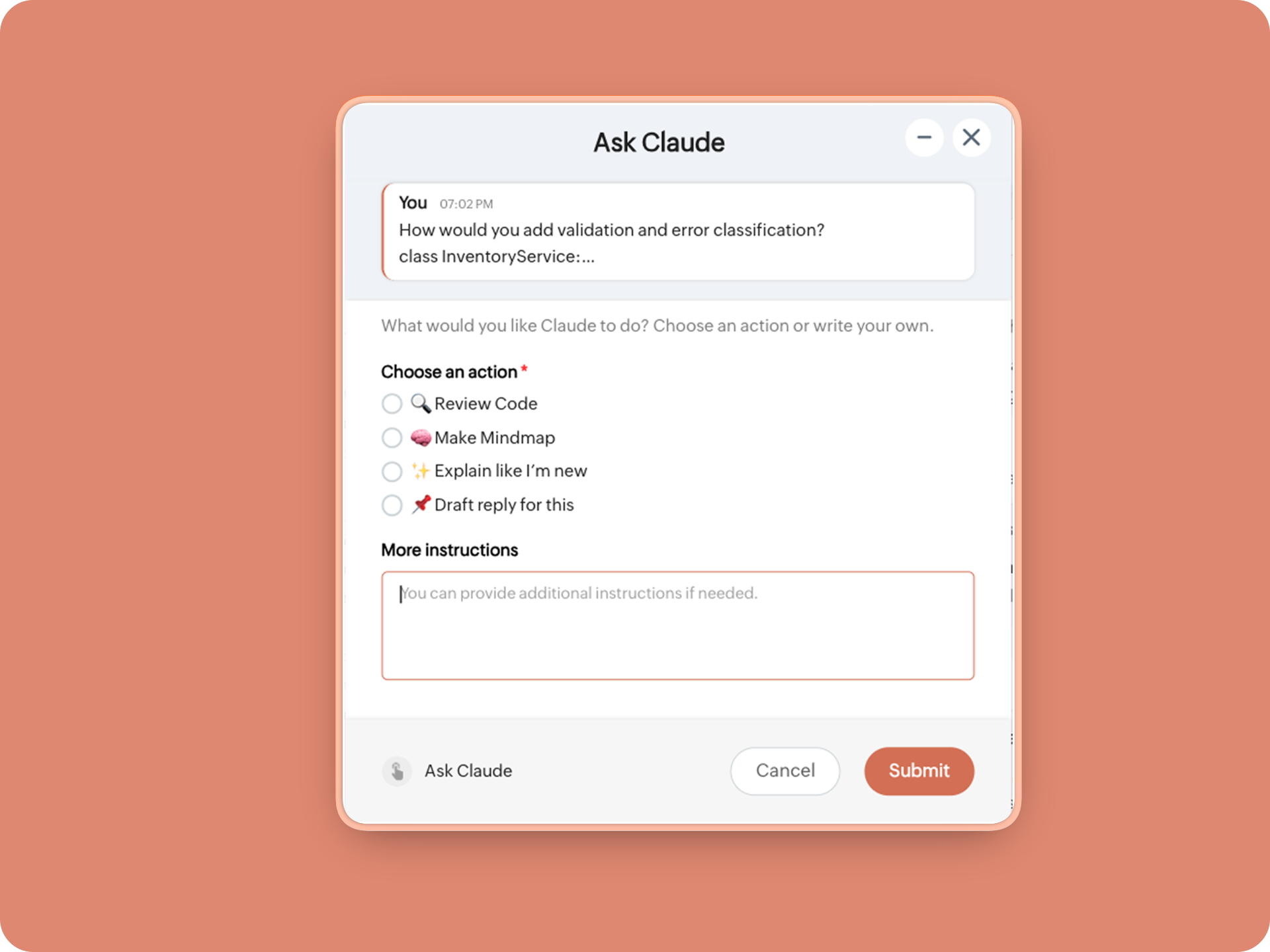
1. When executed on any message, a form opens to prompt:

A. 🔍 Review code
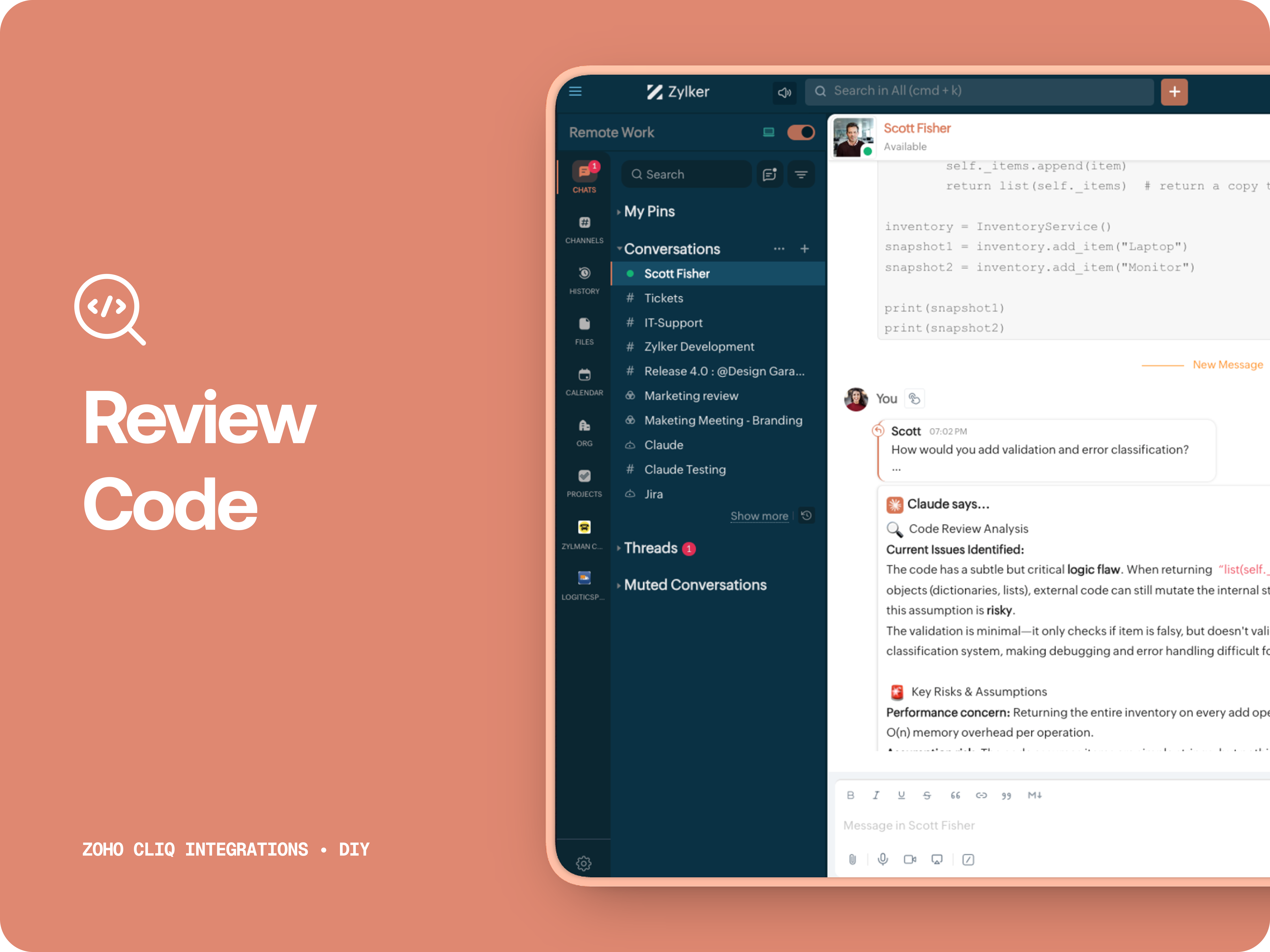
Claude acts like a senior engineer who finds bugs, lists risks, suggest improvements, provides corrected code.


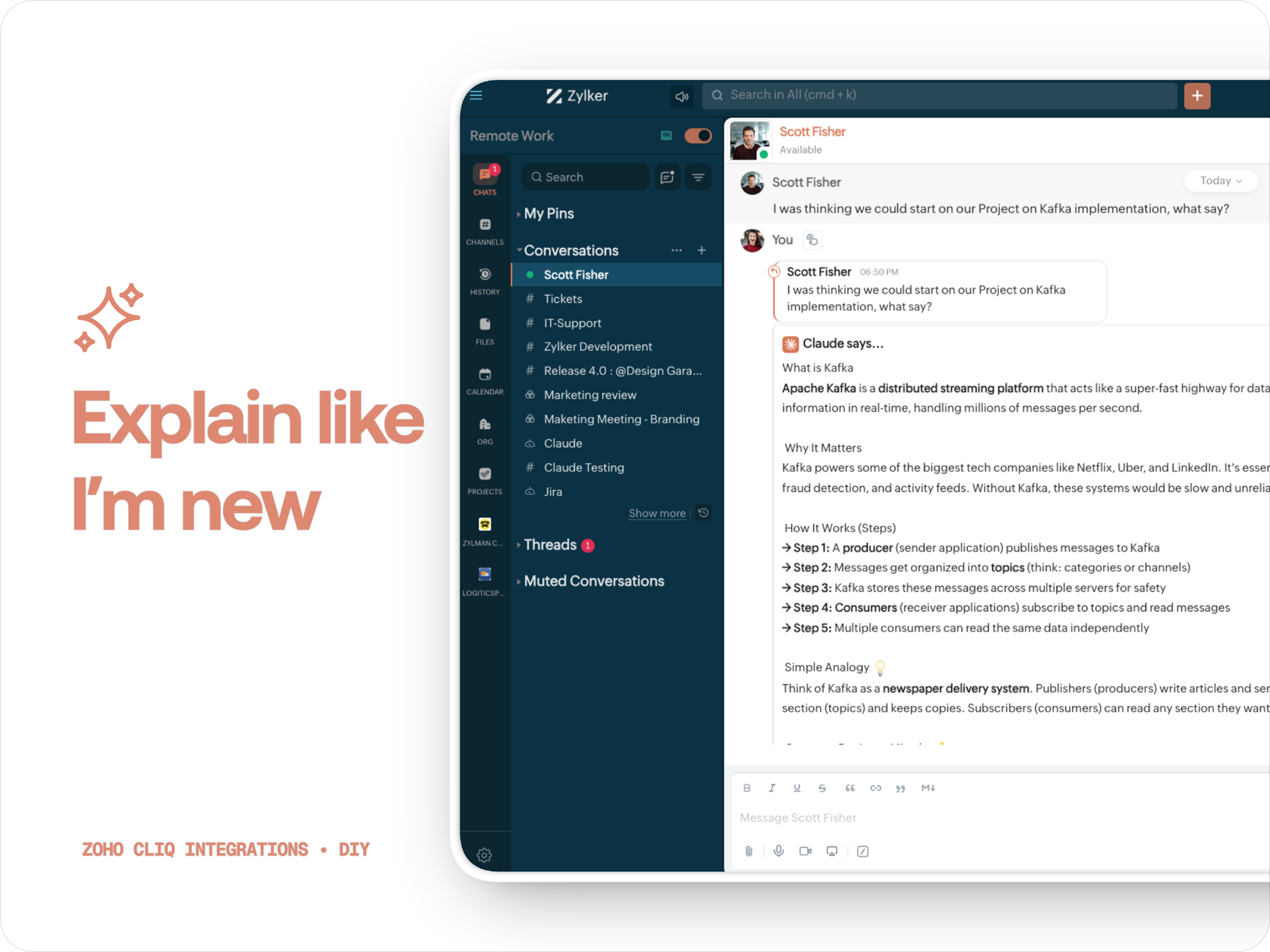
B. ✨ Explain like I'm new
Claude teaches you what it is, why it matters, how it works, an analogy or common mistakes for any concept.

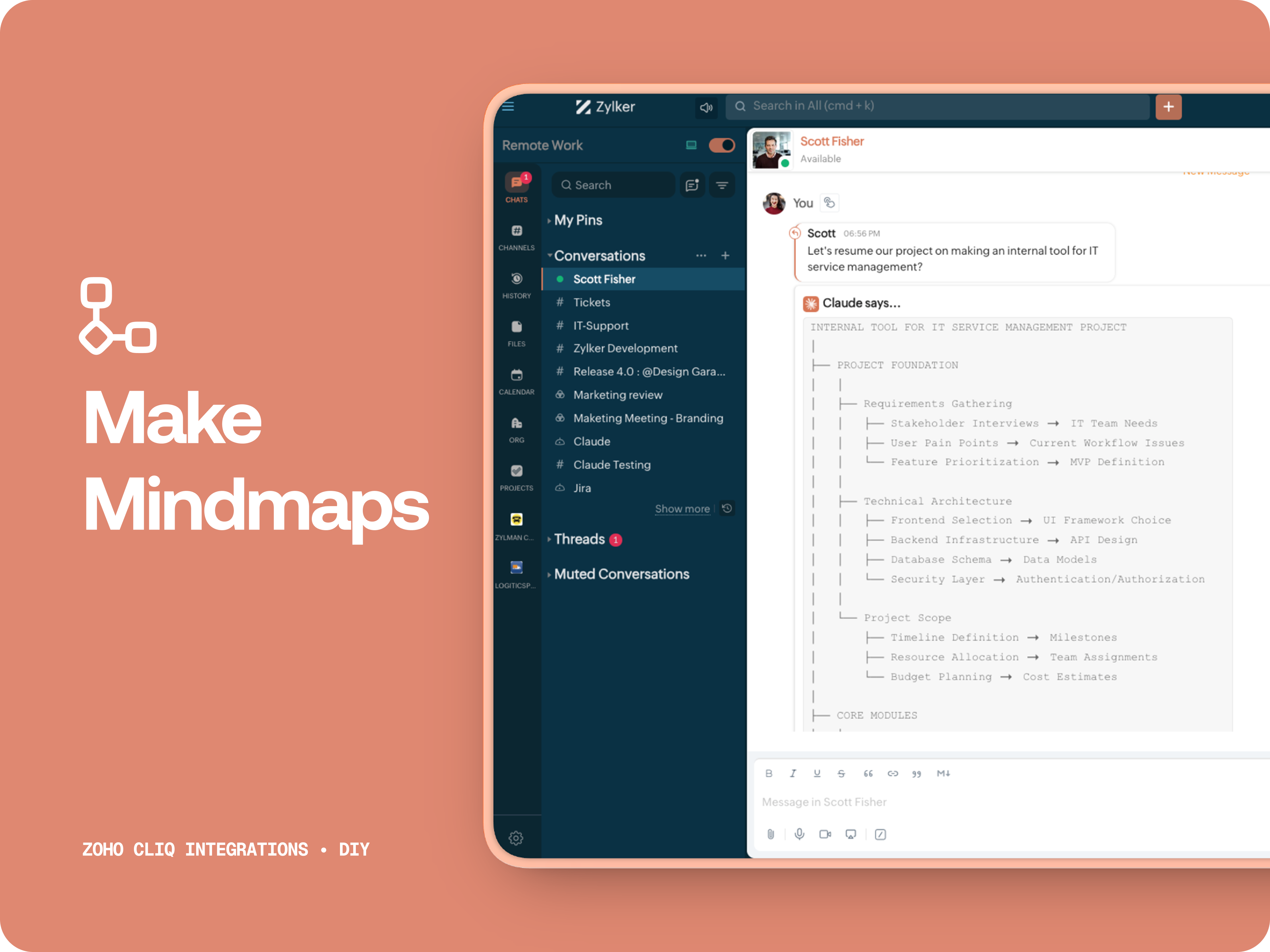
C. 🧠 Make Mindmap

Converts content into a structured ASCII flow chart for explaining system designs, feature breakdowns or general product thinking.

D. 📌 Draft a reply
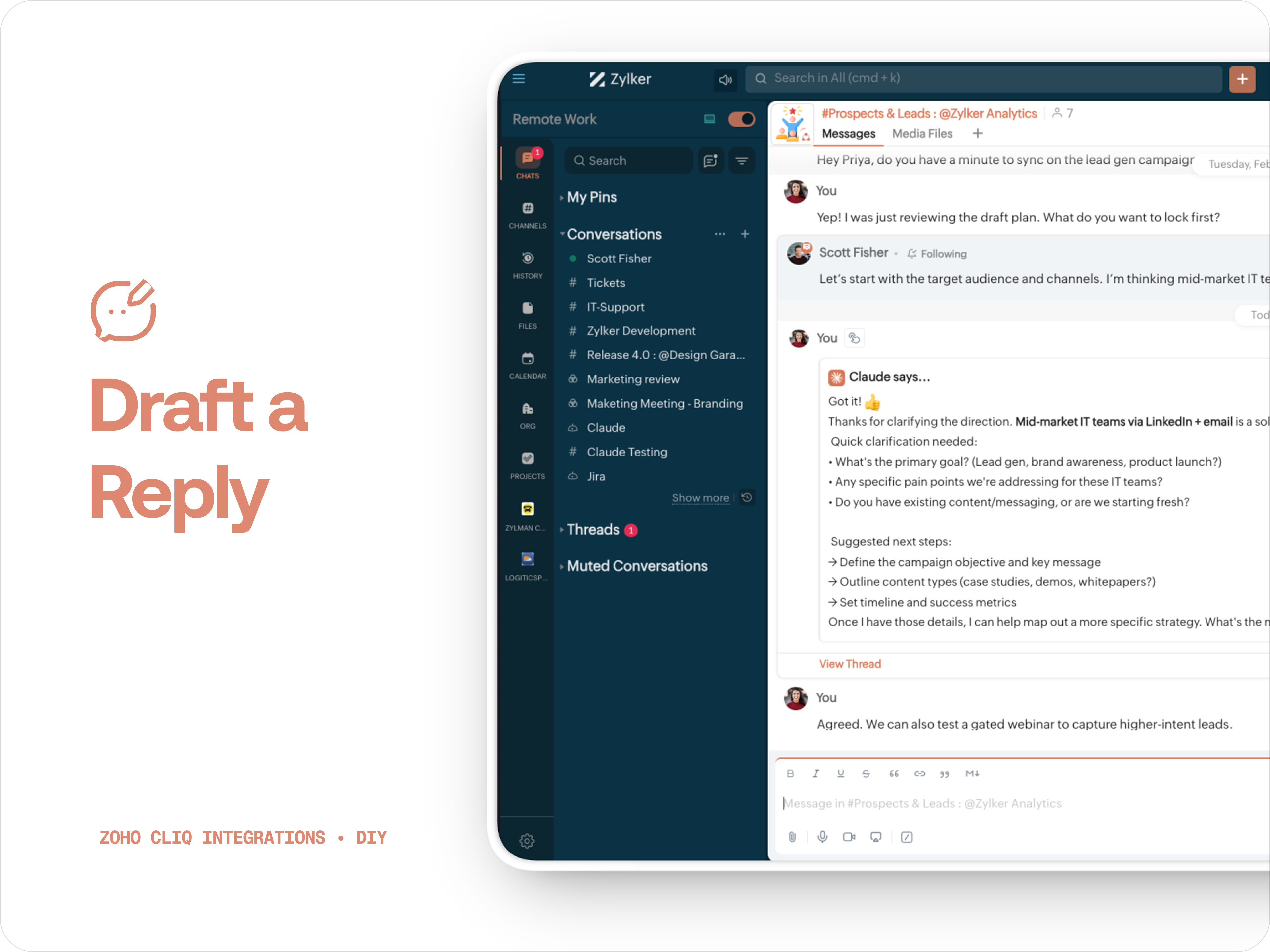
Give professional, concise business replies to address, asks clarifications, suggests next steps in a human tone. 


How to create:

1. Create a
Message Action, name it Ask Claude and give any description of your choice.
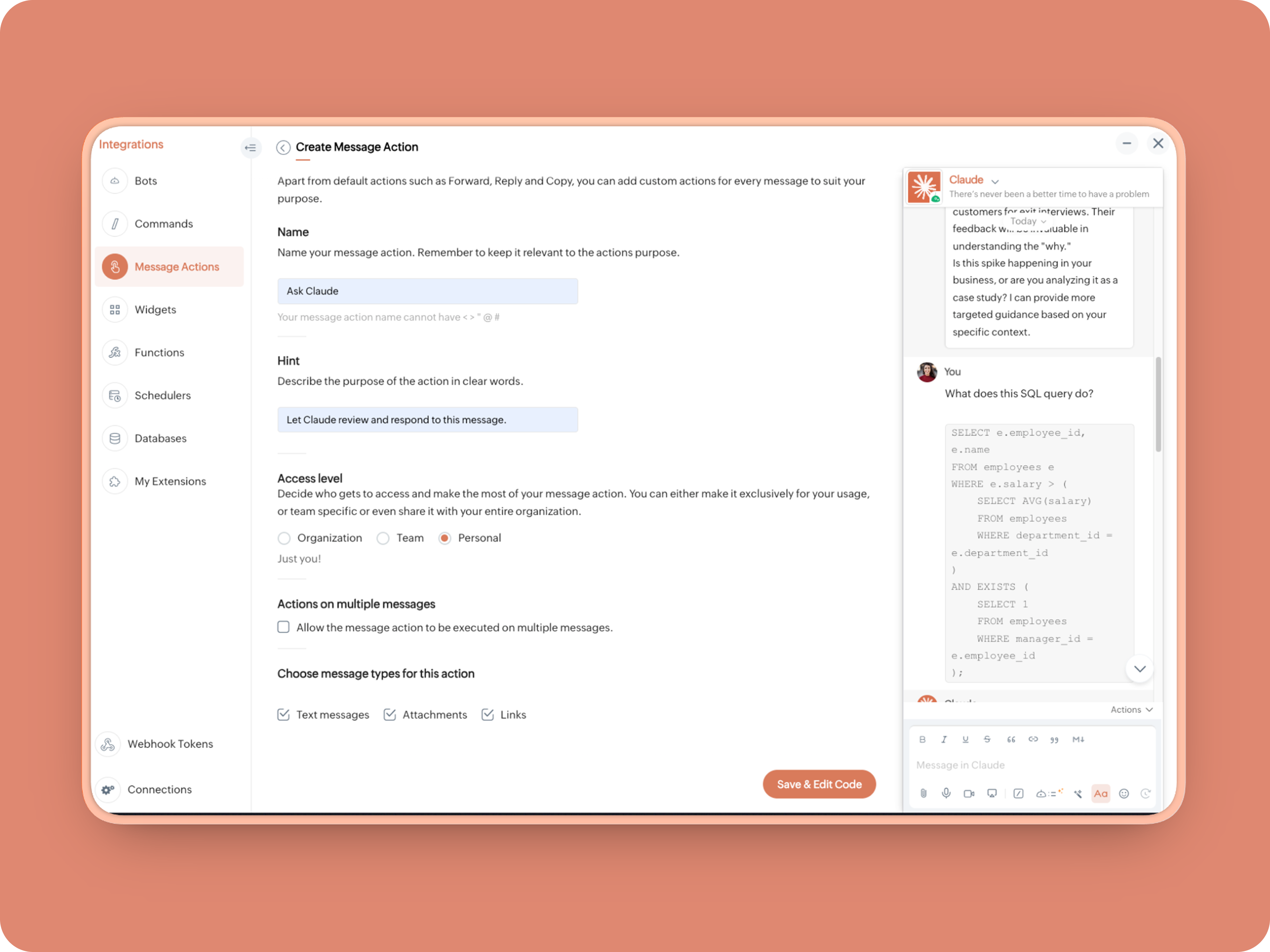


2. Message properties:  Text messages, Attachments, Links
3. Enter code as instructed below:
(Copy the function name and replace it in Line. 14)
  1. info message;
  2. returnForm = false;
  3. if(message.get("type") == "file")
  4. {
  5. fileType = message.get("content").get("file").get("type");
  6. if(fileType != "application/pdf")
  7. {
  8. return {"type":"banner","text":"Only PDF files are supported for this action","status":"failure"};
  9. }
  10. }
  11. inputs = list();
  12. inputs.add({"label":"Choose an action","name":"action","mandatory":true,"type":"radio","options":{{"value":"reviewcode","label":"🔍 Review Code"},{"value":"explainthis","label":"🧠 Make Mindmap"},{"value":"ExplainlikeImnew","label":"✨ Explain like I’m new"},{"value":"Draftreplyforthis","label":"📌 Draft reply for this"}}});
  13. inputs.add({"label":"More instructions","name":"additionalInstructions","placeholder":"You can provide additional instructions if needed.","min_length":"0","max_length":"500","mandatory":false,"type":"textarea"});
  14. return {"type":"form","title":"Ask Claude","hint":"What would you like Claude to do? Choose an action or write your own.","name":"INSERT-FUNCTION-NAME","button_label":"Submit","inputs":inputs,"action":{"type":"invoke.function","name":"INSERT-FUNCTION-NAME"}};
Next, let's create a function and then link it up to the built-Message action to open the form:


Form Function:


1.Go to Functions → Name your function (Eg. askclaude) and add description
2. Select Form function
3. Create
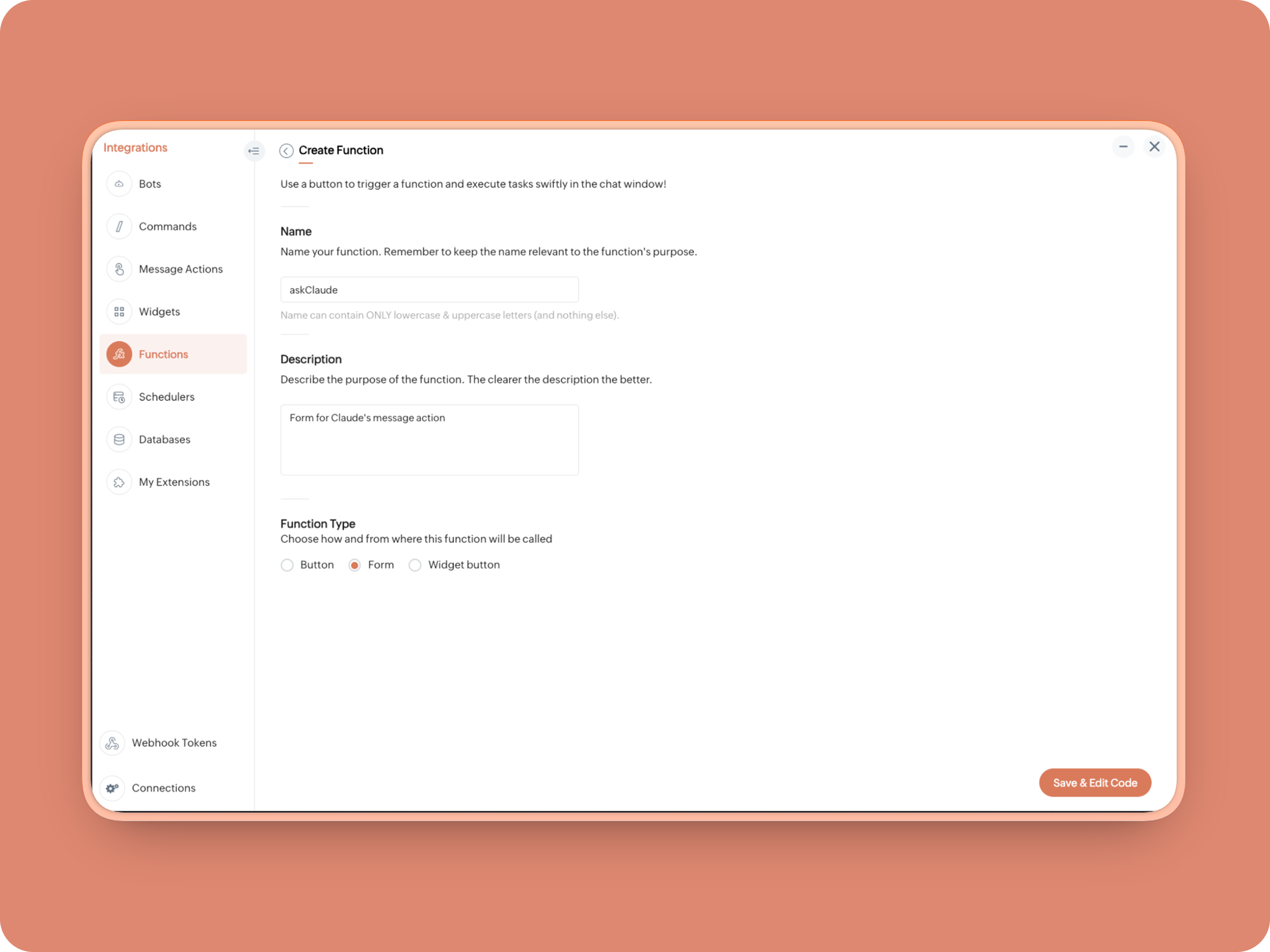


Once created, in the Form Submit Handler, paste this code:
  1. info form;
  2. info message;
  3. // Set up API headers
  4. apiHeaders = Map();
  5. apiHeaders.put("anthropic-version","2023-06-01");
  6. apiHeaders.put("Content-type","application/json");
  7. apiHeaders.put("ENTER-APIKEY-HERE");
  8. // Don't forget your API key!
  9. actionType = form.get("values").get("action").get("value");
  10. promptInstruction = "\"### Instructions ⓘ \nProvide a human-digestible, highly organized response (250-300 characters). Break down your output into bite-sized paragraphs and use bolding to guide the reader's eye. *Strictly avoid tables.* Use plenty of white space and only ### headings for a clean look. \n\n ### Formatting Protocol • \n - Bold: *text* \n - Italic: _text_ \n - Strike: ~text~ \n - Underline: __underline__ \n - Headers: ### Title \n - Quote: \"quote\" \n - Blockquote: > text \n - Bullets: Use • or → for lists \n - Emojis: Use ✨, 🚀, or 💡 to highlight key takeaways \n - Separator: --- \n\n ### and replace all ** to *";
  11. if(actionType == "reviewcode")
  12. {
  13. userPrompt = "🔍 You are a senior engineer. \nReview this code: \n• List bugs or logical errors \n• Note assumptions and risks \n• Suggest improvements \n• Provide corrected code \n• Explain why your version is better\n\n\n" + promptInstruction;
  14. }
  15. else if(actionType == "explainthis")
  16. {
  17. userPrompt = "🧠 You are a systems thinker. \n•Convert the input into a visual flow chart using plain text. \n•Strict Output Rules \n•Output ONLY inside a triple backtick code block \n•Do NOT use Mermaid \n•Do NOT write paragraphs \n•Do NOT explain anything \n•Do NOT use bullet lists outside structure \n•Use ASCII connectors to form a real flow chart \n•Use arrows (→, ↓, ↳, ├──, └──) to show relationships \n•Maintain clear hierarchy and spacing \n•One single root at the top \n•Logical directional flow (top → down) \n•Structure Requirements \n•Root node at top \n•First-level branches below \n•Subpoints indented \n•Cross-links if relevant \n•Clean spacing \n•No duplicated nodes \n•Required Format Example \n•MAIN IDEA \n•Branch 1 -> Subpoint -> Subpoint \n•Branch 2 -> Subpoint ->Subpoint \n•Branch 3 -> Subpoint -> Subpoint\n\n\n" + promptInstruction;
  18. }
  19. else if(actionType == "ExplainlikeImnew")
  20. {
  21. userPrompt = "✨ You are a teacher for beginners. \nExplain: \n• What it is \n• Why it matters \n• How it works (steps) \n• A simple analogy \n• One common beginner mistake\n\n\n" + promptInstruction;
  22. }
  23. else if(actionType == "Draftreplyforthis")
  24. {
  25. userPrompt = "📌 You are a professional responder. \nReply to this message: \n• Directly address main point \n• Ask for clarification if needed \n• Suggest next steps \n• Keep it concise and clear \n• Make sure message in a buisness casual tone, consise, human written.\n\n\n" + promptInstruction;
  26. }
  27. if(form.get("values").get("additionalInstructions").length() > 0)
  28. {
  29. userPrompt = userPrompt + "\n" + form.get("values").get("additionalInstructions");
  30. }
  31. // Check if message is text-only or contains a file
  32. if(message.get("type") == "text" || message.get("type") == "card")
  33. {
  34. // Handle text-only message
  35. userMessageText = message.get("text");
  36. requestPayload = {"max_tokens":1024,"messages":{{"content":userPrompt + "\n\n" + userMessageText,"role":"user"}},"model":"claude-sonnet-4-5-20250929"};
  37. }
  38. else
  39. {
  40. // Handle message with file attachment
  41. uploadedFile = invokeurl
  42. [
  43. url :"https://cliq.zoho" + environment.get("tld") + "/api/v2/files/" + message.get("content").get("file").get("id")
  44. type :GET
  45. connection:"ENTER-CONNECTION-NAME"
  46. ];
  47. info uploadedFile;
  48. base64EncodedFile = zoho.encryption.base64Encode(uploadedFile);
  49. if(message.get("content").containKey("comment"))
  50. {
  51. comment = message.get("content").get("comment");
  52. userPrompt = userPrompt + "\n" + comment;
  53. }
  54. else
  55. {
  56. userPrompt = userPrompt;
  57. }
  58. mediaType = message.get("content").get("file").get("type");
  59. mediaType = "application/pdf";
  60. requestPayload = {"max_tokens":1024,"messages":{{"role":"user","content":{{"type":"document","source":{"type":"base64","media_type":mediaType,"data":base64EncodedFile}},{"type":"text","text":userPrompt}}}},"model":"claude-sonnet-4-5-20250929"};
  61. }
  62. info requestPayload;
  63. // Make API call to Claude
  64. claudeApiResponse = invokeurl
  65. [
  66. url :"https://api.anthropic.com/v1/messages"
  67. type :POST
  68. parameters:requestPayload + ""
  69. headers:apiHeaders
  70. detailed:true
  71. ];
  72. // info claudeApiResponse;
  73. // Extract the actual text response
  74. if(claudeApiResponse.get("responseCode") == 200)
  75. {
  76. responseBody = claudeApiResponse.get("responseText");
  77. parsedResponse = responseBody.toMap();
  78. claudeMessage = parsedResponse.get("content").get(0).get("text").replaceAll("\n\n","\n").remove("---").remove("#");
  79. if(claudeMessage.length() > 4000)
  80. {
  81. claudeMessage = claudeMessage.subString(0,4000) + "...";
  82. }
  83. info "Claude's Response: " + claudeMessage;
  84. }
  85. else
  86. {
  87. responseBody = claudeApiResponse.get("responseText");
  88. parsedResponse = responseBody.toMap();
  89. claudeMessage = "*" + parsedResponse.get("error").get("type") + "* \n" + parsedResponse.get("error").get("message");
  90. info "API Error: " + claudeApiResponse;
  91. }
  92. responseContent = {"text":claudeMessage,"card":{"title":"Claude says...","icon":"https://uxwing.com/wp-content/themes/uxwing/download/brands-and-social-media/claude-ai-icon.png"},"reply_to":message.get("id")};
  93. info responseContent;
  94. info zoho.cliq.postToChat(chat.get("id"),responseContent);
  95. return Map();

When triggered: Opens a form → User selects an action → Adds additional instructions → Submits → Claude processes the selected message


And that's it. You're Claude integration is ready to be used. 


What's Next:

What you built today is just the foundation.

Shape it around how your team actually works. Extend it to turn discussions into action items, review PRs before they’re merged, generate standup updates, extract tasks automatically, or create knowledge snippets from resolved threads.

Start with one real pain point. Solve it well. Then layer more intelligence on top.

The structure is already there. The possibilities are yours.

🔗 Explore Zoho Cliq: Developer Platform
🔗 Explore Anthropic API Docs

Questions? Comments below. 
Looking forward how you'll build and go make it your own. 🚀

    Access your files securely from anywhere

        All-in-one knowledge management and training platform for your employees and customers.


                              Zoho Developer Community


                                                    • Desk Community Learning Series


                                                    • Digest


                                                    • Functions


                                                    • Meetups


                                                    • Kbase


                                                    • Resources


                                                    • Glossary


                                                    • Desk Marketplace


                                                    • MVP Corner


                                                    • Word of the Day


                                                    • Ask the Experts


                                                              • Sticky Posts

                                                              • Automating Real-Time Zoho Bookings Alerts in Zoho Cliq

                                                                Enable your teams to respond in seconds by bridging the gap between booking confirmation and team notification. No sticky notes, no calendar nudges and no follow-up frenzies. For businesses that rely on scheduled appointments, real-time visibility is
                                                              • Cliq Bots - Post message to a bot using the command line!

                                                                If you had read our post on how to post a message to a channel in a simple one-line command, then this sure is a piece of cake for you guys! For those of you, who are reading this for the first time, don't worry! Just read on. This post is all about how
                                                              • Add Claude in Zoho Cliq

                                                                Let’s add a real AI assistant powered by Claude to your workspace this week, that your team can chat with, ask questions, and act on conversations to run AI actions on. This guide walks you through exactly how to do it, step by step, with all the code
                                                              • Automate attendance tracking with Zoho Cliq Developer Platform

                                                                I wish remote work were permanently mandated so we could join work calls from a movie theatre or even while skydiving! But wait, it's time to wake up! The alarm has snoozed twice, and your team has already logged on for the day. Keeping tabs on attendance
                                                              • Customer payment alerts in Zoho Cliq

                                                                For businesses that depend on cash flow, payment updates are essential for operational decision-making and go beyond simple accounting entries. The sales team needs to be notified when invoices are cleared so that upcoming orders can be released. In contrast,


                                                              Manage your brands on social media


                                                                    Zoho TeamInbox Resources


                                                                        Zoho CRM Plus Resources

                                                                          Zoho Books Resources


                                                                            Zoho Subscriptions Resources

                                                                              Zoho Projects Resources


                                                                                Zoho Sprints Resources


                                                                                  Qntrl Resources


                                                                                    Zoho Creator Resources


                                                                                        Zoho CRM Resources

                                                                                        • CRM Community Learning Series

                                                                                          CRM Community Learning Series


                                                                                        • Kaizen

                                                                                          Kaizen

                                                                                        • Functions

                                                                                          Functions

                                                                                        • Meetups

                                                                                          Meetups

                                                                                        • Kbase

                                                                                          Kbase

                                                                                        • Resources

                                                                                          Resources

                                                                                        • Digest

                                                                                          Digest

                                                                                        • CRM Marketplace

                                                                                          CRM Marketplace

                                                                                        • MVP Corner

                                                                                          MVP Corner


                                                                                            Design. Discuss. Deliver.

                                                                                            Create visually engaging stories with Zoho Show.

                                                                                            Get Started Now


                                                                                              Zoho Show Resources

                                                                                                Zoho Writer

                                                                                                Get Started. Write Away!

                                                                                                Writer is a powerful online word processor, designed for collaborative work.

                                                                                                  Zoho CRM コンテンツ


                                                                                                    Nederlandse Hulpbronnen


                                                                                                        ご検討中の方


                                                                                                                • Recent Topics

                                                                                                                • Pasting Images in Zoho Desk ignores cursor location

                                                                                                                  My team has reported an issue which started recently where when we paste an image into a new or existing reply or comment, the pasted image seems to ignore the current cursor location instead paste itself at the last character present in the reply/comment,
                                                                                                                • Enrich your contact and company details automatically using the Data Enrichment topping

                                                                                                                  Greetings, I hope you're all doing well. We're happy to announce the latest topping we've added to Bigin: The Data Enrichment topping, powered by WebAmigo. This topping helps you automatically enhance your contact and company records in Bigin. By leveraging
                                                                                                                • Financial manger

                                                                                                                  why is transaction locking for zoho I Can't closing period
                                                                                                                • API usage

                                                                                                                  My application has bad implementation and code that is resulting in very high API usage. This is my first time experiencing something like this. Does anyone know how I can troubleshoot and fix this?
                                                                                                                • Disabled page

                                                                                                                  Hello, When I try to to run Inventory Valuation Summary and FIFO Cost Lot Tracking reports, I get This page is disabled error. I tried everything in settings, cant find the settings to enable. Help me.
                                                                                                                • Setting defaults for "Find and Merge Duplicate for..."

                                                                                                                  To remove some of the extreme tedium from Zoho's poorly implemented merge function, I would like to set defaults.  Currently I am defaulted to match "ANY" when I would never do that, so I always have to click "ALL". Then it makes me click on several totally irrelevant drop boxes to turn off phone, mobile and other useless match criteria. Is there a way I can set: Match to default as "ALL" Firstname to default to "IS" Lastname to default to "IS" every other match field default to "-NONE-" This will
                                                                                                                • Linux agent 2026_M05 release notes

                                                                                                                  Agent Version: 3.6.5.3 Release date: 28 April, 2026 Major Enhancement: Quick Support feature release. Security improvements and enhancement to in session features.
                                                                                                                • Automated Sales Order Fulfillment Based on Inventory Availability (Allocation / Commitment Modes)

                                                                                                                  Hi everyone, I recently reached out to Zoho Inventory support regarding a workflow challenge and wanted to share both the issue and their response here for visibility. Zoho confirmed: “Zoho Inventory does not currently support automatic notifications
                                                                                                                • Linux agent 2026_M04 release notes

                                                                                                                  Agent Version: 3.6.5.2 Release date: 30 April, 2026 Code refactoring and improvements to function efficiently in minimal hardware environments.
                                                                                                                • Simple Totals on all pages?

                                                                                                                  Hi there. I'm surprised this isn't implemented yet (since most other software has this by default). Can you display a simple total at the bottom of all invoice lists? ie: I click in SALES tab, select INVOICES and on that page please show us a simple total? Yes, I realize I can go the long way around and generate reports and select my date options and select the type of invoices etc...but honestly that shouldn't be necessary when just viewing a list of unpaid invoices and how much total is outstanding.
                                                                                                                • Linux agent 2026_M03 release notes

                                                                                                                  Agent Version: 3.6.5.1 Release date: 27 February, 2026 Bug fixes and performance improvements for optimised session experience.
                                                                                                                • Linux agent 2026_M02 release notes

                                                                                                                  Agent Version: 3.6.5.0 Release date: 26 February, 2026 Major enhancement: File Manager feature release Issue fixing of idle session timing interfering with backend activities.
                                                                                                                • Linux agent 2026_M01 release notes

                                                                                                                  Agent Version: 3.6.4.8 Release date: 13 February, 2026 Optimised the unattended agent uninstallation process to properly cleanup residual files and complete uninstallation process. Fixed issues with CTRL+ALT+DEL command not functioning properly in some
                                                                                                                • Using API for multiple organizations

                                                                                                                  I am busy building an app to load data from a retailer into Zoho Books. We are planning on selling the app to multiple organizations that use this retailer. Is there a way to get a single oauth app to access multiple organizations? From what I can find
                                                                                                                • MacOS agent 2026_M04 release notes

                                                                                                                  Agent Version: 3.120.0 Release date: 23 April, 2026 Retry mechanism for end users to enable Accessibility and Screen Share permissions to successfully join remote sessions. Agent stickiness on multiple desktops to avoid confusion. Improvements to audio
                                                                                                                • MacOS agent 2026_M03 release notes

                                                                                                                  Agent Version: 3.117.0 Release date: 02 March, 2026 Bug fixes and performance improvements for optimised session experience.
                                                                                                                • MacOS agent 2026_M02 release notes

                                                                                                                  Agent Version: 3.116.0 Release date: 23 February, 2026 Major enhancement: File Manager feature release Minor enhancement: Improved peer to peer connectivity across various network conditions. Minor enhancement: Improvements to Elevate to Admin mode
                                                                                                                • MacOS agent 2026_M01 release notes

                                                                                                                  Agent Version: 3.111.0 Release date: 11 February, 2026 Major Enhancement: Quick Support feature release. Upgrades to monitoring protocols for analysing performance. Issue fixing of idle session timing interfering with backend activities.
                                                                                                                • Account Unblock Request

                                                                                                                  Dear Sir/Madam, I hope you are doing well. I noticed that my account has been blocked for violation of the usage policy which I believe comes from it being associated with sending spam. I have since then removed the old keys which were compromised in
                                                                                                                • Kaizen #242 Enabling In-Context Order Creation from Deals Using SlyteUI

                                                                                                                  Hello everyone! Welcome to another interesting Kaizen post. Today’s spotlight is on SlyteUI, the new UI builder designed to create powerful, intuitive user interfaces in minutes. Built for speed and simplicity, SlyteUI empowers teams to deliver high-impact
                                                                                                                • Auto-sync field of lookup value

                                                                                                                  This feature has been requested many times in the discussion Field of Lookup Announcement and this post aims to track it separately. At the moment the value of a 'field of lookup' is a snapshot but once the parent lookup field is updated the values diverge.
                                                                                                                • CRM gets location smart with the all new Map View: visualize records, locate records within any radius, and more

                                                                                                                  Hello all, We've introduced a new way to work with location data in Zoho CRM: the Map View. Instead of scrolling through endless lists, your records now appear as pins on a map. Built on top of the all-new address field and powered by Mappls (MapMyIndia),
                                                                                                                • Can't access google from toppings menu

                                                                                                                  So... When I click the manage button in toppings, nothing happens. it won't let me access the settings.
                                                                                                                • Best sales insights for target accounts?

                                                                                                                  Question for all the sales power-users out there: I would like to gain insights from Zoho CRM for a rotating list of target accounts. Each Outside Salesperson has 5 target accounts, and they can change these targets quarterly with management approval.
                                                                                                                • Emails Disappearing From Inbox

                                                                                                                  I am experiencing the unnerving problem of having some of the messages in my inbox just disappear.  It seems to happen to messages that have been in there for longer than a certain amount of time (not sure how long exactly). They are usually messages that I have flagged and know I need to act on, but have not gotten around to doing so yet.  I leave them in my inbox so I will see them and be reminded that I still need to do something about them, but at least twice now I have opened my inbox and found
                                                                                                                • Cadence not stopping on reply (in some cases) – anyone else?

                                                                                                                  Hi everyone, we’ve noticed that in a few cases, Cadences don’t stop even though the contact replied (setting “stop on reply” is active). It works fine most of the time, but occasionally the reply is visible in CRM without stopping the Cadence. Our assumption
                                                                                                                • Issue with Resume Parsing and Storage Limit in Zoho Recruit

                                                                                                                  Hello Team, We are currently facing an issue with resume parsing in Zoho Recruit. While parsing resumes, we are receiving a message indicating that the storage is full. We would like to delete multiple old resumes from the system to free up storage space.
                                                                                                                • BUG: Related List Buttons with Client Script action now erroring

                                                                                                                  There appears to have been a bug introduced over the last few days with Related List buttons that invoke a Client Script action. Button configuration: Configured Client Script: Results: The default loader is presented at the top of the page, and an error
                                                                                                                • SalesIQ Email Delivery Issues to Microsoft

                                                                                                                  Is anyone else having delivery issues to Hotmail, Outlook, and Live inboxes when sending transcripts and replies via email from SalesIQ? We’ve detected that emails sent from SalesIQ to these accounts aren't arriving—they don’t even bounce back; they simply
                                                                                                                • Introducing the revamped What's New page

                                                                                                                  Hello everyone! We're happy to announce that Zoho Campaigns' What's New page has undergone a complete revamp. We've bid the old page adieu after a long time and have introduced a new, sleeker-looking page. Without further ado, let's dive into the main
                                                                                                                • Multiple Pipelines

                                                                                                                  Is it possible to create multiple candidate pipelines?
                                                                                                                • Insert Template not inserting

                                                                                                                  I have been using the "Insert Template" feature for years and I use it every single working day. Yesterday it was working fine. Today, on two different browsers (Chrome and Edge), I can select "Insert Template", select the template I want to insert, but
                                                                                                                • Default ticket template in helpcenter

                                                                                                                  Hello, I have a web form and a ticket template created. How can I make that my default ticket template? If an user clicks New ticket or create a ticket, I want that template to be the default one. Thank you for the time and info.
                                                                                                                • Zoho Books bill pay option not available with zoho one

                                                                                                                  Why isn't Zoho Books bill pay add-on not available for Zoho one customers not even as a purchasable option. I think this is very inconvenient for companies wanting to use this feature all in one system
                                                                                                                • Access images from form submission in power automate

                                                                                                                  Images from form submission show up as links in power automate. How do I access the image data?
                                                                                                                • Add personal Facebook to Zoho Social

                                                                                                                  Hi. is there any way i can post to my business and personal Facebook and Instagram at the same time when I make or schedule a post?
                                                                                                                • Need help to evaluate if Commerce is good for me

                                                                                                                  Hi, I just want to quickly check if Zoho Commerce can fulfill my needs. Here is what I am looking for: - Multi-vendor plateform : We will be 3-4 different farms that will offer similar products (ex. tomatoes) to few selected customers (retaurants). All
                                                                                                                • Smart Feature Compatibility Indicators for CRM Field

                                                                                                                  Zoho CRM offers a wide range of field types and advanced customization options. However, several field types have feature-specific limitations that are currently documented only in help articles. For example, while configuring a Rich Text field, admins
                                                                                                                • Ask the Experts: A Live Q&A Session

                                                                                                                  Session Closed We've locked this post as the session has ended. We'll see you again in the next session! We’re back with another exciting edition of the Ask the Experts series, this time exclusively for our Zoho Recruit users from the USA & Canada regions!
                                                                                                                • T&C acceptance gate before estimate Accept, with audit trail

                                                                                                                  We had to settle a Florida small-claims case in 2025 because we couldn't prove our customer was bound to the venue clause in our Terms & Conditions. The estimate footer mentioned the T&Cs, and Zoho Books logged the customer's IP and timestamp when they
                                                                                                                • Next Page