Add Comprehensive Accessibility Features to Zoho Writer
Hello Zoho Writer Team,
We hope you are doing well.
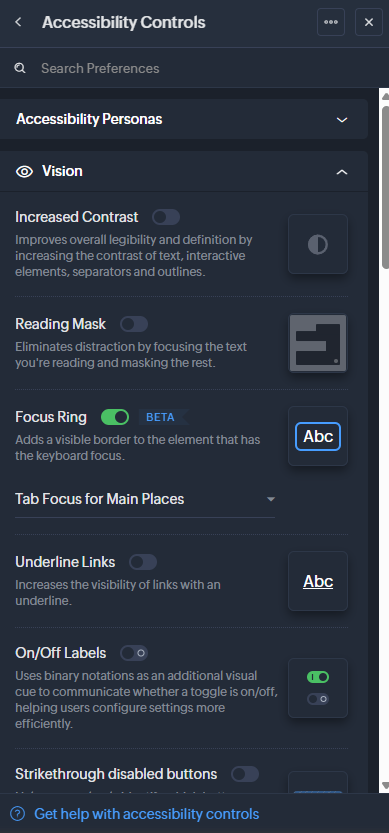
We would like to submit a feature request to enhance Zoho Writer with a full set of accessibility tools, similar to the accessibility options already available in the Zoho Desk agent interface.
🚧 Current Limitation
Zoho Writer currently lacks built-in accessibility settings. Unlike the Zoho Desk agent interface, which offers features like contrast settings, visual focus indicators, zoom controls, and keyboard navigation, Zoho Writer provides very limited support for users with accessibility needs.
As a result, users with visual, cognitive, or motor challenges may find it difficult to work efficiently in Zoho Writer, which affects usability, productivity, and inclusiveness.
✅ Requested Enhancement
We request the addition of a dedicated Accessibility Panel within Zoho Writer offering tools such as:
High Contrast Mode
Reading Mask
Focus Ring / Focus Highlight
Underline Links
Adjustable Zoom Level
Adjustable Display Font Size
Enhanced Screen Reader Compatibility
“Skip to Main Content” option
Full Keyboard Navigation & Shortcuts
Page Navigator
Display Density Options (Compact / Comfortable)
Reduced Motion Mode / Disable Animations
Emphasize Active Area
Custom Cursor Options
Custom Scrollbar Options
Something like zoho desk have:
💼 Use Case & Importance
This enhancement goes beyond usability — in many regions, including Israel, digital accessibility is a legal requirement. Organizations like ours must ensure the tools we use meet accessibility standards and support inclusive work environments. Adding these features would make Zoho Writer more accessible, compliant, and valuable for all users.
Thank you for your attention to this important request. We truly appreciate Zoho’s commitment to product improvement and would be happy to share additional examples or discuss accessibility needs further if helpful.
Warm regards,
Ram