Enhancements in Zoho Survey Integration, Zoho CRM Plugin for Microsoft Outlook and more!
We are happy to present to you details of the latest improvements made in Zoho CRM. They include enhancements in Zoho Survey Integration with Zoho CRM, Zoho CRM Plugin for Microsoft Outlook, Webform Integration and Zoho PhoneBridge Integration. Read on to know what they are!
Enhancements in Zoho Survey integration with Zoho CRM
Are you posing survey questions to a customer over a phone call? In that case, you may now quickly want to attend the survey from Zoho CRM on behalf of the customer as you speak to them!
Zoho Survey integration with Zoho CRM brings to you a new feature called Attend Survey , which is present as a link in the Zoho Survey Related List . Using this, a CRM user can take a survey on behalf of a customer.



Enhancements in Zoho Survey integration with Zoho CRM
Are you posing survey questions to a customer over a phone call? In that case, you may now quickly want to attend the survey from Zoho CRM on behalf of the customer as you speak to them!
Zoho Survey integration with Zoho CRM brings to you a new feature called Attend Survey , which is present as a link in the Zoho Survey Related List . Using this, a CRM user can take a survey on behalf of a customer.
These surveys are indicated as
Attended by User in the contact’s
Zoho Survey Related List.
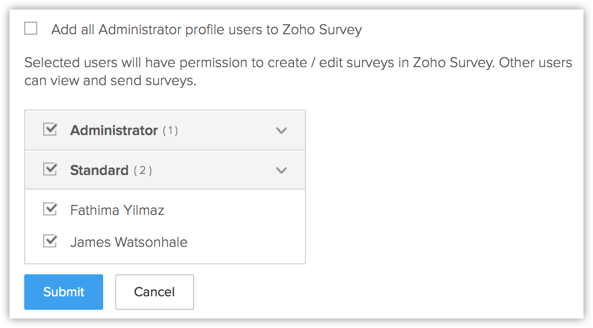
Besides this, there is now an option for you to automatically push CRM users to your Survey account while configuring the integration. The users thus added will be able to create or edit surveys in Zoho Survey.
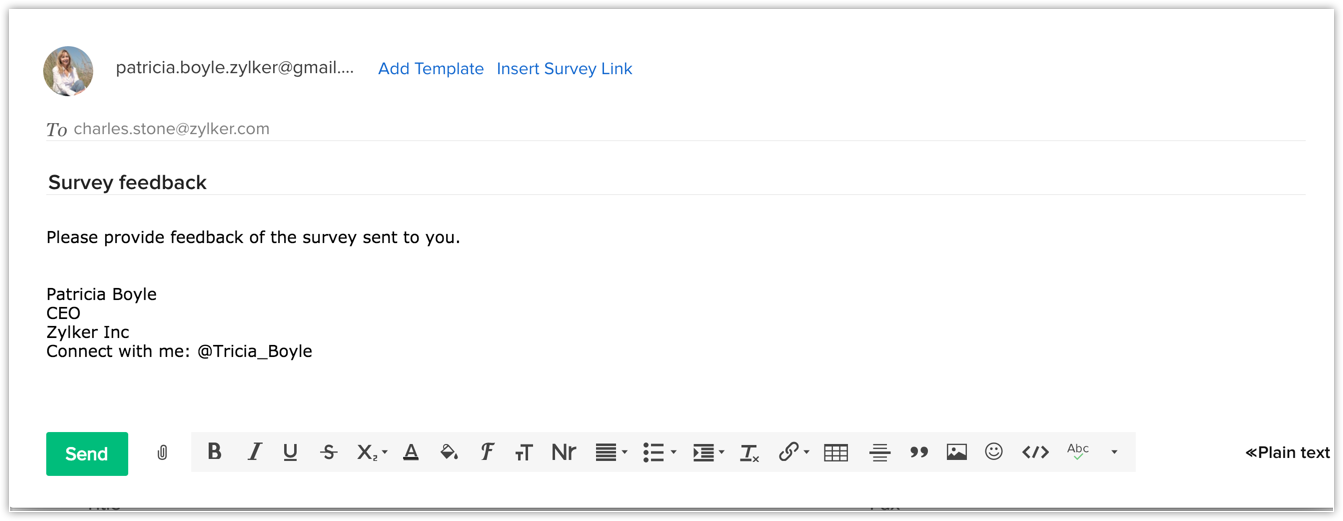
Also, you can now directly insert a survey while composing an email to a customer. Even if you have not prepared a survey email template, you can simply click the
Survey icon to directly select and send a survey to a customer from the
Compose Email popup.
 See also:
See also:
Attend Survey On Behalf of a Customer
Enhancements in Zoho CRM Plugin for Microsoft Outlook
The Zoho CRM Plugin for Microsoft Outlook (for Windows Edition) has a couple of updates in store for you.
While synchronizing contacts, tasks or events, you may want to skip a few of records and then sync the rest. If you are initiating synchronization several times, you have to manually skip the records every time you run the sync. But not anymore. We have introduced an enhancement here to save you the trouble.
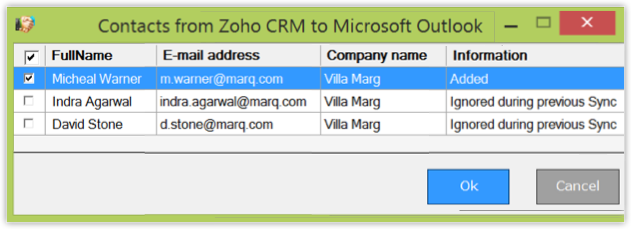
Records that were not added in a previous synchronization will now be marked as Ignored during previous sync and will automatically be unchecked. This way you easily know which records were not synchronized previously and you don’t have to uncheck them manually every time you sync records. If you choose to add them too, you can simply select them and proceed for sync.
Enhancements in Zoho CRM Plugin for Microsoft Outlook
The Zoho CRM Plugin for Microsoft Outlook (for Windows Edition) has a couple of updates in store for you.
While synchronizing contacts, tasks or events, you may want to skip a few of records and then sync the rest. If you are initiating synchronization several times, you have to manually skip the records every time you run the sync. But not anymore. We have introduced an enhancement here to save you the trouble.
Records that were not added in a previous synchronization will now be marked as Ignored during previous sync and will automatically be unchecked. This way you easily know which records were not synchronized previously and you don’t have to uncheck them manually every time you sync records. If you choose to add them too, you can simply select them and proceed for sync.
Besides this, Contacts/Tasks/Calendar Synchronization details are now presented to you in three categories –
To Add,
To Update and
To Delete for better clarity.
Improved UI for Embedding Options in Webform Integration
The user interface for web form embedding options has been improved for ease of use. You can simply select from Source Code, Embed or iFrame format and paste the code on your website. If required you can also choose to track Google Adwords information of the incoming lead/contact via web form.
The user interface for web form embedding options has been improved for ease of use. You can simply select from Source Code, Embed or iFrame format and paste the code on your website. If required you can also choose to track Google Adwords information of the incoming lead/contact via web form.
See also:
Use Webform Code to Embed
New User Interface for Zoho PhoneBridge Integrations
The user interface for all integrations in Zoho Phonebridge has been enhanced for better ease of use. While the looks of the product have been improved, the functionalities remain the same. Do take a look at the change here.
Use Webform Code to Embed
New User Interface for Zoho PhoneBridge Integrations
The user interface for all integrations in Zoho Phonebridge has been enhanced for better ease of use. While the looks of the product have been improved, the functionalities remain the same. Do take a look at the change here.
Do check out these changes right away and let us know what you think.
Regards
Vaagdevi Ravishankar