Assign records based on user roles in an organization.
Hello Enterprise Community,
I am super excited to share a new addition to the assignment rules in Zoho CRM.
When setting assignment rules, administrators can choose to automate all records or only records which match specific criteria. The criteria can be based either on fields in the record or the user associated with the record.
For example, an admin could automate:
Records with Country as Canada to be assigned to Kate (Field-based criteria for assignment)
and/or.
Records created by Harriet to be (re)assigned to Evelyn. (User-based criteria for assignment)
Until now, when defining user-based criteria for assignment, the available criteria qualifiers have been: is, isn't, is empty, and is not empty.
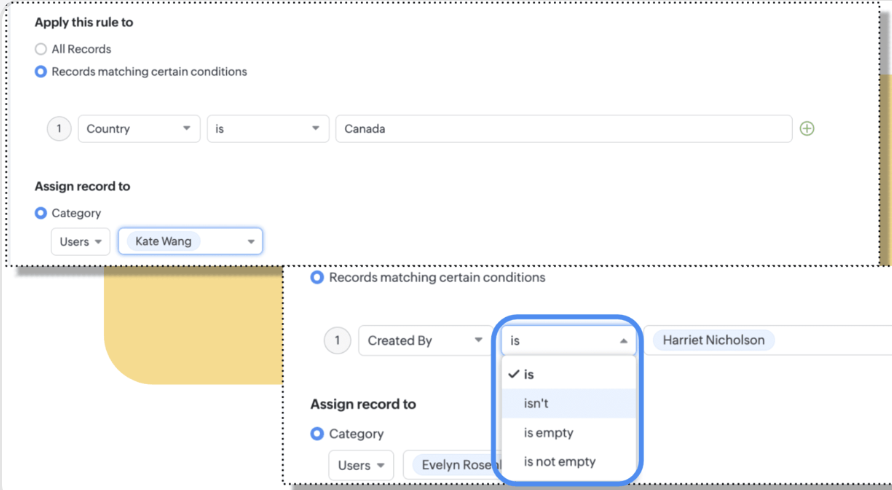
In this update, we are introducing two more qualifiers to assign records based on user roles: belongs to Role and does not belong to Role. From now on, administrators will be able to assign records to users in certain roles or to users who are not in certain roles.
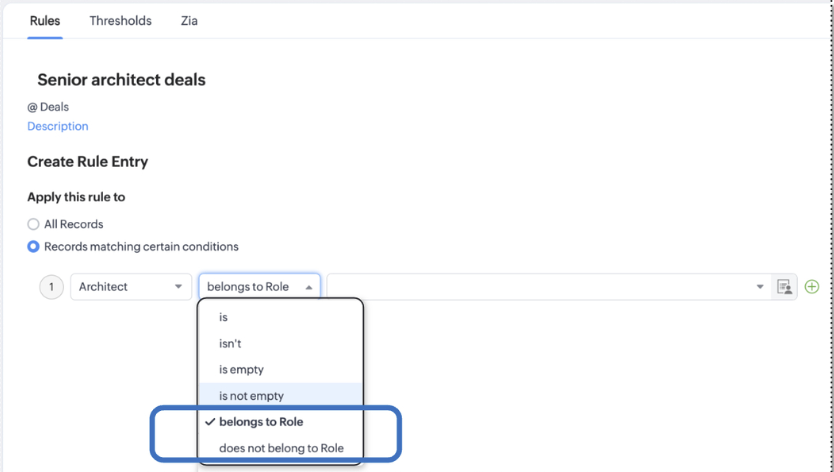
Let's take an example:
Zylker Architecture is an architecture firm. They offer various service tiers for a wide range of customers. They assign their senior architects to customers looking for a luxury look for their homes. This can be automated in Zoho CRM by applying the rule to deals that have any architect in a senior role as the value in a User type field called "Architect".
This role-based user criteria will enable automated assignment to be even more specific and accurate. This enhancement is now available for all users in all DCs.
Regards
Zoho Enterprise Team.