Automation#32:Auto Add New Portal Users to the Help Center User Groups

Automation#32:Auto Add New Portal Users to the Help Center User Groups

Hello Everyone,
Introducing a custom function that automates the process of adding new portal users to Help Center user groups, making user management effortless!
By default, Zoho Desk allows you to assign new portal users to groups manually. But with this custom function, the process is completely automated, ensuring seamless categorization.

Why User Groups?

Zylker Techfix was dedicated to helping customers through their Help Center. While they actively supported users, there was one challenge: everyone received the announcements, irrespective of their requirements.
Zylker Techfix wanted a smarter way to engage their users by sending targeted announcements based on individual interests, such as gadgets, office equipment, and operations.
To make this happen, they created user groups and assigned new users accordingly. But manually adding users to the right groups was time-consuming.
So, they automated the process! With a custom function, they streamlined operations, ensuring every new portal user was automatically assigned to the right Help Center user group. More relevance, better engagement, zero manual effort.
Let’s walk through the steps to incorporate this custom function into your workflow.

Prerequisites

1. Create a connection
  1.1 Go to Setup(S) and choose Connections under Developer Space.
  1.2 Click Create Connection.
  1.3 Select Zoho Desk under Default Services.
  1.4 Set the connection name as zohodesk.
  1.5 Disable the toggle for User Credentials of Login User. 
  1.6 Under Scope, choose the below scope values:
Desk.contacts.READ
Desk.contacts.UPDATE
  1.7 Click Create and Connect.
  1.8 Click Connect and click Accept.
Connection is created successfully.

Create a Workflow Rule

1. Go to Setup, choose Workflows under Automation. 
2. Under Workflows, click Create Rule.

In the Basic Information section,
3. Select Contacts from the drop-down menu under Module.
4. Enter a Rule Name and Description for the rule.
5. If you want to activate the rule right away, select the Active checkbox. Else, create the rule and activate it later.
6. Click Next

In the Execute on section, follow these steps:
7. Select Field Update. Select field isPortalUser. 
8. Click Next.
9. In the Criteria section, add isPortalUser is and select the checkbox. click Next. 
10. In the Actions section, click the + icon and select New next to Custom Functions.
11. Enter a Name and Description for the custom function. Choose Contacts under Module.
12. Under Argument Mapping, give a desired Method Name. Map the arguments as below:
      12.1 In the Argument Name field, type contactId and select Contact ID under the Contacts Section.
13. In the script window, insert the Custom Function given below:
  1. // ---------------User inputs------------------------------------------
  2. deskUrl = "https://desk.zoho.com/api/v1/"; // replace based on user dc
  3. groupId = "<<GROUP ID>>"; // replace the group id in your desk portal
  4. //---------------------------------
  5. logs = Map();
  6. try 
  7. {
  8. getContactStatus = invokeurl
  9. [
  10. url :deskUrl + "contacts/" + contactId + "/helpCenters"
  11. type :GET
  12. connection:"zohodesk"
  13. ];
  14. contactUserId = getContactStatus.get("data").get(0).get("userId");
  15. if(contactUserId != null)
  16. {
  17. addUserToGroup = invokeurl
  18. [
  19. url : deskUrl + "groups/" + groupId + "/users/add"
  20. type :POST
  21. parameters:"" + {"users":{{"id":contactUserId}}}
  22. headers:{"Content-Type":"application/json"}
  23. detailed:true
  24. connection:"zohodesk"
  25. ];
  26. info "addUserToGroup" + addUserToGroup;
  27. }
  28. }
  29. catch (errorInfo)
  30. {
  31. logs.insert("errorInfo":errorInfo);
  32. }
  33. info "logs: \n" + logs;
  34. if(logs.containKey("errorInfo"))
  35. {
  36. throws "Error happen in the CF execution";
  37. }
User Inputs
a. In Line 2, replace .com in the URL based on your DC. 
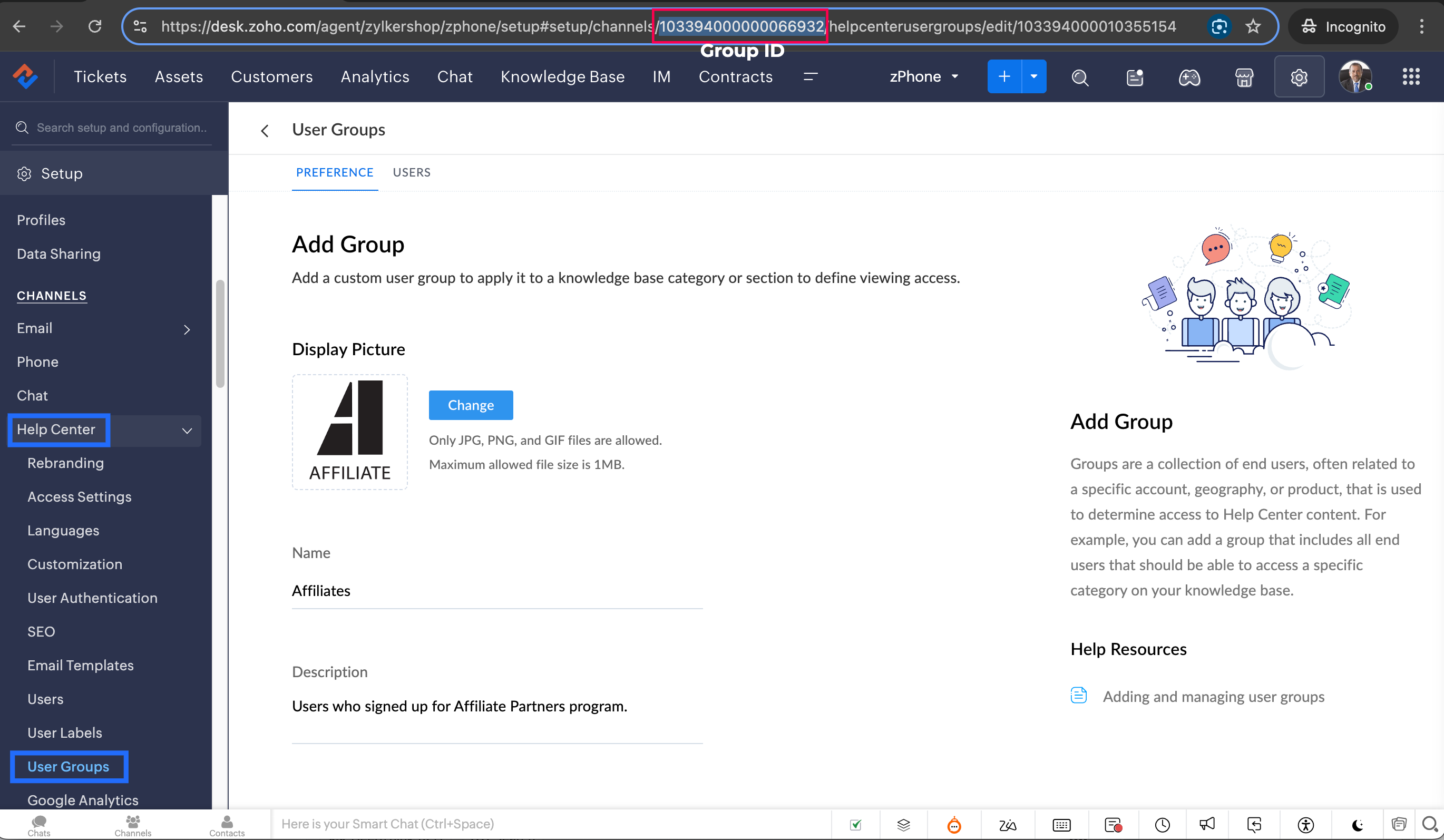
b. In Line 3, enter the group ID to which you would like to add your new portal users. To access group ID, go to Setup >> Help Center >> Select the Department having your preferred User group >> choose User Groups on the left panel >> Select the user group >> The Id in the address bar is the required Group ID. 
Notes
Note: Configure the Workflow for the contacts module in the respective department where you want to add portal users to be added to the User group. 
14. Click Save to save the custom function.
15. Click Save again to save the workflow.

Share with us how this custom function helps you in your operations! Drop a comment below or reach out to us at support@zohodesk.com, we’re just an email away!

Meet you in the next post!
Regards,
Lydia | Zoho Desk

    Access your files securely from anywhere

        All-in-one knowledge management and training platform for your employees and customers.


                              Zoho Developer Community


                                                    • Desk Community Learning Series


                                                    • Digest


                                                    • Functions


                                                    • Meetups


                                                    • Kbase


                                                    • Resources


                                                    • Glossary


                                                    • Desk Marketplace


                                                    • MVP Corner


                                                    • Word of the Day


                                                    • Ask the Experts


                                                              • Sticky Posts

                                                              • Register for Zoho Desk Beta Community

                                                                With the start of the year, we have decided to take a small step in making the life of our customers a little easier. We now have easy access to all our upcoming features and a faster way to request for beta access. We open betas for some of our features
                                                              • Share your Zoho Desk story with us!

                                                                Tell us how you use Zoho Desk for your business and inspire others with your story. Be it a simple workflow rule that helps you navigate complex processes or a macro that saves your team a lot of time; share it here and help the community learn and grow with shared knowledge. 
                                                              • Tip #1: Learn to pick the right channels

                                                                Mail, live chat, telephony, social media, web forms—there are so many support channels out there. Trying to pick the right channels to offer your customers can get pretty confusing. Emails are most useful when the customer wants to put things on record. However, escalated or complicated issues should not be resolved over email because it's slow and impersonal.  When you need immediate responses, live chat is more suitable. It's also quick and convenient, so it's the go-to channel for small issues. 
                                                              • Welcome to Zoho Desk Community - Say hello here!

                                                                Hello everyone! Though we have been here for a while, it’s time to formally establish the Zoho Desk Community; we’re really happy to have you all here! This can be the place where you take a moment to introduce yourself to the rest of the community. We’d love to hear all about you, what you do, what company or industry you work for, how you use Zoho Desk and anything else that you will like to share! Here’s a little about me. I am Chinmayee. I have been associated with Zoho since 2014. I joined here
                                                              • Webinar 1: Blueprint for Customer Service

                                                                With the launch of a host of new features in Zoho Desk, we thought it’ll be great to have a few webinars to help our customers make the most of them. We’re starting off with our most talked about feature, Blueprint in Zoho Desk. You can register for the Blueprint webinar here: The webinar will be delivered by our in-house product experts. This is a good opportunity to ask questions to our experts and understand how Blueprint can help you automate your service processes. We look forward to seeing


                                                              Manage your brands on social media


                                                                    Zoho TeamInbox Resources


                                                                        Zoho CRM Plus Resources

                                                                          Zoho Books Resources


                                                                            Zoho Subscriptions Resources

                                                                              Zoho Projects Resources


                                                                                Zoho Sprints Resources


                                                                                  Qntrl Resources


                                                                                    Zoho Creator Resources


                                                                                        Zoho CRM Resources

                                                                                        • CRM Community Learning Series

                                                                                          CRM Community Learning Series


                                                                                        • Kaizen

                                                                                          Kaizen

                                                                                        • Functions

                                                                                          Functions

                                                                                        • Meetups

                                                                                          Meetups

                                                                                        • Kbase

                                                                                          Kbase

                                                                                        • Resources

                                                                                          Resources

                                                                                        • Digest

                                                                                          Digest

                                                                                        • CRM Marketplace

                                                                                          CRM Marketplace

                                                                                        • MVP Corner

                                                                                          MVP Corner


                                                                                            Design. Discuss. Deliver.

                                                                                            Create visually engaging stories with Zoho Show.

                                                                                            Get Started Now


                                                                                              Zoho Show Resources

                                                                                                Zoho Writer

                                                                                                Get Started. Write Away!

                                                                                                Writer is a powerful online word processor, designed for collaborative work.

                                                                                                  Zoho CRM コンテンツ


                                                                                                    Nederlandse Hulpbronnen


                                                                                                        ご検討中の方


                                                                                                                • Recent Topics

                                                                                                                • Remove or hide default views

                                                                                                                  I'm looking to only have the views pertinent to my organization. Is there a way to show only my custom views (or separate them to a different area or something)? If not, this should be a feature as switching from Zendesk we had this option...
                                                                                                                • Add more than 7 sender addresses in campaigns

                                                                                                                  I need to add at least 15 sender email addresses but am currently limited to 7. Please can you increase. Thank you
                                                                                                                • Email sent to Hotmail arrives to Spam

                                                                                                                  I'm sending email tests to my Hotmail account and they arrives to the Spam folder all the time. My domain has been verified correctly. How can I fix it?
                                                                                                                • Hotmail

                                                                                                                  I am sending an email to a hotmail, and this guy does not receive the email, either in his SPAM nor inbox. Can you help me? thanks!
                                                                                                                • Let’s Talk Recruit: Your pipeline is full. So why aren’t roles closing?

                                                                                                                  Welcome back to Let’s Talk Recruit, where we break down hiring workflows into simple, actionable insights for recruiters. The focus this month is on what slows down your pipeline even when everything looks like it’s working. Picture this. You log in to
                                                                                                                • Mirror Component in Zoho CRM: Access real-time related data without leaving your record

                                                                                                                  Hi everyone, This feature is now available for the JP, CA, SA, UAE, and AU DCs. We're excited to bring to you Zoho CRM's mirror component, which presents relevant data on a record's details page and keeps everything users need in one place without having
                                                                                                                • Search through email contents

                                                                                                                  Is there a way to search through the email history of a lead? Meaning if among the 50 emails to a lead about different topics I want to find all the ones with the word "pizza" in the body of the email, is that possible? Thanks for your help, Hanan
                                                                                                                • Marketing Tip #9: Track your traffic sources

                                                                                                                  Not all marketing channels work equally well. Knowing whether your visitors come from Google, Instagram, or email helps you focus on what actually drives sales. Try this today: Check your Zoho Commerce reports or connect Zoho PageSense to see your top
                                                                                                                • It Really Can Be This Simple

                                                                                                                  Let's be honest.... Running a business already comes with enough moving parts. Invoices, payments, follow-ups, reminders, tracking who paid and who disappeared. It can slowly turn into a full-time admin job on its own, especially when you are a Sole Proprietor,
                                                                                                                • Huge confusion in zoho crm and zoho analytics

                                                                                                                  Context => We have reporting based hierarchy in zoho crm and basically there will be one sales head and couple sales managers and 10 pre sales excutives divided between 2 sales managers we have maintained that in zoho crm and there is complex reporting
                                                                                                                • Zoho Books | Product updates | May 2026

                                                                                                                  Hello users, We're back with the latest updates and enhancements we've rolled out in Zoho Books. From sales tax automation to scanning receipts for free, explore the updates designed to upgrade your bookkeeping experience. Sales Tax Automation [US & Canada
                                                                                                                • Update: [Issue fixed] Temporary access issue on Android and iOS devices

                                                                                                                  Hello, Zoho Sheet users! We're aware that some of you are currently unable to open spreadsheet files from your Android and iOS devices. We extend our sincere apologies for the inconvenience caused. We're working on fixing the issue with highest priority
                                                                                                                • Action Required: Migrate Your SQL Server Connection

                                                                                                                  Dear Users, Following our earlier communication on the upcoming Zoho Analytics security updates affecting Microsoft SQL Server connections, we have revised our recommended approach. The previously shared cipher suite configuration is no longer the recommended
                                                                                                                • Currency Change for Companies

                                                                                                                  Hello FSM Team, We would like your assistance in changing the company currency for our UAE organization from AED to USD. Currently, all customers and users are configured with AED currency settings, and we would like to standardize the organization currency
                                                                                                                • Accrual Data - Zoho Books API

                                                                                                                  Hi Team, When we integrate Zoho Books with Zoho Analytics, we usually receive a consolidated dataset called “Accrual Transactions,” which contains all types of transaction data. Could you please confirm whether it is possible to retrieve this same data
                                                                                                                • Bank Fees - Allow User to Choose Expense Account

                                                                                                                  Bank fees from Customer Payments can only be debited against the system Bank Fees account due to hard-coding. The user should be able to select which expense account those fees are debited against. The use case is pretty straightforward. A business like
                                                                                                                • Showing Cost Price and Profit Margin in PDF

                                                                                                                  Hi there, We use two different types of quotes in our company. One is a version for our clients that does not include cost or profit margin information, and the other is for our internal team that includes profit margin and cost. We are running into an
                                                                                                                • Side bar menu

                                                                                                                  It would be great if you could stop the auto collapse of expanded menus when selecting a different module. It would save a lot of mouse clicks for a lot of users that frequently switch between sales & purchases as we do, it's easier to collapse them manually when not required !
                                                                                                                • Syncing zoho books into zoho crm

                                                                                                                  I was wondering how I can use zoho books in crm as I have been using them separately and would like to sync the two. Is this possible and if so, how? Thanks
                                                                                                                • Remove horizontal scroll bar

                                                                                                                  Is there any way to remove or hide the horizontal scroll bars on the iframe reports? I removed columns, but it still stays there.
                                                                                                                • Rich Text Type Format for Notes Field

                                                                                                                  Has it been discussed or is there a way to insert a table in the notes field? We sometimes receive information in a table format, and it would be beneficial to have it in the same format as a note on a record. Moderation Update (12-May-26): We are working
                                                                                                                • Multiple Blueprints on different fields at the same time.

                                                                                                                  It looks only 1 Blueprint can run at the same time, it makes sense for many Blueprints on the same field (Eg. Stage). But what about multiple Blueprints on "different" fields? the multiple options must be available. (Eg. Stage, Documents Status, Contract
                                                                                                                • Updating Sales orders on hold

                                                                                                                  Surely updating irrelevant fields such as shipping date should be allowed when sales orders are awaiting back orders? Maybe the PO is going to be late arriving so we have to change the shipment date of the Sales order ! Not even allowed through the api - {"code":36014,"message":"Sales orders that have been shipped or on hold cannot be updated."}
                                                                                                                • sales IQ issue on website

                                                                                                                  i integrated the zoho sales IQ code on the website but it is comming in distroted form i am sharing the screenshot below the website is bulit in wix platform
                                                                                                                • Contract to payment flow

                                                                                                                  Hi everyone, I’m trying to set up a contract-to-payment flow and want to avoid duplicating invoices or customers in Zoho Books. The flow should be: contract generated from CRM, sent via Zoho Sign, client signs, deposit is paid, and the invoice should
                                                                                                                • Linking Contacts to Other Modules

                                                                                                                  In creator, I've got a Contacts page with a lookup that searches Suppliers. Is there a way to have the contacts attached to the Suppliers modular as a list automatically, similar to the CRM version? It goes the other way. If I entered an Employee in the
                                                                                                                • Multiple Pipelines

                                                                                                                  Is it possible to create multiple candidate pipelines?
                                                                                                                • Automation #7 - Auto-update Email Content to a Ticket

                                                                                                                  This is a monthly series where we pick some common use cases that have been either discussed or most asked about in our community and explain how they can be achieved using one of the automation capabilities in Zoho Desk. Email is one of the most commonly
                                                                                                                • Introducing Custom Columns in Forecasts in Zoho CRM

                                                                                                                  Release Plan: Enabling in Phased Manner, Enabled for JP DC Hello all, Forecasts in Zoho CRM help sales representatives, managers, and business stakeholders evaluate performance and plan future sales activities. While standard metrics such as Target, Achieved
                                                                                                                • How would you handle Warranty replacement parts or items in zoho inventory

                                                                                                                  Hi everyone, I'm working on setting up zoho inventory for our distribution business.  We handle the service for our customers and will replace items that malfunction under a warranty basis.  Does anyone else do this and how do you set it up in inventory?  Do you have to create a sales order and if you want to the original item back, do you use a RMA?  If so, how is it done so there isn't a credit memo associated with it? Thanks, Tim
                                                                                                                • Atlassian Jira integration live in Zoho Apptics

                                                                                                                  Tracking crashes and fixing them often happen with different tools. You might use Zoho Apptics to track crashes and understand what went wrong and Jira to resolve those issues. If you use both, you're probably familiar with the manual effort involved
                                                                                                                • What's New in Zoho Billing | January 2026

                                                                                                                  Excited about the latest enhancements in Zoho Billing? Our January updates bring an intelligent AI assistant, smarter subscription management, and improved tax compliance, saving you time and reducing manual work. Dive into the details below to see how
                                                                                                                • Customising Outcome drop down

                                                                                                                  Is it possible to customize the drop down list for appointment outcomes?
                                                                                                                • Auto-sync field of lookup value

                                                                                                                  This feature has been requested many times in the discussion Field of Lookup Announcement and this post aims to track it separately. At the moment the value of a 'field of lookup' is a snapshot but once the parent lookup field is updated the values diverge.
                                                                                                                • Printing preview is empty

                                                                                                                    - head-line - I'm a happy user of Zoho Writer almost a year now, but I got some seriues probelm on my Printing Preview. I wrote some long doc, and once in a while I did a printing preview, and everything were fine. Suddnly the Printing Preview is empty and the Page View dosn't deviding the doucmunebt into pages. thank you, and love your service - Eli.
                                                                                                                • DYK 4 - Reactions

                                                                                                                  Did You Know that you can react to comments in Zoho Projects? In a collaborative workspace, comments come in throughout the day. Some need a detailed reply, others just need to be acknowledged, and the more the replies, the harder it is to follow the
                                                                                                                • since the new interface of ZOHO writer can't turn of automatic reminder option for merge documents

                                                                                                                  Since the new interface of ZOHO writer I have this problem. I have a large set of templates that I use to send documents to ZOHO Sign. But now in all those templates the box for Sending reminders is ticked, which i don't want. But even if I untick the
                                                                                                                • Introducing Interactive WhatsApp Templates and Quick Replies in the Bigin iOS App

                                                                                                                  Hello everyone! We are happy to introduce interactive WhatsApp templates and Quick replies in Business Messaging in the Bigin iOS app. Scenario: John Bailey owns a small-scale digital marketing company. He gets an enquiry on chat while he is busy, so
                                                                                                                • New UI for Writer - Disappointed

                                                                                                                  I've been enjoying Zoho Writer as a new user for about 6 months, and I really like it. One of my favorite things about it is the menu bar, which you can hide or leave out while still seeing most of your page because it is off to the left. I think this
                                                                                                                • Qualified electronic signatures (QES) via SIGN8 in Zoho Sign

                                                                                                                  Zoho Sign now integrates with SIGN8, a qualified trust service provider (QTSP) under the eIDAS regulation, so you can collect qualified electronic signatures (QES) that are legally recognized across the EU. With QES via SIGN8, you can: Allow recipients
                                                                                                                • Next Page