Automation Series: Auto-update Task Closure Field Based on Due Date
In a project, tasks are owned and worked on by different users and each progresses at a different rate. With Zoho Projects, the task delay duration can be calculated automatically when a task runs past its due date. This gives project managers better visibility into delivery estimates without checking each task individually.
Consider an onboarding team working on tasks such as Contractor Enrolment, Implementation Timeline Discussion, and Lead Assignment, each aligned to a go-live schedule. As work moves forward, tasks are picked up and worked on by different members along the way. It gets tedious to calculate task delays individually as the project expands, making delivery reviews repetitive and time consuming.
Whenever a task is marked as Completed, the workflow rule is triggered and the associated custom function compares the task Completion date against its Due date. Tasks that closed on or before the Due date are updated as On Time in the Closure field. Tasks that closed after the Due date are updated as Delayed and the number of overdue days is calculated and updated automatically. This helps project managers determine tasks that consistently take longer than planned, so future timelines can be adjusted before delays happen.
To configure this flow in your Zoho Projects portal,
1. Navigate to the upper-right corner of the page and click  → Customization → Layouts and Fields → Tasks.
2. Click the required layout and drag and drop to create the following Custom status and fields:
- Closure - Custom Picklist field with two values: On Time and Delayed.
- Days - Number field to capture the number of days delayed. This field will only populate when the closure status is Delayed.
- Stop - Checkbox field to prevent the Workflow Rule from repeatedly triggering after the task is updated.
- Re Open and Completed - Ensure the following statuses are available in your Task Layout.

3. Click Save.
5. Click Create Connection, choose Zoho Projects as the service, and add the following scopes:
- ZohoProjects.tasks.UPDATE
- ZohoProjects.portals.READ
- ZohoProjects.projects.READ

6. Navigate to Custom Functions under Developer Space.
7. Click the Tasks tab in the upper navigation panel.
8. Create a new custom function and add the following Deluge script.

Ensure that the portal URL aligns with your data centre. If not, the function may not execute as expected.
- // scopes: ZohoProjects.tasks.UPDATE, ZohoProjects.portals.READ, ZohoProjects.projects.READ
- projectsV3Endpoint = "https://projectsapi.zoho.in/api/v3/portal/";
- endPoint = "https://projects.zoho.in/restapi/portal/";
- format = "dd-MM-yyyy";
- statusName = "Completed";
- // Get task layout details
- taskLayoutDetailsResponse = invokeurl
- [
- url :endPoint + portalId + "/projects/" + projectId + "/tasklayouts"
- type :GET
- connection:"fieldupdateoncompletion"
- ];
- statusDetails = taskLayoutDetailsResponse.get("status_details");
- for each status in statusDetails
- {
- if(status.get("name").equalsIgnoreCase(statusName))
- {
- completedStatusId = status.get("id");
- }
- }
- params = Map();
- if(endDate != null)
- {
- days = daysBetween(toDate(zoho.currentdate.toString(format),format),toDate(toString(endDate,format)));
- if(days >= 0)
- {
- params.put("closure","On time");
- params.put("stop",true);
- updateTask = invokeurl
- [
- url :projectsV3Endpoint + portalId + "/projects/" + projectId + "/tasks/" + taskId
- type :PATCH
- parameters:params.toString()
- connection:"fieldupdateoncompletion"
- ];
- }
- if(days < 0)
- {
- delayedDays = days * -1;
- params.put("closure","Delayed");
- params.put("days",delayedDays);
- params.put("stop",true);
- updateTask = invokeurl
- [
- url :projectsV3Endpoint + portalId + "/projects/" + projectId + "/tasks/" + taskId
- type :PATCH
- parameters:params.toString()
- connection:"fieldupdateoncompletion"
- ];
- }
- }
- params.clear();
- params.put("status",{"id":completedStatusId});
- updateTask = invokeurl
- [
- url :projectsV3Endpoint + portalId + "/projects/" + projectId + "/tasks/" + taskId
- type :PATCH
- parameters:params.toString()
- connection:"fieldupdateoncompletion"
- ];
- return "success";

- Lines 2 and 3: Replace the domain in the endpoint URLs to match your data centre.
- Line 5: Replace "Completed" with the custom task closure status configured in your portal.
- Lines 11, 34, 48 and 59: Replace "fieldupdateoncompletion" with your Zoho Projects connection name.
- Line 27: Replace "On time" with the Closure field value configured in your portal.
- Line 40: Replace "Delayed" with the Closure field value configured in your portal.
- Lines 24, 25, 37, 39, and 41: Replace "days" with the API name of your number field if it has been renamed.
9. Add the following arguments during configuration.
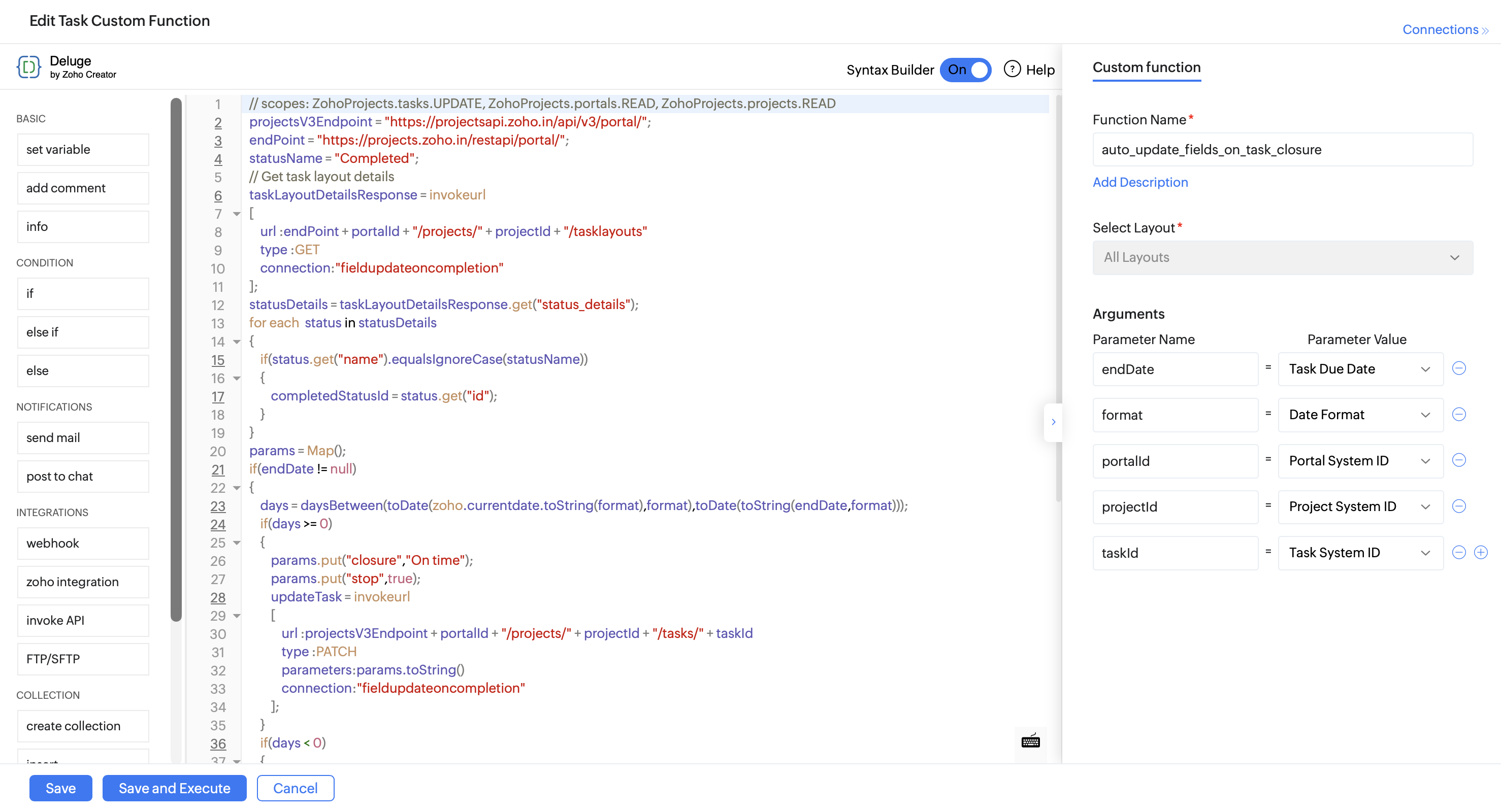
10. Click Save.
12. Click the Tasks tab in the upper navigation panel and click New Workflow Rule.
13. Select Based on User Action as the execution condition and execute the rule when a task is Updated.
14. Click Add Criteria+ and set the following criteria:
- Task Status Is Completed
- AND Stop Is Disabled
If you have configured a Custom Status or using the default Closed status, ensure the Task Status in the Workflow Rule criteria is set to match your portal configuration.
15. Click +Add Action and select Update Field. Set Status to custom status Re Open.
16. Click +Add Action again and select Associate Custom Function. Select the custom function created previously.
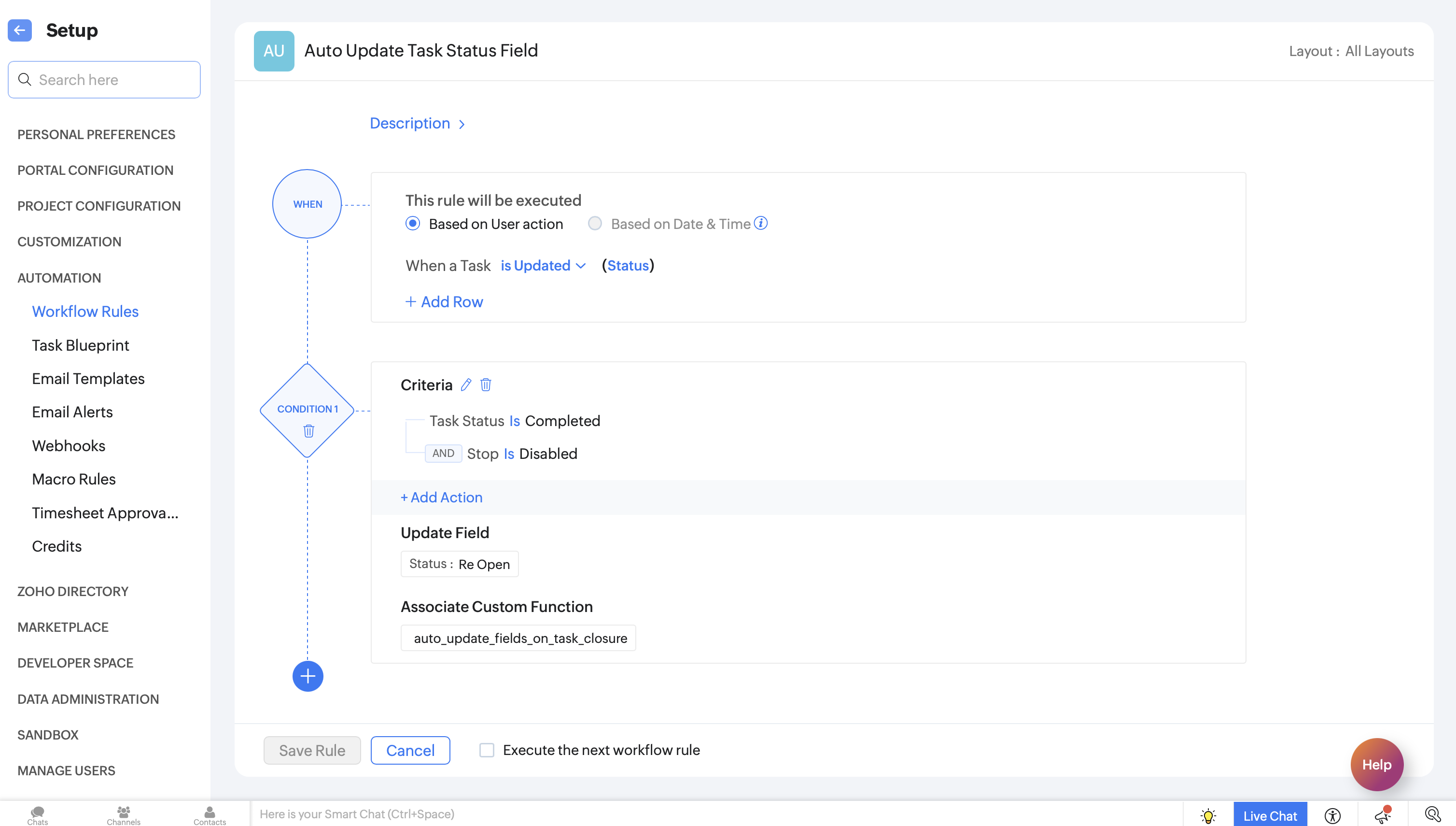
17. Click Save Rule.
18. Toggle the Workflow Rule Status on to enable it.

With this automation in place, teams can automatically track on-time and delayed tasks along with overdue days. This gives project managers better visibility into delivery timelines.
If you have any questions, feel free to drop a comment below or reach out to us at support@zohoprojects.com.
Access your files securely from anywhere
Zoho FSM Video Tutorials
Centralize Knowledge. Transform Learning.
All-in-one knowledge management and training platform for your employees and customers.
New to Zoho Recruit?

Zoho Developer Community
New to Zoho LandingPage?
Zoho LandingPage Resources
New to Zoho Survey?
New to Zoho CRM Plus?
Deliver unforgettable customer experiences
New to Zoho CRM Plus?
Deliver unforgettable customer experiences
New to Zoho Marketing Plus?
Everything you need to run your marketing
New to Zoho Marketing Plus?
Everything you need to run your marketing
New to Bigin?





Topic Participants
Ritula S
Sticky Posts
Update on Using Extensions in Custom Modules
Extensions in Zoho Projects now support custom modules. You can add extensions to custom module records and configure where each extension appears and who can access it during installation. Supported Extensions: Checklist, Google Drive, SharePoint ConfigureAutomation Series: Automate Project File Uploads from Zoho WorkDrive
Project documents are often prepared before development begins. When files such as product requirements, design files, guidelines, or plans are stored in a shared folder in Zoho WorkDrive, teams can automate copying them to the corresponding project teamNew Updates in Zoho Projects
Creating projects and keeping reports up to date are part of everyday project management. With the latest updates to Zoho Projects, you can now create projects from requirement documents or prompts using an AI agent and sync project data with Zoho AnalyticsAutomation Series: Restrict Task Updates Outside Planned Dates
When a project follows the waterfall methodology, it is important to execute the tasks in a sequential order in which they are planned. Deviating from the initial plan may cause disparity between the project scope and the outcome. Codex Script in ZohoDYK 14: Create Tasks with AI
Did you know AI can suggest tasks within your Zoho Projects portal? Breaking a project into clear, actionable work items takes time and manual effort. Especially when the same team handles both planning and execution. AI task suggestions in Zoho Projects
New to Zoho TeamInbox?
Zoho TeamInbox Resources
Zoho CRM Plus Resources
Zoho Books Resources
Zoho Billing Resources
Zoho Projects Resources
Zoho Sprints Resources
Qntrl Resources
Zoho Creator Resources
Zoho CRM Resources
Design. Discuss. Deliver.
Zoho Show Resources

Get Started. Write Away!
Writer is a powerful online word processor, designed for collaborative work.
Zoho CRM コンテンツ
-
オンラインヘルプ
-
Webセミナー
-
機能活用動画
-
よくある質問
-
Ebook
-
-
Zoho Campaigns
- Zoho サービスのWebセミナー
その他のサービス コンテンツ
Nederlandse Hulpbronnen

ご検討中の方
Recent Topics
Make Camera Overlay & Recording Controls Visible in All Screen-Sharing Options
Hi Zoho WorkDrive Team, Hope you are doing well. We would like to request an improvement to the screen-recording experience in Zoho WorkDrive. Current Limitation: At the moment the recording controls are visible only inside the Zoho WorkDrive tab. WhenVENDORS ARE NOT SYNCHED WITH CONTACTS IN CRM
Hello, While the ACCOUNTS and CONTACTS (Including the primary contact) are synced with the CONTACTS module in CRM, the vendor's CONTACTS are not synced with CRM - which basically forces the users to re-enter all vendor's contacts twice and then updateProperly Capture Dropdowns & Hover Elements When Recording a Window/Tab
Hi Zoho WorkDrive Team, Hope you are doing great. We encountered a limitation when recording a selected window or browser tab: Certain UI elements, such as dropdown lists, hover menus, and overlays, are not captured unless we record the entire screen.Add Camera Background Blur During Recording
Hi Zoho WorkDrive Team, Hope everything is well. We would like to request an enhancement to the video recording feature in Zoho WorkDrive. Currently, the camera preview displayed during a recording does not support background blur. This is an essentialWorkDrive Desktop Sync Is Being Deprecated: Move to WorkDrive TrueSync for a Smarter Experience
Hi everyone, We are excited to share a better, smarter way to access and manage your files directly from your computer! We’re transitioning from our legacy Desktop Sync app to WorkDrive TrueSync, designed to give you faster performance,greater flexibility,Support Uploading YouTube Videos Longer Than 60 Minutes
Hi Zoho Social Team, How are you? We would like to request support for uploading YouTube videos longer than 60 minutes directly through Zoho Social. Your support team informed us that Zoho Social currently cannot upload videos over 60 minutes due to “APICaso de Éxito: ACKstorm transforma la gestión de personas con Zoho People
"Con Zoho People hemos centralizado la gestión de personas y facilitado la autonomía de la plantilla." Equipo de ACKstorm ACKstorm es una empresa especializada en consultoría y servicios cloud que trabaja con el ecosistema de Zoho para optimizar sus procesosZoho Books Sandbox environment
Hello. Is there a free sandbox environment for the developers using Zoho Books API? I am working on the Zoho Books add-on and currently not ready to buy a premium service - maybe later when my add-on will start to bring money. Right now I just need aAction required: Authenticate your sender domain in Zoho Marketing Automation before December 14, 2026
Starting December 14, 2026, Zoho Marketing Automation will enforce a daily sending cap for unauthenticated custom sender domains. If you're sending email campaigns from your own domain but haven't authenticated it yet, you'll only be able to send up toAsk the Expert: Unlock the Power of AI and Zia Agents in Zoho CRM
Are you using Zoho CRM to manage your sales processes and customer relationships, and wondering how AI can help you work smarter, automate more, and take your CRM capabilities to the next level? We have great news: the “Ask the Expert” session is comingWhat's new in Zoho Desk 2026 - A decade of ideas brought to life
Hello everyone, 2026 marks a special milestone for us as we celebrate 10 years of Zoho Desk. A decade into business, there is always something new to keep up with, new expectations to meet, and new ways to make customer support better. Zoho Desk continuesManual categorisation of bank transactions
Good Day I am hoping someone here can assist me. I have a lot of catching up to do with some bank transactions. I imported all my bank statements manually. Where possible i created a rule to have the transactions auto categorised. However there are someIdea: Upload your own letterhead and design PDF templates freely (like Lexware Office and sevDesk)
Your own letterhead on every invoice and quote, uploaded in two clicks, no HTML, no public image links. Tools like Lexware Office (formerly lexoffice) and sevDesk already offer this. Zoho Books is more powerful in almost every other way, so let's closeSorting of invoices keeps changing
Hi there, I log into Zoho invoice around 2-3 times a week. Usually I sort my invoice list by "Date created". Every now and again when I log in, this sorting criteria has changed. It's not clear to what criteria it is changing and how/why, but I find it a little annoying not seeing the latest invoices at the top. Can you please look into this and make sure the sorting function is stored in a cookie or on the server? Thanks, KaiFeature Request: Add Sort by Cell Color and Text Color functionality
Hello Zoho Sheet Development Team, I am writing to suggest a feature enhancement for Zoho Sheet. Currently, the platform supports "Filter by Color," which is incredibly useful. However, there is no native option to "Sort by Color" (by cell fill or textMulti-Day Installations
We schedule technicians on multi-day installations. A single appointment from Monday 8 AM through Friday 5 PM counts as 105 working hours, causing false overbooking. We need one appointment spanning five days but only 40 hours counted toward technicianRebrand your CRM with the all-new custom domain mapping setup
UPDATES TO THIS FEATURE! 19th Jan, 2024 — Custom domain mapping has been made available for portal users in Zoho One and CRM Plus. 23rd June, 2023 — Custom domain mapping has been made available for all users, in all DCs. Hello everyone! We are elatedHow to manage additional required address information for Customers and Vendors.
Has anybody figured out a way to incorporate relevant delivery information in the limited address fields for customers and vendors? For example, most carriers have an additional 'delivery instructions' field to add important information like deliveryAction required: Authenticate your sender domain before December 14, 2026
Starting December 14, 2026, Zoho Campaigns will enforce a daily sending cap for unauthenticated custom sender domains. If you're sending email campaigns from your own domain but haven't authenticated it yet, you'll only be able to send up to 5,000 emailsChange default "Sort by"
Is there a way to change the default "sort by" when searching across modules?" in Zoho CRM? Currently the default sort method is "Modified time" but i would like to utilize the second option of "relevance" as the sort by default and not have to changeEnhanced access controls and smoother authentication for organization emails
Available to customers in all DCs. Hello everyone, We've improved how organization emails work in Zoho CRM, which are used when multiple users need to send emails from a common address, like sales@company.com or support@company.com. Admins can set upNew Search Function
Hey Team, The search function updated in our CRM about a week ago, so I assume it was an automated update across Zoho. It no longer displays leads/deals etc in Chronological order so that the most recently created or updated is the first to display whichError AS101 when adding new email alias
Hi, I am trying to add apple@(mydomain).com The error AS101 is shown while I try to add the alias.Transaction rules for "Owner's Contribution" ?
I have a bank account where a lot of the deposits are "Owner's Contributions" (i.e., the business owner investing money in the company). Is it possible to create a Transaction Rule to automatically recognize these? They all have the same verbiage fromPrint a price list or price book
Hi Community. Am I right in concluding that Zoho has no functionality to print a price list from either Zoho CRM, Zoho Inventory or Zoho Books? I won't get stuck on the fact that Zoho doesn't sync price books between Zoho CRM and Books/Inventory (moreThe Social Wall: October 2026
Hello everyone This month, we're making it easier to organize your monitoring workspace with Monitor Groups in Zoho Social. Organize your monitor columns into groups You can now organize your monitor columns into custom groups based on your preferences.Field of Lookup - 5 Field Association Limit.
This query relates to the post at: https://help.zoho.com/portal/en/community/topic/introducing-the-field-of-lookup-in-crm-public-early-access-2023 My simple (and common) scenario: I select an account / customer lookup and want their address pulled intoFeature Request - Electronic submission of tax returns in Canada
Allow the user to submit Canada Revenue Agency GST/HST returns with NETFILE. Provide the same functionality for provincial revenue agencies for PST/RST remittances. Today Zoho Books only provides the math required to calculate each line, requiring theAbility to translate Zoho CRM Kiosks
Hi team, Is support for translating kiosk text and screen names in the Zoho CRM translation tool planned on the roadmap? Thanks,Files in Teamspaces: keep your team's documents where the work happens
Release Note: This feature is available for all accounts across all DCs Hello Everyone, A Teamspace is built around a specific team and a shared objective, and it holds the modules and projects that team works with every day. The document that team dependsHow to download multiple files in Creator?
I'm trying to download multiple files from a creator report using a for loop but it only seems to be downloading one file. It seems like no more code can be run after downloading this one file. Is there a way to download multiple files? I'm currentlyRequest for Zoho Desk Version and Module Details
Kindly help us confirm the version of Zoho Desk currently being used in our portal, along with the module/edition name. We require this information urgently for our internal documentation.ZohoMail_get_mail_attachment corrupts binary attachments (PDFs) over MCP
Hi all, The Zoho Mail MCP tool ZohoMail_get_mail_attachment returns binary attachments as UTF-8 text, so PDFs come back corrupted and an AI client can't read or save them. What we see: - The response header is content-type: application/octet-stream;charset=UTF-8.Request: Custom CSS Theme
I would really like a custom CSS theme that enables me to completely customize the look and feel of the survey page based on the typography of my company brand. Unfortunately, there does not appear to be complete customization with existing themes. ThisDécouvrez le nouveau Zoho Analytics : l’analytique agentique pour toutes les entreprises
Nous sommes ravis de vous annoncer le lancement du tout nouveau Zoho Analytics ! Cette nouvelle version marque un tournant majeur dans l’évolution de la plateforme. Initialement conçue comme une solution de BI en libre-service permettant de créer desZia Agents in Zoho CRM: a better way to set up digital employees
Hello everyone, If you've been using Zia Agents in Zoho CRM, so far using Connections was the only deployment method you're familiar with. You create an agent in Zia Agents (define its objective, write instructions, use tools, add knowledge base) andAdmin Logging in as another User
How can a Super Admin login as another user. For example, I have a sales rep that is having issues with their Accounts and I want to view their Zoho Account with out having to do a GTM and sharing screens. Latest Update (27th April 2026): With the earlyTool Parameter UI - Freeze Header
When one has a number of tools with a number of parameters, scrolling down hides the heading information, forcing one to scroll back up to get confirmation which radio button is which: Seems like simply freezing the header would eliminate that issue.Cannot replace custom tools
This is so incredibly frustrating. Create a tool group. Add your custom schema to create your custom tools. Attach to an Agent. Now you need to update your schema to make an adjustment? You can't edit the schema or even re-upload a new schema. It blocksTesting Tools - Can't View Response
When adding a custom tool and trying to test it, one can see whether or not the test has a successful http response, but the actual payload cannot be viewed to verify the tool's performance. I thought that's what the little hover link was for, but mousingNext Page