Bidirectional sync between Zoho Bookings and Zoho CRM - Part 1
Hey, community members!
The default integration between Zoho CRM and Zoho Bookings is unidirectional, which means that any appointments booked, rescheduled, or deleted in Zoho Bookings will be reflected in Zoho CRM. However, any modifications made to events in Zoho CRM that originated from Zoho Bookings will not be reflected back in Zoho Bookings. Hence, as we're announcing in this community post, we've made the sync bidirectional.
This community post will cover the process of configuring appointment bookings from Zoho CRM in Zoho Bookings, as well as managing appointment statuses such as Canceled, No Show and Completed. We have addressed the rescheduling action in a separate post. To view it, please click on the following link: Reschedule Action
This community post will be beneficial for active Zoho CRM users who handle all their meetings within Zoho CRM. Additionally, you can use this community post as a reference to explore various automation possibilities tailored to your business requirements. For instance, with this post's guidance, when you update a booking's status field to "Completed" in Zoho CRM, it will automatically sync with Zoho Bookings and trigger an automated "Mark as completed" email to customers. This enhancement will improve your Zoho Bookings and Zoho CRM synchronization experience, making appointment management easier.
Prerequisites of bidirectional sync:
- Zoho Bookings Premium subscription
- Zoho CRM paid subscription
- Enable Zoho CRM integration within Zoho Bookings
The purpose of enabling the Zoho CRM integration within Zoho Bookings is to transfer booking details from Zoho Bookings to Zoho CRM. In this configuration, the mandatory field is the Booking ID, which is passed from Zoho Bookings to Zoho CRM through the integration. Whenever an appointment is booked, customer details will be sent to the designated CRM module, and a corresponding record will be created in the Meetings module within Zoho CRM, which will help in automating the workflow.
Here's the complete demo video that covers all the configurations discussed in the community post below:
Timestamps for your reference:
0:35 - Purpose of this community post
Here's the complete demo video that covers all the configurations discussed in the community post below:
Timestamps for your reference:
0:35 - Purpose of this community post
1:26 - Zoho CRM plugin installation
4:43 - Custom field creation
7:20 - Function creation
9:22 - Connection creation
10:24 - Configuring arguments
11:06 - Workflow creation
13:33 - Argument mapping
14:41 - Output verification
17:41 - Conclusion
How we're approaching this bidirectional sync
1. Booking an appointment from Zoho CRM
Install the Zoho Bookings for Zoho CRM plugin within your Zoho CRM application. This plugin enables the creation of a "New Appointment" button within the Zoho CRM Leads and Contacts module, which enables you to select the desired booking page you wish to open. You can choose from various workspace, service, or staff booking pages. After configuration, you can initiate the process of scheduling bookings directly from within your Zoho CRM account.
- Guide on Zoho Bookings and Zoho CRM plugin installation: Booking page selection for Zoho CRM plugin
2. Booking status: Completed or No Show
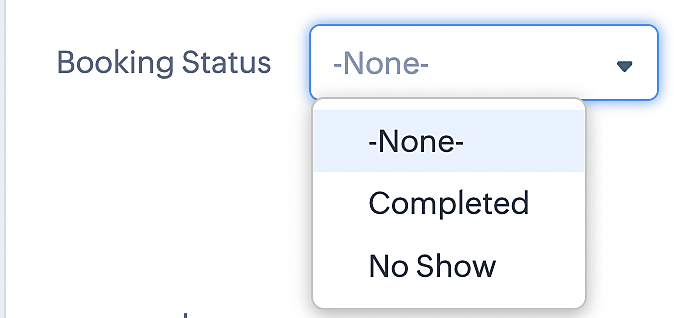
To update a booking's status (Completed or No Show), we've added a new picklist properties field named "Booking Status" in the Meetings module and configured it with two options: "completed" and "no show". Depending on the booking status chosen, the corresponding booking in Zoho Bookings will be updated.
- Details on how to add a custom field to the Meetings module : Customizing modules
- Here's a video that demonstrates how to add a field to a module in Zoho CRM: Adding fields
Reference:
3. Booking status: Canceled
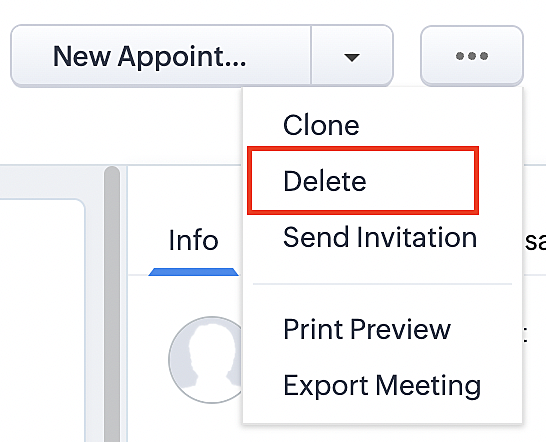
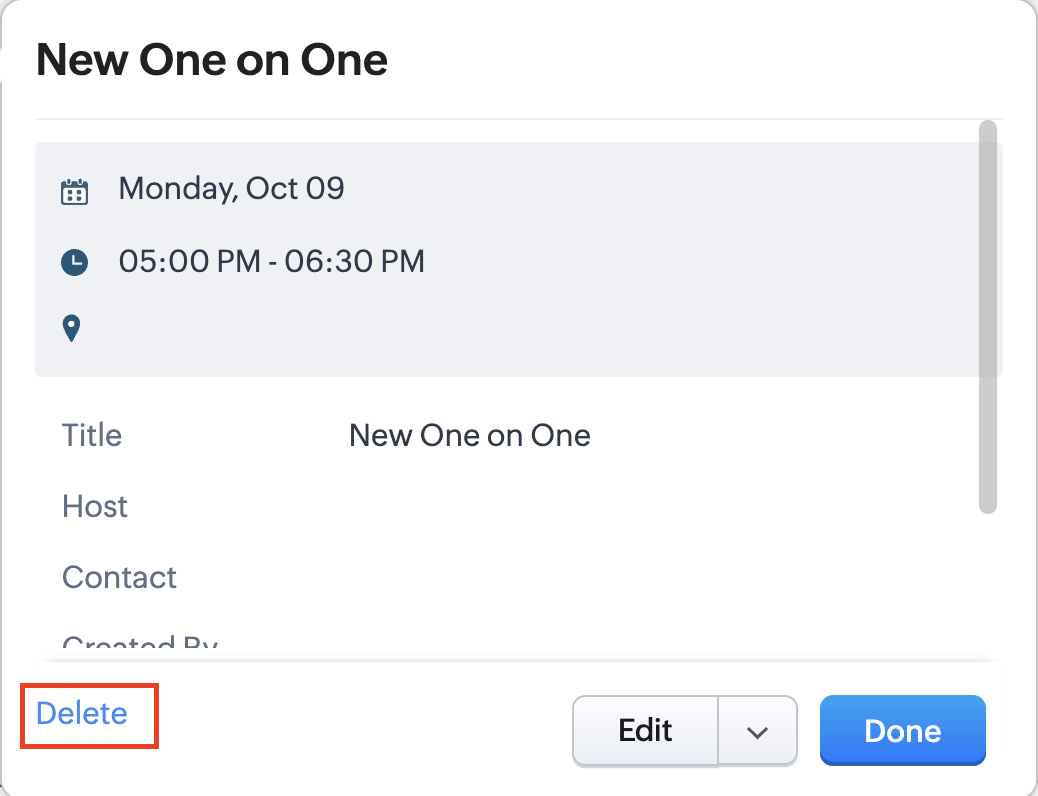
Whenever a meeting is deleted from the Meetings module, the corresponding booking in the Zoho Bookings app will also be canceled automatically. The meeting can be deleted either from the Meetings module or directly from the calendar.
To enable bidirectional sync between Zoho CRM and Zoho Bookings
Complete these steps in Zoho CRM.
Step 1: Creating connections
You first need to establish a connection between Zoho CRM and Zoho Bookings. Zoho Bookings is listed as one of the default connections in Zoho CRM, making it simple to set up. Select the Zoho Bookings connection, define the connection name and scope, and you'll be all set. This connection will enable you to link both applications and facilitate the seamless transfer of data.
Read here for more details on how to create connection in Zoho CRM: Connections
Step 2: Creating functions
In this context, we'll be creating three functions: one for marking appointments as completed, another for canceling appointments, a third for marking appointments as no shows, and a fourth for rescheduling appointments. For each function, we must also configure arguments, which pass values or data into a function when making a call. Here, we'll pass the booking ID to the function as an argument to update the necessary booking status.
i. To create a function for marking appointments as completed:
1. Go to Setup > Developer Space > Functions.
2. In the Functions page, click + Create New Function.

3. Configure the function name, display name, and description.
4. Set the category as automation.
This opens the Deluge script page.
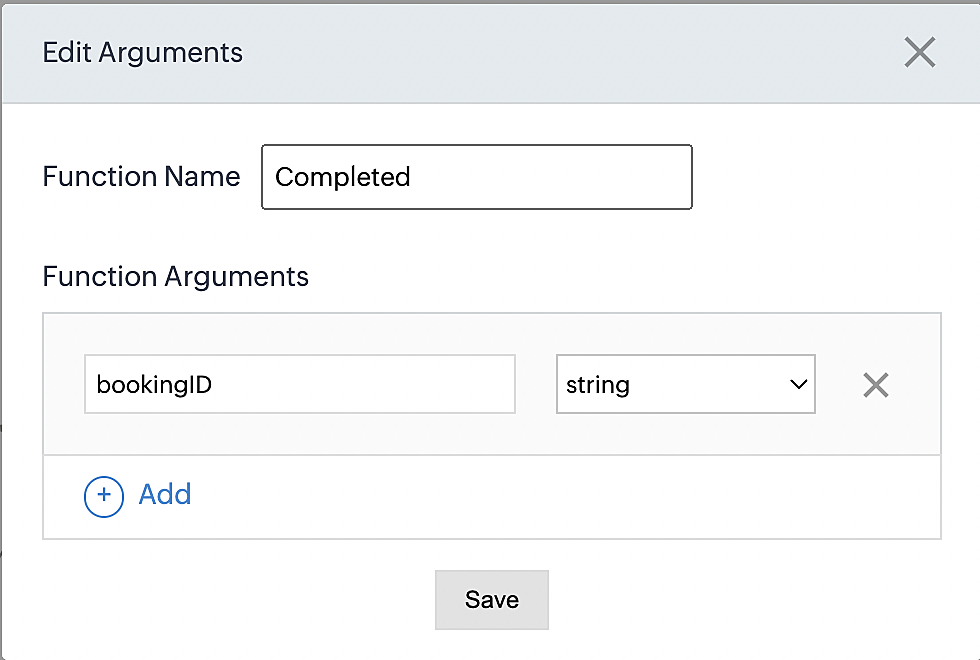
5. Next, configure the function's arguments:
A. Click on Edit Arguments on the Deluge script page.

B. Set the Parameter Name as bookingID. (Please note that the "bookingID" value is case sensitive and must match
the term used in the code).
C. Set the type as string.
Reference:
Please configure the below code in the Deluge script page.
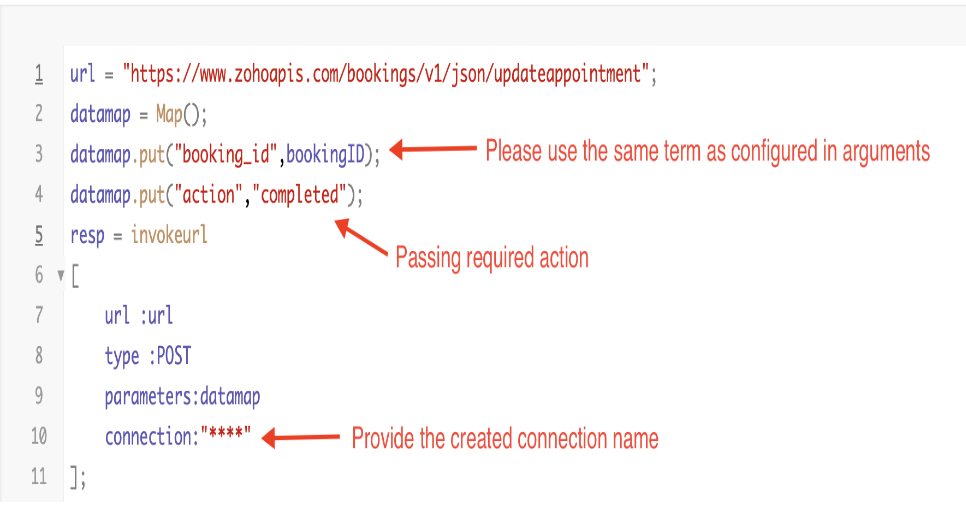
By completing these steps, we've configured a function that will mark appointments as completed.
ii. To create a function for marking appointments as no shows
1. Go to Setup > Developer Space > Functions.
2. In the Functions page, click + Create New Function.

3. Configure the function name, display name, and description.
4. Set the category as automation.
This opens the Deluge script page.
5. Next, configure the function's arguments:
A. Click on Edit Arguments on the Deluge script page.

B. Set the Parameter Name as bookingID. (Please note that the "bookingID" value is case sensitive and must match
the term used in the code).
C. Set the type as string.
Reference:
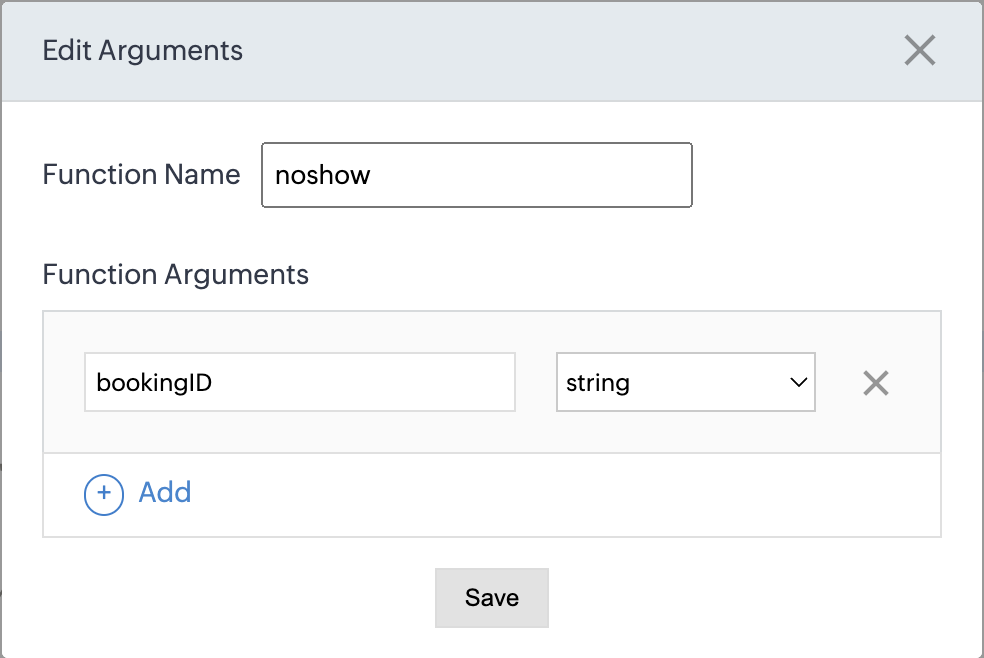
Please configure the below code on the Deluge script page.
Code link: No show
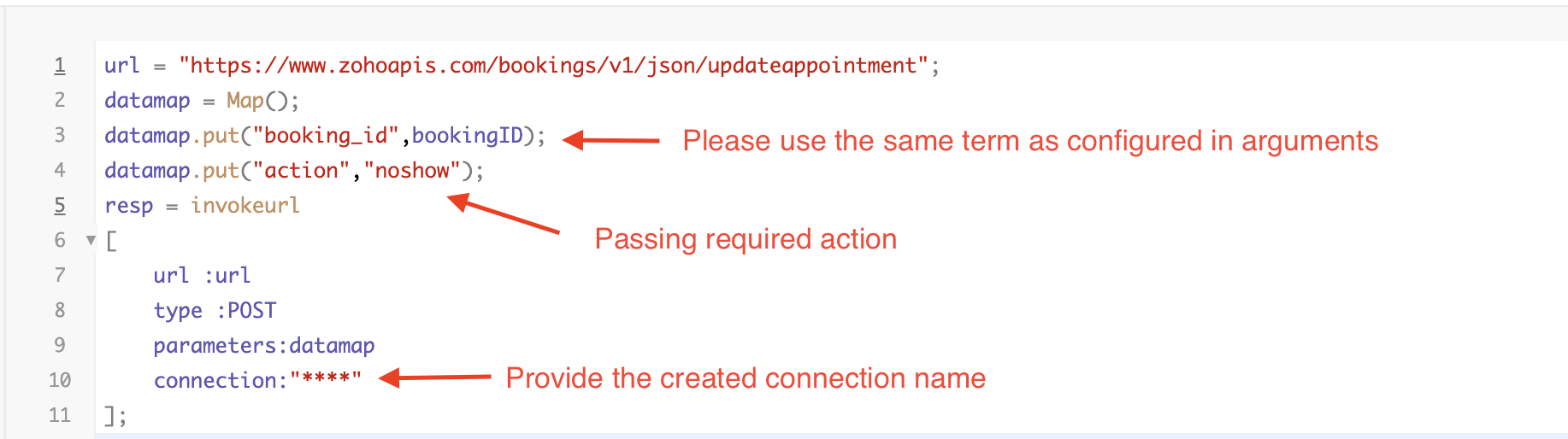
By completing these steps, we've configured a function that marks appointments as no shows.
iii. To create a function for marking appointments as canceled
1. Go to Setup > Developer Space > Functions.
2. In the Functions page, click + Create New Function.

3. Configure the function name, display name, and description.
4. Set the category as automation.
This opens the Deluge script page.
5. Next, configure the function's arguments:
A. Click on Edit Arguments on the Deluge script page.

B. Set the Parameter Name as bookingID. (Please note that the "bookingID" value is case sensitive and must match
the term used in the code).
C. Set the type as string.
Reference
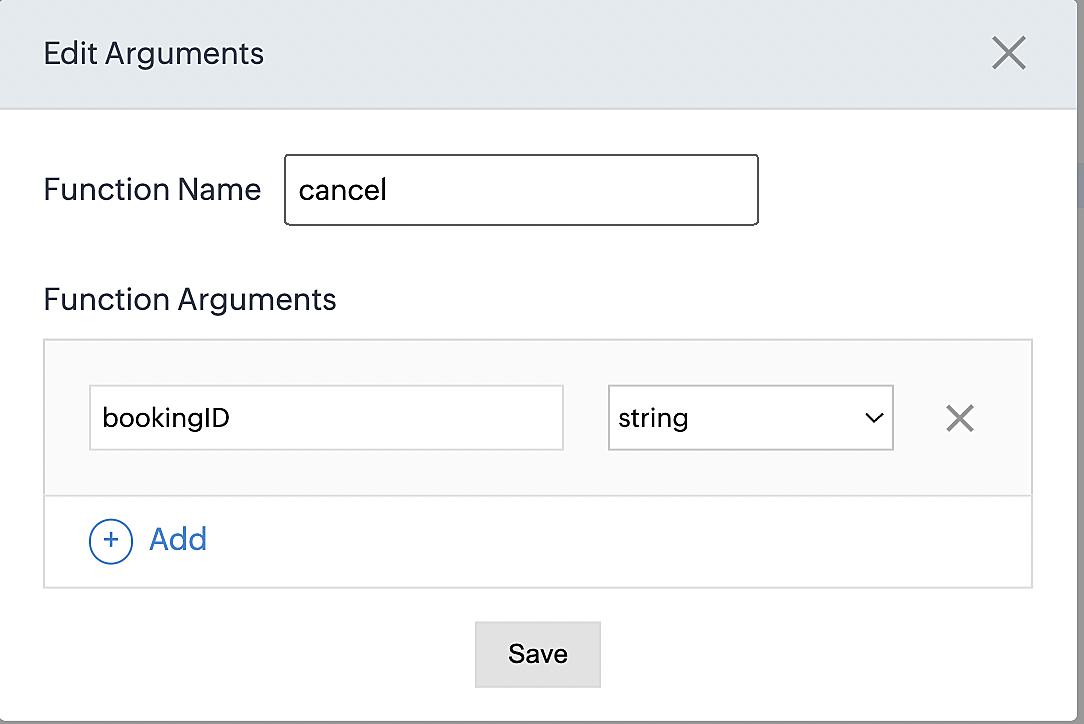
Please configure the below code on the Deluge script page.
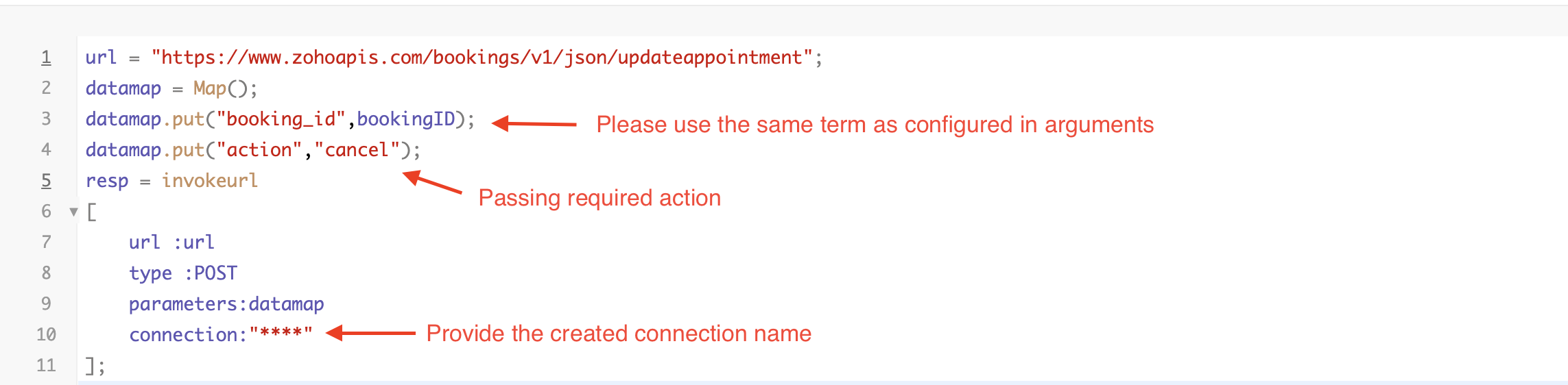
By completing these steps, we've configured a function that marks appointments as canceled.
Code explanation
Below is an explanation of the code that covers all the configurations present in the three functions mentioned above (cancel, mark as completed, and mark as no show).
Line 1: Based on the Zoho Bookings account's data center, we're setting up the API endpoint URL configuration.
Lines 2 - 4: To update appointments, we utilize the Zoho Bookings API. Within the update appointment API, there are two mandatory fields that need to be included: BookingID and action (completed/cancel/noshow).
Lines 5 - 10: We use the invokeURL task for API calls. To learn more about the invokeURL task, please refer to the following document: InvokeURL task for API calls
Now, let's proceed and learn about the process of creating a workflow and linking the established functions to it. This will enable us to automate the entire appointment status updating process.
Step 3: Creating a workflow
Workflow rules are sets of actions (email notifications, tasks and field updates) that are executed when specified conditions are met. Here, we'll generate workflow rules for each action to activate the respective function, thereby automating the appointment status updating process.
i. Creating a workflow for "canceling" appointments in Zoho Bookings when a meeting is deleted in Zoho CRM
Part 1: Creating the rule
1. Go to Setup > Automation > Workflow Rules.
2. In the Workflow Rules page, click Create Rule.

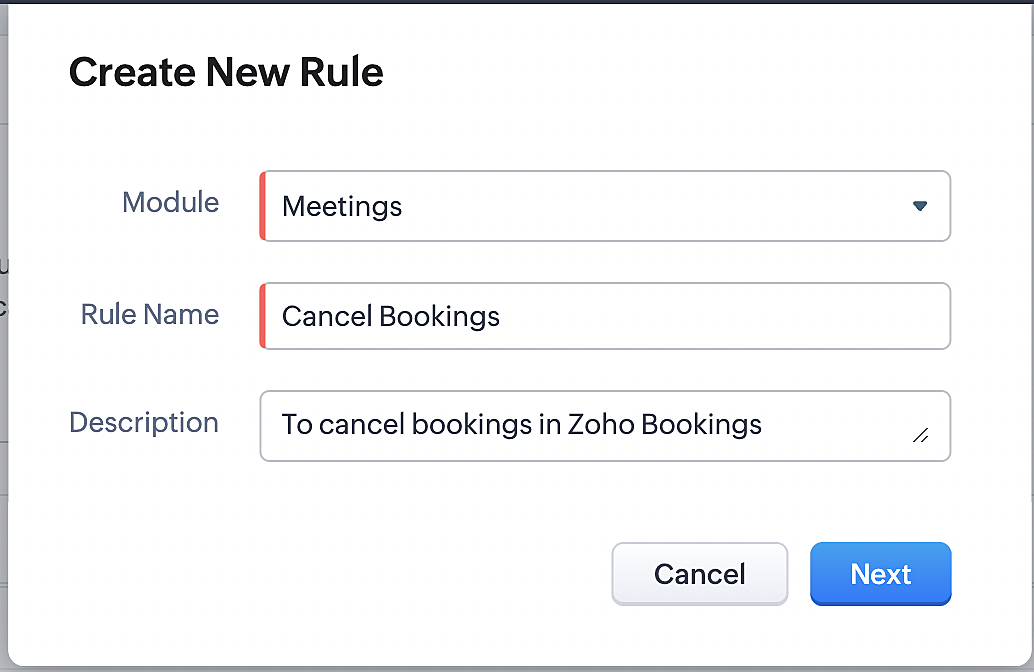
3. Select "Meetings" under Module and configure rule name and description as required.
More details: Create Rule
Reference:
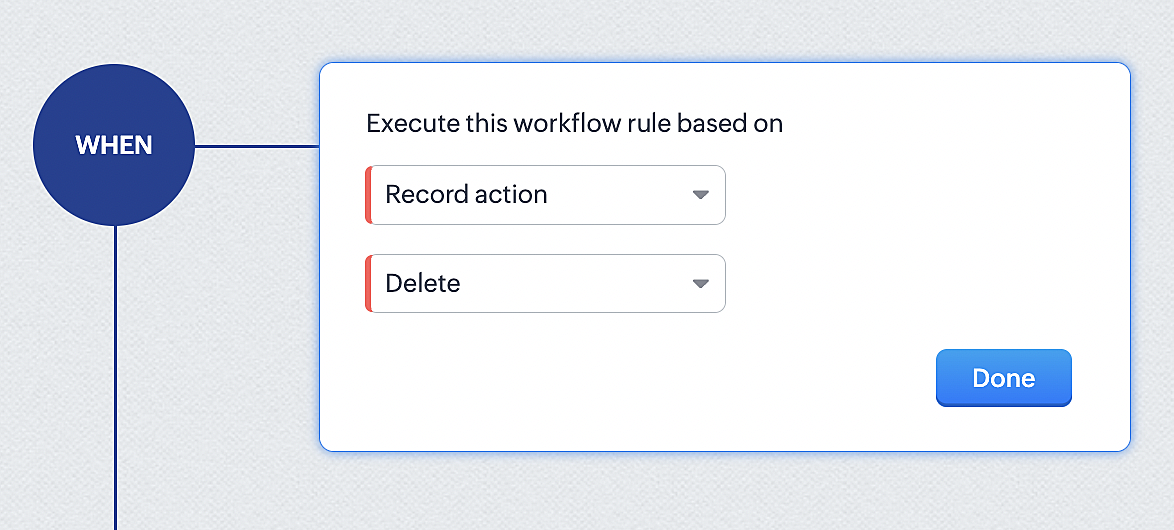
1. Select Record Action > Delete > Done to execute the rule when meetings are deleted.
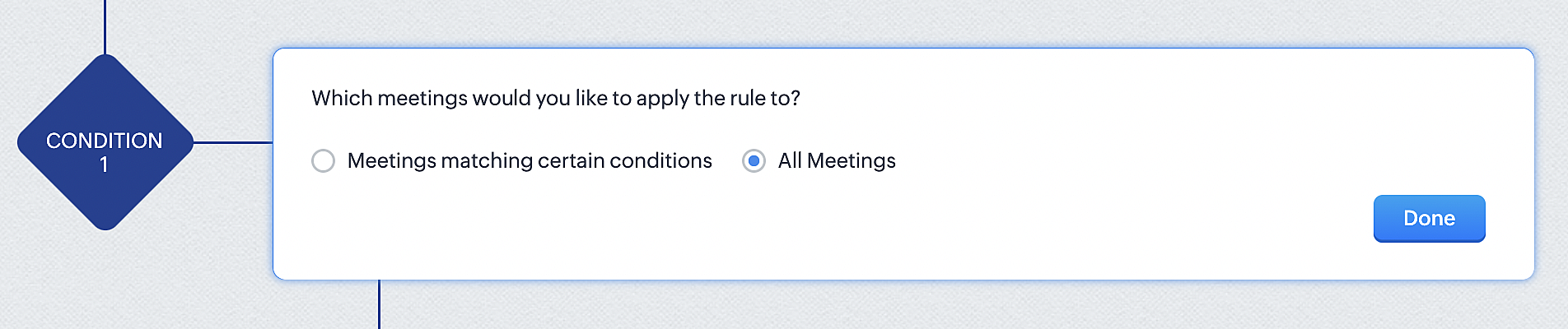
2. Configure condition > All Meetings.
3. Instant Actions > Function.
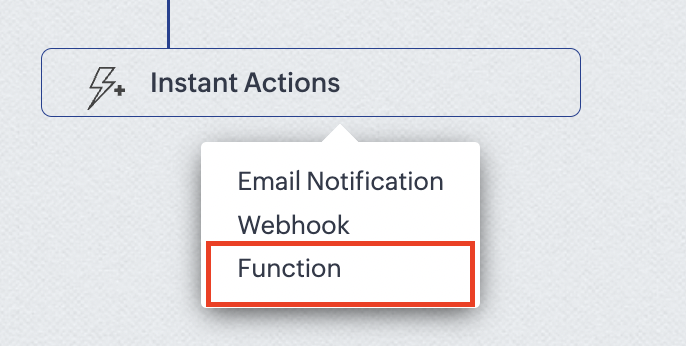
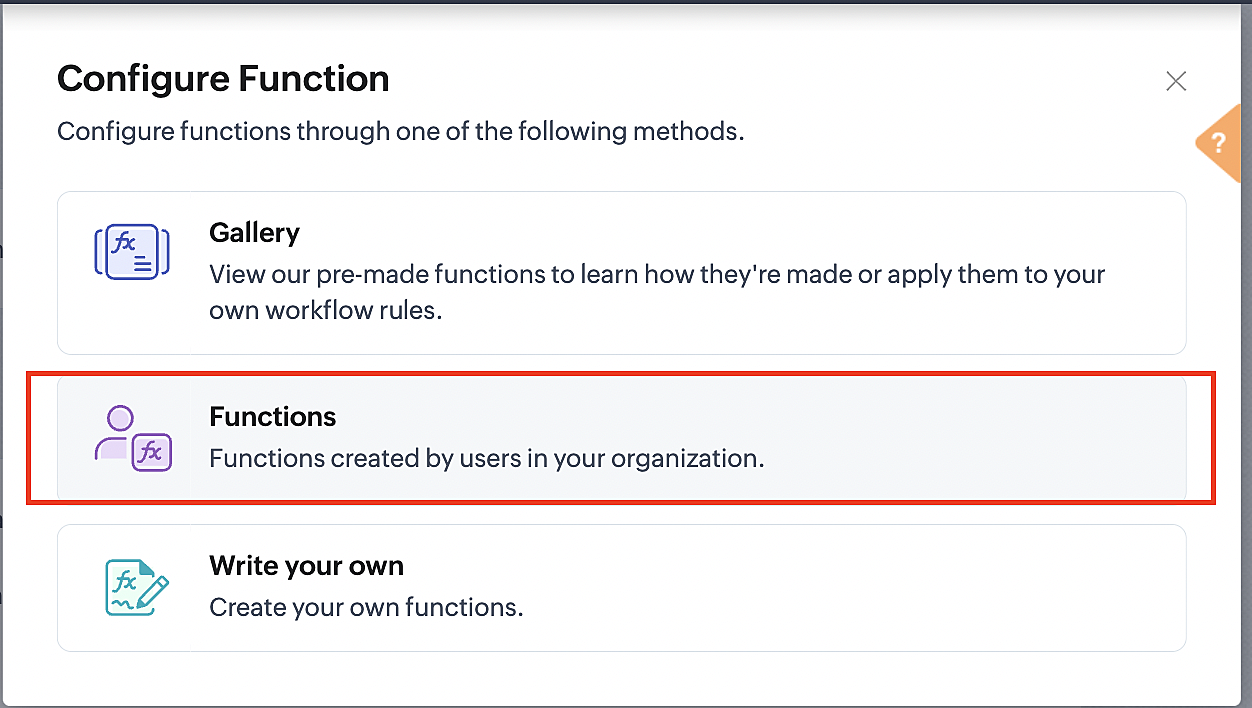
4. Click the New Function button.

5. In the Configure custom function page, select the "cancel" function you created from among the functions users in your organization have created.
Part 3: Argument mapping
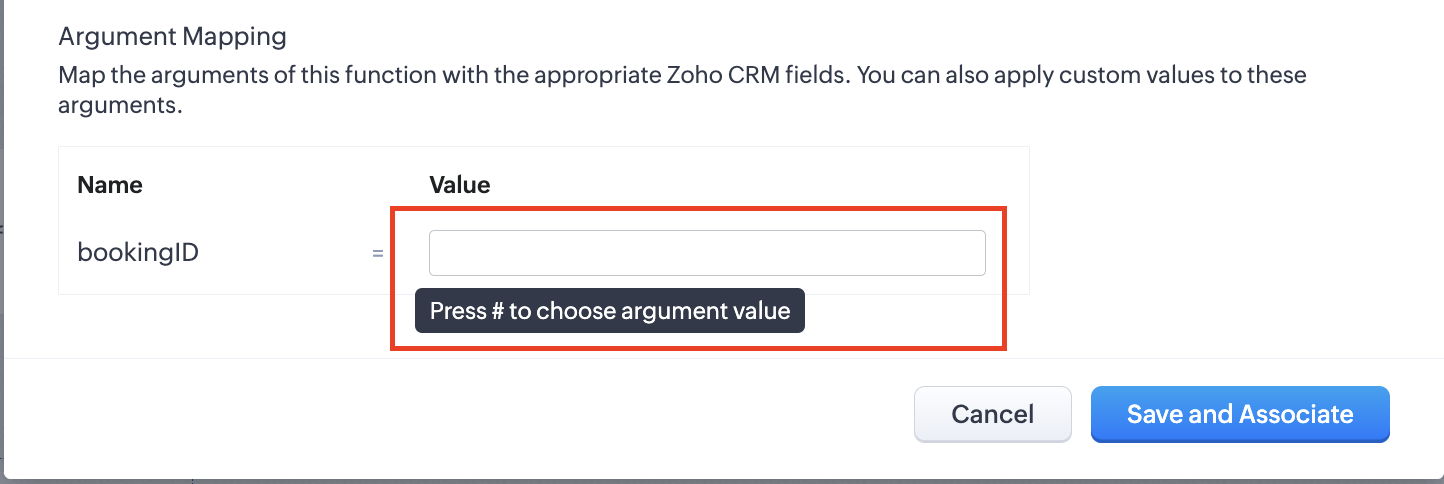
1. Press # to choose an argument value.
2. Select Meetings under Module and BookingId in the field.
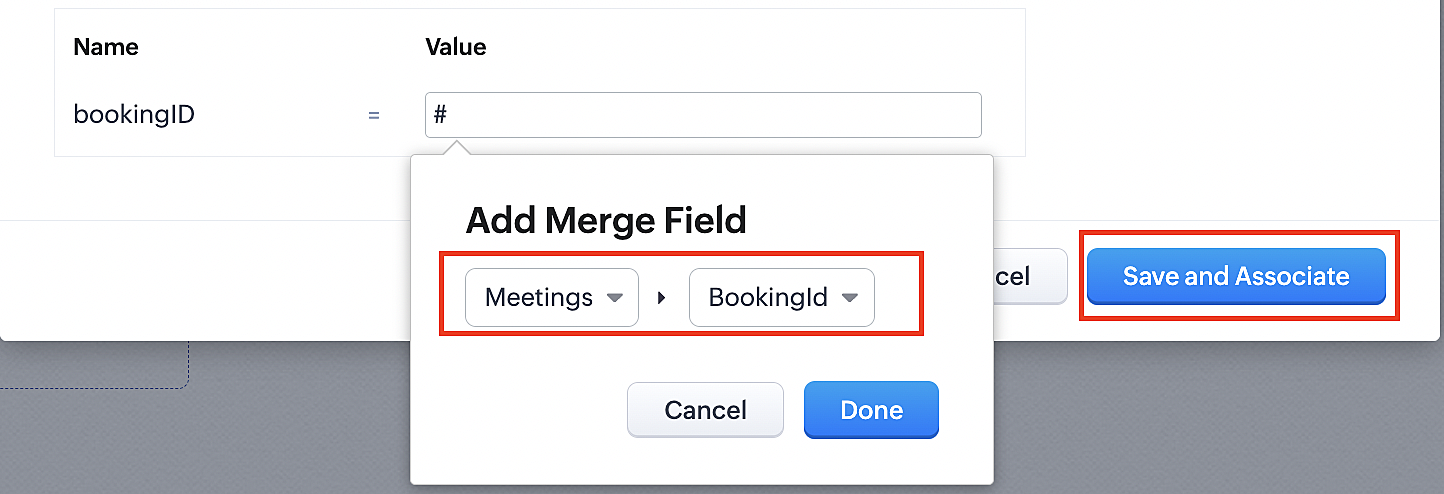
3. Click the Save and Associate button.
Reference:
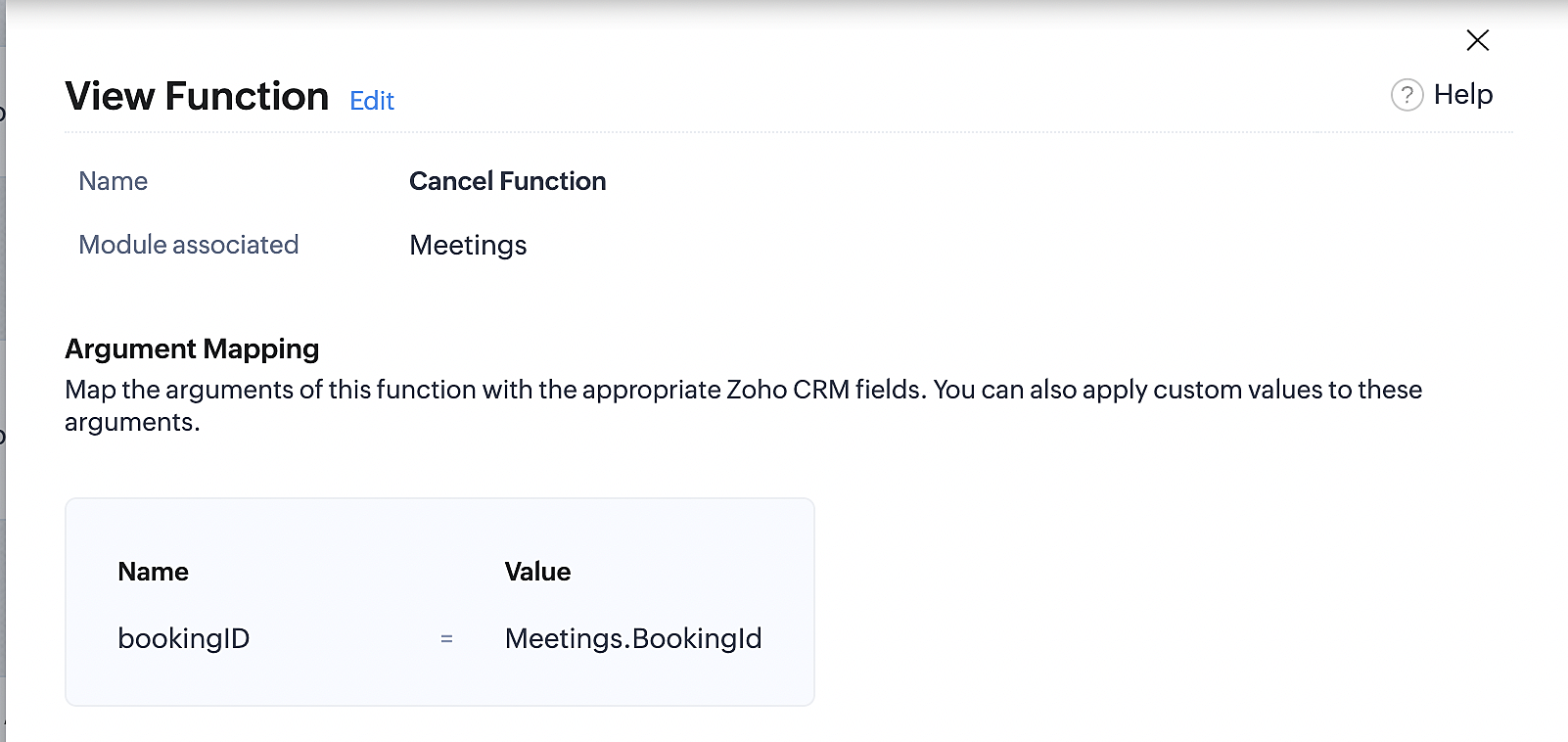
Below is the final flow of the cancel booking workflow:
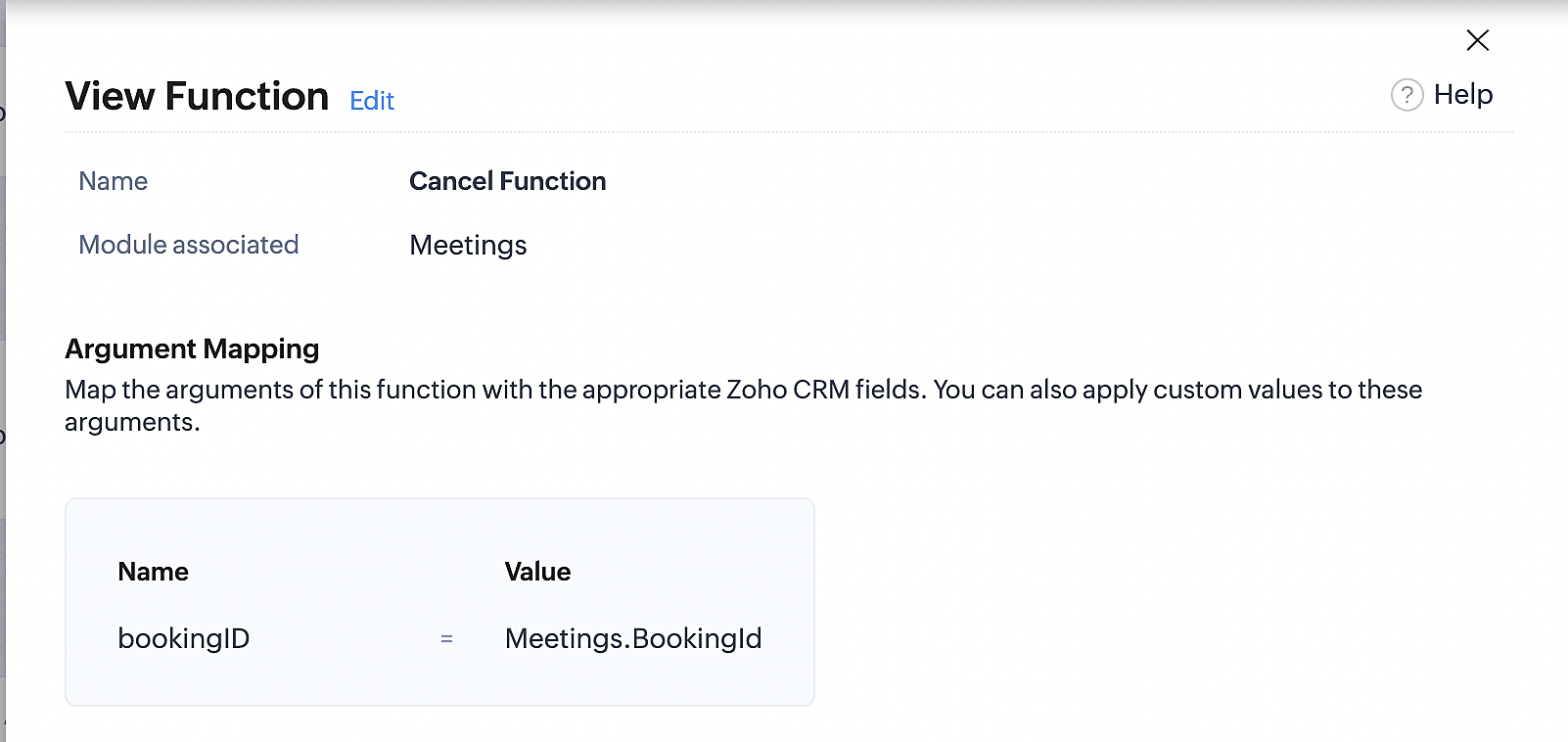
At the end of Part 3, we will have created a workflow that will be executed automatically when meetings are deleted in Zoho CRM. Simultaneously, the bookings associated with the meeting will also be canceled in Zoho Booking.
ii. Creating workflow for updating an appointment's status as "no show" in Zoho Bookings when the meeting's booking status is marked as no show in Zoho CRM
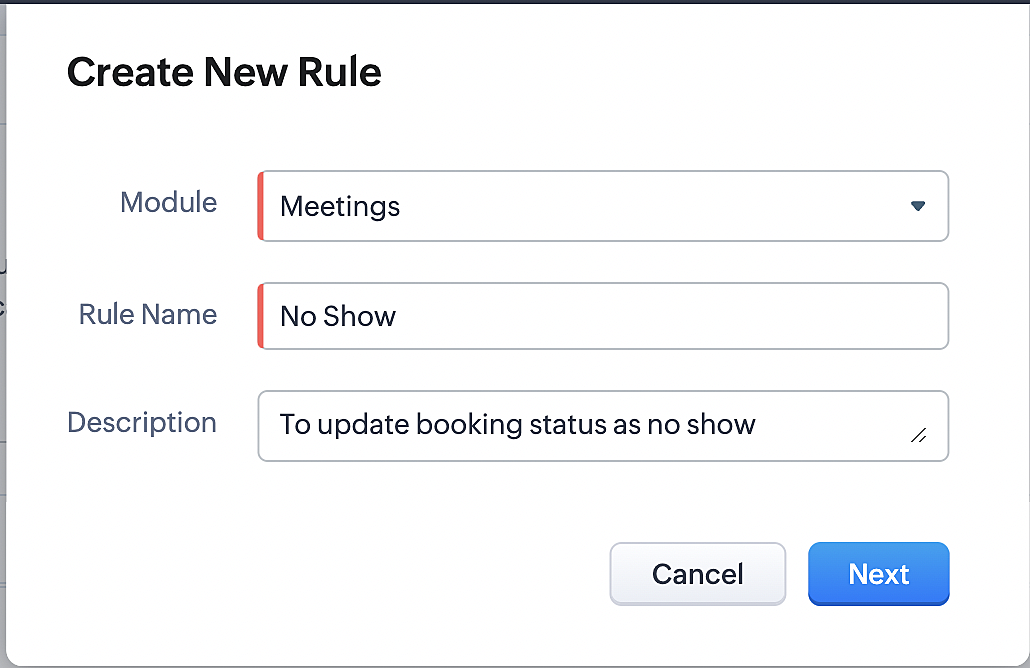
Part 4: Creating the rule
1. Go to Setup > Automation > Workflow Rules.
2. In the Workflow Rules page, click Create Rule.

3. Select Meetings under Module and configure the rule name and description as required.
Reference:
Part 5: Specifying the rule trigger
If you encounter difficulties while navigating through the steps mentioned below, please refer to Part 2 above, where we have provided step-by-step screenshots for clarification.
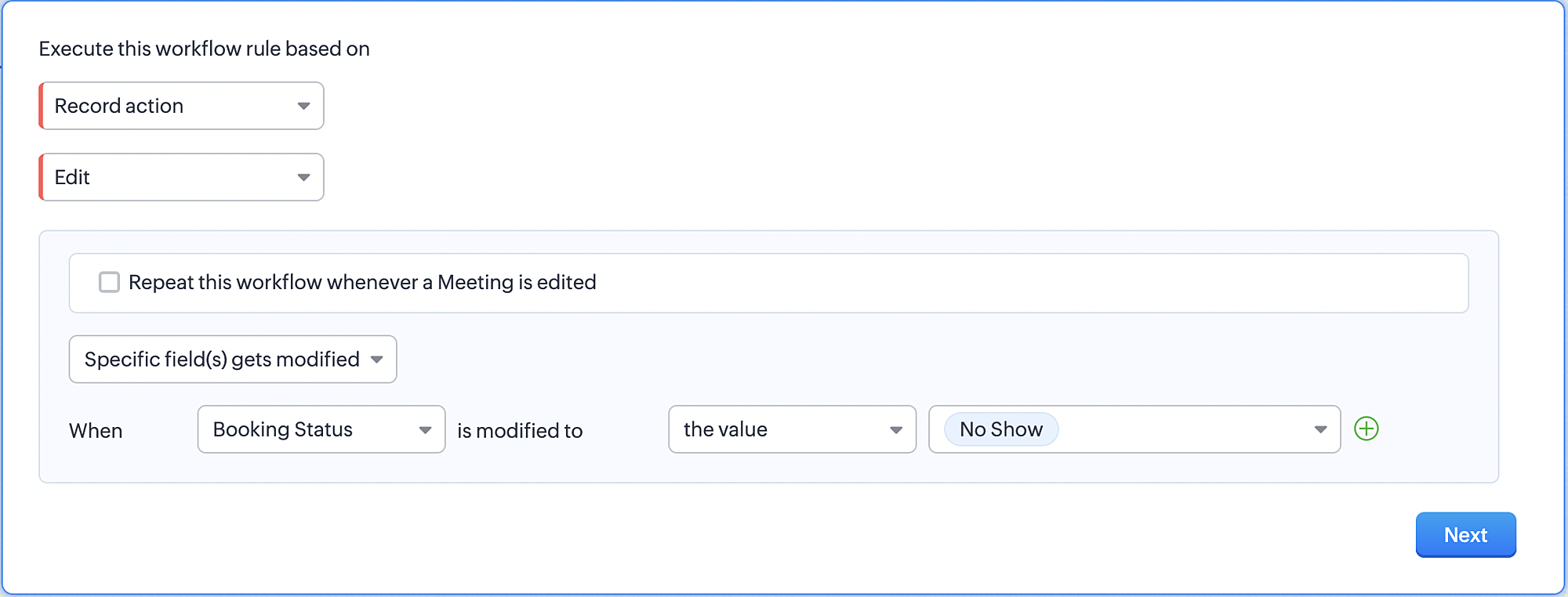
1. Record Action > Edit.

2. Enable the Specific field(s) gets modified and configure it per the screenshot below.
a. This is to ensure that the workflow is executed only when the booking status under the meeting module is
updated to "No Show".
updated to "No Show".
3. Configure condition > All Meetings.
4. Instant Actions > Function > New Function.
5. In the Configure custom function page, select the "no show" function you created from among the functions
users in your organization have created.
users in your organization have created.
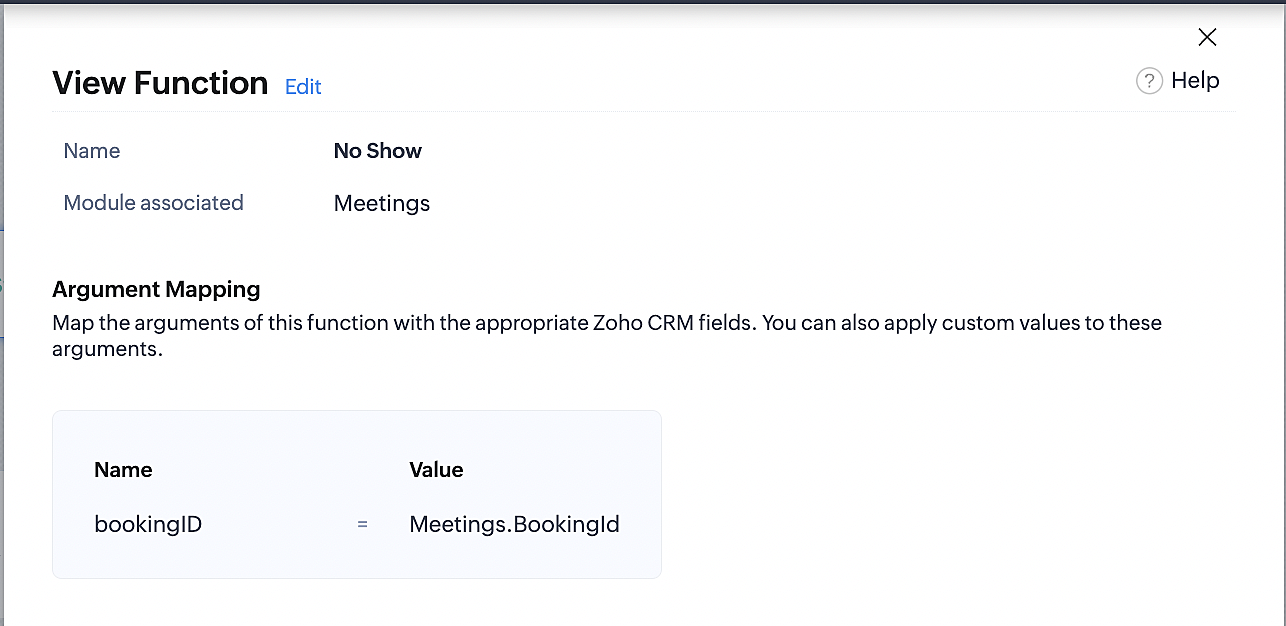
Part 6: Argument mapping:
If you encounter difficulties while navigating through the steps mentioned below, please refer to Part 3 above, where we have provided step-by-step screenshots for clarification.
1. Press # to choose an argument value.
2. Select Meetings under Module and configure the field as "BookingId".
3. Click Save and Associate button.
Reference:
Below is the final flow of the "No Show" booking status workflow:
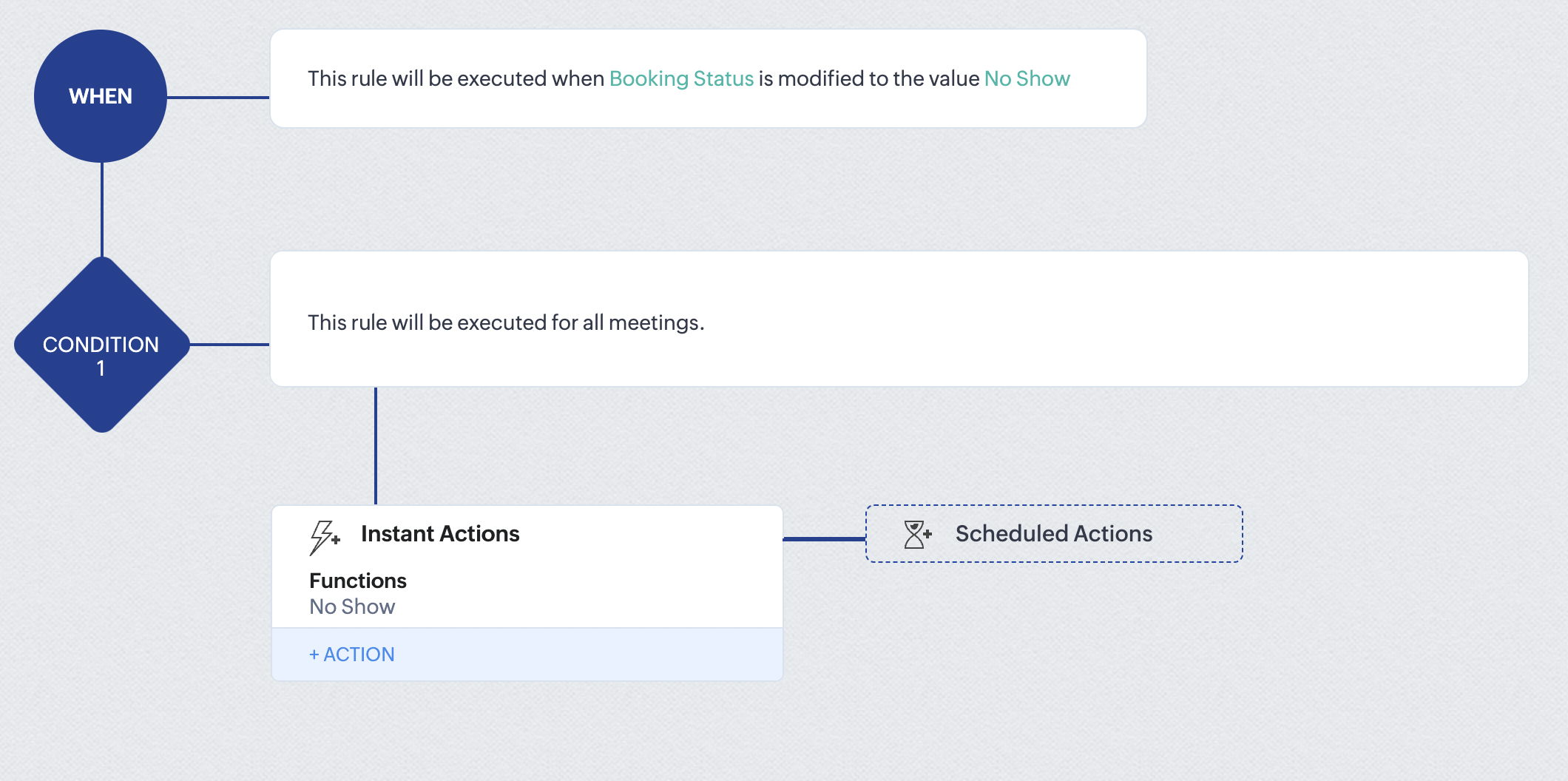
At the end of part 6, we will have created a workflow that automatically executes when the booking status field within the Zoho CRM Meetings module is updated to "No Show." This action will result in the associated bookings for that meeting also being marked as "No Show" in Zoho Bookings.
iii. Creating workflow for updating appointment status as "Completed" in Zoho Bookings when the booking status field of the meeting is marked as completed in Zoho CRM.
Part 7: Creating the rule
1. Go to Setup > Automation > Workflow Rules.
2. In the Workflow Rules page, click Create Rule.

3. Select Meetings under Module and configure rule name and description as required.
Reference:
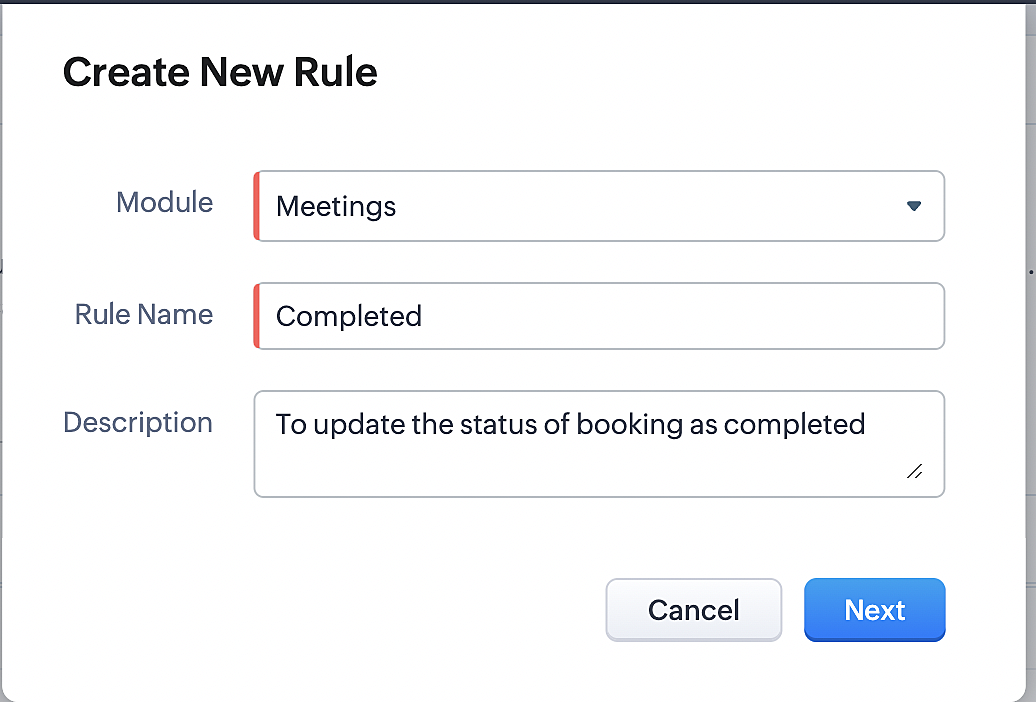
Part 8: Specifying the rule trigger
If you encounter difficulties while navigating through the steps mentioned below, please refer to Part 2 above, where we have provided step-by-step screenshots for clarification.
1. Record Action > Edit.

2. Enable the Specific field(s) gets modified setting and configure it per the screenshot below.
a. This serves to ensure that the workflow is executed only when the booking status under the Meetings module is
updated to "Completed".
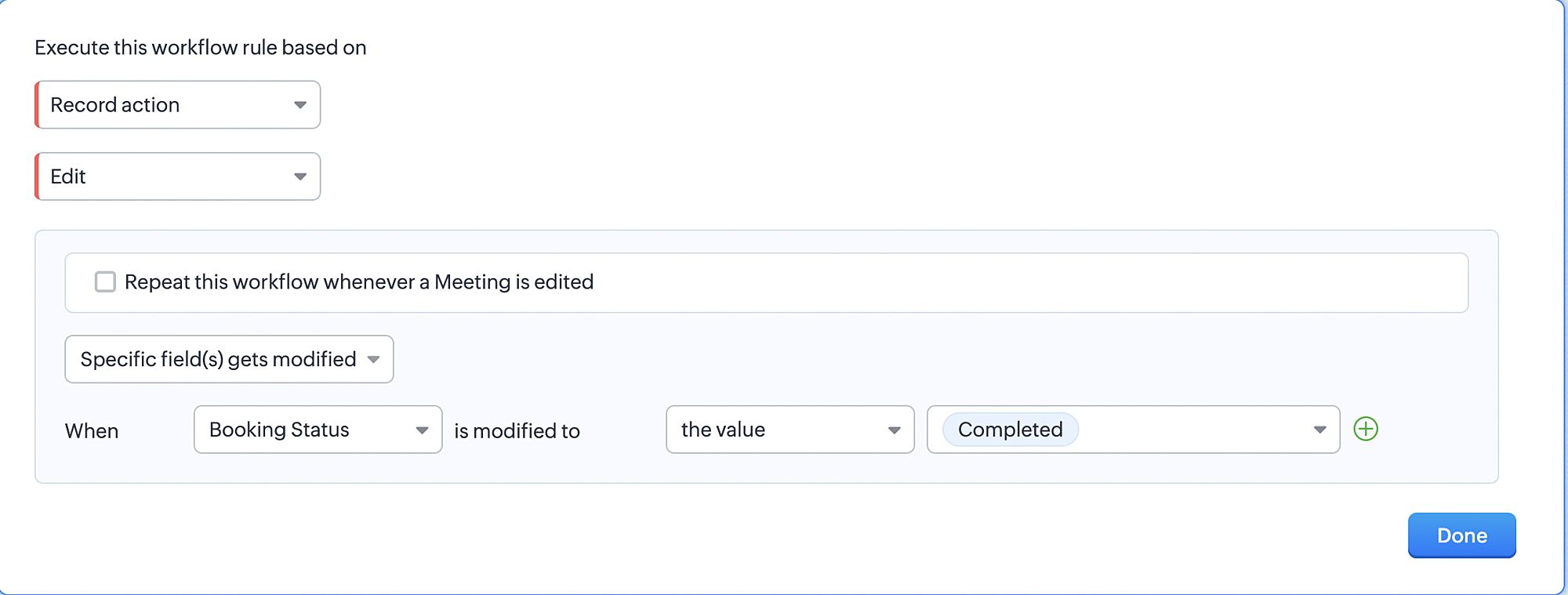
3. Configure condition > All Meetings.
4. Instant Actions > Function > New Function.
5. In the Configure custom function page, select the "completed" function you created from among the functions users
in your organization have created.
Part 9: Argument mapping:
If you encounter difficulties while navigating through the steps mentioned below, please refer to Part 3 above, where we have provided step-by-step screenshots for clarification.
1. Press # to choose an argument value.
2. Select Meetings under Module and configure the field as "BookingId".
3. Click Save and Associate button.
Reference:
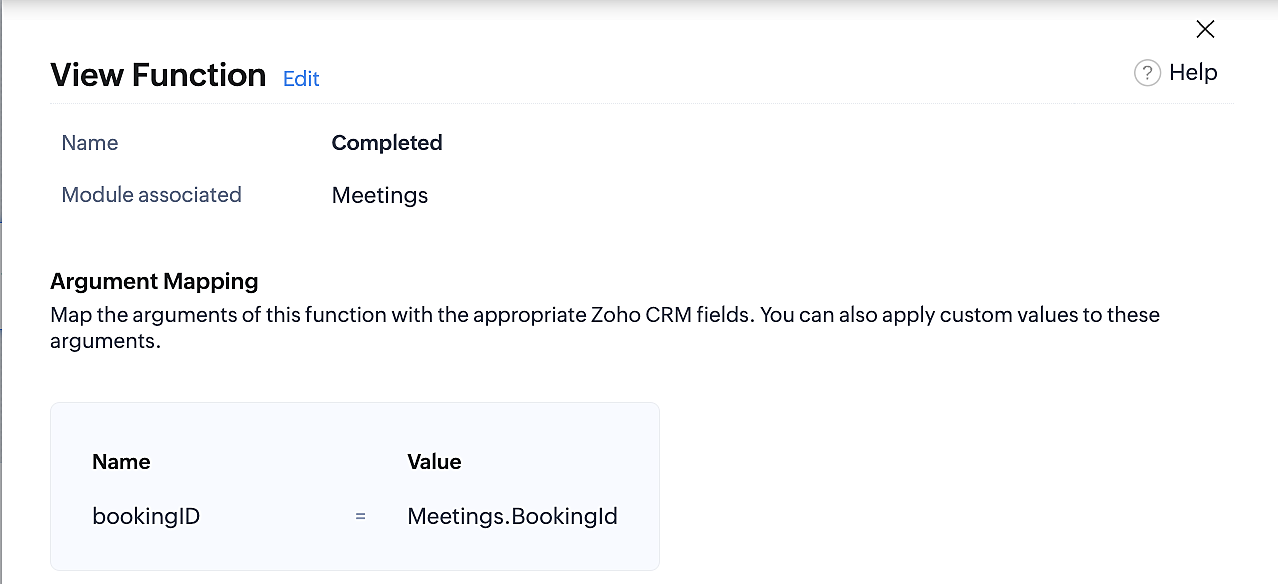
Below is the final flow of the "Completed" booking status workflow:
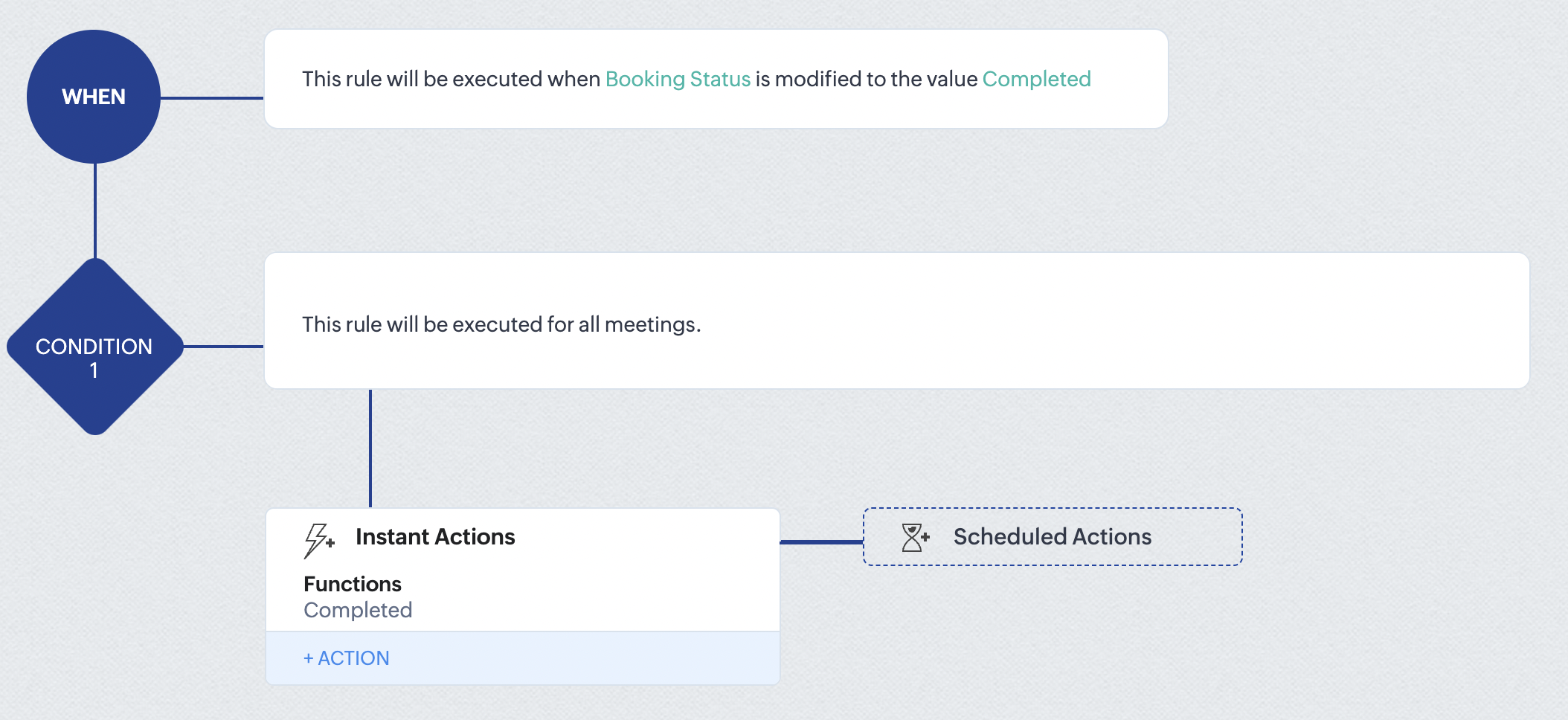
At the end of part 9, we will have created a workflow that is automatically executed when the booking status field within the Zoho CRM Meetings module is updated to "Completed." As a result, the associated bookings for that meeting will also be marked as "Completed" in Zoho Bookings.
Conclusion
We've reached the end of this community post. With the integration mentioned above in place, you'll be able to book, cancel, and update the status of appointments in Zoho Bookings directly from your Zoho CRM application. This will help you effectively manage your appointments in one place. As mentioned above, we've covered the rescheduling action in a separate post, which you can access by clicking on the following link: Reschedule Action
Furthermore, we've outlined a method for automating appointment statuses in detail. You can use this document as a reference to explore the various possibilities that suit your needs.
If you have any questions or need assistance with your configuration, please email us at hello@zohobookings.com or support@zohobookings.com.
Access your files securely from anywhere
New to Zoho Recruit?

Zoho Developer Community
New to Zoho LandingPage?
Zoho LandingPage Resources
New to Zoho Survey?
New to Zoho CRM Plus?
Deliver unforgettable customer experiences
New to Zoho CRM Plus?
Deliver unforgettable customer experiences
New to Zoho Marketing Plus?
Everything you need to run your marketing
New to Zoho Marketing Plus?
Everything you need to run your marketing
New to Bigin?





Topic Participants
Kaushik S
bruce
Ishwarya SG
PrismaNote Support
Sticky Posts
Presenting ABM for Zoho CRM: Expand and retain your customers with precision
Picture this scenario: You're a growing SaaS company ready to launch a powerful business suite, and are looking to gain traction and momentum. But as a business with a tight budget, you know acquiring new customers is slow, expensive, and often deliversGood news! Calendar in Zoho CRM gets a face lift
Dear Customers, We are delighted to unveil the revamped calendar UI in Zoho CRM. With a complete visual overhaul aligned with CRM for Everyone, the calendar now offers a more intuitive and flexible scheduling experience. What’s new? Distinguish activitiesCreate and populate a record in an instant: Introducing zero-shot field prompting to Zia's ICR
A couple of months ago, we upgraded our in-house AI image detection and validation tool, Zia Vision, with intelligent character recognition (ICR). By training Zia with sample images, you could create and enrich CRM records with data extracted from standardIn-person ZUG Meetups for Real Estate Professionals - US Q1 2026
The Real Estate Zoho User Group is going on a multi-city, in-person meetup tour across the US, and we’d love to see you there! These meetups are a great opportunity to: Connect with fellow real estate professionals using Zoho Share challenges and discoverNimble enhancements to WhatsApp for Business integration in Zoho CRM: Enjoy context and clarity in business messaging
Dear Customers, We hope you're well! WhatsApp for business is a renowned business messaging platform that takes your business closer to your customers; it gives your business the power of personalized outreach. Using the WhatsApp for Business integration
New to Zoho TeamInbox?
Zoho TeamInbox Resources
Zoho CRM Plus Resources
Zoho Books Resources
Zoho Subscriptions Resources
Zoho Projects Resources
Zoho Sprints Resources
Qntrl Resources
Zoho Creator Resources
Zoho CRM Resources
Design. Discuss. Deliver.
Zoho Show Resources

Get Started. Write Away!
Writer is a powerful online word processor, designed for collaborative work.
Zoho CRM コンテンツ
-
オンラインヘルプ
-
Webセミナー
-
機能活用動画
-
よくある質問
-
Ebook
-
-
Zoho Campaigns
- Zoho サービスのWebセミナー
その他のサービス コンテンツ
Nederlandse Hulpbronnen

ご検討中の方
Recent Topics
Ask the Experts 22: Scale up your customer support with integrations & extensibility
Hello everyone! The foundation is set. Build the beams. Raise the pillars. Set the walls. The Zoho Desk architecture stands tall. Let's discuss integration within Zoho Desk, extensions from the Marketplace, creating connections between Zoho Desk and otherIs there no way to duplicate an entire workflow or even custom function across multiple departments?
Is there no way to duplicate an entire workflow or even a custom function from one department to other departments, like it is done for field duplication from one department layout to other department layouts?Automated reply on any new ticket raised by customer
Hi ZohoDesk team, Can we set up an automation so that whenever a new ticket is created against our support email; ZohoDesk immediately sends our standard acknowledgement, including the expected TAT for resolution? If that’s possible, could you share theZoho equipment rental - just like Booqable
Hi Zoho Team, is it possible to create a module or a system like booqable? our business starts renting our IT equipment assets that have been recently used for Events and Projects, we are having ZOHO books so its easy to integrate if you create one. BooqableProfit Margin Scheme
I'm a tourism company operating in the aviation and outbound tourism sectors. Typically, taxes are 0% as our operations are outside the country. However, the state has now imposed a tax on the profit margin. This means if the selling price of an airlineVisibility and Enforcement for Outdated Plug Parameters in Zobot Canvas
Dear Zoho SalesIQ Team, Greetings, We’d like to suggest an important usability and quality improvement for working with Plugs inside Zobot. Current Behavior: When we update the code of an existing Plug, any Zobot card using that Plug requires manual resaving.Announcement: Zoho DataPrep to Deprecate Password-Only Authentication for Snowflake Connections on July 31, 2025
As part of our ongoing commitment to security and in alignment with Snowflake's pledge to the Cybersecurity and Infrastructure Security Agency (CISA) Secure by Design initiative, Zoho DataPrep will no longer support single-factor password authentication.The same Contact associated to multiple Companies - Deals
Hi, I would like to know if there is an option to associate the same contact with multiple companies (two or more) deals, using the same contact details for all. This is because we have contacts who are linked to different companies or branches of theText on Zoho Sign confirmation dialouge is very small compared to text used everywhere else on Zoho Sign.
I've reported multiple times through Zoho's support email that the text on this notification is very small in contrast to all the other text on the Zoho Sign app. I think it's a bug and it just needs the font size to be increased. It's very minor butWise integration in Zoho Books
Hi, it is now time for zoho books to support Wise.com integration for payment links. Wise has launched credit card payments, now about 0.5% cheaper than Stripe. Also their bank payments are much much cheaper than credit cards. Its time for books teamError Message: None of the rows can be imported
I have been using zoho sheets to download my CSV file for about 2 years now, this month, October 2021, for some reason when I download it to upload to zoho books I get a message saying "None of the rows can be imported". I have been using the same process,Invalid Element place_of_contact, Invalid Element gst_no, Invalid Element gst_treatment
so this is the body contact_name: orderData.customerName, company_name: orderData.customerName, email: orderData.email, contact_type: 'customer', currency_code: 'INR', gst_treatment: 'business_gst', gst_no: 'i using proper gst no i just removed it fromNot able to item an item to non taxable via api, despite sending is_taxable as false
Hi everyone, I'm trying to update an item via books api and even when sending is_taxable as false, the item still shows Taxable in zoho, I get no errors as well when I update, any help appreciated in this!Collection & Payment Mapping Automation
We book Sales Invoices and Purchase Invoices against Same Projects. Both Sales Invoices & Purchase Invoices can have one or multiple Projects mentioning the Project ID. We prefer to Make vendor Payments Once we have received The Collections from ClientsNested Sub-forms (Subform within subform)
Hi Team, Whether there is any possibilities to add sub-form with in another sub-form like Main Form -> Sub form A ->Sub form B If we tried this, only one level of sub form only working. Any one having any idea about this? Thanks Selvamuthukumar RRestore Trashed Records Anytime Within 30 Days
Access the recycle bin from the Data Administration tab under the settings page in Zoho Projects, which gives better control over the trashed data. When records like projects, phases, task lists, tasks, issues, or project templates are trashed, they areAvoiding Inventory Duplication When Creating Bills for Previously Added Stock
I had created several items in Zoho Books and manually added their initial stock at the time of item creation. However, I did not record the purchase cost against those items during that process. Now, I would like to create Purchase Orders and convertApplying EUR Payments to USD Invoices in Zoho Books
Hello, I have a customer to whom I issue invoices in USD. However, this customer makes payments in both EUR and USD. I have already enabled the multi-currency feature in Zoho Books Elite, but I am facing an issue: When the customer makes a payment inHow to prevent users from editing mail merge templates from Zoho crm
We want users to use public mail merge templates. They should not be able to edit templates but only preview data merge and send emails. We did prohibit "manage mail merge template" in the user profile. But they can still edit the template in the zohoCustomer Addresses cannot be edited/deleted in invoices
In the invoices we have an option to change the customer address and add a new address Now I dont know why for some reason if we add an address through this field, the address doesn't appear in the customer module We cannot delete the addresses addedCustom Fields connected to Invoices, Customers, Quotes, CRM
I created the exact same custom fields in Books: Invoices, Customer, Quotes, and in CRM but they don't seem to have a relationship to one another. How do I connect these fields so that the data is mapped across transactions?Accelerate Github code reviews with Zoho Cliq Platform's link handlers
Code reviews are critical, and they can get buried in conversations or lost when using multiple tools. With the Cliq Platform's link handlers, let's transform shared Github pull request links into interactive, real-time code reviews on channels. ShareHeads up: We're going to update the VAT Summary table's visibility (UK and Germany Editions)
Hello users, Note: This change only applies to organisations using the UK and Germany editions of Zoho Books. Currently, if you've enabled the VAT Summary table in a template, it will be displayed only in PDFs sent to your customers whose default currencyPartial payment invoicing
Greetings I have questions related to payments and retainer invoices: 1. When I want to issue a partial payment invoice, I can't specify the portion to be paid or already paid, then balance to be shown as Due. 2. Retainer invoice is only available asInputting VAT Pre-Registration expenses for first VAT Return
Hi Zoho, I've just registered for VAT and am setting up Zoho to handle calculations and VAT return submissions. I'm struggling to figure out how to input the last 4 years worth of expenses into Zoho so that they're calculated in the VAT module. When IAnyone else experiencing very slow loading of pages in Zoho Projects?
I reported this yesterday only to be told there are no issues but is anyone else experiencing stupidly slow loading of pages. On our loading screen, it is taking often as long as 60 seconds to load a page and just stays on this screen for ages! OtherZoho Desk Lookup Field Reporting
Thank you for adding the ability to add additional lookup fields for desk tickets. My question is how do you report against these fields? For example: Associating related accounts to the primary desk ticket account, I am not able to add the lookup fieldsIntegrating asana will cause notification messages to pop up continuously
When I create or edit a task in Asana, the Asana bot keeps updating messages to group chat, which causes the cliq to keep popping up notifications.Entire notebook that had notes has disappeared
I don't know how tf this happened. All I did was uninstall and reinstall the mobile app after fixing a bug I had. After I reinstalled the app, everything was synced back except for one folder which had a bunch of notes in it. None of those notes are inMy site has disappeared from web builder
www.mproperties.uk My site above is still working. However it has completely disappeared from my Zoho sites' web builder. I am therefore unable to edit my site whatsoever. Please help.Trying to trigger email notification based on rollup summary field
Hi there, I'm trying to trigger an email notification via Workflow Rules wherever the rollup summary field "Total Shipments" goes from empty to not empty. However this field is not available from the picklist of options in the Workflow rule. Can anyonezia data enrichment - switch to webamigo Extension
Hello, I have so far used data enrichment via Zia. Now I have installed the Webamigo extension to expand personal data. Unfortunately, nothing has changed after the installation; are there any additional steps needed to switch from the previous methodExport Timeline
With the new Timeline features, it would be really helpful to have the option to export a timeline. When handling customer complaints, having the full breakdown of everything that happens on a module is great but we usually have to send this to anotherInteractions Tab in Zoho CRM: A 360° Omnichannel View of Every Customer Touchpoint
Hello Everyone, Hope you are well! We are here today with yet another announcement in our series for the revamped Zoho CRM. Today, we introduce Interactions Tab a new way to view all customer interactions from one place inside your CRM account. CustomersHow to resubscribe a contact marked as "Unsubscribed (Marked by Recipient)" without using a form?
Hello, I have a question regarding Zoho Marketing Automation functionality. Is there a way for an administrator to change the subscription status of a contact marked as "Unsubscribed (Marked by Recipient)" back to "Subscribed" without using a form? Ideally,Linkedin: when Zoho Social is going serious with it?
Hi, it's been said in the past that Linkedin related features in Zoho Social were well behind those of other social networks because of limitations imposed by the platform. Now that we see around my tools (take taplio.com) frankly outpacing ZSocial on5名限定 課題解決型ワークショップイベント Zoho ワークアウト開催のお知らせ(7/24)
ユーザーの皆さま、こんにちは。Zoho ユーザーコミュニティチームの藤澤です。 7月開催のZoho ワークアウトについてお知らせします。 2ヶ月ぶりに、渋谷にて「リアル開催」します! ▷▷詳細はこちら:https://www.zohomeetups.com/20250724Zoho ━━━━━━━━━━━━━━━━━━━━━━━━ Zoho ワークアウトとは? Zoho ユーザー同士で交流しながら、サービスに関する疑問や不明点の解消を目的とした「Zoho ワークアウト」を開催します。 Zoho サービスで完了させたい設定やカスタマイズ、環境の整備など……各自で決めた目標達成に向け、How to get fields centered in a form?
Is it possible to center fields in a form? Some of my forms do some don't and it is really not aestheticly pleasing? Any help would be greatly appricated. Thanks, Michael McNeillWebhooks and Integration
Hey, I was looking to create automation using webhooks or something equivalent of a trigger based mechanism, to connect it as an integration. But I don't find any relevant APIs to setup these webhooks/notifcations for the "Zoho Books". Can anyone pleaseZoho Books X Zoho Expense
Hello there, Please can you tell me if it is possible to sync from Books to Expense? I much prefer the Expense reports to that of Books and the Credit Card feeds work via expense and not Books for me. However I find books is much better to deal with theNext Page