Bidirectional sync between Zoho Bookings and Zoho CRM - Part 1
Hey, community members!
The default integration between Zoho CRM and Zoho Bookings is unidirectional, which means that any appointments booked, rescheduled, or deleted in Zoho Bookings will be reflected in Zoho CRM. However, any modifications made to events in Zoho CRM that originated from Zoho Bookings will not be reflected back in Zoho Bookings. Hence, as we're announcing in this community post, we've made the sync bidirectional.
This community post will cover the process of configuring appointment bookings from Zoho CRM in Zoho Bookings, as well as managing appointment statuses such as Canceled, No Show and Completed. We have addressed the rescheduling action in a separate post. To view it, please click on the following link: Reschedule Action
This community post will be beneficial for active Zoho CRM users who handle all their meetings within Zoho CRM. Additionally, you can use this community post as a reference to explore various automation possibilities tailored to your business requirements. For instance, with this post's guidance, when you update a booking's status field to "Completed" in Zoho CRM, it will automatically sync with Zoho Bookings and trigger an automated "Mark as completed" email to customers. This enhancement will improve your Zoho Bookings and Zoho CRM synchronization experience, making appointment management easier.
Prerequisites of bidirectional sync:
- Zoho Bookings Premium subscription
- Zoho CRM paid subscription
- Enable Zoho CRM integration within Zoho Bookings
The purpose of enabling the Zoho CRM integration within Zoho Bookings is to transfer booking details from Zoho Bookings to Zoho CRM. In this configuration, the mandatory field is the Booking ID, which is passed from Zoho Bookings to Zoho CRM through the integration. Whenever an appointment is booked, customer details will be sent to the designated CRM module, and a corresponding record will be created in the Meetings module within Zoho CRM, which will help in automating the workflow.
Here's the complete demo video that covers all the configurations discussed in the community post below:
Timestamps for your reference:
0:35 - Purpose of this community post
Here's the complete demo video that covers all the configurations discussed in the community post below:
Timestamps for your reference:
0:35 - Purpose of this community post
1:26 - Zoho CRM plugin installation
4:43 - Custom field creation
7:20 - Function creation
9:22 - Connection creation
10:24 - Configuring arguments
11:06 - Workflow creation
13:33 - Argument mapping
14:41 - Output verification
17:41 - Conclusion
How we're approaching this bidirectional sync
1. Booking an appointment from Zoho CRM
Install the Zoho Bookings for Zoho CRM plugin within your Zoho CRM application. This plugin enables the creation of a "New Appointment" button within the Zoho CRM Leads and Contacts module, which enables you to select the desired booking page you wish to open. You can choose from various workspace, service, or staff booking pages. After configuration, you can initiate the process of scheduling bookings directly from within your Zoho CRM account.
- Guide on Zoho Bookings and Zoho CRM plugin installation: Booking page selection for Zoho CRM plugin
2. Booking status: Completed or No Show
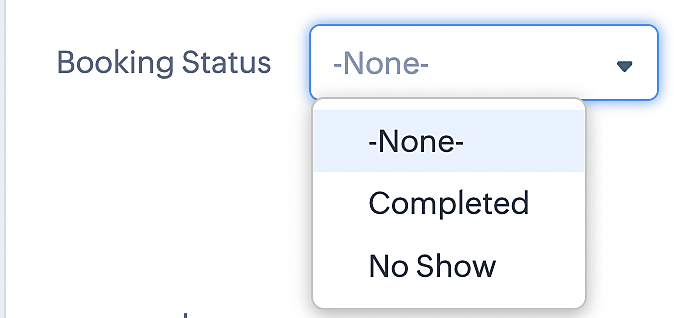
To update a booking's status (Completed or No Show), we've added a new picklist properties field named "Booking Status" in the Meetings module and configured it with two options: "completed" and "no show". Depending on the booking status chosen, the corresponding booking in Zoho Bookings will be updated.
- Details on how to add a custom field to the Meetings module : Customizing modules
- Here's a video that demonstrates how to add a field to a module in Zoho CRM: Adding fields
Reference:
3. Booking status: Canceled
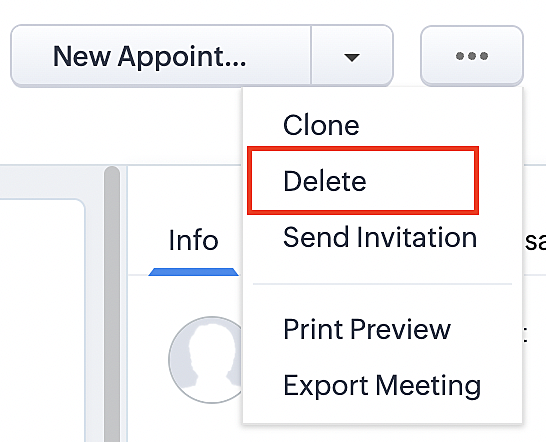
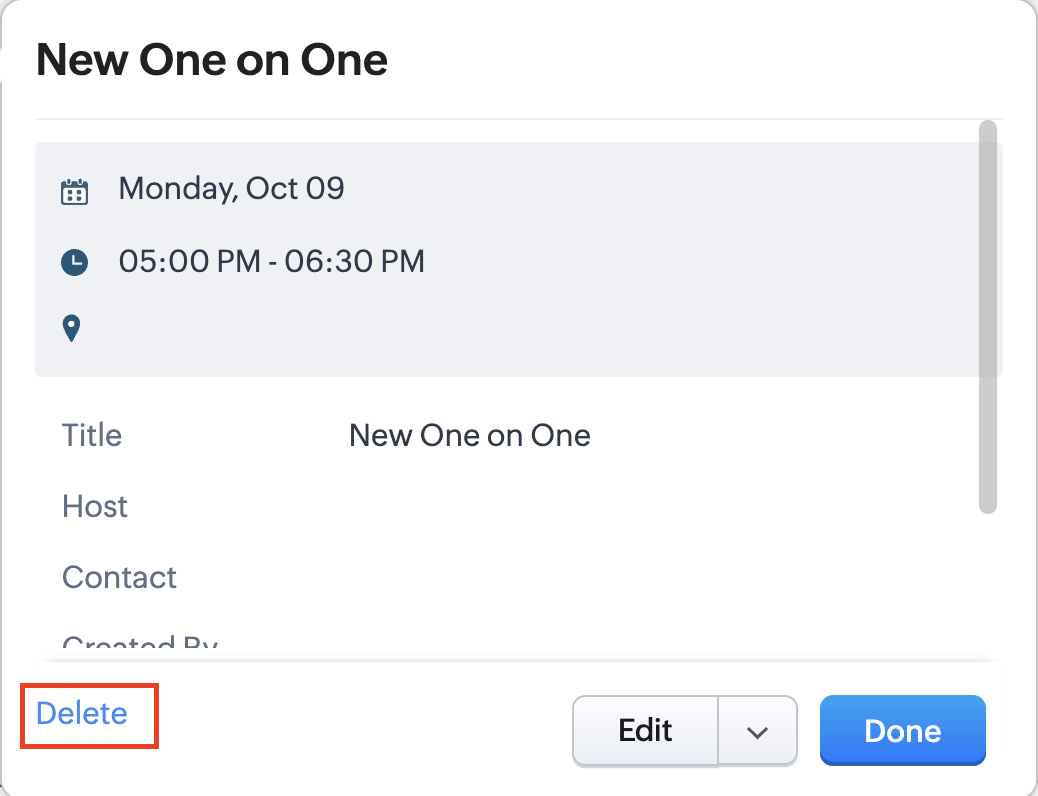
Whenever a meeting is deleted from the Meetings module, the corresponding booking in the Zoho Bookings app will also be canceled automatically. The meeting can be deleted either from the Meetings module or directly from the calendar.
To enable bidirectional sync between Zoho CRM and Zoho Bookings
Complete these steps in Zoho CRM.
Step 1: Creating connections
You first need to establish a connection between Zoho CRM and Zoho Bookings. Zoho Bookings is listed as one of the default connections in Zoho CRM, making it simple to set up. Select the Zoho Bookings connection, define the connection name and scope, and you'll be all set. This connection will enable you to link both applications and facilitate the seamless transfer of data.
Read here for more details on how to create connection in Zoho CRM: Connections
Step 2: Creating functions
In this context, we'll be creating three functions: one for marking appointments as completed, another for canceling appointments, a third for marking appointments as no shows, and a fourth for rescheduling appointments. For each function, we must also configure arguments, which pass values or data into a function when making a call. Here, we'll pass the booking ID to the function as an argument to update the necessary booking status.
i. To create a function for marking appointments as completed:
1. Go to Setup > Developer Space > Functions.
2. In the Functions page, click + Create New Function.

3. Configure the function name, display name, and description.
4. Set the category as automation.
This opens the Deluge script page.
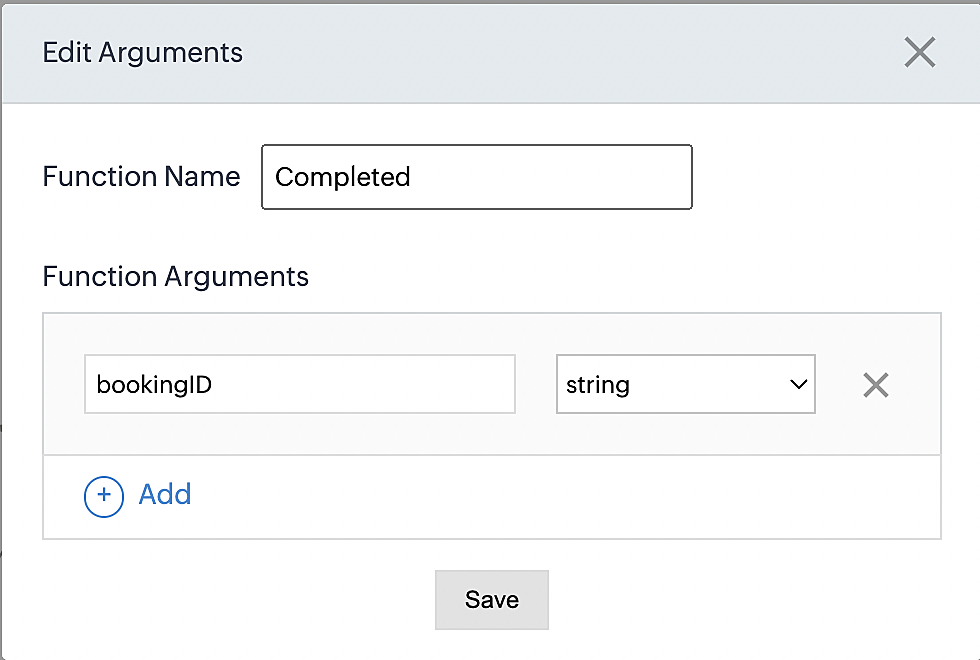
5. Next, configure the function's arguments:
A. Click on Edit Arguments on the Deluge script page.

B. Set the Parameter Name as bookingID. (Please note that the "bookingID" value is case sensitive and must match
the term used in the code).
C. Set the type as string.
Reference:
Please configure the below code in the Deluge script page.
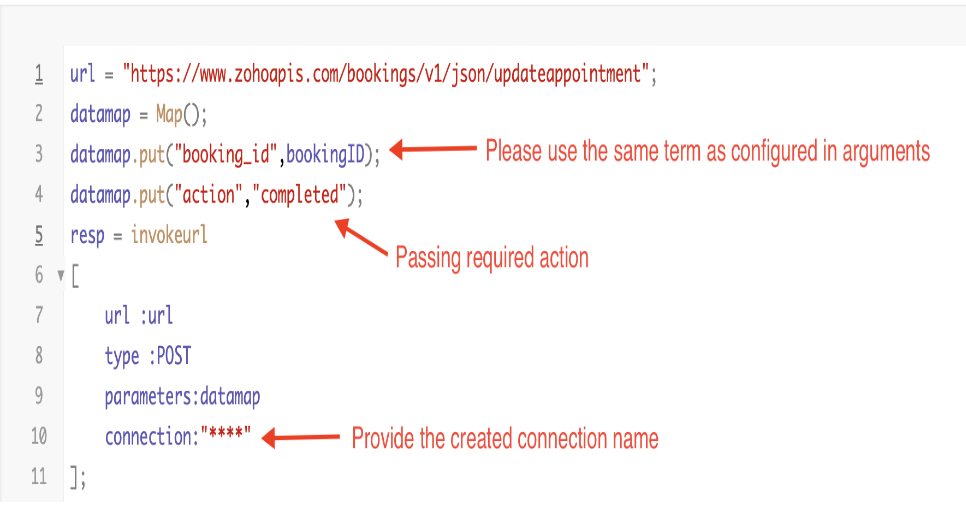
By completing these steps, we've configured a function that will mark appointments as completed.
ii. To create a function for marking appointments as no shows
1. Go to Setup > Developer Space > Functions.
2. In the Functions page, click + Create New Function.

3. Configure the function name, display name, and description.
4. Set the category as automation.
This opens the Deluge script page.
5. Next, configure the function's arguments:
A. Click on Edit Arguments on the Deluge script page.

B. Set the Parameter Name as bookingID. (Please note that the "bookingID" value is case sensitive and must match
the term used in the code).
C. Set the type as string.
Reference:
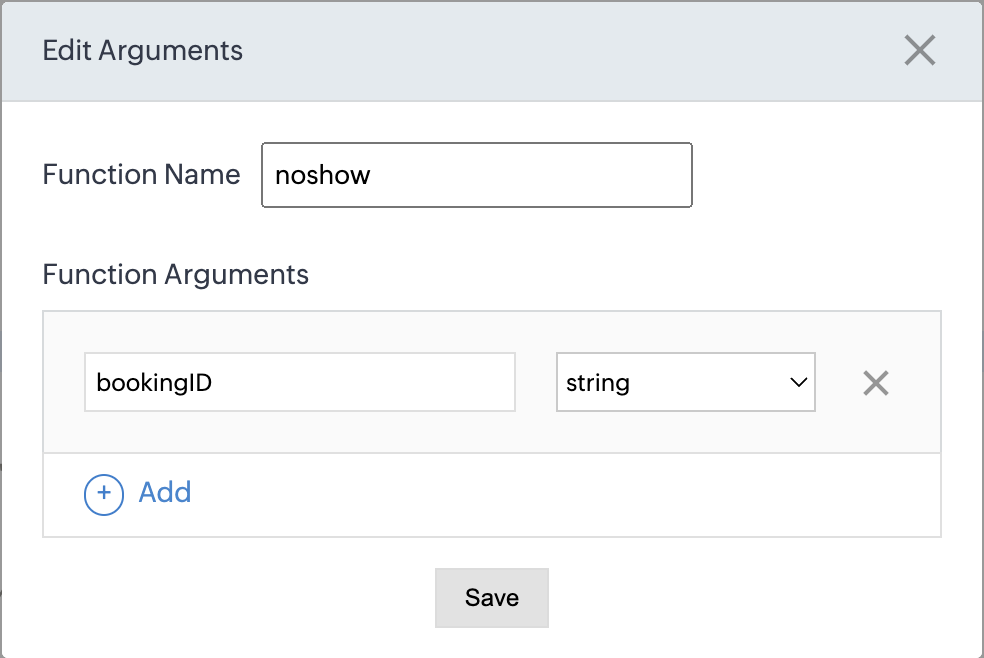
Please configure the below code on the Deluge script page.
Code link: No show
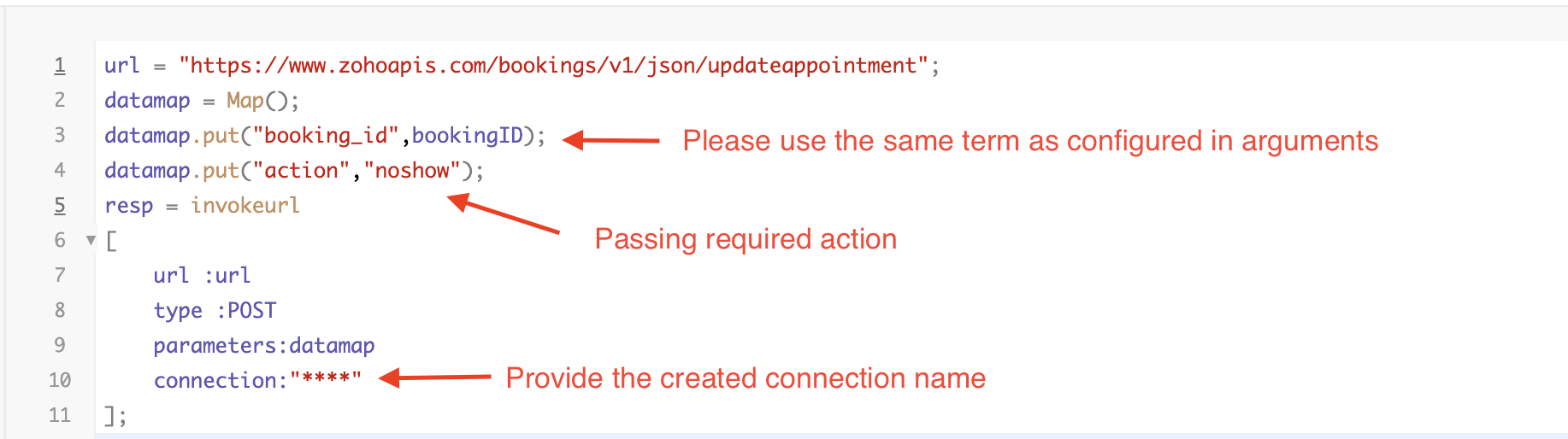
By completing these steps, we've configured a function that marks appointments as no shows.
iii. To create a function for marking appointments as canceled
1. Go to Setup > Developer Space > Functions.
2. In the Functions page, click + Create New Function.

3. Configure the function name, display name, and description.
4. Set the category as automation.
This opens the Deluge script page.
5. Next, configure the function's arguments:
A. Click on Edit Arguments on the Deluge script page.

B. Set the Parameter Name as bookingID. (Please note that the "bookingID" value is case sensitive and must match
the term used in the code).
C. Set the type as string.
Reference
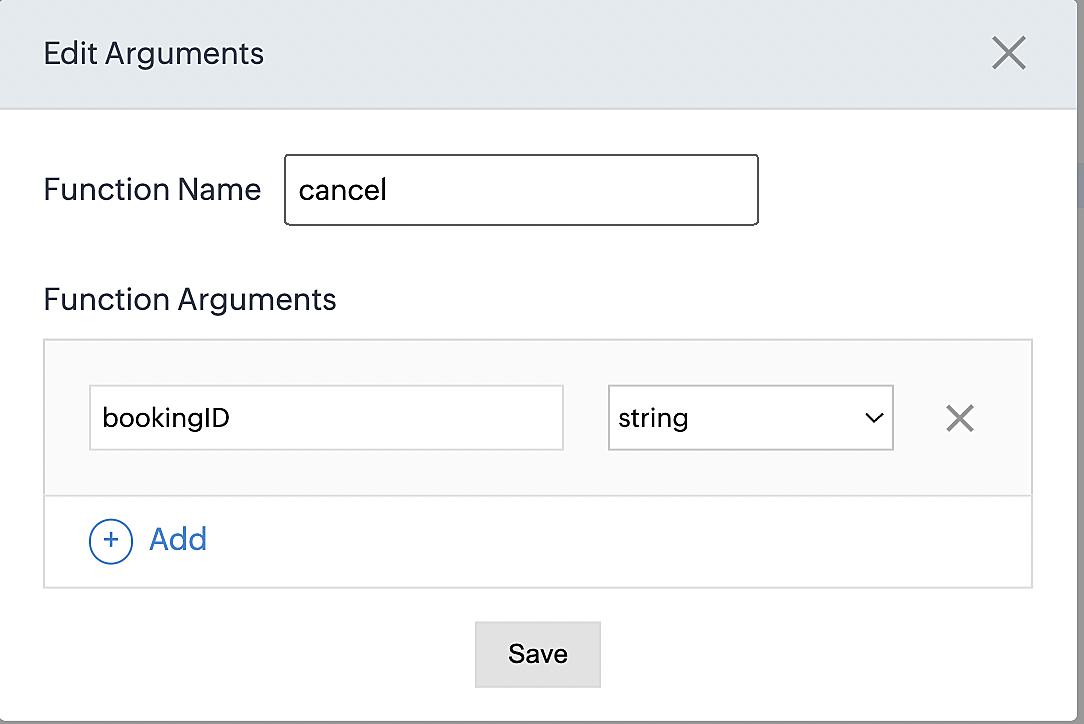
Please configure the below code on the Deluge script page.
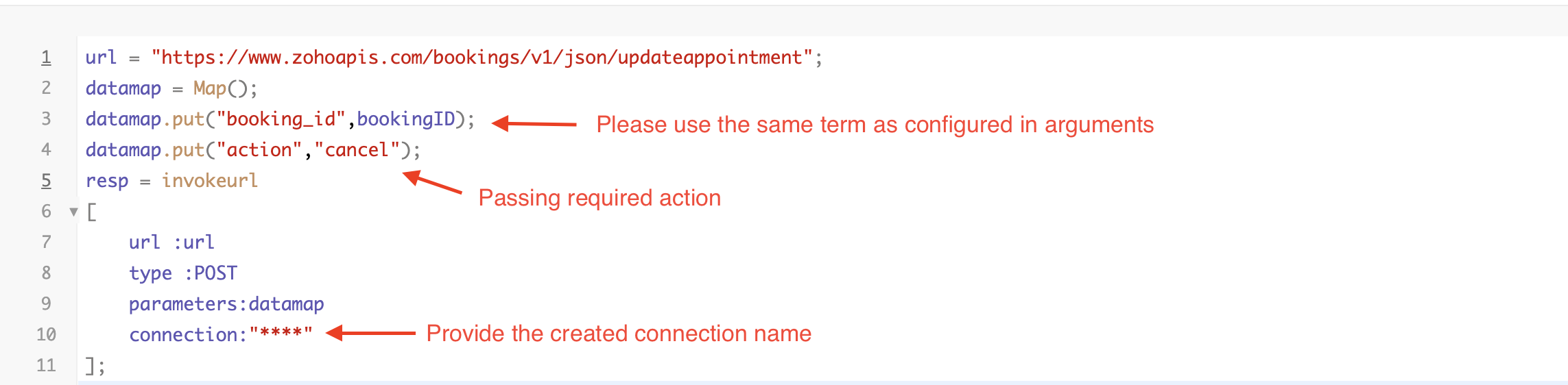
By completing these steps, we've configured a function that marks appointments as canceled.
Code explanation
Below is an explanation of the code that covers all the configurations present in the three functions mentioned above (cancel, mark as completed, and mark as no show).
Line 1: Based on the Zoho Bookings account's data center, we're setting up the API endpoint URL configuration.
Lines 2 - 4: To update appointments, we utilize the Zoho Bookings API. Within the update appointment API, there are two mandatory fields that need to be included: BookingID and action (completed/cancel/noshow).
Lines 5 - 10: We use the invokeURL task for API calls. To learn more about the invokeURL task, please refer to the following document: InvokeURL task for API calls
Now, let's proceed and learn about the process of creating a workflow and linking the established functions to it. This will enable us to automate the entire appointment status updating process.
Step 3: Creating a workflow
Workflow rules are sets of actions (email notifications, tasks and field updates) that are executed when specified conditions are met. Here, we'll generate workflow rules for each action to activate the respective function, thereby automating the appointment status updating process.
i. Creating a workflow for "canceling" appointments in Zoho Bookings when a meeting is deleted in Zoho CRM
Part 1: Creating the rule
1. Go to Setup > Automation > Workflow Rules.
2. In the Workflow Rules page, click Create Rule.

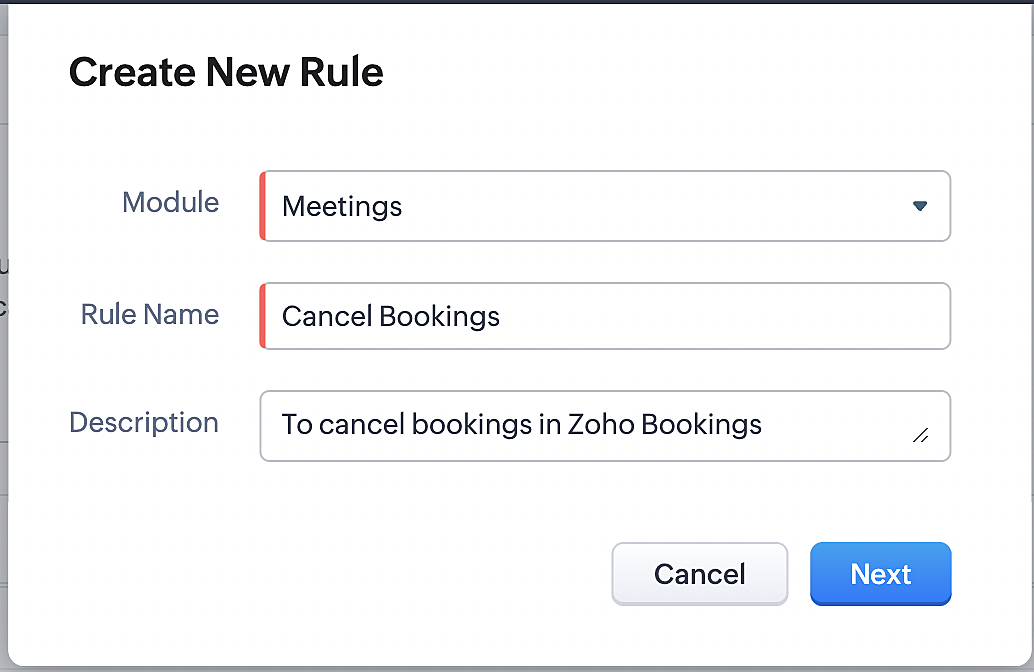
3. Select "Meetings" under Module and configure rule name and description as required.
More details: Create Rule
Reference:
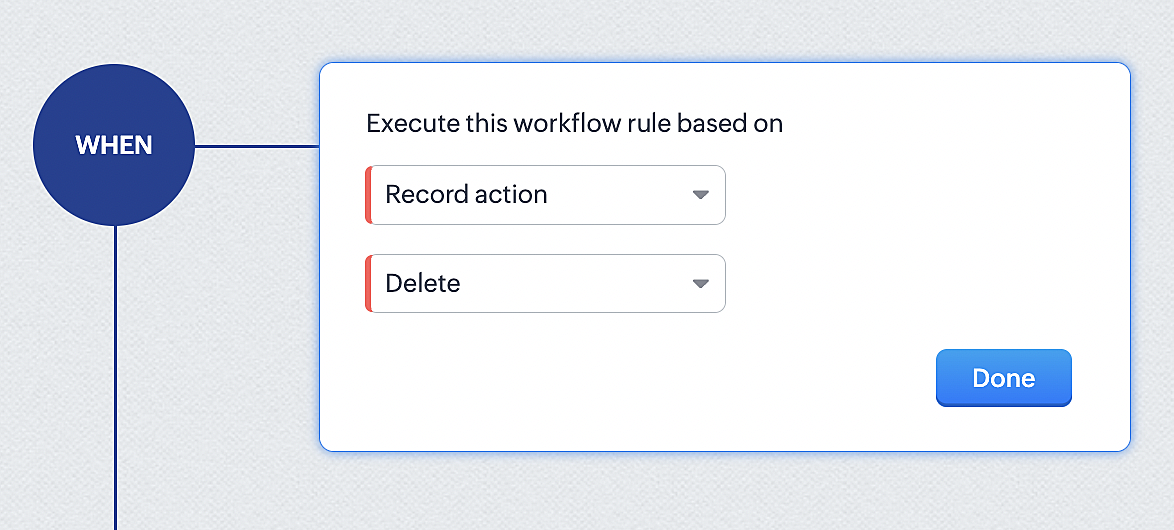
1. Select Record Action > Delete > Done to execute the rule when meetings are deleted.
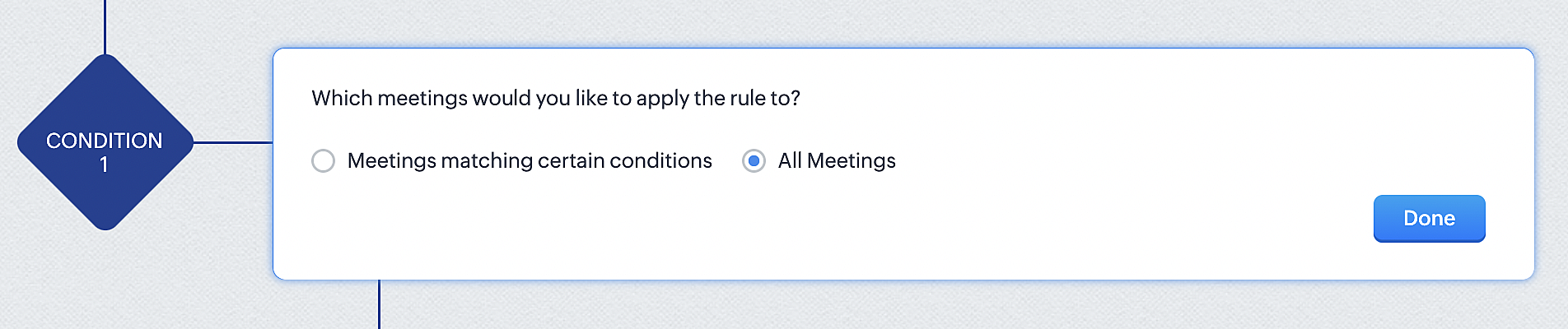
2. Configure condition > All Meetings.
3. Instant Actions > Function.
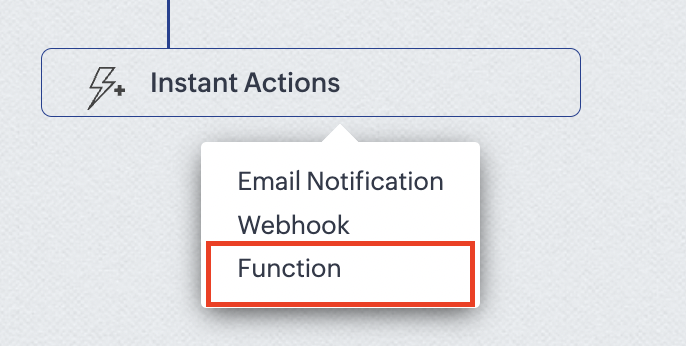
4. Click the New Function button.

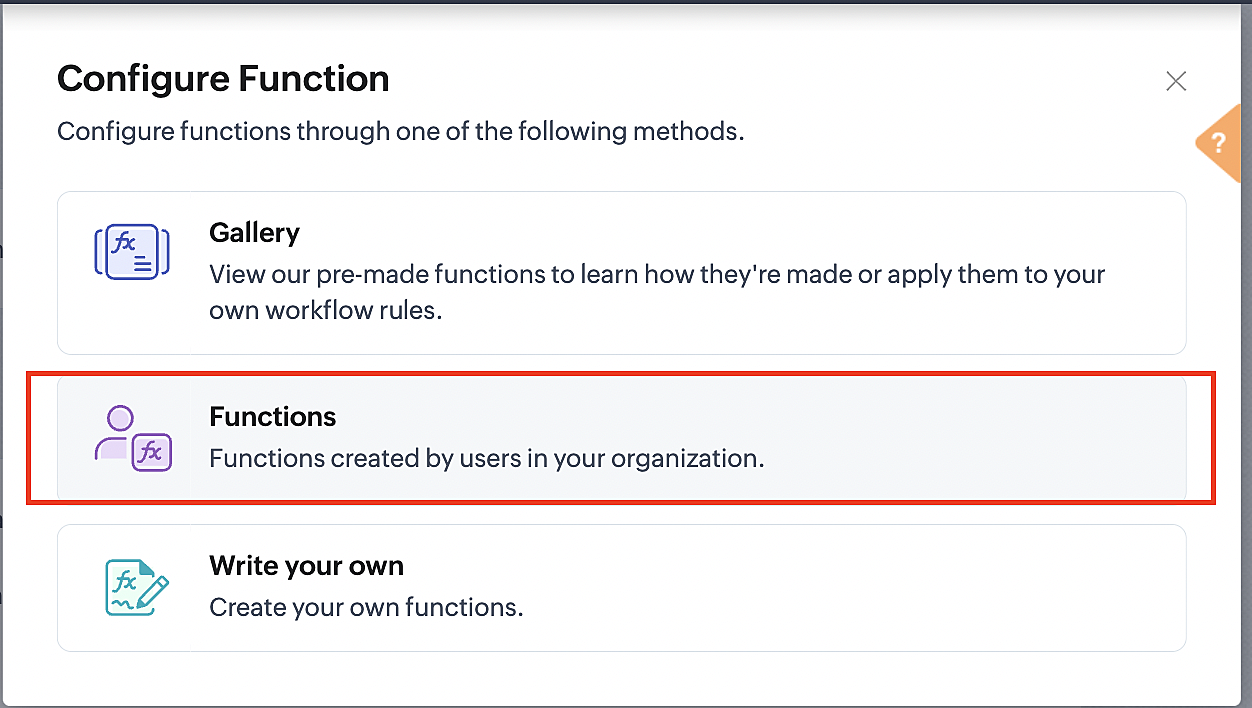
5. In the Configure custom function page, select the "cancel" function you created from among the functions users in your organization have created.
Part 3: Argument mapping
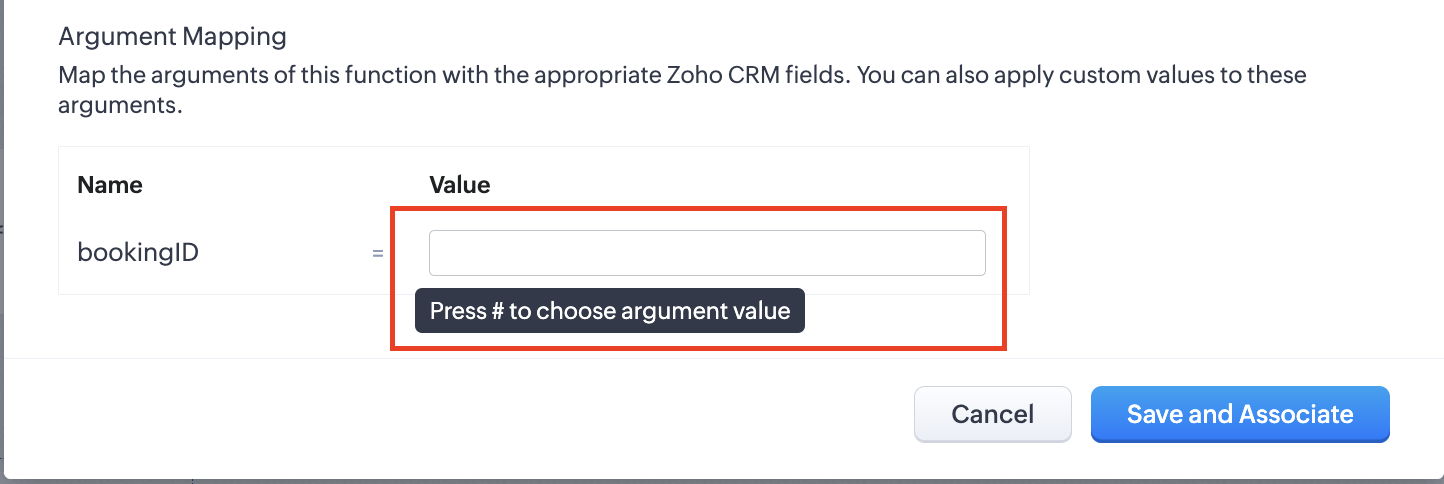
1. Press # to choose an argument value.
2. Select Meetings under Module and BookingId in the field.
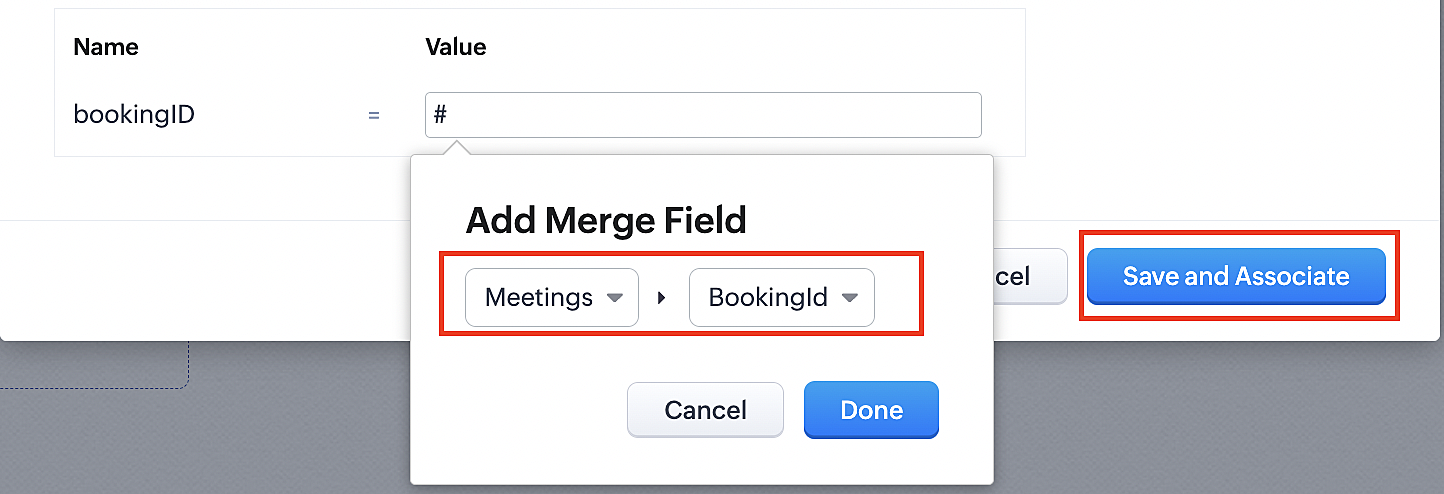
3. Click the Save and Associate button.
Reference:
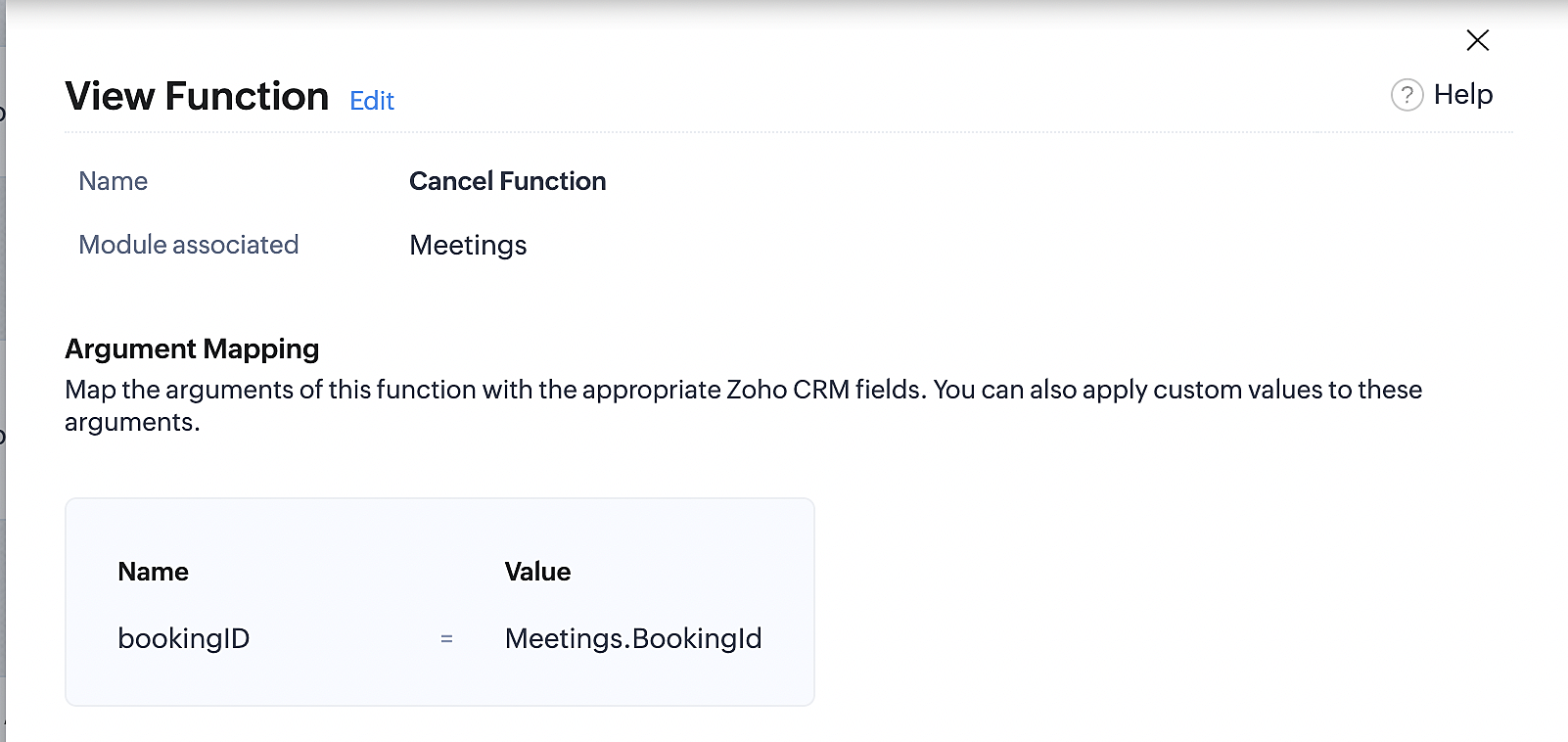
Below is the final flow of the cancel booking workflow:
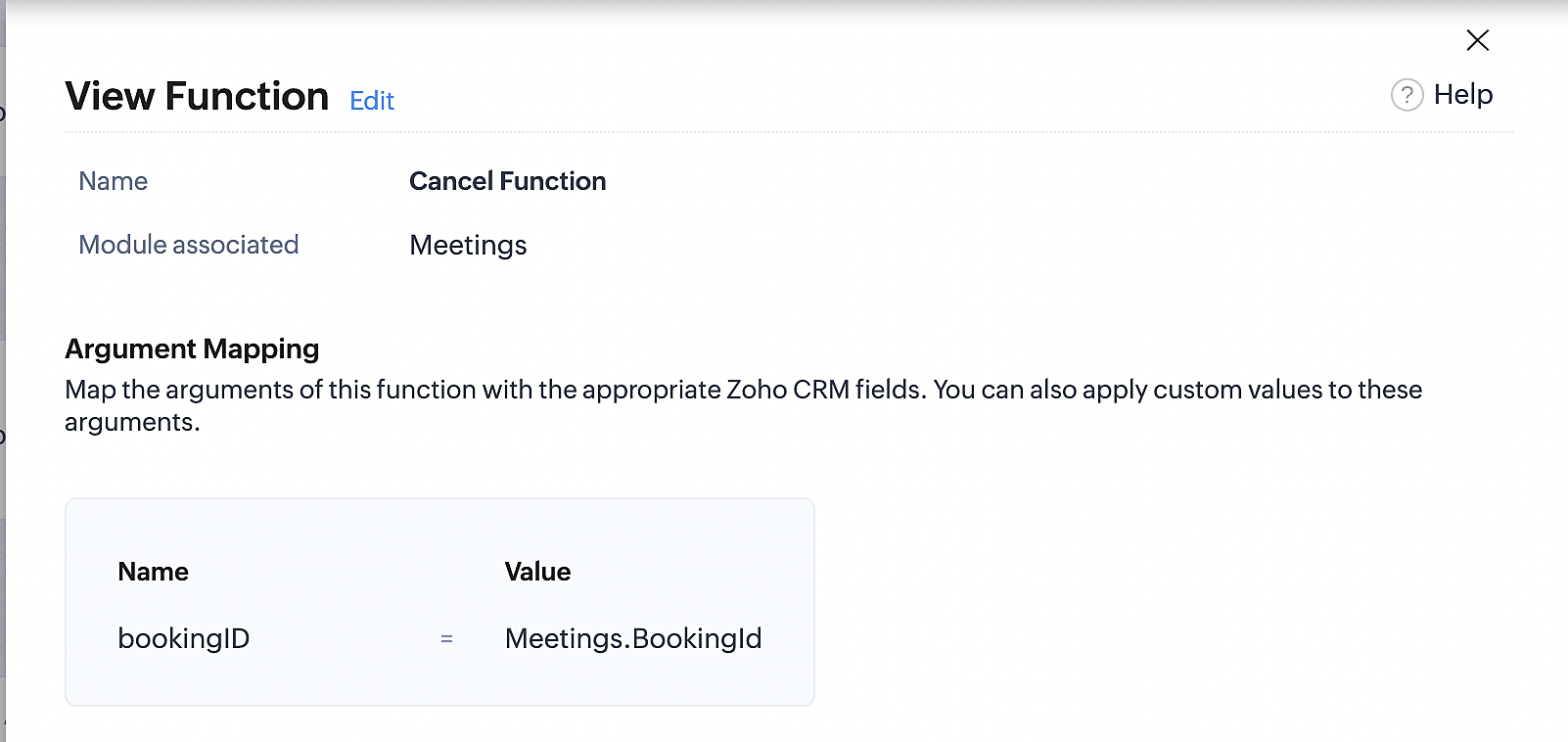
At the end of Part 3, we will have created a workflow that will be executed automatically when meetings are deleted in Zoho CRM. Simultaneously, the bookings associated with the meeting will also be canceled in Zoho Booking.
ii. Creating workflow for updating an appointment's status as "no show" in Zoho Bookings when the meeting's booking status is marked as no show in Zoho CRM
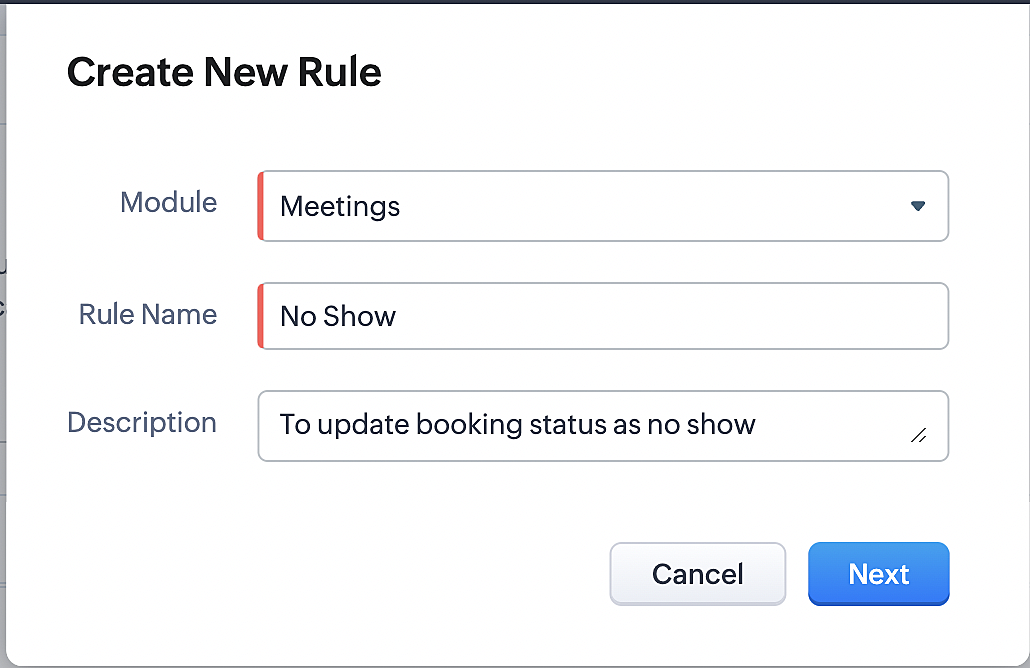
Part 4: Creating the rule
1. Go to Setup > Automation > Workflow Rules.
2. In the Workflow Rules page, click Create Rule.

3. Select Meetings under Module and configure the rule name and description as required.
Reference:
Part 5: Specifying the rule trigger
If you encounter difficulties while navigating through the steps mentioned below, please refer to Part 2 above, where we have provided step-by-step screenshots for clarification.
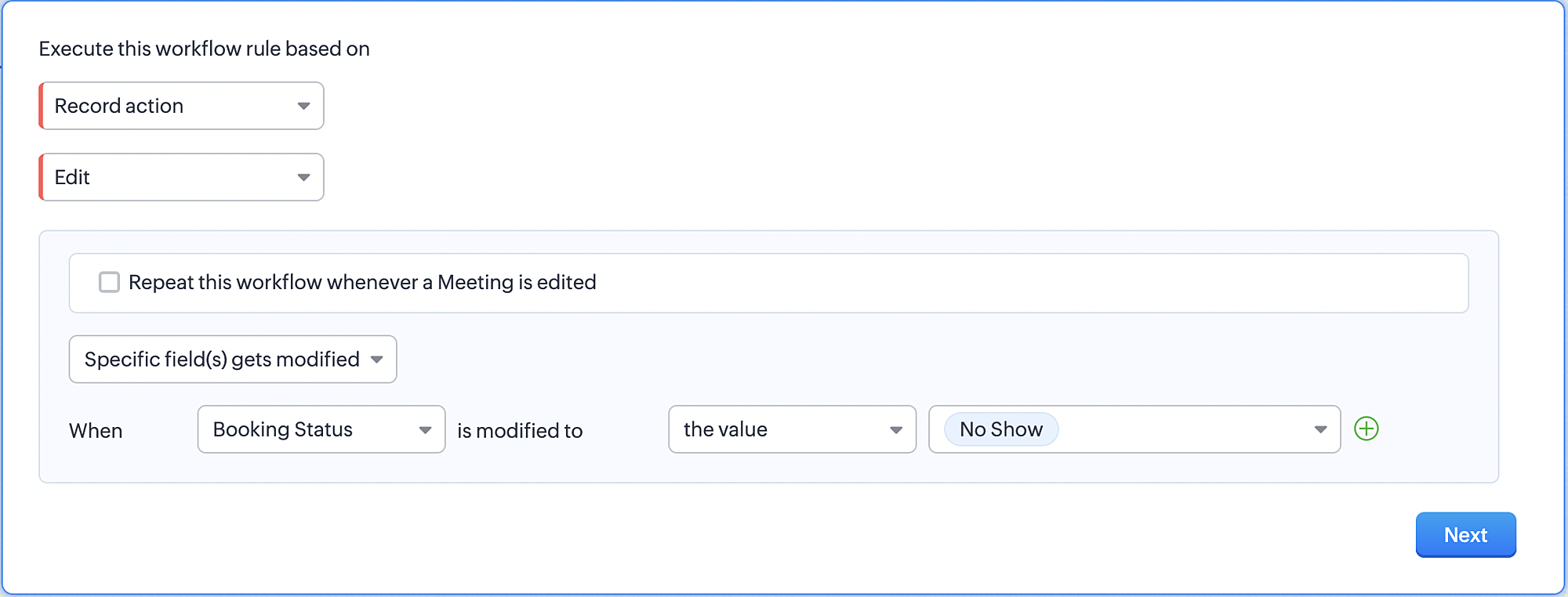
1. Record Action > Edit.

2. Enable the Specific field(s) gets modified and configure it per the screenshot below.
a. This is to ensure that the workflow is executed only when the booking status under the meeting module is
updated to "No Show".
updated to "No Show".
3. Configure condition > All Meetings.
4. Instant Actions > Function > New Function.
5. In the Configure custom function page, select the "no show" function you created from among the functions
users in your organization have created.
users in your organization have created.
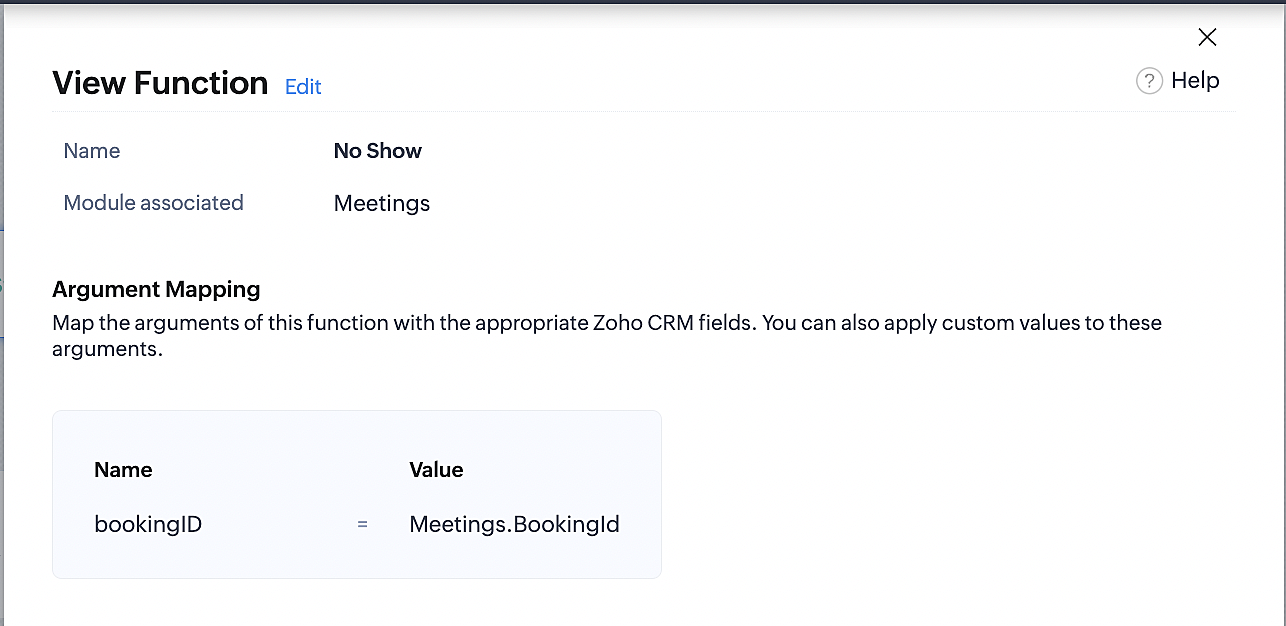
Part 6: Argument mapping:
If you encounter difficulties while navigating through the steps mentioned below, please refer to Part 3 above, where we have provided step-by-step screenshots for clarification.
1. Press # to choose an argument value.
2. Select Meetings under Module and configure the field as "BookingId".
3. Click Save and Associate button.
Reference:
Below is the final flow of the "No Show" booking status workflow:
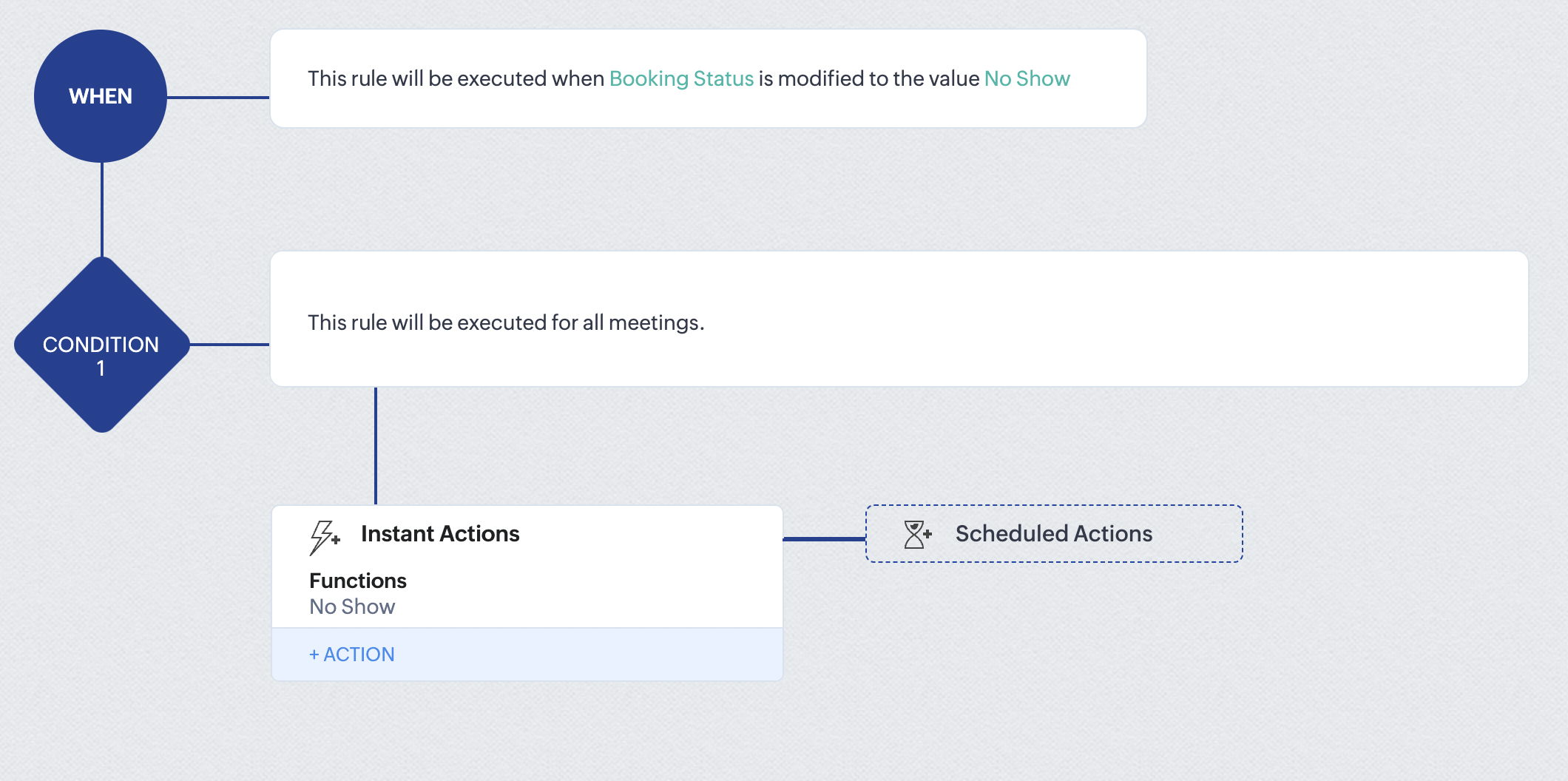
At the end of part 6, we will have created a workflow that automatically executes when the booking status field within the Zoho CRM Meetings module is updated to "No Show." This action will result in the associated bookings for that meeting also being marked as "No Show" in Zoho Bookings.
iii. Creating workflow for updating appointment status as "Completed" in Zoho Bookings when the booking status field of the meeting is marked as completed in Zoho CRM.
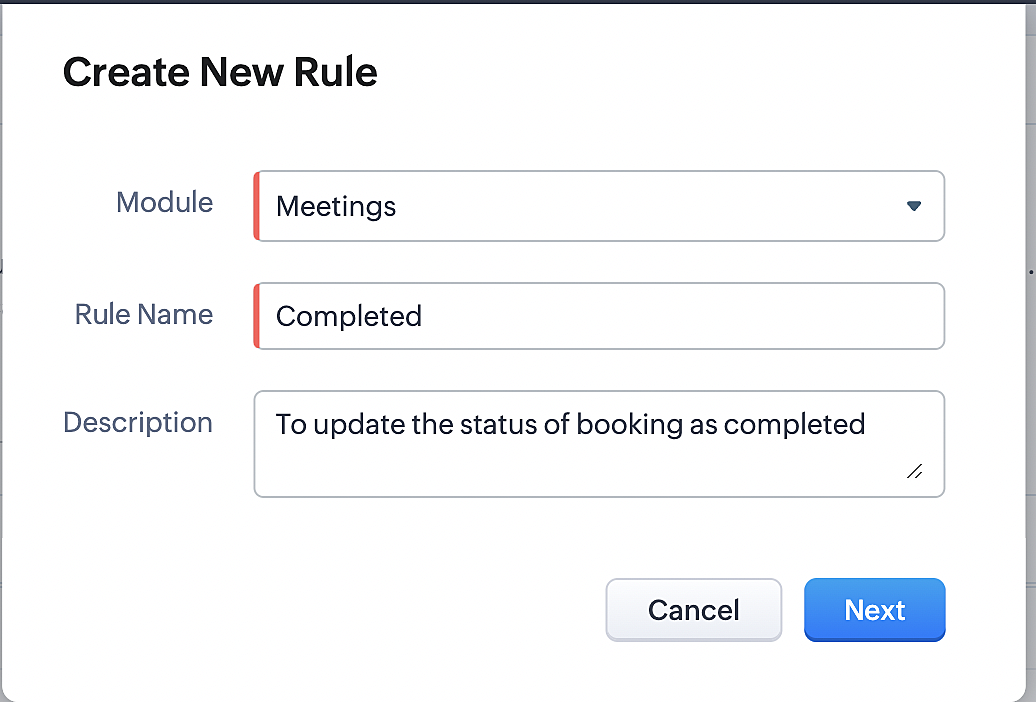
Part 7: Creating the rule
1. Go to Setup > Automation > Workflow Rules.
2. In the Workflow Rules page, click Create Rule.

3. Select Meetings under Module and configure rule name and description as required.
Reference:
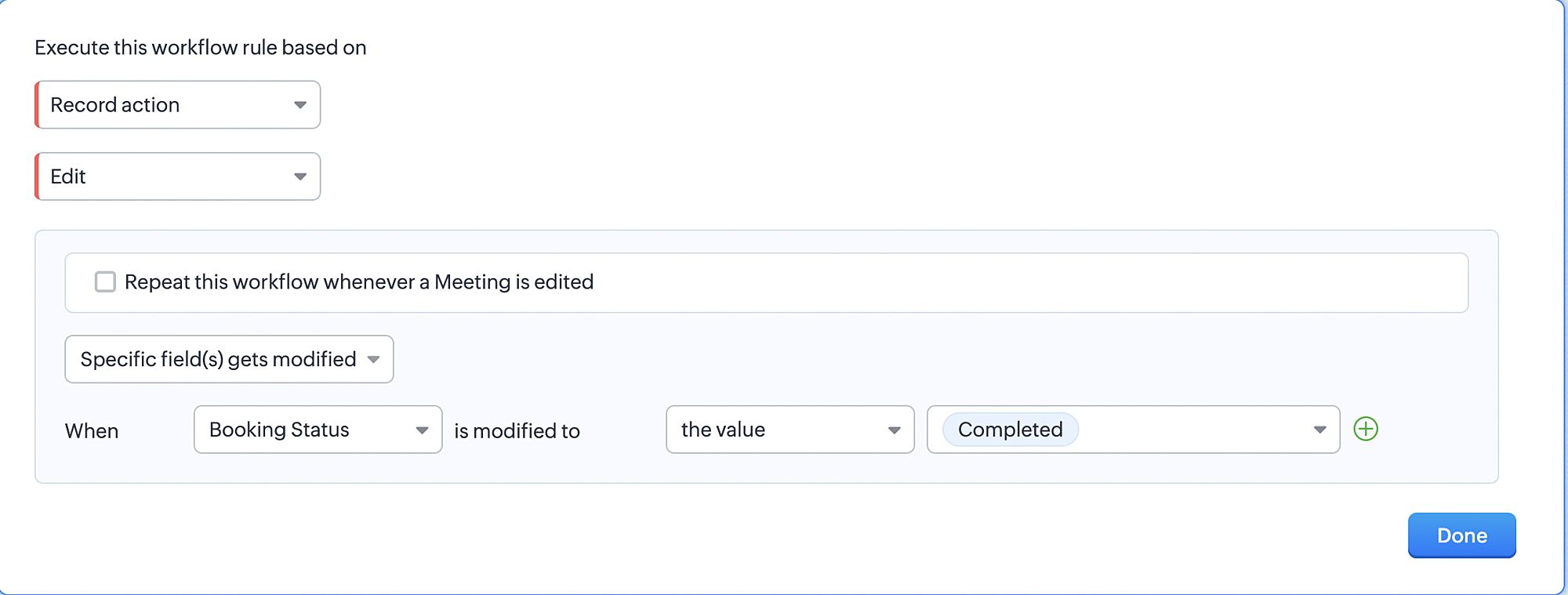
Part 8: Specifying the rule trigger
If you encounter difficulties while navigating through the steps mentioned below, please refer to Part 2 above, where we have provided step-by-step screenshots for clarification.
1. Record Action > Edit.

2. Enable the Specific field(s) gets modified setting and configure it per the screenshot below.
a. This serves to ensure that the workflow is executed only when the booking status under the Meetings module is
updated to "Completed".
3. Configure condition > All Meetings.
4. Instant Actions > Function > New Function.
5. In the Configure custom function page, select the "completed" function you created from among the functions users
in your organization have created.
Part 9: Argument mapping:
If you encounter difficulties while navigating through the steps mentioned below, please refer to Part 3 above, where we have provided step-by-step screenshots for clarification.
1. Press # to choose an argument value.
2. Select Meetings under Module and configure the field as "BookingId".
3. Click Save and Associate button.
Reference:
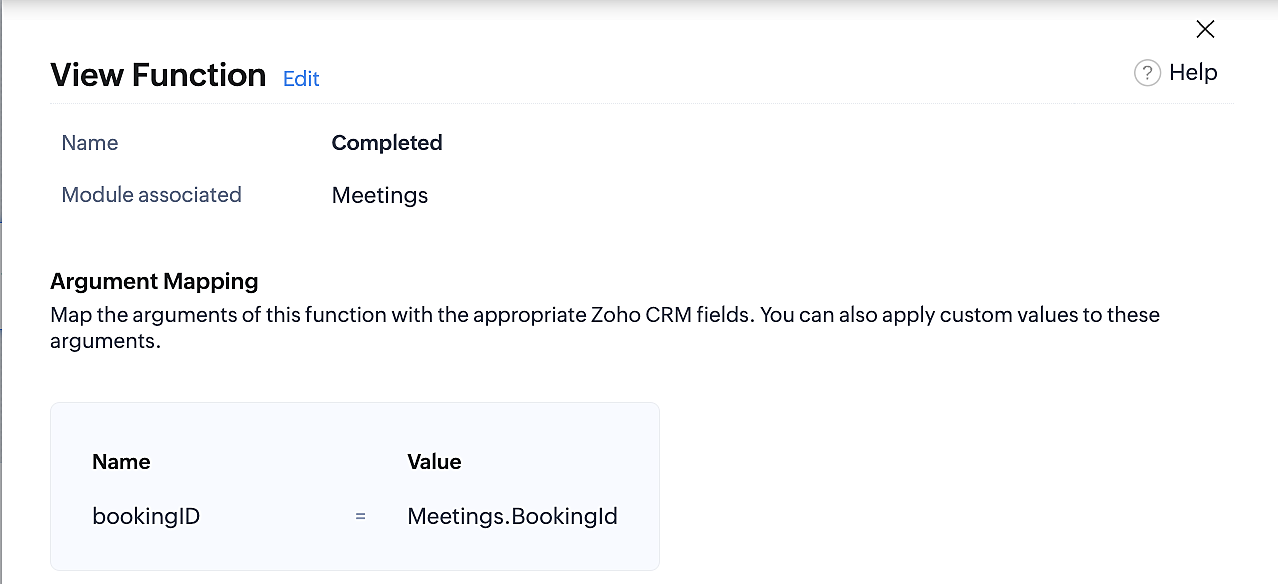
Below is the final flow of the "Completed" booking status workflow:
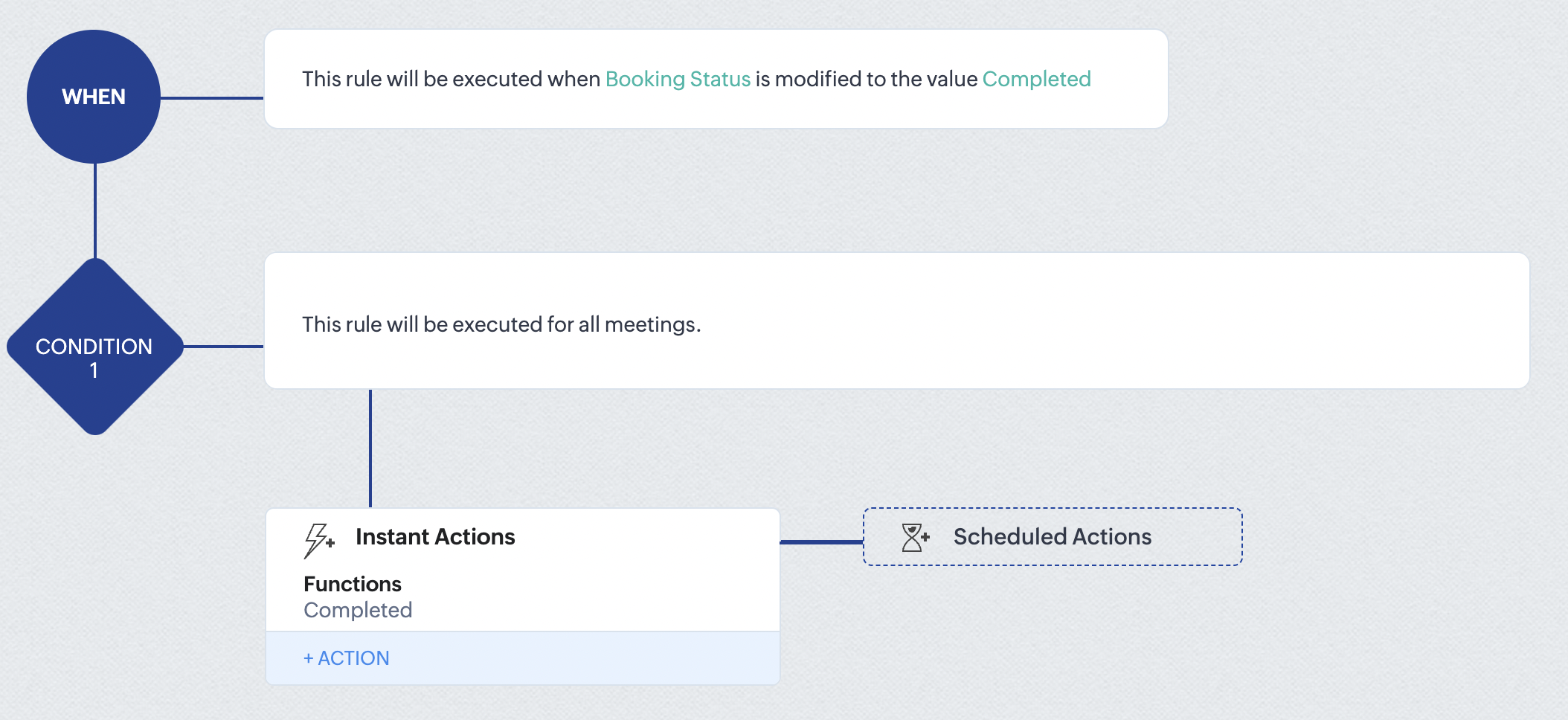
At the end of part 9, we will have created a workflow that is automatically executed when the booking status field within the Zoho CRM Meetings module is updated to "Completed." As a result, the associated bookings for that meeting will also be marked as "Completed" in Zoho Bookings.
Conclusion
We've reached the end of this community post. With the integration mentioned above in place, you'll be able to book, cancel, and update the status of appointments in Zoho Bookings directly from your Zoho CRM application. This will help you effectively manage your appointments in one place. As mentioned above, we've covered the rescheduling action in a separate post, which you can access by clicking on the following link: Reschedule Action
Furthermore, we've outlined a method for automating appointment statuses in detail. You can use this document as a reference to explore the various possibilities that suit your needs.
If you have any questions or need assistance with your configuration, please email us at hello@zohobookings.com or support@zohobookings.com.
Access your files securely from anywhere
New to Zoho Recruit?

Zoho Developer Community
New to Zoho LandingPage?
Zoho LandingPage Resources
New to Zoho Survey?
New to Zoho CRM Plus?
Deliver unforgettable customer experiences
New to Zoho CRM Plus?
Deliver unforgettable customer experiences
New to Zoho Marketing Plus?
Everything you need to run your marketing
New to Zoho Marketing Plus?
Everything you need to run your marketing
New to Bigin?





Topic Participants
Kaushik S
bruce
Ishwarya SG
PrismaNote Support
Sticky Posts
Presenting ABM for Zoho CRM: Expand and retain your customers with precision
Picture this scenario: You're a growing SaaS company ready to launch a powerful business suite, and are looking to gain traction and momentum. But as a business with a tight budget, you know acquiring new customers is slow, expensive, and often deliversGood news! Calendar in Zoho CRM gets a face lift
Dear Customers, We are delighted to unveil the revamped calendar UI in Zoho CRM. With a complete visual overhaul aligned with CRM for Everyone, the calendar now offers a more intuitive and flexible scheduling experience. What’s new? Distinguish activitiesCreate and populate a record in an instant: Introducing zero-shot field prompting to Zia's ICR
A couple of months ago, we upgraded our in-house AI image detection and validation tool, Zia Vision, with intelligent character recognition (ICR). By training Zia with sample images, you could create and enrich CRM records with data extracted from standardIn-person ZUG Meetups for Real Estate Professionals - US Q1 2026
The Real Estate Zoho User Group is going on a multi-city, in-person meetup tour across the US, and we’d love to see you there! These meetups are a great opportunity to: Connect with fellow real estate professionals using Zoho Share challenges and discoverNimble enhancements to WhatsApp for Business integration in Zoho CRM: Enjoy context and clarity in business messaging
Dear Customers, We hope you're well! WhatsApp for business is a renowned business messaging platform that takes your business closer to your customers; it gives your business the power of personalized outreach. Using the WhatsApp for Business integration
New to Zoho TeamInbox?
Zoho TeamInbox Resources
Zoho CRM Plus Resources
Zoho Books Resources
Zoho Subscriptions Resources
Zoho Projects Resources
Zoho Sprints Resources
Qntrl Resources
Zoho Creator Resources
Zoho CRM Resources
Design. Discuss. Deliver.
Zoho Show Resources

Get Started. Write Away!
Writer is a powerful online word processor, designed for collaborative work.
Zoho CRM コンテンツ
-
オンラインヘルプ
-
Webセミナー
-
機能活用動画
-
よくある質問
-
Ebook
-
-
Zoho Campaigns
- Zoho サービスのWebセミナー
その他のサービス コンテンツ
Nederlandse Hulpbronnen

ご検討中の方
Recent Topics
*UPDATE: ISSUE RESOLVED, SEE HOW FOR HELP* Issue imbedding Youtube Videos
**UPDATE: RESOLVED** For anyone that is having a similar issue, try this workaround before attempting to have the Zoho techs fix it. I have been in communication with them for weeks about this and they can't seem to fix the issue. Thinking it may have just been my computer or my browser, I tried two different computers on two different networks, each running different versions of Windows, and tried it on Chrome, Firefox and IE; nothing worked. So, needless to say, it's an issue with Zoho somewhere.Backorder For Composite Items
Hello If i released SO for composite item and use backorder feature of zoho inventory then it should backorder child item items of composite and not composite item.This is basic of backordering.I conveyed this to zoho call center but no solution yet.Paid Support
We are in the process of creating tiers for our support offerings. There will be three tiers of support available - 2 paid and 1 free. The paid tiers will be purchased in allotted hours. I need to figure out how to a) work in the out of the box SLA, ContractsAutomatically CC supervisor
Hello, in our organization agents are replying to tickets and they are required to CC their supervisor on all emails to and from customers. is there a way to have an email address automatically populate in the CC field when reply to a ticket? thaZoho One - White Label
Releasing a white-label feature for Zoho One, or any software or service, can offer several advantages and benefits for both the company providing the software (Zoho in this case) and its users. Here are some key reasons for releasing a white-label featureAre this Features included in the Road Map
1. Sync between description/short description in Zoho Books/Inventory and Zoho Commerce: I am unsure how it works now. I belive the description is not pulled. 2. Pick Up: This feature is great. It is added on Zoho Commerce but not on Books/Inventory whichReconciliation - Show Transactions After End Date
I did a quick search, and I've only seen this brought up indirectly. In the reconciliation interface, transactions dated up to a week after the end date should be available for being reconciled. The use case is pretty simple... many times, transactionsAuto populate email field in zoho form
Hi, Is there a way the email field in zoho forms can be auto populated based on the name selected from a drop down list?Option to accept and pay for estimate from Public Estimate link?
Is there any way that our customers can get the Estimate in their email, click on "View Estimate" and from the public link, click Accept and Pay? When they click that, in the background Zoho would create the invoice record in the so that the payment wouldKaizen #125 Manipulating Multi-Select Lookup fields (MxN) using Zoho CRM APIs
Hello everyone! Welcome back to another week of Kaizen. In last week's post in the Kaizen series, we discussed how subforms work in Zoho CRM and how to manipulate subform data using Zoho CRM APIs. In this post, we will discuss how to manipulate a multi-selectEasily track referrals with Zoho Forms
Referral tracking can be a powerful way for businesses to understand where their leads are coming from. With Zoho Forms, tracking the referral sources of your leads is an easy and straightforward process. Here are some tips to help you make the most ofAdd an email to an existing ticket is not working
I noticed that in Zoho Desk the funcionality to add an email to an existing ticket is not working using the syntax [##12345##], has the method changed? In red is the syntax we use to add email to an existing ticket As you can see, he did not add the emailNew CRM to Campaigns Sync Doesn't Continue Making Updates
Changes made in CRM are not appearing in mapped fields in matching Campaign records after migrating to the new sync process. The only way we've found to get records to update is to call into Support and point out the problem. After convincing SupportZoho Integration with UPS
I have 2 questions: Firstly, is there a way to notify UPS that we have a package to collect once we have done the shipping label? Secondly, how do I get the tracking number and shipment method onto the Invoice and Package Slip for the customer? ThanCannot log in to IMAP account as of last night
Hey I've been using MFA with an authenticator for a while and have had to use application passwords for Outlook and Edison Mail on my Android devices. Last night the app passwords started to be rejected on my Android devices so I created new ones forLow Stock View
We use the Low Stock view frequently as a guide to inform us when to reorder items, but the view is misleading because it does not take into account Purchase Orders that have already been raised. Unless you are aware and check item by item, this can leadImprove History Feature in Zoho Inventory
At present there is a "history" tab on Zoho Inventory Items, however this only shows a date and time stamp along with the users name. It doesn't say what was changed. What is the value of this if you can't see what was changed? My Ideal is to includeShow backordered items on packing slip
We send out a lot of large orders, and often there are one or two things backordered. How can I fix the packing slips to show quantity ordered & quantity packed There should also be the ability to "ship" 0 of an item so the receiver knows that thingsDocument | Files
The vendor "Partial matches" still not fixed here after years of putting up with having to select most vendors manually ! ( again, the banking "Transaction rules" would solve a lot of these issues ) Some unwanted, irrelevant pdf's also arrive. It wouldbooks+POS+ tap to pay+ stripe
So in the UK we now have tap to pay with stripe. So we can use the stripe app as a POS terminal. Brilliant news. Can we hope that the Books App might add this feature ASAP. It would be great to have one system rather than using the not very good SquareCanvas Form View - Client Script Page on load - Url params not working
We have a custom module with a canvas page for form view. We have a button in Customers module to open this canvas page using invokeurl function. We send few parameters as in the URL as query parameters. https://crm.zoho.in/crm/orgxxxxxxxx/tab/CustomModule12/create/canvas/64333200000261xxxx?layoutId=643332000002605001&c=${Customers.CustomerSending Recruit SMS's to Zoho Cliq - Or tracking in the Messages module in Recruit?
Is there any way to send SMS Gateway messages in Recruit to ZOho Cliq? We use 2-way SMS massages a lot in Zoho Recruit to speed up communication with Candidates. However the only way to keep track of received SMS's is by keeping a look out for the EmailIs it possible to set a customer context variable in Zobot
Hi, I want to use a context variable to route users down different paths in my Zobot chat flow. I know I can do this when the user enters data. But I want to know if I can use a variable that is 'hard coded' on the card, that the user is unaware of. UseCannot change Blog Title
There is nowhere to change the blog title. You can change the blog URL but that is making no difference to the text "Enter Your Post Title" am I missing something?Kaizen #203 - Answering Your Questions | Handling API Limits and Error Responses
Hi Everyone, Welcome back to yet another post in the Kaizen Series! We appreciate your keen participation in the 200th milestone celebration of the Kaizen series. We will continue to answer the queries we received through the feedback. When working withHow to verify website ownership with google search console
Hi, I am having a free .in domain provided by Zoho I have created a website on it now I want to verify my ownership to google webmaster. Can you please help me how to do that."SPF record exceed the allowed limit of 10"
Hi, I was wondering if there were a "universal Zoho SPF record" that would allow all my configured Zoho services that email things to meet this limitation ? or do I have to have an entry for mail, com, billing, etc?Animated GIF Images in Chat
I know this seems to be a small feature request but in a recent Cliq update Zoho disabled autoplay for animated GIFs posted in Cliq conversations. We think this was not a good change. In our organization, animated GIFs in a chat play a role in expressingI can't seem to login in to Mail Apps of MacOS /IOS
Hi, i'm having trouble in signing in to mail apps from IOS. It's always come back to wrong passwords. But i already changed my password like 3 times. But still it says wrong credentialsProfile Image Showing Incorrectly in Zoho Mail
Hi everyone, I’m facing a serious issue with Zoho Mail. The profile image showing for my email address is incorrect — it’s not my image. When I send an email to my Gmail account, it displays someone else’s image. This looks very suspicious and can makeI need access to my old email
I need access to my old email bromzeman@zoho.com to verify it for forwarding. I can’t access the inbox to get the confirmation code. Please assist with recovery or forwarding. as you might already know, they made alot of the email addresses to have thatSet Defaults for Email Groups
Is there a way to set defaults for all of the groups that I establish as a moderator? For example, I want every group I establish to have the following settings: 1. Moderator is <user> 2. User is <user>, <user> 3. Notifications for new group turnedLOGS FOR RECEIVED MAIL ( READ DATE & TIME)
In Zoho mail we can extract the read logs of received mails so that we can see when we have read the mail and at what time & we have read it.Domain verification probem
Hello, i use a domain from Namecheap with hosting from Cinfu when i try to verify my domain on zoho i get "TXT Verification failure" i even tried the HTML verification and the code appears but also giving me the verification failure error.Switching to Cloudflare email routing from Zoho Mail
Hello, I'm currently working on migrating from Zoho Mail to Cloudflare's email routing solution. This requires changing MX and TXT records for our custom domain - when we do this, will our users still be able to log into their accounts and access an archivedUn Subscription Button
How can i Add the Un Subscription Button in Zoho mailDocuments unable view and need to downlad
I can't view .doc files in Zoho mail unless I download them, but I can view PDF files without downloading.we encountered a problem while sending your email. please try again later.
Adding and removing people from groups
We're having problems adding people to a group. Apparently Zoho has one email address and will not recognize a different email address.MAIL SEARCH IS NOT WORKING
THIS ISSUE HAS BEEN BUGGING ME SINCE MORNING, PLEASE RESOLVE THIS AT THE EARLIESTNext Page