Bidirectional sync between Zoho Bookings and Zoho CRM - Part 1
Hey, community members!
The default integration between Zoho CRM and Zoho Bookings is unidirectional, which means that any appointments booked, rescheduled, or deleted in Zoho Bookings will be reflected in Zoho CRM. However, any modifications made to events in Zoho CRM that originated from Zoho Bookings will not be reflected back in Zoho Bookings. Hence, as we're announcing in this community post, we've made the sync bidirectional.
This community post will cover the process of configuring appointment bookings from Zoho CRM in Zoho Bookings, as well as managing appointment statuses such as Canceled, No Show and Completed. We have addressed the rescheduling action in a separate post. To view it, please click on the following link: Reschedule Action
This community post will be beneficial for active Zoho CRM users who handle all their meetings within Zoho CRM. Additionally, you can use this community post as a reference to explore various automation possibilities tailored to your business requirements. For instance, with this post's guidance, when you update a booking's status field to "Completed" in Zoho CRM, it will automatically sync with Zoho Bookings and trigger an automated "Mark as completed" email to customers. This enhancement will improve your Zoho Bookings and Zoho CRM synchronization experience, making appointment management easier.
Prerequisites of bidirectional sync:
- Zoho Bookings Premium subscription
- Zoho CRM paid subscription
- Enable Zoho CRM integration within Zoho Bookings
The purpose of enabling the Zoho CRM integration within Zoho Bookings is to transfer booking details from Zoho Bookings to Zoho CRM. In this configuration, the mandatory field is the Booking ID, which is passed from Zoho Bookings to Zoho CRM through the integration. Whenever an appointment is booked, customer details will be sent to the designated CRM module, and a corresponding record will be created in the Meetings module within Zoho CRM, which will help in automating the workflow.
Here's the complete demo video that covers all the configurations discussed in the community post below:
Timestamps for your reference:
0:35 - Purpose of this community post
Here's the complete demo video that covers all the configurations discussed in the community post below:
Timestamps for your reference:
0:35 - Purpose of this community post
1:26 - Zoho CRM plugin installation
4:43 - Custom field creation
7:20 - Function creation
9:22 - Connection creation
10:24 - Configuring arguments
11:06 - Workflow creation
13:33 - Argument mapping
14:41 - Output verification
17:41 - Conclusion
How we're approaching this bidirectional sync
1. Booking an appointment from Zoho CRM
Install the Zoho Bookings for Zoho CRM plugin within your Zoho CRM application. This plugin enables the creation of a "New Appointment" button within the Zoho CRM Leads and Contacts module, which enables you to select the desired booking page you wish to open. You can choose from various workspace, service, or staff booking pages. After configuration, you can initiate the process of scheduling bookings directly from within your Zoho CRM account.
- Guide on Zoho Bookings and Zoho CRM plugin installation: Booking page selection for Zoho CRM plugin
2. Booking status: Completed or No Show
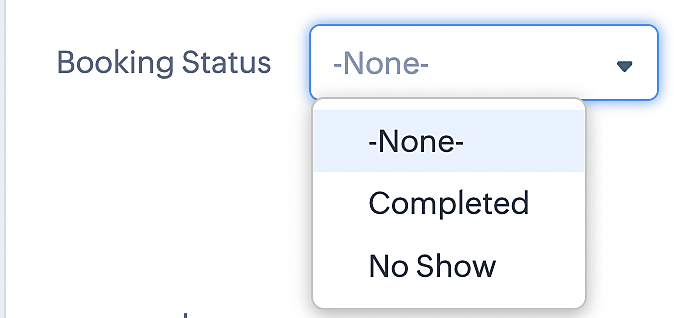
To update a booking's status (Completed or No Show), we've added a new picklist properties field named "Booking Status" in the Meetings module and configured it with two options: "completed" and "no show". Depending on the booking status chosen, the corresponding booking in Zoho Bookings will be updated.
- Details on how to add a custom field to the Meetings module : Customizing modules
- Here's a video that demonstrates how to add a field to a module in Zoho CRM: Adding fields
Reference:
3. Booking status: Canceled
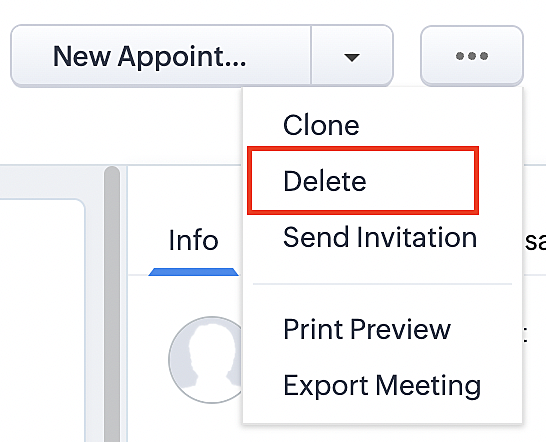
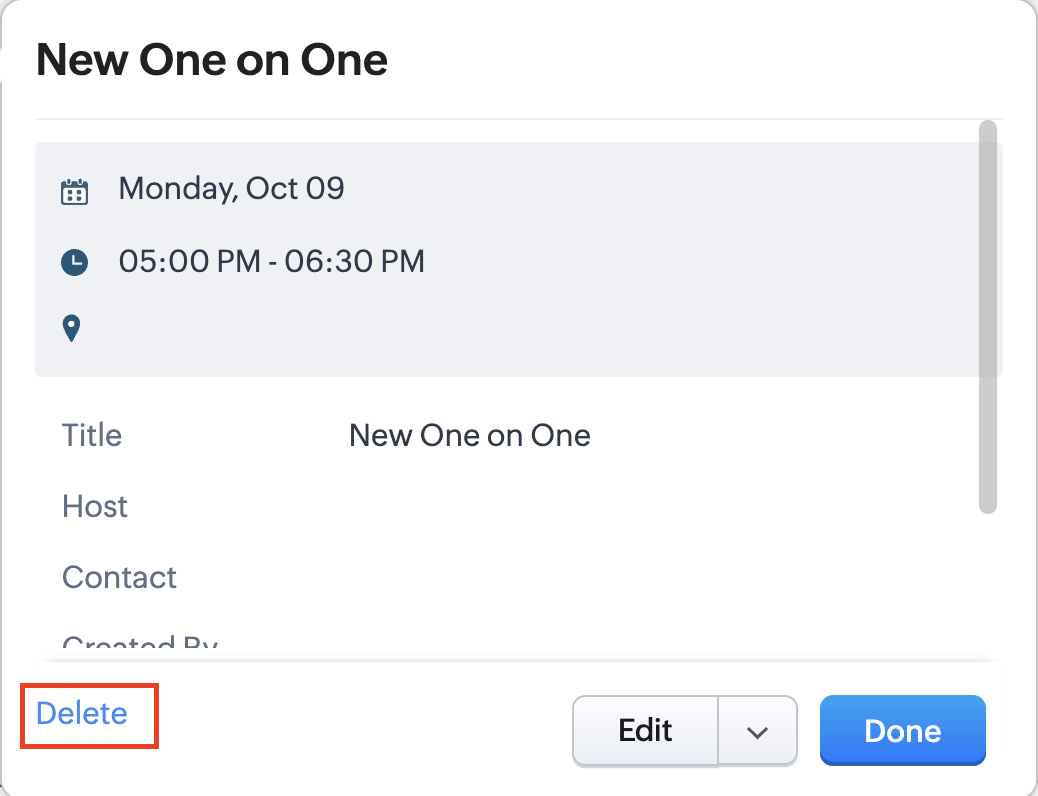
Whenever a meeting is deleted from the Meetings module, the corresponding booking in the Zoho Bookings app will also be canceled automatically. The meeting can be deleted either from the Meetings module or directly from the calendar.
To enable bidirectional sync between Zoho CRM and Zoho Bookings
Complete these steps in Zoho CRM.
Step 1: Creating connections
You first need to establish a connection between Zoho CRM and Zoho Bookings. Zoho Bookings is listed as one of the default connections in Zoho CRM, making it simple to set up. Select the Zoho Bookings connection, define the connection name and scope, and you'll be all set. This connection will enable you to link both applications and facilitate the seamless transfer of data.
Read here for more details on how to create connection in Zoho CRM: Connections
Step 2: Creating functions
In this context, we'll be creating three functions: one for marking appointments as completed, another for canceling appointments, a third for marking appointments as no shows, and a fourth for rescheduling appointments. For each function, we must also configure arguments, which pass values or data into a function when making a call. Here, we'll pass the booking ID to the function as an argument to update the necessary booking status.
i. To create a function for marking appointments as completed:
1. Go to Setup > Developer Space > Functions.
2. In the Functions page, click + Create New Function.

3. Configure the function name, display name, and description.
4. Set the category as automation.
This opens the Deluge script page.
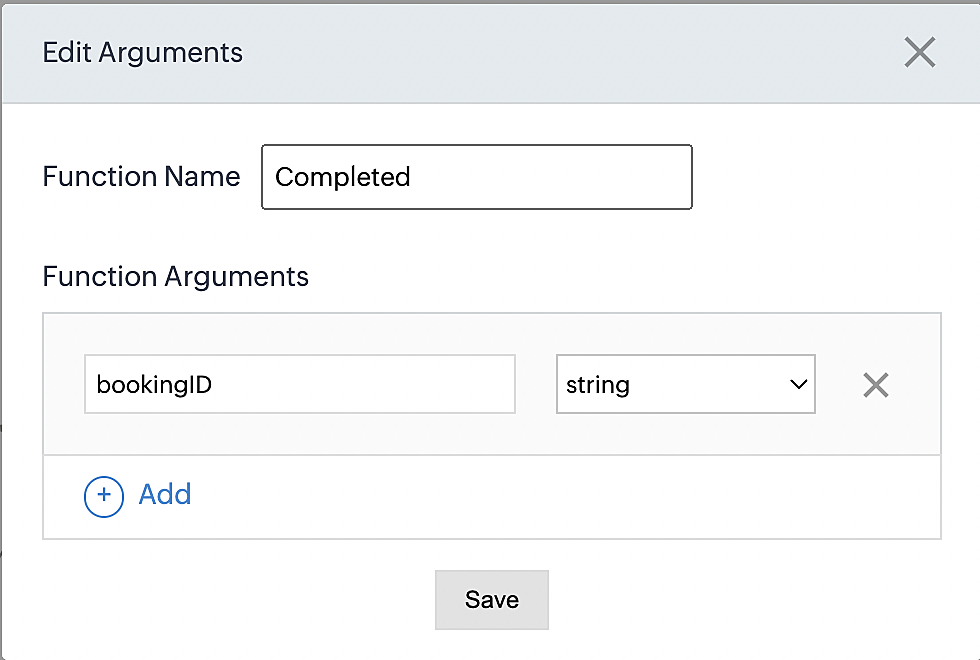
5. Next, configure the function's arguments:
A. Click on Edit Arguments on the Deluge script page.

B. Set the Parameter Name as bookingID. (Please note that the "bookingID" value is case sensitive and must match
the term used in the code).
C. Set the type as string.
Reference:
Please configure the below code in the Deluge script page.
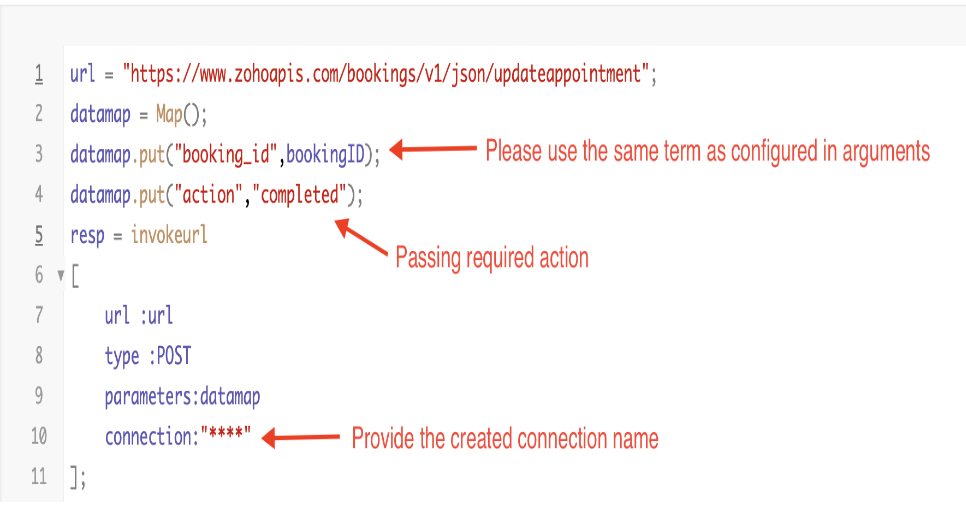
By completing these steps, we've configured a function that will mark appointments as completed.
ii. To create a function for marking appointments as no shows
1. Go to Setup > Developer Space > Functions.
2. In the Functions page, click + Create New Function.

3. Configure the function name, display name, and description.
4. Set the category as automation.
This opens the Deluge script page.
5. Next, configure the function's arguments:
A. Click on Edit Arguments on the Deluge script page.

B. Set the Parameter Name as bookingID. (Please note that the "bookingID" value is case sensitive and must match
the term used in the code).
C. Set the type as string.
Reference:
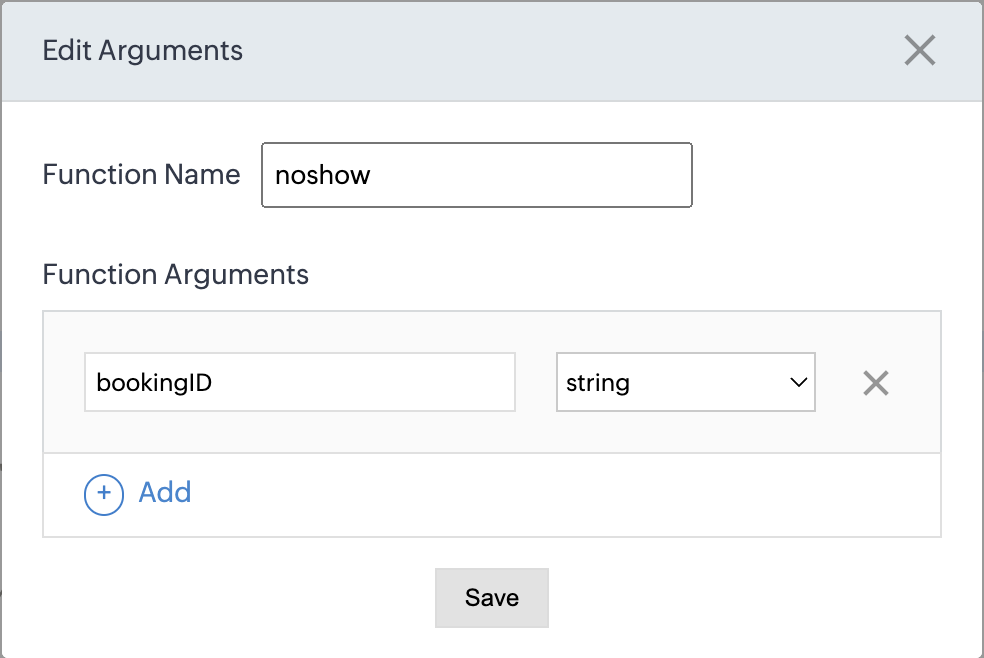
Please configure the below code on the Deluge script page.
Code link: No show
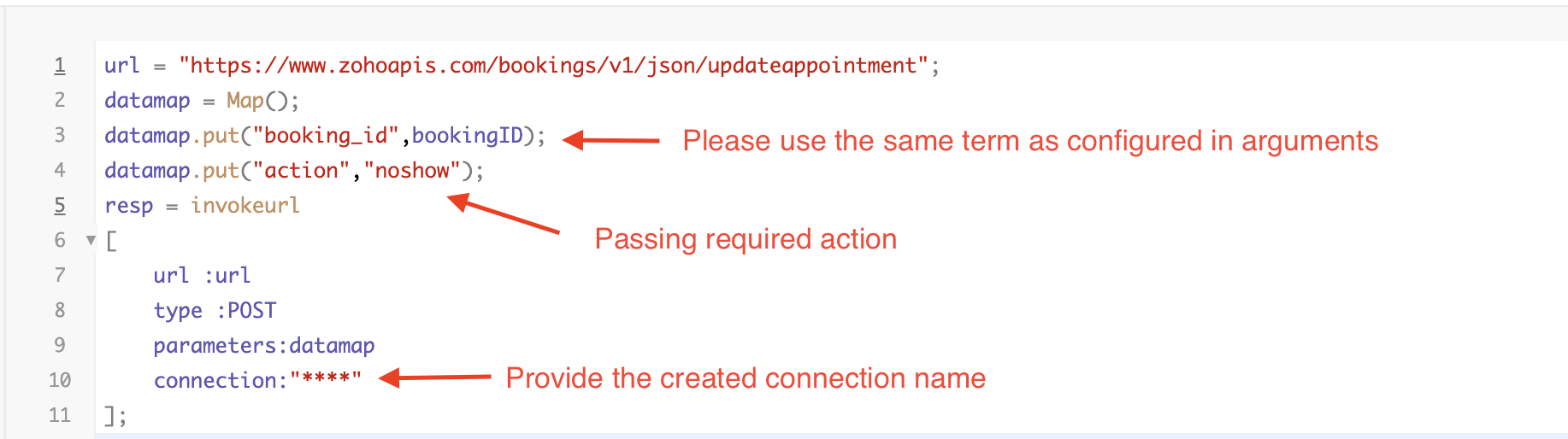
By completing these steps, we've configured a function that marks appointments as no shows.
iii. To create a function for marking appointments as canceled
1. Go to Setup > Developer Space > Functions.
2. In the Functions page, click + Create New Function.

3. Configure the function name, display name, and description.
4. Set the category as automation.
This opens the Deluge script page.
5. Next, configure the function's arguments:
A. Click on Edit Arguments on the Deluge script page.

B. Set the Parameter Name as bookingID. (Please note that the "bookingID" value is case sensitive and must match
the term used in the code).
C. Set the type as string.
Reference
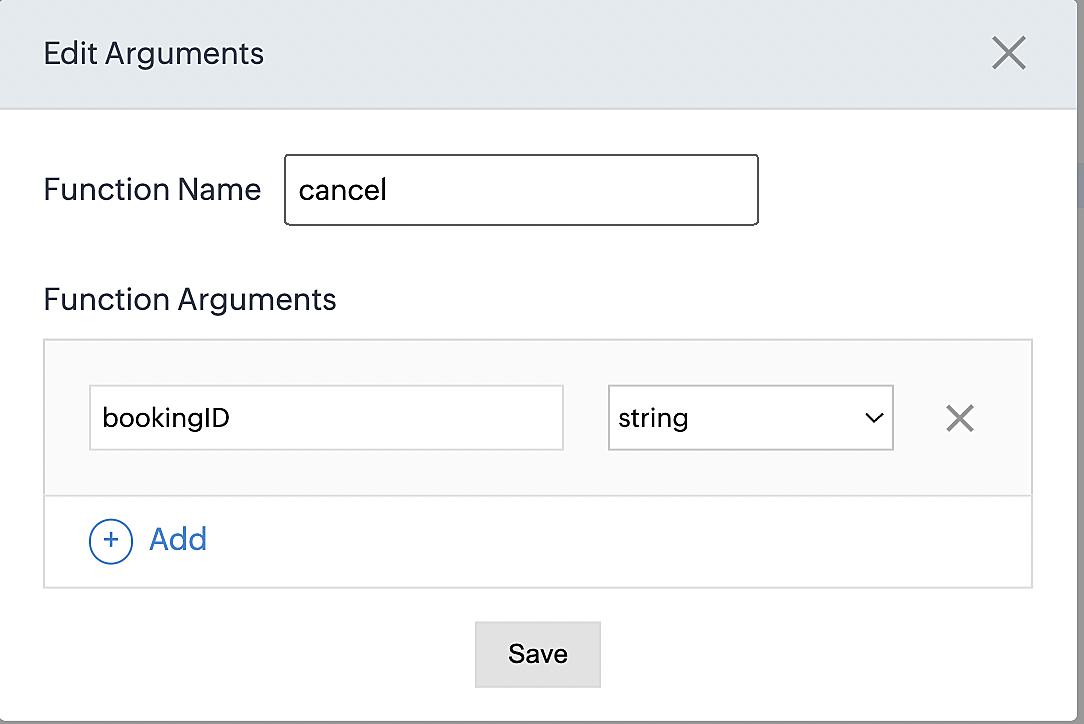
Please configure the below code on the Deluge script page.
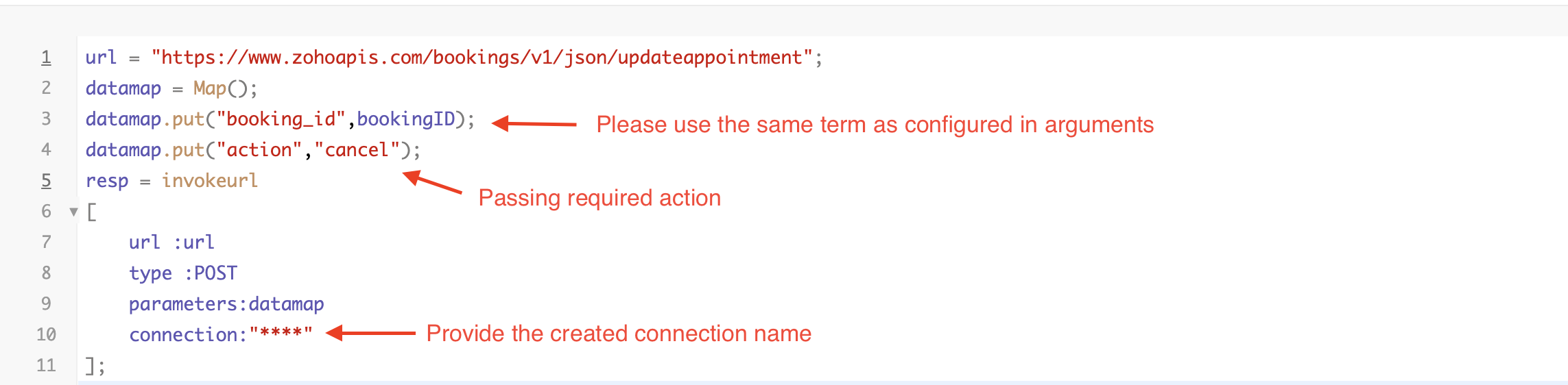
By completing these steps, we've configured a function that marks appointments as canceled.
Code explanation
Below is an explanation of the code that covers all the configurations present in the three functions mentioned above (cancel, mark as completed, and mark as no show).
Line 1: Based on the Zoho Bookings account's data center, we're setting up the API endpoint URL configuration.
Lines 2 - 4: To update appointments, we utilize the Zoho Bookings API. Within the update appointment API, there are two mandatory fields that need to be included: BookingID and action (completed/cancel/noshow).
Lines 5 - 10: We use the invokeURL task for API calls. To learn more about the invokeURL task, please refer to the following document: InvokeURL task for API calls
Now, let's proceed and learn about the process of creating a workflow and linking the established functions to it. This will enable us to automate the entire appointment status updating process.
Step 3: Creating a workflow
Workflow rules are sets of actions (email notifications, tasks and field updates) that are executed when specified conditions are met. Here, we'll generate workflow rules for each action to activate the respective function, thereby automating the appointment status updating process.
i. Creating a workflow for "canceling" appointments in Zoho Bookings when a meeting is deleted in Zoho CRM
Part 1: Creating the rule
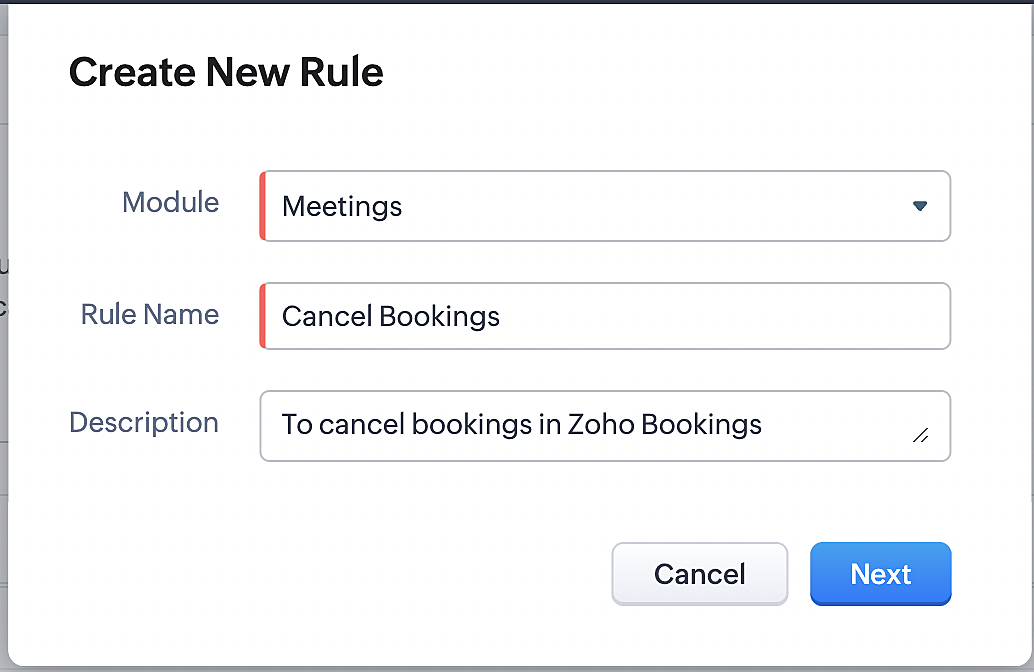
1. Go to Setup > Automation > Workflow Rules.
2. In the Workflow Rules page, click Create Rule.

3. Select "Meetings" under Module and configure rule name and description as required.
More details: Create Rule
Reference:
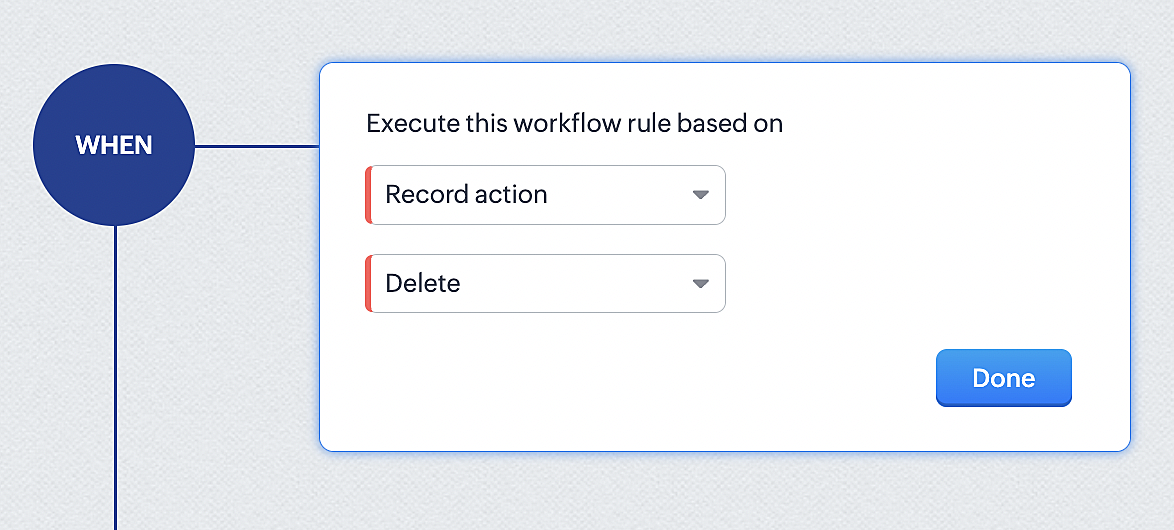
1. Select Record Action > Delete > Done to execute the rule when meetings are deleted.
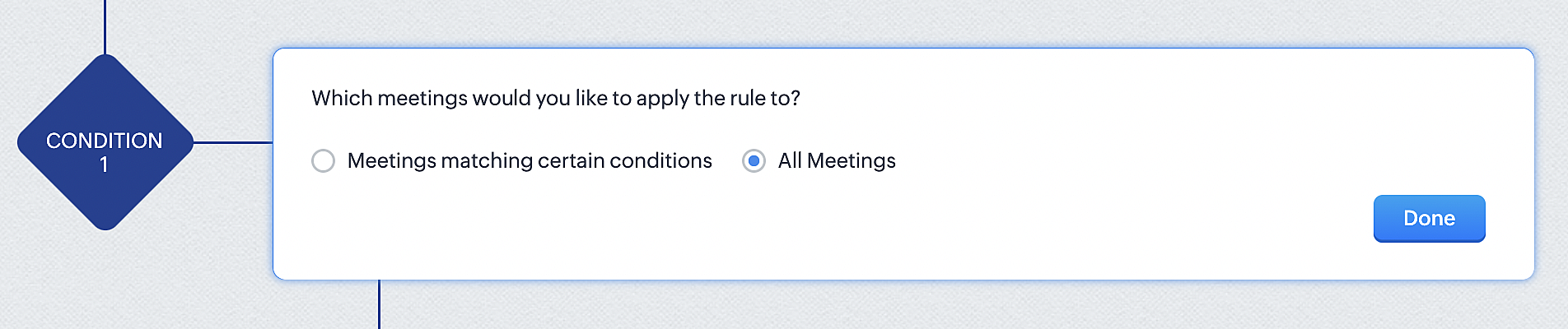
2. Configure condition > All Meetings.
3. Instant Actions > Function.
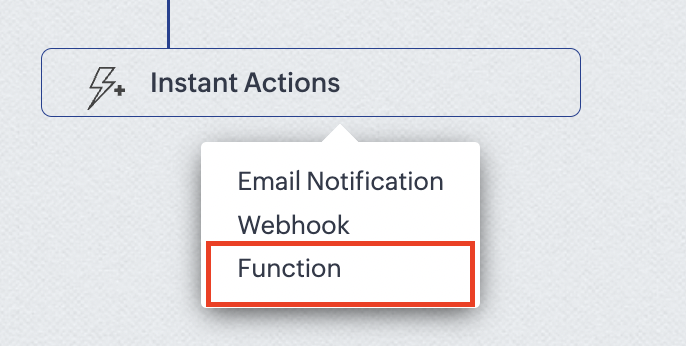
4. Click the New Function button.

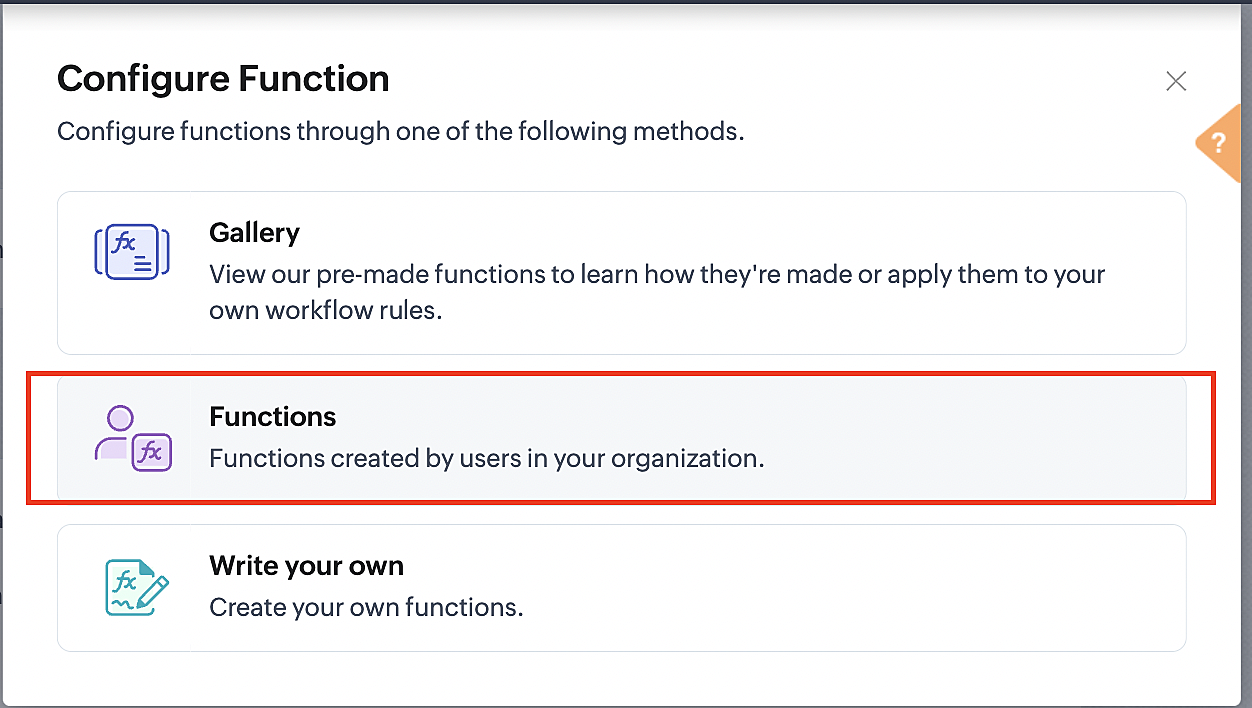
5. In the Configure custom function page, select the "cancel" function you created from among the functions users in your organization have created.
Part 3: Argument mapping
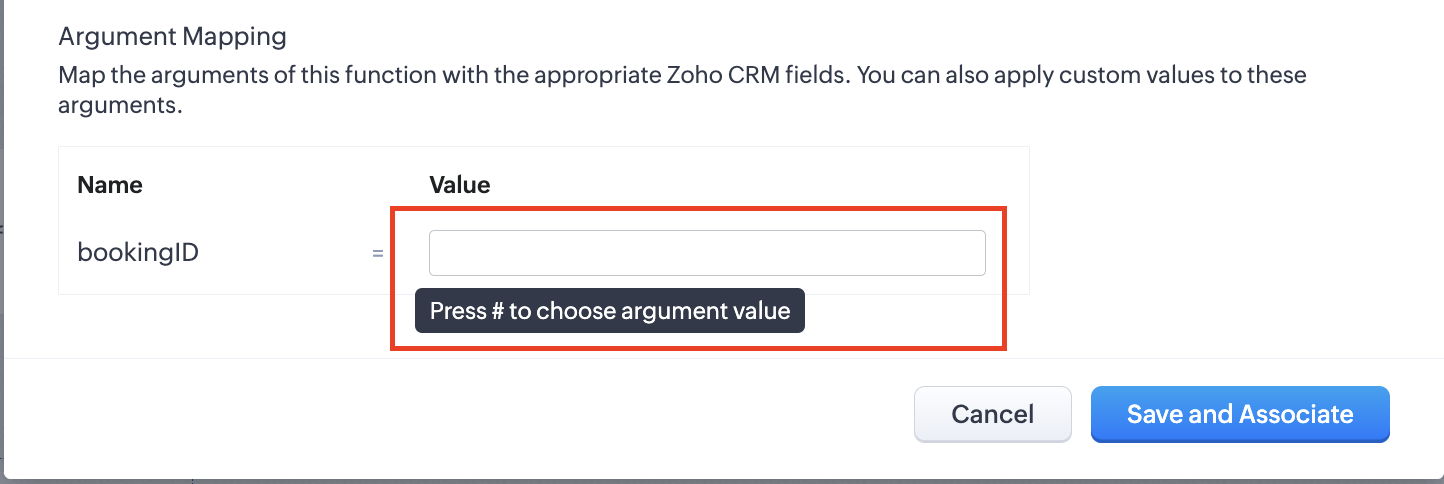
1. Press # to choose an argument value.
2. Select Meetings under Module and BookingId in the field.
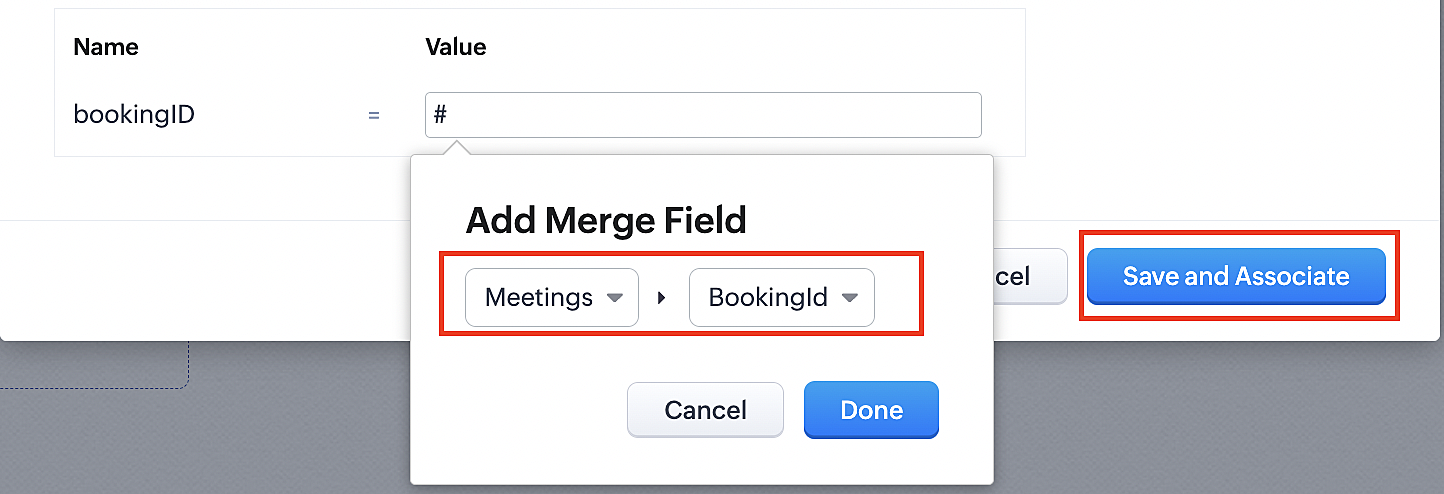
3. Click the Save and Associate button.
Reference:
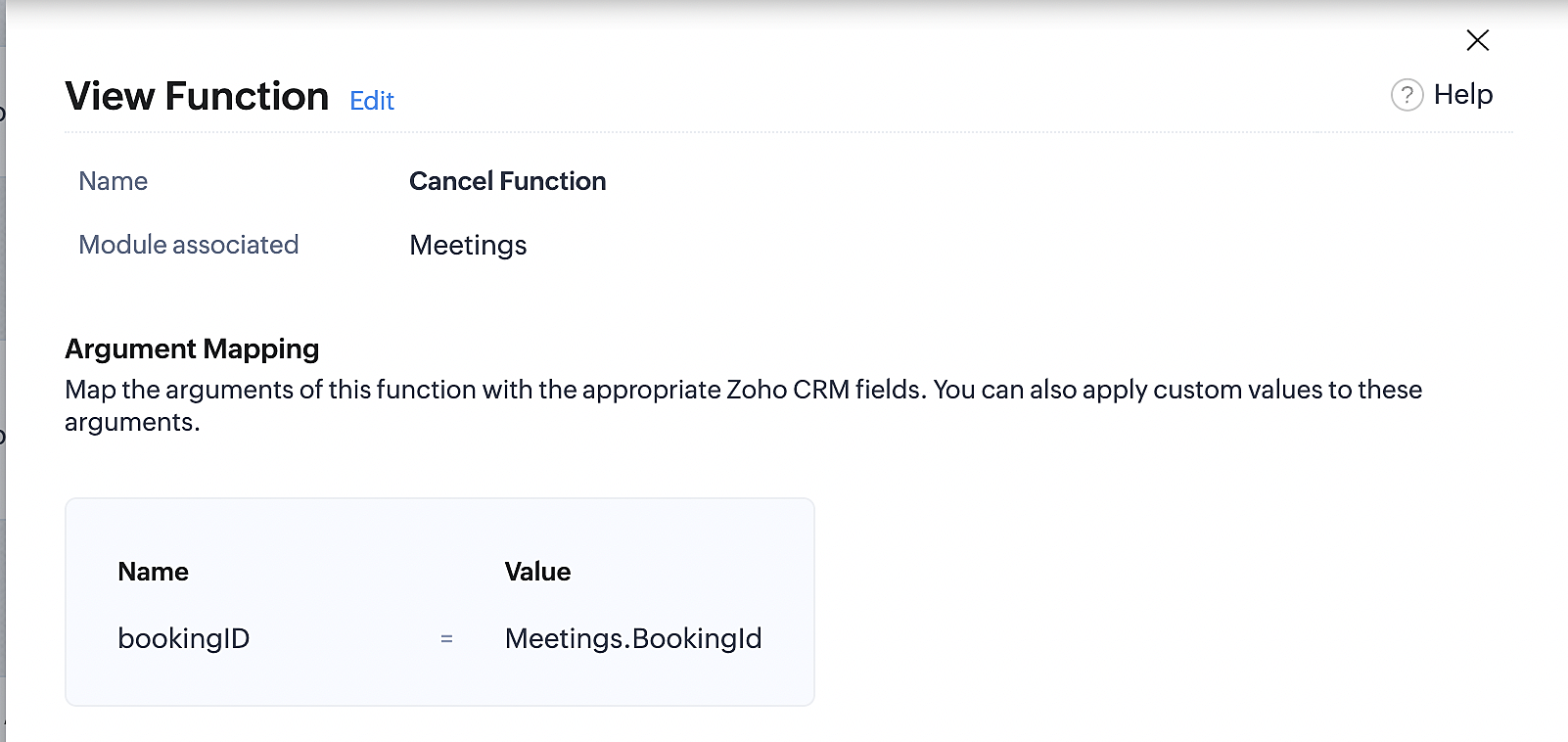
Below is the final flow of the cancel booking workflow:
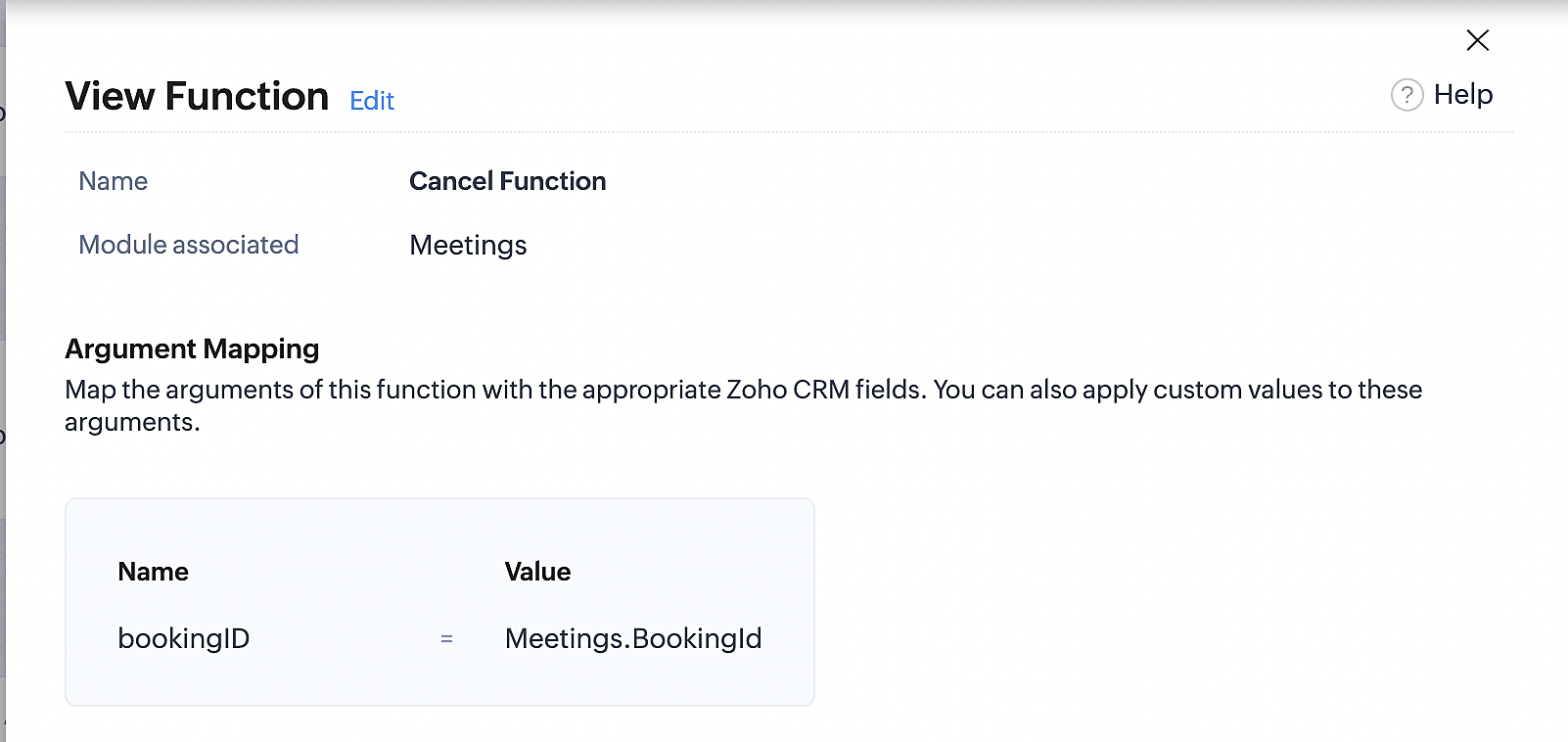
At the end of Part 3, we will have created a workflow that will be executed automatically when meetings are deleted in Zoho CRM. Simultaneously, the bookings associated with the meeting will also be canceled in Zoho Booking.
ii. Creating workflow for updating an appointment's status as "no show" in Zoho Bookings when the meeting's booking status is marked as no show in Zoho CRM
Part 4: Creating the rule
1. Go to Setup > Automation > Workflow Rules.
2. In the Workflow Rules page, click Create Rule.

3. Select Meetings under Module and configure the rule name and description as required.
Reference:
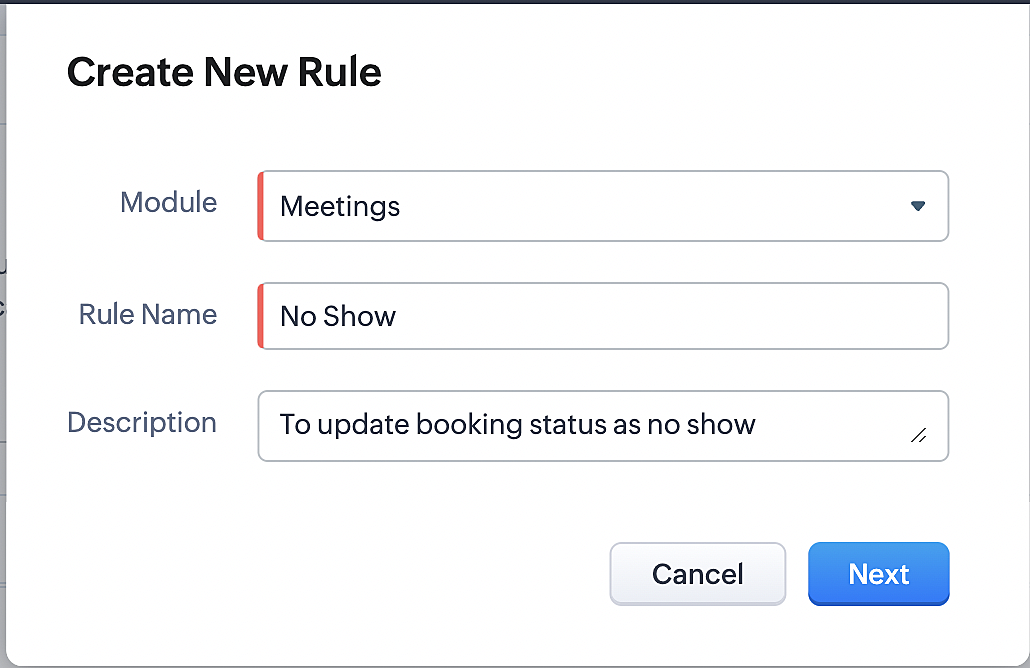
Part 5: Specifying the rule trigger
If you encounter difficulties while navigating through the steps mentioned below, please refer to Part 2 above, where we have provided step-by-step screenshots for clarification.
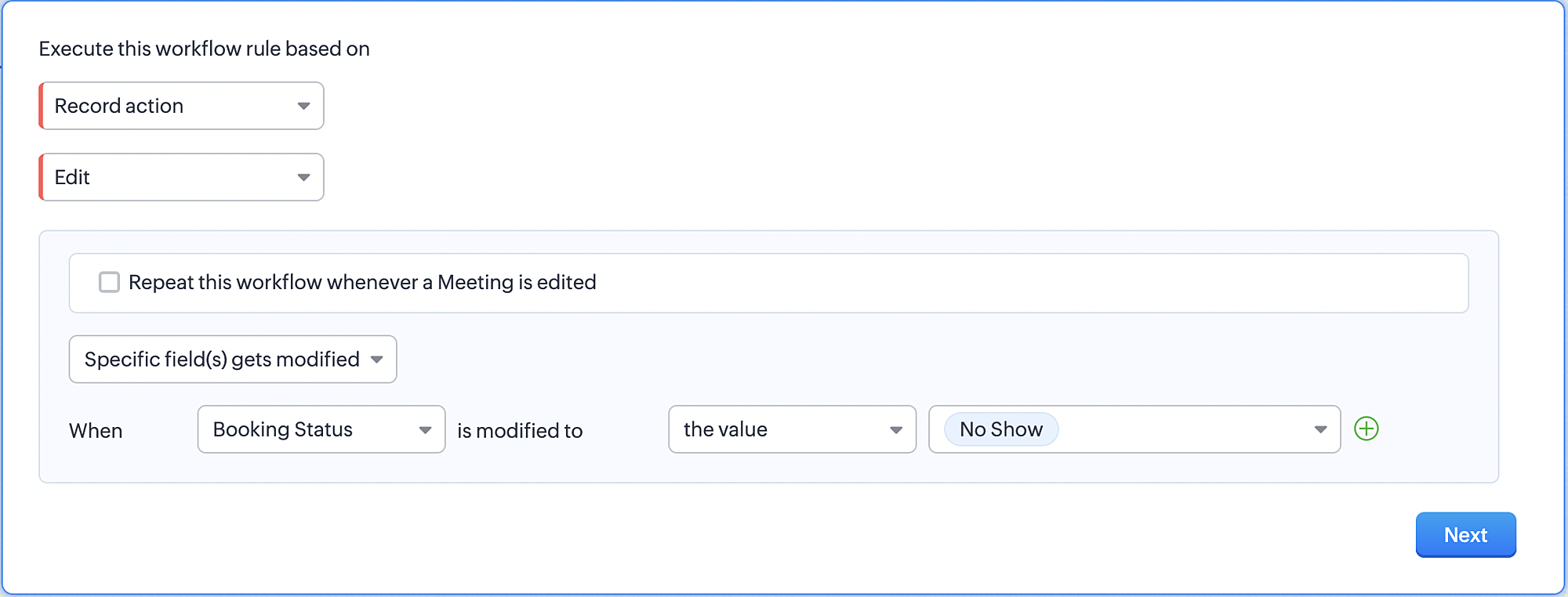
1. Record Action > Edit.

2. Enable the Specific field(s) gets modified and configure it per the screenshot below.
a. This is to ensure that the workflow is executed only when the booking status under the meeting module is
updated to "No Show".
updated to "No Show".
3. Configure condition > All Meetings.
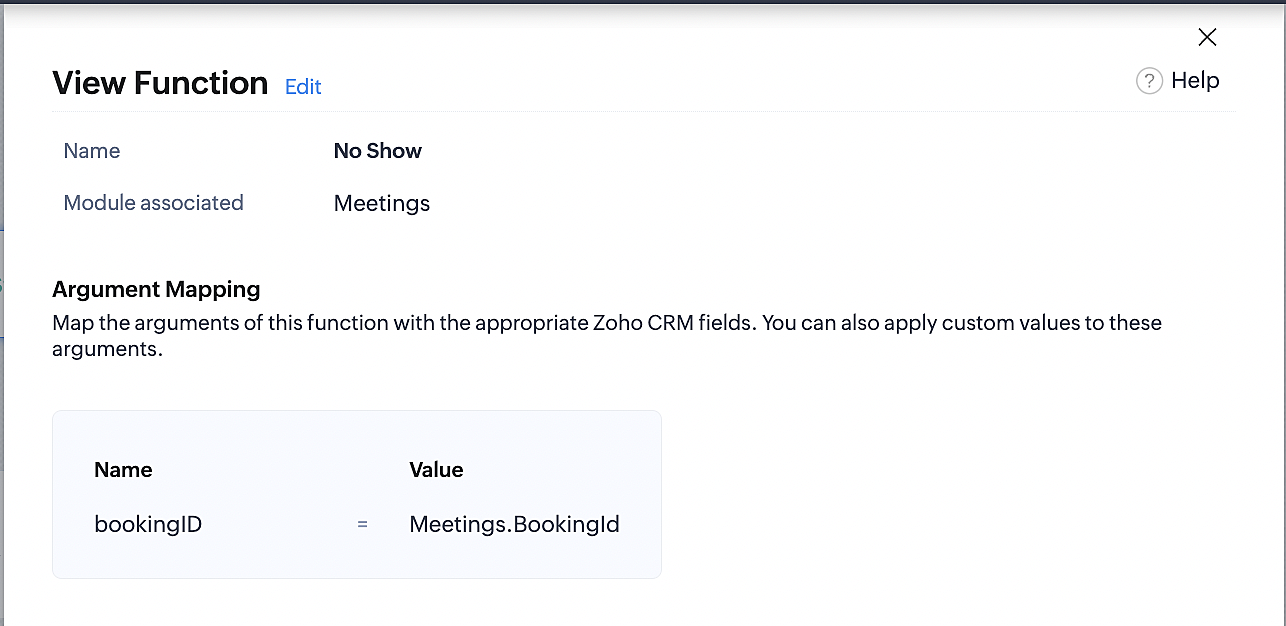
4. Instant Actions > Function > New Function.
5. In the Configure custom function page, select the "no show" function you created from among the functions
users in your organization have created.
users in your organization have created.
Part 6: Argument mapping:
If you encounter difficulties while navigating through the steps mentioned below, please refer to Part 3 above, where we have provided step-by-step screenshots for clarification.
1. Press # to choose an argument value.
2. Select Meetings under Module and configure the field as "BookingId".
3. Click Save and Associate button.
Reference:
Below is the final flow of the "No Show" booking status workflow:
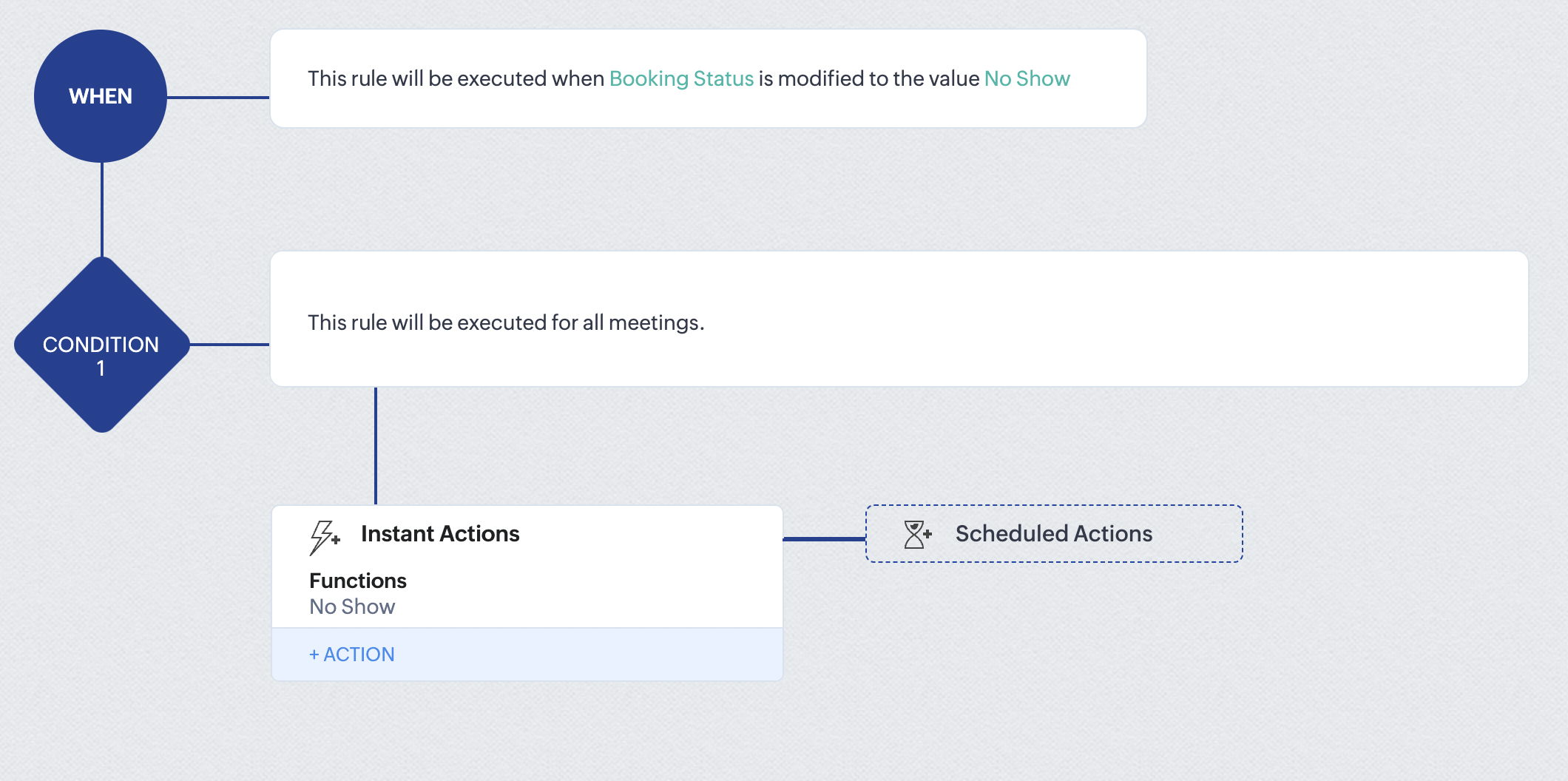
At the end of part 6, we will have created a workflow that automatically executes when the booking status field within the Zoho CRM Meetings module is updated to "No Show." This action will result in the associated bookings for that meeting also being marked as "No Show" in Zoho Bookings.
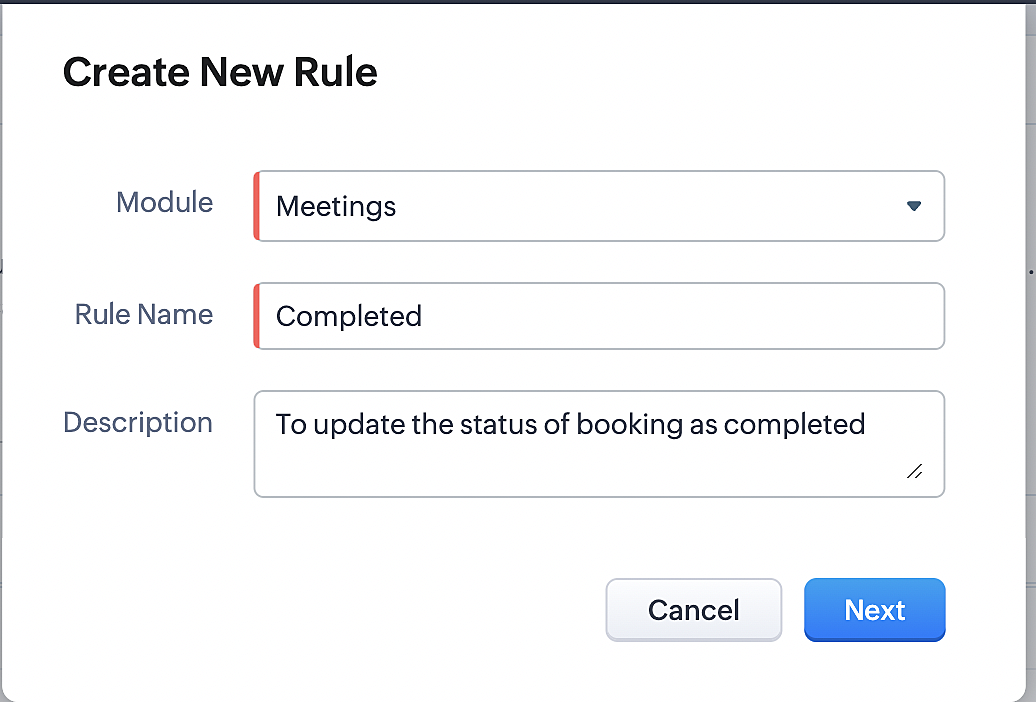
iii. Creating workflow for updating appointment status as "Completed" in Zoho Bookings when the booking status field of the meeting is marked as completed in Zoho CRM.
Part 7: Creating the rule
1. Go to Setup > Automation > Workflow Rules.
2. In the Workflow Rules page, click Create Rule.

3. Select Meetings under Module and configure rule name and description as required.
Reference:
Part 8: Specifying the rule trigger
If you encounter difficulties while navigating through the steps mentioned below, please refer to Part 2 above, where we have provided step-by-step screenshots for clarification.
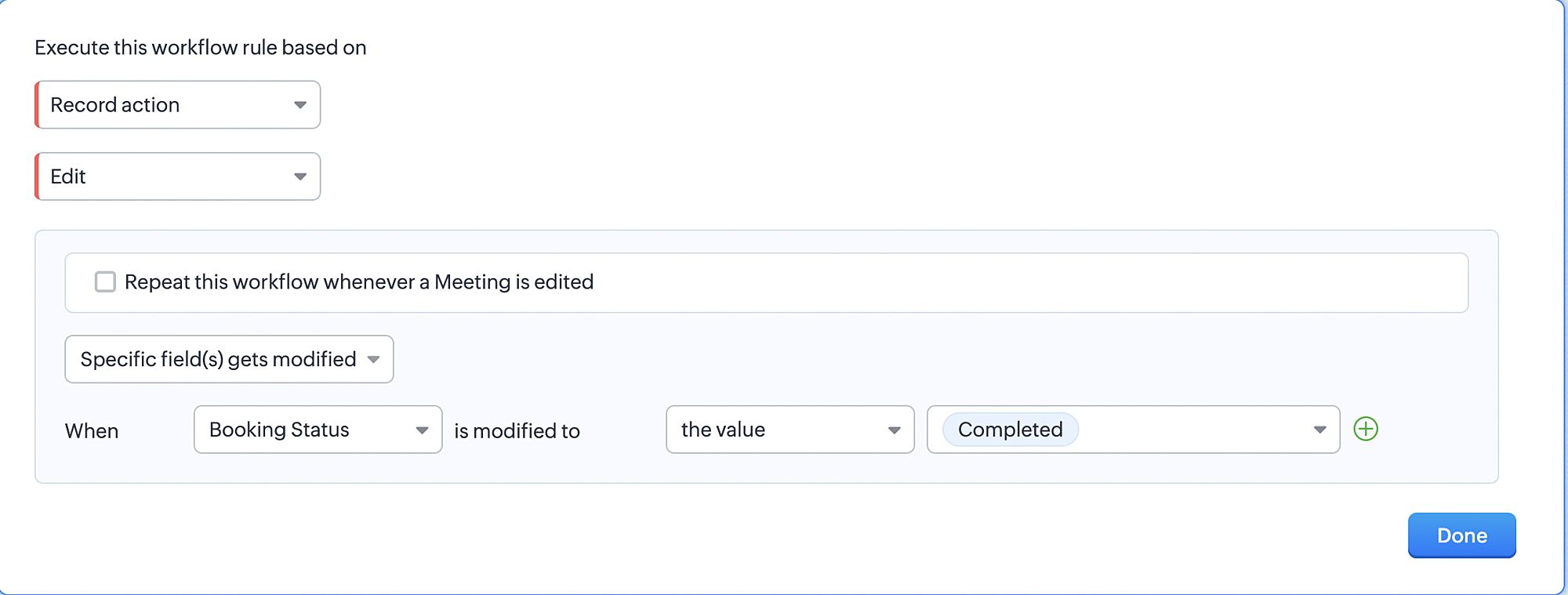
1. Record Action > Edit.

2. Enable the Specific field(s) gets modified setting and configure it per the screenshot below.
a. This serves to ensure that the workflow is executed only when the booking status under the Meetings module is
updated to "Completed".
3. Configure condition > All Meetings.
4. Instant Actions > Function > New Function.
5. In the Configure custom function page, select the "completed" function you created from among the functions users
in your organization have created.
Part 9: Argument mapping:
If you encounter difficulties while navigating through the steps mentioned below, please refer to Part 3 above, where we have provided step-by-step screenshots for clarification.
1. Press # to choose an argument value.
2. Select Meetings under Module and configure the field as "BookingId".
3. Click Save and Associate button.
Reference:
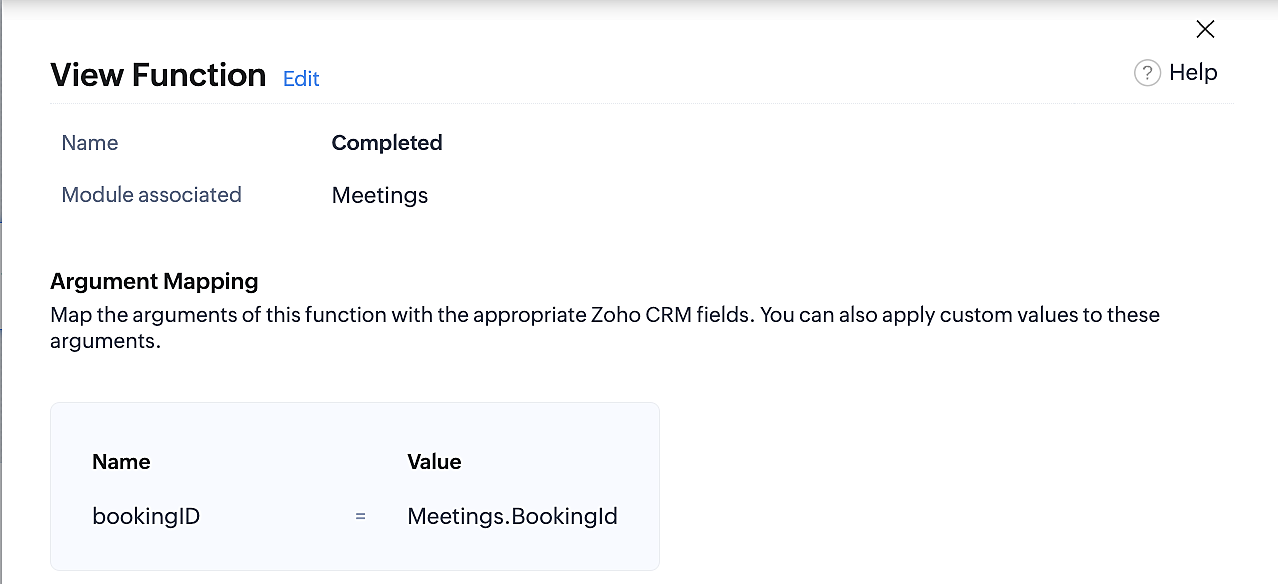
Below is the final flow of the "Completed" booking status workflow:
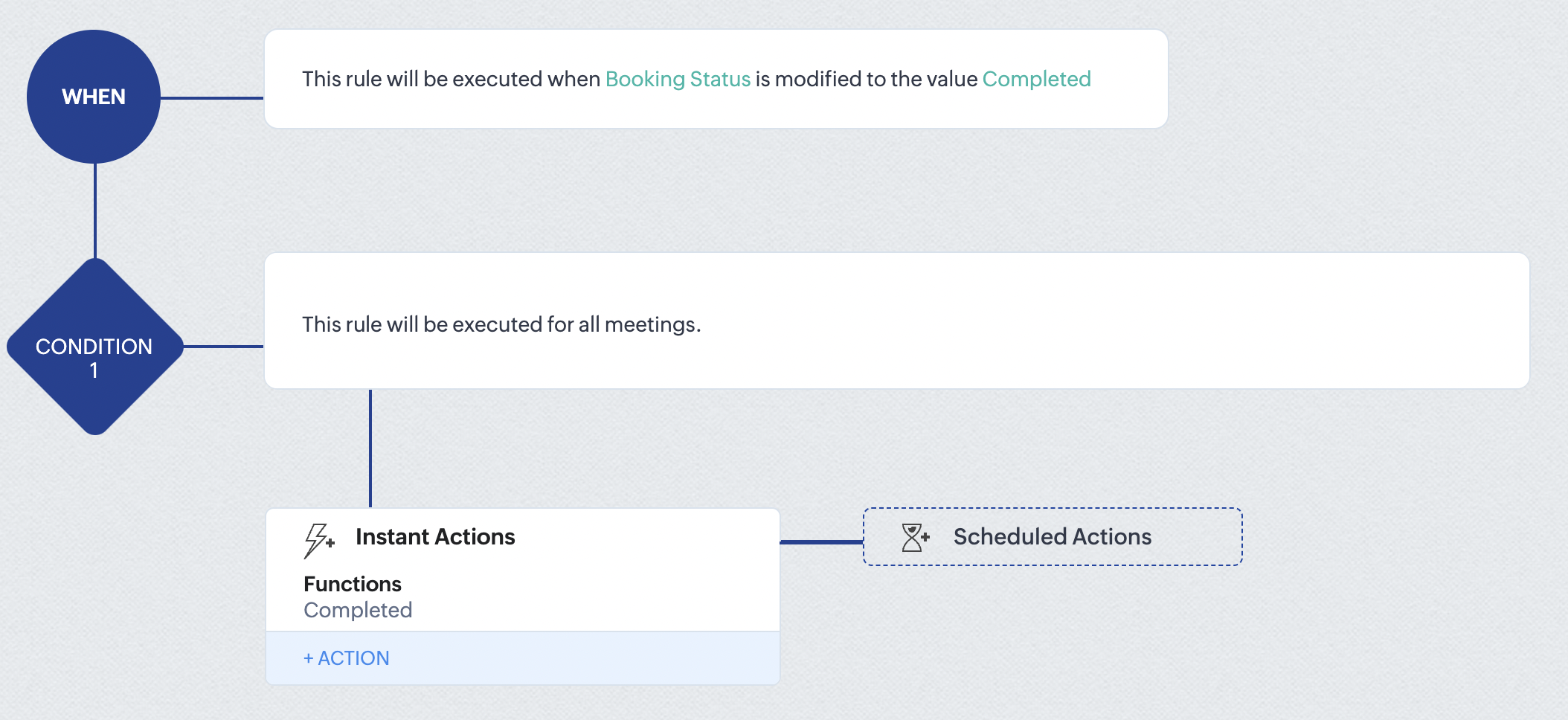
At the end of part 9, we will have created a workflow that is automatically executed when the booking status field within the Zoho CRM Meetings module is updated to "Completed." As a result, the associated bookings for that meeting will also be marked as "Completed" in Zoho Bookings.
Conclusion
We've reached the end of this community post. With the integration mentioned above in place, you'll be able to book, cancel, and update the status of appointments in Zoho Bookings directly from your Zoho CRM application. This will help you effectively manage your appointments in one place. As mentioned above, we've covered the rescheduling action in a separate post, which you can access by clicking on the following link: Reschedule Action
Furthermore, we've outlined a method for automating appointment statuses in detail. You can use this document as a reference to explore the various possibilities that suit your needs.
If you have any questions or need assistance with your configuration, please email us at hello@zohobookings.com or support@zohobookings.com.
Access your files securely from anywhere
New to Zoho Recruit?

Zoho Developer Community
New to Zoho LandingPage?
Zoho LandingPage Resources
New to Zoho Survey?
New to Zoho CRM Plus?
Deliver unforgettable customer experiences
New to Zoho CRM Plus?
Deliver unforgettable customer experiences
New to Zoho Marketing Plus?
Everything you need to run your marketing
New to Zoho Marketing Plus?
Everything you need to run your marketing
New to Bigin?





Topic Participants
Kaushik S
bruce
Ishwarya SG
PrismaNote Support
Sticky Posts
Presenting ABM for Zoho CRM: Expand and retain your customers with precision
Picture this scenario: You're a growing SaaS company ready to launch a powerful business suite, and are looking to gain traction and momentum. But as a business with a tight budget, you know acquiring new customers is slow, expensive, and often deliversGood news! Calendar in Zoho CRM gets a face lift
Dear Customers, We are delighted to unveil the revamped calendar UI in Zoho CRM. With a complete visual overhaul aligned with CRM for Everyone, the calendar now offers a more intuitive and flexible scheduling experience. What’s new? Distinguish activitiesCreate and populate a record in an instant: Introducing zero-shot field prompting to Zia's ICR
A couple of months ago, we upgraded our in-house AI image detection and validation tool, Zia Vision, with intelligent character recognition (ICR). By training Zia with sample images, you could create and enrich CRM records with data extracted from standardIn-person ZUG Meetups for Real Estate Professionals - US Q1 2026
The Real Estate Zoho User Group is going on a multi-city, in-person meetup tour across the US, and we’d love to see you there! These meetups are a great opportunity to: Connect with fellow real estate professionals using Zoho Share challenges and discoverNimble enhancements to WhatsApp for Business integration in Zoho CRM: Enjoy context and clarity in business messaging
Dear Customers, We hope you're well! WhatsApp for business is a renowned business messaging platform that takes your business closer to your customers; it gives your business the power of personalized outreach. Using the WhatsApp for Business integration
New to Zoho TeamInbox?
Zoho TeamInbox Resources
Zoho CRM Plus Resources
Zoho Books Resources
Zoho Subscriptions Resources
Zoho Projects Resources
Zoho Sprints Resources
Qntrl Resources
Zoho Creator Resources
Zoho CRM Resources
Design. Discuss. Deliver.
Zoho Show Resources

Get Started. Write Away!
Writer is a powerful online word processor, designed for collaborative work.
Zoho CRM コンテンツ
-
オンラインヘルプ
-
Webセミナー
-
機能活用動画
-
よくある質問
-
Ebook
-
-
Zoho Campaigns
- Zoho サービスのWebセミナー
その他のサービス コンテンツ
Nederlandse Hulpbronnen

ご検討中の方
Recent Topics
Anyone get the OpenAI API to work in Zoho Meeting?
Has anyone been able to get the OpenAI API to work in generating meeting summaries? I have been trying, but I get an error that says "OpenAI key notes request rate exceeded. Please try again later or upgrade your open AI account." I contacted Zoho supportPush Notifications Customization
There is no way to customize the notifications we get. I would like to be able to get notifications based on if they are assigned directly to me, my team, my department, or perhaps tickets that match a specific criteria (a contact or account is a VIPAnnouncing Early Access to the next generation of Zoho Desk UI
Customer service is one of the categories where efficiency and quality of service have to run in parallel, and your team's experience with their helpdesk goes a long way ensuring these aspects are uncompromised. Introducing DOT Design for Zoho Desk -Editing the record in report
I have a use-case as below- User creates a assessment record by filling some fields. User assigns that record to portal user by using Assigned To dropdown (Assigned To is Users field in form with choices as customers). I have set the record owner of formCan we have Bills of Material Module ?
Can we have Bills of Material Module ?Main Ticket Page Customization
We do not love the ticket list page (right after clicking Tickets menu item) would like options to customize it.Agent Collision Missing from Mobile App
Please add Agent Collision capabilities to the mobile app.Zia Sentiment and Functionality on Mobile
Please add Zia sentiment and generative responses to the mobile app. It would be nice to see the ticket sentiment and generate a response back to a user using Zia on my iPhoneView Account Attachments on iOS
Please allow us to view account attachments on the mobile iOS app!How do I run a PnL by Sales Person?
I am trying to run a PnL by sales person but am not seeing the option do so. All I need to know (per salesperson) is revenue, cost of goods, gross profit.View Contracts and Support Plans on Mobile
We would like to be able to see contracts and support plans from the mobile app on iOS!App like Miro
Hi all, is there a way to have a interactive whiteboard like in Miro? We want to visualize our processes and workflows in an easy way.Loan repayment Entry
While receiving loan, i does following steps in My Zoho books. 1. Create "Loan & Advance " Account as Parent Account under Long Term Liabilities. 2. Create another account For Example "Mr. ABC's Loan as Child account under the parent account. Now: InQuotes module send email reverted back into 2022??
Our Zoho CRM PLUS quotes, sales orders, invoice modules is showing us an email composer from 2022. We cannot send emails and its been a real pain. I tried clicking the new version over there but it doesnt seem to do anything. Any help is welcome. thWorkflow Condition - how do check that a date / time value is in the past?
Hello, I'm got a workflow that runs a function when records reach their 'Effective Date / Time', but sometimes records are created after the 'Effective Date / Time' so I have another workflow that checks for records which needs to be processed immediately.Pre filling SignForm field values by URL field alias's in Zoho Sign
Hi, Does anyone know if it's possible to pre fill the field values of the SignForm by using field alias's like you can in Zoho forms? To be more specific, I want to be able to change the SignForm URL to include some information like this: Before : https://sign.zoho.eu/signform?form_link=234b4d535f495623920c288fc8538cb9e6db03bbfd44499b63f3e5c48daf78f44bc47f333e2f5072cc1ee74b7332fe18b25c93fab10cb6243278d49c67eacbf30bbe5b6e1cc8c6b2#/How to Split Payout in Zoho Books (Without Using Journal?)
Hi, I'm trying to properly record payouts in Zoho Books. The issue is that each payout is a combination of sales and expenses (fees). When I try to categorise the payout transaction from the Banking tab, I can only split the transaction using income-typePayment Schedule
Please add the ability to create a payment schedule. The other options, like retainer invoices or two invoices, do not work for the customer. We invoice a client and need to be able to show them everything they owe in one invoice, and when each paymentWhich pricing system do you think would work best for us?
Imagine we’re selling strictly wholesale. We’d rather not publish unit prices; instead, we quote customers case-by-case. To spur larger orders, we’re considering a transparent discount ladder—say: $0 – $999: 0 % $1,000 – $1,999: 5 % $2,000 – $4,999: 10Can't Remove Payment Gateway
I am getting the error "Settings cannot be cleared as some of the transactions are still in progress." when trying to remove the PayGate payment gateway which I was unable to get working. I am now using paystack and I want to remove Paygate.Sync specific Zoho Inventory Warehouses to Zoho Commerce
As said in the title, we would want to only sync stock from one warehouse of Zoho Inventory to the Zoho Commerce item stock. We have a 2 warehouses in different countries and the way that Zoho Commerce works (It takes stock from ALL WAREHOUSES EVERYWHEREWeekly Tips : Automatically clean clutter with Junk cleanup interval
If you regularly receive many unwanted or spam emails, your Spam folder can quickly fill up and start taking up valuable storage space in your Zoho Mail account. Instead of manually clearing it every few days, you might find it helpful to enable automaticAny solution for getting portal users list in deluge or in widget
Hi Team, Has anyone able to find the solution to get portal users list in deluge or in zoho creator widgets? Thanks, PayalThe Grid is here!
Hey Zoho Forms Community! 👋 We’re thrilled to announce the launch of a feature that’s been on your wishlist for a while: Grids What is Grids? Grids let you place form fields side by side in multiple columns to create a more concise and organized formSteuerberater der Zoho benutzt in Deutschland
I write in English because the issue is related to German regulations. Wir sind ein Unternehmen, welches aktuell keine Pflicht zur doppelten Buchführung hat. Aktuell bucht unser Steuerberater jeden Beleg, auch unsere Auslagen. Wir würden dies gerne selbstGraphQL in new Send Webhooks feature
Hello, is it possible to use GraphQL apis in the new Send Webhooks feature?# 2 Why do we need a billing system when accounting covers billing?
In today's evolving financial tech stack, businesses use a mix of tools to manage their day-to-day operations, from invoicing to full-fledged accounting. While accounting platforms typically come with built-in invoicing features, specialized billing systemsHow to insert an Excel/Zoho Sheet table in a chat?
Hello, is there a way to paste an excel/zoho sheet table to a conversation without loosing table lines. I tried to paste a piece of a table and all the columns and rows were gone. How to easily paste a table without a need of sending a file? KatarzyMass Update Application Status
How to update application statuses of Multiple Applications at once? Is that possible? If not then why please consider adding it It can save hours of manual work Thats the only Option I seeFree webinar: Streamlining customer service paperwork with the Zoho Sign extension for Zoho Desk
Hi there! Wondering how to bridge the gap between digitized customer service and business paperwork? Attend our free webinar to learn how you can do this by connecting Zoho Sign, our digital signature app, with Zoho Desk, our online customer service helpMail Search Not Working
Hello, Mail search is not working at all. I've tried Chrome and Mozilla. I can try and search for an exact term, or even an email that is 1st in my email list. All search does is sit and spin, or it comes up with no results. I've also tried it on my androidCannot Send Email to a Gmail Account
Hello, I have a zoho-hosted email account, alex@chirochannelnetwork.com that has trouble sending to gmail accounts. But not all gmail accounts, only some of them. I've tried to figure this out with clients, and they don't appear to be going into theirUnblock ME
info@pentekykloi.gr Unable to send message;Reason:554 5.1.8 Email Outgoing Blocked. Learn more. I purchase additional storageCannot Print Landscape with Zoho Sheet
I am noticing that when using the Zoho Sheet desktop for Mac, that even when selecting landscape as the print option, once you choose "Print", a second system dialog opens that automatically makes the view portrait again, and does not allow printing inPower of Automation : Enhancing custom date field calculations by excluding Weekends and Holidays
Hello Everyone, A Custom function is a user-written set of code to achieve a specific requirement. Set the required conditions needed as when to trigger using the Workflow rules (be it Tasks / Project) and associate the custom function to it. Requirement:Temporary Outage in Zoho Cliq Affecting US Users – July 23, 2025
We experienced a service disruption in Zoho Cliq that impacted core functionality for users in the US region. The issue occurred between Jul 23, 2025, 06:54:00 PM IST and 07:13:13 PM IST, lasting approximately 19 minutes. To restore service stability,portal.assignUserInProfile - Não esta adicionando
Estou encontrando problema com este comando portal.assignUserInProfile Não esta incluindo o usuário no portal Alguém pode me dizer o que pode ser thisapp.portal.assignUserInProfile("teste@gmail.com","Customer");CRM emails vs Campaigns
Please help me understand this. I am having a difficult understanding of "Campaigns" sent through CRM (real emails) or Zoho One (blast "potentially junk" emails) This is what I currently think emails sent via CRM are "real" emails sent through linked real personal email accounts and therefore are more likely to get delivered. We use this for critical updates for our "Approved " accounts and certain other preferred statuses emails via Campaigns are sent through the Zoho server (like MailChimp, CampaignSetting up property management in Zoho Books
Hi, I run a property management business that manages property complexes. There are multiple owners, some owning more than one property on the same complex. My role is to manage the fees they pay for maintenance of common areas, such as the swimming poolReverse proxy
We have a web application in the creator platform. When I launch a particular DNS, I would like that DNS to redirect to the web page of the application in creator app. Has anyone achieved it and if yes, please share how to do it.Next Page