Bidirectional sync between Zoho Bookings and Zoho CRM - Part 1
Hey, community members!
The default integration between Zoho CRM and Zoho Bookings is unidirectional, which means that any appointments booked, rescheduled, or deleted in Zoho Bookings will be reflected in Zoho CRM. However, any modifications made to events in Zoho CRM that originated from Zoho Bookings will not be reflected back in Zoho Bookings. Hence, as we're announcing in this community post, we've made the sync bidirectional.
This community post will cover the process of configuring appointment bookings from Zoho CRM in Zoho Bookings, as well as managing appointment statuses such as Canceled, No Show and Completed. We have addressed the rescheduling action in a separate post. To view it, please click on the following link: Reschedule Action
This community post will be beneficial for active Zoho CRM users who handle all their meetings within Zoho CRM. Additionally, you can use this community post as a reference to explore various automation possibilities tailored to your business requirements. For instance, with this post's guidance, when you update a booking's status field to "Completed" in Zoho CRM, it will automatically sync with Zoho Bookings and trigger an automated "Mark as completed" email to customers. This enhancement will improve your Zoho Bookings and Zoho CRM synchronization experience, making appointment management easier.
Prerequisites of bidirectional sync:
- Zoho Bookings Premium subscription
- Zoho CRM paid subscription
- Enable Zoho CRM integration within Zoho Bookings
The purpose of enabling the Zoho CRM integration within Zoho Bookings is to transfer booking details from Zoho Bookings to Zoho CRM. In this configuration, the mandatory field is the Booking ID, which is passed from Zoho Bookings to Zoho CRM through the integration. Whenever an appointment is booked, customer details will be sent to the designated CRM module, and a corresponding record will be created in the Meetings module within Zoho CRM, which will help in automating the workflow.
Here's the complete demo video that covers all the configurations discussed in the community post below:
Timestamps for your reference:
0:35 - Purpose of this community post
Here's the complete demo video that covers all the configurations discussed in the community post below:
Timestamps for your reference:
0:35 - Purpose of this community post
1:26 - Zoho CRM plugin installation
4:43 - Custom field creation
7:20 - Function creation
9:22 - Connection creation
10:24 - Configuring arguments
11:06 - Workflow creation
13:33 - Argument mapping
14:41 - Output verification
17:41 - Conclusion
How we're approaching this bidirectional sync
1. Booking an appointment from Zoho CRM
Install the Zoho Bookings for Zoho CRM plugin within your Zoho CRM application. This plugin enables the creation of a "New Appointment" button within the Zoho CRM Leads and Contacts module, which enables you to select the desired booking page you wish to open. You can choose from various workspace, service, or staff booking pages. After configuration, you can initiate the process of scheduling bookings directly from within your Zoho CRM account.
- Guide on Zoho Bookings and Zoho CRM plugin installation: Booking page selection for Zoho CRM plugin
2. Booking status: Completed or No Show
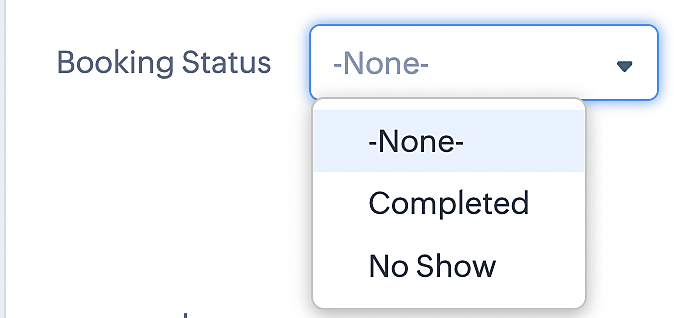
To update a booking's status (Completed or No Show), we've added a new picklist properties field named "Booking Status" in the Meetings module and configured it with two options: "completed" and "no show". Depending on the booking status chosen, the corresponding booking in Zoho Bookings will be updated.
- Details on how to add a custom field to the Meetings module : Customizing modules
- Here's a video that demonstrates how to add a field to a module in Zoho CRM: Adding fields
Reference:
3. Booking status: Canceled
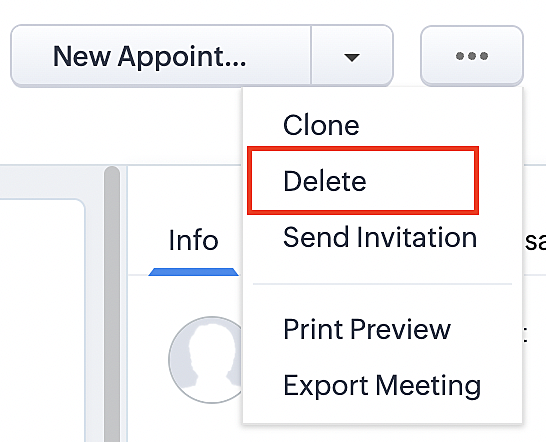
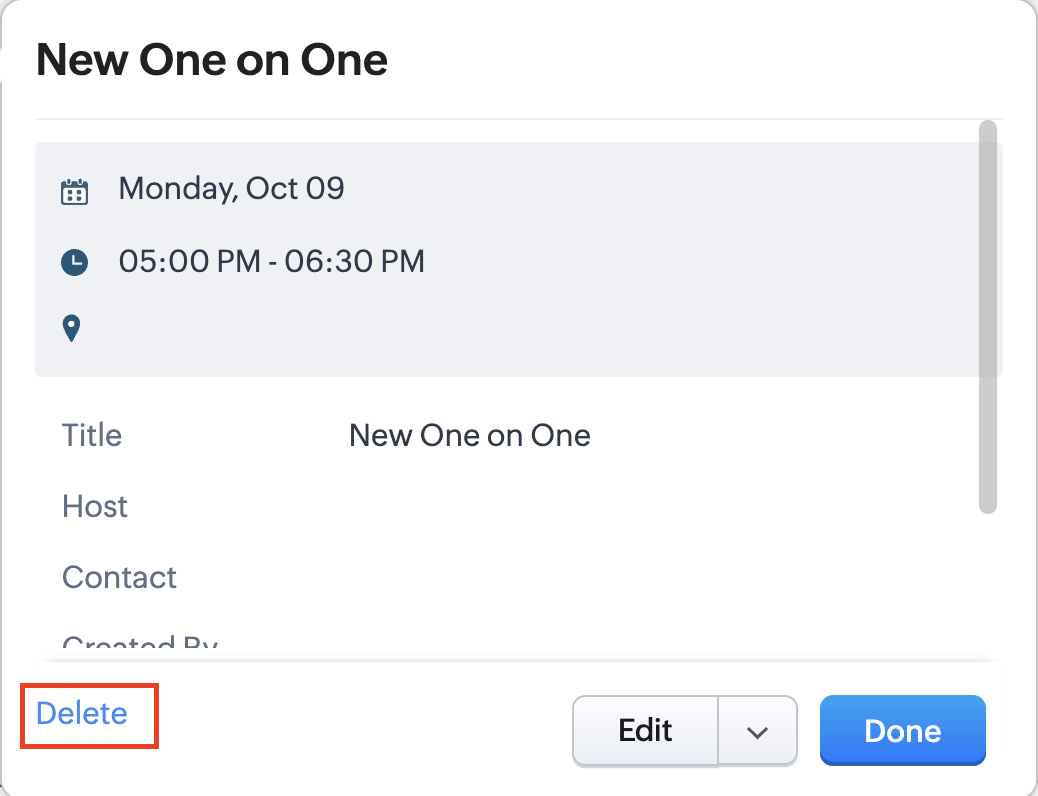
Whenever a meeting is deleted from the Meetings module, the corresponding booking in the Zoho Bookings app will also be canceled automatically. The meeting can be deleted either from the Meetings module or directly from the calendar.
To enable bidirectional sync between Zoho CRM and Zoho Bookings
Complete these steps in Zoho CRM.
Step 1: Creating connections
You first need to establish a connection between Zoho CRM and Zoho Bookings. Zoho Bookings is listed as one of the default connections in Zoho CRM, making it simple to set up. Select the Zoho Bookings connection, define the connection name and scope, and you'll be all set. This connection will enable you to link both applications and facilitate the seamless transfer of data.
Read here for more details on how to create connection in Zoho CRM: Connections
Step 2: Creating functions
In this context, we'll be creating three functions: one for marking appointments as completed, another for canceling appointments, a third for marking appointments as no shows, and a fourth for rescheduling appointments. For each function, we must also configure arguments, which pass values or data into a function when making a call. Here, we'll pass the booking ID to the function as an argument to update the necessary booking status.
i. To create a function for marking appointments as completed:
1. Go to Setup > Developer Space > Functions.
2. In the Functions page, click + Create New Function.

3. Configure the function name, display name, and description.
4. Set the category as automation.
This opens the Deluge script page.
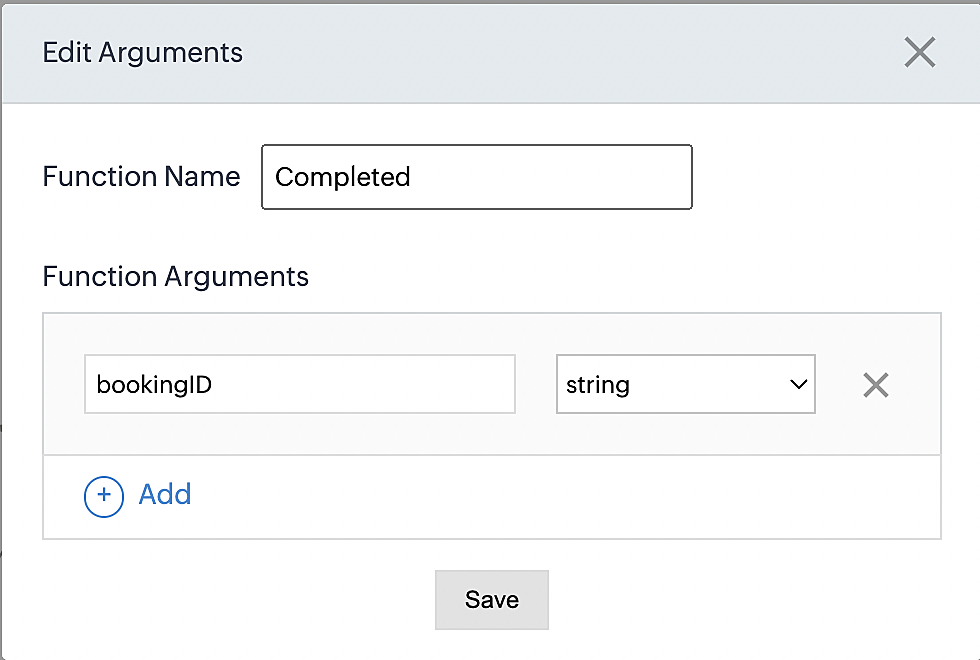
5. Next, configure the function's arguments:
A. Click on Edit Arguments on the Deluge script page.

B. Set the Parameter Name as bookingID. (Please note that the "bookingID" value is case sensitive and must match
the term used in the code).
C. Set the type as string.
Reference:
Please configure the below code in the Deluge script page.
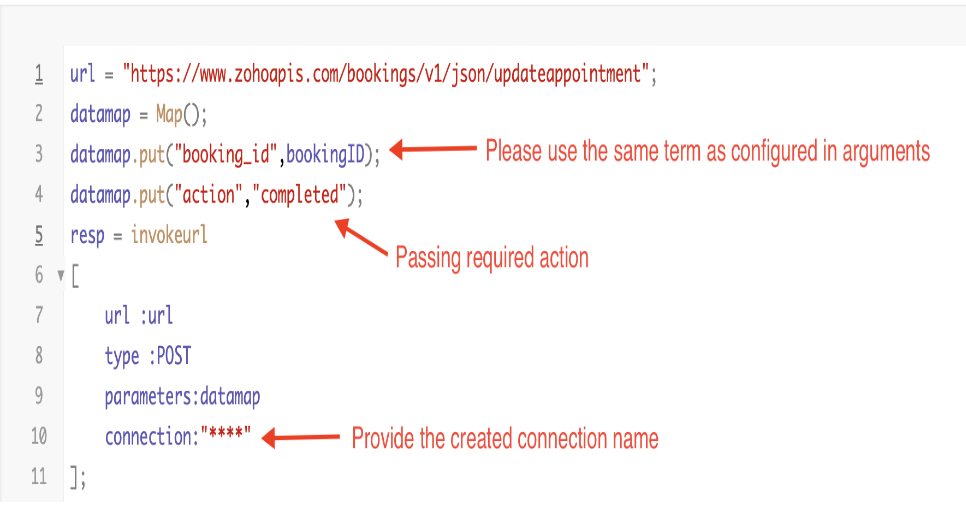
By completing these steps, we've configured a function that will mark appointments as completed.
ii. To create a function for marking appointments as no shows
1. Go to Setup > Developer Space > Functions.
2. In the Functions page, click + Create New Function.

3. Configure the function name, display name, and description.
4. Set the category as automation.
This opens the Deluge script page.
5. Next, configure the function's arguments:
A. Click on Edit Arguments on the Deluge script page.

B. Set the Parameter Name as bookingID. (Please note that the "bookingID" value is case sensitive and must match
the term used in the code).
C. Set the type as string.
Reference:
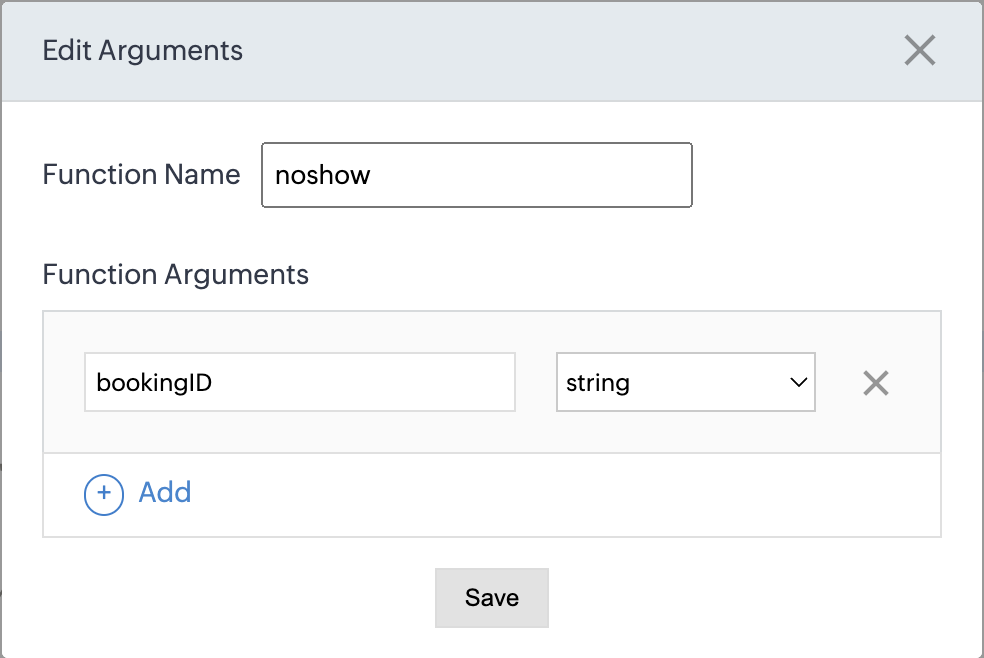
Please configure the below code on the Deluge script page.
Code link: No show
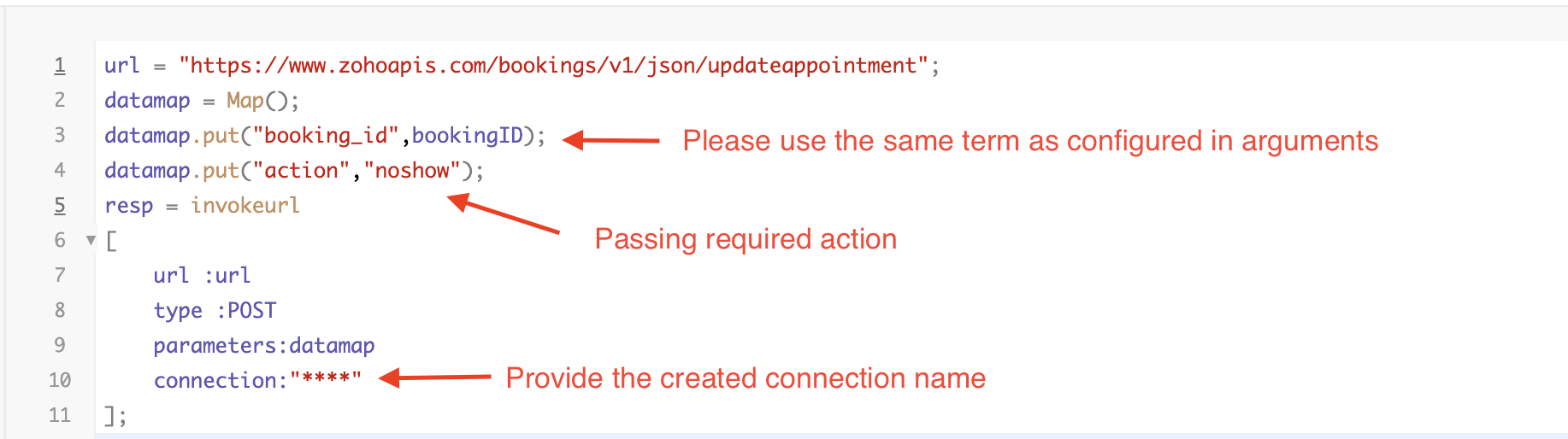
By completing these steps, we've configured a function that marks appointments as no shows.
iii. To create a function for marking appointments as canceled
1. Go to Setup > Developer Space > Functions.
2. In the Functions page, click + Create New Function.

3. Configure the function name, display name, and description.
4. Set the category as automation.
This opens the Deluge script page.
5. Next, configure the function's arguments:
A. Click on Edit Arguments on the Deluge script page.

B. Set the Parameter Name as bookingID. (Please note that the "bookingID" value is case sensitive and must match
the term used in the code).
C. Set the type as string.
Reference
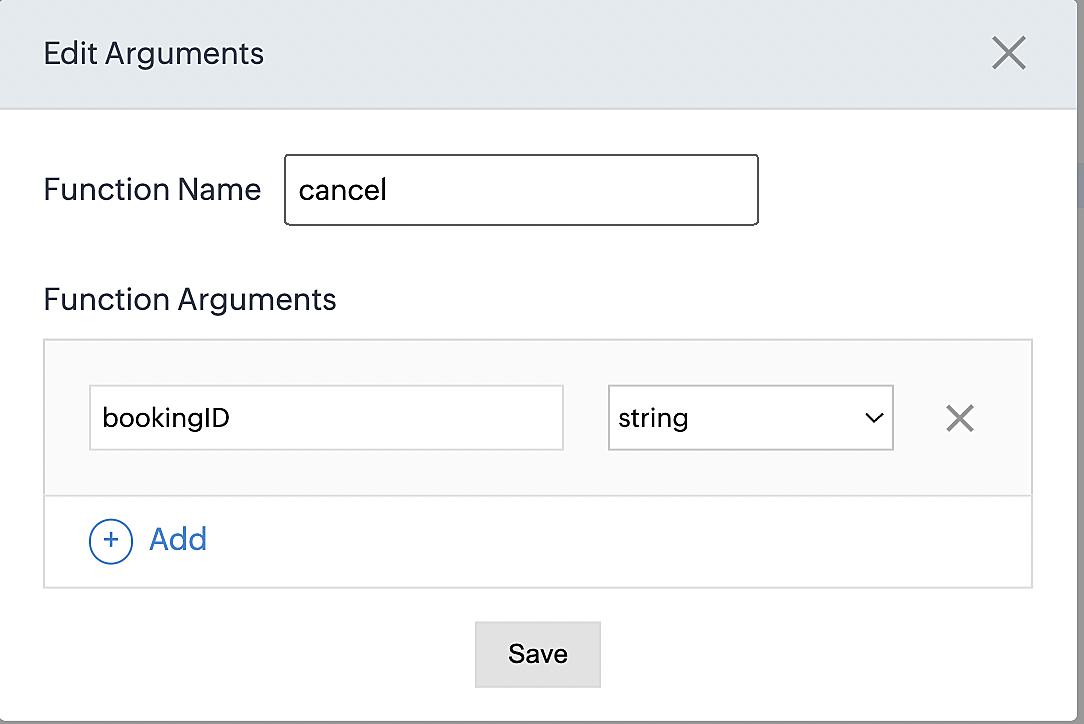
Please configure the below code on the Deluge script page.
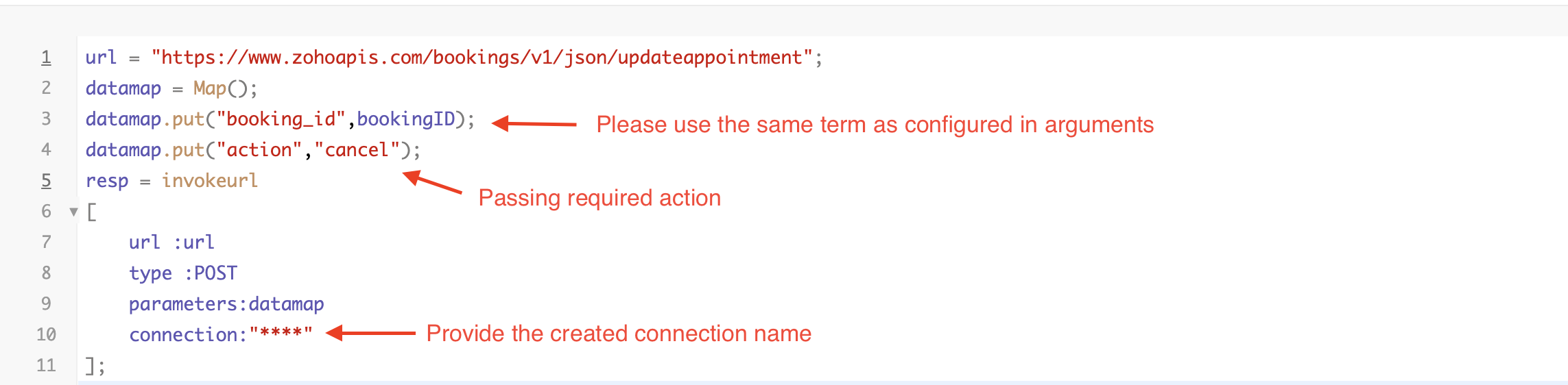
By completing these steps, we've configured a function that marks appointments as canceled.
Code explanation
Below is an explanation of the code that covers all the configurations present in the three functions mentioned above (cancel, mark as completed, and mark as no show).
Line 1: Based on the Zoho Bookings account's data center, we're setting up the API endpoint URL configuration.
Lines 2 - 4: To update appointments, we utilize the Zoho Bookings API. Within the update appointment API, there are two mandatory fields that need to be included: BookingID and action (completed/cancel/noshow).
Lines 5 - 10: We use the invokeURL task for API calls. To learn more about the invokeURL task, please refer to the following document: InvokeURL task for API calls
Now, let's proceed and learn about the process of creating a workflow and linking the established functions to it. This will enable us to automate the entire appointment status updating process.
Step 3: Creating a workflow
Workflow rules are sets of actions (email notifications, tasks and field updates) that are executed when specified conditions are met. Here, we'll generate workflow rules for each action to activate the respective function, thereby automating the appointment status updating process.
i. Creating a workflow for "canceling" appointments in Zoho Bookings when a meeting is deleted in Zoho CRM
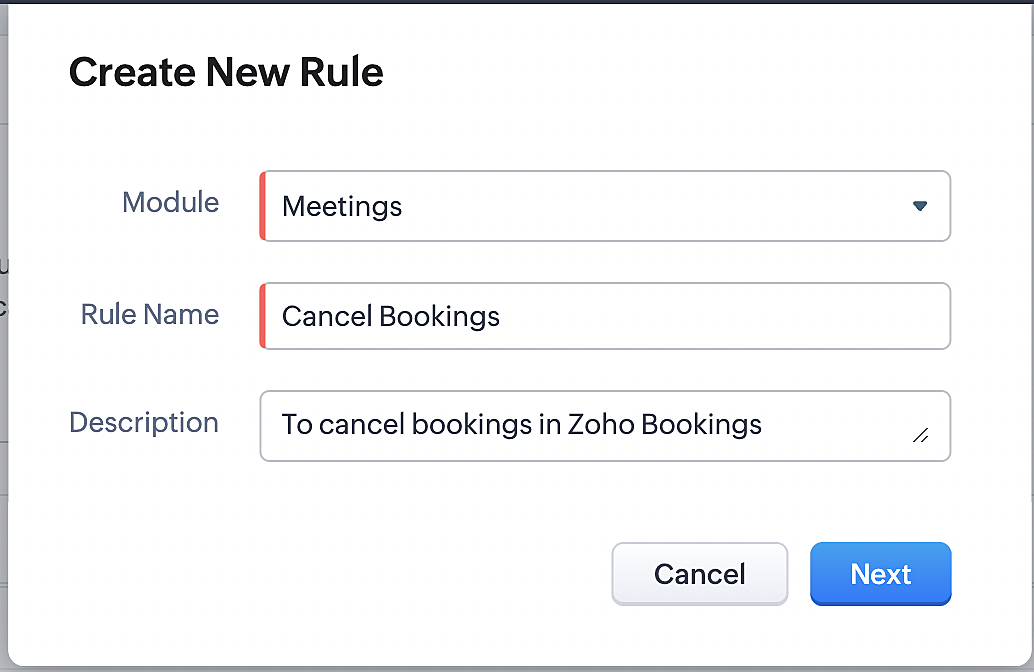
Part 1: Creating the rule
1. Go to Setup > Automation > Workflow Rules.
2. In the Workflow Rules page, click Create Rule.

3. Select "Meetings" under Module and configure rule name and description as required.
More details: Create Rule
Reference:
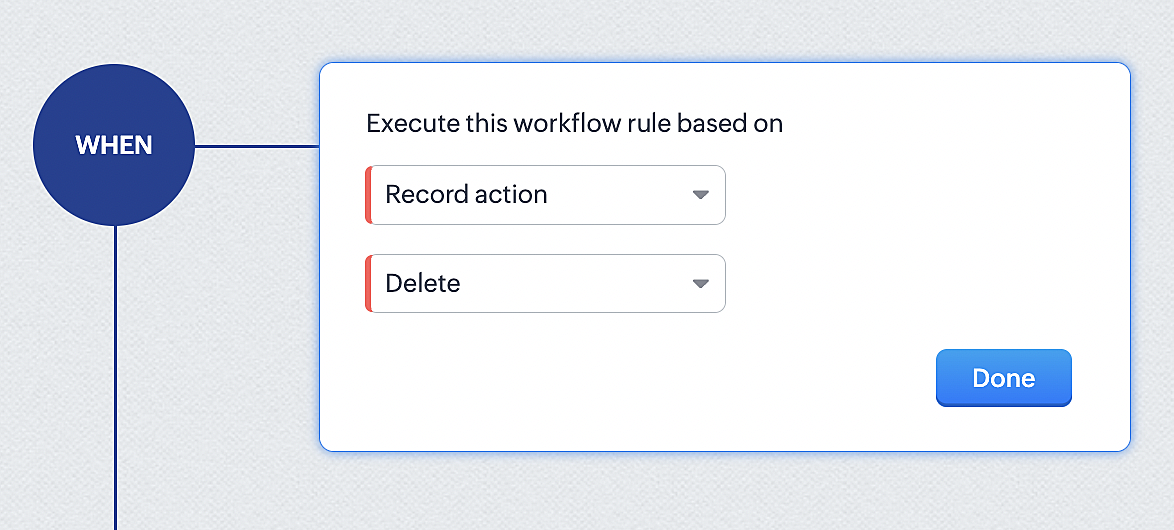
1. Select Record Action > Delete > Done to execute the rule when meetings are deleted.
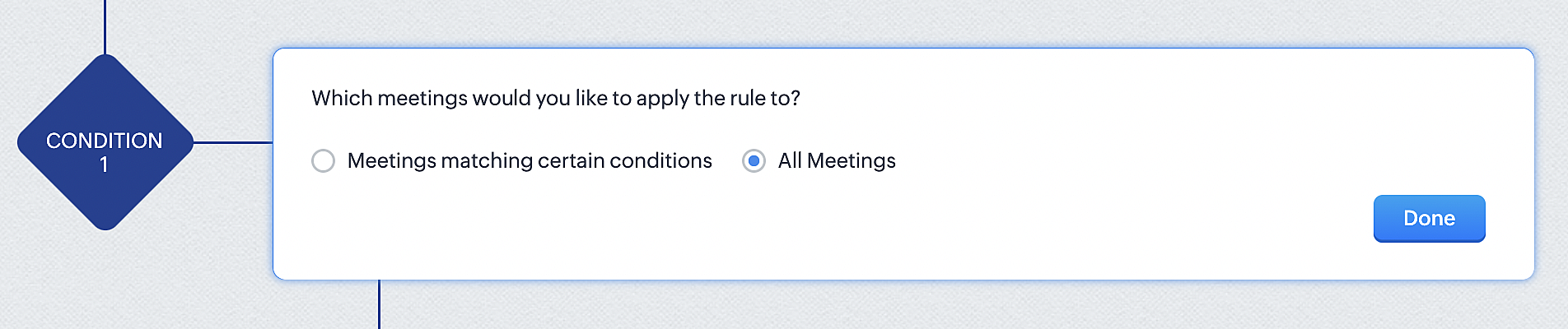
2. Configure condition > All Meetings.
3. Instant Actions > Function.
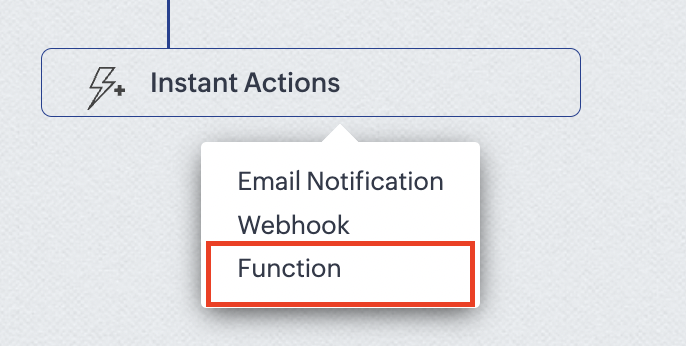
4. Click the New Function button.

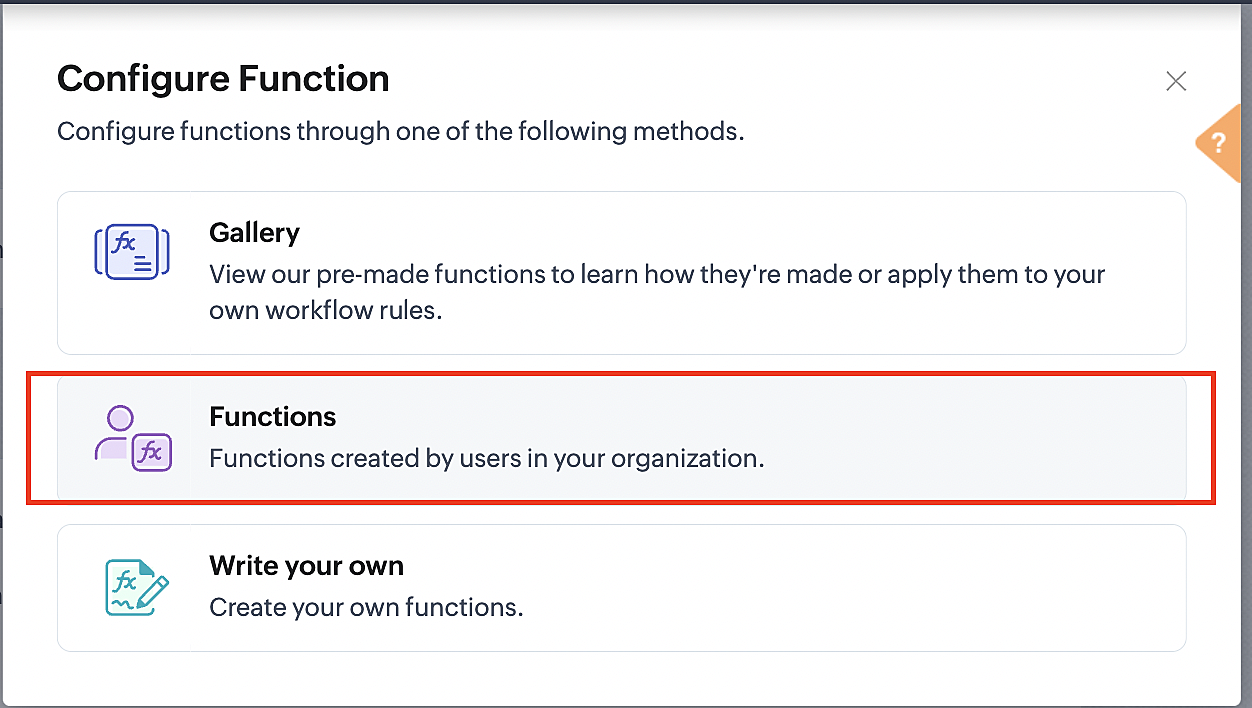
5. In the Configure custom function page, select the "cancel" function you created from among the functions users in your organization have created.
Part 3: Argument mapping
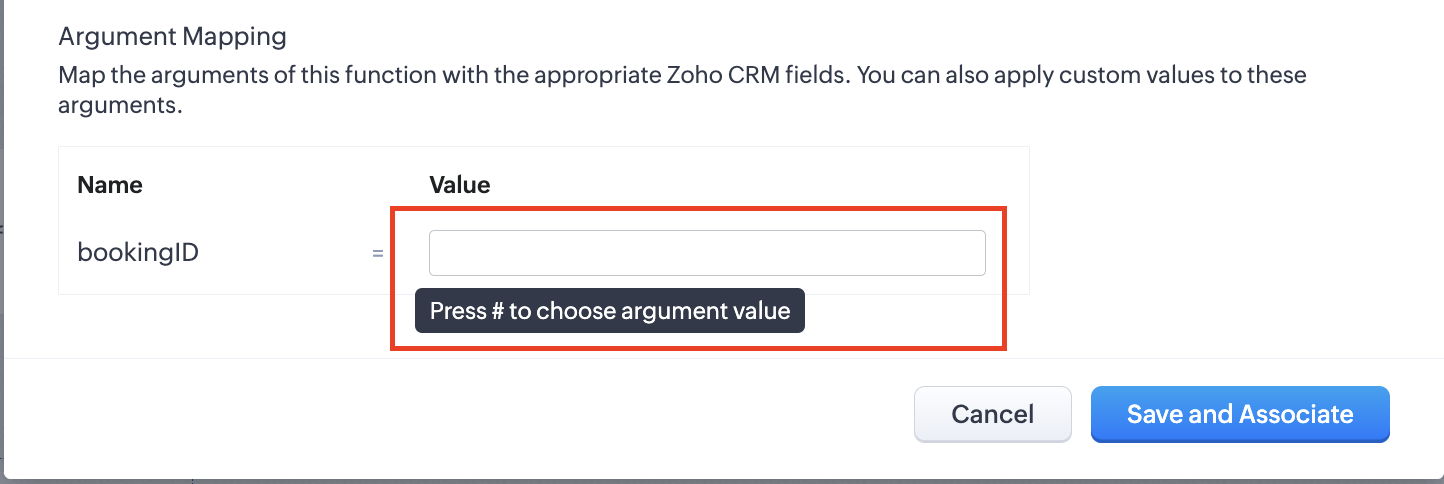
1. Press # to choose an argument value.
2. Select Meetings under Module and BookingId in the field.
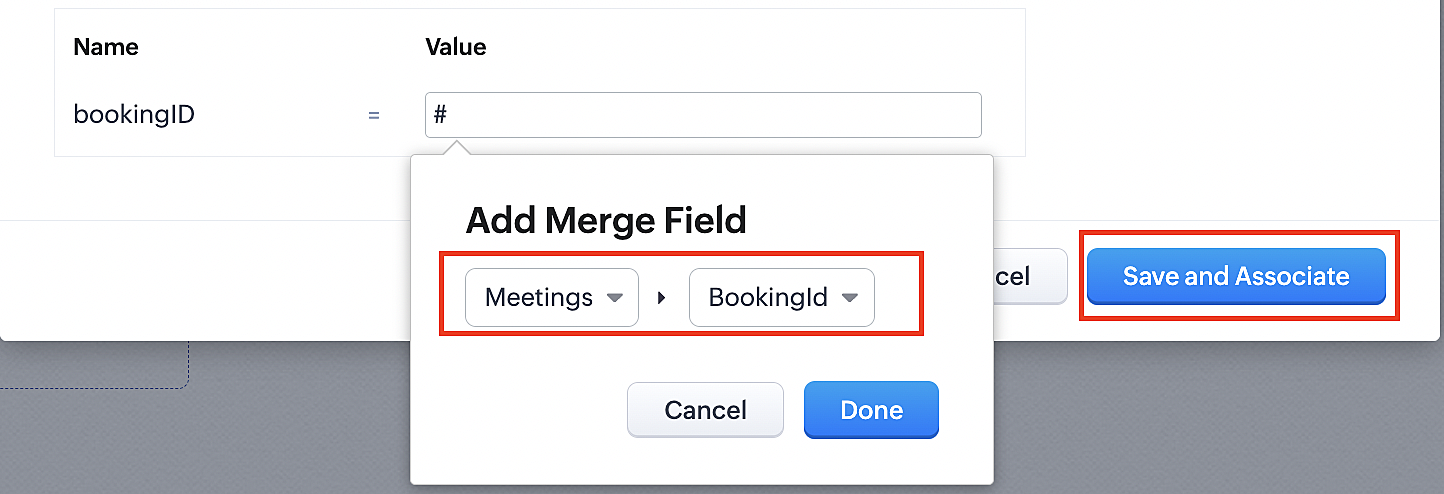
3. Click the Save and Associate button.
Reference:
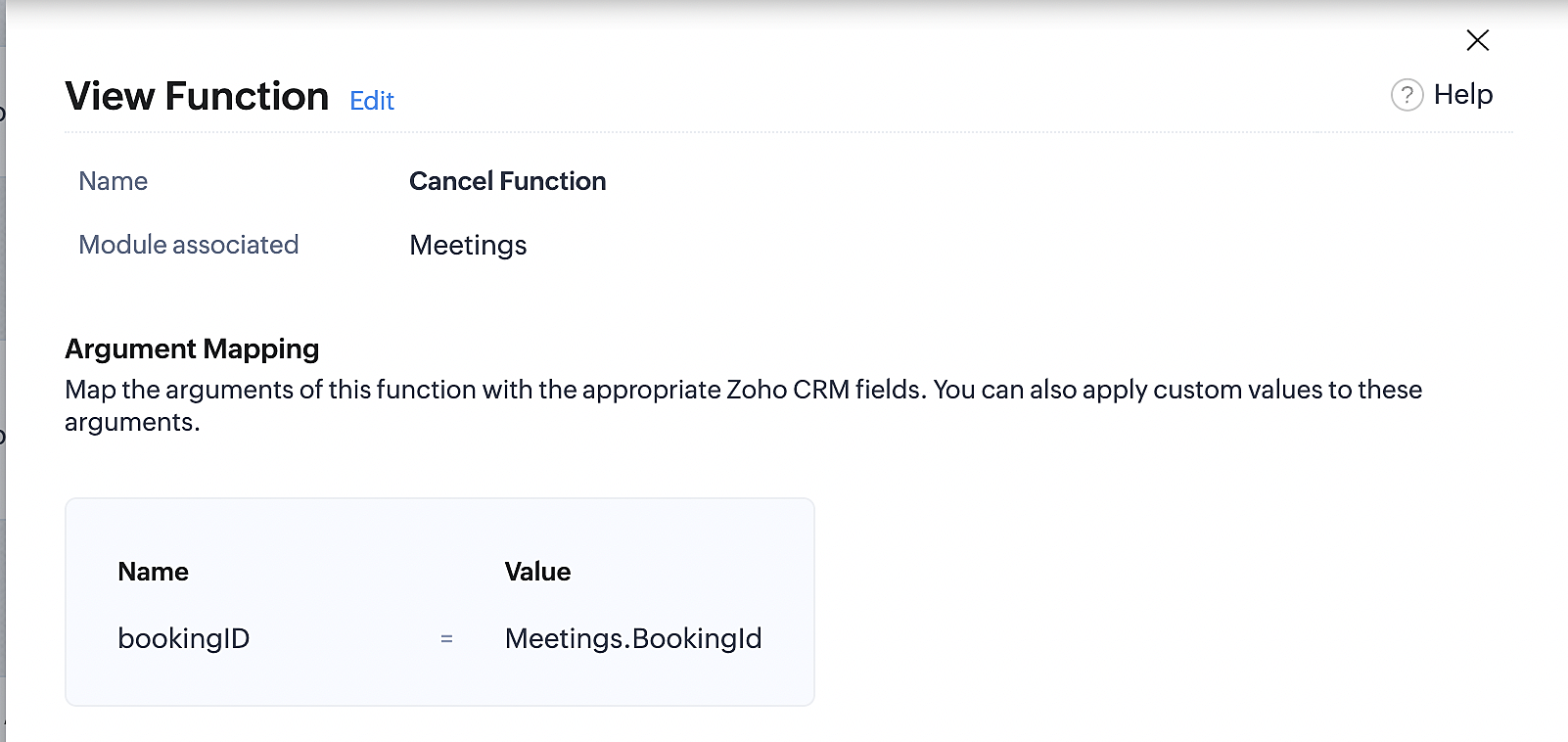
Below is the final flow of the cancel booking workflow:
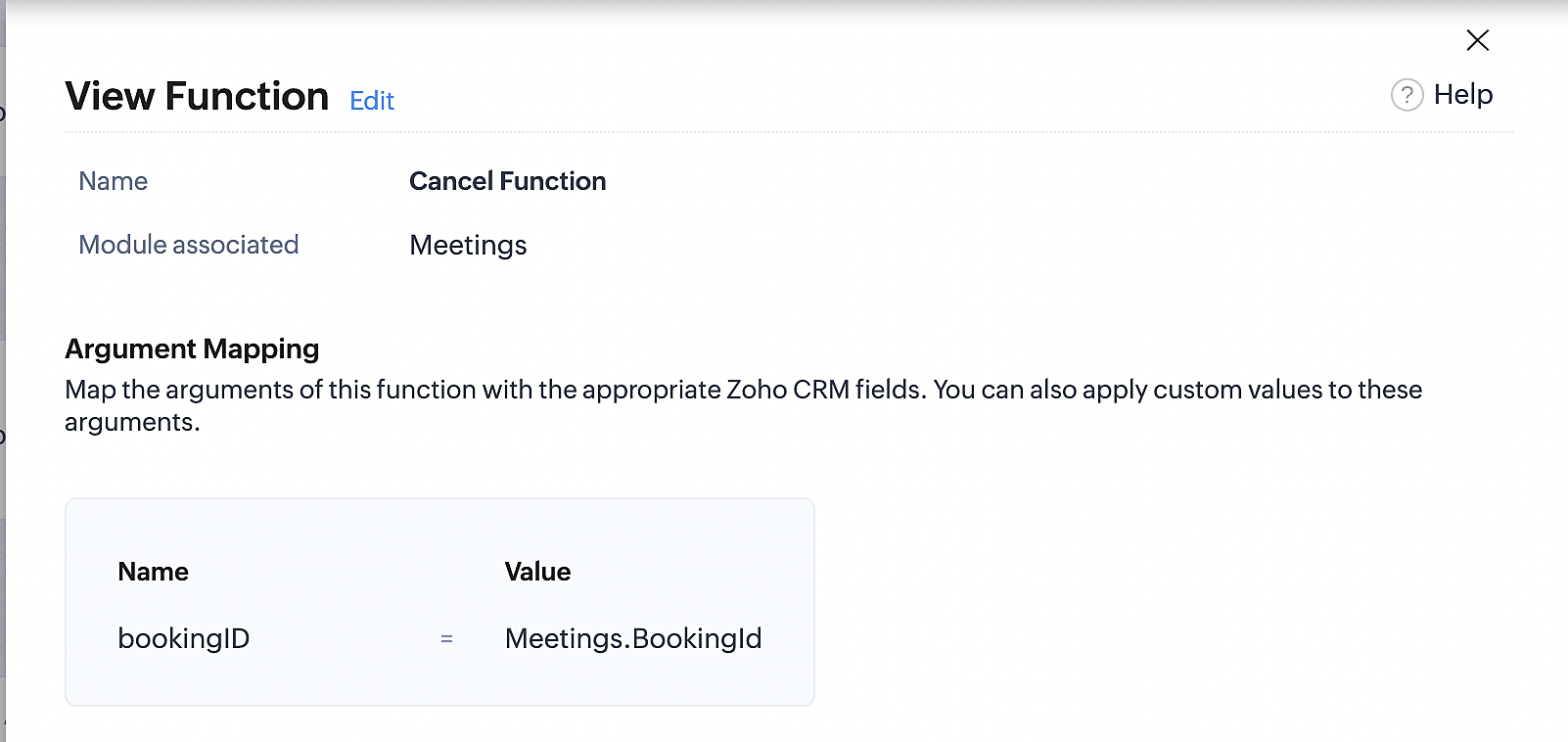
At the end of Part 3, we will have created a workflow that will be executed automatically when meetings are deleted in Zoho CRM. Simultaneously, the bookings associated with the meeting will also be canceled in Zoho Booking.
ii. Creating workflow for updating an appointment's status as "no show" in Zoho Bookings when the meeting's booking status is marked as no show in Zoho CRM
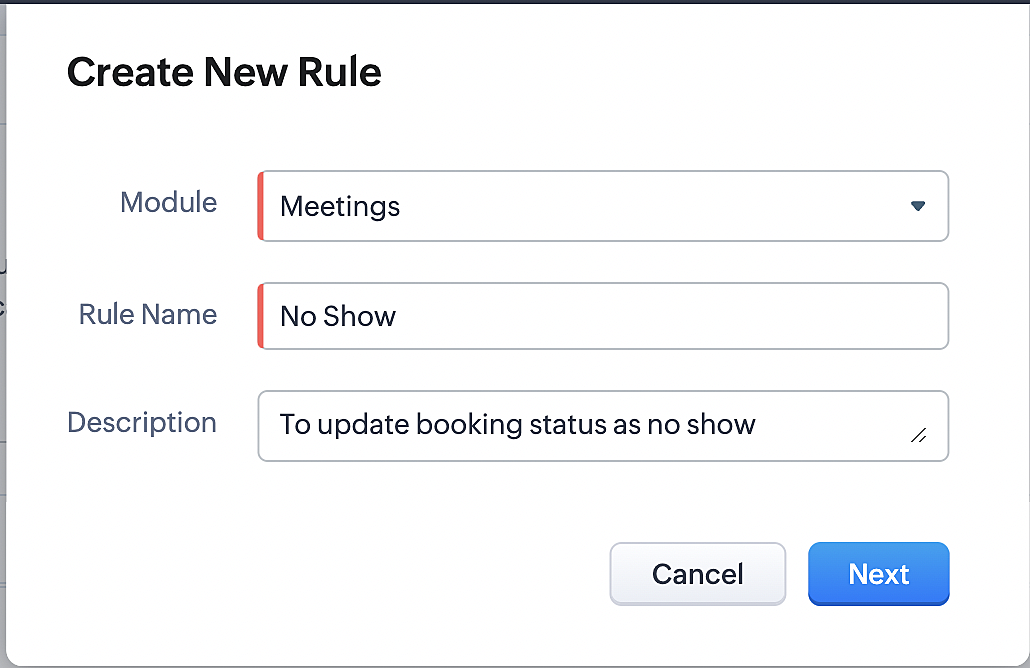
Part 4: Creating the rule
1. Go to Setup > Automation > Workflow Rules.
2. In the Workflow Rules page, click Create Rule.

3. Select Meetings under Module and configure the rule name and description as required.
Reference:
Part 5: Specifying the rule trigger
If you encounter difficulties while navigating through the steps mentioned below, please refer to Part 2 above, where we have provided step-by-step screenshots for clarification.
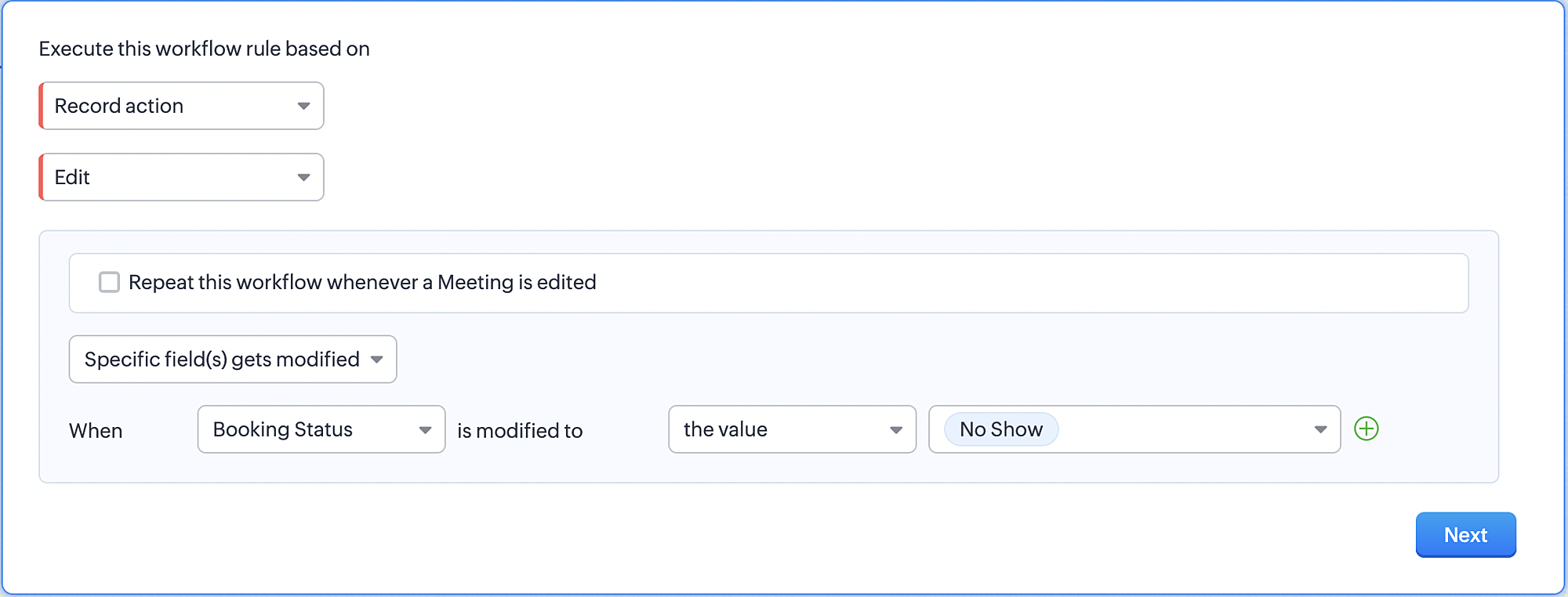
1. Record Action > Edit.

2. Enable the Specific field(s) gets modified and configure it per the screenshot below.
a. This is to ensure that the workflow is executed only when the booking status under the meeting module is
updated to "No Show".
updated to "No Show".
3. Configure condition > All Meetings.
4. Instant Actions > Function > New Function.
5. In the Configure custom function page, select the "no show" function you created from among the functions
users in your organization have created.
users in your organization have created.
Part 6: Argument mapping:
If you encounter difficulties while navigating through the steps mentioned below, please refer to Part 3 above, where we have provided step-by-step screenshots for clarification.
1. Press # to choose an argument value.
2. Select Meetings under Module and configure the field as "BookingId".
3. Click Save and Associate button.
Reference:
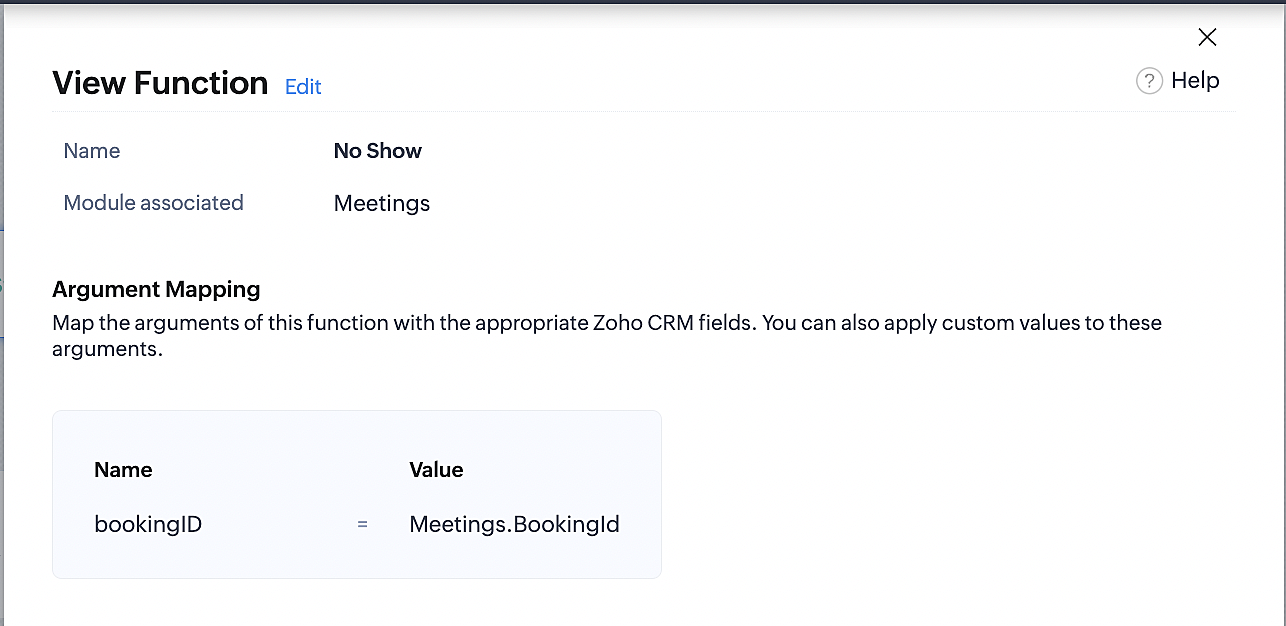
Below is the final flow of the "No Show" booking status workflow:
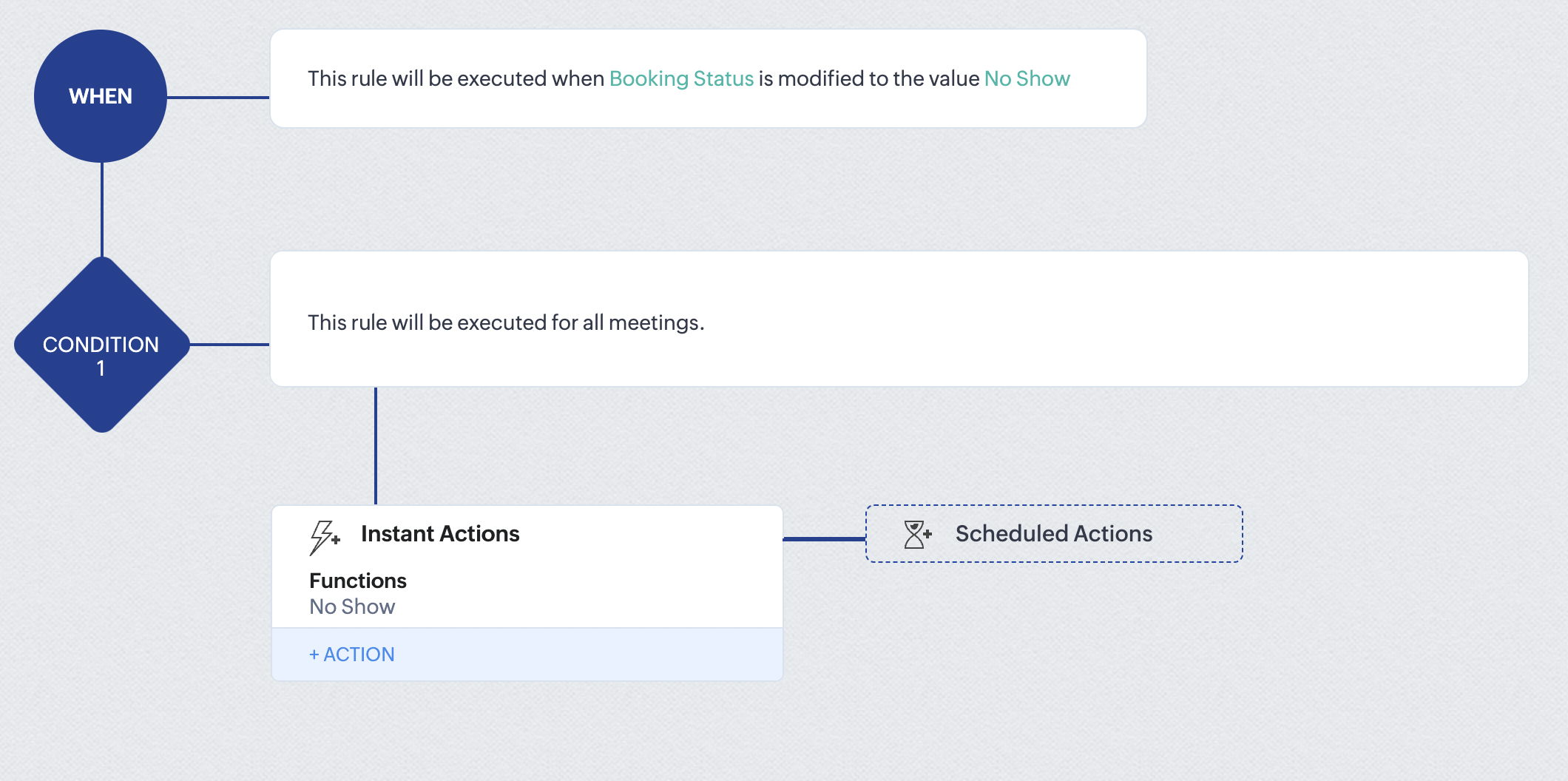
At the end of part 6, we will have created a workflow that automatically executes when the booking status field within the Zoho CRM Meetings module is updated to "No Show." This action will result in the associated bookings for that meeting also being marked as "No Show" in Zoho Bookings.
iii. Creating workflow for updating appointment status as "Completed" in Zoho Bookings when the booking status field of the meeting is marked as completed in Zoho CRM.
Part 7: Creating the rule
1. Go to Setup > Automation > Workflow Rules.
2. In the Workflow Rules page, click Create Rule.

3. Select Meetings under Module and configure rule name and description as required.
Reference:
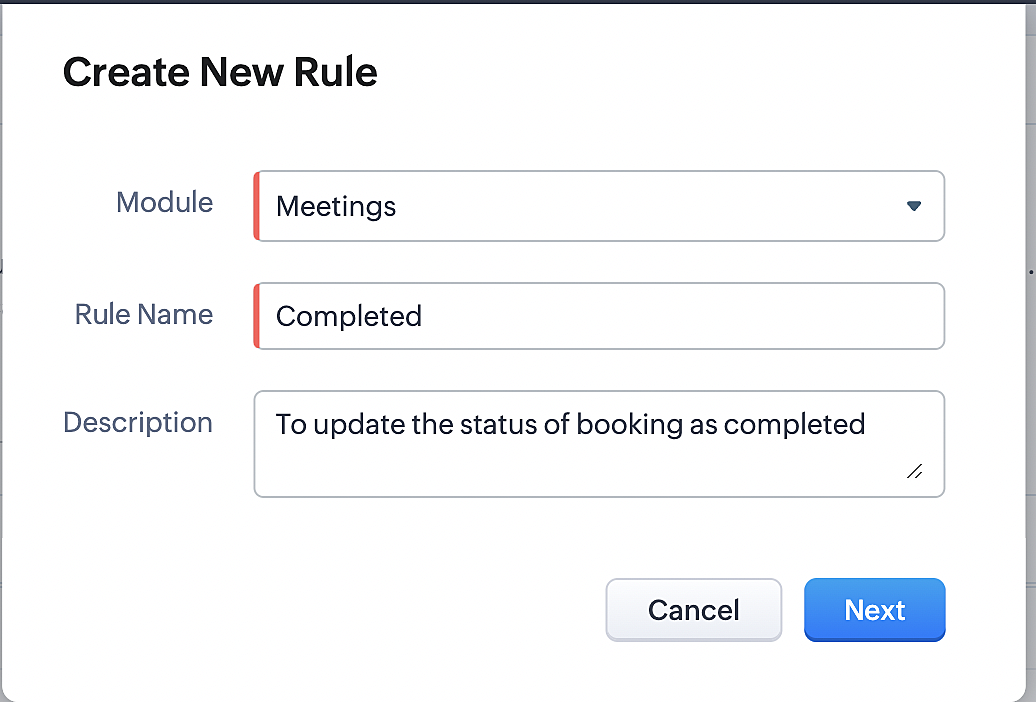
Part 8: Specifying the rule trigger
If you encounter difficulties while navigating through the steps mentioned below, please refer to Part 2 above, where we have provided step-by-step screenshots for clarification.
1. Record Action > Edit.

2. Enable the Specific field(s) gets modified setting and configure it per the screenshot below.
a. This serves to ensure that the workflow is executed only when the booking status under the Meetings module is
updated to "Completed".
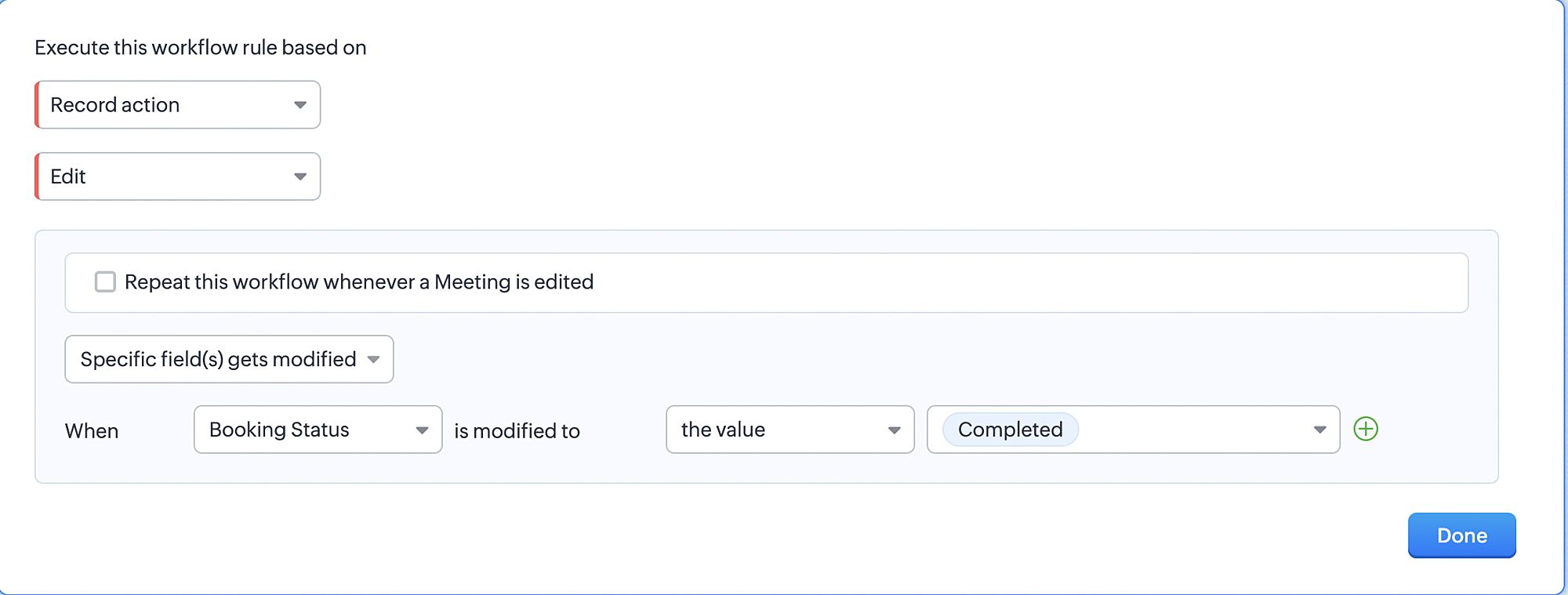
3. Configure condition > All Meetings.
4. Instant Actions > Function > New Function.
5. In the Configure custom function page, select the "completed" function you created from among the functions users
in your organization have created.
Part 9: Argument mapping:
If you encounter difficulties while navigating through the steps mentioned below, please refer to Part 3 above, where we have provided step-by-step screenshots for clarification.
1. Press # to choose an argument value.
2. Select Meetings under Module and configure the field as "BookingId".
3. Click Save and Associate button.
Reference:
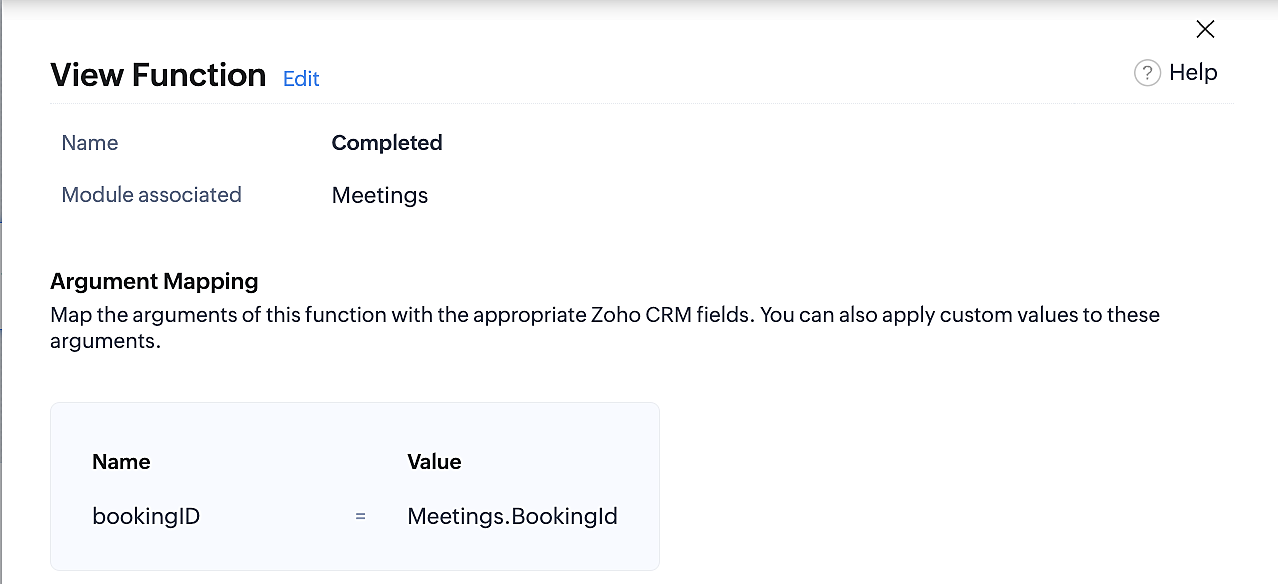
Below is the final flow of the "Completed" booking status workflow:
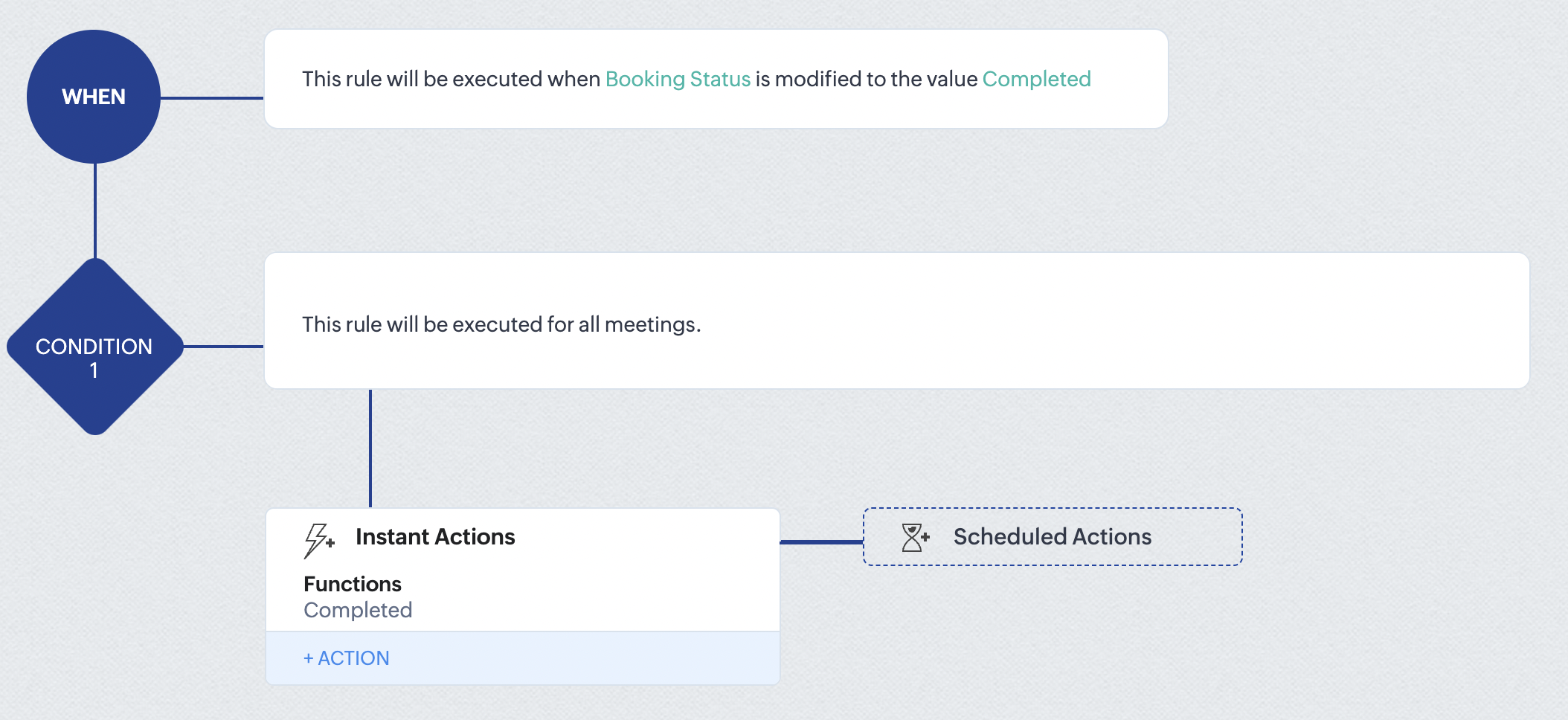
At the end of part 9, we will have created a workflow that is automatically executed when the booking status field within the Zoho CRM Meetings module is updated to "Completed." As a result, the associated bookings for that meeting will also be marked as "Completed" in Zoho Bookings.
Conclusion
We've reached the end of this community post. With the integration mentioned above in place, you'll be able to book, cancel, and update the status of appointments in Zoho Bookings directly from your Zoho CRM application. This will help you effectively manage your appointments in one place. As mentioned above, we've covered the rescheduling action in a separate post, which you can access by clicking on the following link: Reschedule Action
Furthermore, we've outlined a method for automating appointment statuses in detail. You can use this document as a reference to explore the various possibilities that suit your needs.
If you have any questions or need assistance with your configuration, please email us at hello@zohobookings.com or support@zohobookings.com.
Access your files securely from anywhere
New to Zoho Recruit?

Zoho Developer Community
New to Zoho LandingPage?
Zoho LandingPage Resources
New to Zoho Survey?
New to Zoho CRM Plus?
Deliver unforgettable customer experiences
New to Zoho CRM Plus?
Deliver unforgettable customer experiences
New to Zoho Marketing Plus?
Everything you need to run your marketing
New to Zoho Marketing Plus?
Everything you need to run your marketing
New to Bigin?





Topic Participants
Kaushik S
bruce
Ishwarya SG
PrismaNote Support
Sticky Posts
Presenting ABM for Zoho CRM: Expand and retain your customers with precision
Picture this scenario: You're a growing SaaS company ready to launch a powerful business suite, and are looking to gain traction and momentum. But as a business with a tight budget, you know acquiring new customers is slow, expensive, and often deliversGood news! Calendar in Zoho CRM gets a face lift
Dear Customers, We are delighted to unveil the revamped calendar UI in Zoho CRM. With a complete visual overhaul aligned with CRM for Everyone, the calendar now offers a more intuitive and flexible scheduling experience. What’s new? Distinguish activitiesCreate and populate a record in an instant: Introducing zero-shot field prompting to Zia's ICR
A couple of months ago, we upgraded our in-house AI image detection and validation tool, Zia Vision, with intelligent character recognition (ICR). By training Zia with sample images, you could create and enrich CRM records with data extracted from standardIn-person ZUG Meetups for Real Estate Professionals - US Q1 2026
The Real Estate Zoho User Group is going on a multi-city, in-person meetup tour across the US, and we’d love to see you there! These meetups are a great opportunity to: Connect with fellow real estate professionals using Zoho Share challenges and discoverNimble enhancements to WhatsApp for Business integration in Zoho CRM: Enjoy context and clarity in business messaging
Dear Customers, We hope you're well! WhatsApp for business is a renowned business messaging platform that takes your business closer to your customers; it gives your business the power of personalized outreach. Using the WhatsApp for Business integration
New to Zoho TeamInbox?
Zoho TeamInbox Resources
Zoho CRM Plus Resources
Zoho Books Resources
Zoho Subscriptions Resources
Zoho Projects Resources
Zoho Sprints Resources
Qntrl Resources
Zoho Creator Resources
Zoho CRM Resources
Design. Discuss. Deliver.
Zoho Show Resources

Get Started. Write Away!
Writer is a powerful online word processor, designed for collaborative work.
Zoho CRM コンテンツ
-
オンラインヘルプ
-
Webセミナー
-
機能活用動画
-
よくある質問
-
Ebook
-
-
Zoho Campaigns
- Zoho サービスのWebセミナー
その他のサービス コンテンツ
Nederlandse Hulpbronnen

ご検討中の方
Recent Topics
Setting up property management in Zoho Books
Hi, I run a property management business that manages property complexes. There are multiple owners, some owning more than one property on the same complex. My role is to manage the fees they pay for maintenance of common areas, such as the swimming poolReverse proxy
We have a web application in the creator platform. When I launch a particular DNS, I would like that DNS to redirect to the web page of the application in creator app. Has anyone achieved it and if yes, please share how to do it.Still client need to download .exe?
Hello, the client for use zoho assist need everytime download .exe file and launch it?Splitting a ticket's entire thread
Hi, When you split a ticket it only splits the individual reply that you clicked "Split as new ticket" on. Is it not possible to split the entire ticket thread from that point into the new ticket (every reply from the split point forward)? Or is thereEditing the text on the Help Center home page
Is it possible to edit the "Welcome to Help Center" message anywhere? This one: We'd like to be able to tailor it a little more ourselves.WHMCS for Zoho Flow
Can we use WHMCS for Zoho flow?Online meetings through Calendar Booking form with options
This is great to see and particularly for those users who don't have Zoho BOOKINGS. The shame of it all though is that it could have been better. Why do we have to set up separate booking forms for each type of meeting and for each online conferencingAgents permission per department
Hi Team, can I setup permission for each agent what they can do in each department, for example I want account department agents to only have view access to support department tickets and not allowed to assign or reply to clients. I am sure this wouldCRM notes
I want to be able to add notes to a task that do not necessarily get rolled up into an account or contact. For example, I tasks to work on a Court Order for John Doe divorce account. There might be lots of updates (in the form of notes) that employeesFunction #8: Add additional charges to invoices
Here goes one of the highly sought-after custom functions in Zoho Books. If you find yourself needing to apply additional charges to customers on their invoices (say credit card surcharges, or fuel charges applicable to customers from a certain region,Alternative / optional Position
How do you create an alternative position or an optional position (article) in offers?جمود في الصفحة عند حفظ عمل
عندما اقوم باضافة ايقونة الى صفحة النموذج تجمد الصفحة ولا تعمل وتصبح مثل المظلة احدث الصفحة لا تعمل انتظر قليلا لا تعمل اقوم بنسخ رابط الصفحة والصقه في الرابط فيعملZOHO Books Canadian payroll Integration
Hello, I know ZOHO books doesn't have Canadian payroll and I dont believe its coming anytime soon. My question is there a Canadian payroll software that could be integrated with Zoho Books? Thank you HDZoho Desk Time Tracking and the Salary Privacy Issue
Hello colleagues, Just wondering if anyone did hit the same wall? In the Desk, when the agent-specific hourly rates are enabled (Zoho Desk → Setup → Time Tracking → Billing Preferences), these Time Entries are being displayed in the Ticket History tab.How to Delete, Disable, or Remove Streams from the Mail App?
Is there a way to remove Streams from the mail app sidebar? I get too many notifications, it doesn't add any value to Zoho's functionality (especially since you can just make comments inside an email), and is distracting. I do not want notifications/alertsDelay in MX updates
Hi, I set MX Records 12 hours ago, and I am receiving email normally, but I still get notification MX record is not pointing correctly. Error: The MX records of your domain is not yet pointed to Zoho Mail. Why there is a delay in detecting MX records,make.com integration
Just wondering if anyone on Zoho One account connecting apps to Make.com We're on Canadian server (.com) and when connecting to Make.com, it keeps having error of Invalid Client ID. I have contacted both Zoho and Make and both sides said it's not an errorArticle Numbers for KB articles
Hello, I was wondering if it's possible to turn on article numbers/ part numbering for KB articles. If this is not already a feature, we'd like to request it. Frequently a solution will require multiple articles so tracking which articles are referencedRefund Request ,Zoho Mail Subscription (zoho suport is not replying)
Hi Zoho Team, I recently subscribed to the Zoho Mail yearly plan, but after evaluating it, I found that the interface does not suit my workflow. I’ve already canceled the subscription from my end. As I’m well within your 30-day refund window, I’m requestingFile Encryption - Zoho Desk iOS app update
Hello, Everyone! We have now introduced the 'File Encryption' option within the Zoho Desk app as part of the HIPAA Compliance. This option allows the user to encrypt the attachments within the Desk mobile app, which acts as an additional layer of security.Data encryption - Zoho Desk iOS
Hello, Everyone! In the recent iOS version(v2.8.23) of the Zoho Desk app, we have supported data encryption. As a part of HIPAA Compliance, the Zoho Desk mobile app now allow users to encrypt the Desk mobile database as an additional layer of security.Notify Admin when a user forgets to check-in or check-out at the designated time.
Hello, I would like notify the Admin via email when a user forgets to check-in or check-out at the designated time. What is the best way to setup this email notification?Assistance Needed with Prospect Conversion Issue
Hi, I attempted to convert a prospect to an account, but received a pop-up notification indicating that the contact information matches an existing contact. I selected the option to add it to the existing contact, but it appears the prospect was not successfullyMail Merge - unable to send more than 50 email
Hi, I've subscribed to the pay email service because of the Mail Merge feature. However, I've found that this feature only allow to send up to 50 emails. I've to attach a screenshot for your reference. This limitation is not mentioned anywhere in service.Zoholics Europe 2025: Your Ultimate Data Analysis (Zoho Analytics) Workshop Experience
Why should you attend? This year, Zoholics Europe 2025 is putting data analysis centre stage. With a dedicated workshop designed to answer all your data-related questions, you’ll gain practical skills, real-time solutions, and expert insights that youUK payroll entries
Hey guys, Nett payroll payments are imported direct into the bank, using an external payroll system (will be glad for Zoho to have a UK payroll app) At present I have monthly recurring bills for HMRC which are auto entered & paid when due. This seemsInvoice status on write-off is "Paid" - how do I change this to "Written off"
HI guys, I want to write off a couple of outstanding invoices, but when I do this, the status of the invoices shows as "Paid". Clearly this is not the case and I need to be able to see that they are written off in the customer's history. Is there a wayReverse Charge Services (Non-EU) Showing Correctly in 84/85 and 67, But Missing in Box 46 - Germany
Hi, I'm located in Germany and I’ve set up my expenses for non-EU services (e.g., OpenAI, DeepSeek) under the reverse charge mechanism (§ 13b UStG) in Zoho Books, and I noticed some discrepancies in the VAT Summary Report. What’s Correct: Reverse ChargeZoho Live Chat/Support
What is going on with Zoho support lately? I've tried to use the live chat feature 4 different times and it refuses to connect to any (despite waiting over 30 minutes one of the tries). I finally gave up and emailed my question nearly a week ago and stillCan we have a module to records Certificate No and TDS rates for Lower TDS Certificates by the vendors ?
Can we have a module to records Certificate No and TDS rates for Lower TDS Certificates by the vendors ?Tip #38- Track Organizational Changes: A Guide to Using Action Log Viewer- 'Insider Insights'
Hello Zoho Assist Community! Ever needed to trace who did what and when within your remote support operations? Let’s say your support team is growing, and you want to monitor key activities like settings updates, user invites, module changes, or permissionTip of the Week #67– Avoid confusion – Mark duplicate threads.
When customers send the same message to multiple email addresses, such as support@ and sales@, your team may end up seeing the same message in different inboxes. This creates confusion, risks double replies, and clutters your workspace. Use the Mark asTax in Quote
Each row item in a quote has a tax value. At the total numbers at the bottom, there is also a Tax entry. If you select tax in both of the (line item, and the total), the tax doubles. My assumption is that the Tax total should be totalling the tax fromFinal Reminder: Discontinuation of Older ASAP Widgets and Mobile SDK Support
We launched the new ASAP Help Widget last year, introducing a unified and enhanced experience. Since then, older configurations have been placed in read-only mode, with all major updates and improvements built exclusively on the new version. As part ofZoho Subscriptions -- Zoho Commerce integration
Is there integration between Zoho Subscriptions and Zoho Commerce? I would like to create subscription plans in Zoho Subscritpions and list them for on my Zoho Commerce store.Website show Blank white screen
Customer called me to tell me my website is currently down upon review it shows a white screen however I can access everything via editor. JITCADCAM.comHow manufacturing analytics can transform your enterprise with Zoho Projects Plus
Did you know that every single car is made up of 30,000 to 40,000 individual parts? All of these are manufactured meticulously in various facilities before being assembled into one. The global manufacturing industry spans a wide range from deliveringProjects custom colors replaced by default orange
Since yesterday, projects uploaded to Zoho, to which I had assigned a custom color, have lost the customization and reverted to the default color (orange). Has anyone else had the same problem? If so, how did you resolve it?Customize your SalesIQ live chat with Custom CSS and blend it with your website design
Hi everyone. Hope you all are having a great day! SalesIQ offers various inbuilt customization choices for your chat widget and window like changes in colour, theme, font etc. Although these choices are many, sometimes they may not match with the designFrom Email Address When Replaying to Missed Chats
One of the most common things we do is follow up on every missed chat. Missed chats are like money in the bank, people just waiting for your response and to start a relationship with our companies. However, SalesIQ only lets you respond from 1 email address from your entire account?! We have happily paid for 4 subscriptions, but our users cannot reply from their own email address? How are we supposed to build customer relationships? The fix to this issue is so simple, just load in the logged inNext Page