Bidirectional sync between Zoho Bookings and Zoho CRM - Part 1
Hey, community members!
The default integration between Zoho CRM and Zoho Bookings is unidirectional, which means that any appointments booked, rescheduled, or deleted in Zoho Bookings will be reflected in Zoho CRM. However, any modifications made to events in Zoho CRM that originated from Zoho Bookings will not be reflected back in Zoho Bookings. Hence, as we're announcing in this community post, we've made the sync bidirectional.
This community post will cover the process of configuring appointment bookings from Zoho CRM in Zoho Bookings, as well as managing appointment statuses such as Canceled, No Show and Completed. We have addressed the rescheduling action in a separate post. To view it, please click on the following link: Reschedule Action
This community post will be beneficial for active Zoho CRM users who handle all their meetings within Zoho CRM. Additionally, you can use this community post as a reference to explore various automation possibilities tailored to your business requirements. For instance, with this post's guidance, when you update a booking's status field to "Completed" in Zoho CRM, it will automatically sync with Zoho Bookings and trigger an automated "Mark as completed" email to customers. This enhancement will improve your Zoho Bookings and Zoho CRM synchronization experience, making appointment management easier.
Prerequisites of bidirectional sync:
- Zoho Bookings Premium subscription
- Zoho CRM paid subscription
- Enable Zoho CRM integration within Zoho Bookings
The purpose of enabling the Zoho CRM integration within Zoho Bookings is to transfer booking details from Zoho Bookings to Zoho CRM. In this configuration, the mandatory field is the Booking ID, which is passed from Zoho Bookings to Zoho CRM through the integration. Whenever an appointment is booked, customer details will be sent to the designated CRM module, and a corresponding record will be created in the Meetings module within Zoho CRM, which will help in automating the workflow.
Here's the complete demo video that covers all the configurations discussed in the community post below:
Timestamps for your reference:
0:35 - Purpose of this community post
Here's the complete demo video that covers all the configurations discussed in the community post below:
Timestamps for your reference:
0:35 - Purpose of this community post
1:26 - Zoho CRM plugin installation
4:43 - Custom field creation
7:20 - Function creation
9:22 - Connection creation
10:24 - Configuring arguments
11:06 - Workflow creation
13:33 - Argument mapping
14:41 - Output verification
17:41 - Conclusion
How we're approaching this bidirectional sync
1. Booking an appointment from Zoho CRM
Install the Zoho Bookings for Zoho CRM plugin within your Zoho CRM application. This plugin enables the creation of a "New Appointment" button within the Zoho CRM Leads and Contacts module, which enables you to select the desired booking page you wish to open. You can choose from various workspace, service, or staff booking pages. After configuration, you can initiate the process of scheduling bookings directly from within your Zoho CRM account.
- Guide on Zoho Bookings and Zoho CRM plugin installation: Booking page selection for Zoho CRM plugin
2. Booking status: Completed or No Show
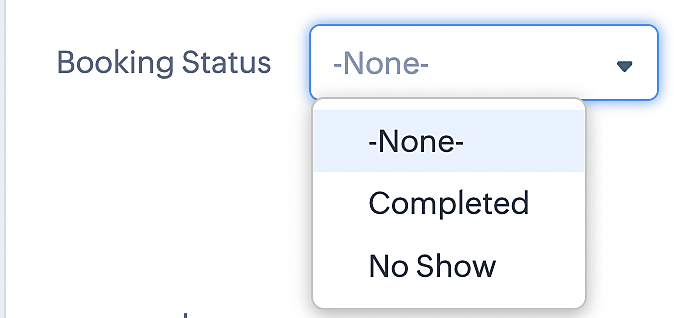
To update a booking's status (Completed or No Show), we've added a new picklist properties field named "Booking Status" in the Meetings module and configured it with two options: "completed" and "no show". Depending on the booking status chosen, the corresponding booking in Zoho Bookings will be updated.
- Details on how to add a custom field to the Meetings module : Customizing modules
- Here's a video that demonstrates how to add a field to a module in Zoho CRM: Adding fields
Reference:
3. Booking status: Canceled
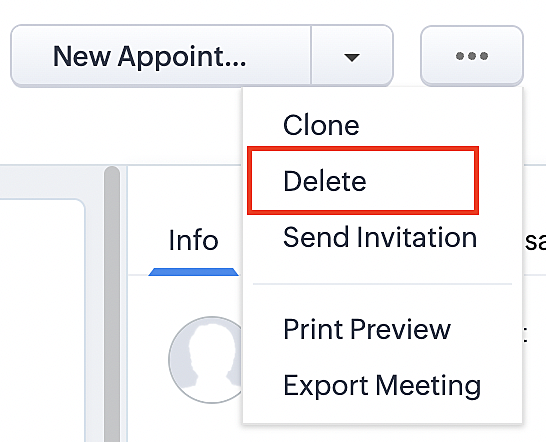
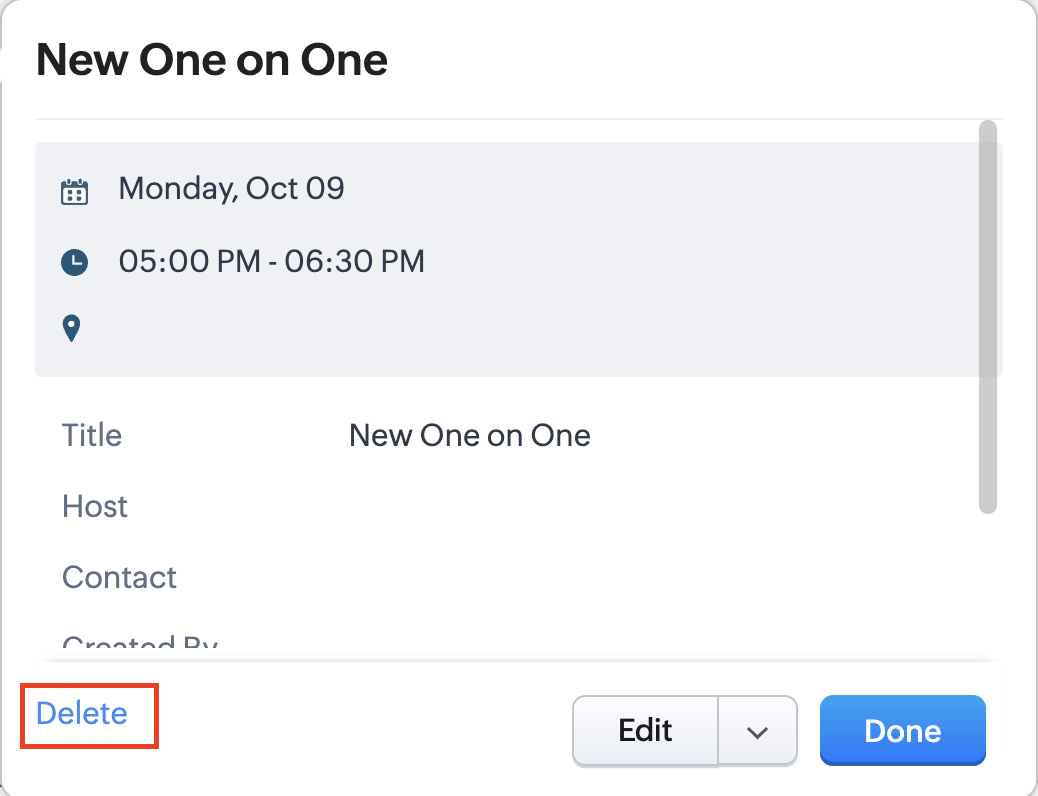
Whenever a meeting is deleted from the Meetings module, the corresponding booking in the Zoho Bookings app will also be canceled automatically. The meeting can be deleted either from the Meetings module or directly from the calendar.
To enable bidirectional sync between Zoho CRM and Zoho Bookings
Complete these steps in Zoho CRM.
Step 1: Creating connections
You first need to establish a connection between Zoho CRM and Zoho Bookings. Zoho Bookings is listed as one of the default connections in Zoho CRM, making it simple to set up. Select the Zoho Bookings connection, define the connection name and scope, and you'll be all set. This connection will enable you to link both applications and facilitate the seamless transfer of data.
Read here for more details on how to create connection in Zoho CRM: Connections
Step 2: Creating functions
In this context, we'll be creating three functions: one for marking appointments as completed, another for canceling appointments, a third for marking appointments as no shows, and a fourth for rescheduling appointments. For each function, we must also configure arguments, which pass values or data into a function when making a call. Here, we'll pass the booking ID to the function as an argument to update the necessary booking status.
i. To create a function for marking appointments as completed:
1. Go to Setup > Developer Space > Functions.
2. In the Functions page, click + Create New Function.

3. Configure the function name, display name, and description.
4. Set the category as automation.
This opens the Deluge script page.
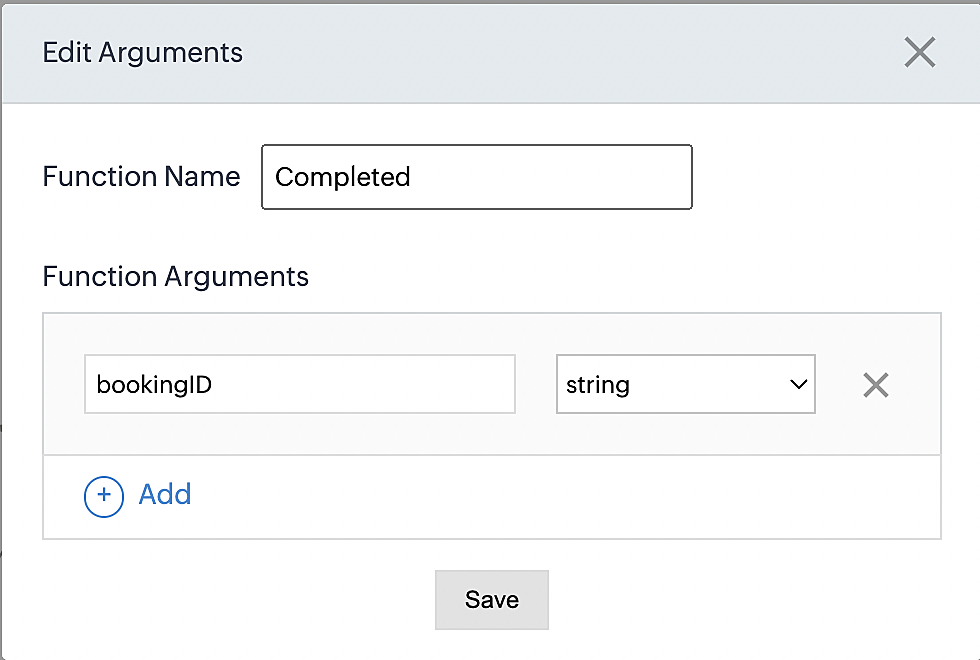
5. Next, configure the function's arguments:
A. Click on Edit Arguments on the Deluge script page.

B. Set the Parameter Name as bookingID. (Please note that the "bookingID" value is case sensitive and must match
the term used in the code).
C. Set the type as string.
Reference:
Please configure the below code in the Deluge script page.
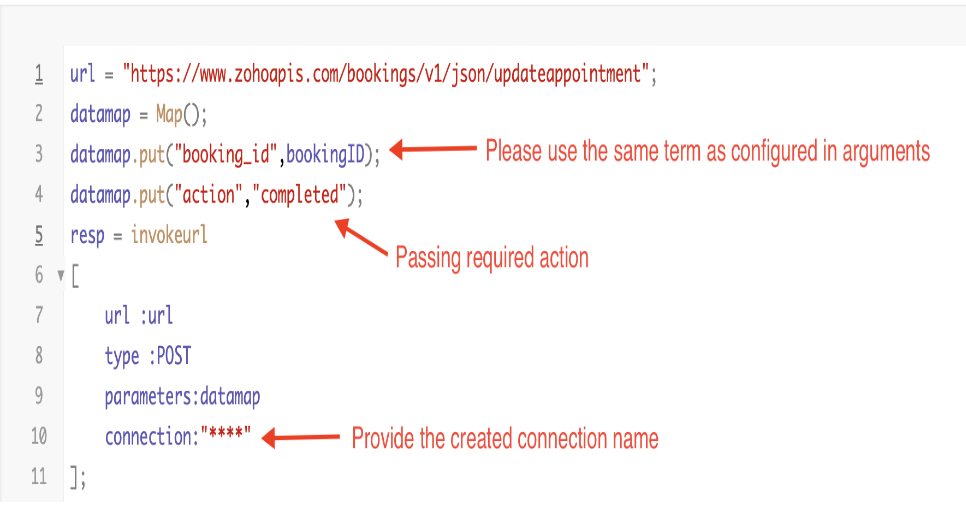
By completing these steps, we've configured a function that will mark appointments as completed.
ii. To create a function for marking appointments as no shows
1. Go to Setup > Developer Space > Functions.
2. In the Functions page, click + Create New Function.

3. Configure the function name, display name, and description.
4. Set the category as automation.
This opens the Deluge script page.
5. Next, configure the function's arguments:
A. Click on Edit Arguments on the Deluge script page.

B. Set the Parameter Name as bookingID. (Please note that the "bookingID" value is case sensitive and must match
the term used in the code).
C. Set the type as string.
Reference:
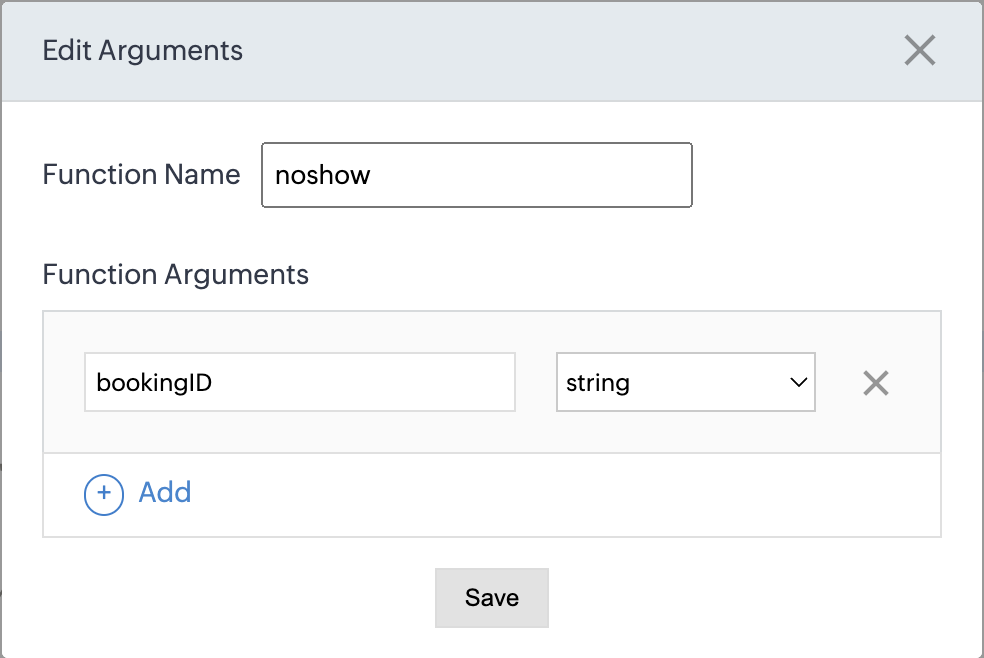
Please configure the below code on the Deluge script page.
Code link: No show
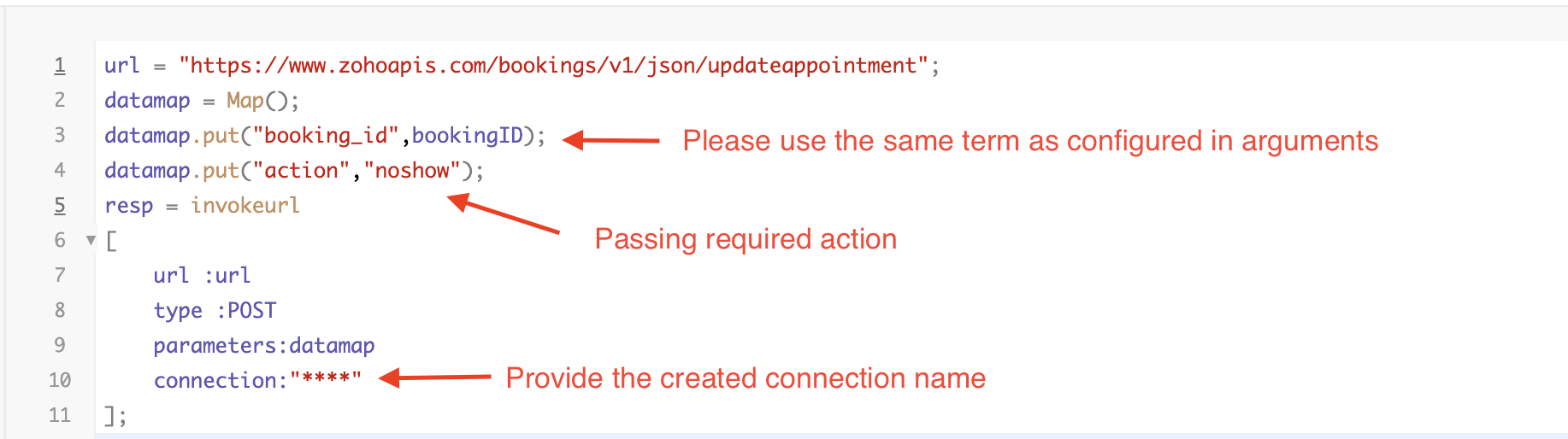
By completing these steps, we've configured a function that marks appointments as no shows.
iii. To create a function for marking appointments as canceled
1. Go to Setup > Developer Space > Functions.
2. In the Functions page, click + Create New Function.

3. Configure the function name, display name, and description.
4. Set the category as automation.
This opens the Deluge script page.
5. Next, configure the function's arguments:
A. Click on Edit Arguments on the Deluge script page.

B. Set the Parameter Name as bookingID. (Please note that the "bookingID" value is case sensitive and must match
the term used in the code).
C. Set the type as string.
Reference
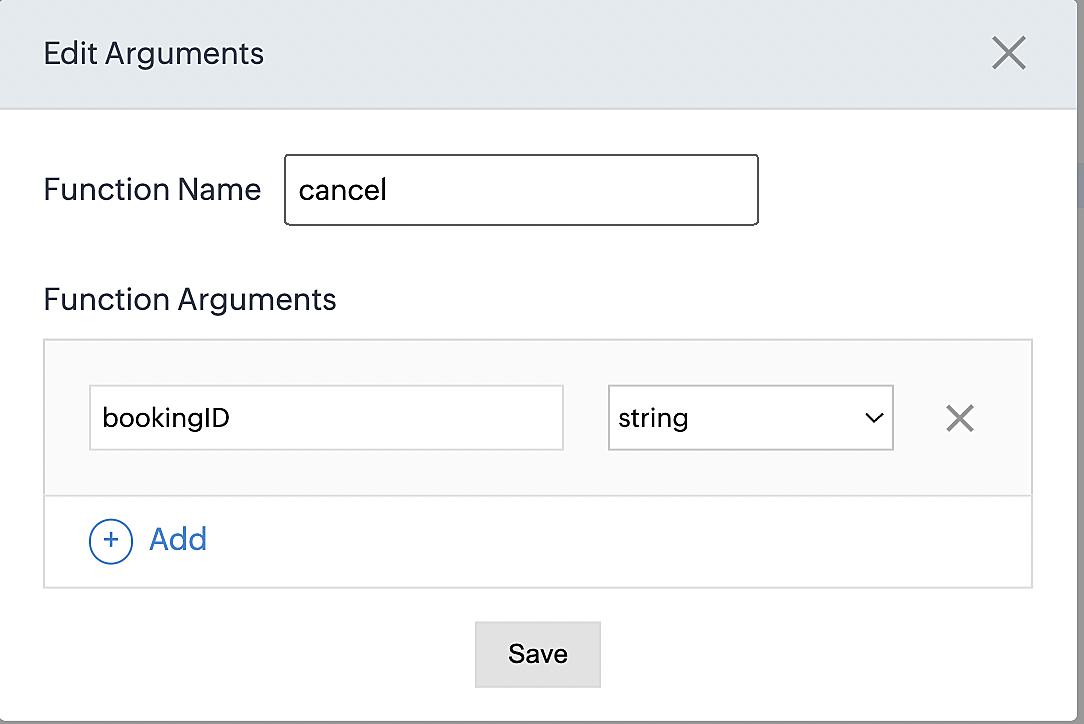
Please configure the below code on the Deluge script page.
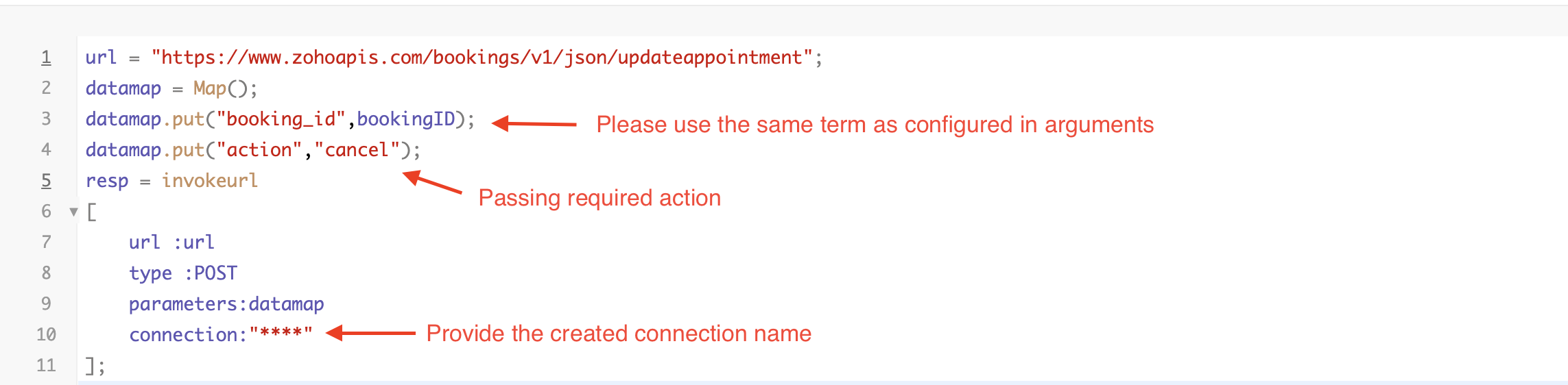
By completing these steps, we've configured a function that marks appointments as canceled.
Code explanation
Below is an explanation of the code that covers all the configurations present in the three functions mentioned above (cancel, mark as completed, and mark as no show).
Line 1: Based on the Zoho Bookings account's data center, we're setting up the API endpoint URL configuration.
Lines 2 - 4: To update appointments, we utilize the Zoho Bookings API. Within the update appointment API, there are two mandatory fields that need to be included: BookingID and action (completed/cancel/noshow).
Lines 5 - 10: We use the invokeURL task for API calls. To learn more about the invokeURL task, please refer to the following document: InvokeURL task for API calls
Now, let's proceed and learn about the process of creating a workflow and linking the established functions to it. This will enable us to automate the entire appointment status updating process.
Step 3: Creating a workflow
Workflow rules are sets of actions (email notifications, tasks and field updates) that are executed when specified conditions are met. Here, we'll generate workflow rules for each action to activate the respective function, thereby automating the appointment status updating process.
i. Creating a workflow for "canceling" appointments in Zoho Bookings when a meeting is deleted in Zoho CRM
Part 1: Creating the rule
1. Go to Setup > Automation > Workflow Rules.
2. In the Workflow Rules page, click Create Rule.

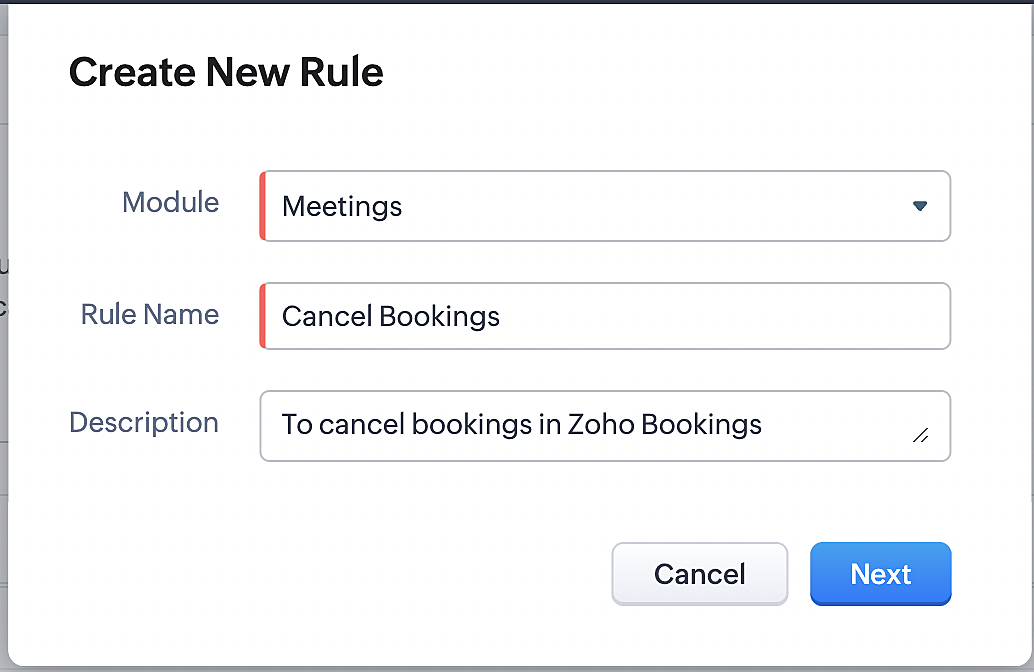
3. Select "Meetings" under Module and configure rule name and description as required.
More details: Create Rule
Reference:
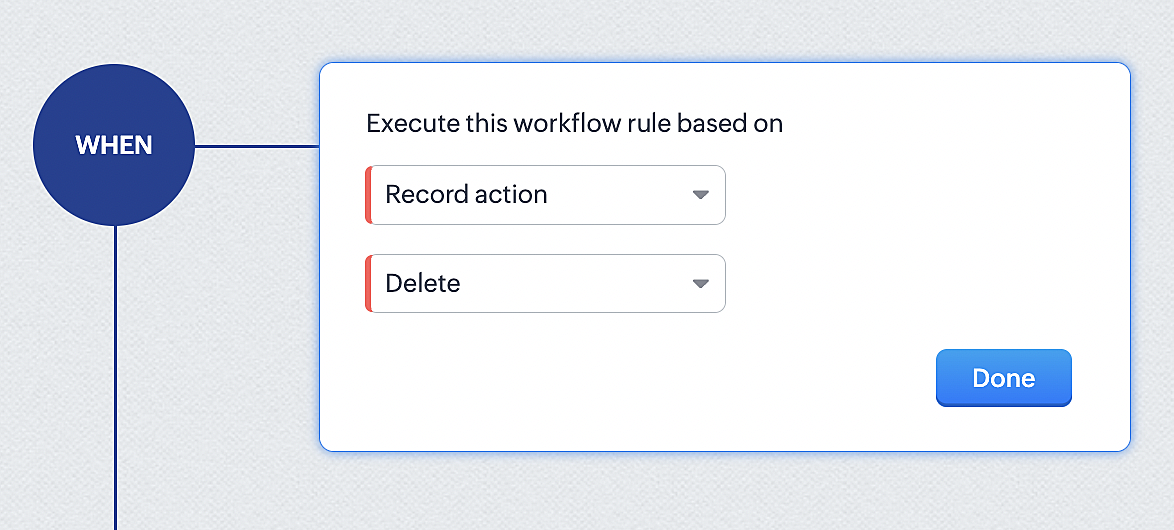
1. Select Record Action > Delete > Done to execute the rule when meetings are deleted.
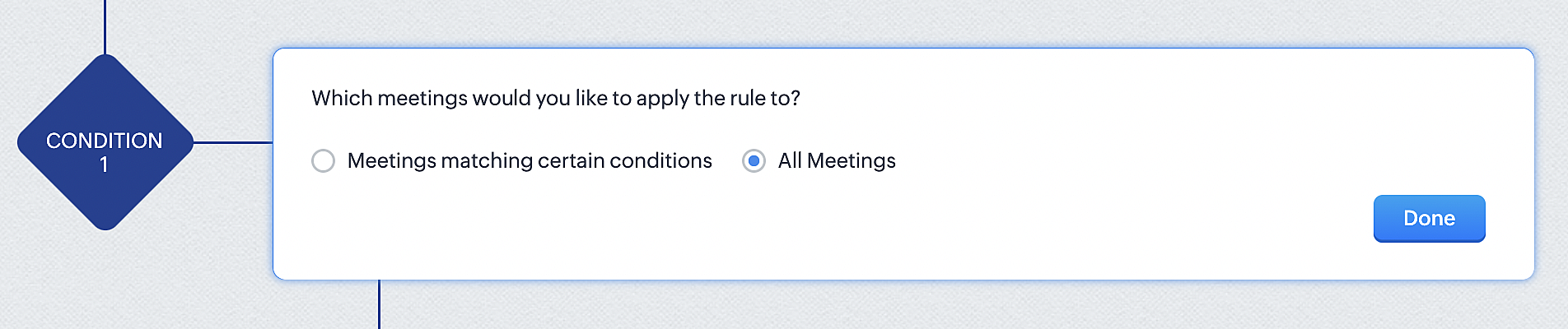
2. Configure condition > All Meetings.
3. Instant Actions > Function.
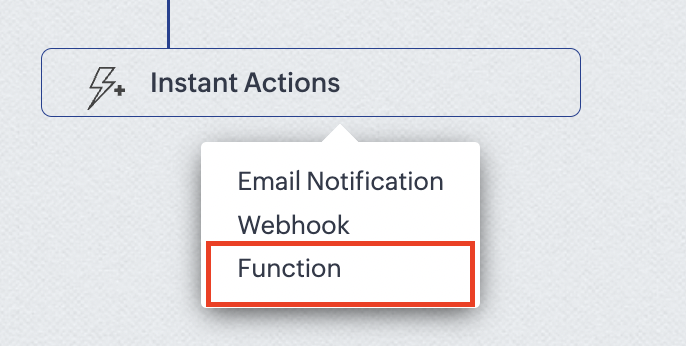
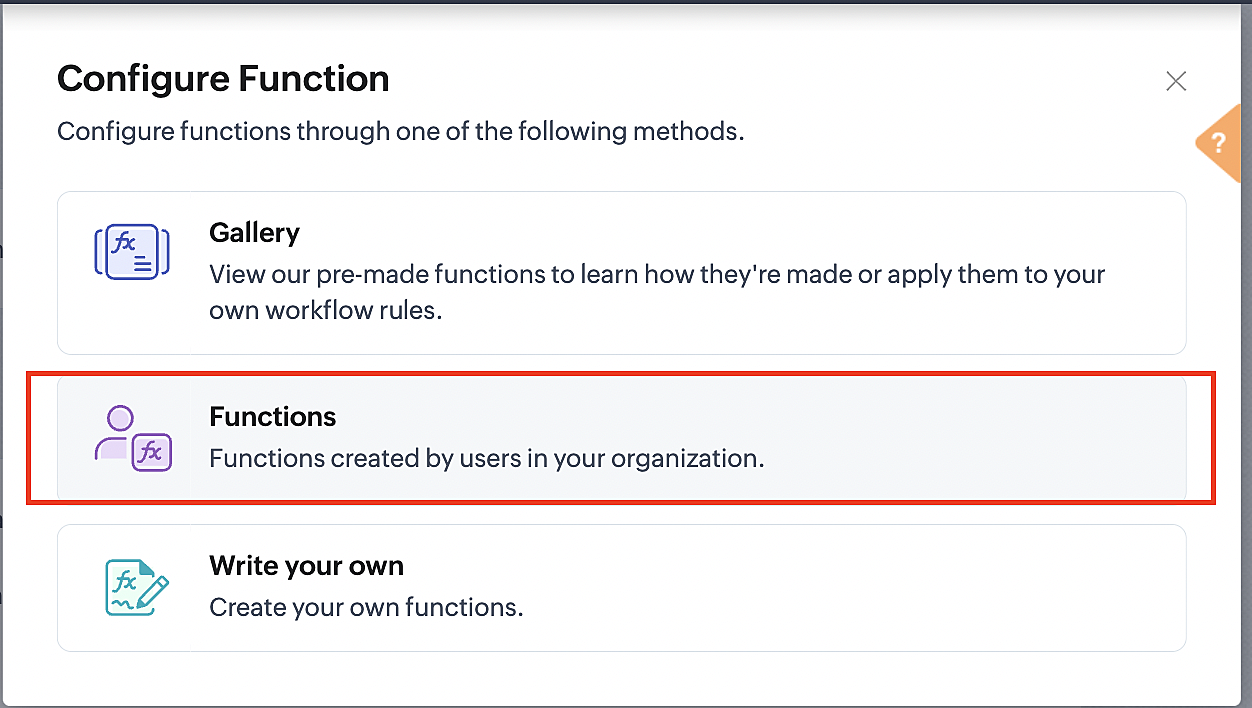
4. Click the New Function button.

5. In the Configure custom function page, select the "cancel" function you created from among the functions users in your organization have created.
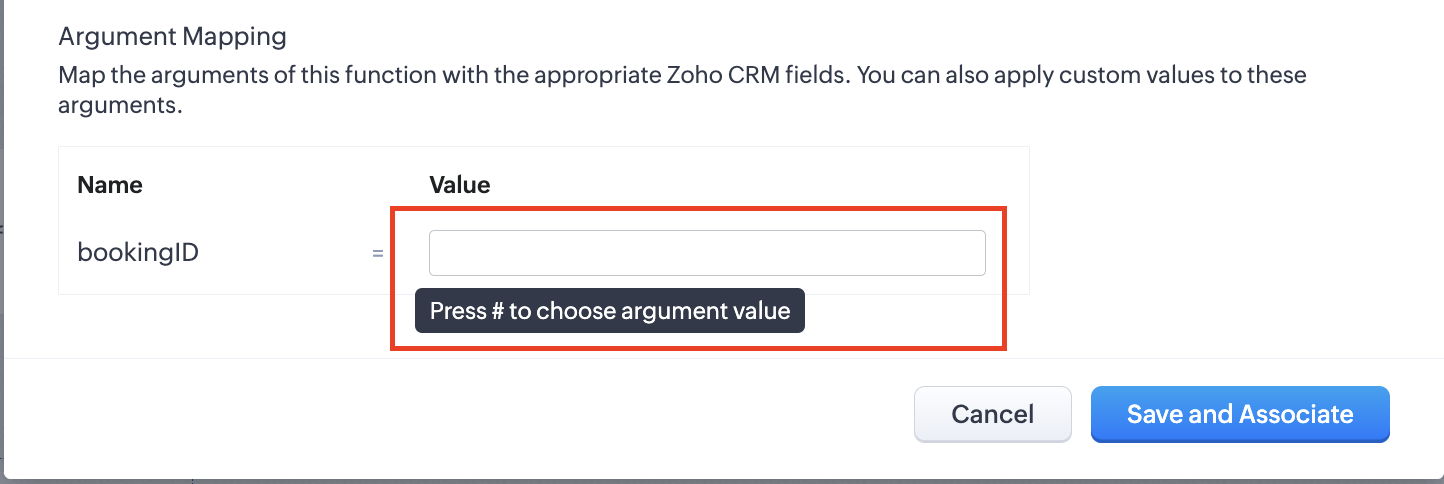
Part 3: Argument mapping
1. Press # to choose an argument value.
2. Select Meetings under Module and BookingId in the field.
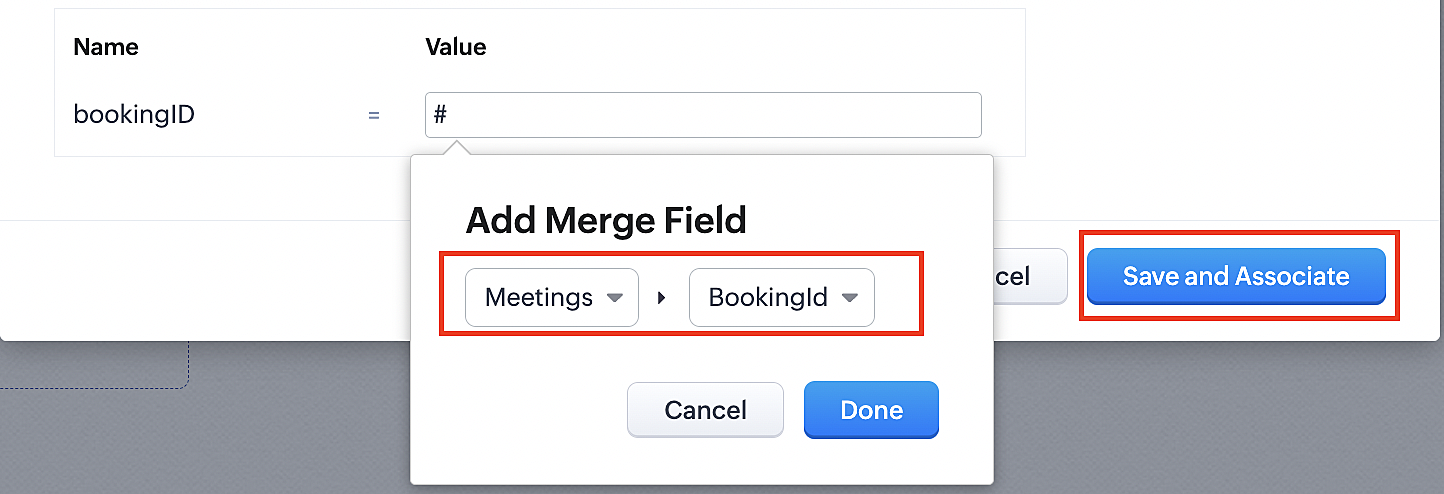
3. Click the Save and Associate button.
Reference:
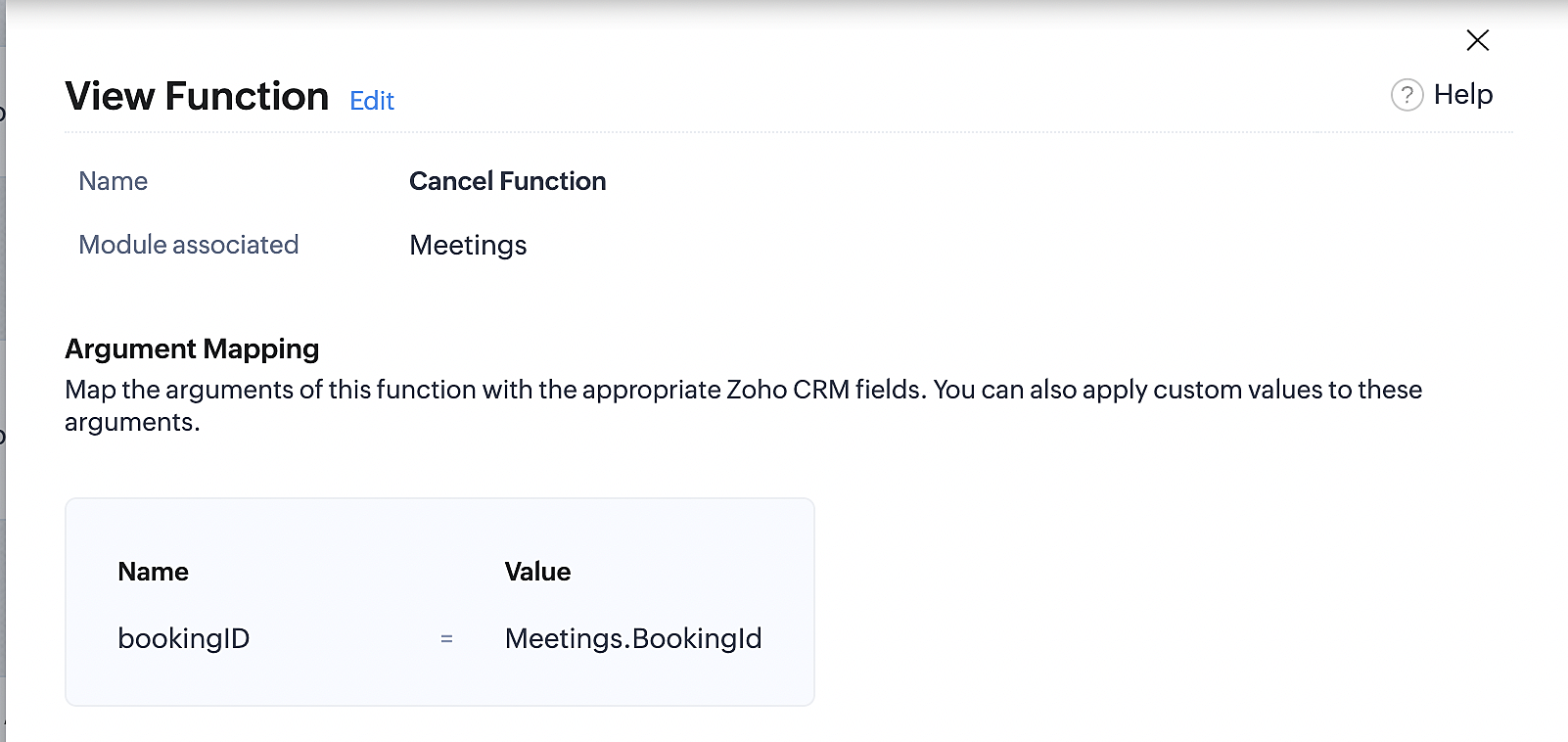
Below is the final flow of the cancel booking workflow:
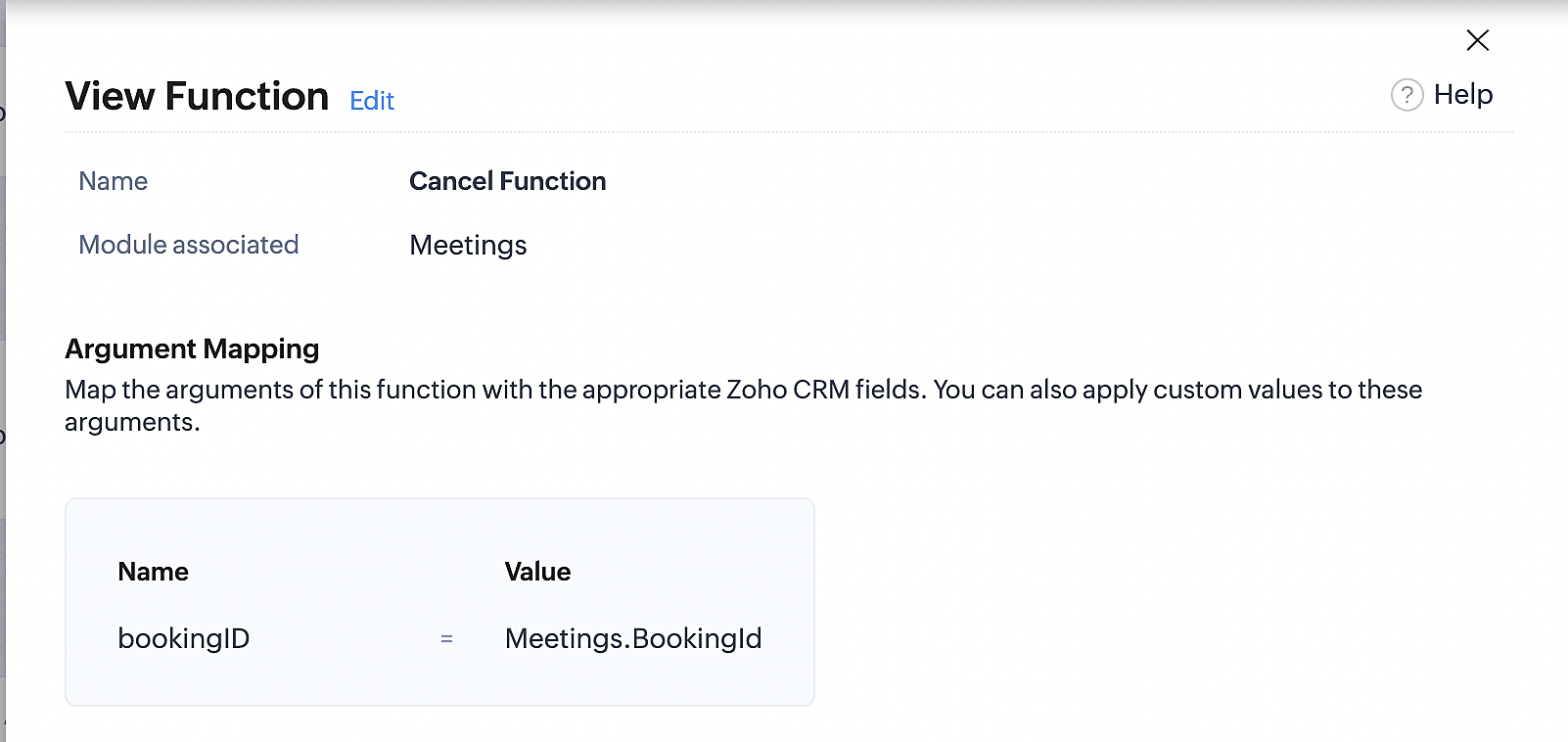
At the end of Part 3, we will have created a workflow that will be executed automatically when meetings are deleted in Zoho CRM. Simultaneously, the bookings associated with the meeting will also be canceled in Zoho Booking.
ii. Creating workflow for updating an appointment's status as "no show" in Zoho Bookings when the meeting's booking status is marked as no show in Zoho CRM
Part 4: Creating the rule
1. Go to Setup > Automation > Workflow Rules.
2. In the Workflow Rules page, click Create Rule.

3. Select Meetings under Module and configure the rule name and description as required.
Reference:
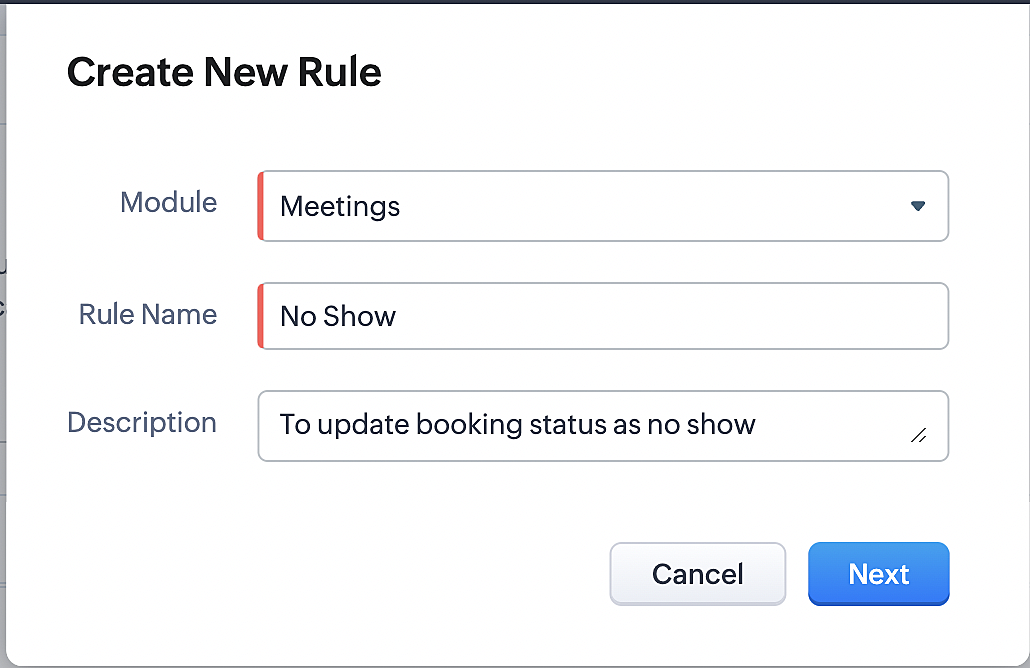
Part 5: Specifying the rule trigger
If you encounter difficulties while navigating through the steps mentioned below, please refer to Part 2 above, where we have provided step-by-step screenshots for clarification.
1. Record Action > Edit.

2. Enable the Specific field(s) gets modified and configure it per the screenshot below.
a. This is to ensure that the workflow is executed only when the booking status under the meeting module is
updated to "No Show".
updated to "No Show".
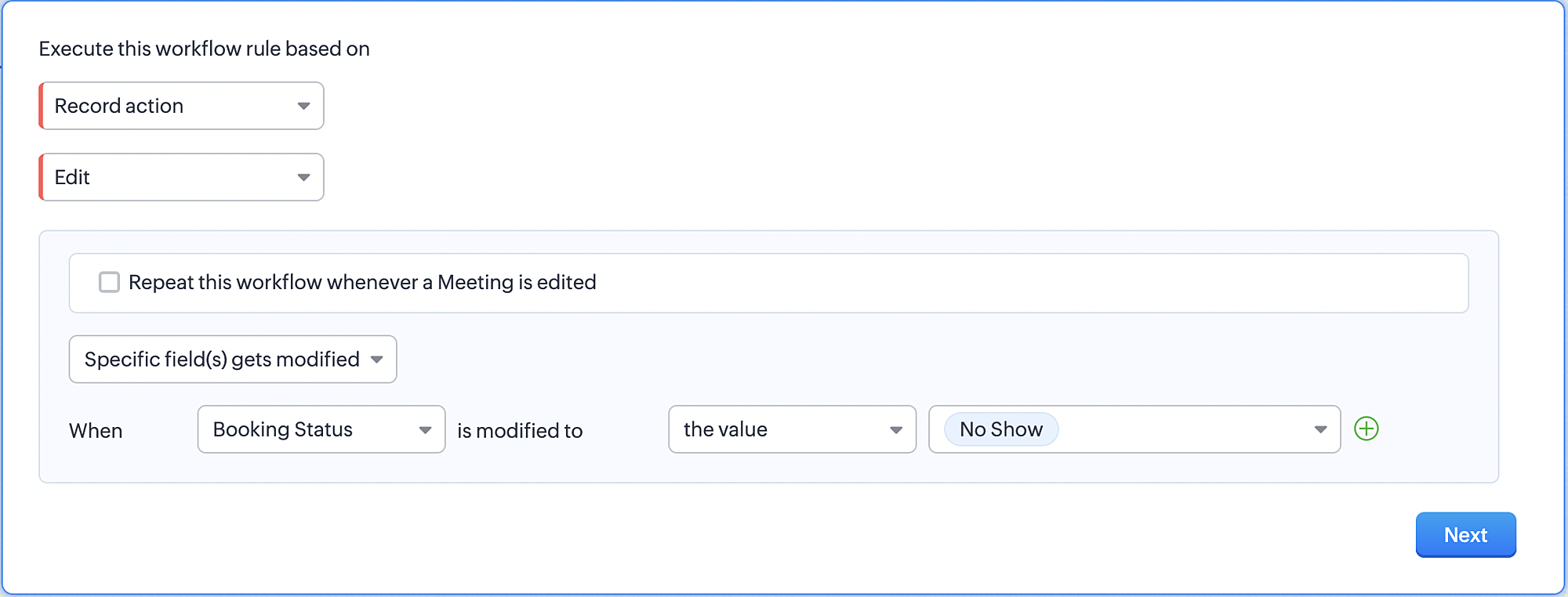
3. Configure condition > All Meetings.
4. Instant Actions > Function > New Function.
5. In the Configure custom function page, select the "no show" function you created from among the functions
users in your organization have created.
users in your organization have created.
Part 6: Argument mapping:
If you encounter difficulties while navigating through the steps mentioned below, please refer to Part 3 above, where we have provided step-by-step screenshots for clarification.
1. Press # to choose an argument value.
2. Select Meetings under Module and configure the field as "BookingId".
3. Click Save and Associate button.
Reference:
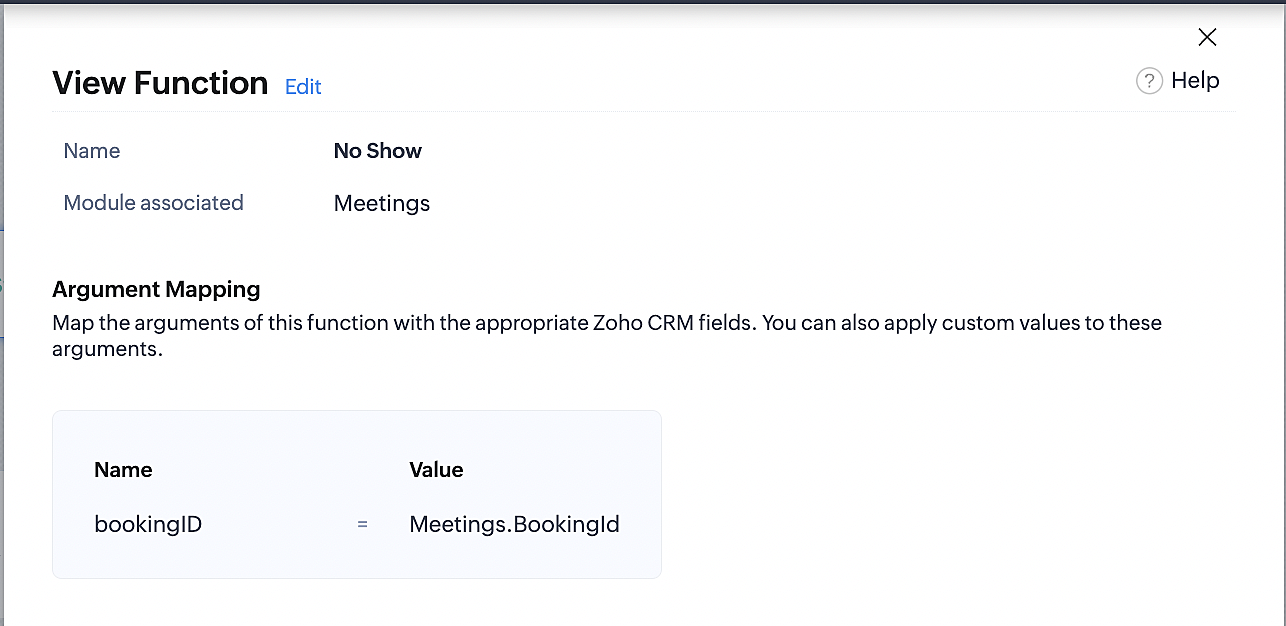
Below is the final flow of the "No Show" booking status workflow:
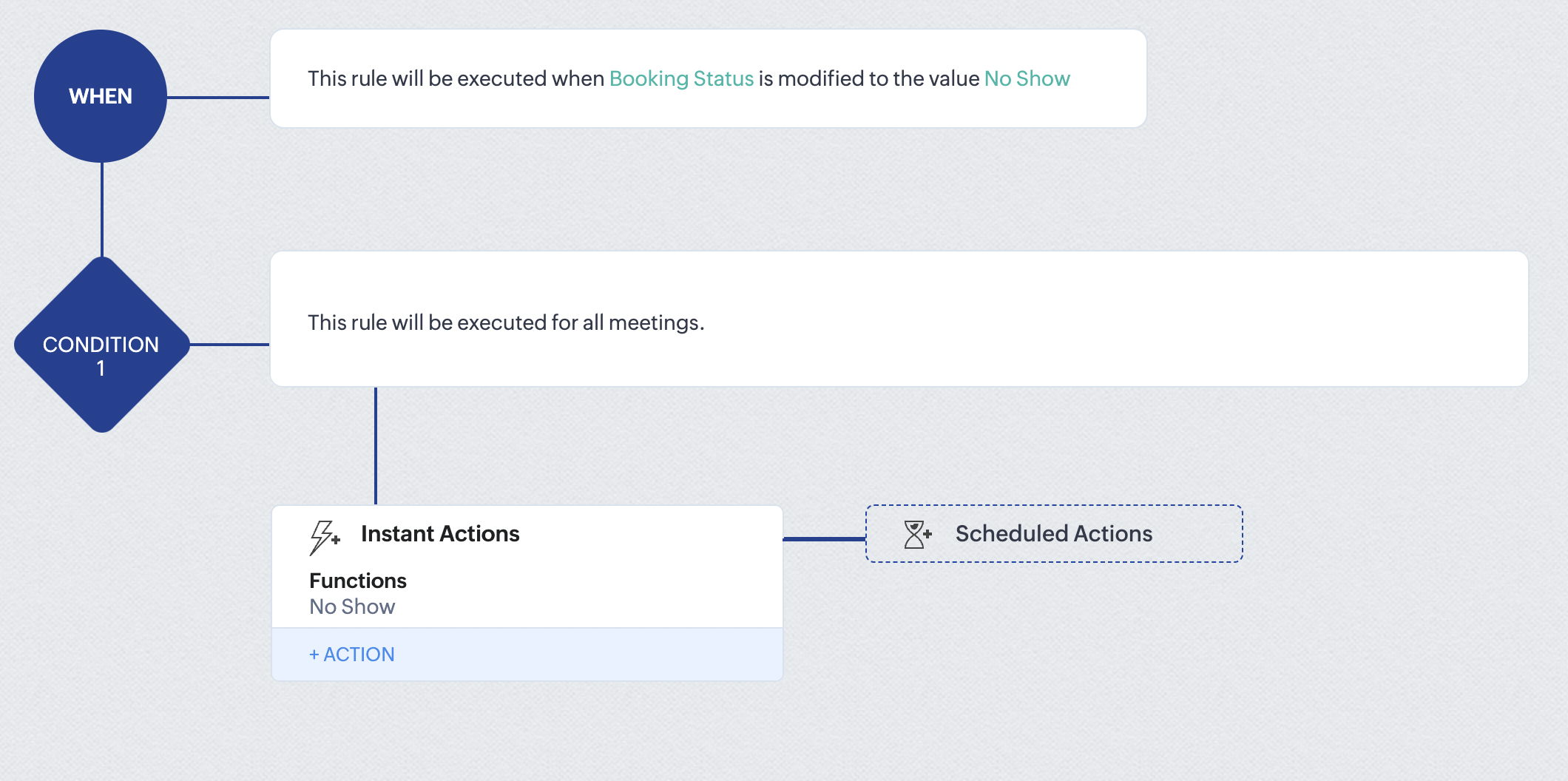
At the end of part 6, we will have created a workflow that automatically executes when the booking status field within the Zoho CRM Meetings module is updated to "No Show." This action will result in the associated bookings for that meeting also being marked as "No Show" in Zoho Bookings.
iii. Creating workflow for updating appointment status as "Completed" in Zoho Bookings when the booking status field of the meeting is marked as completed in Zoho CRM.
Part 7: Creating the rule
1. Go to Setup > Automation > Workflow Rules.
2. In the Workflow Rules page, click Create Rule.

3. Select Meetings under Module and configure rule name and description as required.
Reference:
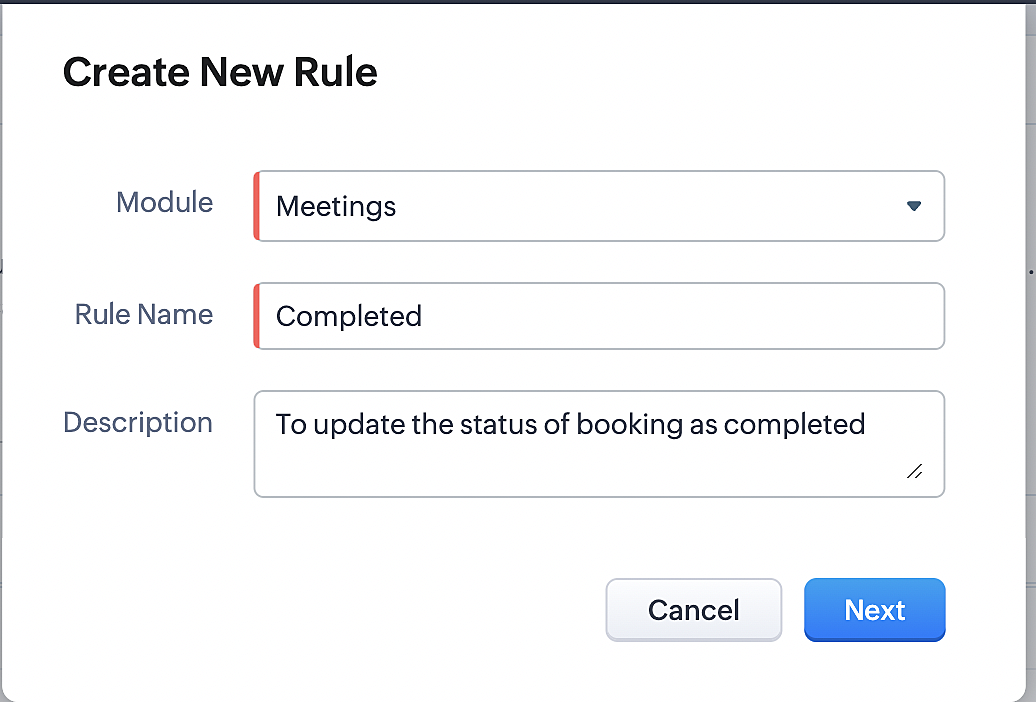
Part 8: Specifying the rule trigger
If you encounter difficulties while navigating through the steps mentioned below, please refer to Part 2 above, where we have provided step-by-step screenshots for clarification.
1. Record Action > Edit.

2. Enable the Specific field(s) gets modified setting and configure it per the screenshot below.
a. This serves to ensure that the workflow is executed only when the booking status under the Meetings module is
updated to "Completed".
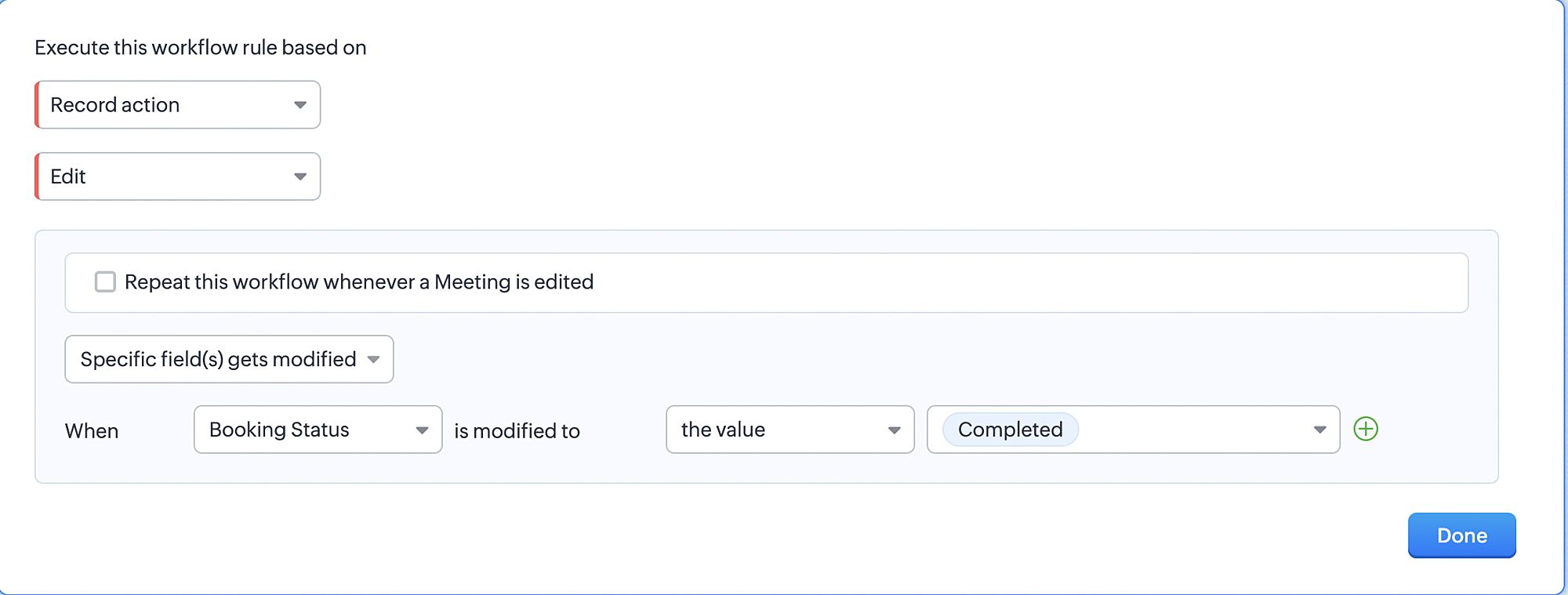
3. Configure condition > All Meetings.
4. Instant Actions > Function > New Function.
5. In the Configure custom function page, select the "completed" function you created from among the functions users
in your organization have created.
Part 9: Argument mapping:
If you encounter difficulties while navigating through the steps mentioned below, please refer to Part 3 above, where we have provided step-by-step screenshots for clarification.
1. Press # to choose an argument value.
2. Select Meetings under Module and configure the field as "BookingId".
3. Click Save and Associate button.
Reference:
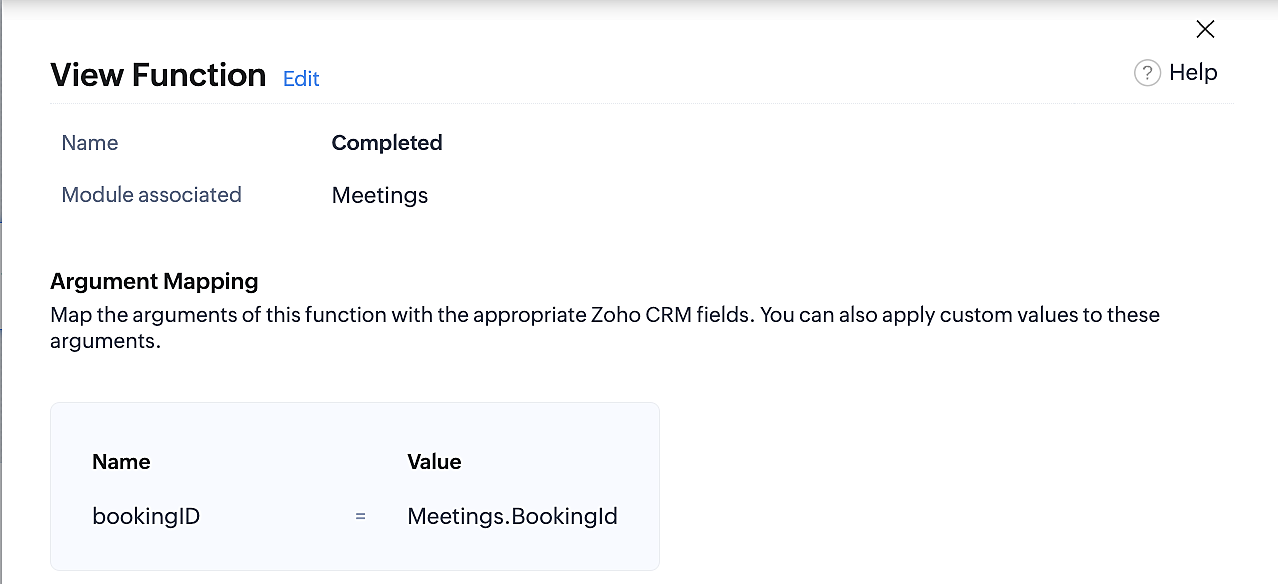
Below is the final flow of the "Completed" booking status workflow:
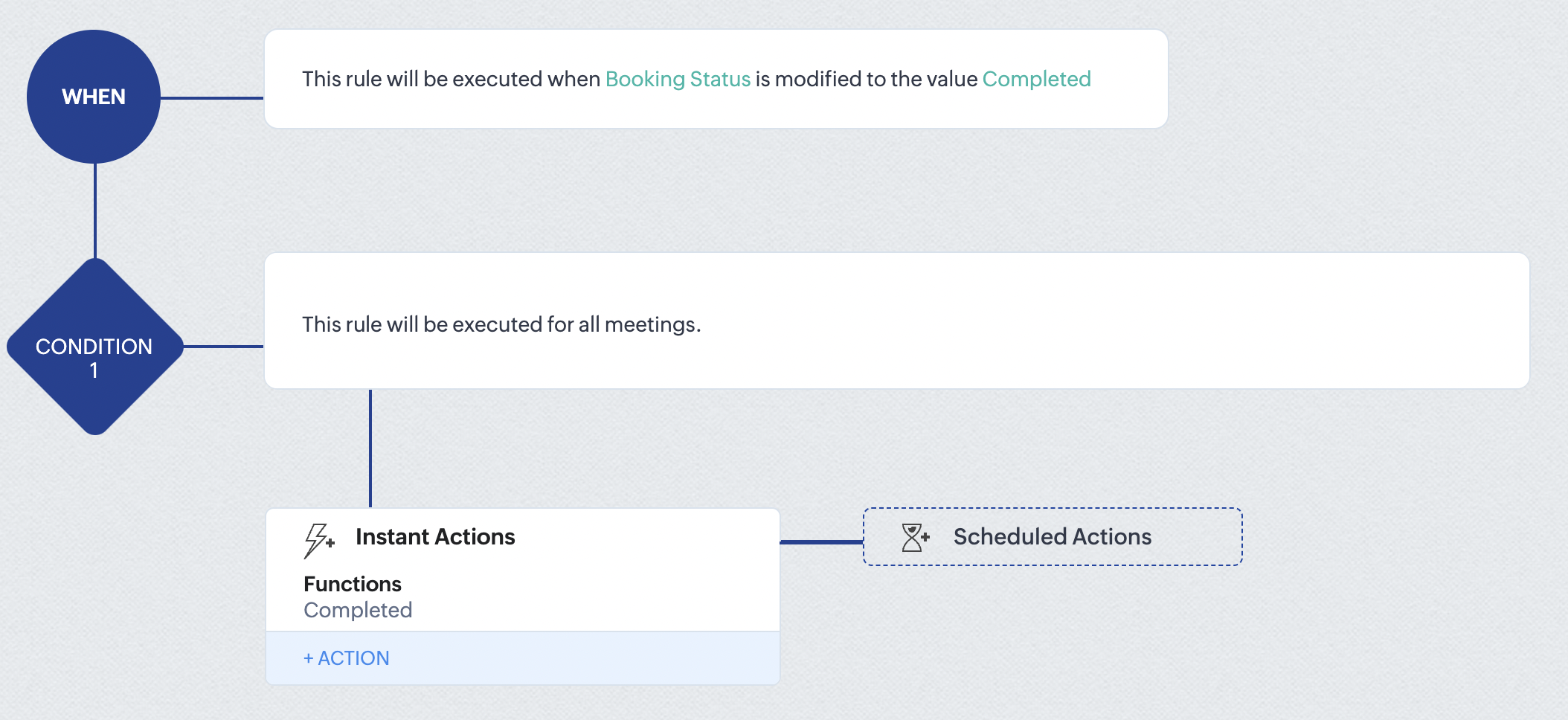
At the end of part 9, we will have created a workflow that is automatically executed when the booking status field within the Zoho CRM Meetings module is updated to "Completed." As a result, the associated bookings for that meeting will also be marked as "Completed" in Zoho Bookings.
Conclusion
We've reached the end of this community post. With the integration mentioned above in place, you'll be able to book, cancel, and update the status of appointments in Zoho Bookings directly from your Zoho CRM application. This will help you effectively manage your appointments in one place. As mentioned above, we've covered the rescheduling action in a separate post, which you can access by clicking on the following link: Reschedule Action
Furthermore, we've outlined a method for automating appointment statuses in detail. You can use this document as a reference to explore the various possibilities that suit your needs.
If you have any questions or need assistance with your configuration, please email us at hello@zohobookings.com or support@zohobookings.com.
Access your files securely from anywhere
New to Zoho Recruit?

Zoho Developer Community
New to Zoho LandingPage?
Zoho LandingPage Resources
New to Zoho Survey?
New to Zoho CRM Plus?
Deliver unforgettable customer experiences
New to Zoho CRM Plus?
Deliver unforgettable customer experiences
New to Zoho Marketing Plus?
Everything you need to run your marketing
New to Zoho Marketing Plus?
Everything you need to run your marketing
New to Bigin?





Topic Participants
Kaushik S
bruce
Ishwarya SG
PrismaNote Support
Sticky Posts
Presenting ABM for Zoho CRM: Expand and retain your customers with precision
Picture this scenario: You're a growing SaaS company ready to launch a powerful business suite, and are looking to gain traction and momentum. But as a business with a tight budget, you know acquiring new customers is slow, expensive, and often deliversGood news! Calendar in Zoho CRM gets a face lift
Dear Customers, We are delighted to unveil the revamped calendar UI in Zoho CRM. With a complete visual overhaul aligned with CRM for Everyone, the calendar now offers a more intuitive and flexible scheduling experience. What’s new? Distinguish activitiesCreate and populate a record in an instant: Introducing zero-shot field prompting to Zia's ICR
A couple of months ago, we upgraded our in-house AI image detection and validation tool, Zia Vision, with intelligent character recognition (ICR). By training Zia with sample images, you could create and enrich CRM records with data extracted from standardIn-person ZUG Meetups for Real Estate Professionals - US Q1 2026
The Real Estate Zoho User Group is going on a multi-city, in-person meetup tour across the US, and we’d love to see you there! These meetups are a great opportunity to: Connect with fellow real estate professionals using Zoho Share challenges and discoverNimble enhancements to WhatsApp for Business integration in Zoho CRM: Enjoy context and clarity in business messaging
Dear Customers, We hope you're well! WhatsApp for business is a renowned business messaging platform that takes your business closer to your customers; it gives your business the power of personalized outreach. Using the WhatsApp for Business integration
New to Zoho TeamInbox?
Zoho TeamInbox Resources
Zoho CRM Plus Resources
Zoho Books Resources
Zoho Subscriptions Resources
Zoho Projects Resources
Zoho Sprints Resources
Qntrl Resources
Zoho Creator Resources
Zoho CRM Resources
Design. Discuss. Deliver.
Zoho Show Resources

Get Started. Write Away!
Writer is a powerful online word processor, designed for collaborative work.
Zoho CRM コンテンツ
-
オンラインヘルプ
-
Webセミナー
-
機能活用動画
-
よくある質問
-
Ebook
-
-
Zoho Campaigns
- Zoho サービスのWebセミナー
その他のサービス コンテンツ
Nederlandse Hulpbronnen

ご検討中の方
Recent Topics
Zoho - Outlook plugin
Does anyone know if there is a way to modify the autofill in the Zoho plugin in outlook? When we create a contact, it enters the correct email address and name, but then pulls information from our own signature line to add phone number, address, etc.Zoho Books - Sales Person Information
Hi Team, On Invoices, Quotes, etc... I can include the Sales Person, but it only shows their name and not their email or phone number. It would be great to have place on invoice templates where we can manage what sales person information should be showsOffline working in Zoho Creator portal
Zoho's help says that offline working is only available in the Creator mobile app and not in the portal app. But I can see offline options in the portal app too and it seems to work when I test it. My portal users are often in areas where there is poorFetch Records using Dynamic Criteria
Hi, I have a form that builds a filter based on user input. I need to fetch the records based on dynamic criteria. How would I accomplish this as there is no eval function? For example: desiredRecord = Form1[dynamicCriteria];Url filter Report date (pivot chart)
Hello. Is it possible to filter the data in pivot char using parameters in the url? I'm trying but I should not doing very well. Something like: https://creator.zoho.com/.../....../#Report:MyPivotChartReport?MyDate=01-Jan-2012;31-Jun-2012;MyDate_op=58 SaludosSending gmail to a particular person fails because the address gets changed to "gmaill", with a second "l" typo somewhere
I send to bob@gmail.com (example) and get an error sending to bob@gmaill.com, only for this one person. Note the extra "l" in the email the system tried to send to, which was not in the address I entered. Can't find a typo in the contact or anywhere elseEmoji Support in Bigin CRM
We request the implementation of emoji support across Bigin CRM. This feature should allow users to seamlessly use emojis in text fields, headlines, and deals. It would enhance communication, improve the visual appeal of records, and bring more personalizationBigin Booking Pages enhancements
I would like to ask for several enhancements for the brand new (and promising) Booking feature. 1. Add "Contact/Mobile" Field to Booking form We use Mobile as key (id), but unfortunately it is missing from the Booking form, only Home Phone is available.Amount in words in Indian format
Hi, I had coded the following code to convert amount in words. But in the code in the format of US like million. But i need in Lakh and Crore. So pls suggest ideas r post corrected code string Num2Words(int val) { val_s = input.val.toString(); th = {"", "thousand", "million", "billion", "trillion"}; // uncomment this line for English Number System // th = {"","thousand","million", "milliard","billion"}; dg = {"zero", "one", "two", "three", "four", "five", "six", "seven", "eight",What are people using to send Service based emails?
Zoho Campaigns is for marketing. Users can unsubscribe from these emails. Service based emails need to be delivered and can without the worry of Can-spam act. What are people using to send service based emails? My mailing list is derived from a databaseStandalone LMS tool
Will Zoho release a standalone LMS (Learning management System) than can be used by external parties (guest)?Announcing Kiosk 1.1 - Customize screen titles, configure new fields & actions, use values from your Kiosk to update fields, and more.
Hello all We are back again with more enhancements to Kiosk. So what's new? Enhancements made to the Components Add titles for your Kiosk screens and adjust its width to suit your viewing preferences. Three new fields can be added to your screen: Percentage,An Overview of Dario Schiraldi Deutsche Bank Executive
Hello Community, Dario Schiraldi is an executive at Deutsche Bank, focused on advancing the firm’s financial services and crafting its global strategic vision. With 20 years of expertise in leadership roles, he has spearheaded successful market acquisitionsEmailing a document to WorkDrive
Does WorkDrive include the ability to upload a document by sending an attachment to an email address? (Books and Expenses include this functionality) If it doesn't is it under consideration? on the Road Map?Allow Changing Appointment Status from "Completed" to "No Show" or Other Valid States
Hi Zoho Bookings Team, We hope you're doing well. We would like to submit a feature request regarding appointment status management in Zoho Bookings. 🎯 Use Case Sometimes, an appointment is mistakenly marked as Completed, but later we realize that theZoho One and Tally Integration
Has Anyone in this forum done any implementation with Zoho CRM and Tally accounting software. If so who have you used and how easy was it?Microsoft PowerPoint files Extremely slow to save
I and others on my team have noticed that Microsoft PowerPoint documents are extremely slow to save when using WorkDrive. It always takes over 30 seconds to save a file. Word and Excel files seem to save in a typical length of time, but PowerPoint isHow can users unblock their blocked Zoho Mail accounts?
After the reason for the account block (storage exceeded, spam detection etc.) has been rectified, the user can unblock the account from the UnBlock Me page. Account support@edu2review.com Edu2Review is an education review platform, we rate the qualityAdding additional fields for batch information
Hello, I am looking at adding additional information into our inventory module. we would like to be able to see up to 8 attributes that will be individual & different for each batch (i.e. batch specific information) but currently I seem to only be ableDynamic Pickup List Values using Deluge and Client Script
I would like to dynamically show Pickup List Values For example we need to fetch some data from an on premise application and display it so they can choose and pick This can be done in Creator but I didn't find anything for CRMValidation Rule for Controlled Stage Movement in Deals Module (Deluge Script)
For keeping a control over module stage or status, you can use the below deluge script. The below deluge script defines validation control over deals module stages: // Function to validate allowed stage transitions in the Deals module map validation_rule.LeadStatustValidation1(StringPick List Issues
I have created a pick list that looks at a table in a sheet, it selects the column I want fine. Various issues have come along. The option to sort the pick list is simplistic, only allows an ascending alphabetical sort. Bad luck if you want it descending.Four types of task dependencies
"Nothing is particularly hard if you divide it into small jobs." - Henry Ford Projects, small or large, are driven by simple work units called tasks. Monitoring standalone tasks might look simple but as the workflow becomes elaborate, tasks may start relying on one another. In project management, this relationship between tasks is termed as "Task Dependencies". Dependency between tasks arise1099 tracking
Do zoho books offer feature of tracking for 1099's for contractors, etc? Quick books offers this feature and wondered when/if Zoho books will do sameVAT-type Taxes in US Edition?
I'm located in the US, and I use the Zoho One US edition of Books. We are in the process of registering with Canadian authorities for their GST / HST, which is a VAT-type of scheme. It is not immediately obvious to me how one would deal with input taxSchedule sms to be sent later
When will you make available an option to send sms's at a later time??? You finaly have this option available on emails, so it will be very useful to have it also with sms. Our sms provider, has already this available but we cannot use it because youEcommerce integration with prestashop
Development of campaigns integration with prestahop. When???How to create an article containing images and rich text via the api?
Hi, I'm trying to migrate our kb articles from our previous helpdesk service, and import them to ZohoDesk. Is there any way to create an article that contains images? Is it possible to add formatting to articles created via the API? Thanks, Adam.Number of statement execution limit exceeded on deluge scheduled function
I'm working on a send email functionality in creator that sends out crew work orders at the end of the day each day for the next day. I'm running into the issue that zoho is unable to handle the number of statements that I am doing to be able to successfullyZoho SignForm In Progress But Cannot Be Completed
If a person starts signing a document (via SignForm), but closes the window before submitting, Zoho marks the document "in progress", but how do they finish signing it?How to show Assemblies AND component items in a report
Hi Is there any way in Analytics to create a report that shows the Composite Item AND the Component Items with mapped quantity? It seems that the component item is not exposed in any table that I can find. Also, the same question but for Stock on Hand.....thisMandatory Messages for Specific Members in Zoho Cliq Channels
Hello Zoho Cliq Team, We hope you're doing well. We would like to request a feature enhancement to Zoho Cliq that would allow marking certain messages in a channel as mandatory for specific members — with built-in tracking and reminders. 🎯 Use Case:Admin Access to Message Read Statistics in Zoho Cliq
Hello Zoho Cliq Team, We hope you're doing well. We would like to request a feature enhancement that would allow admins or channel owners to view read/unread statistics for messages, even if they were not the original sender. 🎯 Use Case: Currently, inOnline Member Visibility in Channels (Similar to WhatsApp Group Presence)
Hello Zoho Cliq Team, We hope you're doing well. We’d like to request an enhancement to Zoho Cliq’s channel experience by introducing online presence indicators for channel members — similar to how WhatsApp shows how many people in a group are currentlyShow ticket field in Zoho Desk only if that same field is not empty (API‑created records)
Zoho Team , We have a ticket workflow where every ticket is created via API based on dynamic logic from an external form. That form has complex logic and already decides what’s relevant to ask, and the API only populates fields in Zoho Desk based on thatMultiple Products on Ticket
Good morning. We will classify all tickets based on the product. Users sometimes send different requests on the same ticket, so we are facing some challenges. Is there a way to add more than one product to the ticket, or is there a way to tie the productNão recebo Email de confirmação e validação de cadastro do PagSeguro
Olá, utilizei uma das minhas contas de email Zoho para criar um cadastro no PagSeguro, contigo o email com o link de confirmação da conta não chega no meu email Zoho (nem.ma caixa de spam, nem na lixeira, e nem em outras pastas). Outros emails do PagSeguroaccounts payable and receivable subaccounts
How to create accounts payable and receivable subaccounts? Being that I have several clients and in my balance sheet have to specify the accounts of each client and not only appear "accounts receivable or accounts payable" ??DUPLICATING WORKFLOWS IN CREATOR
Hi all, I want to duplicate and slightly amend 3 workflows in Creator so that I don't have to keep typing in all the rules and properties each time. I can see lots of videos on CRM with the 3 dots at the top of the workflow, but nothing like that in Creator.Add SKU to query options in `items` API endpoint
It would be very useful to be able to pull items by SKU in the API as this is a commonly used unique ID that tends to be consistent across systems.Next Page