Kaizen #174 : Client Script Commands

Kaizen #174 : Client Script Commands


Hello everyone!

Client Script Commands feature is a highly anticipated functionality that enables users to trigger Client Scripts anywhere within Zoho CRM, extending the scope of client script beyond standard pages and events. In this Kaizen post, we'll explore how to implement and utilize this feature effectively.

In this post,


  1. What are Client Script Commands?

  2. How to create and use Client Script Commands?

    1. Using Command Palette

    2. Using Keyboard Shortcuts

  3. Scenario - 1

  4. Solution

  5. Scenario - 2

  6. Solution

  7. Summary

  8. Related Links


1. What are Client Script Commands?

Client Script Commands feature is another dimension of Client Script that enables users to trigger them anytime and anywhere in CRM, extending their event-driven functionality beyond just specific modules and pages. This functionality can be accessed through custom keyboard shortcuts or a command palette, making it easier for users to perform repetitive tasks quickly

2. How to create and use Client Script Commands?

Create a command by specifying the Category as Commands (instead of module) while creating a Client Script.


Check this documentation for more details.

To trigger a Command, you can use one of the following ways.

A. Using Command Palette
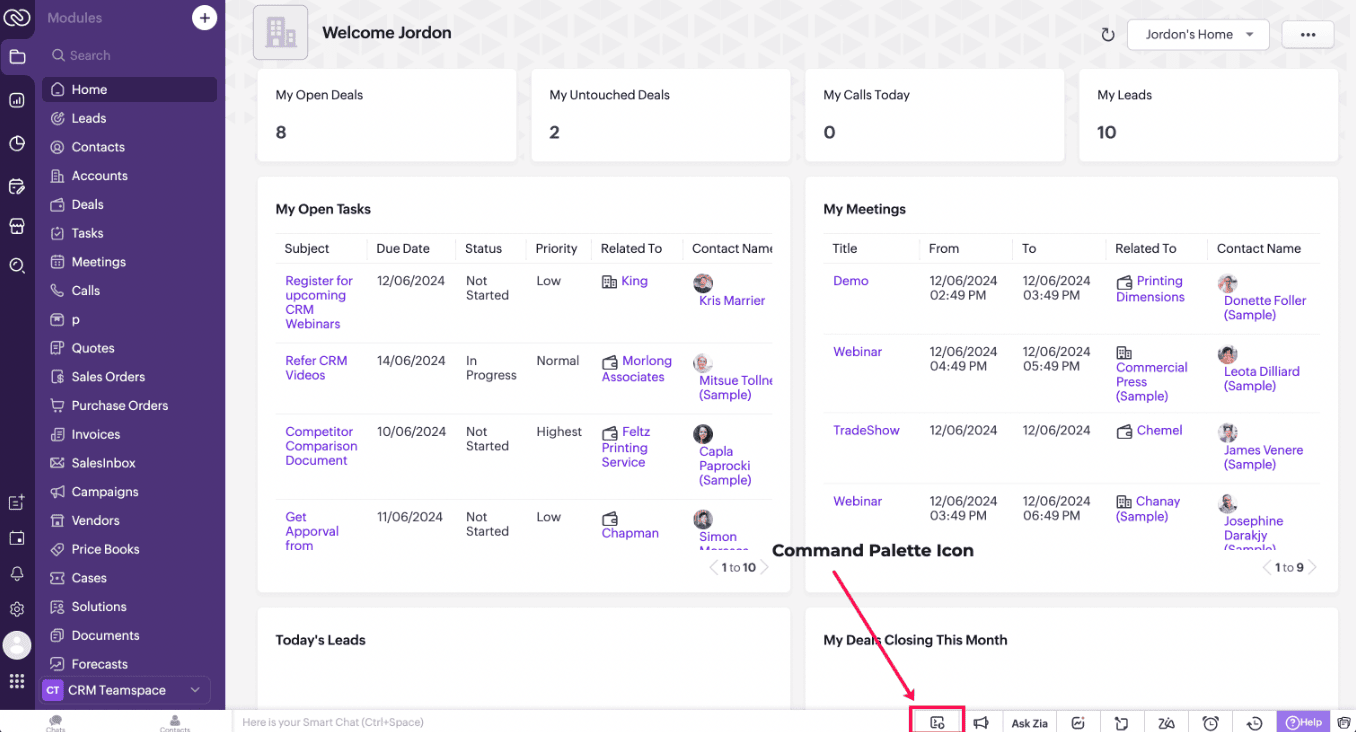
Click on the Command Palette icon in the footer of CRM and select the name of the Command that you want to trigger.


B. Using Keyboard shortcuts

You can also link each of the Commands to a shortcut key and trigger a Command using that designated shortcut key. Each user can set specific shortcuts based on individual preference and use them to trigger a Command.
Check this documentation for more details.

3. Scenario - 1

At Zylker, a financial company using Zoho CRM, Sales Advisors need a quick way to calculate EMI during customer phone calls. The solution should allow seamless access to an EMI Calculator from any page in Zoho CRM.

4. Solution

To achieve this in Zoho CRM,  you need to create a Widget for EMI calculator and create a Client Script Command.

A. Create a Widget for EMI calculator

  • Install Zoho CLI, and follow the steps given in this document to create the Widget app folder. Then update the html, javascript, and css code as per your requirement.

index.html

<!DOCTYPE html>

<html lang="en">

  <head>

    <meta charset="UTF-8" />

    <meta http-equiv="X-UA-Compatible" content="IE=edge" />

    <meta name="viewport" content="width=device-width, initial-scale=1.0" />

    <title>Document</title>

    <link rel="stylesheet" href="style.css" />

  </head>

  <body>

    <div class="loan-calculator">

      <div class="top">

        <h2>EMI Calculator</h2>

        <form action="#">

          <div class="group">

            <div class="title">Amount</div>

            <input type="range" min="1000" value="30000" max="50000" step="500" class="loan-amount" id="loanAmount" />

            <div class="slider-label">$<span id="loanAmountValue"></span></div>

          </div>

          <div class="group">

            <div class="title">Interest Rate</div>

            <input type="range" min="5" value="6" max="100" step="1" class="interest-rate" id="interesRate" />

            <div class="slider-label"><span id="interesRateValue"></span></div>

          </div>

          <div class="group">

            <div class="title">Tenure (in months)</div>

            <input type="range" min="6" max="100" step="1" value="12" class="loan-tenure" id="tenureMonth" />

            <div class="slider-label"><span id="tenureMonthValue"></span></div>

          </div>

        </form>

      </div>

      <div class="result">

        <div class="left">

          <div class="loan-emi">

            <h3>Loan EMI</h3>

            <div class="value">123</div>

          </div>

          <div class="total-interest">

            <h3>Total Interest Payable</h3>

            <div class="value">1234</div>

          </div>

          <div class="total-amount">

            <h3>Total Amount</h3>

            <div class="value">12345</div>

        <div class="right">

          <canvas id="myChart" width="400" height="400"></canvas>

        </div>

      </div>

    </div>

    <script src="https://cdn.jsdelivr.net/npm/chart.js@3.6.2/dist/chart.min.js"></script>

    <script src="https://live.zwidgets.com/js-sdk/1.2/ZohoEmbededAppSDK.min.js"></script>

    <script src="main.js"></script>

  </body>

</html>


  • Click here to view the complete code.

  • Once you have added the code, upload the zip file by following the below steps.

  • Go to Setup > Developer Space > Widgets.

  • Click Create New Widget and Fill in the details.


  • The Hosting should be "Zoho" and mention the html page of the app folder that you uploaded.


Notes

Note:

The widget should be of "button" type in order to render through a Client Script.


B. Create Client Script Commands.


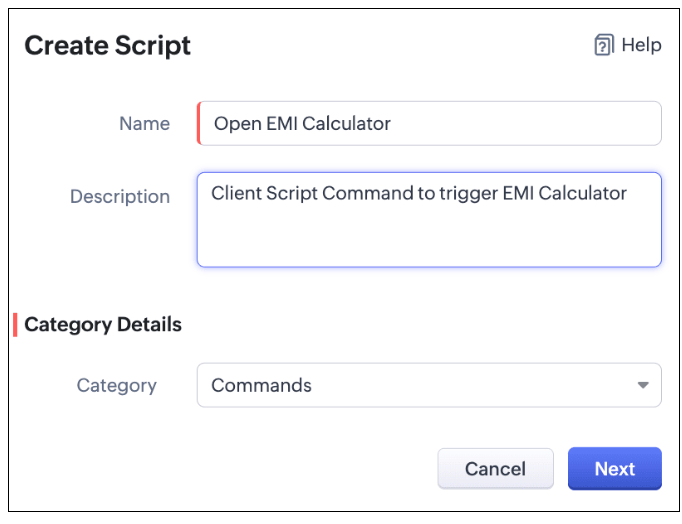
  • Configure a Client Script Command by specifying the Name and Description The Category should be Commands. Click Next. Click here to know how to configure a Client Script.


  • Enter the following script and click Save.


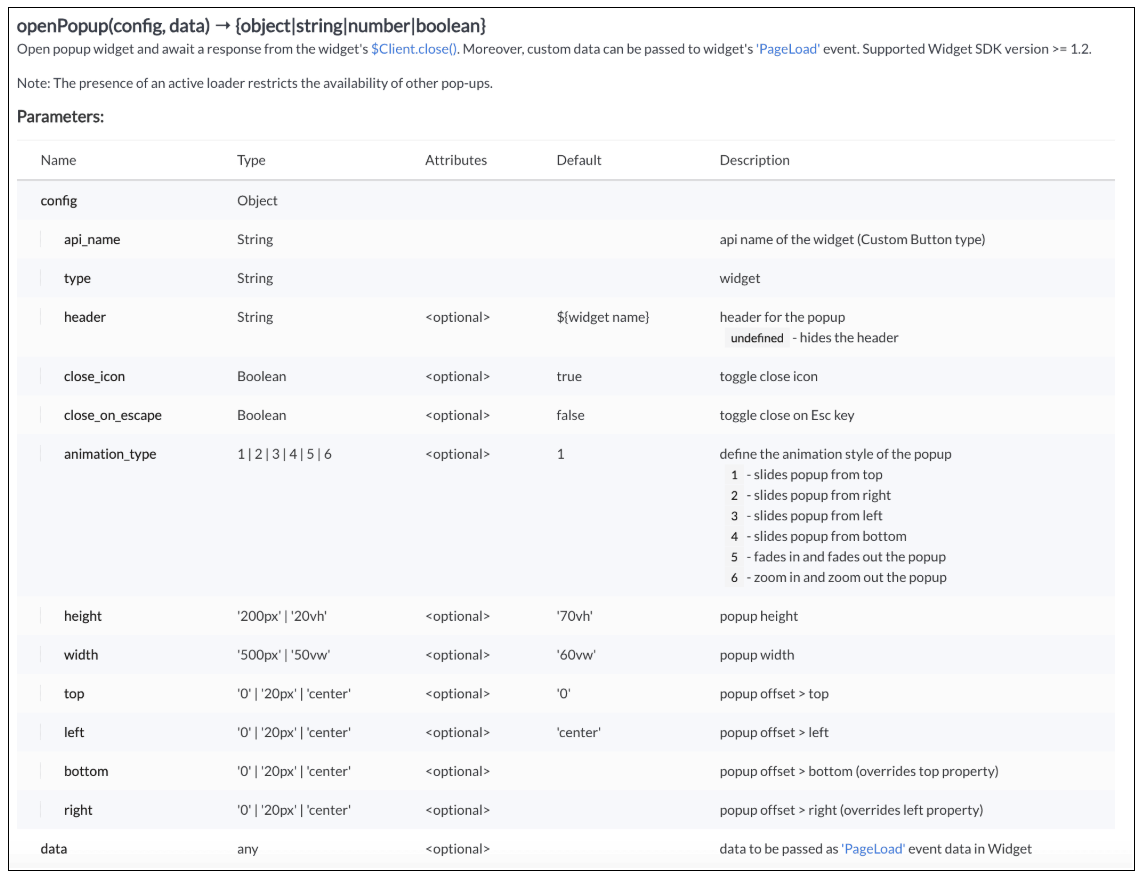
     ZDK.Client.openPopup({ api_name: 'emi_calculator', type: 'widget', header: 'EMI Calculator', animation_type: 4,  height: '750px', width: '500px', top:'100px',left: '500px' }, { data: 'sample data to be passed });


  • Here "emi_calculator" is the API name of the Widget,

    • Type is Widget,

    • Header is EMI Calculator,

    • animation type is 4 where the popup slides from the bottom.

    • The other parameters are optional and has default values as shown in the image.

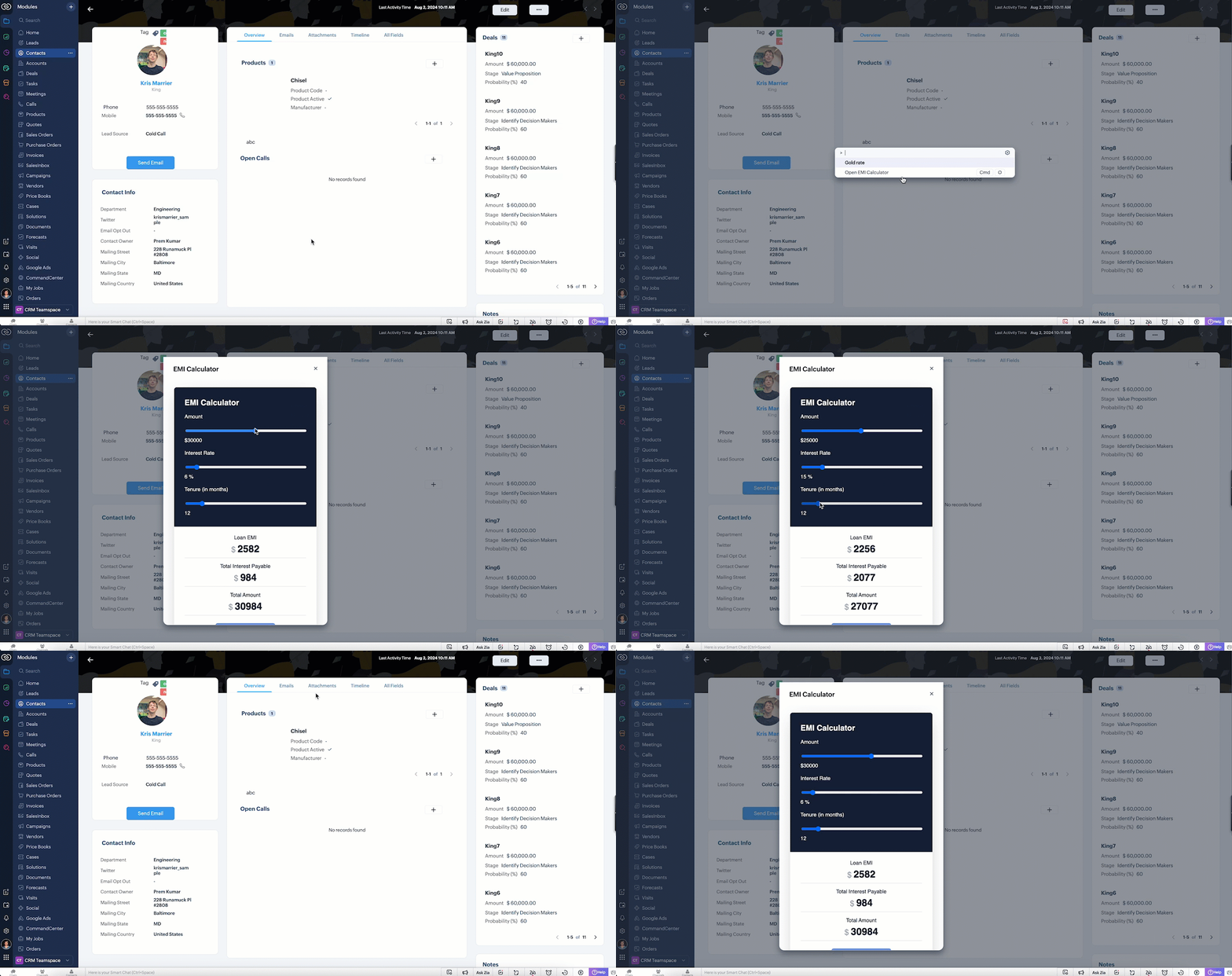
  • Here is how the EMI Calculator appears as and when the salesperson needs. The user can either click on the Command Palette Icon at the footer or use a keyboard shortcut as per his convenience to open the calculator.


  • In the above gif, the keyboard shortcut is cmd O.

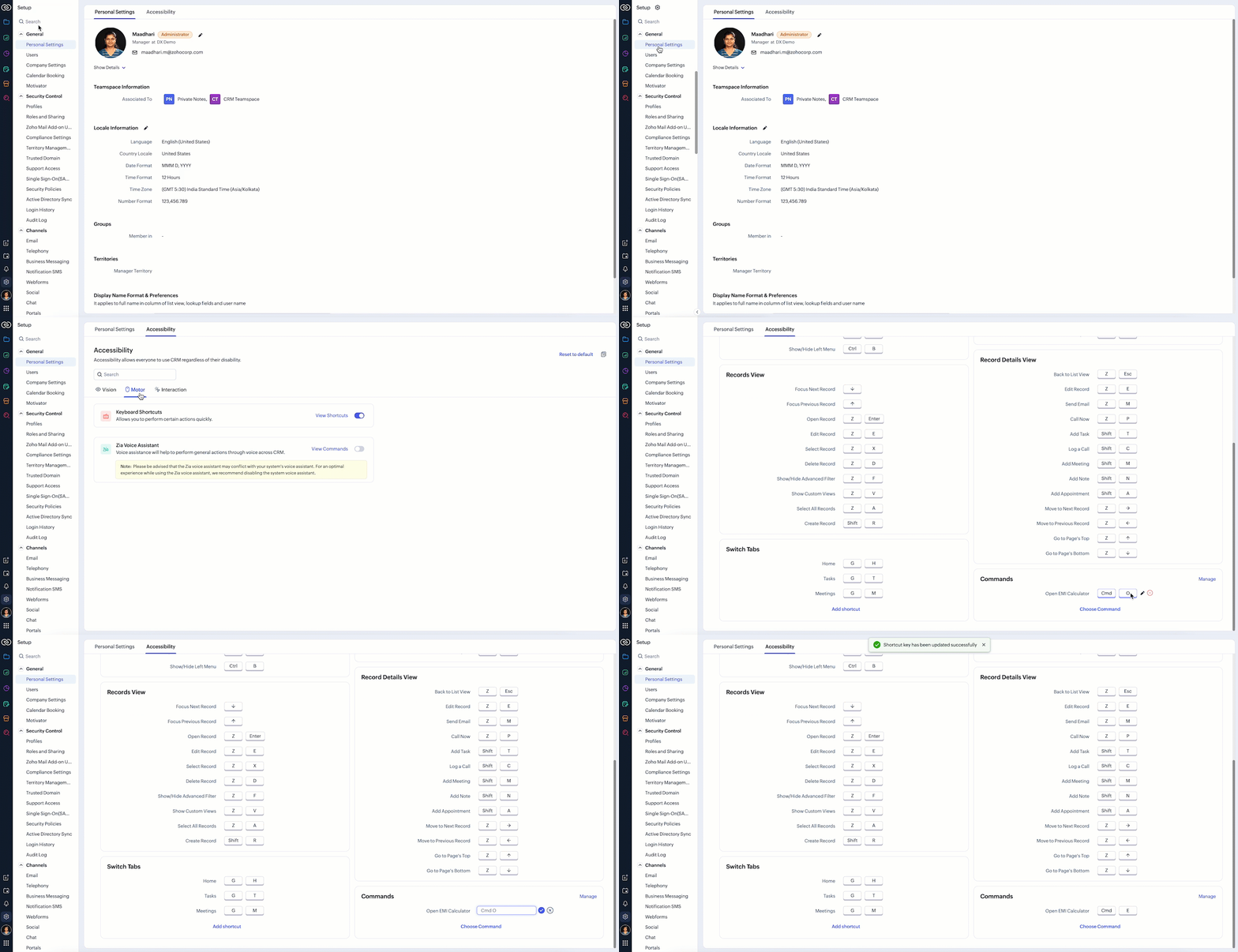
  • To customize the keyboard shortcut,

    Go to Setup → General → Personal Settings. Select "Motor" from the Accessibility Tab and Click "View Shortcuts" as shown in the below gif.


4. Scenario - 2

At Zylker, an international wholesale company using Zoho CRM, salespeople need a quick way to check real-time gold rates from different countries while discussing bulk orders with retailers. The solution should provide seamless access to updated, region-specific gold rates directly within the CRM interface to assist with accurate pricing decisions during customer interactions.

5. Solution

To achieve this in Zoho CRM, you need to create a Widget for EMI calculator and create a Client Script Command.

A. Create a Widget for gold rate

Install Zoho CLI, and follow the steps given in this document to create the Widget app folder. Then update the html, javascript, and css code as per your requirement.

index.html

<!DOCTYPE html>

<html>

  <head>

    <meta charset="UTF-8">

<script src="https://live.zwidgets.com/js-sdk/1.2/ZohoEmbededAppSDK.min.js"></script>

<div class="container">

      <div style="display: flex;">

        <label for="country" style="width: 70%;font-weight: bolder;">Today's Gold rate:</label>

        <select id="country" onchange="updateGoldRates()" style="width: 30%;">


            <option value="USD" >United States</option>

            <option value="INR" selected>India</option>

            <option value="GBP">United Kingdom</option>

            <option value="AUD">Australia</option>

        </select>

      </div>


      <table id="goldRatesTable">

          <thead>

              <tr>

                  <th>Type</th>

                  <th>Rate (Per Gram)</th>

              </tr>

          </thead>

          <tbody>


          </tbody>

      </table>

  </div>


  <script>

      const goldRatesData = {

     };


      const symbol = ['₹', '$', '£', 'A$'];


      async function getLiveData (currency) {

        var myHeaders = new Headers();

        myHeaders.append("x-access-token", "goldapi-4wvh4nslzb5p0d5-io");

        myHeaders.append("Content-Type", "application/json");


        var requestOptions = {

          method: 'GET',

          headers: myHeaders,

          redirect: 'follow'

        };


        let response = await fetch(`https://www.goldapi.io/api/XAU/${currency}`, requestOptions);

        let res = await response.text();


        let data = JSON.parse(res);


        let desig;

        if(data.currency === 'INR'){

          desig = symbol[0];

        }

        else if(data.currency === 'USD'){

          desig = symbol[1];

        }

        else if(data.currency === 'GBP'){

          desig = symbol[2];

        }

        else if(data.currency === 'AUD'){

          desig = symbol[3];

        }

        goldRatesData[`${data.currency}`] = [

              { type: '24K Gold', price: `${desig + " " + data.price_gram_24k}` },

              { type: '22K Gold', price: `${desig + " " + data.price_gram_22k}` },

              { type: '18K Gold', price: `${desig + " " + data.price_gram_18k}` }

            ];


      };


      async function updateGoldRates() {

          var currency = document.getElementById("country").value;

          console.log("Event:: ",currency);

          const country = document.getElementById('country').value;

          const tableBody = document.querySelector('#goldRatesTable tbody');

          tableBody.innerHTML = '';


          await getLiveData(currency);

          if (country && goldRatesData[country]) {

              const rates = goldRatesData[country];

              rates.forEach(rate => {

                  const row = document.createElement('tr');

                  row.innerHTML = `

                      <td>${rate.type}</td>

                      <td>${rate.price}</td>

                  `;

                  tableBody.appendChild(row);

              });

          }

      }

      updateGoldRates();


      ZOHO.embeddedApp.on("PageLoad",function(res){

        document.getElementById('msg').innerText = res.data;

      });


      ZOHO.embeddedApp.init();

    </script>

  </body>

</html>

  • Once you have added the code, upload the zip file by following the below steps.

  • Go to Setup > Developer Space > Widgets.

  • Click Create New Widget and Fill in the details.

  • The Hosting should be "Zoho" and mention the html page of the app folder that you uploaded.


B. Create Client Script Commands

  • Configure a Client Script Command by specifying the Name and Description and click Next. Click here to know how to configure a Client Script.


Script

ZDK.Client.openPopup({ api_name: 'goldrate', type: 'widget',header: undefined, animation_type: 4, 

 height: '350px', width: '300px', top:'100px',left: '500px' }, { data: 'sample data to be passed' });

  • Click here to know more about openPopup().

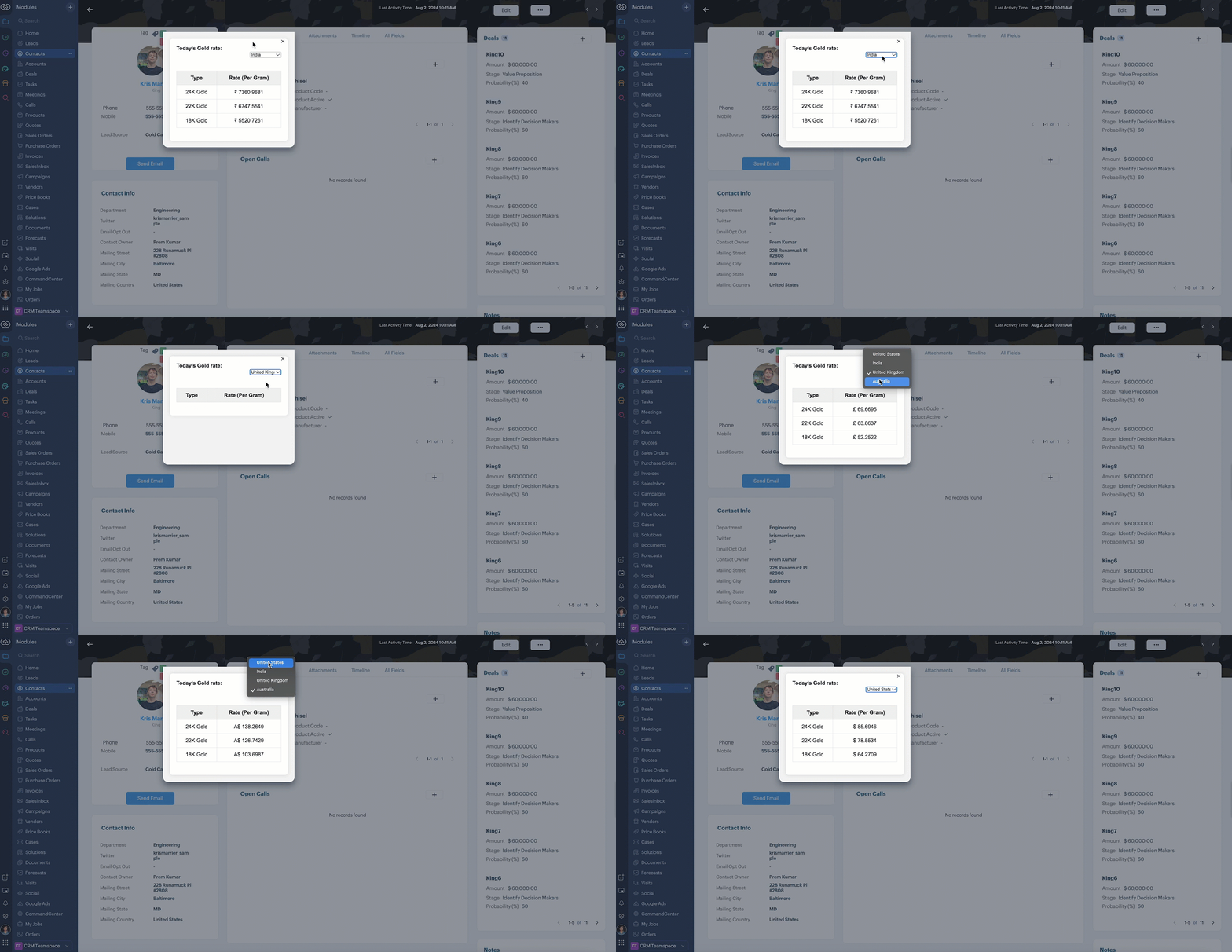
  • Consider that the user has created the shortcut CMD G to trigger Client Script.

  • Here is how the Gold Rate appears as and when the salesperson used the shortcut keys CMD G.

6. Summary

We have seen,

  • how to use Client Script Commands

  • how to create keyboard shortcuts for Commands

  • how to view Widget as a popup using Commands


7. Related Links

    Access your files securely from anywhere


                            Zoho Developer Community


                                                  • Desk Community Learning Series


                                                  • Digest


                                                  • Functions


                                                  • Meetups


                                                  • Kbase


                                                  • Resources


                                                  • Glossary


                                                  • Desk Marketplace


                                                  • MVP Corner


                                                  • Word of the Day


                                                  • Ask the Experts


                                                            • Sticky Posts

                                                            • Kaizen #217 - Actions APIs : Tasks

                                                              Welcome to another week of Kaizen! In last week's post we discussed Email Notifications APIs which act as the link between your Workflow automations and you. We have discussed how Zylker Cloud Services uses Email Notifications API in their custom dashboard.
                                                            • Kaizen #216 - Actions APIs : Email Notifications

                                                              Welcome to another week of Kaizen! For the last three weeks, we have been discussing Zylker's workflows. We successfully updated a dormant workflow, built a new one from the ground up and more. But our work is not finished—these automated processes are
                                                            • Kaizen #152 - Client Script Support for the new Canvas Record Forms

                                                              Hello everyone! Have you ever wanted to trigger actions on click of a canvas button, icon, or text mandatory forms in Create/Edit and Clone Pages? Have you ever wanted to control how elements behave on the new Canvas Record Forms? This can be achieved
                                                            • Kaizen #142: How to Navigate to Another Page in Zoho CRM using Client Script

                                                              Hello everyone! Welcome back to another exciting Kaizen post. In this post, let us see how you can you navigate to different Pages using Client Script. In this Kaizen post, Need to Navigate to different Pages Client Script ZDKs related to navigation A.
                                                            • Kaizen #210 - Answering your Questions | Event Management System using ZDK CLI

                                                              Hello Everyone, Welcome back to yet another post in the Kaizen Series! As you already may know, for the Kaizen #200 milestone, we asked for your feedback and many of you suggested topics for us to discuss. We have been writing on these topics over the


                                                            Manage your brands on social media


                                                                  Zoho TeamInbox Resources


                                                                      Zoho CRM Plus Resources

                                                                        Zoho Books Resources


                                                                          Zoho Subscriptions Resources

                                                                            Zoho Projects Resources


                                                                              Zoho Sprints Resources


                                                                                Qntrl Resources


                                                                                  Zoho Creator Resources


                                                                                      Zoho CRM Resources

                                                                                      • CRM Community Learning Series

                                                                                        CRM Community Learning Series


                                                                                      • Kaizen

                                                                                        Kaizen

                                                                                      • Functions

                                                                                        Functions

                                                                                      • Meetups

                                                                                        Meetups

                                                                                      • Kbase

                                                                                        Kbase

                                                                                      • Resources

                                                                                        Resources

                                                                                      • Digest

                                                                                        Digest

                                                                                      • CRM Marketplace

                                                                                        CRM Marketplace

                                                                                      • MVP Corner

                                                                                        MVP Corner


                                                                                          Design. Discuss. Deliver.

                                                                                          Create visually engaging stories with Zoho Show.

                                                                                          Get Started Now


                                                                                            Zoho Show Resources

                                                                                              Zoho Writer

                                                                                              Get Started. Write Away!

                                                                                              Writer is a powerful online word processor, designed for collaborative work.

                                                                                                Zoho CRM コンテンツ


                                                                                                  Nederlandse Hulpbronnen


                                                                                                      ご検討中の方


                                                                                                              • Recent Topics

                                                                                                              • Jobs at multiple locations

                                                                                                                Hi A lot of times we have same job open at multiple locations. So I would like an option where we can create a job and choose multiple locations. Currently we have to create individual jobs for each location. If we can create one job and mention multiple
                                                                                                              • From Zoho CRM to Paper : Design & Print Data Directly using Canvas Print View

                                                                                                                Hello Everyone, We are excited to announce a new addition to your Canvas in Zoho CRM - Print View. Canvas print view helps you transform your custom CRM layouts into print-ready documents, so you can bring your digital data to the physical world with
                                                                                                              • Passing the CRM

                                                                                                                Hi, I am hoping someone can help. I have a zoho form that has a CRM lookup field. I was hoping to send this to my publicly to clients via a text message and the form then attaches the signed form back to the custom module. This work absolutely fine when
                                                                                                              • Tag Adding Option in Kanban Card Customization Bigin CRM Mobile App

                                                                                                                I would like to request an option to add and display tags on Kanban cards in the Bigin CRM mobile app. This feature would make it easier to categorize deals and quickly identify priorities while working on the go.
                                                                                                              • Empowered Custom Views: Cross-Module Criteria Now Supported in Zoho CRM

                                                                                                                Hello everyone, We’re excited to introduce cross-module criteria support in custom views! Custom views provide personalized perspectives on your data and that you can save for future use. You can share these views with all users or specific individuals
                                                                                                              • WhatsApp Voice Message Sending Option in Bigin CRM

                                                                                                                I would like to request a feature that allows users to send WhatsApp voice messages directly from Bigin CRM. This would help improve communication efficiency and make it easier for teams to respond quickly to customer inquiries.
                                                                                                              • CRM: hosting a single html file in Zoho and displaying it as a widget

                                                                                                                I have seen that CRM offers the option of uploading a web project to Zoho itself and displaying it as a widget in CRM. The instructions then talk about setting a development environment with Node and developing an application to upload to Zoho. But I
                                                                                                              • Synchronise item image between Zoho Commerce and Zoho Books/Inventory/CRM

                                                                                                                Here is a blindingly simple idea to tie several Zoho products together. Zoho - please include a method to synchronise the item image (or images) from one Zoho application to another. For example, if you upload an item image in Zoho Inventory, a user should
                                                                                                              • How to change position button transtition of Blueprint?

                                                                                                                Hi Everyone, Look at my screenshoot, it is possible move the reject button to the right? I couldn't find that setting in the blueprint. Thank you.
                                                                                                              • Marketer’s Space - WhatsApp Pricing Update: What Marketers Need to Know and Do

                                                                                                                Hello Marketers, Welcome back to Marketer’s Space! WhatsApp made changes to their pricing model on July 1, 2025, moving from conversation-based pricing to a per-message pricing model. This week’s post focuses on what these changes mean for your WhatsApp
                                                                                                              • Multi file upload

                                                                                                                Hi, I just wonder if one could upload multiple files in one shot, say between one and three files, without adding multiple File Upload fields? Thanks, Alalbany
                                                                                                              • Sorting Descending in a lookup

                                                                                                                I have a case number lookup on multiple forms. I need the most recent added to appear at the top of the lookup or as the list of cases grom it's too much to scroll. Is there a way to have a look up sort descending?
                                                                                                              • Importing customer comments and multiple shipto addresses

                                                                                                                I am evaluating Zoho Books and have most of my data imported with two exceptions: (1) Import customer comments - in my current system I have several comments of different types, and I need to bring these into Zoho. Preferably Books customer records, but
                                                                                                              • Can we add custom fields to portal community profiles?

                                                                                                                How do we add custom fields to our profile pages in our portal community? If we have the ability to add custom fields, will we be able to access those fields via API? We want to use our Desk community in our help portal as our primary community and would
                                                                                                              • Auto-upload Creator Files to WorkDrive

                                                                                                                Hi everyone, I’m working on a workflow that uploads files from Zoho Creator to specific subfolders in Zoho WorkDrive, as illustrated in the attached diagram. My Creator application form has two multi-file upload fields, and I want—on successful form submission—to
                                                                                                              • Asap Widget 2.0

                                                                                                                Where's the documentation for the new ASAP widget? https://www.zoho.com/desk/developers/asap/#introduction this one is outdated How can we dynamically navigate between different views? How can we prefill ticket forms using ASAP 2.0?
                                                                                                              • Update date & time when a cell is edited

                                                                                                                Hi All, I am desiring to have a cell update with the current date and time when another cell is edited. Any ideas?  Thank you
                                                                                                              • CRM x WorkDrive: File storage for new CRM signups is now powered by WorkDrive

                                                                                                                Availability Editions: All DCs: All Release plan: Released for new signups in all DCs. It will be enabled for existing users in a phased manner in the upcoming months. Help documentation: Documents in Zoho CRM Manage folders in Documents tab Manage files
                                                                                                              • Can the Trigger be changed?

                                                                                                                I'm afraid I already know the answer, but here goes... After activating a workflow (under Campaigns > Automations), Then later choosing to Edit the workflow, Can the Workflow's Trigger be changed? Currently the entire Trigger section + options are gone
                                                                                                              • Marketer's Space: Proven tips to improve open rates – I

                                                                                                                Hello Marketers! Welcome back to another post in Marketer's Space! In this week's post, we'll discuss the ever-important concept of open rates. This will be a multi-part series, as we have a range of topics to cover. Open rates—which measure the percentage
                                                                                                              • Holidays

                                                                                                                Hi; For defining Holidays, you need to add logic to handle the year as well as the month & day. We need to be able to enter Holidays for the next year. I need to add a holiday for January 2, 2017, but I can't until January 1st, which is a Sunday and we
                                                                                                              • Creating Custom PDF Template from Form

                                                                                                                I am trying to create a custom PDF from form submissions. I have the standard subscription and it indicates that PDF forms are included. I cannot find anywhere to create PDF forms. I try to follow the instructions from here: https://help.zoho.com/portal/en/kb/forms/form-settings/pdf-settings/pdf-editor/articles/creating-your-own-pdf-template#Creating_your_template_from_the_scratch
                                                                                                              • Important Update: Facebook Metrics Deprecation & Impact on Zoho Analytics

                                                                                                                Dear Zoho Analytics users, Facebook has deprecated a set of metrics from the Facebook Pages Insights API, effective November 15, 2025. As a result, these changes will affect any reports and dashboards in Zoho Analytics that rely on Facebook Pages data.
                                                                                                              • Quick Copy Column Name

                                                                                                                Please add the ability to quickly copy the name of a column in a Table or Query View. When you right-click the column there should be an option to copy the name, or if you left-click the column and use the Ctrl+C keyboard shortcut it should copy the
                                                                                                              • Conditional Field Visibility in Bigin CRM

                                                                                                                I would like to request support for conditional field visibility within Bigin CRM. This feature should allow administrators to configure show/hide rules for fields based on predefined criteria (e.g., field values, picklist selections, stage changes,
                                                                                                              • Introducing Zoho MCP for Bigin

                                                                                                                Hello Biginners! We're excited to introduce Zoho MCP for Bigin, a completely new way of interacting with Bigin data using AI. With Zoho MCP, you can securely connect your Bigin account with popular AI agents like Claude, Cursor, Windsurf, and VS Code,
                                                                                                              • Introducing the Zoho Projects Learning Space

                                                                                                                Every product has its learning curve, and sometimes having a guided path makes the learning experience smoother. With that goal, we introduce a dedicated learning space for Zoho Projects, a platform where you can explore lessons, learn at your own pace,
                                                                                                              • MCP > Creator connection failing with Claude

                                                                                                                I'm trying to get claude to access any of my Zoho Creator apps and it keeps failing. I have enabled all tools for creator and ensured in claude settings that everything is authorised. Here is what claude says : Unfortunately, the error messages I'm receiving
                                                                                                              • Is it possible to sync data every 5–10 minutes in Zoho Analytics (CRM or Excel imports)?

                                                                                                                Hello Team, I want to know if Zoho Analytics supports near real-time syncing of data from different sources. My requirements: I am importing data from Zoho CRM → Zoho Analytics I also have some datasets maintained in Excel/CSV I want both data sources
                                                                                                              • Feature Request: Dynamic Dimension Control for zc_LoadIn Popups

                                                                                                                As detailed in this community discussion, Zoho Creator's zc_LoadIn parameter is a vital tool for opening components (forms, reports, or pages) in modal dialogs via HTML snippets, Notes, or Rich Text Fields. While powerful, this feature suffers from a
                                                                                                              • Subforms in stateless forms

                                                                                                                I think the title says it all. We need to be able to add subforms to stateless forms. Currently the only workaround is to create a Form and delete each record upon submission of the form. I need to build an interface to update our inventory. Basically
                                                                                                              • Text wrap column headers in reports?

                                                                                                                Is it possible to auto wrap column headers so that a longer multi-word header displays as two lines when the column is narrower than the width of the header title?
                                                                                                              • What’s New in Zoho Inventory — Latest Features, Integrations & Updates | December 2025

                                                                                                                Zoho Inventory has evolved significantly over the past months, bringing you smarter, faster, and more connected tools to streamline your operations. Whether you’re managing multichannel sales, complex fulfillment workflows, or fast-moving stock, our newest
                                                                                                              • Marketer’s Space - Multi-Channel Campaigns for the Biggest Shopping Week with Zoho Marketing Automation

                                                                                                                Hello marketers, Welcome back to another post in Marketers Space! The biggest shopping week of the year is almost here, and it’s your moment to shine without the stress. With Black Friday and Cyber Monday just around the corner, being present across email,
                                                                                                              • Auto-Invite Users to Portals in Zoho CRM based on Conditions

                                                                                                                Hello Everyone, You can now automate portal invitations in Zoho CRM with the new Auto-Invite users feature in Portal management. No more manually enabling portal access one by one. With this enhancement, you can automatically send invites for users to
                                                                                                              • Pricing Strategies: #5 Stay local, Price & Sell Global

                                                                                                                Arun had always dreamed of taking his handmade craft business beyond his hometown. For years, he sold locally. Most of his customers are familiar faces, in our usual currency and with the exact expectations. But one day, a traveller visited his workshop
                                                                                                              • Best practice to structure reporting to include events covering multiple months / quarters.

                                                                                                                Hi, I'm new to Zoho, have some experience of more "enterprise" tools, looking for some input from the community. I'm looking to create a report that includes events that cover a long period, each event has a start / end date and I'm struggling undertanding
                                                                                                              • Incorrect Email Notifications for Product Reviews

                                                                                                                Dear Zoho Commerce Support Team, I am writing to report a technical issue that occurs frequently on our platform. Problem Description: We regularly receive email notifications informing us of new product reviews awaiting approval. However, when we access
                                                                                                              • Zoho CRM for Everyone's NextGen UI Gets an Upgrade

                                                                                                                Hello Everyone We've made improvements to Zoho CRM for Everyone's Nextgen UI. These changes are the result of valuable feedback from you where we’ve focused on improving usability, providing wider screen space, and making navigation smoother so everything
                                                                                                              • What is the easiest way to move Hotmail emails to an IMAP server?

                                                                                                                The easiest way to move Hotmail (Outlook.com) emails to an IMAP server is to add your Hotmail account directly to any email client that supports IMAP, then copy the messages across. This avoids paid tools and keeps the process simple. Fastest free method:
                                                                                                              • Next Page