Cross Module Filtering – Use Fields from Lookup modules in Custom Views criteria and Advanced Filters
Hello everyone,
Zoho CRM now enables you to achieve deeper filtering of records in a module, using fields of a lookup, thereby enhancing your data management experience manifold.
This filtering based on lookup module fields is now available in advanced filters and custom views. With this capability, you can explore your database more thoroughly and retrieve exactly what you need to carry out CRM tasks efficiently.
Consider the following scenarios:
— You want to narrow your customers based on the associated account’s industry or annual revenue to send a targeted email campaign.
— Or you might want to extract a list of products based on the rating of the associated vendor before placing a purchase order.
— Likewise, an insurance business may need to filter policy holders based on the policy tenure and premium amount stored in the associated Policies module.
In each of these cases, the key filtering field resides in a different (associated) module. Earlier, achieving this could've been a bit challenging but not anymore!
Our cross-module filtering based on fields of lookup helps achieve exactly this, directly in the native module. Fields of a lookup module are now present in the criteria section of Advanced Filters and Custom Views of any module, enabling you to narrow down a list of records based on a combination of fields from the native module as well as lookup module. Once you derive your list, you can go ahead and perform important CRM functions on the records such as the execution of Macros, sending mass emails, updating a field, and so on.
Here’s how the use cases play out with the new capability:

2. Create a custom list view of products associated with vendors rated 5 stars.

3. Pull up policy holders whose policies have a tenure of 5 years and a premium of more than 20,000 INR per year.


Note:
You can use up to 3 lookup fields in your filters. This count includes related module fields and subform fields.
You can add up to 5 fields from a lookup module for filtering.
Additionally, the lookup name field is now a dropdown, so you can pick records directly instead of typing to search.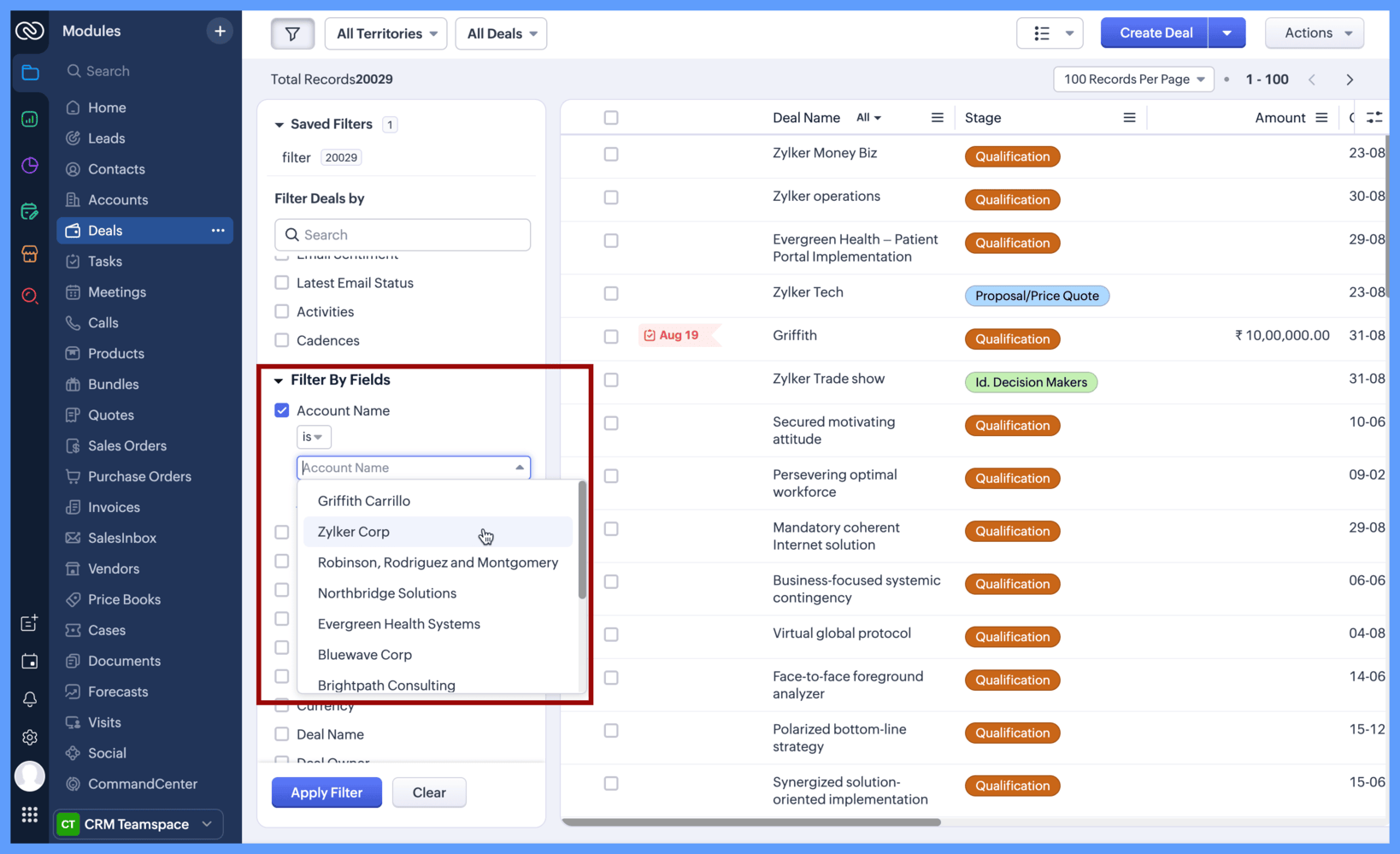
Now that lookup field filtering is available directly in the module, try it out in Advanced Filters or Custom Views. Just apply conditions from the lookup module and refine your list right there.
We hope you find these updates helpful!
Kind regards,
The Zoho CRM Team
Release plan: The feature is currently enabled for AU, CN, and JP data centers up to the Enterprise edition. For EU, US, and IN data centers, it is available up to the Professional edition. Enablement for other editions and DCs is in progress.