Customer Satisfaction (CSAT) Report
From data to decisions: A deep dive into ticketing system reports
What is the customer satisfaction report?
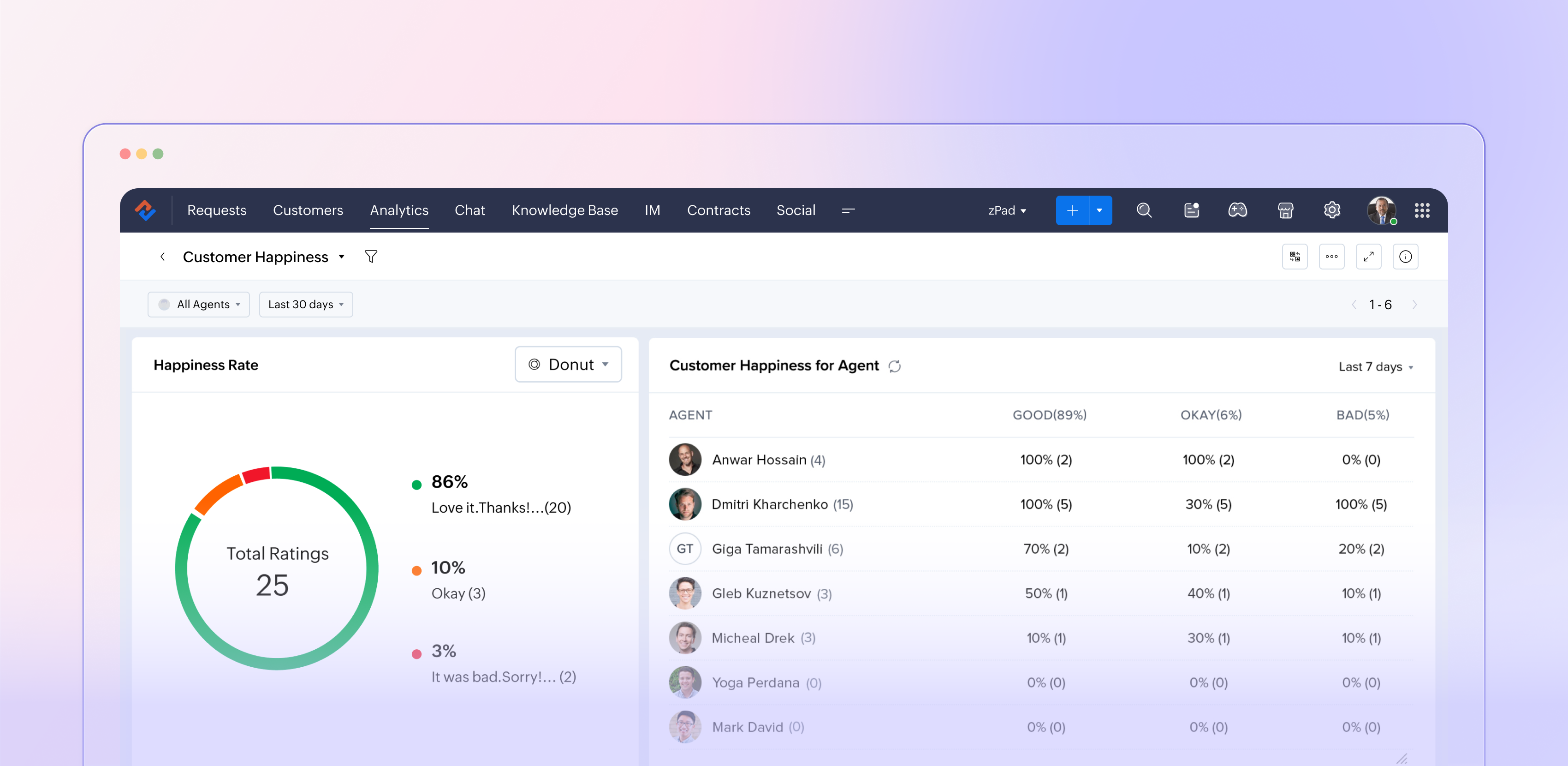
The customer satisfaction report in Zoho Desk (typically powered by the Customer Happiness Rating feature and corresponding surveys) aggregates customer feedback captured after ticket responses or closures. It translates that input into metrics such as positive, negative, and neutral ratings, trends over time, and performance by agents, departments, and channels. This data helps support managers move from guesswork to data‑driven decisions about service quality.
Why customer satisfaction reporting matters
Customer satisfaction reporting is more than just a supplemental dashboard; it plays a crucial role in companies' efforts to shape customers' overall perception of the brand. It indicates whether your support truly addresses customer problems in a way that matters, rather than simply measuring ticket closure.
This reporting acts as an early indicator of potential churn by highlighting dissatisfied customers and recurring issues. Additionally, it supports the case for investments in training, staffing, and tools by relying on data rather than personal opinions. When utilized effectively, customer satisfaction reports create a link between everyday support activities and long-lasting customer loyalty.
How Zoho Desk captures customer satisfaction
Zoho Desk lets you initiate a straightforward rating or survey at key moments during the support experience, such as after an agent responds or when a ticket is closed. Customers can quickly express their satisfaction using options such as "Happy / Neutral / Unhappy" and may also leave a comment if they wish. When gathered on a larger scale, these micro-interactions become fundamental to the customer satisfaction report.
Since this feedback is linked to specific tickets, it allows for in-depth analysis, revealing which agents or teams consistently impress customers, identifying the types of issues or communication channels (such as email, chat, phone, or social media) that lead to dissatisfaction, and observing how satisfaction levels fluctuate with changes in SLAs, new processes, or feature launches. This integration of feedback with contextual information transforms a simple survey into a valuable layer of strategic insights.
Key metrics
- Overall satisfaction score: Your high‑level health metric, usually expressed as a percentage or rating based on all collected responses for a chosen period.
- Rating distribution: The Split between positive, neutral, and negative responses helps you see whether a high score is built on many “okay” experiences or truly delighted customers.
- Trends over time: How satisfaction moves week‑over‑week or month‑over‑month, especially before and after significant changes like feature releases or holiday seasons.
- Agent and team performance: Side‑by‑side comparisons showing which agents or departments win the most positive feedback and where coaching is needed.
- Channel performance: Satisfaction by email, chat, phone, and other channels, so you can align staffing and training with where the experience is weakest.
Turning report insights into action
The real value of the customer satisfaction report comes from what your team does with it.
Close the loop with customers
Use low ratings and negative comments as triggers for follow‑ups, callbacks, or escalations. This not only recovers at‑risk relationships but also shows customers that their feedback matters.
Coach and celebrate agents
Highlight agents with consistently high satisfaction scores in team meetings and use their interactions as best‑practice examples. For those struggling, use the report to identify patterns across issue types, channels, or time slots, and create targeted coaching plans.
Fix process and product issues
Look for recurring themes in comments linked to low ratings: confusing policies, slow approvals, missing macros, or product bugs. Feed these patterns into internal improvement projects or backlogs so the same pain points don’t repeat.
Experiment and measure
Treat your support process like a product. When you change an SLA, tweak a template, or introduce a new self‑service flow, watch the satisfaction report over the following weeks. If scores move up, standardize the change; if they drop, roll back or refine.
The bottom line
We recommend you use it in a continuous‑improvement loop; Zoho Desk’s customer satisfaction report becomes more than a static KPI board. It becomes a living feedback engine that keeps your support experience aligned with what customers actually feel and expect.
Please stay tuned for more in the Desk Reports series.
Regards,
Kavya Rao
The Zoho Desk Team

Time-based reports
Agent-based reports
Ticket-based reports
Article-based reports