We've made several enhancements to Hosted Payment Pages in Zoho Billing, including a redesigned single page checkout, custom field configuration, mobile OTP verification, and the ability to share a single payment page for multiple items. You can also let customers sign in or sign up during checkout and set usage limits for individual hosted page links.
Here's a closer look at these updates and how you can use them in your business workflows.
Redesigned Single Page Checkout
We've redesigned the checkout experience with a new Single Page Layout for both one-time purchases and subscriptions.
The new layout brings order details and customer information together on a single page, allowing customers to review their purchases and enter their details without navigating between multiple steps.
Want to see how the new single page checkout flow works?
Try our demo.
It also introduces features that help customers complete transactions more conveniently. Here's what the new single page checkout can do:
- User Verification: Verify customers during checkout.
- Auto-save and Resume: Let customers resume checkout after leaving the page or refreshing it.
- Recommended Addons: Suggest relevant addons that customers can explore and include in their purchase.
- Item and Plan Images: Display images to give customers a visual understanding of what they are purchasing.
- Clear Pricing Breakdown: Show coupons, prices, and taxes to help customers understand the payment details
This feature is enabled by default for organizations created on and after July 24th 2026 . For existing organizations, it is available in Early Access. Reach out to us at
support@zohobilling.com to enable it.
Add Invoice and Customer Custom Fields from Templates
Previously, custom field preferences for Hosted Payment Pages and the Customer Portal were managed from the Custom Fields settings page and applied to all Hosted Payment Page templates.
Now, add Customer and Invoice Custom Fields directly to each Hosted Payment Page template. Set each field as Mandatory, Optional, Read Only, or Hidden to collect the required information and show only the relevant fields at checkout.
Configuring these settings directly in the templates simplifies setup, gives you greater flexibility in managing checkout fields, and helps you tailor the checkout experience to your business requirements. For more information, refer to the feature's
help documentation.
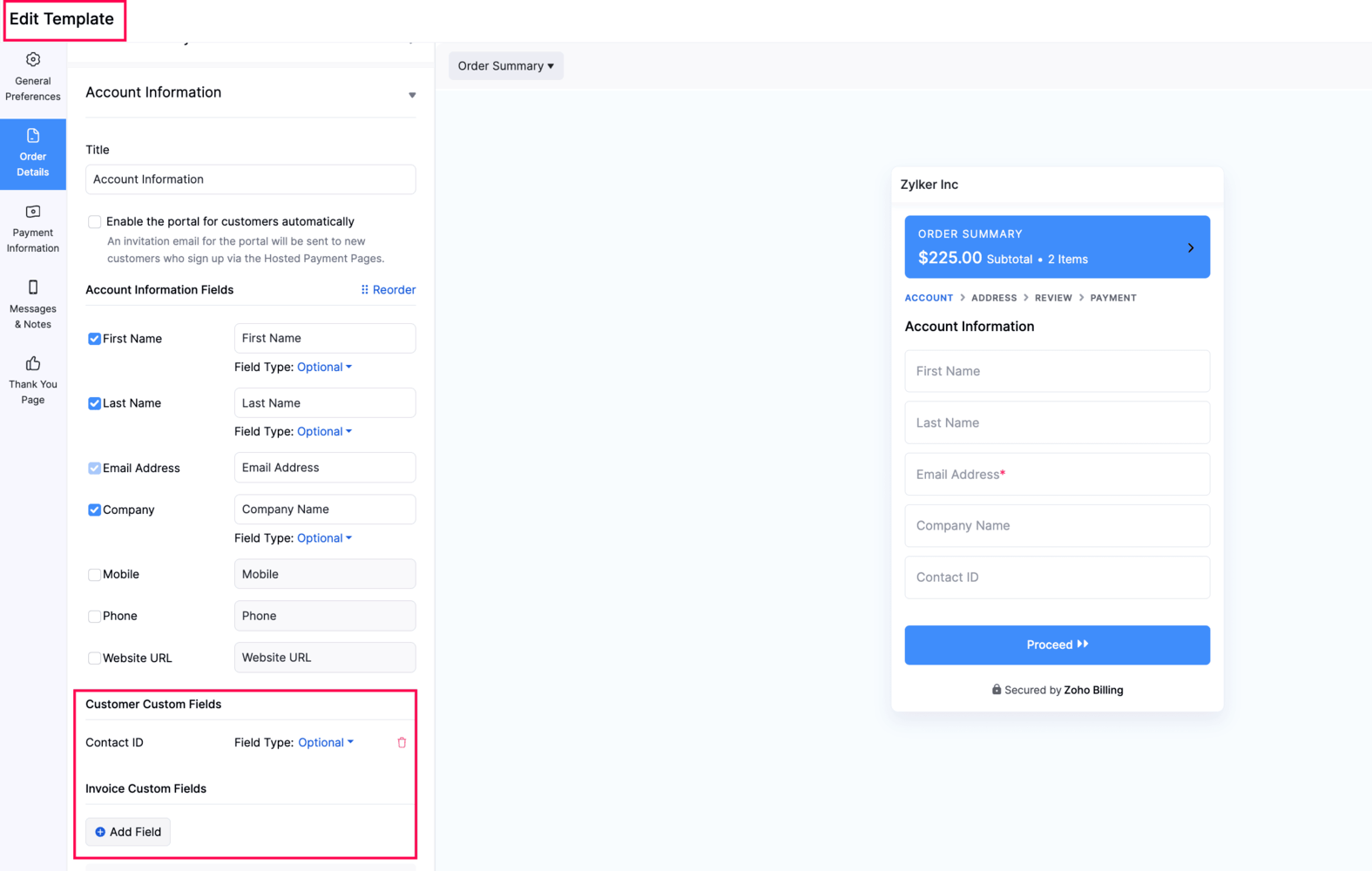
To configure custom fields, go to Settings > Hosted Pages > select a template and add a custom field in relevant sections.
This feature is enabled by default for organizations created on and after July 2026 . For existing organizations, it is available in Early Access. Reach out to us at
support@zohobilling.com to enable it.
Verify Customers Using Mobile OTP (India Edition)
Customers can now verify their identity using their registered mobile number, in addition to email verification. Once enabled, customers can also use mobile OTP to sign in to the Customer Portal. You can customize the OTP SMS template under SMS Notifications.
To configure this, go to Settings > Hosted Payment Pages > Edit or create a template > User Verification Settings, and select Verify with Email or Mobile. You can then choose whether customers should verify through SMS or email.
This feature is currently available in Early Access. To enable it for your organization, reach out to us at
support@zohobilling.com.
Let Customers Sign In or Sign Up During Checkout
Customers can now sign in to an existing Customer Portal account or create a new one during checkout. This helps you track all their transactions under a single customer record and manage them easily.
When customers enter their registered email address, Zoho Billing checks whether they already have a Customer Portal account and guides them to sign in or sign up accordingly. Their details are automatically filled in where applicable, making checkout faster and easier.
To set user verification, go to Settings > Hosted Payment Pages > Edit or create a template > User Verification Settings, and select Sign In to Existing Account or Sign Up.
For the India edition (Early Access), you can choose whether customers verify their identity through email, mobile OTP, or both when signing in or signing up. To configure this at the organization level, go to Customer Portal > General > Default Login > Mobile OTP.
Share Hosted Payment Pages with Multiple Items
You can now share Hosted Payment Pages that include multiple items, allowing customers to choose the products they want to purchase without requiring you to create transactions in advance.
Add multiple items to a single page and mark them as mandatory or optional. When a purchase is completed, Zoho Billing automatically creates the transaction based on your configuration.
Once your page is ready, share it with customers using a URL, QR code, embedded iframe, or HTML button.
To share a hosted page link for multiple items, go to Items, select the items for which you'd like to share a hosted page and click Share Hosted Page. In the configuration page, you can choose if the items should be marked mandatory.
Set Usage Limits for Hosted Payment Page Links
You can now set a usage limit for individual Hosted Payment Page links. This is useful for promotions with a fixed number of purchases, campaigns, or sales with a fixed number of uses. Once a link reaches its usage limit, customers can no longer use it to make a purchase. Learn more about this feature from our
help documentation.
To configure a usage limit, go to Item or Plan Details > Share Hosted Payment Page > Usage Limit.
This feature is currently available in Early Access. Reach out to us at
support@zohobilling.com to enabled it for your organization.
With these updates, Hosted Payment Pages offer more flexibility to adapt your checkout experience to different business needs, simplify purchase journeys, and collect the information you need from customers.
We'd love to hear your thoughts! Which of these updates would be most useful to your business? Share your questions, and suggestions in the comments below. Have some queries? Reach out to us at support@zohobilling.com.
Happy Billing!


