E-mail Spoofing : Comment l’éviter et protéger votre entreprise
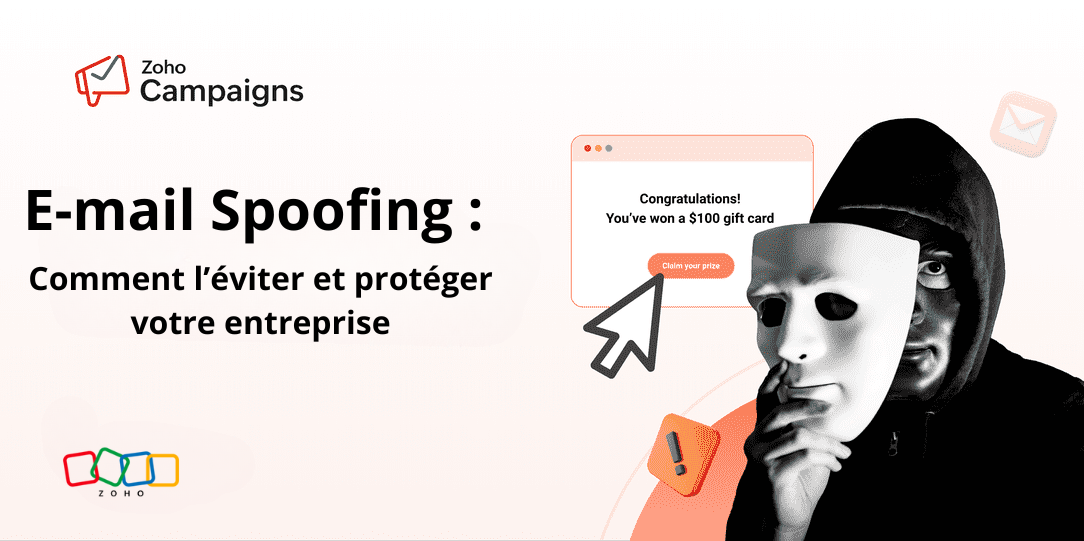
Vous est-il déjà arrivé de recevoir un e-mail qui semblait légitime — avec le bon logo, un ton familier — mais qui vous a tout de même paru suspect ? Pire encore, un de vos clients vous a-t-il déjà contacté après avoir reçu un e-mail douteux qui semblait provenir de votre entreprise ?
C’est ça, le spoofing d’e-mail.
Le spoofing d’e-mail est une technique utilisée par des cybercriminels pour falsifier l’adresse de l’expéditeur afin de faire croire que le message provient d’une source fiable — souvent une entreprise connue. Leur objectif ? Tromper le destinataire pour l’amener à cliquer sur un lien malveillant ou à divulguer des informations sensibles.
Dans cet article, nous allons vous expliquer comment fonctionne le spoofing d’e-mail, les risques qu’il représente et, surtout, les actions que vous pouvez mettre en place pour protéger votre entreprise et vos clients.
À quoi ressemble un e-mail spoof ?
Voici les éléments clés à surveiller pour identifier un e-mail spoofé :
- Spoofing du nom d’affichage : un e-mail où le nom d’affichage est identique ou très proche de celui d’un employé réel de l’entreprise. Cela crée un faux sentiment de légitimité.
- Spoofing du domaine : l’expéditeur falsifie non seulement le nom d’affichage, mais aussi le nom de domaine de l’entreprise. L’adresse e-mail semble alors provenir du domaine officiel, rendant la fraude plus difficile à détecter.
- Adresse de l’expéditeur suspecte : c’est souvent un indice révélateur. Même si le nom d’affichage peut sembler familier, le domaine qui suit le symbole “@” est souvent différent ou étrange. Cela trahit généralement une tentative de spoofing.
- Un ton pressant ou menaçant : les cybercriminels utilisent souvent un langage alarmant pour pousser le destinataire à agir rapidement, sans prendre le temps de réfléchir. Cela peut inclure des menaces ou une fausse urgence.
- Promesses de gains ou de cadeaux : ces e-mails prétendent souvent que vous avez gagné un prix ou une récompense. Cela pousse les victimes à fournir des informations personnelles ou à cliquer sur des liens ou pièces jointes malveillants pouvant infecter leurs appareils.
- Incohérences visuelles : certains e-mails spoofés présentent des logos obsolètes, des fautes de mise en page ou un format différent des communications habituelles de l’entreprise. Bien que les fraudeurs deviennent de plus en plus habiles à imiter le style visuel, certaines tentatives restent faciles à repérer.
Stopper le spoofing d’e-mail : les bonnes pratiques à connaître
Le spoofing d’e-mail peut être limité, voire empêché, en configurant plusieurs mécanismes d’authentification comme SPF, DKIM et DMARC. Chacun joue un rôle distinct dans la vérification des messages, mais c’est leur mise en œuvre conjointe qui permet de protéger efficacement votre domaine contre les tentatives de spoofing.
Sender Policy Framework (SPF)
SPF est un protocole d’authentification des e-mails conçu pour vérifier l’identité de l’expéditeur.
Pour mettre en place SPF, vous devez déclarer les adresses IP ou serveurs de messagerie autorisés à envoyer des e-mails en votre nom. Lorsqu’un e-mail est reçu, le serveur de réception interroge le serveur DNS du domaine pour vérifier si l’adresse IP de l’expéditeur figure bien parmi celles autorisées. Si ce n’est pas le cas, le message peut être marqué comme suspect ou bloqué.
L’e-mail n’est délivré dans la boîte de réception du destinataire que s’il provient d’une adresse IP autorisée et s’il réussit la validation SPF. En configurant correctement les enregistrements SPF, vous pouvez améliorer la délivrabilité de vos messages, réduire les risques de spam et prévenir l’usurpation d’adresse e-mail.

DomainKeys Identified Mail (DKIM)
DKIM est une signature numérique ajoutée à chaque e-mail que vous envoyez. Elle fonctionne en complément des enregistrements SPF.
En plus de vérifier l’authenticité de l’expéditeur, DKIM permet de s’assurer que le contenu du message n’a pas été altéré ou modifié pendant son acheminement. C’est un moyen efficace de garantir l’intégrité des e-mails et de renforcer la confiance des destinataires.
Pour configurer DKIM, il faut publier une clé publique dans les enregistrements DNS de votre domaine. Lorsqu’un e-mail est envoyé, votre serveur génère une empreinte numérique du message (incluant le contenu et les titres) et la signe à l’aide d’une clé privée, qui reste confidentielle.
Lors de la réception, le serveur du destinataire utilise la clé publique pour vérifier si cette signature est bien authentique. Si l’empreinte correspond, cela signifie que le message n’a pas été altéré pendant son envoi.
Cette méthode garantit l’intégrité de vos e-mails et empêche les attaquants de se faire passer pour vous, puisqu’ils ne possèdent pas la clé privée nécessaire pour signer les messages.

DMARC (Domain-based Message Authentication, Reporting and Conformance)
DMARC est une méthode d’authentification avancée conçue pour prévenir le spoofing e-mail. Elle repose sur les protocoles SPF et DKIM, et permet de définir une politique claire à appliquer lorsqu’un message échoue à ces vérifications.
Concrètement, DMARC vous permet de publier une politique dans votre DNS indiquant aux serveurs de messagerie des destinataires quoi faire lorsqu’un e-mail ne passe pas les contrôles SPF ou DKIM. Trois actions sont possibles :
Action 1 : Aucune action
Aucune mesure n’est prise, même si le message échoue aux vérifications SPF ou DKIM.
L’e-mail est quand même transmis dans la boîte de réception du destinataire.
Action 2 : Quarantine
L’e-mail est livré, mais redirigé vers le dossier des spams ou courrier indésirable, car il n’a pas passé les contrôles SPF/DKIM.
Action 3 : Rejeter
Si cette politique est choisie, tout e-mail qui échoue aux vérifications SPF ou DKIM est simplement rejeté. Il ne sera jamais livré au destinataire.

Comment Zoho Campaigns vous aide à prévenir le spoofing d’identité par email et à protéger votre domaine
Zoho Campagins permet à chaque utilisateur de configurer facilement les enregistrements SPF et DKIM afin d’authentifier son domaine.

Si un email réussit les vérifications SPF et DKIM, la politique DMARC ne s’applique pas. En revanche, si l’une de ces vérifications échoue, le serveur de réception consulte alors la politique DMARC du domaine pour déterminer comment traiter le message. Il est important de noter qu’une politique DMARC ne peut être activée qu’après la mise en place des enregistrements SPF et DKIM, sans quoi la validation DMARC échouera.
Une fois l’authentification SPF et DKIM configurée pour votre domaine, vous pouvez définir la politique DMARC dans les enregistrements DNS de votre domaine. Vous pouvez en apprendre davantage sur la configuration des enregistrements DMARC ici.

Configurer SPF et DKIM permet non seulement de lutter contre spoofing e-mail, mais aussi d’améliorer la délivrabilité de vos messages. En plus de SPF et DKIM, Zoho Campaigns propose également plusieurs fonctionnalités axées sur la délivrabilité, afin d'assurer que vos emails atteignent toujours la boîte de réception.
E-mail spoofing évolue constamment, et rester passif face à cette menace peut entraîner des pertes financières ou nuire à la réputation de votre entreprise.
En mettant en place de manière proactive des protocoles d’authentification email tels que SPF, DKIM et DMARC, les entreprises peuvent réduire considérablement les risques liés à l’usurpation d’identité par email.
L'équipe Zoho France
Access your files securely from anywhere
Zoho FSM Video Tutorials
Centralize Knowledge. Transform Learning.
All-in-one knowledge management and training platform for your employees and customers.
New to Zoho Recruit?

Zoho Developer Community
New to Zoho LandingPage?
Zoho LandingPage Resources
New to Zoho Survey?
New to Zoho CRM Plus?
Deliver unforgettable customer experiences
New to Zoho CRM Plus?
Deliver unforgettable customer experiences
New to Zoho Marketing Plus?
Everything you need to run your marketing
New to Zoho Marketing Plus?
Everything you need to run your marketing
New to Bigin?





Topic Participants
Kinjal Lodaya
Sticky Posts
Collaboration sans faille avec Zoho One
Bonjour à tous, Dans cet article nous allons voir comment Zoho One permet une collaboration à différents niveaux . La façon dont nous travaillons évolue. À mesure que les entreprises se mondialisent, la plupart des activités sont menées en équipe.
New to Zoho TeamInbox?
Zoho TeamInbox Resources
Zoho CRM Plus Resources
Zoho Books Resources
Zoho Billing Resources
Zoho Projects Resources
Zoho Sprints Resources
Qntrl Resources
Zoho Creator Resources
Zoho CRM Resources
Design. Discuss. Deliver.
Zoho Show Resources
Get Started. Write Away!
Writer is a powerful online word processor, designed for collaborative work.
Zoho CRM コンテンツ
-
オンラインヘルプ
-
Webセミナー
-
機能活用動画
-
よくある質問
-
Ebook
-
-
Zoho Campaigns
- Zoho サービスのWebセミナー
その他のサービス コンテンツ
Nederlandse Hulpbronnen

ご検討中の方
Recent Topics
[Online Training] Zoho RPA masterclass: Fundamentals, SAP® automation, & AI workflows
Hello everyone! Greetings from the Zoho RPA Training Team! We're excited to announce our upcoming Online Training on Zoho RPA. Manual, repetitive tasks like entering data, updating spreadsheets, managing files, and extracting information from documentsZoho Inventory | Can't uncheck/turn off Advance Tracking
Hi, I wanted to know if there's a way to turn off Advanced Tracking (such as Serial Number or Batch Tracking) for an item in Zoho Inventory. I’ve read that you might need to delete associated transactions and clear the opening stock to disable these features.CNIL - Suivi de Pixel
Bonjour à tous, À la suite de la nouvelle recommandation de la CNIL sur les pixels de suivi dans les e-mails, savez-vous si Zoho Campaigns permet : de conditionner le suivi des ouvertures au consentement de chaque contact ; de proposer un lien permettantJoin Zoho Meeting only via Web browser and not with Zoho Meeting App
Dear Zoho team, according to the documentation [1], Zoho Meeting only offers web view for Chrome and Firefox on a desktop. For other browsers and devices, participants can only join a Zoho Meaning with the Zoho Meeting App installed. This is a big hurdleGetting an error when trying to use the Zoho Desk Resources with our Zobot chat
Hello, When I try to set our Zobot AI Card Training to Zoho Desk resources I get an error when testing it and it bypasses the bot completely. When I try to switch it to the Zoho SalesIQ resources option in there it will list some articles but not giveKB Articles from Zoho Learn - Import as .md
I love the concept of being able to use articles from Zoho Learn as knowledge base articles for Zia Agents. This will absolutely help with proper documentation and organization of company processes and SOPs. This was a great concept. However, even whenCannot reorder fields in Page Layout in Expenses and Purchase Requests
It is very inconvenient that the custom fields in Page Layout cannot be re-ordered. The only way is to remove the fields and re-create them; however, it is impractical. This would affect the reports and dashboards we are having. Not able to re-order thePurchase Requisition in Zoho Books
I want to understand if Zoho Books is having the following workflow: PR ( Purchase Requisition ) >> PO ( Purchase order) >> GRN/SRN ( Goods/Services receipt note) >> BillZoho Books | Product Updates | November 2026
Hello users, As the year winds down, we've introduced several enhancements to make compliance, inventory management, and everyday bookkeeping easier in Zoho Books. This month's updates include an improved TDS experience, a new way to exchange transactionsTips & Tricks #8 | Zoho Mail: Seguridad, privacidad y control para tu empresa
El correo electrónico sigue siendo una herramienta fundamental para cualquier organización. Por él circulan comunicaciones internas, información de clientes, documentos confidenciales y datos esenciales para el negocio. Por eso, elegir un proveedor dePersonalize Email Campaigns using CRM Data
Recently, few of our CRM users wanted to send an email campaign with personalized sender details and signature so that recipients can instantly recognize the sender. We are happy to announce the new enhancement in campaign creation through which you can personalize your email campaign using CRM Contact/Lead Owner's data. Let’s see how we can use those data to send emails. Personalize sender details Using Zoho Campaigns, you can send an email campaign with a personalized sender name and email address集めて終わりにしない。― Zoho FormsからCRMへデータをつなぐ
ユーザーの皆さま、こんにちは。ゾーホージャパンの友田です。 Zoho Formsで問い合わせや資料請求を受け付けた後、その情報をどうしていますか? 例えば、 フォームから届いた氏名や会社名、メールアドレスを確認して、Zoho CRMにも同じ情報を入力している。 そんな作業が発生している場合、FormsとCRMをつなぐことで、その手間を減らせるかもしれません。 Formsに入力された情報をCRMへ Zoho Formsは、Zoho CRMと連携できます。 例えば、Webサイトから資料請求を受け付ける場合、Sheet co-edit: no live presence — also on Collaborate demo?
Two Sheet co-edit sessions open OK (same document_id, document.edit: true), but there’s no real-time collaboration: no cell highlights, Group Chat → Users stays empty. Writer co-edit works on the same Office Integrator setup. We see the same on the officialShort product videos on Zoho Commerce product pages: what works?
Short product videos are becoming a normal part of online store pages, and I have been thinking about how to use them well on a Zoho Commerce store. A few points that seem to matter: Keep them short. 6 to 15 seconds showing the product from a few anglesHow to embed Google Analytics GA4 tracking on a standalone Public Page (outside Customer Portal)?
Hi, Is there an official or recommended way to embed Google Analytics (GA4) tracking directly onto a standalone public Zoho Creator Page (outside of a Customer Portal)? I’m considering using an invisible Custom JS Widget as a workaround, but I’d loveUnable to integrate Whatsapp Messaging into Zoho CRM - Business Messaging
Hello, I want to set up Business Messaging in our Zoho CRM and am struggling to set it up. I have logged into the account and our facebook business page, our business shows in the dropdown for WhatsApp Business Account but does not for WhatsApp BusinessZoho CRM calendar merge with outlook
Hi Zoho team! I did the steps for syncing the zoho CRM calendar with outlook. Everything works well as long as the user creates meetings inside the newly created Zoho CRM calendar in outlook, but I need a way to also display the meetings which are receivedThunderbird cannot authenticate Zoho on android
I keep getting a message from Thunderbird on Android that it could not authenticate for my account, dadashton@zoho.com., and to update my server settings. Now the settings are exactly the same for my other devices (1 Windows, 1 Mac and 2 Linux) Can anybodyBills import rejects the Account column (The account does not exist), although the accounts exist in the Chart of Accounts
Hello Zoho Books Team, I am unable to import bills into my Zoho Books. The import keeps rejecting the Account column, even though the accounts exist and work when I create a bill manually. What I am doing Bills > Import Bills, CSV/XLSX file, 145 rows,How do I reorder the item table columns in my invoice template?
There must be a way I just cannot find it. Anyone?Zoho Desk API returning 403 SCOPE_MISMATCH for Ticket Search API
Hello Zoho Support Team, We are experiencing an authorization issue with the Zoho Desk Ticket Search API. Our integration was working correctly yesterday, but we are now receiving the following error when calling the Search Tickets endpoint: API: GETFree webinar: Zoho Sign in Q3 2026
Hi there! From smarter signing on your Apple devices to new ways to verify and personalize your documents, Zoho Sign had a busy Q3—and we're bringing it all together in one session. Join us for a complete walkthrough of everything new this quarter, plusZoho Desk - Delete an email conversation
When using Zoho support desk I see an option to delete and edit conversations that are comments, BUT if the conversation was automatically added as a conversation from an email, then the option to delete it seems not to be available. Is there a way toMessages do not open and I cannot reply to messages in Zohodesk
Hi, this is an unusual behaviour. I cannot reply to messages: Accessing a draft message - runs endlessly. Sending Emails fail:Link item in purchase order to Customer
Is it possible to link each item in purchase order to a customer which would create an associated list, so I can easily find where, when and what my customer have order from us. Thanks!Passing the CRM
Hi, I am hoping someone can help. I have a zoho form that has a CRM lookup field. I was hoping to send this to my publicly to clients via a text message and the form then attaches the signed form back to the custom module. This work absolutely fine whenI want to test some payment subscription with a test credit card from stripe
I have a test customer and place https://stripe.com/docs/testing#international-cards test credit card number to the Add New Card in subscription.zoho customer page. After I added, the test card was declined. Am I missing something?This user is not allowed to add in Zoho. Please contact support-as@zohocorp.com for further details
Hello, Just signed up to ZOHO on a friend's recommendation. Got the TXT part (verified my domain), but whenever I try to add ANY user, I get the error: This user is not allowed to add in Zoho. Please contact support-as@zohocorp.com for further details I have emailed as well and writing here as well because when I searched, I saw many people faced the same issue and instead of email, they got a faster response here. My domain is: raisingreaderspk . com Hope this can be resolved. Thank youStrengthen your account security with Password Policy
Still using the same password for all your accounts? Or perhaps your password is easy to guess or follows a predictable pattern? If so, your account could be at risk. Once someone gets hold of a password that you reuse, they could potentially gain accessExpanding sales, marketing, and support capabilities in Zoho CRM Plus 3.0
Hey everyone, It's been more than 10 years since we launched Zoho CRM Plus back in 2014. This is quite a milestone, and we've come a long way in empowering you with everything you need to offer an exceptional customer experience. On that note, we expandedIntroducing PRM: Build, manage, and scale your partner ecosystem
Growing a partner ecosystem is a good problem to have. What starts as a handful of partners can quickly turn into a maze of spreadsheets, emails, and disconnected processes. More partners mean more opportunities, greater reach, and new ways to growLive connection to DS files in Zoho Creator / ChatGPT
As an idea, we are using ChatGPT to build with Zoho Creator (outside of Zia), which is works brilliantly to assist write deluge, provide test suggesitons etc. Currently we are uploading the DS files which are very point in time, it would be great to haveZoho Forms - Feature Request - Embed iFrame or Dynaic URLs in Description fields
Hi Zoho Forms team, I'm working with a client who uses Zoho Forms internally to collect information over the phone from potential work placement candidates. At the end of the form, the candidate needs to be booked in for an induction, which we've configuredNew in Office Integrator: Add text, diagrams, and drawings to your spreadsheet
Hi users, We are pleased to introduce the Shapes feature in Zoho Office Integrator's spreadsheet editor. It lets users create visual elements; including simple shapes, text boxes, freehand drawings, and structured diagrams; directly within the spreadsheet.Highlight what matters, erase what doesn’t in PDFs
When reviewing PDFs or preparing them for sharing, two things often come up: you want to draw attention to what’s important, and you want to hide what isn’t. Zoho PDF Editor gives you both capabilities in one place with its highlight and erase tools.Introducing the Zoho Campaigns MCP server
Hello everyone, We are pleased to announce that Zoho Campaigns is now available in Zoho MCP. You can now connect your Zoho Campaigns organization to AI tools such as Claude, ChatGPT, GitHub Copilot in VS Code, and Cursor, and manage your email marketingSubForm Custom Sort - Deluge Workflows
I have been experimenting with the Custom Order function of Subforms, it works beautifully within the subform itself and retains the sorting order. However, I need to be able to iterate through the records in Deluge using the sort order (The usage caseBank feeds automation is broken - requires manual intervention and authentication
Yodlee supports Australian Open Banking CDR protocols natively, but Zoho Books' implementation is still triggering legacy screen-scraping MFA blocks on CBA and other business banking accounts. When will Zoho update its Australian bank feed pipeline toCannot Access Subform Display Order in Deluge
As highlighted in this community post, we still have to deal with the significant limitation of not being able to access the user-sorted order of subform rows through Deluge. This creates a major disconnect between the UI capabilities and backend automation,Process FOR loop for subform items in the order of the manual sorting
Hi Guys, I have searched everywhere and tried everything, but I still not able to resolve one particular challenge. I have a subform in my Invoice with rows for each item. I made it so that we can change the order of the items manually. I need to be ableNext Page